Bizkonnect vs UpLead 2026: Which B2B Data Tool Wins?
Bizkonnect sells org charts and account maps; UpLead sells a verified contact database. We compare pricing, accuracy, and fit so you pick the right one in 2026.
Choosing between Bizkonnect and UpLead is really a choice between two different jobs. Bizkonnect maps the inside of an account — who reports to whom, where the buying committee sits, how the org chart connects. UpLead is a self-serve B2B contact database built to hand you verified emails and direct dials fast. Both call themselves "sales intelligence," but you buy them for opposite reasons.
This guide breaks down where each one actually earns its price, where they fall short, and where a dedicated finder-and-enrichment layer fits underneath either of them.
TL;DR: Bizkonnect vs UpLead#
- Bizkonnect is an account-mapping and org-chart tool. You buy it to understand the structure of a target account — reporting lines, departments, decision-makers — for account-based selling.
- UpLead is a self-serve prospecting database (~155M+ contacts) with real-time email verification, intent data, and a Chrome extension. You buy it for volume list-building.
- Pricing gap is wide. UpLead is transparent and credit-based (free trial, then ~$99/mo Essentials). Bizkonnect is quote-based and enterprise-leaning.
- Neither is a true email-finder API. If your bottleneck is accurate emails at scale via API, a dedicated layer like Tomba slots in cheaper and cleaner.
- Best move for most teams: pick the platform that matches your motion (ABM = Bizkonnect, volume outbound = UpLead), then verify and enrich contacts with a focused tool before they hit your sequencer.
What is Bizkonnect?#
Bizkonnect is a sales intelligence platform best known for actionable org charts. Instead of just dumping a list of names at a company, it visualizes the reporting structure: who the VP of Marketing is, which managers sit under them, and how that ladder climbs to the C-suite. For account-based sales teams chasing large, multi-stakeholder deals, that map is the product.
Think of it like the difference between a phone book and a seating chart at a wedding. A phone book gives you every name in town. A seating chart tells you who's at the head table, who's next to the bride, and who you actually need to talk to. Bizkonnect sells the seating chart.
It layers on company data, technographics, and email campaign support, but the org-chart visualization is the reason teams adopt it. The trade-off: it's built for considered, committee-driven enterprise sales, not for spraying 5,000 cold emails this week.
What is UpLead?#
UpLead is a self-serve B2B contact and company database. You filter by industry, title, location, company size, technology used, and intent signals, then pull verified contacts into your CRM or a CSV. Its headline feature is real-time email verification — UpLead checks an email at the moment you export it, which is meant to keep bounce rates low.
Where Bizkonnect is depth-first (one account, fully mapped), UpLead is breadth-first (thousands of accounts, lightly mapped). It's the tool a rep or small SDR team reaches for when the quarterly target is "book 40 meetings" and the input is "build a clean list of 3,000 directors of operations at mid-market SaaS companies."
UpLead also ships a Chrome extension for grabbing contacts off company sites and LinkedIn, plus data enrichment to fill gaps in records you already own.
Bizkonnect vs UpLead: core comparison#
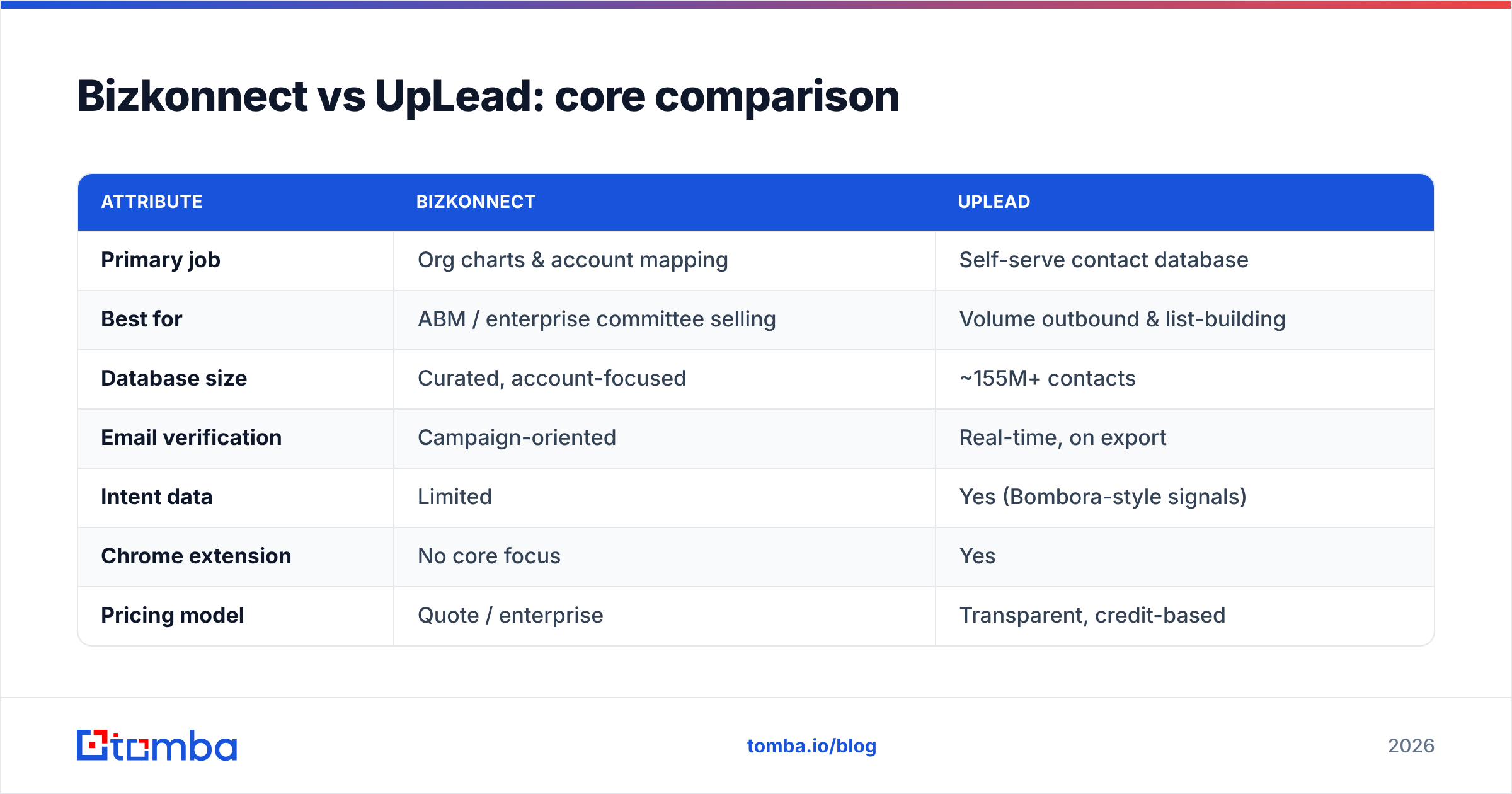
Here's the side-by-side on the attributes that actually drive a buying decision.
| Attribute | Bizkonnect | UpLead |
|---|---|---|
| Primary job | Org charts & account mapping | Self-serve contact database |
| Best for | ABM / enterprise committee selling | Volume outbound & list-building |
| Database size | Curated, account-focused | ~155M+ contacts |
| Email verification | Campaign-oriented | Real-time, on export |
| Intent data | Limited | Yes (Bombora-style signals) |
| Chrome extension | No core focus | Yes |
| Pricing model | Quote / enterprise | Transparent, credit-based |
| Entry price | Custom (sales call) | Free trial → ~$99/mo |
| API access | Limited | Available on higher tiers |
| Learning curve | Higher (mapping workflows) | Low (filter and export) |
The pattern is clear: Bizkonnect is a strategic ABM instrument with enterprise pricing and onboarding; UpLead is a transactional prospecting engine you can be productive in within an hour.
Is Bizkonnect better than UpLead?#
It depends entirely on your sales motion — there's no universal winner.
Bizkonnect wins when:
- You sell into large enterprises with 6–12 person buying committees and need to know the political map before you send a single email.
- Deals are big and slow. When one logo is worth six figures, spending time mapping the org pays off.
- Your reps multi-thread. Knowing the full reporting chain lets you build champions across departments instead of betting everything on one contact.
UpLead wins when:
- Volume is the constraint. You need clean lists fast and your motion is "more qualified contacts in the sequencer."
- You want transparent, self-serve pricing without a procurement cycle.
- You value low bounce rates out of the box thanks to verification at export time.
- You're SMB or mid-market selling to one or two decision-makers per account, not a committee.
If you're a 5-rep startup doing high-volume outbound, paying for Bizkonnect's mapping depth is overkill. If you're an enterprise AE working ten named accounts, UpLead's breadth won't tell you who actually signs.
How accurate is the data?#
This is where both tools — and frankly every database vendor — deserve scrutiny. B2B data decays fast: people change jobs, titles shift, companies reorganize. Industry estimates put annual B2B contact decay around 22–30%. A "155M+ contacts" headline means little if a tenth of them are stale.
UpLead's real-time verification is a genuine advantage here because it checks the email at the moment of export rather than relying on a record that was validated months ago. Bizkonnect's org charts face a tougher freshness problem: reporting structures change quietly, and a map that was accurate last quarter can quietly mislead you this quarter.
The practical takeaway is the same regardless of which platform you choose: never trust a single source's verification blindly. A two-step process — pull from your database, then re-verify and enrich through a dedicated layer — is how serious teams keep bounce rates under control. You can run exported lists through an independent email verifier and patch missing fields with data enrichment before anything reaches your sending tool.
For independent signal on data quality, cross-check current user reviews on G2 rather than vendor marketing pages — review velocity and recency tell you more than a feature list.
What about pricing?#
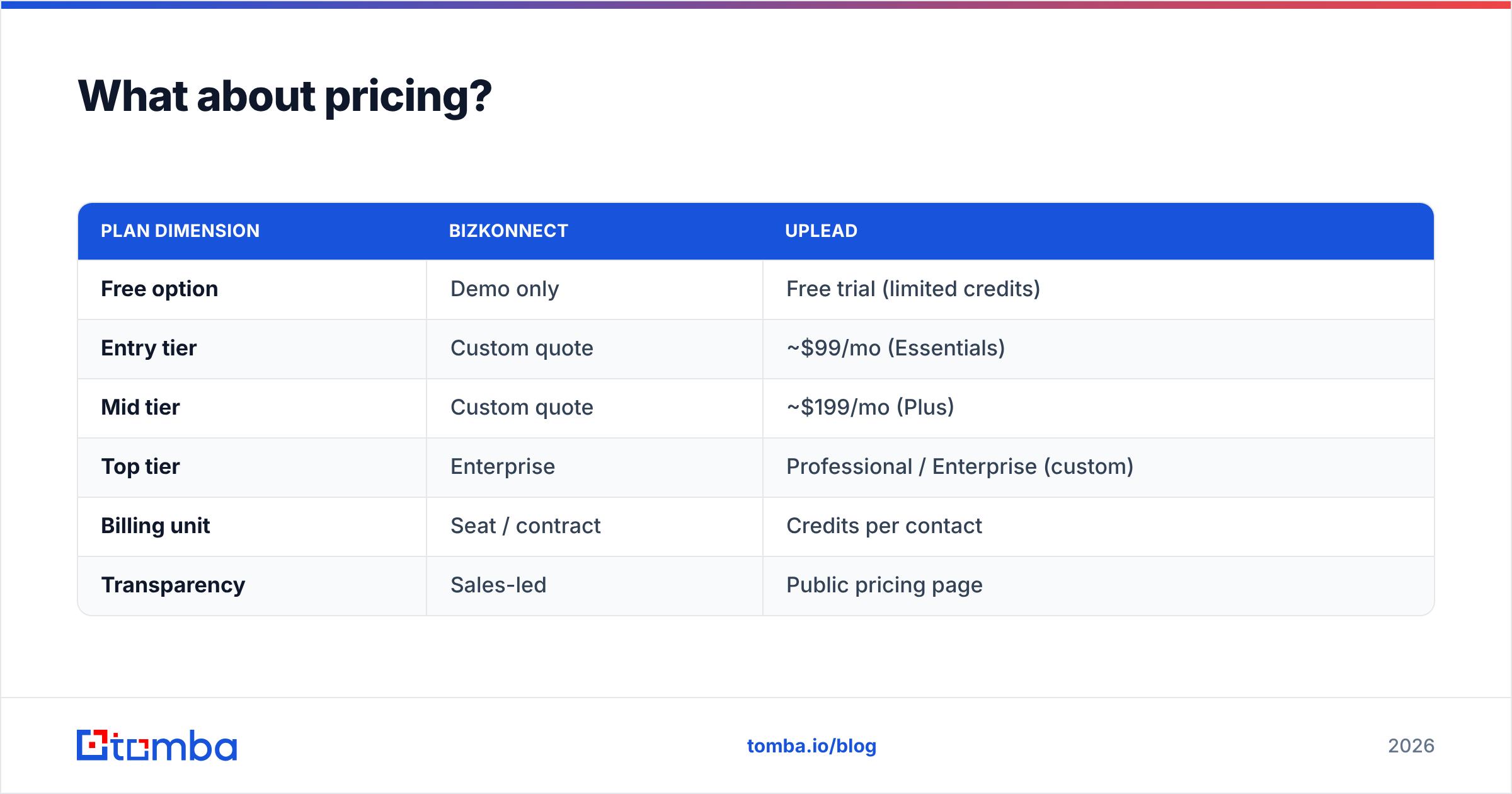
Pricing is the cleanest dividing line between these two.
| Plan dimension | Bizkonnect | UpLead |
|---|---|---|
| Free option | Demo only | Free trial (limited credits) |
| Entry tier | Custom quote | ~$99/mo (Essentials) |
| Mid tier | Custom quote | ~$199/mo (Plus) |
| Top tier | Enterprise | Professional / Enterprise (custom) |
| Billing unit | Seat / contract | Credits per contact |
| Transparency | Sales-led | Public pricing page |
UpLead publishes its numbers; Bizkonnect routes you through a sales conversation, which usually signals enterprise-tier commitment. If budget predictability matters and you want to start small, UpLead's credit model is friendlier. If you're already running an ABM program with executive sponsorship, Bizkonnect's pricing is in line with other enterprise sales-intelligence suites.
One thing neither does well: cost-efficient, high-volume email finding via API. Database seats are priced for human users clicking through a UI, not for programmatic enrichment of tens of thousands of records. That's a different unit economics problem — and it's exactly where a finder-first tool earns its keep.

Where does an email finder fit in?#
Both Bizkonnect and UpLead assume you live inside their platform. But most teams run a stack: a database for discovery, a sequencer for sending, a CRM for tracking, and increasingly an API layer that stitches it all together. The email layer is where deliverability is won or lost.
This is the gap a dedicated tool like Tomba fills. Instead of paying database-seat prices to enrich records programmatically, you can:
- Find verified professional emails by name and company with the email finder.
- Pull every contact at a target company with domain search — useful for multi-threading the same accounts Bizkonnect maps.
- Verify and enrich at scale through the Tomba API without buying another full database seat.
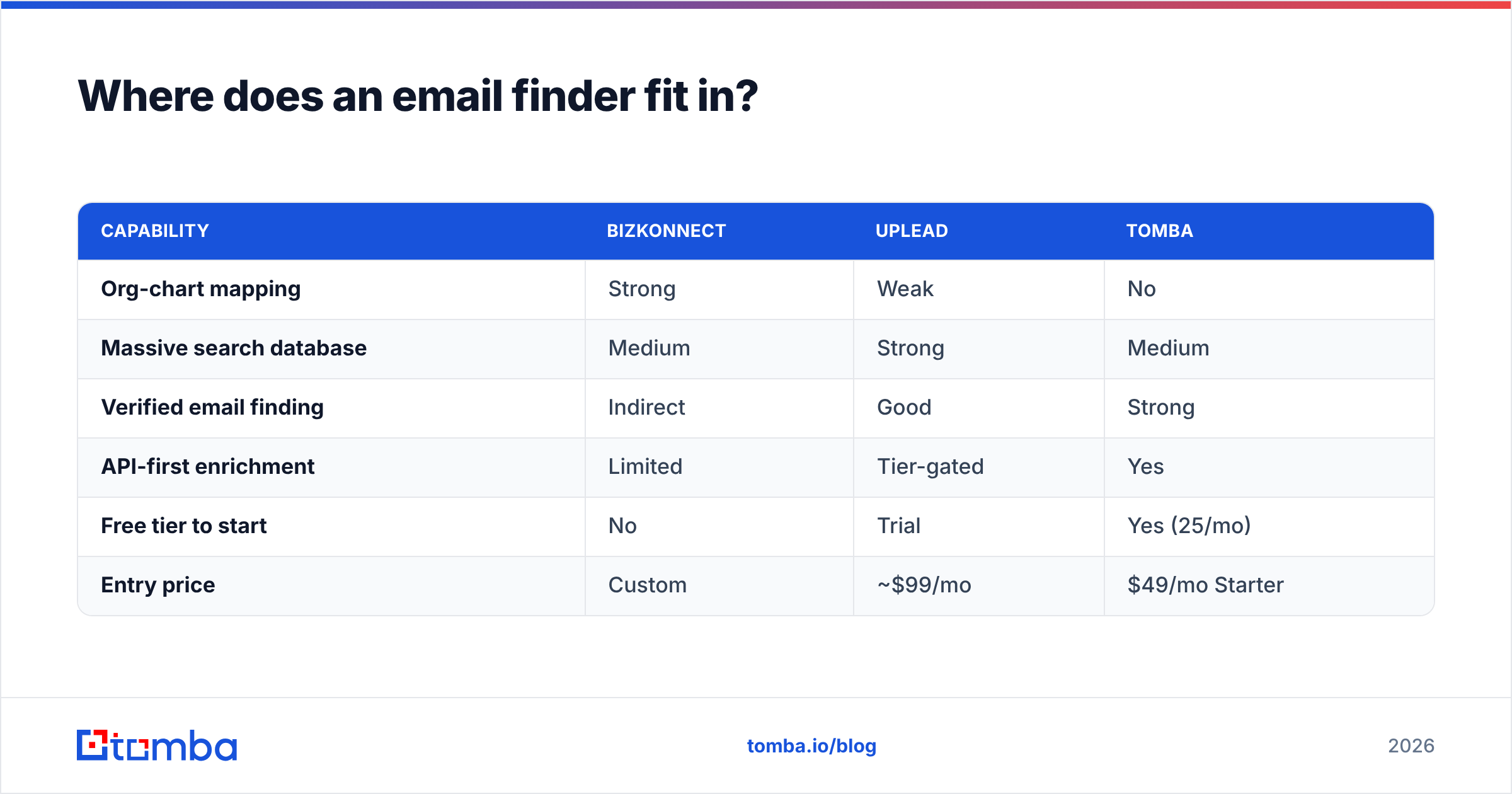
Here's how the layers compare for the specific job of getting accurate, send-ready emails:
| Capability | Bizkonnect | UpLead | Tomba |
|---|---|---|---|
| Org-chart mapping | Strong | Weak | No |
| Massive search database | Medium | Strong | Medium |
| Verified email finding | Indirect | Good | Strong |
| API-first enrichment | Limited | Tier-gated | Yes |
| Free tier to start | No | Trial | Yes (25/mo) |
| Entry price | Custom | ~$99/mo | $49/mo Starter |
Tomba isn't trying to replace an ABM mapping tool or a 155M-record database. It sits underneath them — the verification and finding layer that keeps your bounce rate low and your enrichment cheap. Plenty of teams run UpLead for discovery and Tomba for the API-driven email work, because mixing the right tool for each job beats overpaying one vendor to do everything adequately.
Which should you choose in 2026?#
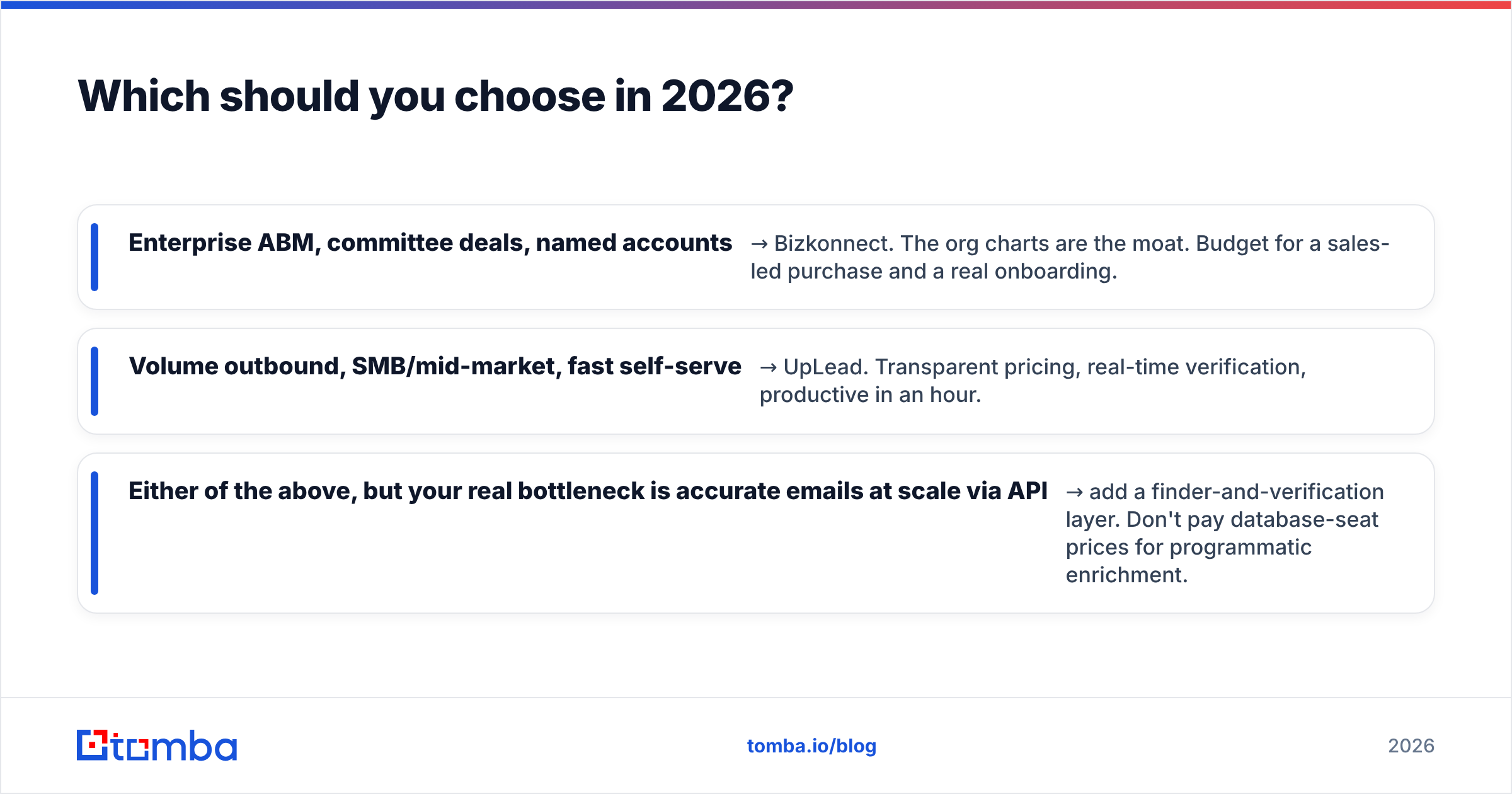
Match the tool to the motion:
- Enterprise ABM, committee deals, named accounts → Bizkonnect. The org charts are the moat. Budget for a sales-led purchase and a real onboarding.
- Volume outbound, SMB/mid-market, fast self-serve → UpLead. Transparent pricing, real-time verification, productive in an hour.
- Either of the above, but your real bottleneck is accurate emails at scale via API → add a finder-and-verification layer. Don't pay database-seat prices for programmatic enrichment.
Be honest about which problem is actually costing you pipeline. If reps are guessing at org structure, that's a Bizkonnect-shaped problem. If reps have targets but no clean list, that's UpLead. If your sequences bounce and your enrichment bills are absurd, that's an email-layer problem — and that's a different purchase.
For independent feature checks before you commit, read each vendor's own documentation at bizkonnect.com and uplead.com, and weigh them against your specific ICP rather than a generic "best tool" verdict.
Frequently asked questions#
Is UpLead the same as Bizkonnect? No. UpLead is a self-serve contact database for building verified prospect lists at volume. Bizkonnect is an account-mapping tool focused on org charts and reporting structures for enterprise ABM.
Which has more contacts? UpLead, with a database of roughly 155M+ contacts built for broad search. Bizkonnect is curated around account depth rather than raw count.
Which is cheaper? UpLead is more affordable and transparent for most teams, starting around $99/mo with a free trial. Bizkonnect is quote-based and enterprise-leaning.
Do I still need an email finder if I use one of these? Often, yes. For API-driven enrichment and independent email verification at scale, a focused tool is cheaper and cleaner than enriching through a full-seat database license.
The bottom line#
Bizkonnect and UpLead solve different problems wearing the same "sales intelligence" label. Bizkonnect maps the inside of an account for committee selling; UpLead hands you verified contacts at volume for fast outbound. Pick by motion, not by feature count — and don't assume either one fully solves your email layer.
If your real pain is accurate, send-ready emails without paying database-seat prices, start with the Tomba Email Finder. The free tier gives you 25 searches a month to test accuracy on your own list, and the Starter plan is $49/mo when you're ready to scale. See full Tomba pricing to slot it under whichever database you choose — and stop letting bounce rates eat your reply numbers.
Ready to find emails that actually work?
Join 150,000+ professionals who stopped guessing and started sending. Free credits on signup — no credit card required.
Get the Tomba newsletter
Practical outbound tactics and product updates — once every two weeks.
About the author