Bloom vs HoneyBook 2026: Which Clientflow CRM Wins?
Bloom vs HoneyBook compared on pricing, automation, payments, and lead capture so you can pick the right clientflow CRM for your creative business in 2026.
Choosing between Bloom and HoneyBook comes down to one question: do you want the cheapest all-in-one clientflow tool, or the most polished one with the deepest integrations? This guide breaks down both so you can stop comparing tabs and pick.
TL;DR — Bloom vs HoneyBook in 30 seconds#
- HoneyBook is the more mature platform: better automations, native QuickBooks sync, a stronger mobile app, and a bigger template library. It costs more.
- Bloom (bloom.io) is the budget-friendly challenger: contracts, invoices, scheduling, and a client portal at a lower monthly price, with a usable free tier.
- Pick HoneyBook if you run a growing studio or agency and want automation and accounting integrations to scale with you.
- Pick Bloom if you are a solo creative or freelancer who wants core clientflow features without paying $36+/month.
- Neither tool finds new leads for you — both manage clients you already have. Pair either with a dedicated email finder to fill the top of your funnel.
What are Bloom and HoneyBook?#
Both Bloom and HoneyBook are "clientflow" CRMs — software that manages everything after someone becomes a lead: inquiry forms, proposals, contracts, invoices, scheduling, and payments, all in one place. Think of them as a restaurant's front-of-house system. They don't bring diners through the door, but once a guest is seated, they handle the menu, the order, the bill, and the follow-up so nothing gets dropped.
HoneyBook launched in 2013 and is the category veteran, used heavily by photographers, planners, designers, and other service-based creatives. Bloom is the newer, leaner alternative aimed squarely at solo creatives who found HoneyBook's pricing steep.
The key thing to understand: these are client management tools, not prospecting tools. They organize relationships you already have. That distinction matters for your stack, and we'll come back to it.
How do Bloom and HoneyBook compare on features and price?#
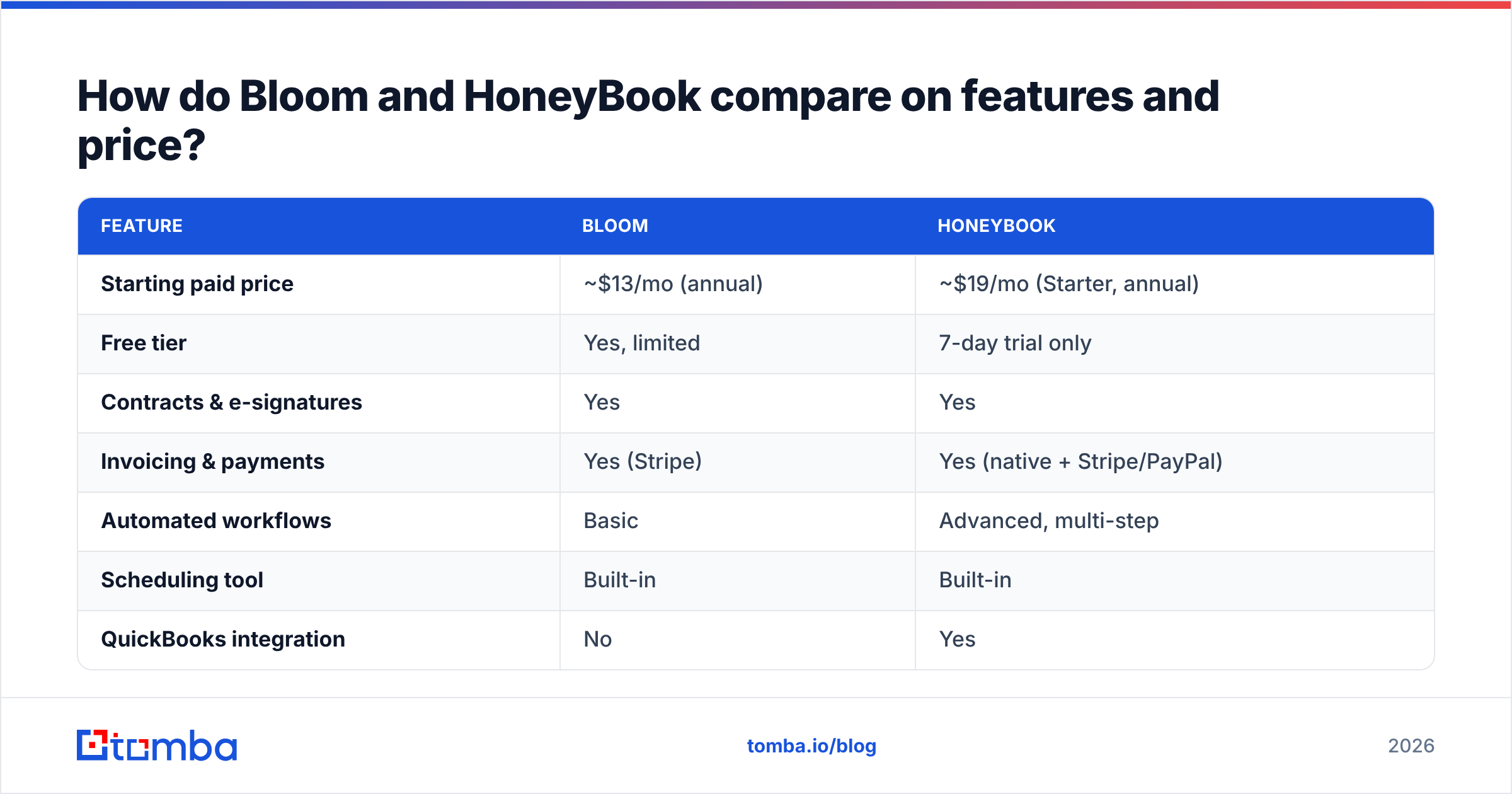
Here is the head-to-head on the attributes that actually change your monthly workflow and your bill.
| Feature | Bloom | HoneyBook |
|---|---|---|
| Starting paid price | ~$13/mo (annual) | ~$19/mo (Starter, annual) |
| Free tier | Yes, limited | 7-day trial only |
| Contracts & e-signatures | Yes | Yes |
| Invoicing & payments | Yes (Stripe) | Yes (native + Stripe/PayPal) |
| Automated workflows | Basic | Advanced, multi-step |
| Scheduling tool | Built-in | Built-in |
| QuickBooks integration | No | Yes |
| Mobile app quality | Functional | Polished, highly rated |
| Template library | Smaller | Large, professionally designed |
| Best for | Solo freelancers | Growing studios & teams |
The pattern is clear. Bloom wins on price and on having a genuine free tier. HoneyBook wins on depth — automation, accounting sync, mobile, and templates. If you have ever read a HoneyBook review on G2, you'll see the same theme repeated: people love the polish but flinch at the cost.
Where Bloom pulls ahead#
- Price. Bloom's entry plan undercuts HoneyBook meaningfully, and its free tier lets you test real client work without a deadline.
- Simplicity. Fewer menus, faster onboarding. A solo photographer can be sending branded invoices within an hour.
- Instant payouts. Bloom markets fast access to funds, which matters when cash flow is tight.
Where HoneyBook pulls ahead#
- Automation. Multi-step workflows that send a contract, wait for signature, then trigger an invoice and a reminder — without you touching anything.
- Accounting. Native QuickBooks Online sync saves hours at tax time.
- Ecosystem. A deeper integrations story and a mobile app users consistently rate higher.
Is HoneyBook better than Bloom?#
For teams and high-volume studios, yes — HoneyBook is better. For a one-person operation watching every dollar, Bloom is often the smarter buy.
The honest answer depends on volume. HoneyBook's automation pays for itself once you're juggling 15+ active projects, because the time you save on manual follow-ups exceeds the price difference. Below that threshold, Bloom's lower cost and free tier make it hard to justify the premium.
Ask yourself three questions:
- How many active clients do you carry at once? Under ~10, Bloom is plenty. Above that, HoneyBook's workflows earn their keep.
- Do you need QuickBooks? If your bookkeeper lives in QuickBooks, HoneyBook's native sync is close to a deal-breaker in its favor.
- Is mobile your primary device? Field creatives (photographers, event pros) tend to prefer HoneyBook's app.
If you answered "small, no, desktop," save your money with Bloom. If you answered "growing, yes, mobile," HoneyBook is worth the spend.
What do Bloom and HoneyBook both miss?#
Both tools manage existing clients beautifully and generate zero new leads. This is the gap nobody mentions in the comparison blogs.
A clientflow CRM activates only when a prospect already raised their hand through your inquiry form. Neither Bloom nor HoneyBook will go find the marketing director at a company you want to work with, surface their email, or tell you their direct phone number. They are downstream tools. Your pipeline still needs an upstream source.
This is where the comparison stops being "Bloom vs HoneyBook" and becomes "clientflow tool plus a prospecting layer." The most effective creative businesses run both:
- A prospecting/data layer to find and qualify new contacts — company emails, verified addresses, phone numbers, enrichment.
- A clientflow CRM (Bloom or HoneyBook) to convert and manage those contacts once they're in motion.
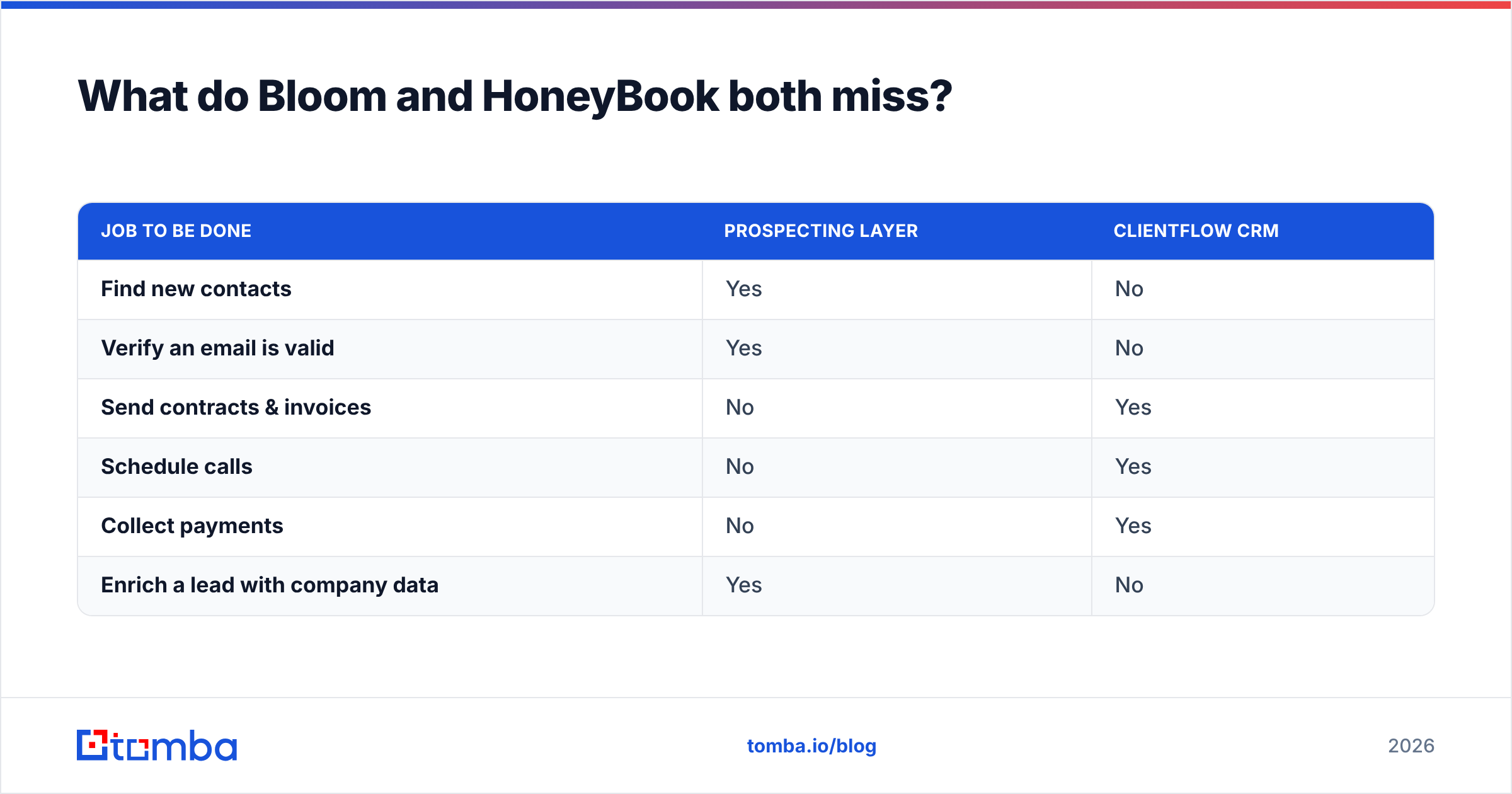
Here's how the two layers split responsibilities:
| Job to be done | Prospecting layer | Clientflow CRM |
|---|---|---|
| Find new contacts | Yes | No |
| Verify an email is valid | Yes | No |
| Send contracts & invoices | No | Yes |
| Schedule calls | No | Yes |
| Collect payments | No | Yes |
| Enrich a lead with company data | Yes | No |
That's why a tool like Tomba sits beside your clientflow CRM rather than competing with it. You use a domain search to pull every public email at a target company, run an email verifier so you never burn your sender reputation on bounces, then drop qualified contacts into Bloom or HoneyBook to start the proposal-to-payment flow.
How should you build a complete creative-business stack?#
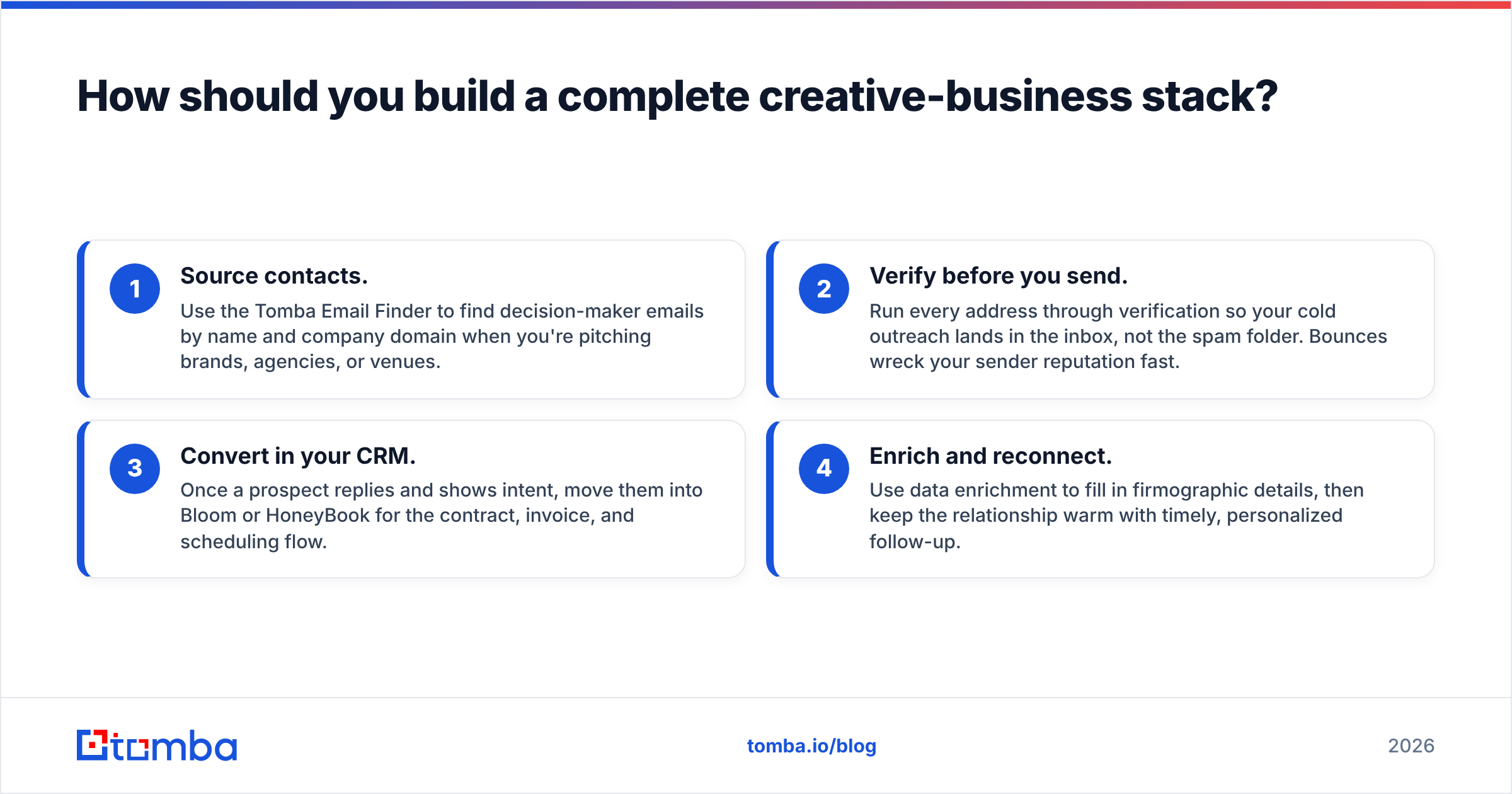
Layer three things: a finder for new contacts, a CRM for client work, and verification glue between them. Here's a concrete, four-step setup that works whether you land on Bloom or HoneyBook.
- Source contacts. Use the Tomba Email Finder to find decision-maker emails by name and company domain when you're pitching brands, agencies, or venues.
- Verify before you send. Run every address through verification so your cold outreach lands in the inbox, not the spam folder. Bounces wreck your sender reputation fast.
- Convert in your CRM. Once a prospect replies and shows intent, move them into Bloom or HoneyBook for the contract, invoice, and scheduling flow.
- Enrich and reconnect. Use data enrichment to fill in firmographic details, then keep the relationship warm with timely, personalized follow-up.
This setup fixes the core weakness of both Bloom and HoneyBook: they assume the lead already exists. By bolting a prospecting layer on top, you control the entire journey from "never heard of you" to "paid invoice."
Bloom vs HoneyBook: which should you choose in 2026?#
Default to HoneyBook if you're scaling and to Bloom if you're solo and cost-conscious — then add a prospecting tool regardless of which you pick.
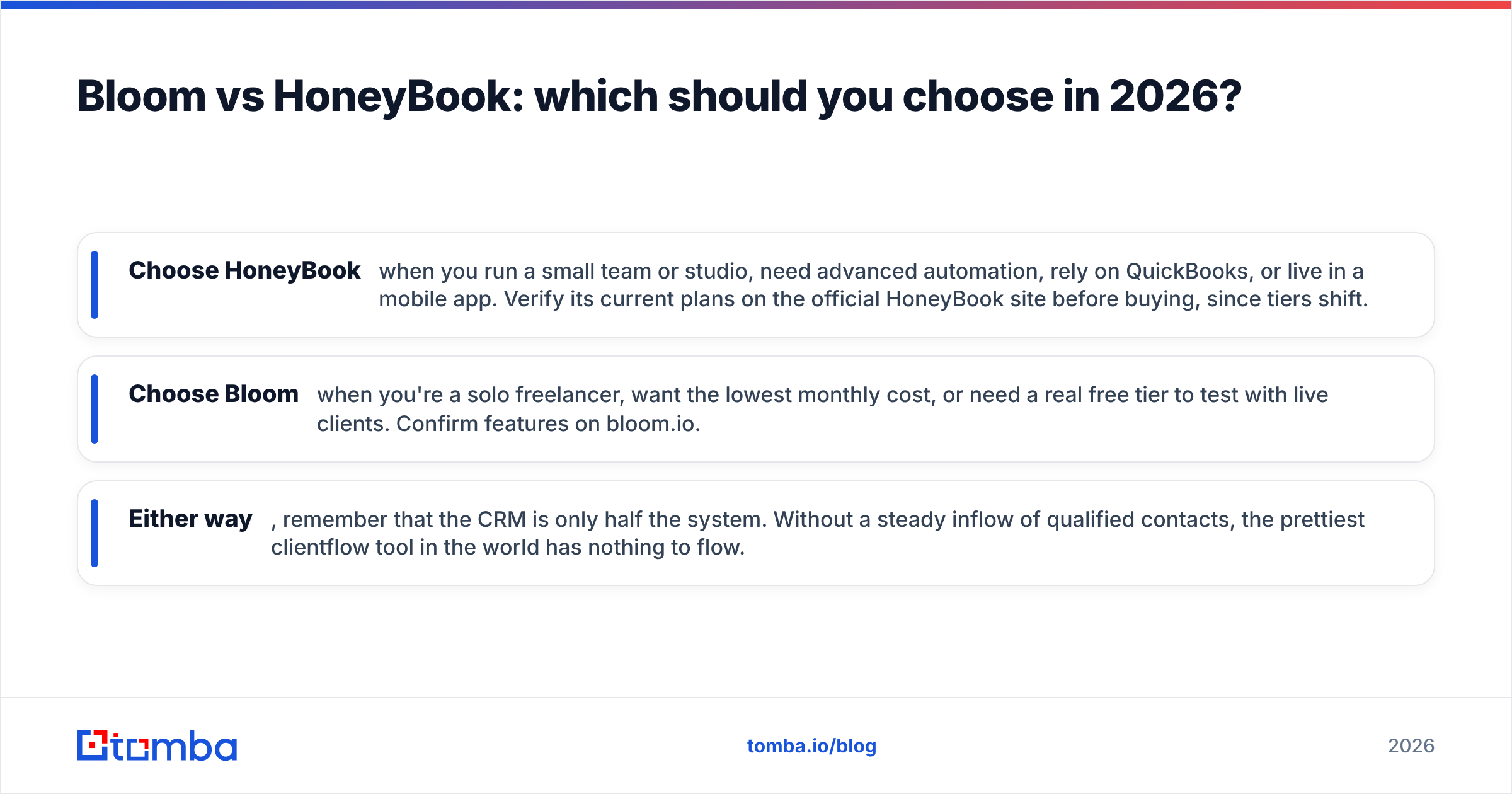
- Choose HoneyBook when you run a small team or studio, need advanced automation, rely on QuickBooks, or live in a mobile app. Verify its current plans on the official HoneyBook site before buying, since tiers shift.
- Choose Bloom when you're a solo freelancer, want the lowest monthly cost, or need a real free tier to test with live clients. Confirm features on bloom.io.
- Either way, remember that the CRM is only half the system. Without a steady inflow of qualified contacts, the prettiest clientflow tool in the world has nothing to flow.
For pricing on the prospecting side, Tomba's plans start free with 25 searches a month and scale to a $49/mo Starter and $99/mo Growth tier — so you can test the find-and-verify layer at zero cost before committing.
The bottom line#
Bloom and HoneyBook solve the same problem — turning clients into paid, organized projects — at two different price points and levels of polish. HoneyBook is the premium, automation-heavy choice for teams; Bloom is the lean, affordable pick for solos. Neither one fills your pipeline.
If you want to stop choosing between client-management features and start feeding both tools a steady stream of qualified prospects, start with the Tomba Email Finder. Find the right contacts, verify them in seconds, and let Bloom or HoneyBook handle everything after the handshake. Your clientflow CRM manages the relationship — Tomba makes sure there's a relationship to manage in the first place.
// get started
Find, verify and enrich your first contacts today
Start on the free plan with 25 searches a month, then scale when your team is ready.
Free plan · No credit card required · GDPR & CCPA
// about the author