BombBomb Pricing, Reviews, Pros and Cons (2026 Guide)
A no-spin breakdown of BombBomb pricing, real user reviews, and the pros and cons of video email in 2026 — plus where it fits in a sales stack and where it doesn't.
BombBomb built its name on a simple idea: a sales email lands harder when the prospect can see your face. But "video email" is a feature, not a pipeline, and the price you pay for it deserves the same scrutiny you'd give any line item. This guide breaks down BombBomb pricing, real reviews, and the honest pros and cons for 2026 — so you can decide whether it earns a seat in your stack.
TL;DR#
- BombBomb is a video email and screen-recording tool, not a prospecting or data platform. It helps you send warmer messages, not find people to send them to.
- Pricing starts around $33/user/month (Essentials, billed annually) and climbs to roughly $59/user/month for Plus, with custom Business pricing for teams.
- Reviews are strong on ease of use and support, weaker on price-per-seat, deliverability of embedded video, and limited analytics on lower tiers.
- The biggest gap: BombBomb assumes you already have verified contacts. Garbage data kills even the best video. Pair it with an accurate email finder and verifier first.
- Best fit: relationship-driven roles — real estate, account management, customer success — more than high-volume cold outbound.
What is BombBomb and who is it for?#
BombBomb is a video messaging platform that lets you record yourself (webcam, screen, or both) and drop that video straight into an email, LinkedIn message, or text. Think of it like swapping a typed sticky note for a quick voicemail with a face — the same information, but it feels personal instead of templated.
It's aimed at people whose deals are built on trust over time: real estate agents, mortgage brokers, account executives, customer success managers, and recruiters. For those roles, a 30-second "here's what I found for you" video can outperform three paragraphs of text. The official product positioning on bombbomb.com leans hard into this human-connection angle, and that's genuinely where it shines.
Where it's a weaker fit: high-volume cold outbound. If your motion is sending 500 first-touch emails a day to people who've never heard of you, video adds friction (recording time) without solving your actual bottleneck — which is usually contact accuracy and email deliverability, not message warmth.

How much does BombBomb cost in 2026?#
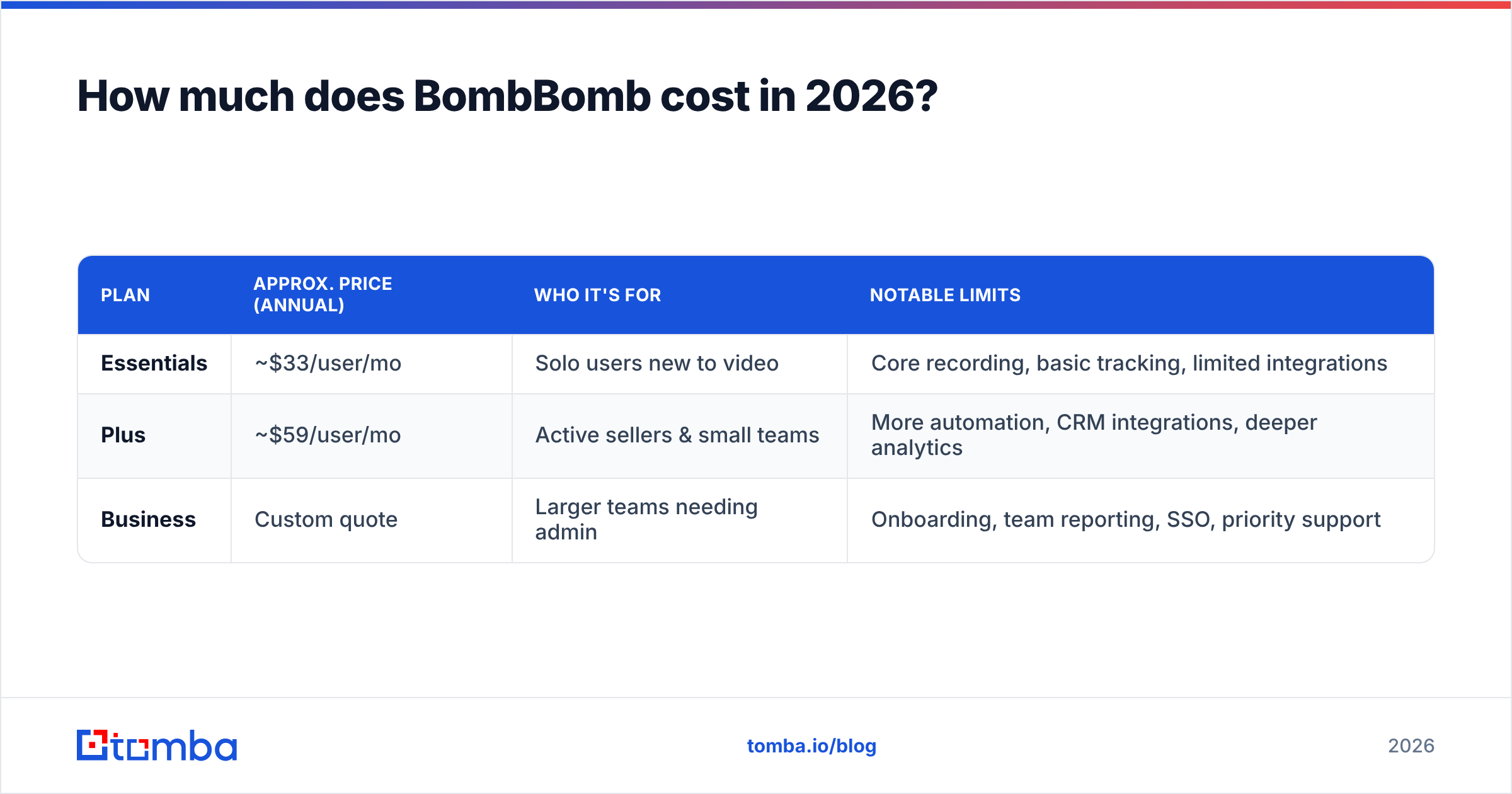
BombBomb prices per user, per month, and rewards annual billing. Exact numbers shift with promotions, so treat these as the public ballpark and confirm on their pricing page before you buy.
| Plan | Approx. price (annual) | Who it's for | Notable limits |
|---|---|---|---|
| Essentials | ~$33/user/mo | Solo users new to video | Core recording, basic tracking, limited integrations |
| Plus | ~$59/user/mo | Active sellers & small teams | More automation, CRM integrations, deeper analytics |
| Business | Custom quote | Larger teams needing admin | Onboarding, team reporting, SSO, priority support |
A few things the table can't capture:
- Monthly billing costs more. Like most SaaS, the headline price assumes you pay 12 months up front. Month-to-month can run noticeably higher per seat.
- Seats add up fast. At ~$59/seat, a 10-person team is roughly $7,000/year for video email alone — before your CRM, sequencer, or data tools.
- Integrations gate features. Tighter CRM and Gmail/Outlook integrations live on higher tiers, so the cheap plan may not do what the demo showed.
- Add-ons exist. Higher send volumes, advanced analytics, and certain hosting features can push the real cost above list.
If you want a sense of how usage-based, credit-style pricing compares, the transparent tiers on Tomba pricing are a useful contrast — you pay for lookups and verifications, not per seat.
What do BombBomb reviews actually say?#
Pull the aggregate from public review sites and a consistent picture emerges. On G2 and Capterra, BombBomb generally sits in the 4.5-star range, and the qualitative feedback clusters into a few repeating themes.
What reviewers consistently praise:
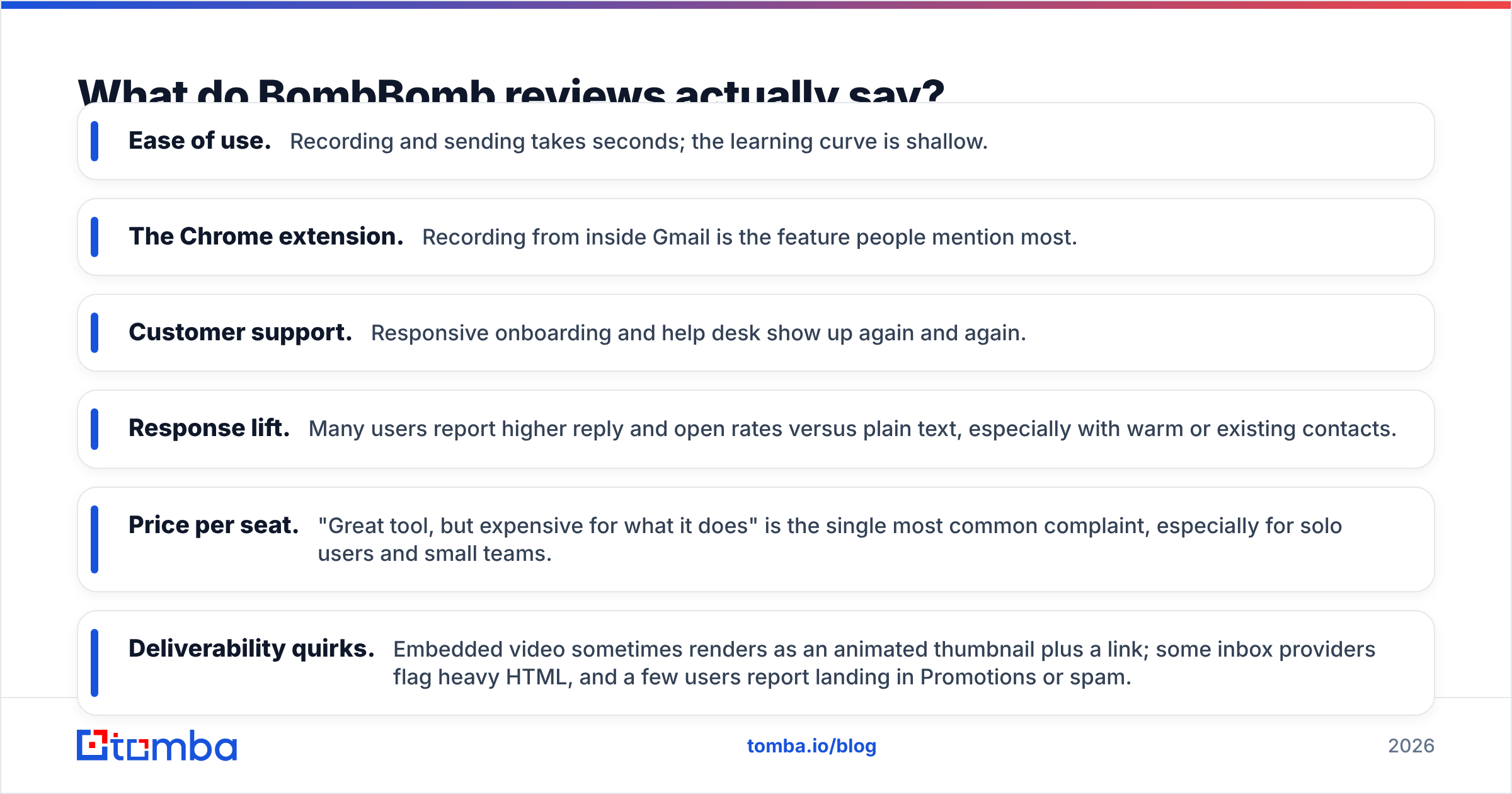
- Ease of use. Recording and sending takes seconds; the learning curve is shallow.
- The Chrome extension. Recording from inside Gmail is the feature people mention most.
- Customer support. Responsive onboarding and help desk show up again and again.
- Response lift. Many users report higher reply and open rates versus plain text, especially with warm or existing contacts.
What reviewers consistently criticize:
- Price per seat. "Great tool, but expensive for what it does" is the single most common complaint, especially for solo users and small teams.
- Deliverability quirks. Embedded video sometimes renders as an animated thumbnail plus a link; some inbox providers flag heavy HTML, and a few users report landing in Promotions or spam.
- Analytics depth on lower tiers. Granular tracking is reserved for higher plans.
- Contract friction. A handful of reviews mention annual commitments and cancellation being less flexible than expected.
The throughline: people like the product and question the price. That's a very different review profile from "the tool doesn't work" — it means the buying decision is about ROI math, not capability.
What are the pros and cons of BombBomb?#
Here's the balanced ledger, stripped of marketing.
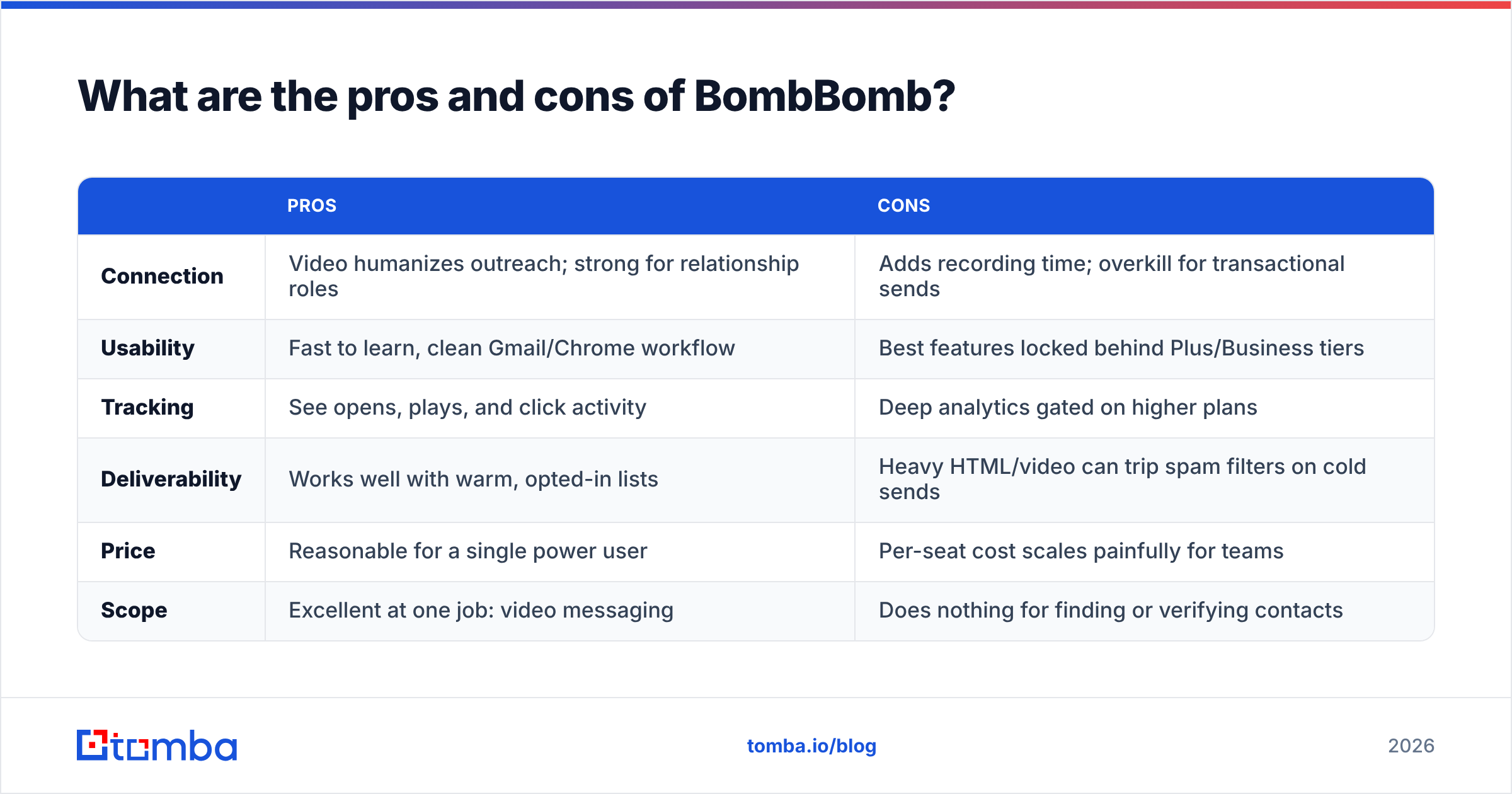
| Pros | Cons | |
|---|---|---|
| Connection | Video humanizes outreach; strong for relationship roles | Adds recording time; overkill for transactional sends |
| Usability | Fast to learn, clean Gmail/Chrome workflow | Best features locked behind Plus/Business tiers |
| Tracking | See opens, plays, and click activity | Deep analytics gated on higher plans |
| Deliverability | Works well with warm, opted-in lists | Heavy HTML/video can trip spam filters on cold sends |
| Price | Reasonable for a single power user | Per-seat cost scales painfully for teams |
| Scope | Excellent at one job: video messaging | Does nothing for finding or verifying contacts |
That last row is the one that quietly sinks ROI. BombBomb is a delivery layer. It assumes the hard part — knowing who to contact and having a real, reachable address for them — is already solved. For most teams, it isn't.
Does video email fix your real bottleneck?#
Usually not — and this is the part most "BombBomb review" articles skip. A flawless video sent to a wrong, outdated, or unverified address is worth exactly zero. Personalization can't rescue bad data; it just makes the bounce more expensive because you spent time recording it.
Think of it like a beautifully wrapped gift sent to the wrong house. The wrapping (your video) is perfect. The address (your contact data) is the problem. Fix the address first.
Two upstream layers do more for reply rates than video ever will on a cold list:
- Finding the right contact. Use a domain search to pull the actual people and email patterns at a target company, instead of guessing or buying a stale list.
- Verifying before you send. Run addresses through an email verifier so your bounce rate stays low and your sender reputation stays intact. One bad campaign of hard bounces can hurt deliverability for weeks.

Do that, and BombBomb's video becomes a multiplier on an already-healthy pipeline. Skip it, and you're paying $59/seat to deliver well-produced messages into the void.
How does BombBomb compare to the alternatives?#
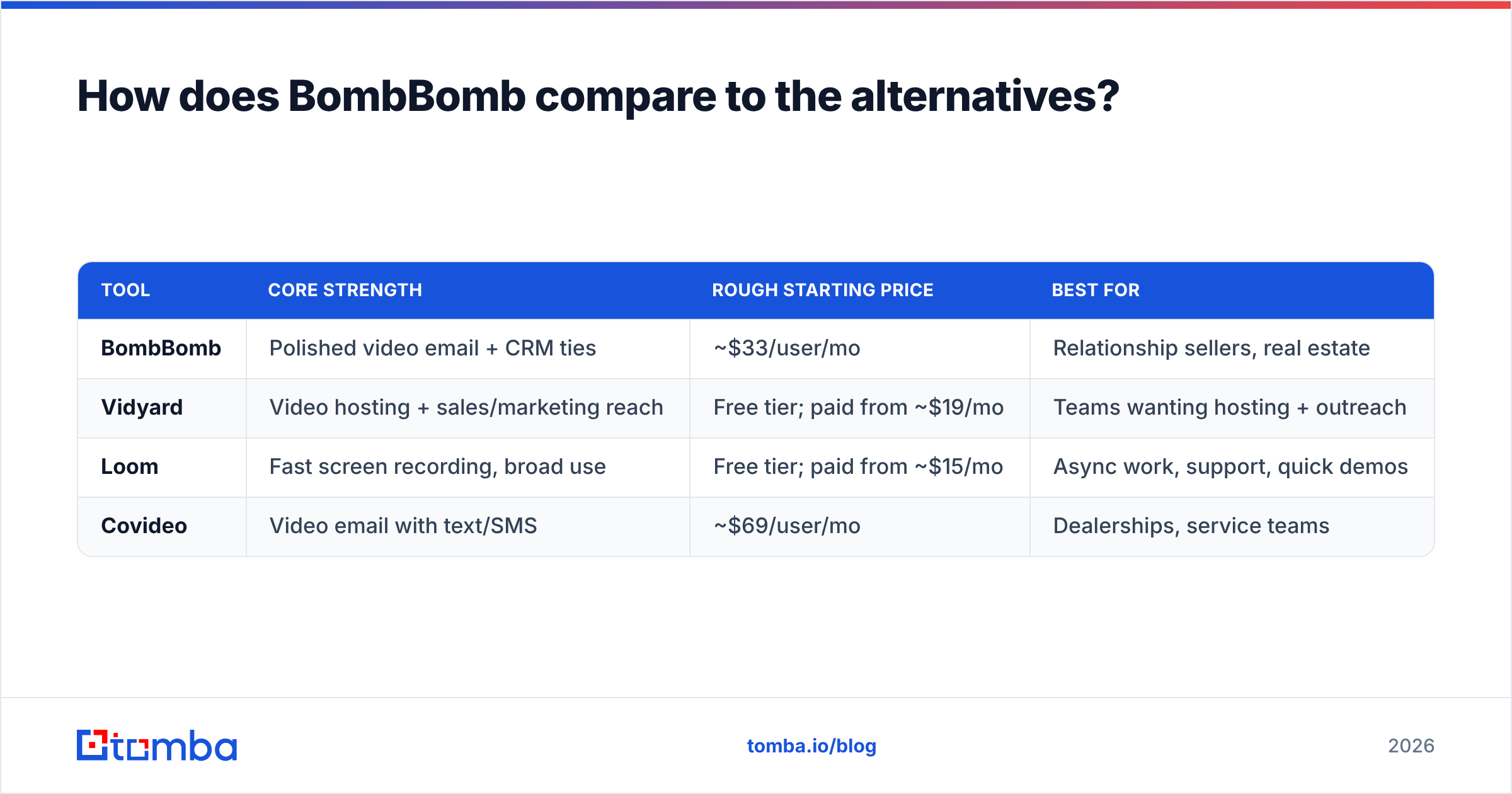
BombBomb isn't the only video email option, and it's worth knowing the field before committing to annual seats.
| Tool | Core strength | Rough starting price | Best for |
|---|---|---|---|
| BombBomb | Polished video email + CRM ties | ~$33/user/mo | Relationship sellers, real estate |
| Vidyard | Video hosting + sales/marketing reach | Free tier; paid from ~$19/mo | Teams wanting hosting + outreach |
| Loom | Fast screen recording, broad use | Free tier; paid from ~$15/mo | Async work, support, quick demos |
| Covideo | Video email with text/SMS | ~$69/user/mo | Dealerships, service teams |
If your main use case is screen recordings and async explainers, a cheaper or free Loom/Vidyard tier may cover you. If you specifically want video email with CRM-grade tracking and you're in a relationship-driven vertical, BombBomb's premium is easier to justify. Either way, none of these tools source or verify contacts — that stays a separate, upstream job no matter which you pick.
Is BombBomb worth it for your team?#
The honest answer is "it depends on your role and your data hygiene."
BombBomb is worth it if:
- Your deals are relationship-led and your contacts already know you or opted in.
- You're a solo power user or small team where one or two seats pay for themselves with a single closed deal.
- You'll actually use it daily — video tools are a habit, and unused seats are the most expensive software you can own.
Look elsewhere (or fix the upstream first) if:
- You run high-volume cold outbound where deliverability and data accuracy are the real constraints.
- You're scaling a large team and per-seat math turns into five figures fast.
- You don't yet have a reliable system for finding and verifying contacts — solve that before adding a delivery layer.
For most B2B teams, the sequence matters: build a clean, verified contact list, confirm deliverability, then layer personalization like video on top. Reverse that order and you're optimizing the last 5% while ignoring the first 80%.
The bottom line#
BombBomb is a good product with a narrow, real job: making outreach feel human through video. Reviews back that up, and the pricing — while steep per seat — is defensible for the right user. The pros (warmth, ease, support) and cons (cost, deliverability quirks, gated features) are both real, and your role decides which side wins.
But video is the last mile, not the engine. Before you spend $33–$59 per seat to deliver prettier messages, make sure the messages are reaching real, verified people. That's where pipeline actually gets built.
Start there. Use Tomba's Email Finder to find accurate, professional email addresses by name, company, or domain, then verify them so your outreach — video or not — lands in the inbox instead of the bounce folder. Connection tools amplify good data; they can't replace it. Get the data right first, and every BombBomb video you record will work harder for you.
Ready to find emails that actually work?
Join 150,000+ professionals who stopped guessing and started sending. Free credits on signup — no credit card required.
Get the Tomba newsletter
Practical outbound tactics and product updates — once every two weeks.
About the author