BombBomb vs Loom (2026): Best Video Email Tool Compared
BombBomb vs Loom in 2026: pricing, deliverability, CRM fit, and which video tool actually books more meetings for sales teams.
Choosing between BombBomb and Loom usually comes down to one question: are you sending video to win deals or to explain work? They look similar on the surface — record yourself, drop a link, track who watched — but they were built for different jobs, and picking the wrong one quietly tanks either your reply rate or your team's productivity.
TL;DR — BombBomb vs Loom in one screen#
- BombBomb is a sales-and-relationship video tool. It's built to record short videos, drop them inside emails, and track engagement against your CRM. Best for SDRs, AEs, and account managers running outreach.
- Loom is an async screen-recording and team-communication tool. It excels at product walkthroughs, support replies, async standups, and onboarding. Best for product, support, design, and engineering teams.
- Pricing: Loom is cheaper to start (a usable free tier, paid from ~$12.50/user/mo). BombBomb has no permanent free plan and starts around $33/user/mo billed annually.
- Deliverability matters more than features. A great video sent to a dead inbox does nothing. Verify your list and use clean sender data before either tool can help.
- Neither finds contacts. BombBomb and Loom assume you already have the right email address — the part most teams get wrong.
What is BombBomb and who is it for?#
BombBomb is a video messaging platform aimed squarely at sales and customer-facing teams. The core pitch is "rehumanize" — replace plain text outreach with a face, a name, and a 60-second pitch that lands inside the body of an email rather than as a cold attachment.
Its strengths are sales-shaped:
- Native email integration with Gmail, Outlook, and a built-in sending engine, so video lives inside the message instead of behind a generic link.
- Animated thumbnail previews that auto-play a few seconds of the video in the inbox to boost open-to-play rates.
- CRM tracking with Salesforce and HubSpot, mapping who watched, for how long, and where they dropped off.
- Team analytics so managers can see which reps actually use video and which videos convert.
If your goal is more replies, more booked meetings, and warmer renewal conversations, BombBomb is built for that motion. You can read more about the platform on the official BombBomb site.
What is Loom and who is it for?#
Loom is an async screen-and-camera recorder built for teams that need to explain things without scheduling a meeting. Hit record, capture your screen plus your face in a bubble, and share a link. The receiver watches on their own time, leaves timestamped comments, and reacts with emoji.
Loom's strengths are internal and product-shaped:
- Instant screen + camera capture with one-click sharing, no editing required.
- AI features that auto-title, summarize, remove filler words, and generate chapters and transcripts.
- Viewer engagement with comments, reactions, and view counts — designed for collaboration, not pipeline.
- Integrations with Slack, Notion, Jira, Figma, and dozens of other workplace tools.
Acquired by Atlassian, Loom now sits firmly in the "future of work" / async-collaboration bucket. If your team's problem is too many meetings and slow handoffs, Loom solves that. Details live on the Loom homepage.
BombBomb vs Loom: the full comparison table#
Here's where the two genuinely diverge. Read this against your actual use case, not the marketing.
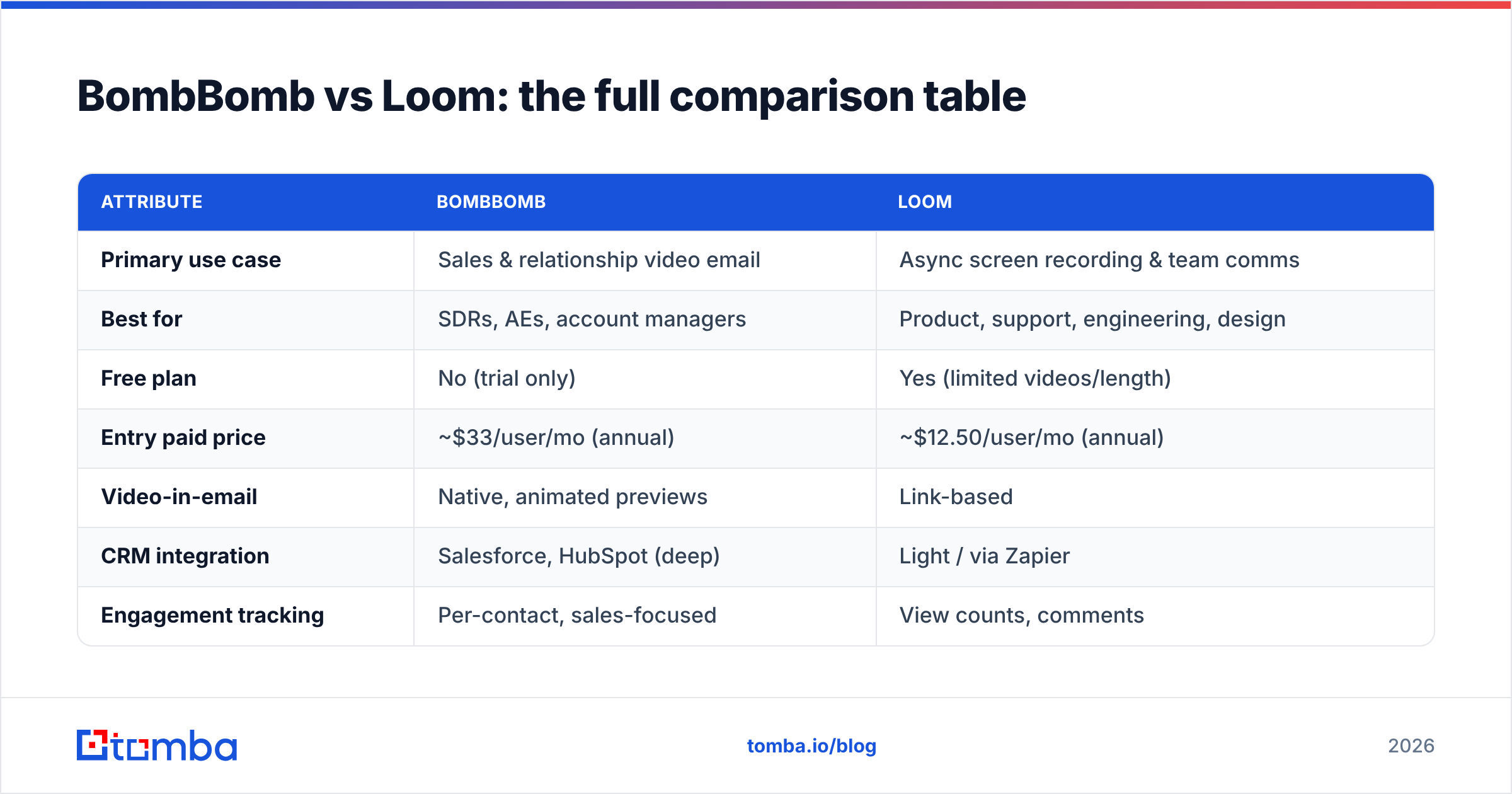
| Attribute | BombBomb | Loom |
|---|---|---|
| Primary use case | Sales & relationship video email | Async screen recording & team comms |
| Best for | SDRs, AEs, account managers | Product, support, engineering, design |
| Free plan | No (trial only) | Yes (limited videos/length) |
| Entry paid price | ~$33/user/mo (annual) | ~$12.50/user/mo (annual) |
| Video-in-email | Native, animated previews | Link-based |
| CRM integration | Salesforce, HubSpot (deep) | Light / via Zapier |
| Engagement tracking | Per-contact, sales-focused | View counts, comments |
| AI editing | Limited | Strong (summaries, filler removal) |
| Screen recording | Yes, basic | Yes, best-in-class |
| Reply/meeting focus | High | Low |
The short version: BombBomb optimizes for conversion, Loom optimizes for clarity. Choosing the cheaper or more feature-rich tool without matching it to your motion is the most common mistake teams make here.
Is BombBomb better than Loom for sales outreach?#
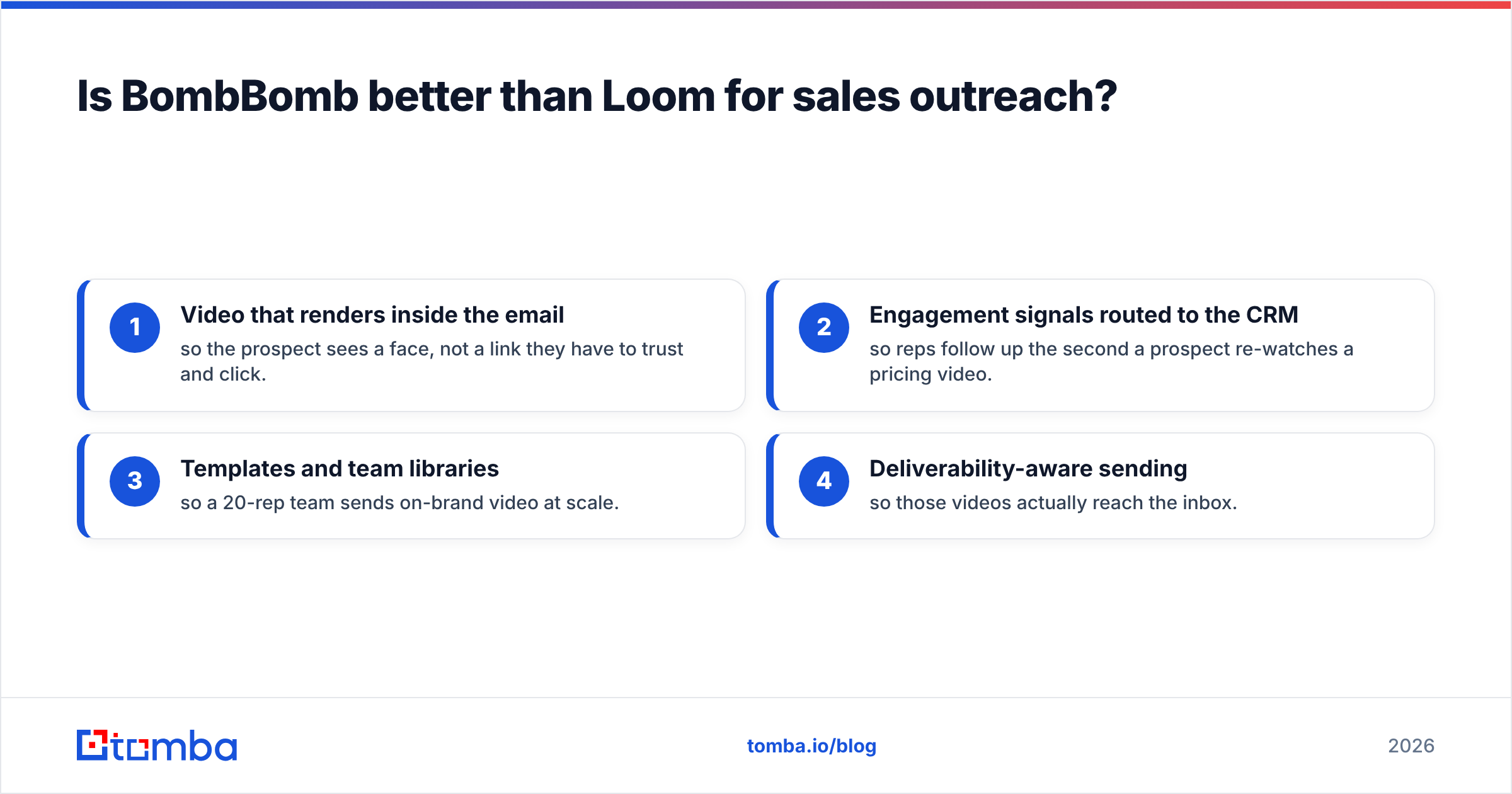
Yes — for outbound and account management specifically, BombBomb wins. The reason isn't video quality; both record fine. It's everything wrapped around the video.
Consider what an SDR actually needs in a sequence:
- Video that renders inside the email so the prospect sees a face, not a link they have to trust and click.
- Engagement signals routed to the CRM so reps follow up the second a prospect re-watches a pricing video.
- Templates and team libraries so a 20-rep team sends on-brand video at scale.
- Deliverability-aware sending so those videos actually reach the inbox.
Loom can technically do outreach — paste a link into any email — but it has no native CRM-driven workflow, no animated inbox previews, and no rep-level sales analytics. You'd be bolting a sales process onto a collaboration tool.
That said, video only converts if the message arrives. The quiet killer of every video-email campaign is the same one that kills text campaigns: bad addresses and poor sender reputation. Before you obsess over BombBomb vs Loom, make sure your list is clean with a proper email verifier, and understand how email deliverability actually works. A 90-second personalized video bounced at the gateway is wasted effort.

Is Loom better than BombBomb for internal and product work?#
Yes — and it's not close. For async communication inside a team or with existing customers, Loom is the stronger product.
Loom's screen recording, instant sharing, and AI summaries make it ideal for:
- Product walkthroughs and feature demos
- Customer support replies ("here's exactly how to fix that")
- Async standups and design reviews
- Onboarding docs and SOP recordings
- Bug reports with screen + voice context
BombBomb can record a screen, but its tooling, editing, and collaboration layer are thinner because that was never the point. If most of your "video" is explaining a workflow rather than pitching a stranger, pay less and get more by choosing Loom.
How do BombBomb and Loom compare on pricing?#
Pricing is where many teams make the call, so be precise about what each tier includes.
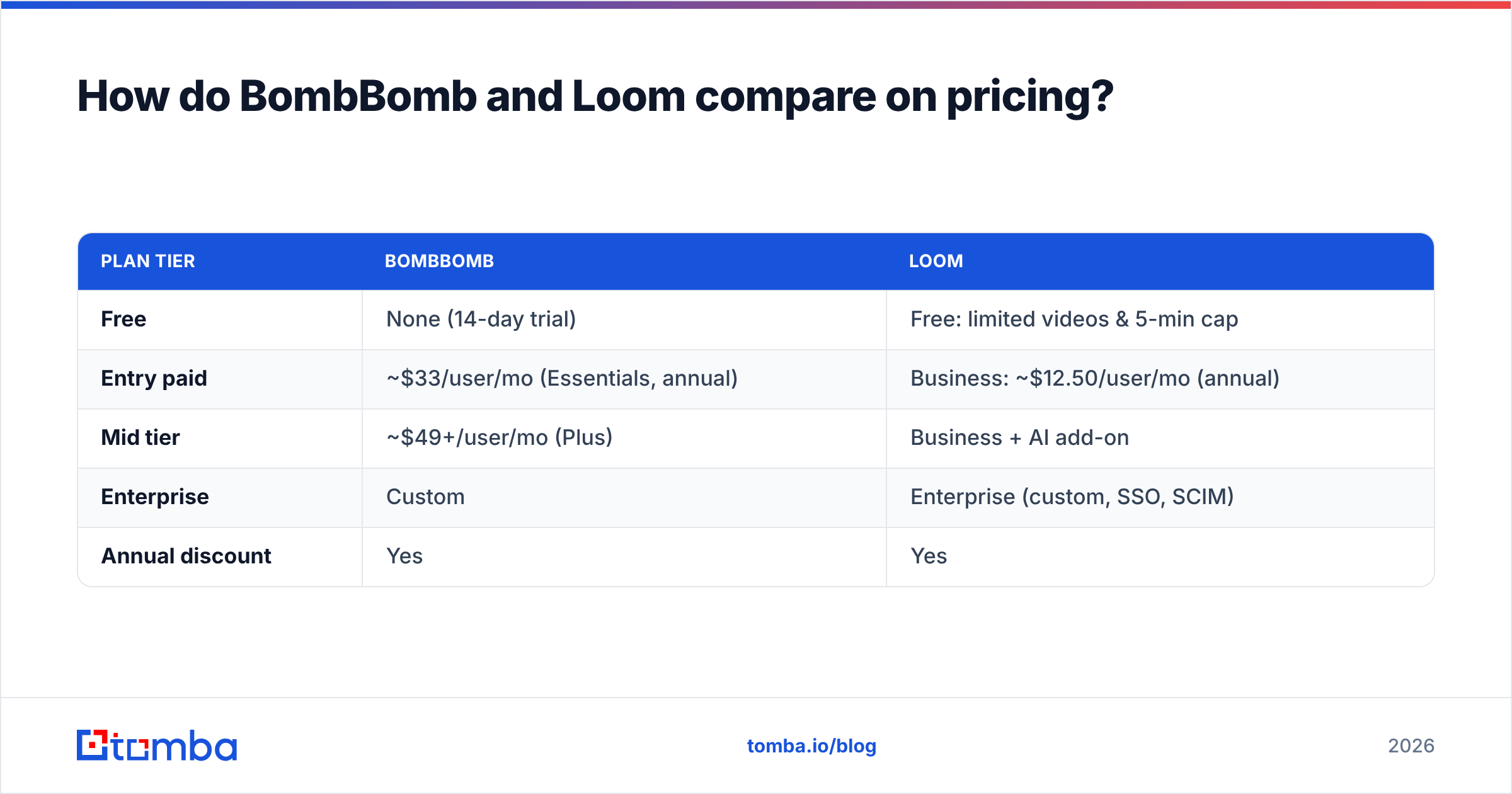
| Plan tier | BombBomb | Loom |
|---|---|---|
| Free | None (14-day trial) | Free: limited videos & 5-min cap |
| Entry paid | ~$33/user/mo (Essentials, annual) | Business: ~$12.50/user/mo (annual) |
| Mid tier | ~$49+/user/mo (Plus) | Business + AI add-on |
| Enterprise | Custom | Enterprise (custom, SSO, SCIM) |
| Annual discount | Yes | Yes |
Loom is materially cheaper at entry and has a free plan you can actually use, which makes it the low-risk pick for small teams testing async video. BombBomb costs more because you're paying for the sales engine — CRM tracking, animated email previews, deliverability tooling — not just the recorder.
The honest framing: if you're a 5-person support team, Loom's free or Business tier is plenty. If you're a revenue team where one extra booked meeting pays for the year, BombBomb's price is rounding error.
What neither BombBomb nor Loom does: find the right contact#
Here's the gap both tools share, and it's the expensive one. Neither BombBomb nor Loom finds or verifies who you should be emailing. They assume you already have a correct, deliverable address and the right person's name. In practice, that assumption is where most outreach quietly fails.
A typical broken sequence looks like this:
- Wrong address — the email bounces, hurting your sender reputation and dragging future deliverability down.
- Wrong person — your beautifully recorded video pitches a junior who can't buy.
- No data — you have a company name but no contact, so the campaign never starts.
This is the layer to fix before you pick a video tool. Use a real email finder to source verified, role-targeted contacts, enrich them with firmographic context, and only then drop them into a BombBomb sequence or a Loom follow-up. Clean inputs make either tool dramatically more effective, and they protect the inbox placement that video outreach depends on.
BombBomb vs Loom: pros and cons#
BombBomb pros
- Purpose-built for sales video email
- Deep Salesforce/HubSpot integration
- Animated inbox previews lift play rates
- Rep- and team-level engagement analytics
BombBomb cons
- No permanent free plan; higher entry price
- Weaker async/editing/AI features
- Overkill for purely internal communication
Loom pros
- Generous free tier, lower entry price
- Best-in-class screen recording
- Strong AI summaries and editing
- Huge workplace integration ecosystem
Loom cons
- No native CRM-driven sales workflow
- Link-based, not video-in-email
- Engagement data isn't sales-oriented
Which should you choose in 2026?#
Decide by motion, not by feature count:
- Outbound sales / account management → BombBomb. You want video tied to your CRM, animated previews, and conversion analytics.
- Product, support, design, engineering → Loom. You want fast async recording, AI summaries, and cheap per-seat pricing.
- A small startup testing the waters → Loom's free plan. Zero risk, instant value.
- A revenue team that lives in HubSpot or Salesforce → BombBomb, every time.
- A hybrid team → many companies run both: BombBomb for prospects, Loom for everything internal. They're not mutually exclusive.
Whatever you choose, remember the order of operations. The tool is the last 10%. The first 90% is reaching the right verified person in a healthy inbox — which is a data problem, not a video problem.
The data layer that makes any video tool work#
Before you spend a dollar on BombBomb or Loom, fix the foundation: a verified, enriched contact list. Tomba's email finder lets you find professional email addresses by name, domain, or company, verify them in bulk, and enrich each contact with the details you need to personalize — so the videos you record actually reach a decision-maker who can say yes. Plans start free (25 searches/month) and scale to Starter at $49/mo; see full Tomba pricing for details. Pair clean Tomba data with BombBomb for outbound or Loom for follow-up, and you'll get more from whichever video tool you pick. You can also compare options on neutral review sites like G2 before committing. Start sourcing verified contacts with the Tomba Email Finder today, and let your video do the closing.
// get started
Find, verify and enrich your first contacts today
Start on the free plan with 25 searches a month, then scale when your team is ready.
Free plan · No credit card required · GDPR & CCPA
// about the author