Bookyourdata vs Email Checkernet: Full 2026 Data Showdown
Bookyourdata sells ready-made B2B contact lists; Email Checkernet just verifies addresses. Here's which one actually fits your 2026 outbound stack — and where both fall short.
Bookyourdata vs Email Checkernet: Which One Actually Fits Your 2026 Stack?
Picking between Bookyourdata and Email Checkernet feels like a fair fight until you realize they aren't playing the same game. One sells you contacts. The other tells you whether an address you already have is real. If you buy the wrong one expecting the other, you waste budget and end up with a half-built pipeline.
This breakdown cuts through the marketing pages and shows what each tool actually does, what it costs in 2026, and where a combined approach beats either one alone.
TL;DR#
- Bookyourdata is a pay-as-you-go B2B contact database. You filter by industry, title, and geography, then export ready-made email and phone lists.
- Email Checkernet (email-checker.net) is a single-purpose email verification service. It does not find or sell contacts — it only validates addresses you bring.
- They solve different problems: Bookyourdata answers "who do I email?" and Email Checkernet answers "is this address deliverable?"
- Bought lists from any vendor decay fast and still need independent verification before you send. Verification alone gives you clean data but zero new prospects.
- For most teams in 2026, the stronger play is a finder plus verifier built on live sources — which is where Tomba Email Finder and its built-in email verifier change the math.
What Is Bookyourdata?#
Bookyourdata is a self-service B2B data marketplace. You log in, apply filters — job title, company size, industry, location, technology used — and the platform shows you a count of matching contacts. You buy credits, export the list, and you own those records as a CSV or a CRM push.
Its pitch is speed and ownership. Instead of researching prospects one by one, you download a few thousand at once. Bookyourdata advertises a high deliverability guarantee and offers a small batch of free credits to test the data before committing.
The catch is the catch with every prebuilt list: the data was compiled before you bought it. A title that was accurate three months ago may now point to someone who left the company. Even a 95% guarantee means dozens of dead addresses per thousand, and bounces hit your sender reputation regardless of who sold you the list.
What Is Email Checkernet?#
Email Checkernet (email-checker.net) does one thing: it checks whether an email address is valid and deliverable. You paste a single address or upload a list, and it runs syntax checks, domain and MX record lookups, and an SMTP handshake to estimate whether a mailbox exists.
It is a verification utility, not a data source. You cannot type "marketing directors in Berlin" and get contacts back. You must already have the addresses. That makes it a complement to a list, not a replacement for one.
Verification tools matter because they protect deliverability. Sending to invalid addresses raises bounce rates, and mailbox providers treat high bounce rates as a spam signal. A good verifier strips the garbage before you send. The open question with any standalone checker is depth — particularly how it handles catch-all domains, which accept every address at the SMTP layer and defeat naive verification.
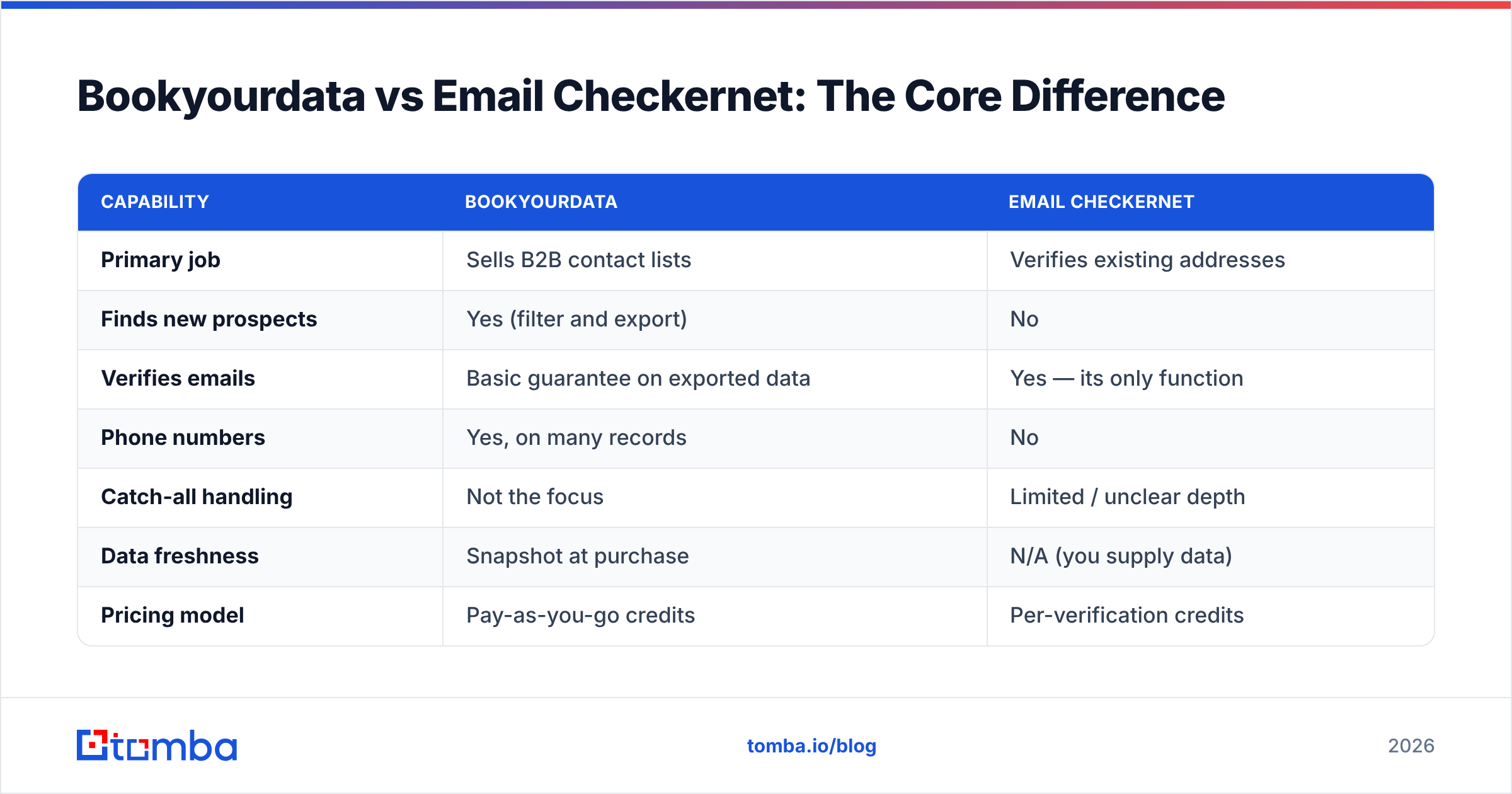
Bookyourdata vs Email Checkernet: The Core Difference#
Here is the cleanest way to think about it. Bookyourdata is the grocery store; Email Checkernet is the expiration-date scanner. One stocks your cart, the other tells you what's gone bad. You need both functions to cook dinner — you just don't get both from one shop.
| Capability | Bookyourdata | Email Checkernet |
|---|---|---|
| Primary job | Sells B2B contact lists | Verifies existing addresses |
| Finds new prospects | Yes (filter and export) | No |
| Verifies emails | Basic guarantee on exported data | Yes — its only function |
| Phone numbers | Yes, on many records | No |
| Catch-all handling | Not the focus | Limited / unclear depth |
| Data freshness | Snapshot at purchase | N/A (you supply data) |
| Pricing model | Pay-as-you-go credits | Per-verification credits |
| Best for | Buying a list fast | Cleaning a list you own |
The takeaway: comparing them head-to-head on "which is better" is the wrong question. The right question is "which job am I trying to do?" If you need contacts, Email Checkernet can't help. If you need clean data on contacts you already have, Bookyourdata is overkill.
How Do They Compare on Pricing in 2026?#
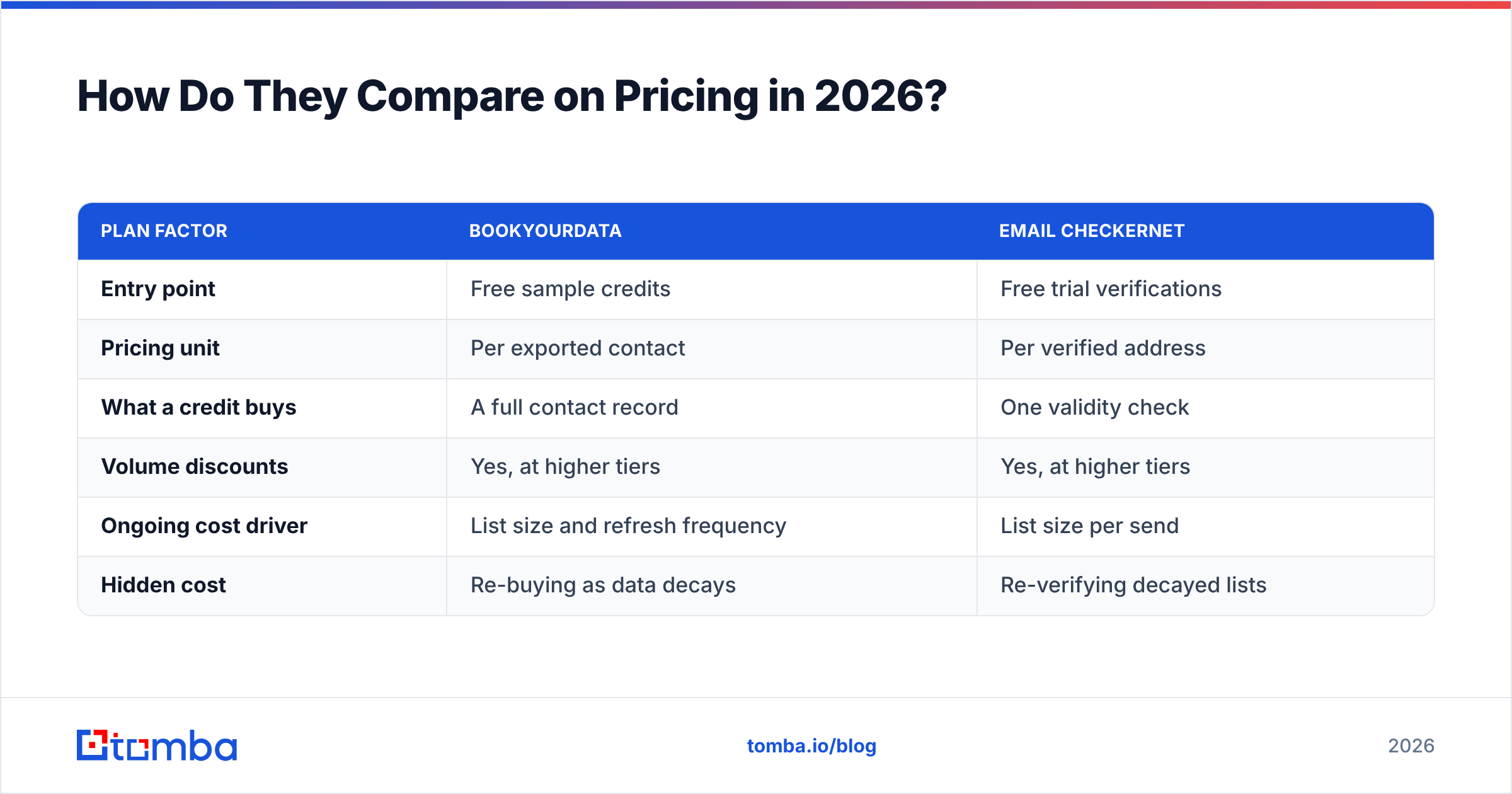
Both use credit models, but the credits buy different things.
| Plan factor | Bookyourdata | Email Checkernet |
|---|---|---|
| Entry point | Free sample credits | Free trial verifications |
| Pricing unit | Per exported contact | Per verified address |
| What a credit buys | A full contact record | One validity check |
| Volume discounts | Yes, at higher tiers | Yes, at higher tiers |
| Ongoing cost driver | List size and refresh frequency | List size per send |
| Hidden cost | Re-buying as data decays | Re-verifying decayed lists |
The economics expose the real problem with the list-buying model. You pay Bookyourdata per contact, then — if you're disciplined — pay a verifier per address to clean what you bought. Then a quarter later the list has decayed and you do it again. Two recurring bills for a dataset that ages the moment you download it.
A finder that pulls from live sources at the moment you search avoids the "buy stale, verify stale, re-buy" loop. You can compare that approach against Tomba pricing, where the Free tier covers 25 searches a month, Starter runs $49/mo, Growth $99/mo, and Pro $249/mo — each search returning a freshly sourced, verifiable contact rather than a cached row.
Which Tool Wins for Data Accuracy?#
Accuracy splits into two questions, and each tool only answers one.
Bookyourdata controls completeness — does the record exist and is the title right? But it cannot control freshness after purchase. The day you export, the clock starts. People change jobs, companies rebrand, domains migrate. A purchased list is a photograph, not a live feed.
Email Checkernet controls deliverability at send time — is this mailbox accepting mail right now? But it is blind to whether the person still works there. An address can be perfectly deliverable and still belong to someone who left the role you care about.
That gap is why neither tool alone gives you confident outreach. You want a contact that is both real (deliverable) and current (right person, right company). The most reliable way to get there in 2026 is to source the contact live and verify it in the same workflow, including a proper catch-all verifier step for the domains that block simple SMTP checks.
When Should You Use Each One?#
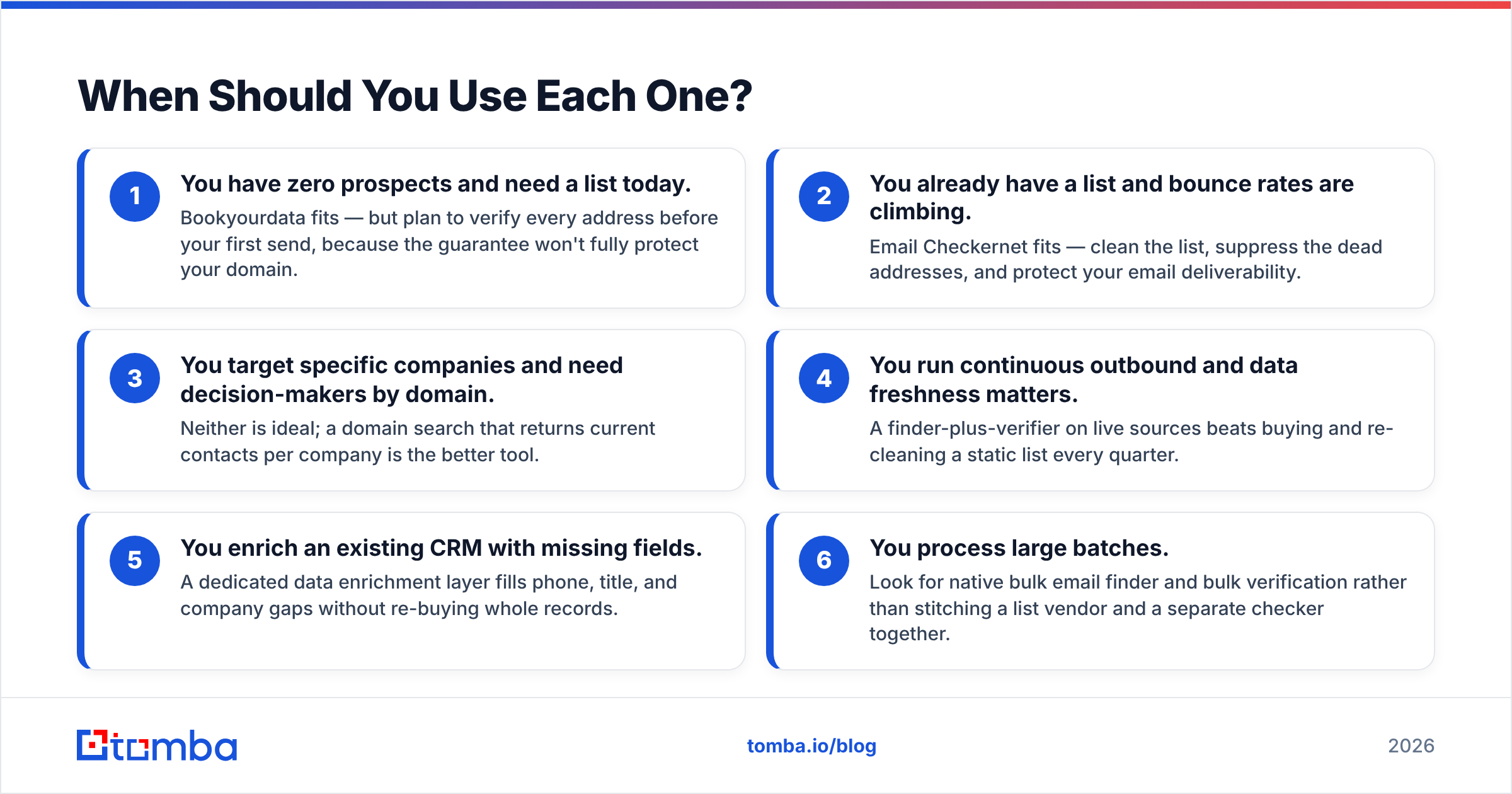
Use the job-to-be-done test. Match your situation to the column, not to the brand.
- You have zero prospects and need a list today. Bookyourdata fits — but plan to verify every address before your first send, because the guarantee won't fully protect your domain.
- You already have a list and bounce rates are climbing. Email Checkernet fits — clean the list, suppress the dead addresses, and protect your email deliverability.
- You target specific companies and need decision-makers by domain. Neither is ideal; a domain search that returns current contacts per company is the better tool.
- You run continuous outbound and data freshness matters. A finder-plus-verifier on live sources beats buying and re-cleaning a static list every quarter.
- You enrich an existing CRM with missing fields. A dedicated data enrichment layer fills phone, title, and company gaps without re-buying whole records.
- You process large batches. Look for native bulk email finder and bulk verification rather than stitching a list vendor and a separate checker together.
What Are the Limitations of Each?#
Bookyourdata's weak spots:
- Data is a snapshot; decay begins at export.
- A deliverability guarantee is not the same as guaranteed accuracy of role or seniority.
- You still need a separate verification pass before sending — the guarantee covers the vendor's quality bar, not your domain's safety.
- Buying lists raises compliance questions in stricter regions; you inherit consent and provenance risk you didn't create.
Email Checkernet's weak spots:
- It finds nothing. Without a source, there's nothing to verify.
- Catch-all domains are the hard case for any standalone SMTP checker, and depth there is the difference between "valid" and "actually safe to send."
- It's one node in a pipeline, so you're managing multiple vendors and exports to do what an integrated tool does in one pass.
Neither limitation is a dealbreaker on its own. Stacked together — buy a decaying list, verify it with a tool that struggles on catch-alls, repeat next quarter — they compound into real cost and real bounces.
How Does Tomba Compare to Both?#
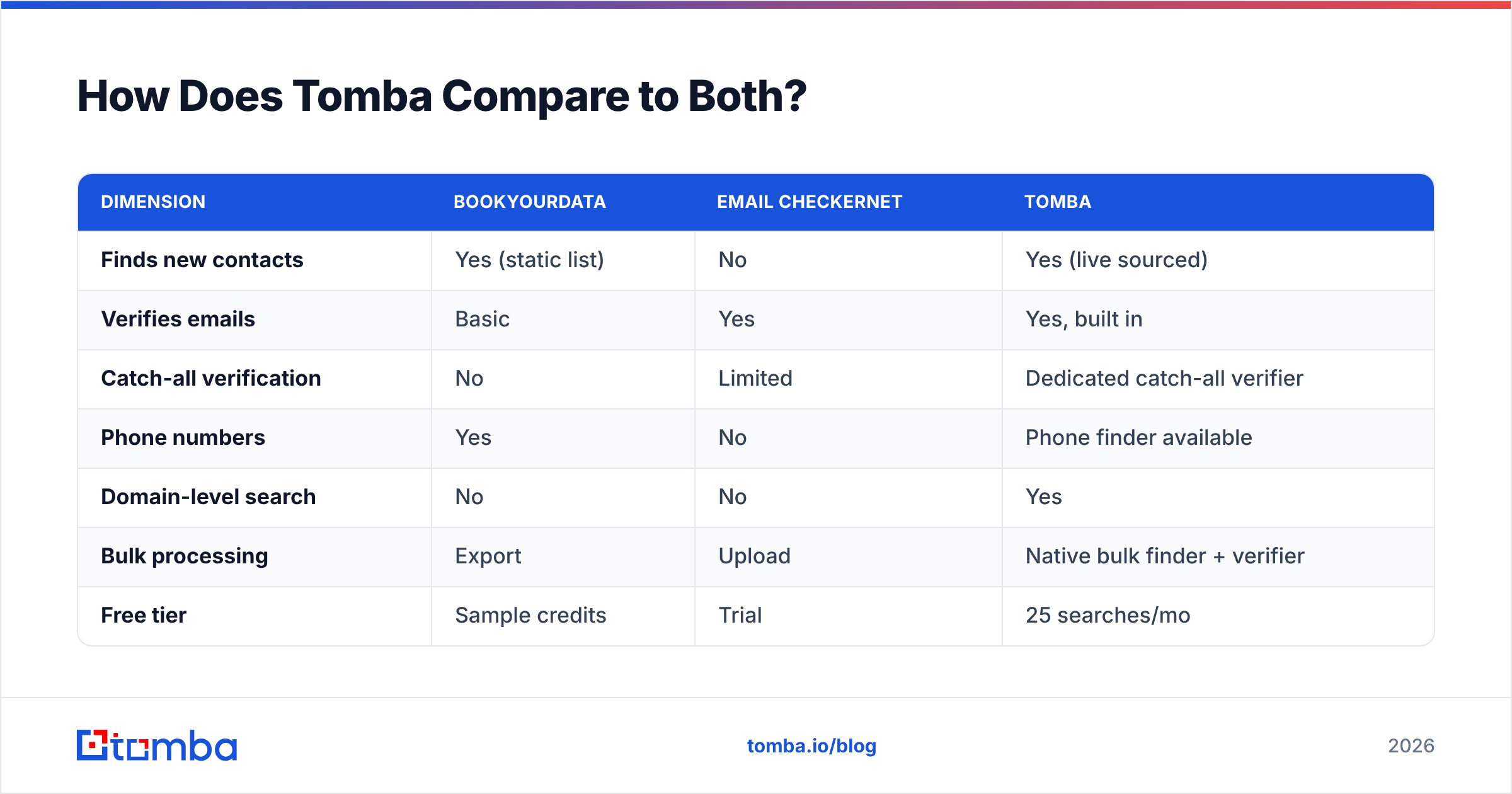
Tomba collapses the two jobs into one workflow. Instead of buying a static list from one vendor and verifying it with another, you find current contacts and verify them in the same place, sourced live rather than served from a cache.
| Dimension | Bookyourdata | Email Checkernet | Tomba |
|---|---|---|---|
| Finds new contacts | Yes (static list) | No | Yes (live sourced) |
| Verifies emails | Basic | Yes | Yes, built in |
| Catch-all verification | No | Limited | Dedicated catch-all verifier |
| Phone numbers | Yes | No | Phone finder available |
| Domain-level search | No | No | Yes |
| Bulk processing | Export | Upload | Native bulk finder + verifier |
| Free tier | Sample credits | Trial | 25 searches/mo |
| Starter price | Pay-as-you-go | Per-check | $49/mo |
The practical difference is the loop you avoid. With a list-plus-checker stack you pay twice and still chase decay. With an integrated email finder you search for the contact you need, the verification runs inline, and the record reflects sources as they are today — not as they were when a list was last compiled. For teams that move data through spreadsheets or automation, the same engine is reachable through the Tomba API, browser extension, and bulk tools, so the workflow scales without bolting vendors together.
You can see how independent reviewers frame the category on G2 before deciding, and confirm the scope of each contender on the official Bookyourdata and Email Checkernet sites — both are honest about being narrow tools, which is exactly the point.
So, Which Should You Choose?#
Choose by the job, not the brand. If you literally need a list of strangers to email this week and nothing else, Bookyourdata gets you there fastest — just budget for a verification pass before you send. If your only problem is a dirty list you already own, Email Checkernet is a cheap, focused fix.
But if you're building outbound that you'll run month after month, the buy-and-re-clean cycle quietly drains budget and risks your domain every quarter. Sourcing contacts live and verifying them in one pass is the model that holds up over time.
That's the case for Tomba. Start free with 25 searches a month, find decision-makers by name or company email search, and let the built-in verifier and catch-all checks keep your bounce rate low — without paying one vendor to find and another to clean. When your outbound needs both fresh contacts and clean data, try the Tomba Email Finder and skip the decay loop entirely.
// get started
Find, verify and enrich your first contacts today
Start on the free plan with 25 searches a month, then scale when your team is ready.
Free plan · No credit card required · GDPR & CCPA
// about the author