Bookyourdata vs Pabbly: Which B2B Tool Wins in 2026?
Bookyourdata sells pay-as-you-go B2B contact lists; Pabbly bundles email verification into an automation suite. Here is how they really compare in 2026 — and where a dedicated finder beats both.
You typed "Bookyourdata vs Pabbly" into a search box because the two names keep showing up on the same lists, and you want to know which one actually belongs in your prospecting stack. Short answer up front: they barely compete. Bookyourdata is a pay-as-you-go B2B contact-list seller. Pabbly is a workflow-automation suite that happens to include an email verifier. Picking between them is less "which is better" and more "which problem am I solving" — and for most outbound teams, neither is the finder you actually need.
This guide breaks down what each tool does, where they overlap, what they cost in 2026, and when a dedicated email finder beats both.
TL;DR#
- Bookyourdata sells downloadable B2B contact lists on credits, with a claimed 97% accuracy guarantee — good for one-off list buys, weak for ongoing real-time enrichment.
- Pabbly is an automation bundle (Connect, Email Marketing, Subscription Billing) where verification is a side feature, not the core — good if you already live inside Pabbly workflows.
- They solve different jobs: Bookyourdata = buy data, Pabbly = move and clean data. Comparing them head-to-head is mostly apples-to-oranges.
- Neither is a true on-demand email finder. If you need fresh, verified emails by name or domain at search time, a dedicated tool fits better.
- For accuracy-first prospecting, pair a finder with an email verifier instead of trusting a static purchased list.
What is Bookyourdata?#
Bookyourdata is a B2B contact-database vendor. You filter by industry, job title, location, company size, and technology, then buy the matching records as a downloadable list. Think of it like a grocery store for leads: you walk in with a shopping list (CMOs in SaaS, US-based, 200+ employees), grab the records off the shelf, and pay per item.
Its headline pitch is a 97% accuracy guarantee with pay-as-you-go credits, so you are not locked into a subscription. Records typically include email, phone, job title, company, and firmographic fields. The model is attractive when you want a chunk of contacts now and do not want a recurring bill.
The catch with any pre-built list is freshness. B2B data decays fast — people change jobs, companies rebrand, domains migrate. A list that was 97% accurate at export can drift within months. That is the structural weakness of buying static data versus finding it live.

What is Pabbly?#
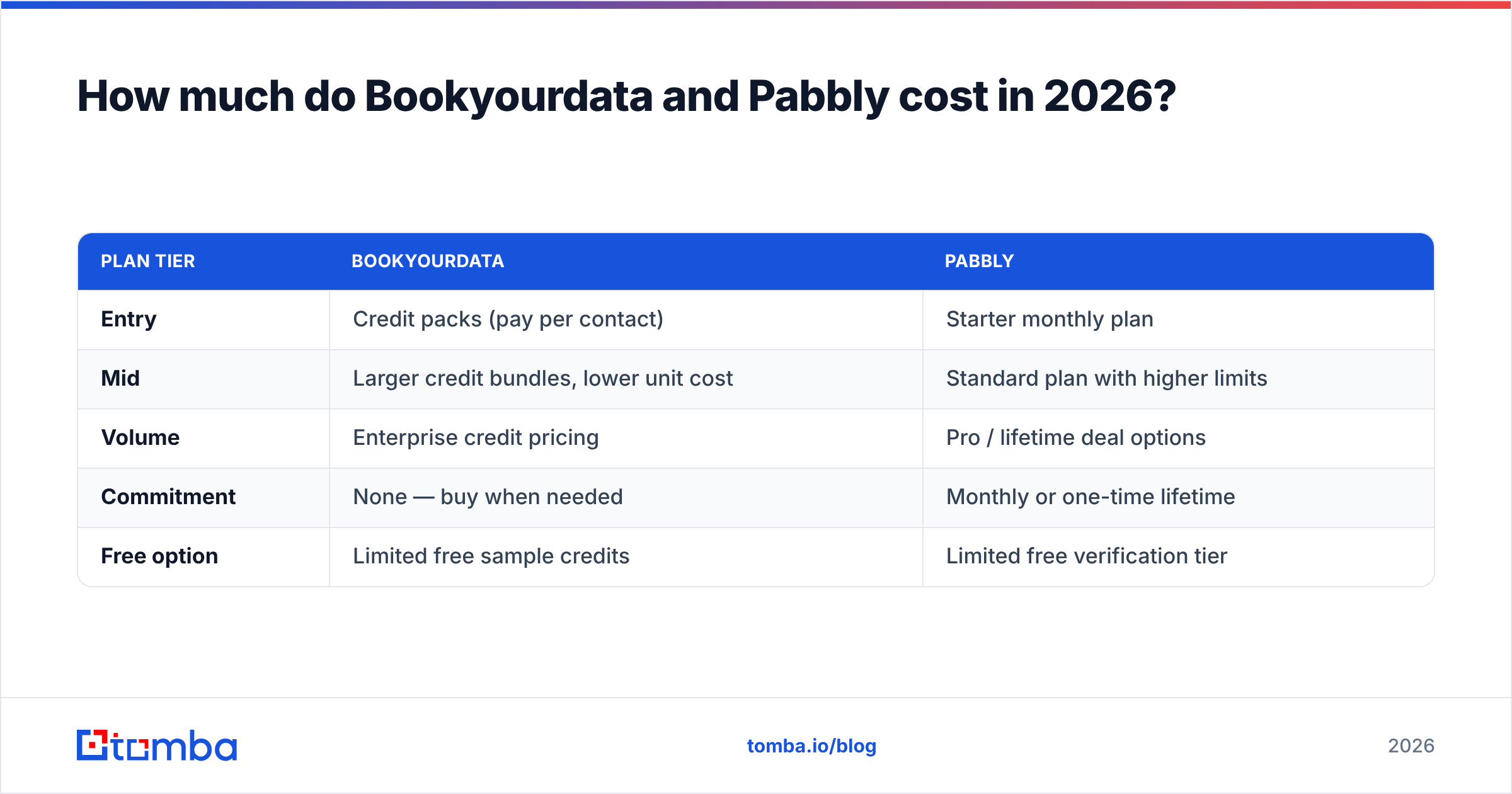
Pabbly is a suite of separate products sold under one brand and, often, one flat license:
- Pabbly Connect — a Zapier-style automation/integration tool that wires apps together.
- Pabbly Email Marketing — bulk email sending with built-in list features.
- Pabbly Subscription Billing — recurring payments and checkout.
- Pabbly Email Verification — bulk list cleaning to cut bounces.
The relevant piece for this comparison is the email verification module. It ingests a list and flags invalid, risky, or dead addresses before you send. It is competent at that one job, but it is a cleaner, not a finder — you have to bring the emails yourself. Pabbly's real gravity is automation: if your team already routes leads through Pabbly Connect, the verifier is a convenient bolt-on.
So the honest framing is this: Bookyourdata gives you contacts you do not have; Pabbly helps you validate and route contacts you already collected. One fills the bucket, the other filters it.
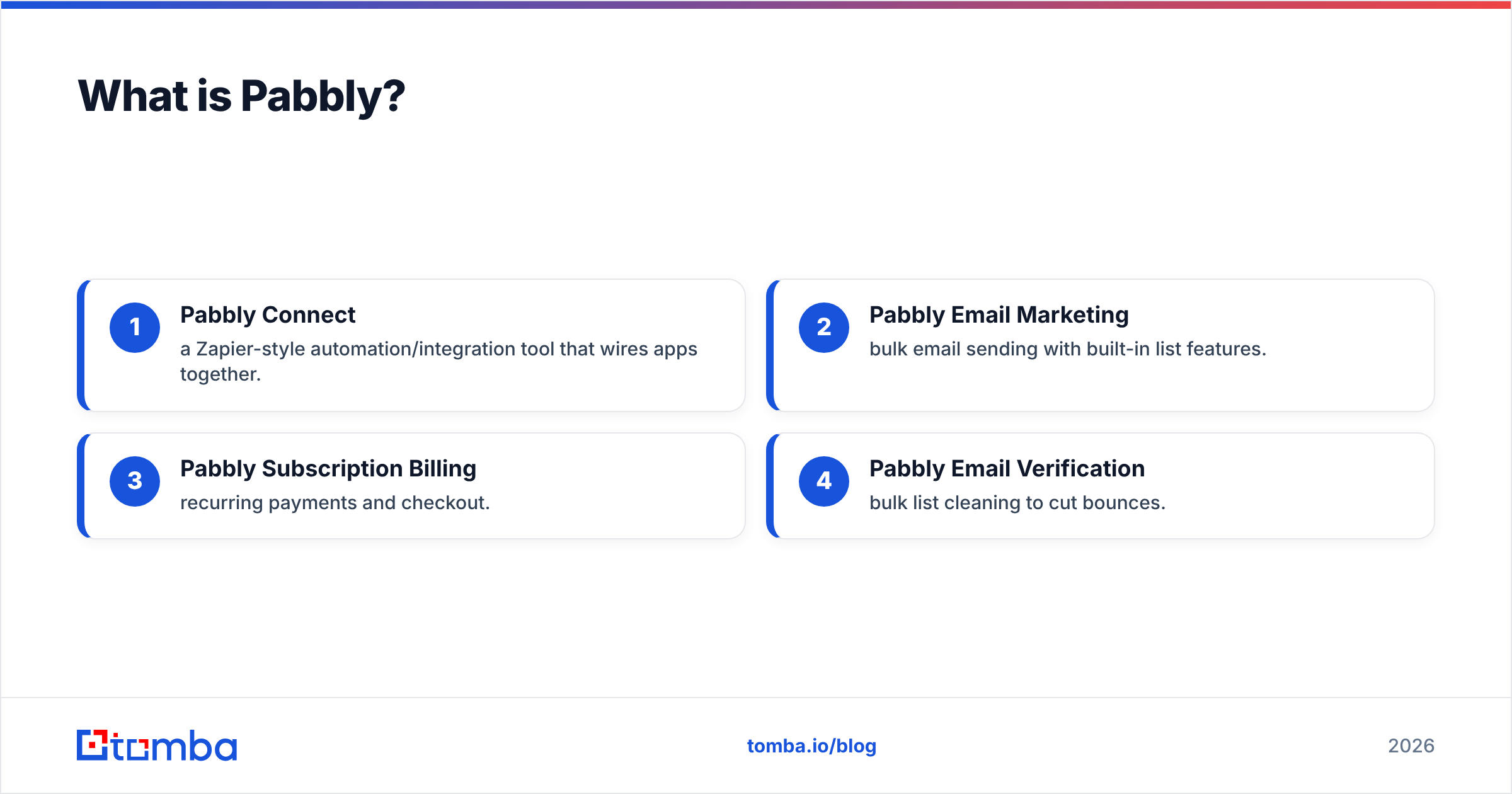
Bookyourdata vs Pabbly: how do they compare?#
Here is the side-by-side. Note how few rows are true head-to-head — that gap is the whole story.
| Attribute | Bookyourdata | Pabbly |
|---|---|---|
| Primary job | Buy B2B contact lists | Automate workflows + verify lists |
| Email finding | No (pre-built records only) | No (cleans lists you supply) |
| Email verification | Bundled with records | Yes — core verification module |
| Real-time / API enrichment | Limited | Via Connect integrations |
| Pricing model | Pay-as-you-go credits | Flat plans + lifetime deals |
| Best for | One-off targeted list buys | Teams living in Pabbly automations |
| Data freshness risk | High (static export) | N/A (you bring the data) |
| Phone numbers | Included in records | No |
The takeaway: if your real need is "get me verified email addresses for these specific people or this domain," neither tool is built for that primary motion. Bookyourdata sells you a bulk export and hopes it stays fresh; Pabbly assumes you already sourced the contacts elsewhere.
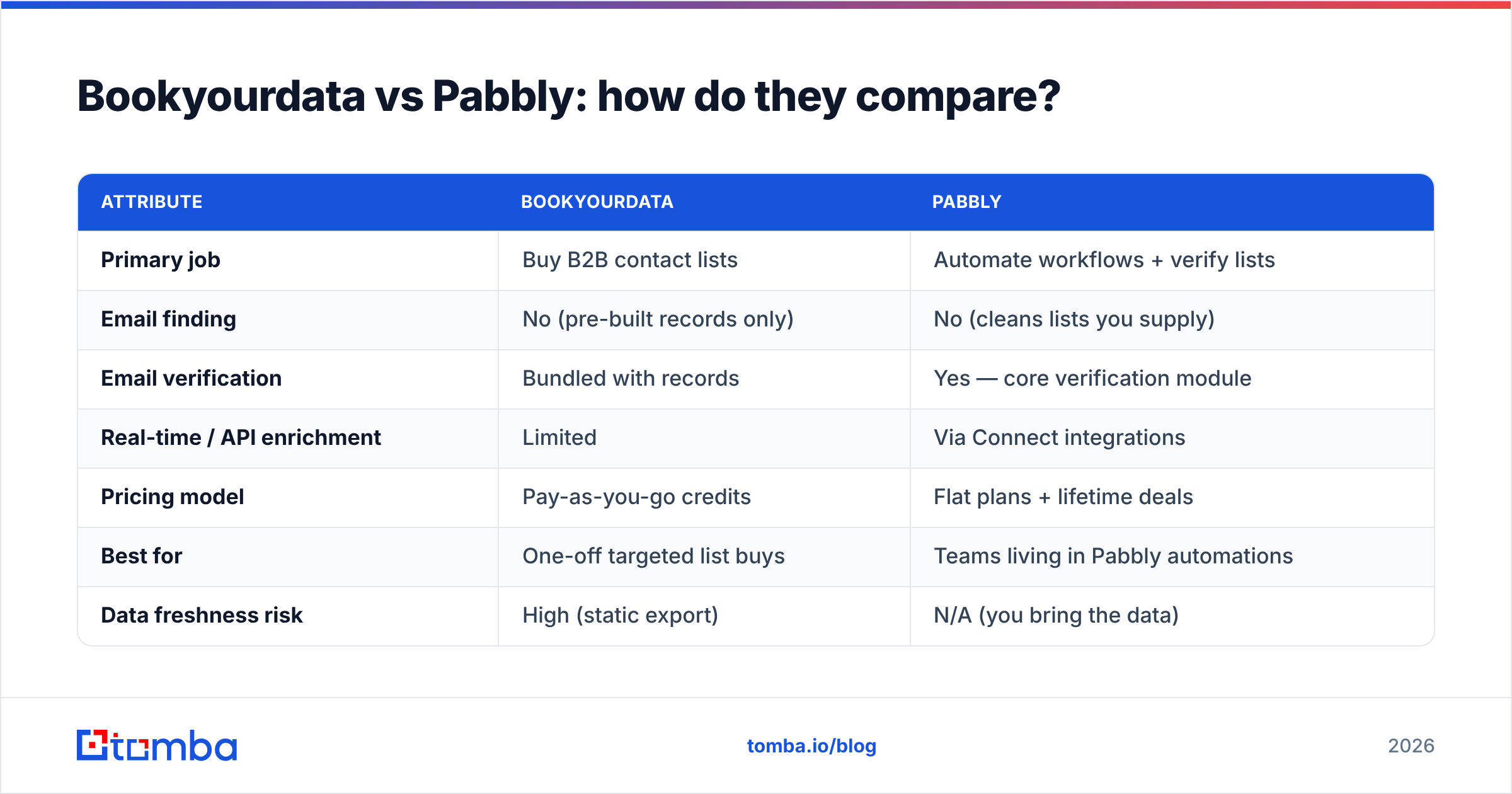
How much do Bookyourdata and Pabbly cost in 2026?#
Pricing answers the budget question fast: Bookyourdata charges per record, Pabbly charges per plan.
| Plan tier | Bookyourdata | Pabbly |
|---|---|---|
| Entry | Credit packs (pay per contact) | Starter monthly plan |
| Mid | Larger credit bundles, lower unit cost | Standard plan with higher limits |
| Volume | Enterprise credit pricing | Pro / lifetime deal options |
| Commitment | None — buy when needed | Monthly or one-time lifetime |
| Free option | Limited free sample credits | Limited free verification tier |
Bookyourdata's pay-as-you-go is genuinely flexible for sporadic buyers. Pabbly's flat and lifetime pricing rewards heavy, recurring automation users. But raw price hides the real cost: bounced sends and dead leads. A cheap list that bounces 15% torches your sender reputation, which is far more expensive than the credits you saved. Always weigh price against verified deliverability, not record count.
For a transparent, tiered comparison point, Tomba pricing runs Free (25 searches/mo), Starter at $49/mo, Growth at $99/mo, and Pro at $249/mo — credit-based but oriented around live finding and verification rather than static exports.
Which one is more accurate?#
Accuracy is the deciding factor for most buyers, and it splits cleanly: Bookyourdata stakes its brand on a 97% guarantee at point of sale; Pabbly improves accuracy after you import a list by removing bad addresses. Neither validates an address at the moment you need to email a specific person.
That distinction matters. A purchased list is a snapshot — accurate the day it was built, decaying every day after. A verification pass on an old list catches dead addresses but cannot resurrect the right one for someone who switched companies. The most reliable workflow is to find the address live, against current sources, then verify it immediately before sending.
This is exactly where a dedicated finder-plus-verifier pipeline pulls ahead. You can pull a contact by name and company through a domain search, confirm it with real-time SMTP-level checks, and enrich the rest of the record with data enrichment — all at the moment of outreach, not months earlier.

When should you choose Bookyourdata?#
Pick Bookyourdata when all of these are true:
- You need a chunk of targeted records once, not an ongoing feed.
- You want zero subscription commitment and prefer paying per contact.
- Phone numbers matter — its records bundle direct dials.
- Your ICP is broad and firmographic (industry + title + geography), so a filtered export covers it.
It is a reasonable tool for a campaign-specific list buy. Just plan to re-verify the list before you send, because no static export stays clean forever. Treat the 97% as a starting line, not a finish line.
When should you choose Pabbly?#
Choose Pabbly when:
- You already run automations through Pabbly Connect and want verification inside that ecosystem.
- You generate your own leads (forms, signups, scrapes) and need to clean them before emailing.
- You want a lifetime-deal price instead of a recurring SaaS bill.
- You need more than verification — billing, email marketing, and integrations under one roof.
Pabbly is a suite play. If you only want list cleaning and nothing else, a standalone verifier is simpler. But if Pabbly Connect is already your nervous system, the verifier earns its place by being one click away.
Where does a dedicated email finder fit?#
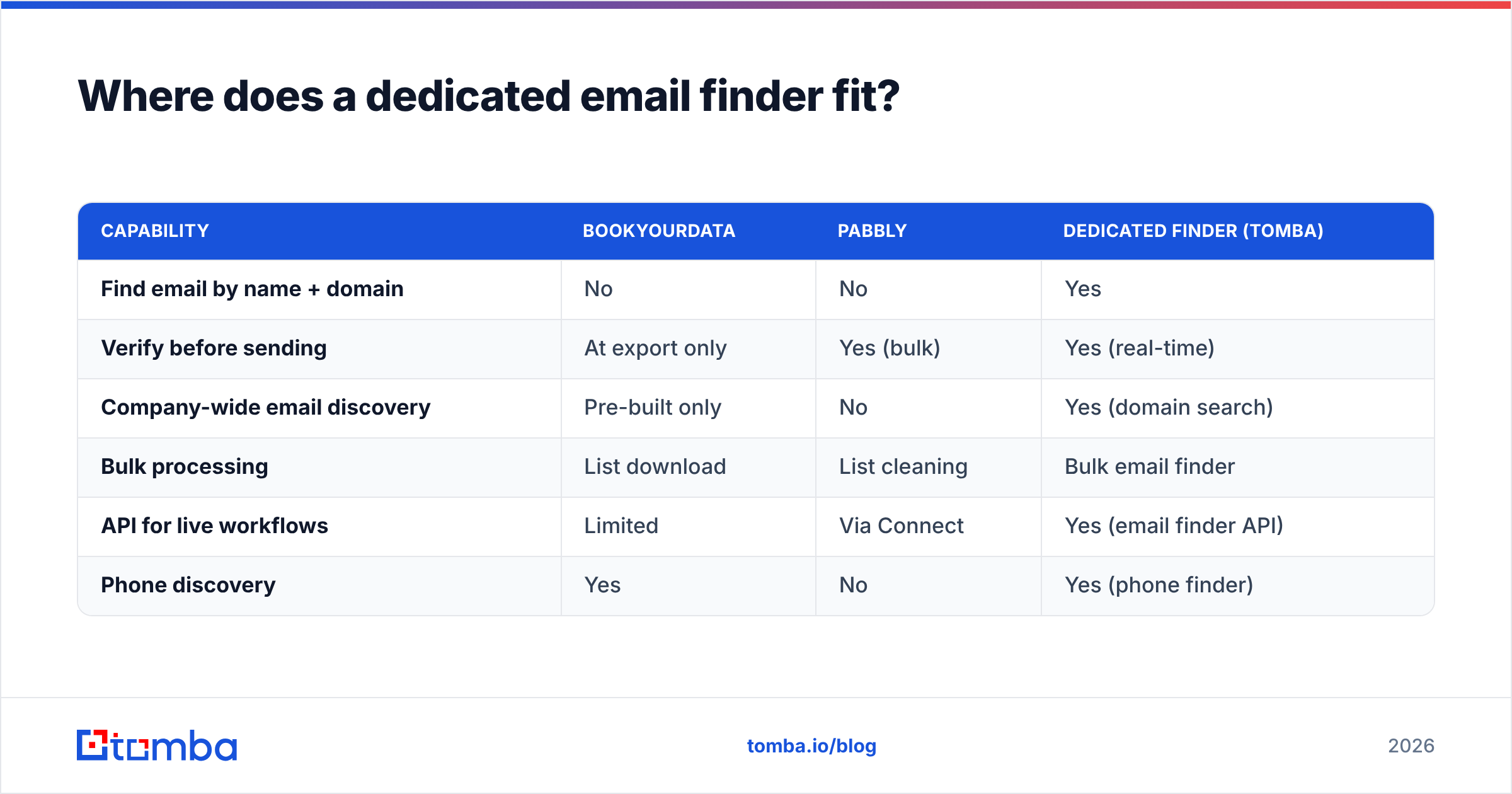
A dedicated finder is the missing third option in this comparison — and for most outbound and recruiting teams, it is the one that actually matches the job. Bookyourdata answers "sell me a list." Pabbly answers "clean my list." A finder answers the question you probably started with: "get me the verified email for this person or this domain, right now."
Here is how the three approaches line up on the core motion:
| Capability | Bookyourdata | Pabbly | Dedicated finder (Tomba) |
|---|---|---|---|
| Find email by name + domain | No | No | Yes |
| Verify before sending | At export only | Yes (bulk) | Yes (real-time) |
| Company-wide email discovery | Pre-built only | No | Yes (domain search) |
| Bulk processing | List download | List cleaning | Bulk email finder |
| API for live workflows | Limited | Via Connect | Yes (email finder API) |
| Phone discovery | Yes | No | Yes (phone finder) |
A finder closes the freshness gap because it sources and validates at request time. You are not betting on a months-old snapshot or hoping a cleaner salvages a stale list. You search, you verify, you send — same session.
Tomba's stack is built around that motion: the email finder for name-and-domain lookups, the verifier for pre-send validation, domain search for mapping every reachable contact at a company, plus enrichment and phone data to round out records. For automation-heavy teams, it also exposes a full API and native integrations, so it can sit inside a Pabbly-style workflow rather than replacing it.
Can you use these tools together?#
Yes — and the smart stacks usually do mix categories rather than forcing one tool to do everything. A practical combined workflow:
- Find verified emails live with a finder (by name, domain, or company) instead of buying a static list.
- Verify every address at send time to protect sender reputation — see Tomba's guide to email verification.
- Automate routing and follow-up through Pabbly Connect if that is your existing backbone.
- Buy a Bookyourdata list only for one-off, broad-net campaigns where speed beats freshness — then re-verify before the first send.
The mistake is treating any single one of these as a complete solution. Bookyourdata without verification leaks bounces. Pabbly without a finder has nothing to verify. A finder without automation leaves manual gaps. Match the tool to the step.
Bookyourdata vs Pabbly: the verdict#
If you are forced to pick just one, the choice is dictated by your actual job-to-be-done, not by which has a flashier landing page:
- Need contacts you do not have? Bookyourdata, with the caveat to re-verify.
- Need to clean and route contacts you already have, inside automations? Pabbly.
- Need fresh, verified emails for specific targets on demand? Neither — use a dedicated finder.
Most outbound teams discover that the third bucket is where they actually live. The list you bought goes stale, and the verifier can only tell you it went stale — it cannot rebuild it. Finding live and verifying on the spot is the workflow that keeps bounce rates low and reply rates honest. You can sanity-check any vendor's claims on independent review sites like G2 before committing, and read each vendor's own docs at bookyourdata.com and pabbly.com.
Start finding verified emails today#
If your real goal is verified emails for the exact people you want to reach — not a static list to clean later — start with the Tomba Email Finder. Search by name, company, or domain, verify every address in real time, and push results straight into your existing automation through the API or native integrations. The free tier gives you 25 searches a month to test accuracy before you spend a credit, and paid plans start at $49/mo. Skip the stale-list gamble and find data that is fresh the moment you use it.
// get started
Find, verify and enrich your first contacts today
Start on the free plan with 25 searches a month, then scale when your team is ready.
Free plan · No credit card required · GDPR & CCPA
// about the author