BookYourData vs QuickEmailVerification: 2026 Buyer Guide
BookYourData sells ready-made B2B lists; QuickEmailVerification cleans the emails you already have. Here's which one fits your 2026 outbound stack — and where a finder beats both.
You typed "BookYourData vs QuickEmailVerification" into a search bar because you want clean B2B contacts that actually land in the inbox. The problem is these two tools solve different halves of that problem — and buying the wrong one wastes budget on data you can't use.
TL;DR#
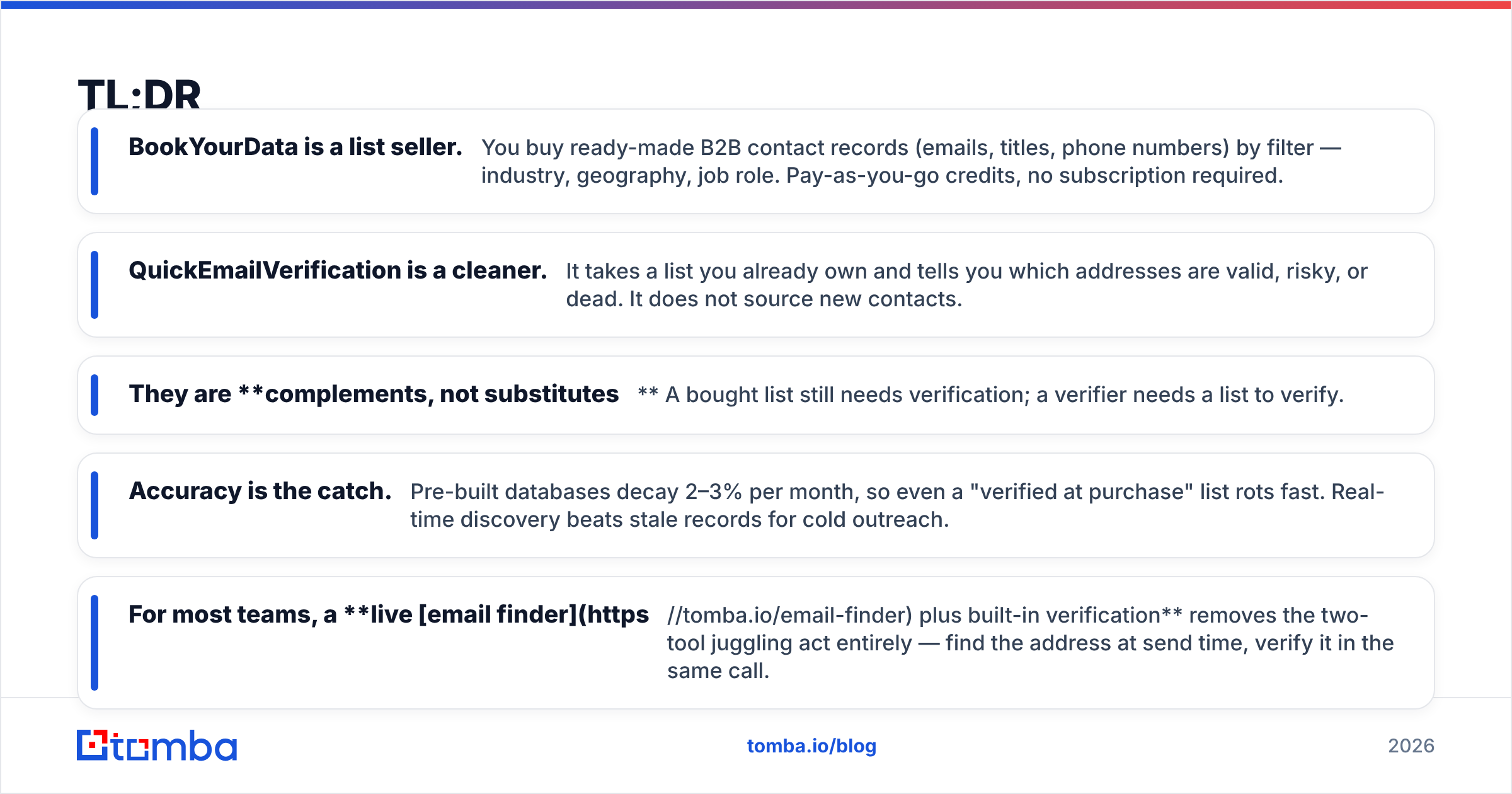
- BookYourData is a list seller. You buy ready-made B2B contact records (emails, titles, phone numbers) by filter — industry, geography, job role. Pay-as-you-go credits, no subscription required.
- QuickEmailVerification is a cleaner. It takes a list you already own and tells you which addresses are valid, risky, or dead. It does not source new contacts.
- They are complements, not substitutes. A bought list still needs verification; a verifier needs a list to verify.
- Accuracy is the catch. Pre-built databases decay 2–3% per month, so even a "verified at purchase" list rots fast. Real-time discovery beats stale records for cold outreach.
- For most teams, a live email finder plus built-in verification removes the two-tool juggling act entirely — find the address at send time, verify it in the same call.
What is BookYourData?#
BookYourData is a self-service B2B data marketplace. You apply filters (job title, company size, industry, location, technologies used), preview the count, and buy the records as a CSV or push them to your CRM. It markets a 97% accuracy guarantee and credits back invalid emails, which is unusual for a list vendor and worth noting.
The model is pay-as-you-go: you buy a credit pack, spend it on contacts, and there is no monthly minimum. That makes it attractive for one-off campaigns — say, a single conference push or a territory launch — where you don't want to commit to a recurring data subscription.
The weakness is structural. Any pre-compiled database is a snapshot. People change jobs, companies fold, domains migrate to catch-all servers. Industry churn data from sources like Gartner consistently shows B2B contact data degrading fast, which is why a list that was 97% accurate the day it was scraped is meaningfully worse 90 days later.
What is QuickEmailVerification?#
QuickEmailVerification does one job well: it validates email addresses. You upload a list (or call its API), and it returns a status for each address — valid, invalid, unknown, accept-all, disposable, or role-based. It checks syntax, domain, MX records, and runs SMTP-level mailbox probing without sending a message.
It is built for the stage after you have a list. If you exported contacts from a webinar, scraped them from LinkedIn, or — yes — bought them from a vendor like BookYourData, QuickEmailVerification tells you which ones are safe to mail before you torch your sender reputation on bounces.
What it does not do is find new contacts. Give it an empty spreadsheet and it has nothing to verify. That's the core distinction this whole comparison hinges on.
BookYourData vs QuickEmailVerification: what's the real difference?#
The honest answer: they sit at different points in the data pipeline. One acquires contacts; the other validates them. Comparing them head-to-head is like comparing a grocery store to a refrigerator — you generally need both, and neither replaces the other.
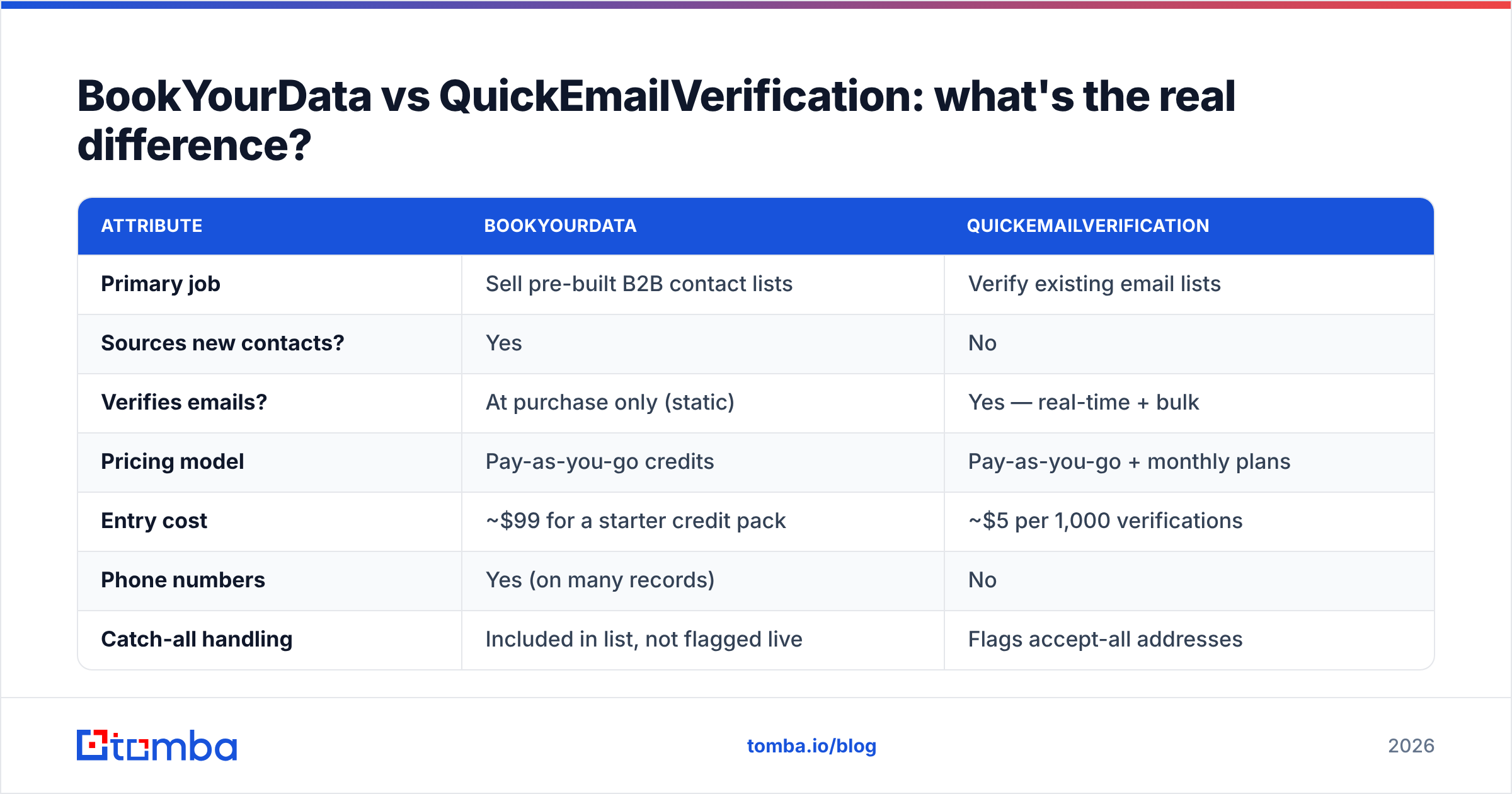
Here's how the two stack up on the attributes that actually drive a buying decision:
| Attribute | BookYourData | QuickEmailVerification |
|---|---|---|
| Primary job | Sell pre-built B2B contact lists | Verify existing email lists |
| Sources new contacts? | Yes | No |
| Verifies emails? | At purchase only (static) | Yes — real-time + bulk |
| Pricing model | Pay-as-you-go credits | Pay-as-you-go + monthly plans |
| Entry cost | ~$99 for a starter credit pack | ~$5 per 1,000 verifications |
| Phone numbers | Yes (on many records) | No |
| Catch-all handling | Included in list, not flagged live | Flags accept-all addresses |
| Best for | One-off list purchases | Cleaning lists you already own |
| Data freshness | Snapshot (decays monthly) | Live at time of check |
The pricing figures above are directional — both vendors adjust packs and tiers, so confirm current numbers on their own sites before you buy.
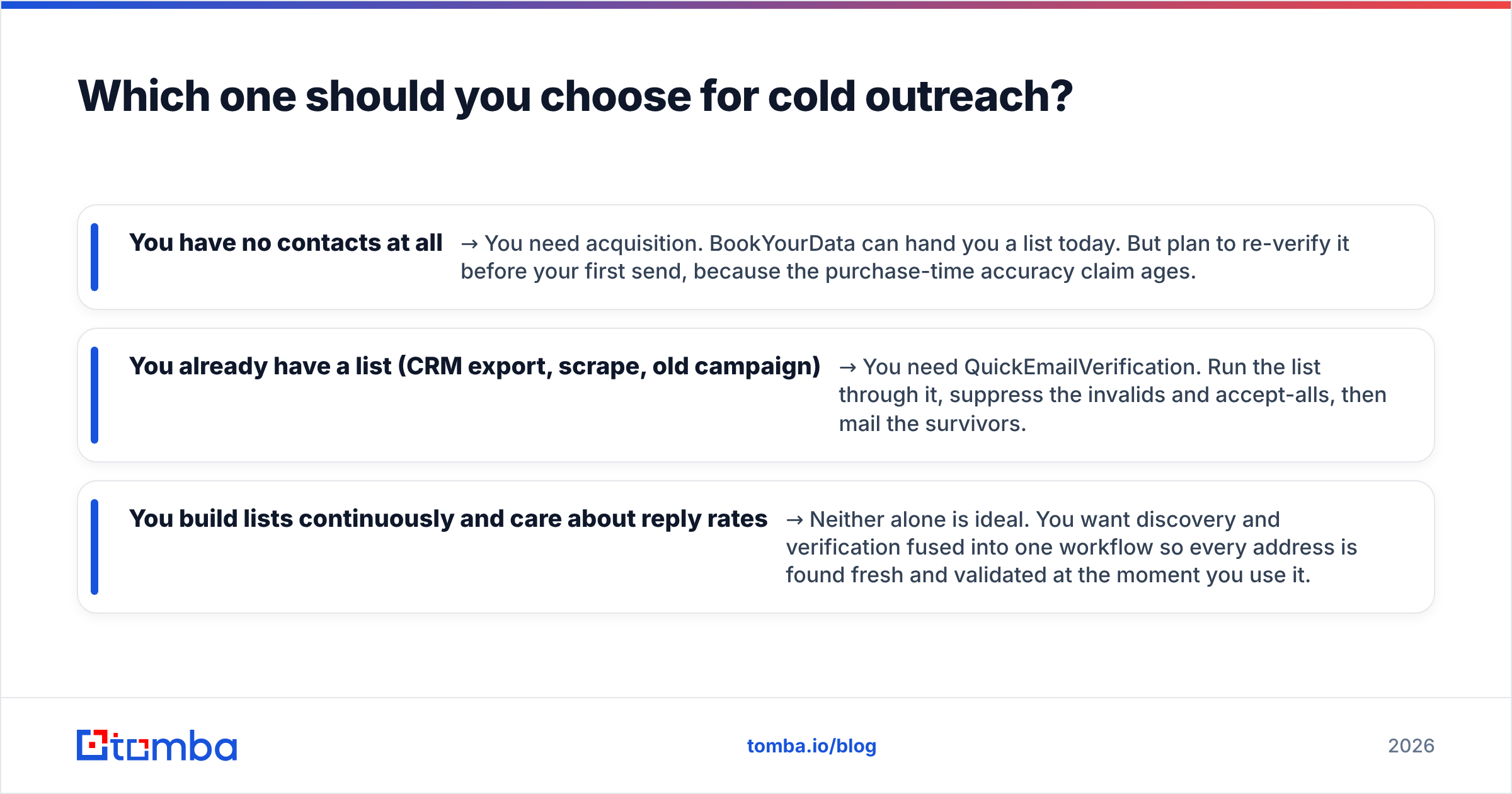
Which one should you choose for cold outreach?#
Choose based on what you're missing, not which brand sounds better.
- You have no contacts at all → You need acquisition. BookYourData can hand you a list today. But plan to re-verify it before your first send, because the purchase-time accuracy claim ages.
- You already have a list (CRM export, scrape, old campaign) → You need QuickEmailVerification. Run the list through it, suppress the invalids and accept-alls, then mail the survivors.
- You build lists continuously and care about reply rates → Neither alone is ideal. You want discovery and verification fused into one workflow so every address is found fresh and validated at the moment you use it.
That third case is where the two-tool approach gets expensive and slow. You pay BookYourData per record, pay QuickEmailVerification per verification, reconcile two exports, and still end up with data that was accurate at purchase but stale at send.
How does a live email finder change the math?#
A live finder flips the order of operations. Instead of buying a giant list and hoping it's still good, you find the specific person you want to reach — by name and company domain — at the moment you're ready to contact them, and verify the address in the same step.
This matters for three concrete reasons:
- Freshness — the lookup runs against current data, not a months-old snapshot, so email deliverability holds up.
- Cost control — you pay for the 200 contacts you actually want, not a 50,000-row list where you'll use 1%.
- One workflow — discovery, verification, and catch-all detection happen together. No CSV ping-pong between a list vendor and a verifier.
Tomba bundles these. The email verifier runs the same SMTP and MX checks QuickEmailVerification does, the catch-all verifier flags accept-all domains, and domain search pulls every public address at a company — so you replace both halves of the BookYourData + QuickEmailVerification combo with one source.
How does Tomba compare on price and scope?#
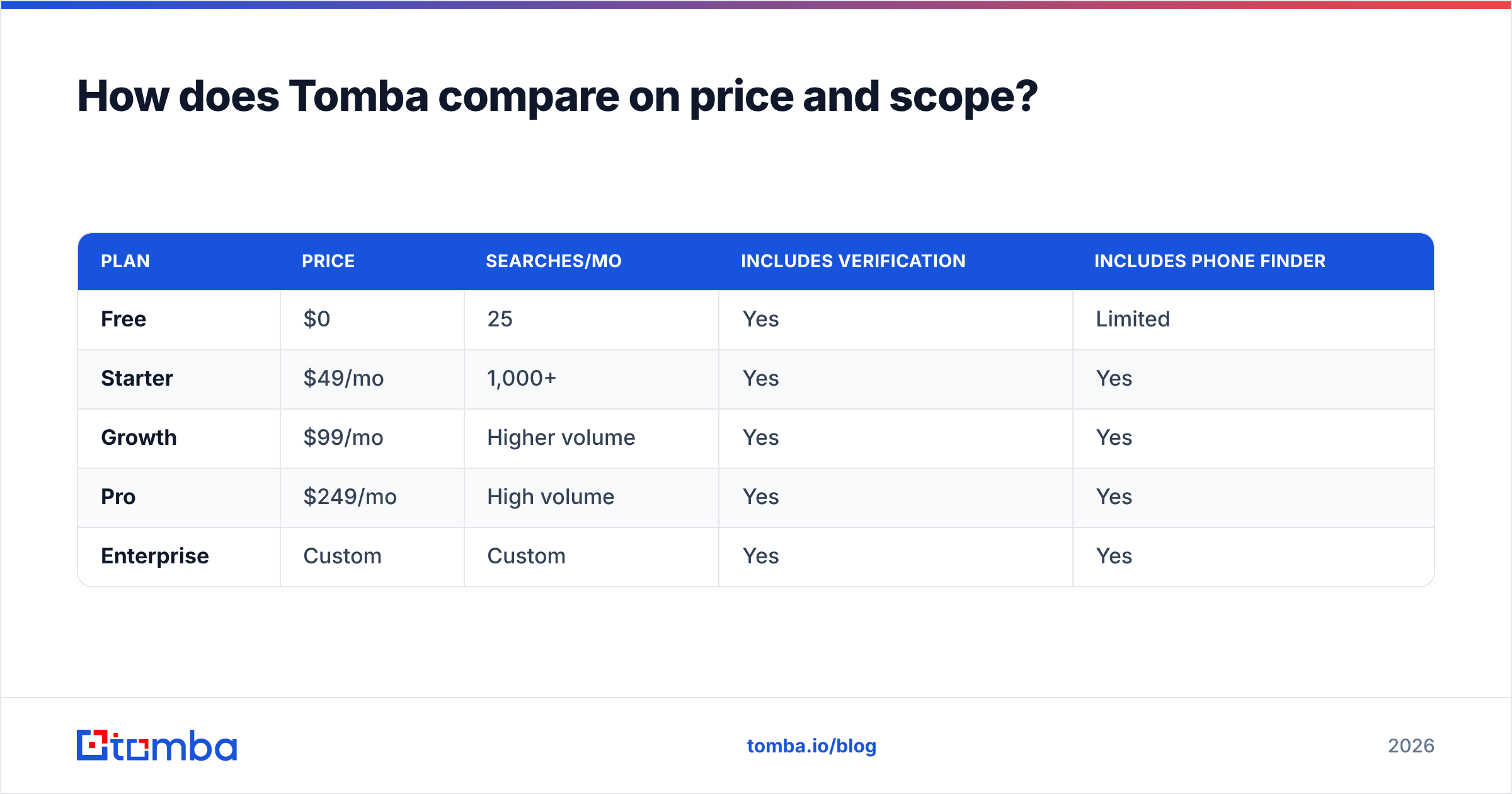
Where BookYourData is credit-only and QuickEmailVerification charges per verification, Tomba runs on flat monthly plans that include both finding and verifying. You aren't paying twice for two stages of the same job.
| Plan | Price | Searches/mo | Includes verification | Includes phone finder |
|---|---|---|---|---|
| Free | $0 | 25 | Yes | Limited |
| Starter | $49/mo | 1,000+ | Yes | Yes |
| Growth | $99/mo | Higher volume | Yes | Yes |
| Pro | $249/mo | High volume | Yes | Yes |
| Enterprise | Custom | Custom | Yes | Yes |
See full Tomba pricing for current credit allowances per tier. The practical point: the $49/mo Starter plan covers discovery and verification, which would otherwise be a BookYourData credit pack plus a QuickEmailVerification subscription stacked on top.
If your real need is sourcing contacts at all — not just cleaning a list you bought — a finder is the tool that does the thing BookYourData charges per record for, without the snapshot decay. Cross-check independent reviews on G2 before committing to any of the three.
When is each tool genuinely the right call?#
To keep this neutral — there are real scenarios where each wins:
- BookYourData wins when you need bulk records with phone numbers for a one-time campaign and don't want any subscription. Its pay-as-you-go model and credit-back guarantee are legitimately good for that narrow case.
- QuickEmailVerification wins when you already have a large, untrusted list and your only job is to clean it before a migration or a big send. It's a focused, reliable verifier.
- A finder like Tomba wins when outreach is ongoing, you target specific people, and you want fresh-at-send-time data with verification baked in — which is most modern outbound teams.
The bottom line#
BookYourData and QuickEmailVerification aren't really rivals — one fills your list, the other cleans it, and serious outbound usually touches both stages. The question is whether you want to manage two tools and live with snapshot decay, or collapse the workflow into a single fresh-data source.
If you're building outreach lists in 2026 and want to find the right contact and confirm it's deliverable in one move, start with the Tomba Email Finder. Find emails by name or domain, verify them on the spot, and skip the two-vendor reconciliation — the free tier gives you 25 searches to test it against any list you've bought or scraped.
// get started
Find, verify and enrich your first contacts today
Start on the free plan with 25 searches a month, then scale when your team is ready.
Free plan · No credit card required · GDPR & CCPA
// about the author