Bookyourdata vs Scrubby: B2B Data Tools Compared (2026)
Bookyourdata sells ready-made B2B contact lists; Scrubby verifies the risky emails most tools skip. Here is how they actually compare in 2026 — and where a finder beats both.
Bookyourdata and Scrubby get compared a lot, but they are not the same kind of product. One sells you contact lists. The other tells you whether an email address is safe to send to. Picking between them without understanding that gap is how teams end up paying for data they can't actually use.
This guide breaks down what each tool does, what it costs, where it breaks, and which one belongs in your outbound stack in 2026.
TL;DR#
- Bookyourdata is a pay-as-you-go B2B contact database — you buy lists of emails, phones, and titles filtered by industry, location, and seniority.
- Scrubby is an email verification service that specializes in the hard cases: catch-all domains and "risky" addresses other verifiers mark as unknown.
- They solve different problems. Bookyourdata gives you contacts; Scrubby cleans contacts you already have. Many teams need both.
- Neither is a true email finder — if you start from a name or domain rather than a pre-built list, you'll want a dedicated finder with built-in verification.
- For most outbound teams, the cheaper, more flexible path is a finder + verifier combo. That's where Tomba Email Finder fits.
What is Bookyourdata?#
Bookyourdata is a B2B contact-list provider. You set filters — job title, industry, company size, country, technology used — and it returns a downloadable list of business contacts with emails, direct dials, and firmographic fields. Pricing is credit-based and pay-as-you-go, which appeals to teams that don't want a monthly subscription.
Its main selling points are a large claimed contact pool (hundreds of millions of records) and a real-time verification step at export, backed by an accuracy guarantee that refunds credits for bounced addresses. You can read more about how list-based providers source records on G2's data category, where Bookyourdata sits among sales-intelligence tools.
The model works best when you want volume fast: pick a segment, buy 2,000 contacts, drop them into your sequencer. The trade-off is that you're buying a snapshot. B2B data decays roughly 2–3% per month as people change jobs, so a list bought in January looks different by April.

What is Scrubby?#
Scrubby is an email verification tool, not a data source. You feed it a list of addresses and it returns a deliverability verdict for each one. Its differentiator is handling the addresses most verifiers give up on — catch-all domains (where the server accepts everything) and "risky" or unknown results.
Standard verifiers do an SMTP check and, when a domain accepts all mail, return "unknown" because they can't confirm the specific inbox exists. Scrubby uses additional signals to push a chunk of those unknowns into a confident valid/invalid decision. If a big slice of your list is catch-all (common in enterprise and tech), that matters — those are exactly the contacts you can't safely email otherwise.
What Scrubby does not do is find or supply contacts. It only grades what you already have. If you want to understand the underlying problem it solves, see Tomba's primer on catch-all verification and the broader topic of email deliverability.
Bookyourdata vs Scrubby: how do they compare?#
Here's the core distinction, side by side. Note that several rows simply don't apply — that's the point.
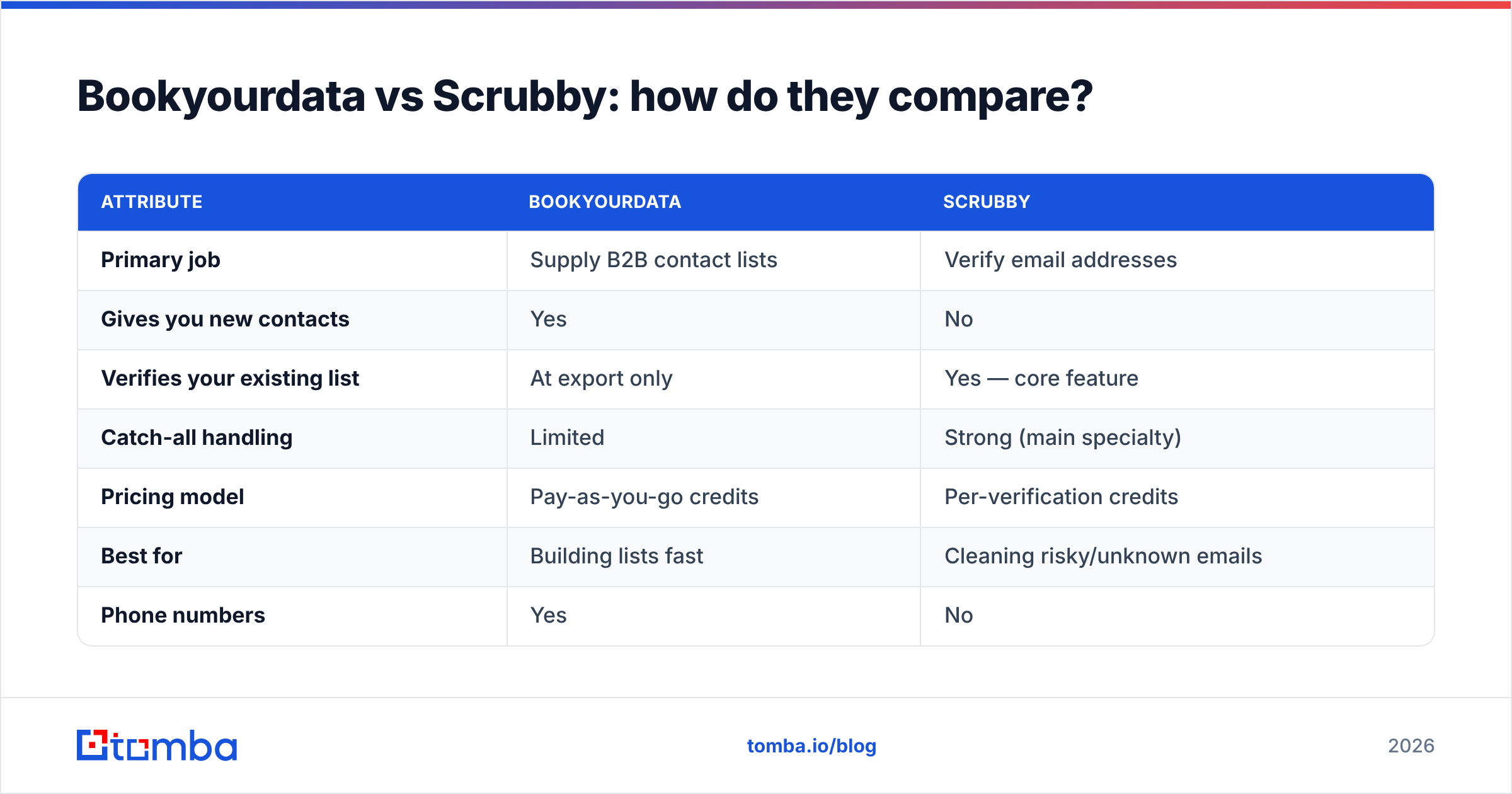
| Attribute | Bookyourdata | Scrubby |
|---|---|---|
| Primary job | Supply B2B contact lists | Verify email addresses |
| Gives you new contacts | Yes | No |
| Verifies your existing list | At export only | Yes — core feature |
| Catch-all handling | Limited | Strong (main specialty) |
| Pricing model | Pay-as-you-go credits | Per-verification credits |
| Best for | Building lists fast | Cleaning risky/unknown emails |
| Phone numbers | Yes | No |
| Works without a list to start | Yes | No |
Read that table and the conclusion is obvious: these are complements, not substitutes. A realistic workflow is buy from Bookyourdata, then run the risky/catch-all portion through Scrubby before sending. Comparing them as either/or only makes sense if you already have a list and just need to decide whether to clean it (Scrubby) or replace it (Bookyourdata).
Which problems is each tool actually solving?#
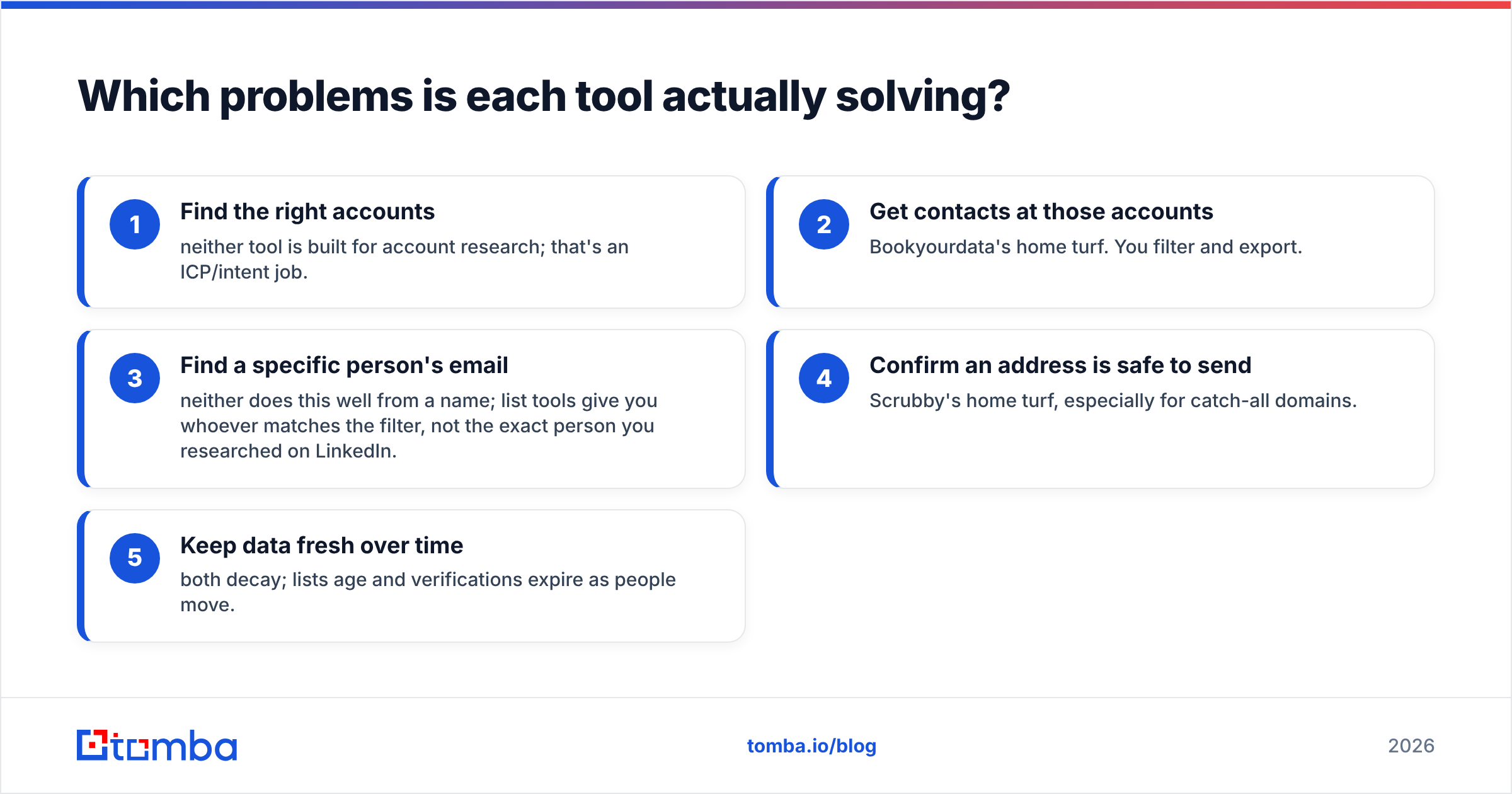
It helps to map both tools to the jobs an outbound team needs done:
- Find the right accounts — neither tool is built for account research; that's an ICP/intent job.
- Get contacts at those accounts — Bookyourdata's home turf. You filter and export.
- Find a specific person's email — neither does this well from a name; list tools give you whoever matches the filter, not the exact person you researched on LinkedIn.
- Confirm an address is safe to send — Scrubby's home turf, especially for catch-all domains.
- Keep data fresh over time — both decay; lists age and verifications expire as people move.
The gap most teams hit is step 3. You build a target list by hand, then need the email for those people — not a bulk segment. That's a finder job, and it's why a comparison that stops at Bookyourdata and Scrubby misses the tool category most reps actually reach for.
How much do Bookyourdata and Scrubby cost?#
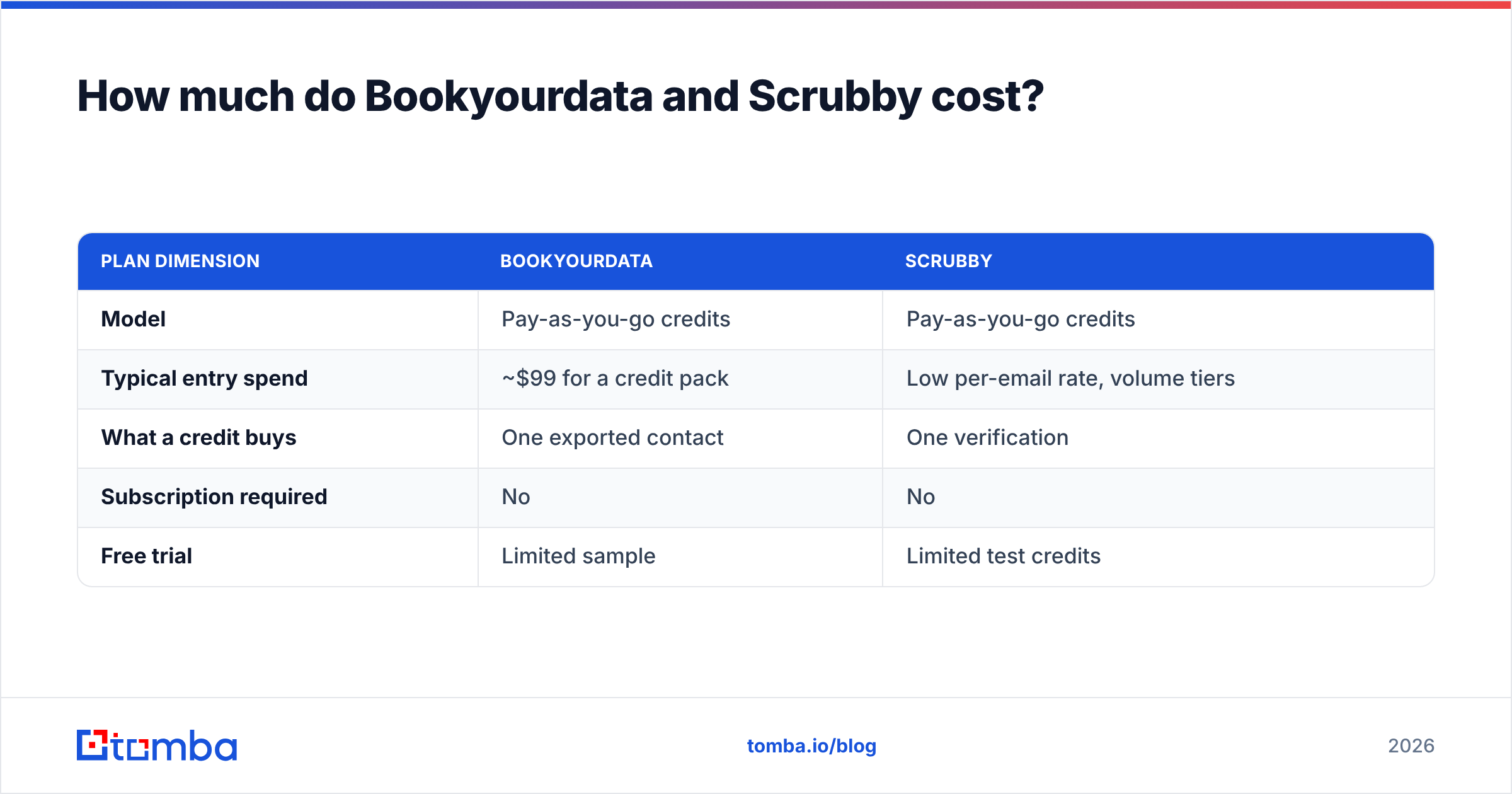
Both use credit-based pricing rather than flat seats, so cost scales with volume. Exact rates shift, so treat these as directional and confirm on each vendor's pricing page.
| Plan dimension | Bookyourdata | Scrubby |
|---|---|---|
| Model | Pay-as-you-go credits | Pay-as-you-go credits |
| Typical entry spend | ~$99 for a credit pack | Low per-email rate, volume tiers |
| What a credit buys | One exported contact | One verification |
| Subscription required | No | No |
| Free trial | Limited sample | Limited test credits |
The hidden math: if you buy 1,000 contacts from a list provider and then verify the catch-all slice (often 20–40% of B2B lists) through a separate verifier, you're paying twice to get one clean, sendable record. For high volumes that adds up fast. By contrast, Tomba pricing bundles finding and verification into one credit on plans starting at $49/mo (Growth $99/mo, Pro $249/mo), with a free tier of 25 searches to test accuracy before you commit.
Is a list provider or a verifier better for cold outreach?#
Neither alone, if your goal is reply rates rather than raw volume. Cold outreach succeeds on two things: reaching real, current inboxes and reaching the right person. A list provider gets you volume but not precision; a verifier gets you safety but no new contacts.
The pattern that protects your sender reputation looks like this:
- Start from intent, not volume. Build a target list of specific people and accounts you actually want to reach.
- Find their work emails directly rather than buying a broad segment and hoping the right people are in it.
- Verify before sending, paying special attention to catch-all domains.
- Re-verify aged lists, because a December export bounces more in March.
Sending to unverified purchased lists is the fastest way to tank sender reputation and land in spam. Microsoft and Google both weight bounce and complaint rates heavily; the Gmail bulk-sender guidelines spell out the thresholds that get you filtered. That's the case for verification — but verification only matters if your contacts were worth reaching in the first place.
Where does an email finder fit in?#
An email finder closes the gap neither Bookyourdata nor Scrubby covers: turning a specific person or domain into a verified, sendable email on demand.
Instead of buying a 2,000-row segment and hoping your researched prospects are inside it, you give a finder a name and company (or just a domain) and get the address back — already run through verification. That's a different motion from list-buying, and it's usually cheaper per usable contact because you're not paying for records you'll never email.
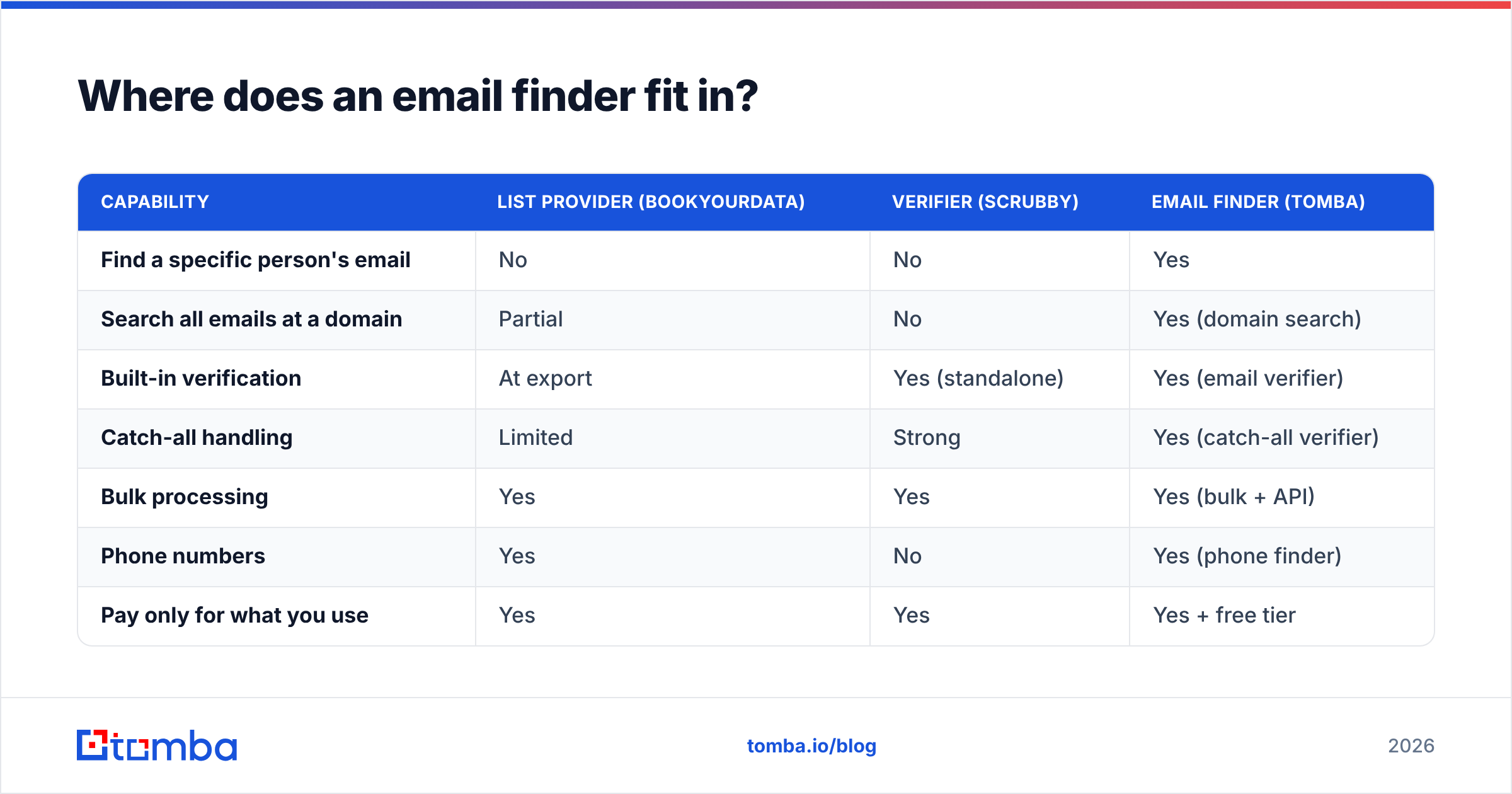
Here's how the three approaches line up:
| Capability | List provider (Bookyourdata) | Verifier (Scrubby) | Email finder (Tomba) |
|---|---|---|---|
| Find a specific person's email | No | No | Yes |
| Search all emails at a domain | Partial | No | Yes (domain search) |
| Built-in verification | At export | Yes (standalone) | Yes (email verifier) |
| Catch-all handling | Limited | Strong | Yes (catch-all verifier) |
| Bulk processing | Yes | Yes | Yes (bulk + API) |
| Phone numbers | Yes | No | Yes (phone finder) |
| Pay only for what you use | Yes | Yes | Yes + free tier |
A finder with verification baked in collapses the buy-then-clean two-step into one. You still get bulk and API access for scale, but you're sourcing the exact contacts you researched instead of a filtered crowd.
When should you still choose Bookyourdata or Scrubby?#
To be fair, there are clear cases where each wins:
- Choose Bookyourdata when you need a large volume of contacts for a broad segment fast, you're comfortable with snapshot data, and direct-dial phone numbers matter to your motion. List buying is genuinely faster than person-by-person research at the very top of a high-volume funnel.
- Choose Scrubby when you already own a list — purchased, exported, or scraped — and a meaningful share of it is catch-all or "unknown." Its specialty is recovering decisions on addresses that generic verifiers won't grade, which can salvage contacts you'd otherwise discard.
- Choose a finder when you research targets individually, care about reaching the specific decision-maker, and want verification included rather than bolted on.
Most growing teams end up running a finder as the default and reaching for list-buying or specialist verification only at the edges.
Bookyourdata vs Scrubby: the verdict#
They're not really rivals. Bookyourdata answers "where do I get contacts?" and Scrubby answers "are these contacts safe to email?" If you only compare those two, you've quietly accepted the buy-a-list-then-clean-it workflow — and paid twice for one usable record.
The more cost-effective default for 2026 is to source verified contacts directly. Start from the people you actually want to reach, pull their work emails with built-in verification, and skip the bulk-segment guesswork. Tomba Email Finder does exactly that — find emails by name, company, or domain search, with verification and catch-all handling included, plus a free tier of 25 searches so you can check accuracy on your own targets before spending a credit. Try it on your next list and compare the bounce rate yourself.
// get started
Find, verify and enrich your first contacts today
Start on the free plan with 25 searches a month, then scale when your team is ready.
Free plan · No credit card required · GDPR & CCPA
// about the author