BookYourData vs Tomba 2026: Which B2B Data Tool Wins?
BookYourData sells prebuilt contact lists; Tomba finds and verifies emails on demand. Here is an honest 2026 breakdown of accuracy, pricing, and fit.
Choosing between BookYourData and Tomba comes down to one question: do you want to buy a prebuilt list or find and verify contacts on demand? Both put B2B email addresses in your pipeline, but they solve the problem from opposite ends. This guide breaks down accuracy, pricing, data freshness, and workflow fit so you can pick the right tool for how your team actually prospects in 2026.
TL;DR#
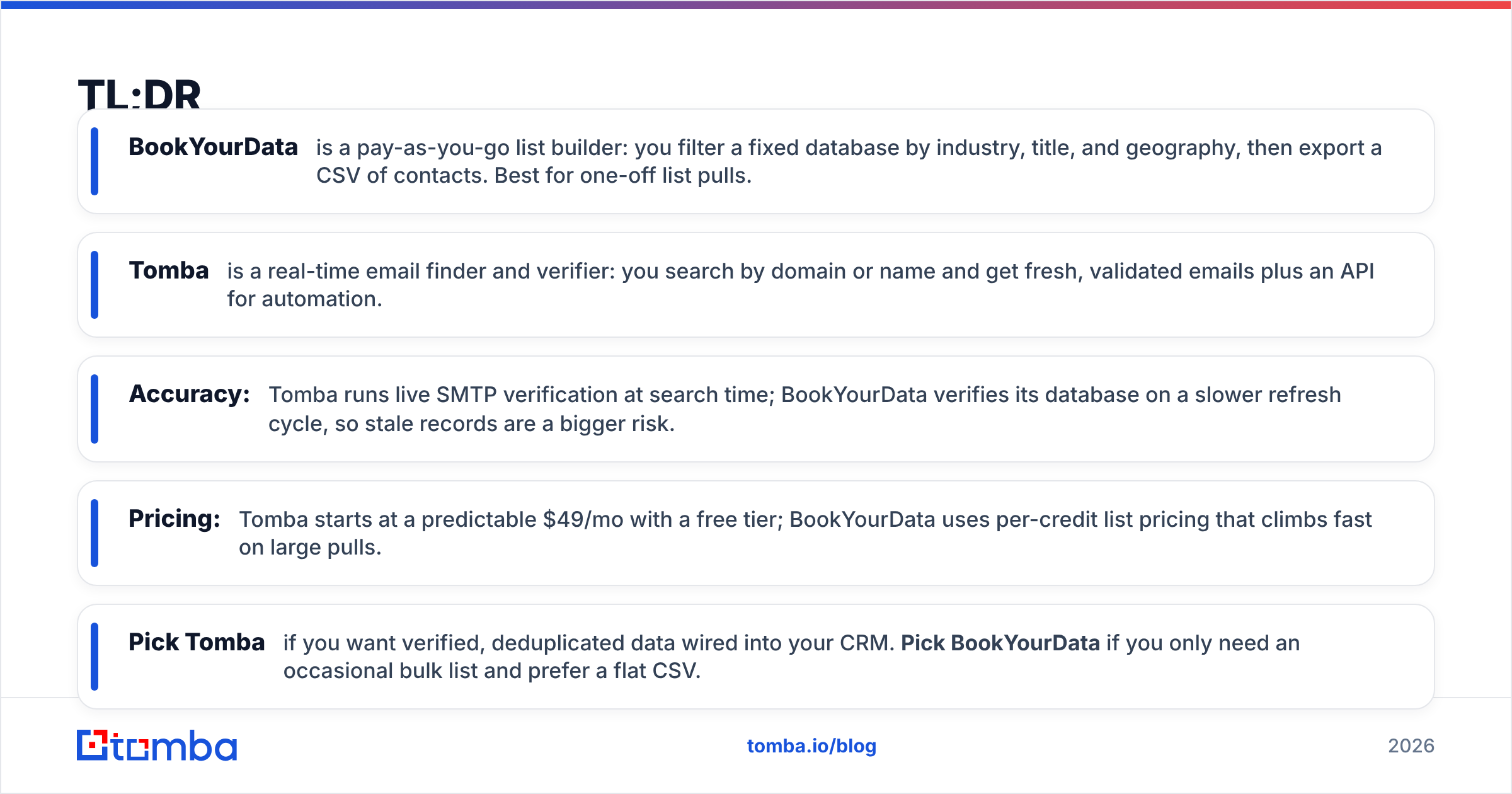
- BookYourData is a pay-as-you-go list builder: you filter a fixed database by industry, title, and geography, then export a CSV of contacts. Best for one-off list pulls.
- Tomba is a real-time email finder and verifier: you search by domain or name and get fresh, validated emails plus an API for automation.
- Accuracy: Tomba runs live SMTP verification at search time; BookYourData verifies its database on a slower refresh cycle, so stale records are a bigger risk.
- Pricing: Tomba starts at a predictable $49/mo with a free tier; BookYourData uses per-credit list pricing that climbs fast on large pulls.
- Pick Tomba if you want verified, deduplicated data wired into your CRM. Pick BookYourData if you only need an occasional bulk list and prefer a flat CSV.
What is BookYourData?#
BookYourData is a self-service B2B contact database. You log in, apply filters — industry, job title, company size, location, technology used — and the platform shows how many matching contacts it holds. You buy the slice you want as credits, then download a spreadsheet of names, emails, phone numbers, and firmographics.
The model is simple and familiar: it is essentially a curated list marketplace with a guarantee on email validity at the moment of purchase. There is no ongoing relationship with each record. You pull a list today, and that snapshot ages from the second it lands in your CSV.
That works well for marketers who run a campaign, exhaust the list, and move on. It works less well for sales teams that prospect continuously and need a contact's email the instant a new account appears.
What is Tomba?#
Tomba is a B2B email-finding and verification platform built around live lookups rather than static exports. You give it a person and a company (or just a domain) and it returns the most likely professional email, scored by confidence, after checking the mail server in real time.
Beyond the core finder, Tomba bundles a email verifier, domain search for pulling every public email on a company, a catch-all verifier, phone finder, and data enrichment. Everything is exposed through the Tomba API, a Chrome extension, and native Google Sheets and Excel add-ins.
The philosophy is different from a list vendor: instead of selling you a frozen database, Tomba treats every email as something to find and re-verify on demand. That keeps the data fresh and lets you find only the contacts you actually need.

How accurate is each tool?#
Accuracy is where the two models diverge most. BookYourData verifies records inside its database and offers an accuracy guarantee, but the verification happens on the vendor's refresh schedule — not at the moment you export. A contact who changed jobs last week may still sit in your downloaded list as valid until the next sweep.
Tomba verifies at search time. When you run a lookup, it performs an SMTP check against the recipient's mail server and returns a status and confidence score before the email ever enters your sequence. That live check is the single biggest driver of lower bounce rates, because you are testing the address as it exists right now, not as it existed when a database was last cleaned.
)
Neither tool is magic. Catch-all domains — where the server accepts every address — defeat naive SMTP checks, which is why Tomba ships a dedicated catch-all verifier to assign realistic confidence instead of a blind "valid." If your outbound volume is high, that distinction protects your sender reputation far more than a one-time list guarantee.
BookYourData vs Tomba: feature comparison#
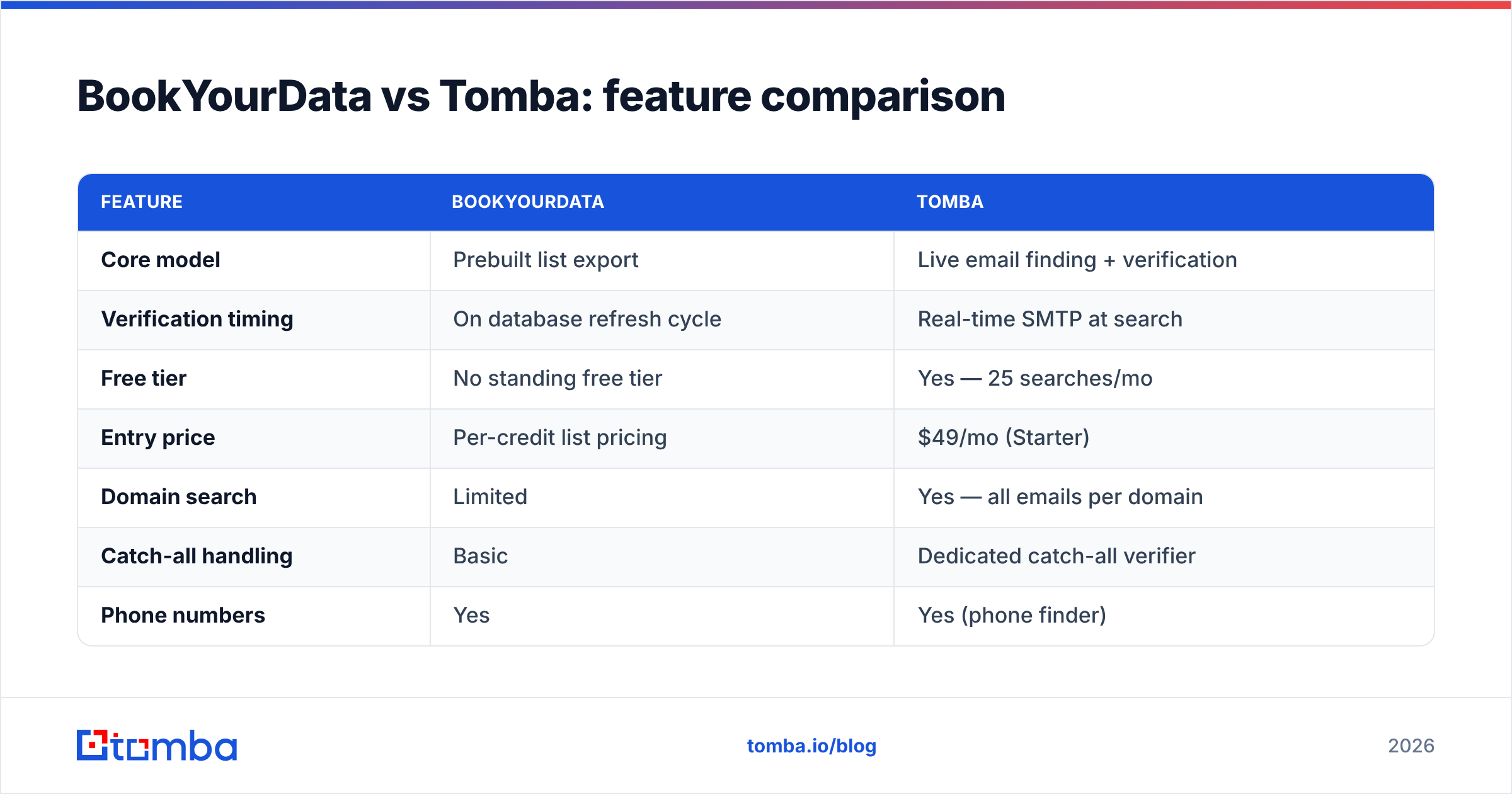
Here is the head-to-head on the attributes that actually change your results.
| Feature | BookYourData | Tomba |
|---|---|---|
| Core model | Prebuilt list export | Live email finding + verification |
| Verification timing | On database refresh cycle | Real-time SMTP at search |
| Free tier | No standing free tier | Yes — 25 searches/mo |
| Entry price | Per-credit list pricing | $49/mo (Starter) |
| Domain search | Limited | Yes — all emails per domain |
| Catch-all handling | Basic | Dedicated catch-all verifier |
| Phone numbers | Yes | Yes (phone finder) |
| Public API | Limited | Full REST API, CLI, MCP |
| Native integrations | CSV export, some CRMs | HubSpot, Salesforce, Pipedrive, Sheets, Zapier |
| Best for | One-off bulk lists | Continuous, automated prospecting |
The table makes the split obvious: BookYourData optimizes for a clean bulk download, Tomba optimizes for fresh data inside an automated workflow. If you live in spreadsheets, the list model is fine. If you live in a CRM and a sequencer, the API-first model wins.
How does pricing compare?#
Conclusion first: Tomba is more predictable; BookYourData can be cheaper for a single small pull but scales unfavorably.
BookYourData prices by credits tied to the number of contacts you export. A small targeted list is affordable, but the cost rises linearly with every contact, and you pay again each time you need a fresh pull because the data ages.
Tomba uses flat monthly tiers with a generous free entry point. You are not buying a frozen list — you are buying the ability to find and verify whenever you need to, including re-checking contacts you already have.
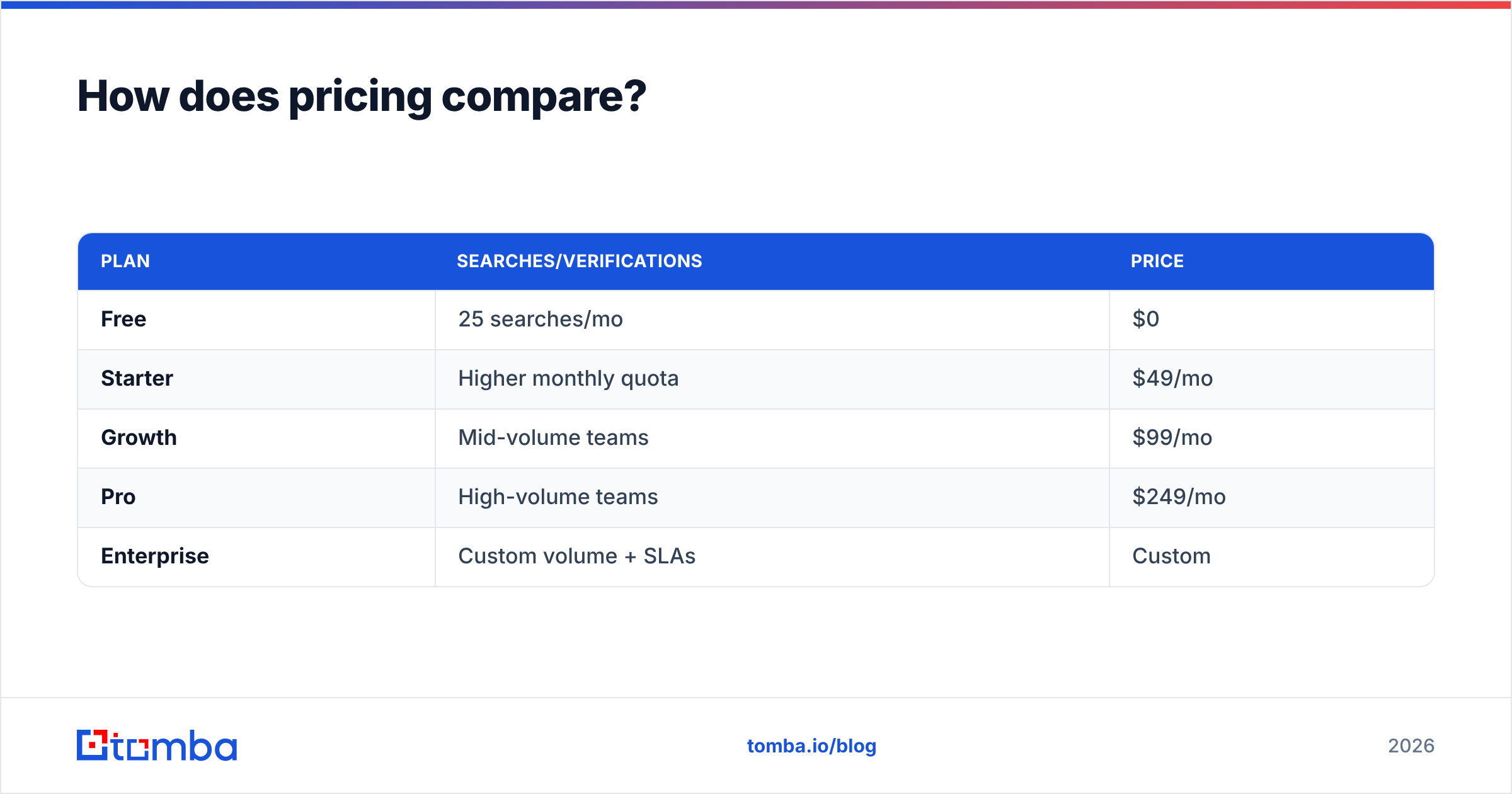
| Plan | Searches/Verifications | Price |
|---|---|---|
| Free | 25 searches/mo | $0 |
| Starter | Higher monthly quota | $49/mo |
| Growth | Mid-volume teams | $99/mo |
| Pro | High-volume teams | $249/mo |
| Enterprise | Custom volume + SLAs | Custom |
See full Tomba pricing for exact credit allocations per tier. The key takeaway: with Tomba you pay a fixed rate and re-verify freely, while a list vendor charges you again for each refreshed export. Over a year of continuous prospecting, the subscription model usually comes out ahead.
)
Which fits your workflow better?#
Think about how data enters your pipeline.
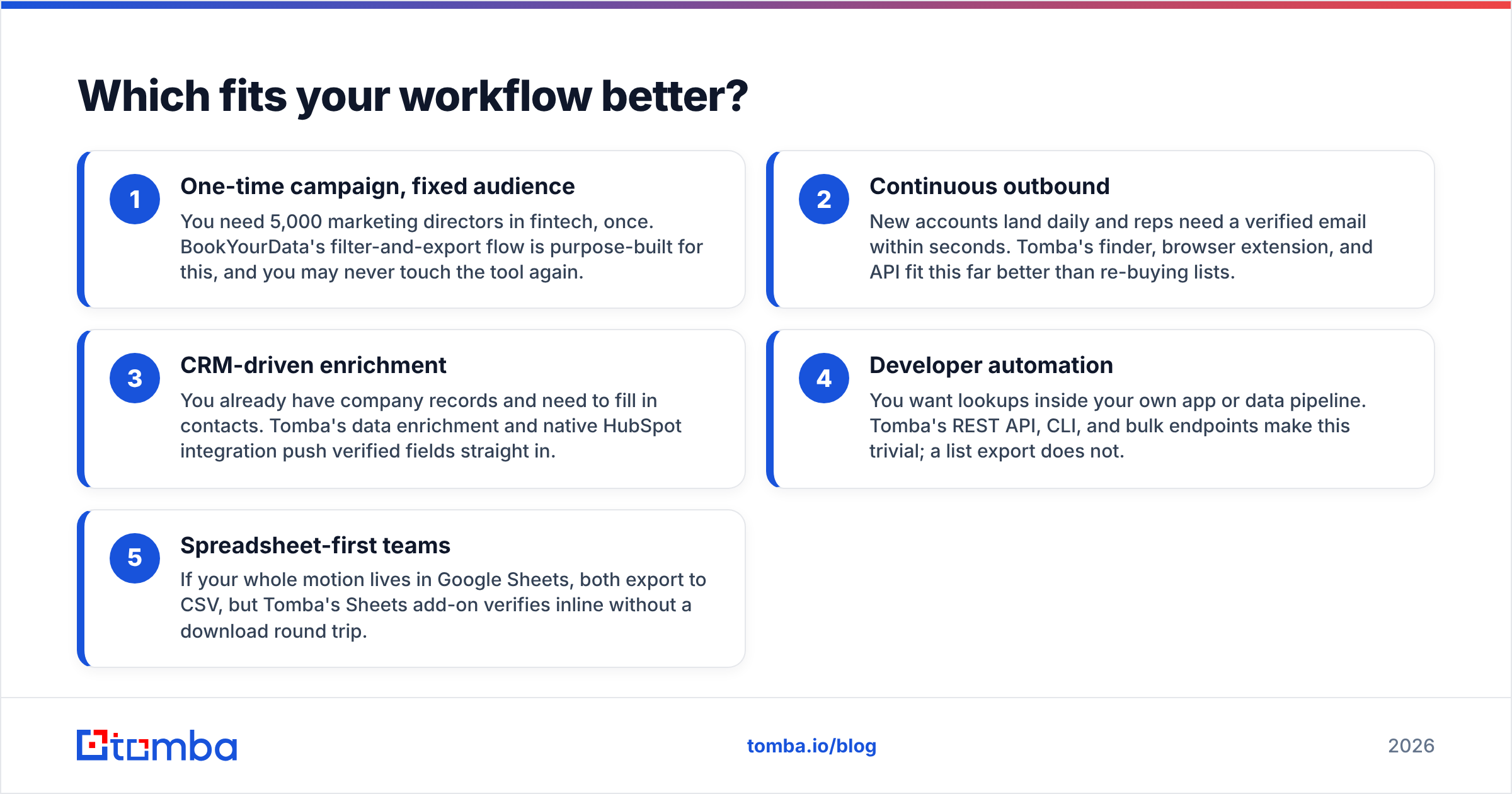
- One-time campaign, fixed audience — You need 5,000 marketing directors in fintech, once. BookYourData's filter-and-export flow is purpose-built for this, and you may never touch the tool again.
- Continuous outbound — New accounts land daily and reps need a verified email within seconds. Tomba's finder, browser extension, and API fit this far better than re-buying lists.
- CRM-driven enrichment — You already have company records and need to fill in contacts. Tomba's data enrichment and native HubSpot integration push verified fields straight in.
- Developer automation — You want lookups inside your own app or data pipeline. Tomba's REST API, CLI, and bulk endpoints make this trivial; a list export does not.
- Spreadsheet-first teams — If your whole motion lives in Google Sheets, both export to CSV, but Tomba's Sheets add-on verifies inline without a download round trip.
For most modern sales teams, the recurring nature of prospecting favors a find-and-verify tool. List buying remains the better answer when your need is genuinely one-off and bounded.
What about data freshness and compliance?#
Purchased lists carry a hidden tax: decay. B2B contact data degrades at roughly 2–3% per month as people change roles, which means a list is meaningfully stale within a quarter. BookYourData mitigates this with its refresh cycle, but you still own a snapshot.
Tomba sidesteps the snapshot problem by re-verifying on demand. You can re-run a bulk verify before any send to catch the contacts who moved since you first found them. That is the difference between cleaning a list once and keeping it clean continuously.
On compliance, both operate in the B2B data space and you remain responsible for lawful outreach under GDPR and CAN-SPAM. Live verification helps indirectly: lower bounce rates and better targeting reduce spam complaints, which protects email deliverability. Always confirm your own legal basis regardless of vendor — neither tool removes that obligation. Industry analysts like Gartner and review platforms such as G2 are useful for vetting a data provider's sourcing practices before you commit.
Pros and cons at a glance#
BookYourData — pros
- Fast, self-serve bulk list building with rich filters
- Accuracy guarantee at point of purchase
- No subscription required for a single pull
BookYourData — cons
- Data ages from the moment you export
- Per-contact cost scales poorly for continuous use
- Limited API and live-verification options
Tomba — pros
- Real-time SMTP verification at search time
- Predictable flat pricing with a free tier
- Full API, CLI, browser extension, and native CRM integrations
- Catch-all handling and on-demand re-verification
Tomba — cons
- Subscription model is overkill for a true one-off list
- Live finding is per-contact rather than instant mass-bulk dumping (though bulk tools close most of that gap)
How do they handle integrations and scale?#
If your stack is just a spreadsheet, integrations barely matter and either tool exports a CSV. The moment a CRM and a sequencer enter the picture, the gap widens.
Tomba connects natively to HubSpot, Salesforce, Pipedrive, Zapier, and Make, plus a documented API and even an MCP server for AI agents. That lets you trigger a verified lookup the instant a lead is created, with no manual import. BookYourData centers on the export-then-import loop, which is fine at low frequency but becomes a chore when you are pulling data weekly.
For teams scaling outbound, the automation surface is often the deciding factor — not the raw database size. A slightly smaller pool of contacts you can verify and route automatically beats a larger pool you have to babysit in a spreadsheet.
Verdict: which should you choose?#
Choose Tomba if you prospect continuously, care about live verification, and want data flowing into your CRM through an API — which describes most B2B sales and RevOps teams in 2026. The free tier and $49/mo Starter make it low-risk to test against your own targets.
Choose BookYourData if your need is a single, well-defined bulk list and you have no appetite for a subscription or ongoing verification. It is a clean answer to a narrow, one-time question.
For everyone running repeatable outbound, the find-and-verify model is the more durable choice. Stale purchased lists are the silent killer of deliverability, and the only real defense is verifying close to send time.
Ready to compare on your own data? Start with the Tomba Email Finder free tier — 25 searches a month, real-time SMTP verification, and no credit card — then run the same contacts you would have bought as a list and check the bounce rate yourself. If accuracy is what you are paying for, let the numbers decide.
// get started
Find, verify and enrich your first contacts today
Start on the free plan with 25 searches a month, then scale when your team is ready.
Free plan · No credit card required · GDPR & CCPA
// about the author