9 Best Boomerang Alternatives for Gmail & Outlook (2026)
Boomerang is great for scheduling and reminders, but it stops at send. Here are the 9 best Boomerang alternatives for 2026, compared on price, features, and where they actually win.

You installed Boomerang to schedule one email at 7 a.m. so it looked like you were an early riser. Then you started using the "boomerang this back to me" reminders, the read receipts, and the response-time predictions. Now you are wondering whether there is something that does all of that and helps you actually fill the top of your pipeline. There is. Several somethings, in fact.
This guide breaks down the nine best Boomerang alternatives for 2026 — what each one is good at, where it falls short, and how to pick based on whether you are a solo founder, a sales rep, or running a whole outbound team.
TL;DR — The Short Version#
- Boomerang is a scheduling-and-reminders tool, not a full sales engagement platform. If you only need send-later and follow-up nudges, it is fine — but you outgrow it fast.
- Best all-around alternative: Mixmax or Mailbutler if you want scheduling plus tracking, templates, and light sequences inside Gmail or Outlook.
- Best for sales sequences: Yesware, Salesloft, or Saleshandy if multi-step cadences and CRM sync matter more than inbox cosmetics.
- Cheapest 1:1 replacement: Right Inbox and Streak cover scheduling, reminders, and tracking for a few dollars a month.
- The missing piece nobody mentions: scheduling a follow-up does nothing if you are emailing the wrong address. Pair any of these with an email finder and an email verifier so your perfectly-timed emails actually land.
What Does Boomerang Actually Do?#
Boomerang is a browser extension and mobile add-on for Gmail and Outlook. Its core jobs are simple: schedule emails to send later, get reminded when someone does not reply, snooze messages out of your inbox until you need them, and track opens. Newer versions layer on an AI writing assistant ("Respondable") that scores your draft for response likelihood.
That is a tidy feature set, and for personal email it works well. The limits show up the moment your needs get more serious:
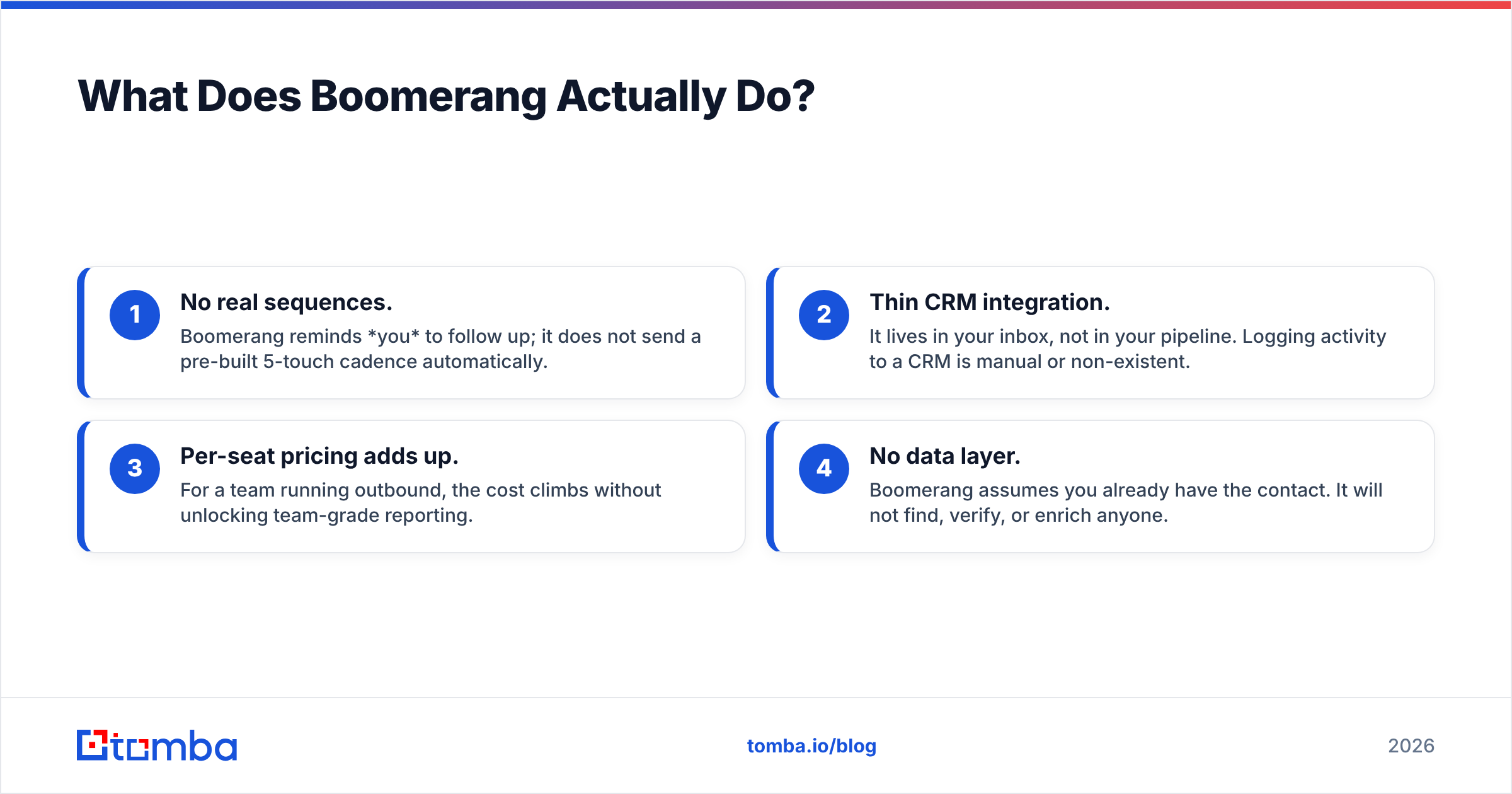
- No real sequences. Boomerang reminds you to follow up; it does not send a pre-built 5-touch cadence automatically.
- Thin CRM integration. It lives in your inbox, not in your pipeline. Logging activity to a CRM is manual or non-existent.
- Per-seat pricing adds up. For a team running outbound, the cost climbs without unlocking team-grade reporting.
- No data layer. Boomerang assumes you already have the contact. It will not find, verify, or enrich anyone.
So the right Boomerang alternative depends entirely on which of those gaps hurts you most.
Who Are the Best Boomerang Alternatives in 2026?#
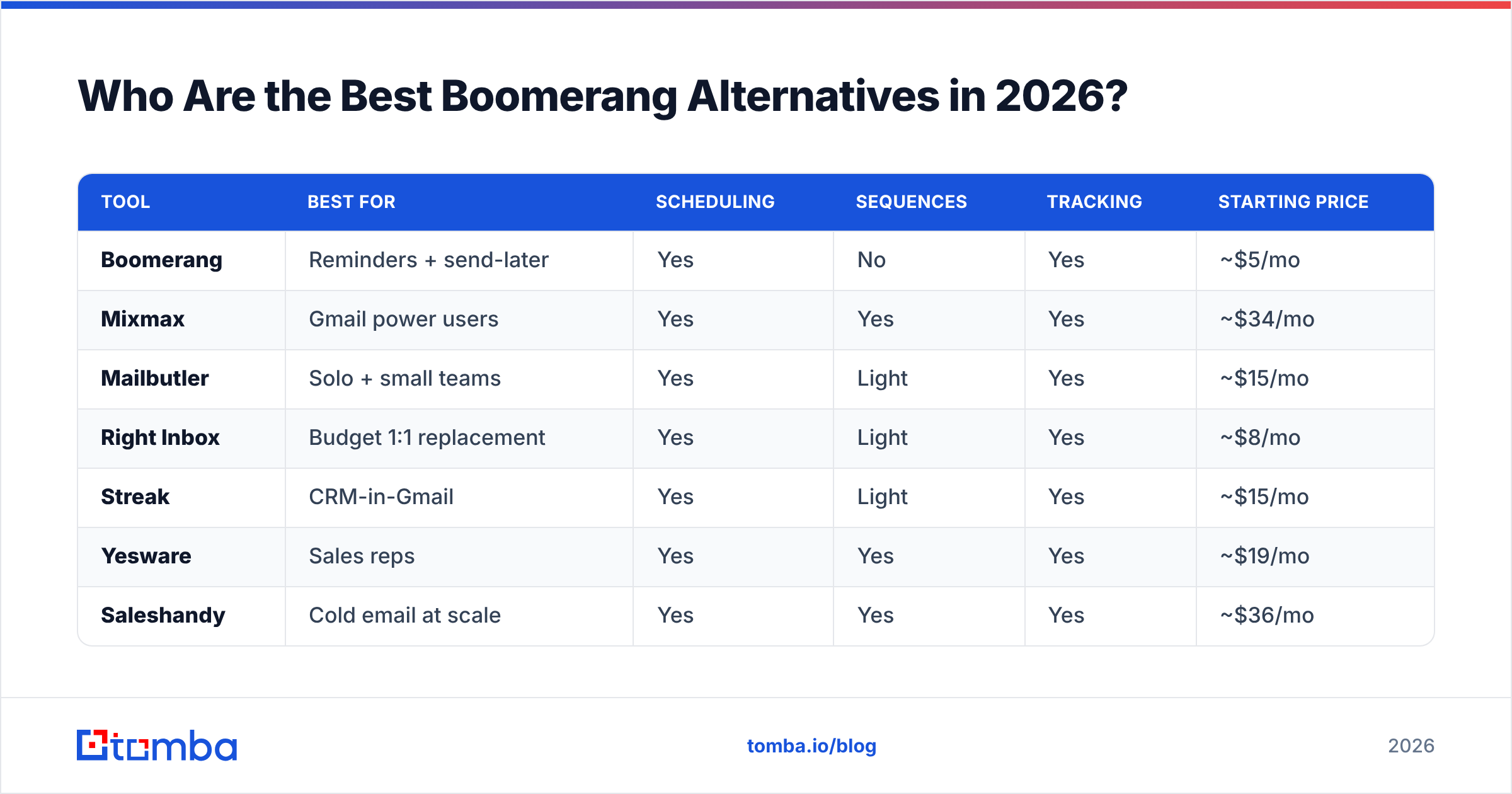
Here is the head-to-head. Prices are entry paid tiers per user per month (billed monthly is usually higher; annual is shown where it is the headline rate). Always confirm on the vendor's own pricing page before you buy.
| Tool | Best for | Scheduling | Sequences | Tracking | Starting price |
|---|---|---|---|---|---|
| Boomerang | Reminders + send-later | Yes | No | Yes | ~$5/mo |
| Mixmax | Gmail power users | Yes | Yes | Yes | ~$34/mo |
| Mailbutler | Solo + small teams | Yes | Light | Yes | ~$15/mo |
| Right Inbox | Budget 1:1 replacement | Yes | Light | Yes | ~$8/mo |
| Streak | CRM-in-Gmail | Yes | Light | Yes | ~$15/mo |
| Yesware | Sales reps | Yes | Yes | Yes | ~$19/mo |
| Saleshandy | Cold email at scale | Yes | Yes | Yes | ~$36/mo |
| Salesloft | Enterprise teams | Yes | Yes | Yes | Custom |
| GMass | Mail merge / bulk | Yes | Yes | Yes | ~$25/mo |
A useful way to read that table: the cheaper rows are inbox utilities (a better Boomerang), and the pricier rows are sales engagement platforms (a different category that happens to include scheduling). Pick the row that matches the job, not the lowest number.
Which Boomerang Alternative Fits Your Use Case?#
Rather than crown one winner, match the tool to how you actually work.
- You want Boomerang, but better, inside Gmail. Look at Mixmax and Mailbutler. Both keep the lightweight inbox feel while adding templates, polls/availability links, open tracking, and basic automation. Mixmax leans toward sales; Mailbutler toward freelancers and small teams who also want notes and contact management.
- You want the same features for less money. Right Inbox and Streak are the closest 1:1 swaps. Right Inbox nails scheduling, reminders, recurring emails, and tracking cheaply. Streak adds a spreadsheet-style CRM right in your inbox if you also want to manage deals.
- You run a real sales motion. Yesware, Saleshandy, and Salesloft are sequence-first. They send multi-step cadences, A/B test, sync to your CRM, and report at the team level. Saleshandy is the value pick for cold email; Salesloft is the enterprise standard; Yesware is the comfortable middle.
- You send bulk/merge campaigns from Gmail. GMass turns Gmail into a mail-merge machine with scheduling and follow-ups baked in — great for newsletters and large 1:many sends without leaving your inbox.
If you are specifically replacing a sequence tool, our Saleshandy alternative breakdown digs deeper into cadence platforms.
Is Mixmax or Yesware the Better Boomerang Upgrade?#
Short answer: Mixmax if you live in Gmail and want polish; Yesware if you want CRM-grade sales reporting.
Mixmax shines on the scheduling and engagement experience — calendar booking, one-click templates, sequences, and slick tracking notifications. It feels like Boomerang grew up. The trade-off is that the price jumps once you want the better automation tiers.
Yesware is built for reps and managers. Its sequences, attachment tracking, and tight Salesforce/Outlook integration make pipeline reporting the headline. It is less "pretty inbox utility" and more "sales tool that happens to handle scheduling." According to peer reviews aggregated on G2, both score well, but buyers consistently choose Yesware when CRM logging is non-negotiable and Mixmax when daily inbox UX matters more.
Neither, though, solves the problem that sinks most outreach: bad contact data.
Why Scheduling Is Only Half the Battle#
Here is the uncomfortable truth that no Boomerang alternative comparison usually says out loud: the perfect send time is worthless if the email bounces.
You can schedule a message for Tuesday 9:14 a.m., write a Respondable-approved subject line, and set three reminders — and it all evaporates if john@company.com was actually j.smith@company.com, or if the address is a dead catch-all. Bounces hurt your sender reputation, and a damaged reputation means even your valid scheduled emails start landing in spam.

So the real "Boomerang stack" for anyone doing outbound is two layers:
- A timing/sequence layer — one of the tools above to control when and how often you reach out.
- A data layer — to make sure who you reach out to is real and reachable.
That second layer is exactly where Boomerang and most of its alternatives are silent. They assume you already have a clean list. You usually do not.
How Do You Add the Missing Data Layer?#
This is where pairing your scheduler with a dedicated finder-and-verifier changes the math. Instead of guessing addresses or buying a stale list, you:
- Find the right contact by name and company or by domain using an email finder or domain search.
- Verify before you send with an email verifier so bounces stay near zero and your scheduled sends actually reach the inbox.
- Enrich the record with role, company, and social data so your templates personalize automatically.
- Hand the clean contact to your scheduler — Mixmax, Yesware, Saleshandy, whichever you chose — and let it handle timing and cadence.
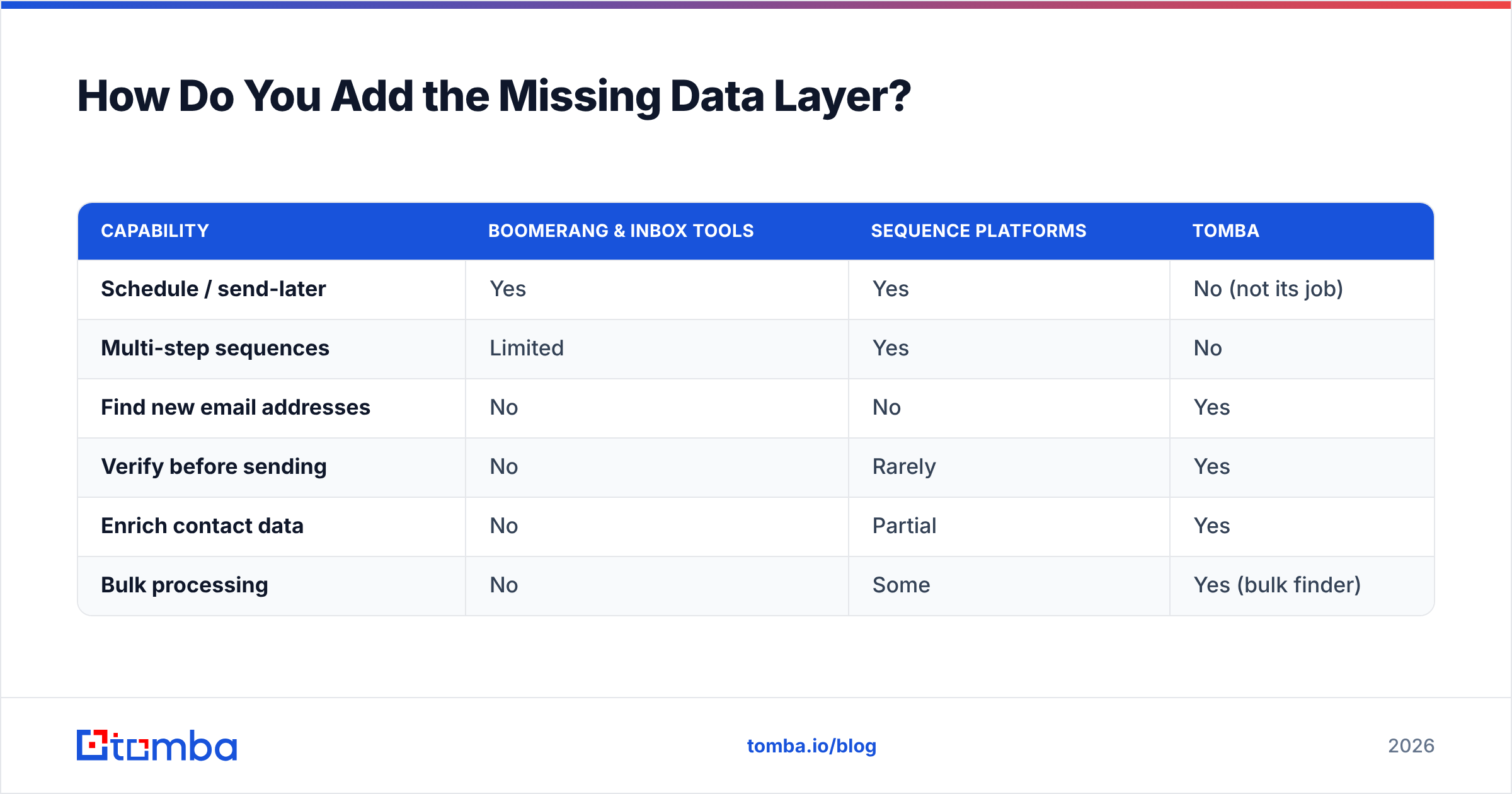
Tomba is built for steps 1–3. It sits upstream of Boomerang and every alternative on this list, which means it does not compete with your scheduler — it feeds it. Here is how the layers compare:
| Capability | Boomerang & inbox tools | Sequence platforms | Tomba |
|---|---|---|---|
| Schedule / send-later | Yes | Yes | No (not its job) |
| Multi-step sequences | Limited | Yes | No |
| Find new email addresses | No | No | Yes |
| Verify before sending | No | Rarely | Yes |
| Enrich contact data | No | Partial | Yes |
| Bulk processing | No | Some | Yes (bulk finder) |
You can connect the two worlds without copy-paste. Tomba's HubSpot integration and the broader integrations lineup (plus the Tomba API) push verified contacts straight into the CRM your scheduling tool already reads from.
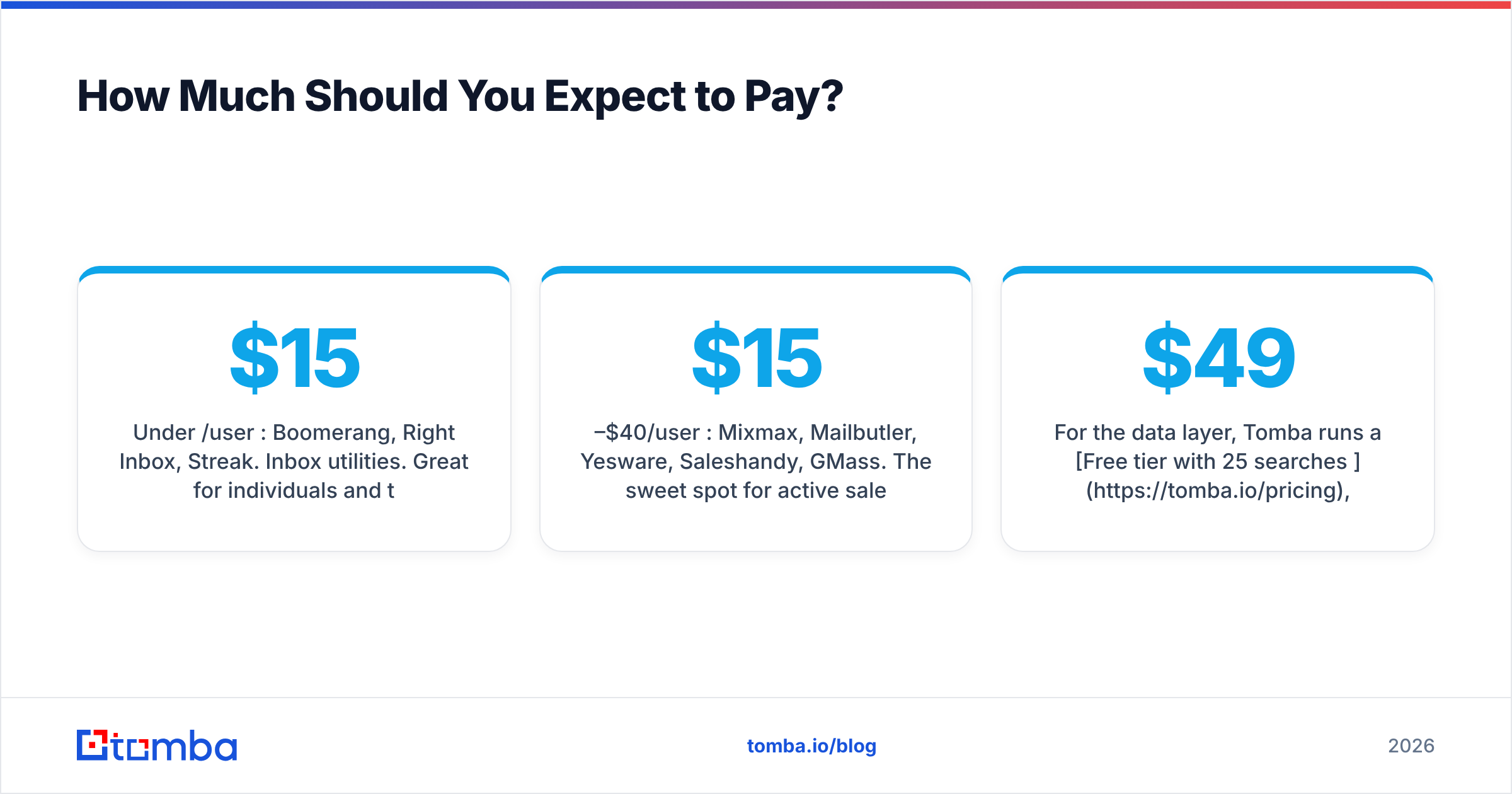
How Much Should You Expect to Pay?#
Budget shapes the decision more than features for most teams. Three rough tiers:
- Under $15/user/mo: Boomerang, Right Inbox, Streak. Inbox utilities. Great for individuals and tiny teams who mainly need scheduling, reminders, and tracking.
- $15–$40/user/mo: Mixmax, Mailbutler, Yesware, Saleshandy, GMass. The sweet spot for active sales reps and small outbound teams who need sequences and reporting.
- Custom/enterprise: Salesloft and the upper Mixmax/Yesware tiers. Worth it when you need governance, advanced analytics, and deep CRM workflows.
For the data layer, Tomba runs a Free tier with 25 searches per month, then Starter at $49/mo, Growth at $99/mo, and Pro at $249/mo. Notice the model is credits and searches, not per-seat — so adding teammates to find and verify contacts does not multiply your bill the way per-seat scheduling tools do. Full Tomba pricing is on the site.
What About Native Gmail and Outlook Features?#
Worth a quick note: both Gmail and Outlook now ship basic scheduling and snooze natively. Gmail's "Schedule send" and Outlook's "Delay delivery" cover the single most common reason people install Boomerang. If send-later is all you need, you may not need any third-party tool at all — check Google's Workspace help docs first.
You still lose reminders-if-no-reply, open tracking, sequences, and templates by going native — which is exactly why the alternatives above exist. But it is honest to admit the floor is "free and built in."
Pros and Cons at a Glance#
Choose an inbox utility (Right Inbox, Streak, Mailbutler) if:
- You send mostly 1:1 emails and want scheduling plus reminders cheaply.
- You do not need automated multi-step cadences.
- You want minimal setup and no new platform to learn.
Choose a sequence platform (Yesware, Saleshandy, Salesloft) if:
- You run repeatable outbound and need cadences, A/B tests, and team reporting.
- CRM logging and pipeline visibility are required.
- You can justify a higher per-seat cost with revenue.
Add a data layer (Tomba) regardless if:
- You are emailing people whose addresses you do not already have verified.
- Your bounce rate is creeping up or replies are dropping.
- You want personalization fields populated automatically.
The Bottom Line#
Boomerang is a fine scheduler, and the best Boomerang alternatives in 2026 fall into two clean buckets: cheaper inbox utilities that do the same job, and sales engagement platforms that do far more. Pick from the first bucket if you send 1:1 email and just want better timing. Pick from the second if you run real cadences and need reporting.
But before you obsess over send times, fix the input. The highest-leverage upgrade to any email workflow is not when you send — it is whether the address is real. Start with the Tomba Email Finder to build accurate, verified contact lists, run them through the email verifier so your scheduled sends never bounce, then let whichever Boomerang alternative you chose handle the timing. Find the right people first; the perfect 9:14 a.m. send takes care of itself.
// get started
Find, verify and enrich your first contacts today
Start on the free plan with 25 searches a month, then scale when your team is ready.
Free plan · No credit card required · GDPR & CCPA
// about the author