Boomerang vs Yesware 2026: Which Email Tool Wins?
Boomerang schedules and reminds; Yesware tracks and sequences. Here's a side-by-side breakdown of pricing, tracking, and which one actually fits a sales team in 2026.
Boomerang vs Yesware: The 2026 Email Productivity Showdown
You opened this tab because two tools keep showing up in the same conversation, and they barely do the same job. Boomerang is a scheduling and inbox-discipline tool. Yesware is a sales engagement layer bolted onto your inbox. People compare them anyway because both live in Gmail and Outlook, both promise to make your email life better, and both charge a monthly fee. So which one earns the seat in your toolbar in 2026?
TL;DR#
- Boomerang is best if your problem is timing and follow-through: send later, snooze, "boomerang this back if no reply," and AI-assisted writing. It's a productivity tool first.
- Yesware is best if your problem is sales activity: open/click tracking, email templates, multi-step sequences, and CRM sync for reps who send outreach all day.
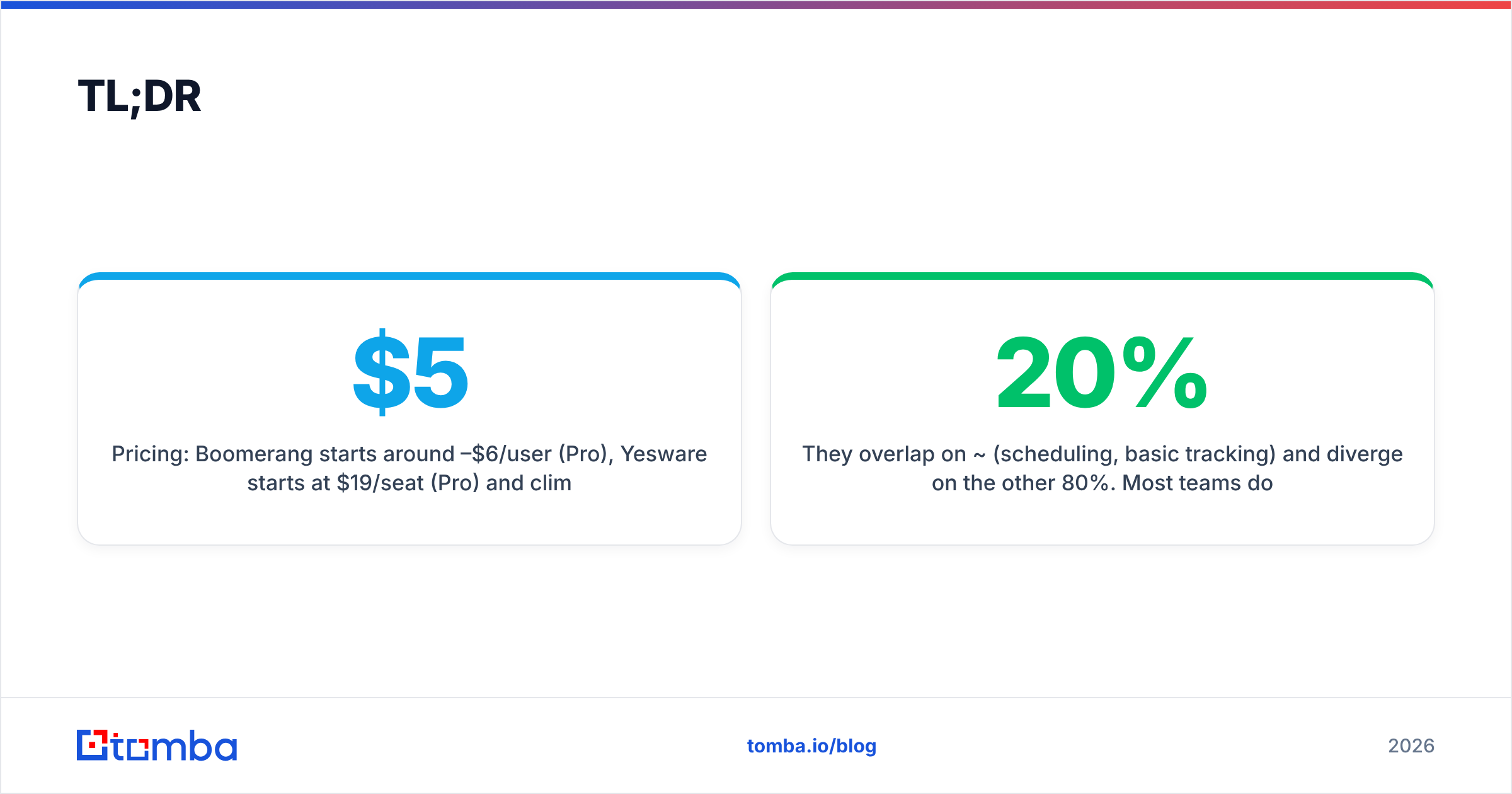
- Pricing: Boomerang starts around $5–$6/user/mo (Pro), Yesware starts at $19/seat/mo (Pro) and climbs fast for sequences and reporting.
- They overlap on ~20% (scheduling, basic tracking) and diverge on the other 80%. Most teams don't actually need both.
- Neither finds or verifies the contact data your campaigns run on — that gap is where a tool like Tomba sits underneath either choice.
What is Boomerang, and who is it for?#
Boomerang is a Gmail and Outlook add-on built around time. Its original trick — and still its most-used feature — is "send later," letting you write an email at 11pm and have it land in someone's inbox at 8am their time. From there it grew a set of inbox-discipline features that, taken together, treat your inbox like a task list instead of a firehose.
The core Boomerang feature set:
- Send Later — schedule any message to send at a future date and time, with timezone awareness.
- Boomerang (the namesake) — archive a thread and have it return to your inbox if nobody replies by a set deadline. This is the follow-up safety net.
- Inbox Pause — stop new mail from appearing until you're ready, so you can focus.
- Respondable + AI writing — a real-time assistant that scores your draft on length, question count, and reading level, plus AI-assisted composition.
- Read receipts and click tracking — lighter than a sales tool, but present for one-off sends.
Boomerang's audience is broad: founders, consultants, recruiters, customer success folks, and anyone whose job is relationships over volume. It is not built to push 300 cold emails a day through templated sequences. It's built so the 30 important emails you send don't fall through the cracks.
What is Yesware, and who is it for?#
Yesware is a sales engagement platform that lives inside Gmail and Outlook. Where Boomerang optimizes individual emails, Yesware optimizes outreach at scale and the data behind it. It's the tool a sales development rep (SDR) or account executive opens when their day is measured in activity and reply rates.
The core Yesware feature set:
- Email tracking — real-time open and link-click notifications, plus attachment tracking so you know when a prospect viewed your deck.
- Templates — saved, shareable, team-wide email templates with merge fields and performance stats.
- Campaigns (multi-step sequences) — automated multi-touch cadences mixing email and call/task steps.
- Meeting scheduler — a Calendly-style booking link to cut the back-and-forth.
- Reporting and CRM sync — activity dashboards and native Salesforce integration so reps' sends log automatically.
Yesware's audience is narrow and clear: revenue teams. If you're running outbound, measuring response rate, and reporting to a sales manager, Yesware speaks your language. If you just want your follow-ups not to slip, it's overkill.
Boomerang vs Yesware: the head-to-head comparison#
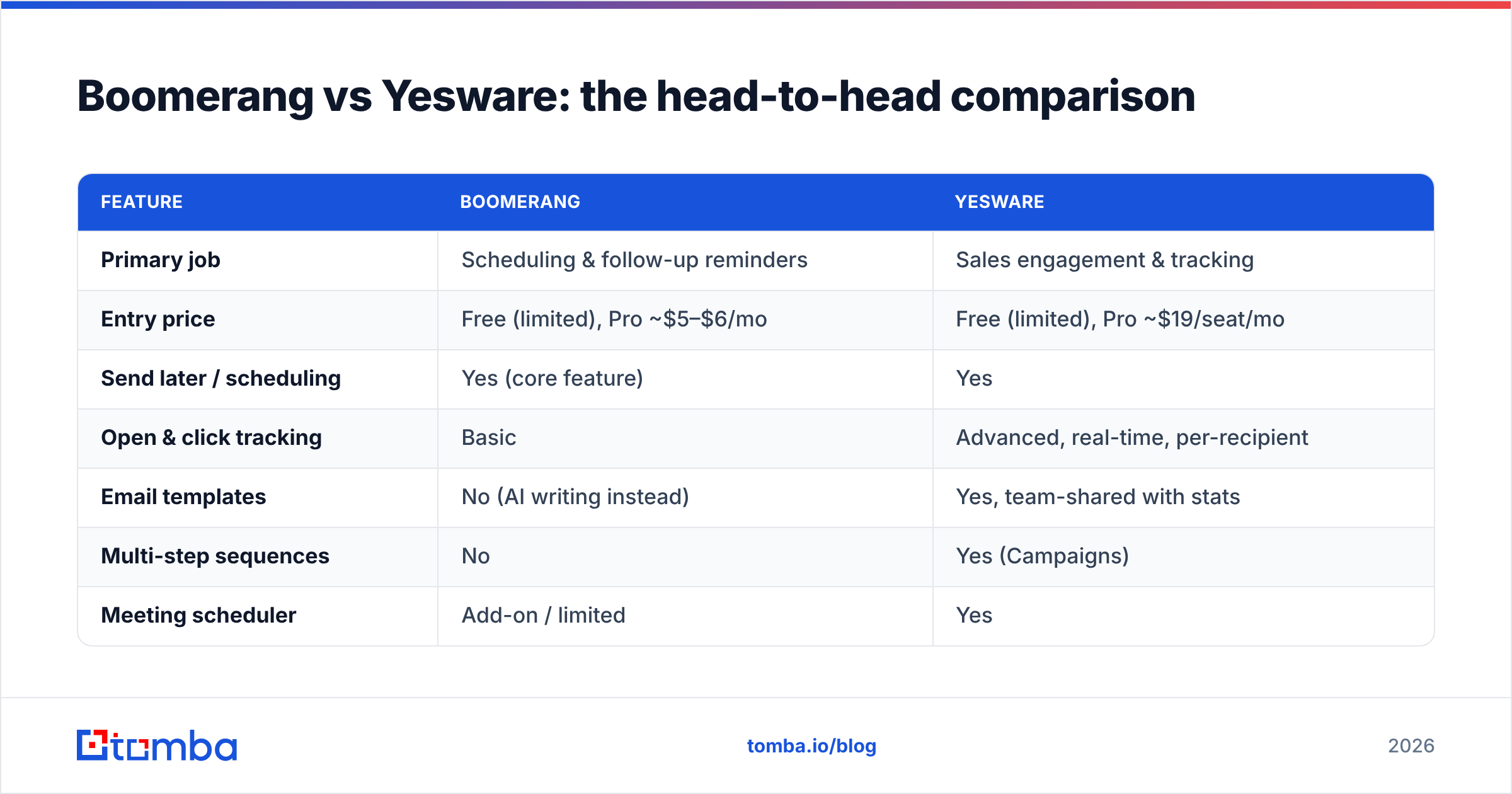
Here's the side-by-side that most "vs" articles bury. Prices reflect publicly listed 2026 plans and are per user, per month, billed annually where applicable.
| Feature | Boomerang | Yesware |
|---|---|---|
| Primary job | Scheduling & follow-up reminders | Sales engagement & tracking |
| Entry price | Free (limited), Pro ~$5–$6/mo | Free (limited), Pro ~$19/seat/mo |
| Send later / scheduling | Yes (core feature) | Yes |
| Open & click tracking | Basic | Advanced, real-time, per-recipient |
| Email templates | No (AI writing instead) | Yes, team-shared with stats |
| Multi-step sequences | No | Yes (Campaigns) |
| Meeting scheduler | Add-on / limited | Yes |
| CRM (Salesforce) sync | No native | Yes, native |
| Reply-detection reminders | Yes (the "boomerang") | Partial (within campaigns) |
| Best for | Individuals, CS, founders | SDRs, AEs, sales teams |
The pattern is obvious once you lay it out: Boomerang wins on personal discipline and price, Yesware wins on team sales workflow and analytics. They're not really competitors so much as tools that occupy adjacent shelves.
Is Boomerang or Yesware better for email tracking?#
Yesware wins email tracking, and it isn't close. Boomerang offers read receipts that tell you whether an email was opened. Yesware tells you who opened it, how many times, which links they clicked, whether they forwarded it, and when they viewed the attachment — then rolls all of that into a dashboard you can filter by campaign or rep.
If tracking is a "nice to know" for you, Boomerang's lightweight version is plenty. If tracking is how you prioritize your day — calling the prospect who opened your email five times this morning — Yesware is built for exactly that signal.
One honest caveat on both: open tracking has gotten less reliable since Apple Mail Privacy Protection started pre-loading images and inflating open counts. Click tracking and reply tracking are now the metrics worth trusting. Yesware surfaces those; Boomerang mostly doesn't.
How do Boomerang and Yesware compare on pricing?#
Boomerang is dramatically cheaper, because it's solving a smaller problem. Its Pro tier sits in the single digits per month, and even its top "Premium" plan undercuts Yesware's entry price. Yesware's pricing reflects what sales platforms cost: the Pro seat is the floor, and the features sales managers actually want — advanced reporting, larger sequence volumes, full Salesforce sync — live in the Premium and Enterprise tiers.
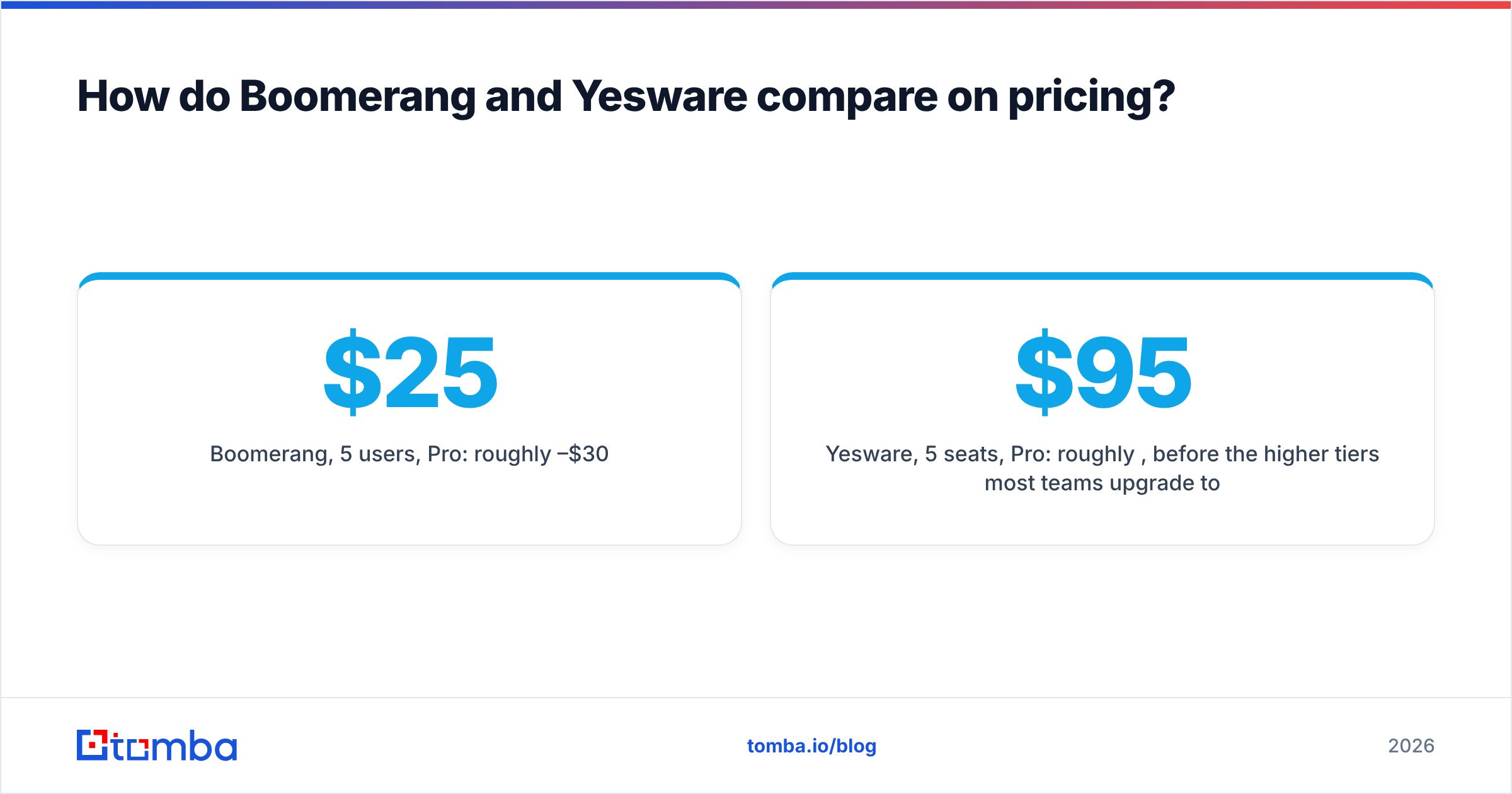
A rough total-cost picture for a 5-person setup:
- Boomerang, 5 users, Pro: roughly $25–$30/month.
- Yesware, 5 seats, Pro: roughly $95/month, before the higher tiers most teams upgrade to.
That 3–4x gap is the price of sequences, CRM sync, and team analytics. Whether it's worth it depends entirely on whether your team sends outreach for a living or just sends a lot of email.
What neither tool does — and why it matters#
Here's the uncomfortable truth both vendors gloss over: Boomerang and Yesware both assume you already have correct email addresses. Scheduling a message for 8am does nothing if the address bounces. Tracking opens is meaningless if 18% of your list is invalid and silently failing. Sequences amplify whatever list quality you feed them — including the bad parts.
This is the layer underneath the comparison, and it's where most outbound programs actually leak money. Industry data consistently shows B2B contact databases decay 25–30% per year as people change jobs. If you're not sourcing and verifying contacts before they enter Boomerang or Yesware, you're optimizing the delivery of mail that was never going to land.
That's the job of an email finder and an email verifier — find the right professional address, then confirm it's deliverable before it ever hits a campaign. A clean, verified list improves your sender reputation, which improves email deliverability, which makes every Yesware open-rate number and every Boomerang follow-up actually worth something.
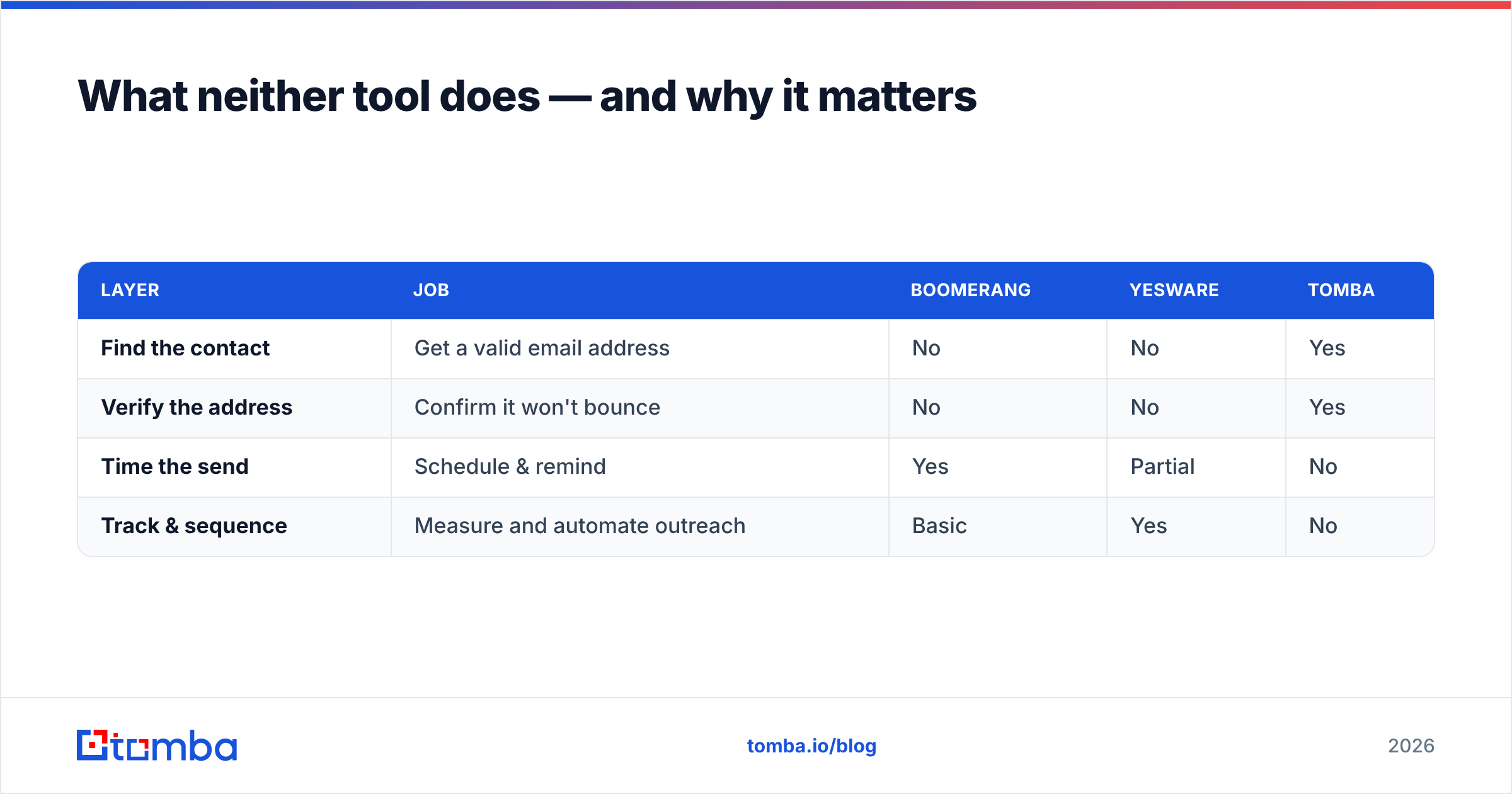
| Layer | Job | Boomerang | Yesware | Tomba |
|---|---|---|---|---|
| Find the contact | Get a valid email address | No | No | Yes |
| Verify the address | Confirm it won't bounce | No | No | Yes |
| Time the send | Schedule & remind | Yes | Partial | No |
| Track & sequence | Measure and automate outreach | Basic | Yes | No |
Read the table top to bottom and the workflow assembles itself: source and clean your data first, then plug it into whichever inbox tool fits your motion.
Which should you choose in 2026?#
Decide by the problem you actually have, not the feature list.
Choose Boomerang if:
- You send a moderate volume of high-value, personal emails.
- Your real pain is forgetting to follow up or sending at the wrong time.
- You're a solo operator, founder, recruiter, or CS rep.
- You want strong value for under $10/user/month.
Choose Yesware if:
- You run outbound sales and live in Gmail or Outlook all day.
- You need open/click tracking, templates, and multi-step sequences.
- You report to a manager who wants activity and reply dashboards.
- You're on Salesforce and want sends to log automatically.
Use both only if an individual on your team needs Boomerang's snooze-and-return discipline and Yesware's sales engagement — rare, but it happens with founder-led sales.
For most readers, the honest answer is: pick one based on whether you're optimizing relationships (Boomerang) or pipeline (Yesware). Then make sure the data flowing into your choice is real. You can compare current plans directly at the official Yesware and Boomerang sites, and cross-check verified user reviews on G2 before you commit a budget.
How to build the full stack the right way#
A practical 2026 setup looks like three layers, not one tool:
- Data layer — find and verify contacts so your list is accurate. Use a domain search to pull the right people at a target company, then verify before import.
- Engagement layer — Boomerang for disciplined personal sending, or Yesware for tracked, sequenced outbound.
- Measurement layer — whichever tool's analytics you trust (Yesware's, here), watched against deliverability, not just opens.
Skip layer one and the other two are guesswork dressed up as a workflow. That's the most common — and most expensive — mistake teams make when they obsess over the Boomerang-vs-Yesware question without asking where their addresses came from.
The bottom line#
Boomerang and Yesware aren't really rivals — they're tools for two different jobs that happen to share an inbox. Boomerang makes you disciplined and is cheap. Yesware makes you a measurable sales machine and costs accordingly. Match the tool to your actual problem and you'll be happy with either.
But before you optimize a single send time or track a single open, fix the layer underneath both: the contacts themselves. Start with the Tomba Email Finder to source verified, deliverable B2B emails, and feed clean data into whichever inbox tool you choose. You can test it on the free tier (25 searches/month) and scale up through Tomba's pricing plans as your outreach grows. Get the data right, and Boomerang or Yesware finally has something worth sending.
Ready to find emails that actually work?
Join 150,000+ professionals who stopped guessing and started sending. Free credits on signup — no credit card required.
Get the Tomba newsletter
Practical outbound tactics and product updates — once every two weeks.
About the author