Bounce Rate Analysis: How to Cut Email Bounces in 2026
A practical guide to bounce rate analysis: how to read hard vs soft bounces, find your real bounce rate, and get it under 2% before your sender reputation tanks.
TL;DR
- Bounce rate analysis is the practice of measuring what share of your sent emails get rejected, then diagnosing why so you can fix the cause instead of guessing.
- Keep your bounce rate under 2%. Past 5%, mailbox providers start throttling you and your sender reputation slides.
- Split every bounce into hard (permanent: dead address, invalid domain) and soft (temporary: full inbox, server down). They need opposite responses.
- Most hard bounces are preventable with list verification before you hit send, not after.
- The fastest lever is cleaning your list at the source: verify new contacts on capture and re-verify dormant ones in bulk.
What is bounce rate analysis?#
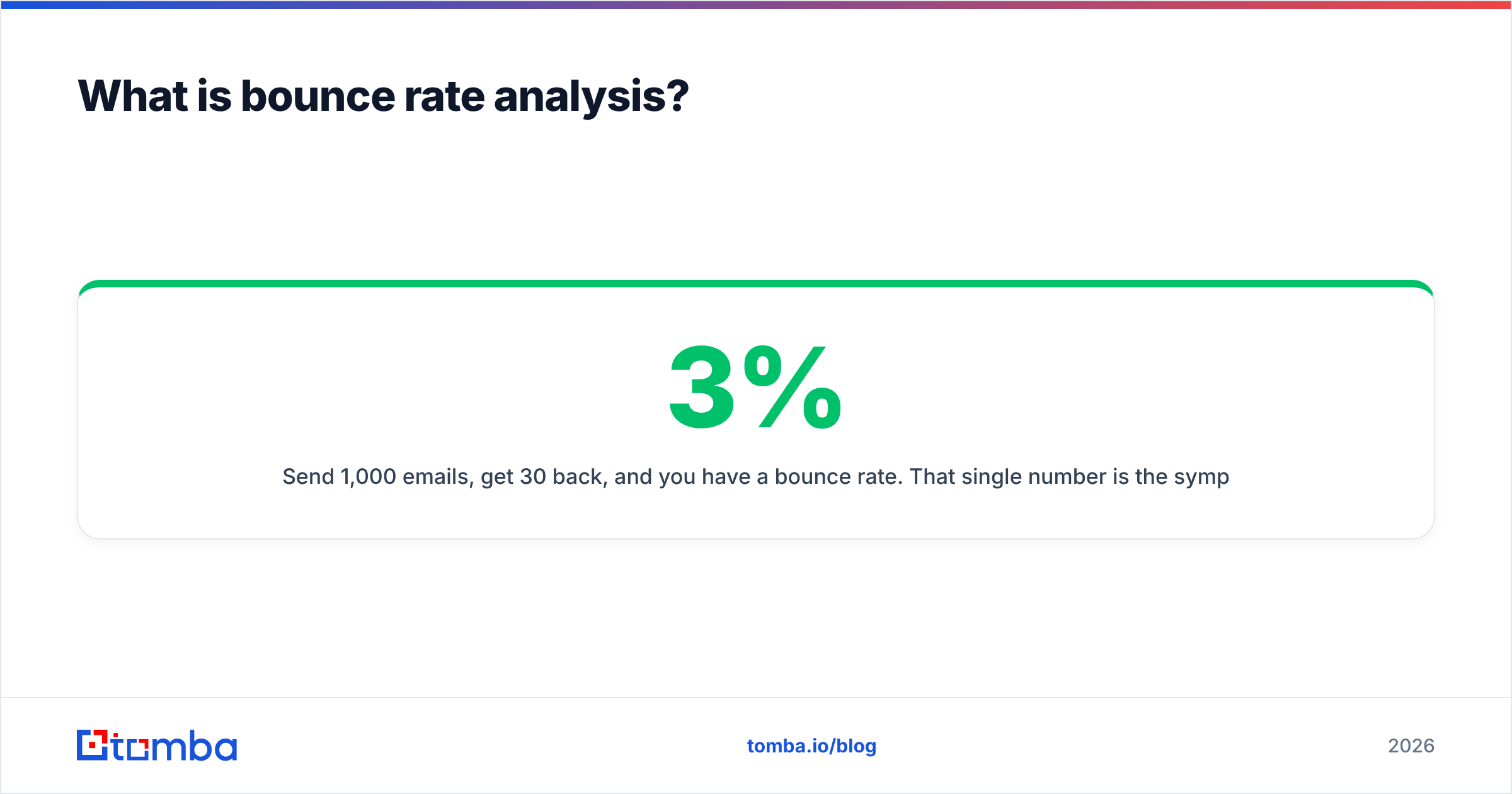
Bounce rate analysis is reading your email bounces like a doctor reads bloodwork: the number alone tells you something is wrong, but the breakdown tells you what to treat.
Your bounce rate is the percentage of sent emails that were returned undelivered:
bounce rate = (bounced emails / total sent) × 100
Send 1,000 emails, get 30 back, and you have a 3% bounce rate. That single number is the symptom. The analysis part is breaking those 30 bounces into categories, mapping each category to a root cause, and deciding what to change. A 3% rate caused by one expired domain is a five-minute fix. The same 3% caused by a scraped, unverified list is a structural problem that will keep hurting you.
Why this matters more than open rate: mailbox providers like Gmail and Outlook treat bounces as a trust signal. A high bounce rate tells them you are mailing addresses you have no relationship with, which is exactly what spammers do. Cross the wrong threshold and your legitimate mail starts landing in spam or getting blocked outright. Bounce rate analysis is how you catch that before it happens.
Hard bounces vs soft bounces: what's the difference?#
Every bounce falls into one of two buckets, and confusing them is the most common analysis mistake.
A hard bounce is a permanent failure. The address does not exist, the domain is dead, or the server has permanently blocked you. These never recover. Mailing them again does nothing but damage your reputation.
A soft bounce is a temporary failure. The mailbox is full, the recipient server is down, your message is too large, or you got greylisted. Retry later and many of these go through.
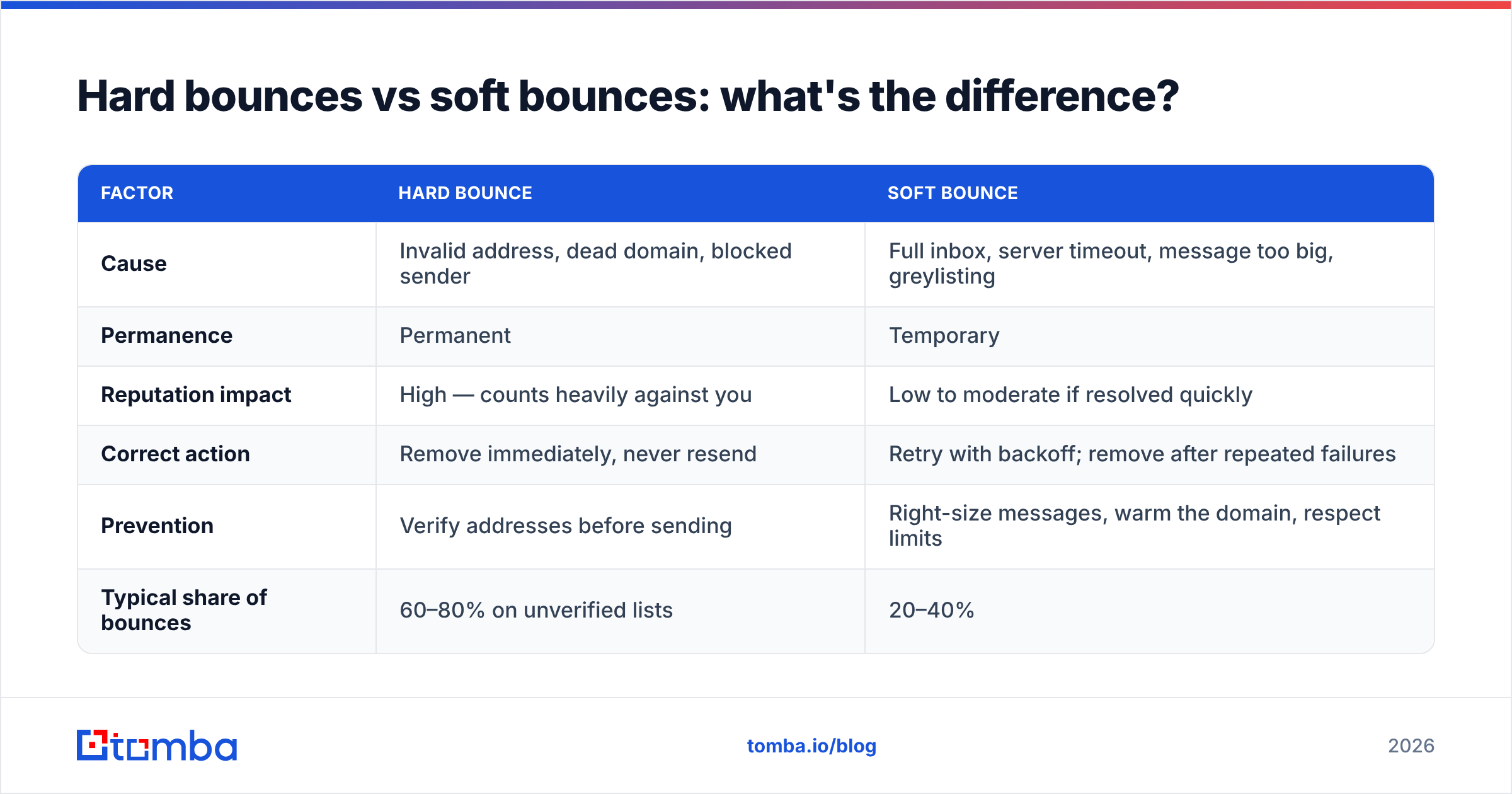
Here is how the two compare across the factors that drive your analysis:
| Factor | Hard bounce | Soft bounce |
|---|---|---|
| Cause | Invalid address, dead domain, blocked sender | Full inbox, server timeout, message too big, greylisting |
| Permanence | Permanent | Temporary |
| Reputation impact | High — counts heavily against you | Low to moderate if resolved quickly |
| Correct action | Remove immediately, never resend | Retry with backoff; remove after repeated failures |
| Prevention | Verify addresses before sending | Right-size messages, warm the domain, respect limits |
| Typical share of bounces | 60–80% on unverified lists | 20–40% |
The practical rule: suppress hard bounces on the first hit, and set a soft-bounce threshold (commonly 3–5 consecutive failures) before you retire an address. If you treat all bounces the same, you either keep poisoning your reputation with dead addresses or you throw away contacts whose inbox was simply full last Tuesday.
What is a good email bounce rate in 2026?#
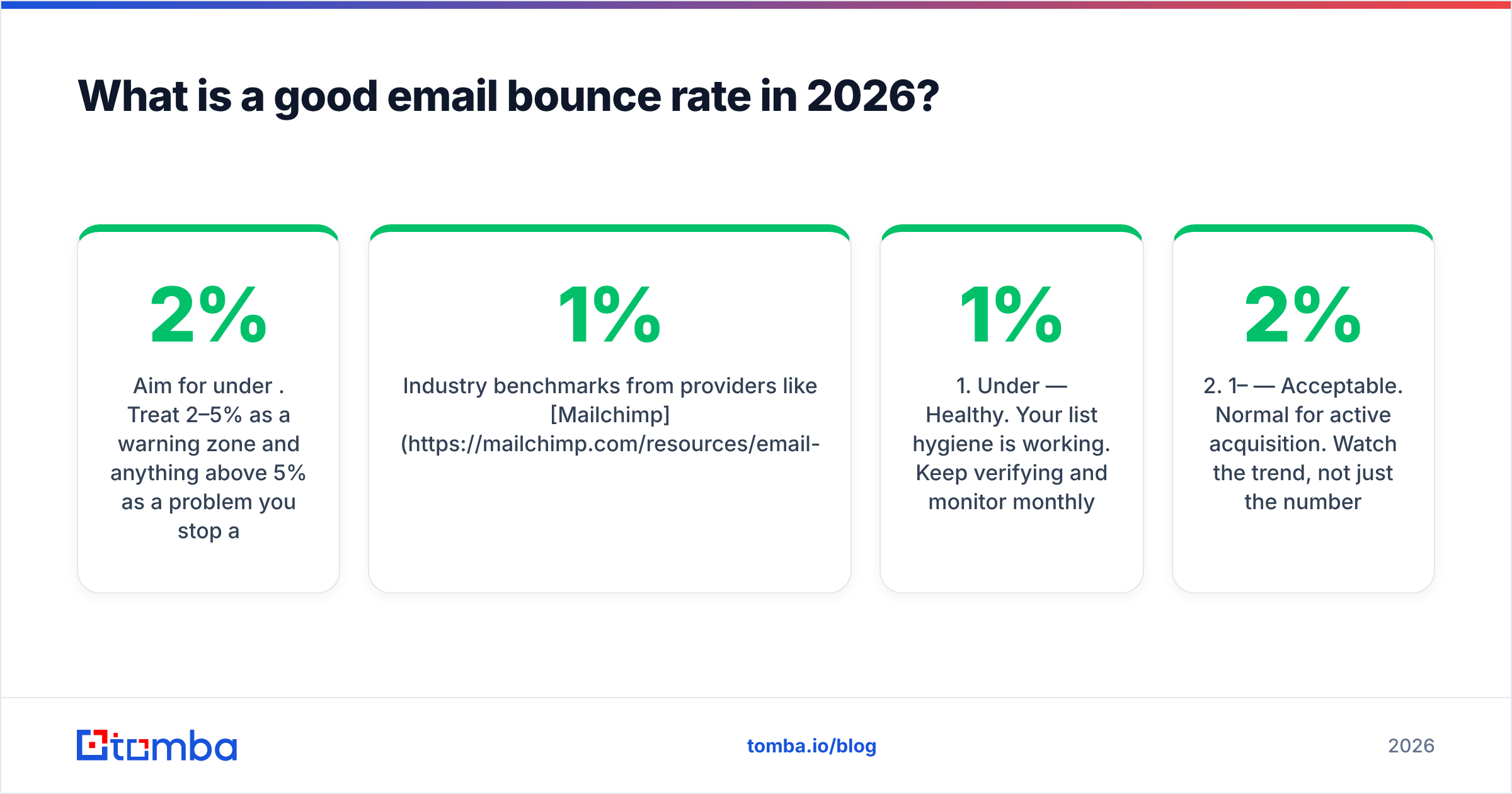
Aim for under 2%. Treat 2–5% as a warning zone and anything above 5% as a problem you stop and fix before your next send.
Industry benchmarks from providers like Mailchimp and HubSpot cluster most healthy senders well under 1% for warm, opted-in lists. Cold outbound runs higher because the data is colder, but the ceiling is the same: mailbox providers do not grade you on a curve for cold email.
Use these tiers as your dashboard:
- Under 1% — Healthy. Your list hygiene is working. Keep verifying and monitor monthly.
- 1–2% — Acceptable. Normal for active acquisition. Watch the trend, not just the number.
- 2–5% — Caution. Something is leaking. Audit your capture sources and re-verify before the next campaign.
- Above 5% — Critical. Mailbox providers are likely throttling you. Pause, clean the entire list, and investigate authentication.
- Above 10% — Emergency. Stop sending. You risk blacklisting and lasting sender reputation damage.
One number in isolation lies. A 4% rate that has been flat for a year is a stable bad habit. A rate that jumped from 0.8% to 4% last week is an incident: a new lead source, a broken form, or an imported list that nobody checked.
Why is my bounce rate high? Root-cause checklist#
High bounce rates almost always trace back to one of a handful of causes. Work this list top to bottom.
- Unverified or scraped lists. The single biggest driver. Addresses collected without validation are full of typos, role accounts, and abandoned mailboxes.
- List decay. B2B email data degrades roughly 22–30% per year as people change jobs. A list that was clean in 2024 is partly rotten by 2026.
- Typos at capture.
gmial.com,@yaho.com, trailing spaces. A form without inline validation feeds these straight into your sends. - Role-based and catch-all addresses.
info@,sales@, and catch-all domains accept-then-discard or behave unpredictably, inflating both bounces and false positives. - Authentication gaps. Missing or broken SPF, DKIM, or DMARC makes receiving servers reject otherwise valid mail. Check your SPF record first.
- Spam traps. Recycled or pristine trap addresses on old purchased lists trigger hard bounces and blacklisting.
- Aggressive sending on a cold domain. Blasting a new domain before warming it earns soft bounces and throttling.
If you only fix one thing, fix the list. Verification before sending eliminates the majority of hard bounces, which are the ones that hurt your reputation most.

How do you actually analyze your bounces? A 5-step workflow#
Numbers without a process are just anxiety. Here is the loop to run after every campaign.
- Pull the raw bounce log. Export bounces from your ESP with the SMTP response codes attached. Codes in the 5xx range are permanent (hard); 4xx are temporary (soft).
- Segment hard vs soft. Group by code. A wall of
550 5.1.1(no such user) screams bad data. A wall of421(service unavailable) points at throttling or warm-up, not your list. - Cluster by domain and source. Are bounces concentrated in one domain (their server has an issue) or one import batch (your data has an issue)? This is where you find the broken form or the bad CSV.
- Map each cluster to a cause using the checklist above, then assign an action: suppress, retry, or fix-at-source.
- Verify before the next send. Run remaining and new addresses through an email verifier so the next campaign starts clean. Re-measure and compare the trend.
The discipline that separates good senders from blacklisted ones is step 5. Analysis that never changes the next send is theater.
Which tools help with bounce rate analysis?#
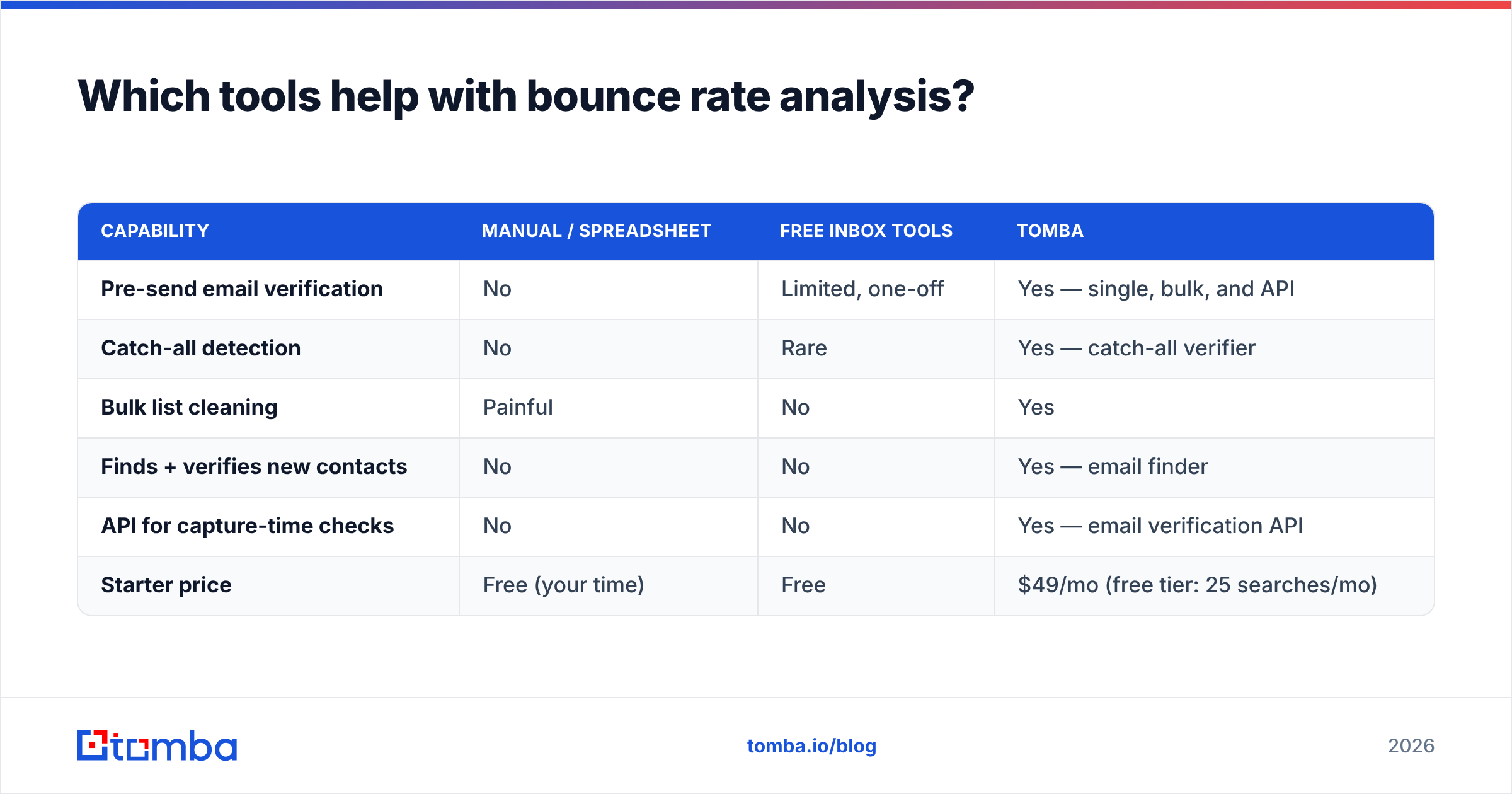
You need two capabilities: verification before you send, and monitoring after. Here is how common approaches stack up.
| Capability | Manual / spreadsheet | Free inbox tools | Tomba |
|---|---|---|---|
| Pre-send email verification | No | Limited, one-off | Yes — single, bulk, and API |
| Catch-all detection | No | Rare | Yes — catch-all verifier |
| Bulk list cleaning | Painful | No | Yes |
| Finds + verifies new contacts | No | No | Yes — email finder |
| API for capture-time checks | No | No | Yes — email verification API |
| Starter price | Free (your time) | Free | $49/mo (free tier: 25 searches/mo) |
Free spot-checkers are fine for verifying one address before an important send. They fall apart the moment you have a list of 5,000 and a campaign on Monday. Once verification is part of your routine, monitoring on the deliverability side matters too: tools like Google Postmaster Tools show how Gmail rates your sending, and G2 is a reasonable place to compare verification vendors on real reviews.
For Tomba specifically, the plan ladder is straightforward: a free tier with 25 searches a month, Starter at $49/mo, Growth at $99/mo, Pro at $249/mo, and custom Enterprise. Full numbers live on the Tomba pricing page.
How do you lower your bounce rate fast?#
Quick wins first, then the structural fixes that keep it down.
This week:
- Suppress every hard bounce from your last three campaigns. Stop resending to known-dead addresses immediately.
- Verify your active list in bulk and remove invalids and undeliverable catch-alls.
- Add inline validation to every signup and lead form to kill typos at the source.
This month:
- Add capture-time verification via API so no unverified address ever enters your database.
- Confirm SPF, DKIM, and DMARC are all passing. Fix authentication before blaming your data.
- Set a soft-bounce retry policy (retry, then retire after 3–5 consecutive fails).
Ongoing:
- Re-verify dormant segments every 90 days to fight list decay.
- Watch the trend, not the snapshot. A creeping rate is an early warning, not noise.
- Warm new sending domains gradually instead of blasting from day one.
The compounding effect is real. A clean list raises deliverability, which raises engagement, which raises your reputation, which lowers future bounces further. Good email deliverability is a flywheel, and verified data is what spins it.
What's the difference between bounce rate and deliverability?#
They are related but not the same, and treating them as identical leads to bad decisions.
Bounce rate measures rejected mail: the server said no. Deliverability measures whether accepted mail actually reaches the inbox instead of the spam folder. You can have a near-zero bounce rate and still have terrible deliverability if everything you send quietly lands in spam.
Bounce rate is the floor. Get it under control first, because high bounces actively wreck deliverability. But once bounces are handled, your attention shifts to engagement, authentication, content, and sending patterns. Bounce rate analysis is step one; inbox placement is the longer game it unlocks.
Closing: clean data is the cheapest deliverability fix#
Most bounce problems are data problems wearing a deliverability costume. You do not fix them by tweaking subject lines or buying a better ESP. You fix them by never sending to a dead address in the first place.
That is exactly where the Tomba Email Finder earns its place in your stack: it finds professional email addresses by name, company, or domain and validates them before they ever touch your list, so the contacts you import start verified instead of getting cleaned up after they have already bounced and dinged your reputation. Pair it with the email verifier for capture-time and bulk checks, start on the free tier, and watch your bounce rate settle where it belongs: under 2%, and trending down.
// get started
Find, verify and enrich your first contacts today
Start on the free plan with 25 searches a month, then scale when your team is ready.
Free plan · No credit card required · GDPR & CCPA
// about the author