Email Bounce Rate Benchmark 2026: Good vs Bad Rates
What counts as a healthy email bounce rate in 2026? See benchmarks by industry, the danger thresholds that trigger throttling, and the exact steps to drop yours below 2%.
TL;DR
- A healthy bounce rate benchmark in 2026 is under 2%; under 0.5% is excellent. Anything above 5% puts your sender reputation at real risk.
- Mailbox providers like Gmail and Microsoft now throttle or junk senders who cross roughly 2-4% hard bounces, so the threshold is stricter than most "industry average" charts admit.
- Bounce rate splits into hard bounces (dead addresses — the ones that hurt) and soft bounces (temporary — usually harmless).
- The single biggest lever is list hygiene: verifying addresses before you send drops hard bounces faster than any warmup trick.
- Benchmarks vary by industry and email type — transactional mail should sit near 0%, cold outbound is judged far more harshly than newsletters.
What is a bounce rate benchmark?#
A bounce rate benchmark is the target percentage of sent emails that get rejected, measured against what healthy senders in your category actually achieve. The formula is simple:
Bounce rate = (bounced emails ÷ total emails sent) × 100
Send 1,000 emails, get 30 bounces, and you're at 3% — already above the safe zone. The reason this number matters more than open or click rate is that mailbox providers read it as a trust signal. High bounces tell Gmail, Outlook, and Yahoo that you don't know who you're emailing, which is the strongest predictor of a spammer. Cross the line and they stop delivering even your good mail.
Think of it like a bouncer at a club checking IDs. If three out of every hundred people you bring hand over fake IDs, the bouncer starts scrutinizing your whole group. Keep it under one in a hundred and you walk in unquestioned.

What is a good email bounce rate in 2026?#
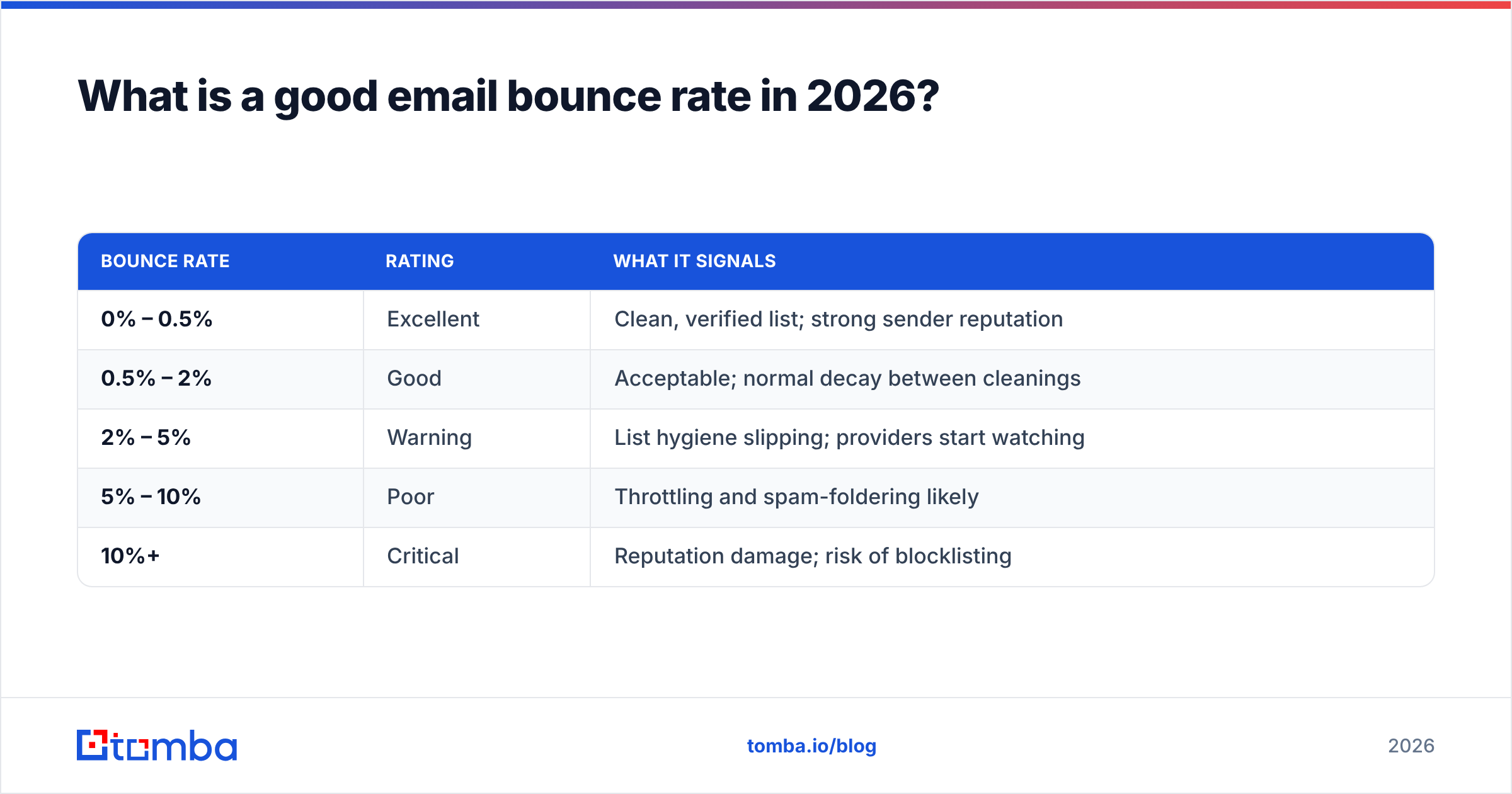
A good bounce rate is below 2%, and the best senders live under 0.5%. Here is how the tiers break down:
| Bounce rate | Rating | What it signals |
|---|---|---|
| 0% – 0.5% | Excellent | Clean, verified list; strong sender reputation |
| 0.5% – 2% | Good | Acceptable; normal decay between cleanings |
| 2% – 5% | Warning | List hygiene slipping; providers start watching |
| 5% – 10% | Poor | Throttling and spam-foldering likely |
| 10%+ | Critical | Reputation damage; risk of blocklisting |
These tiers apply to marketing and outbound email. The expectations shift hard depending on what you send, which is where most "average bounce rate" articles mislead you.
How do benchmarks differ by industry and email type?#
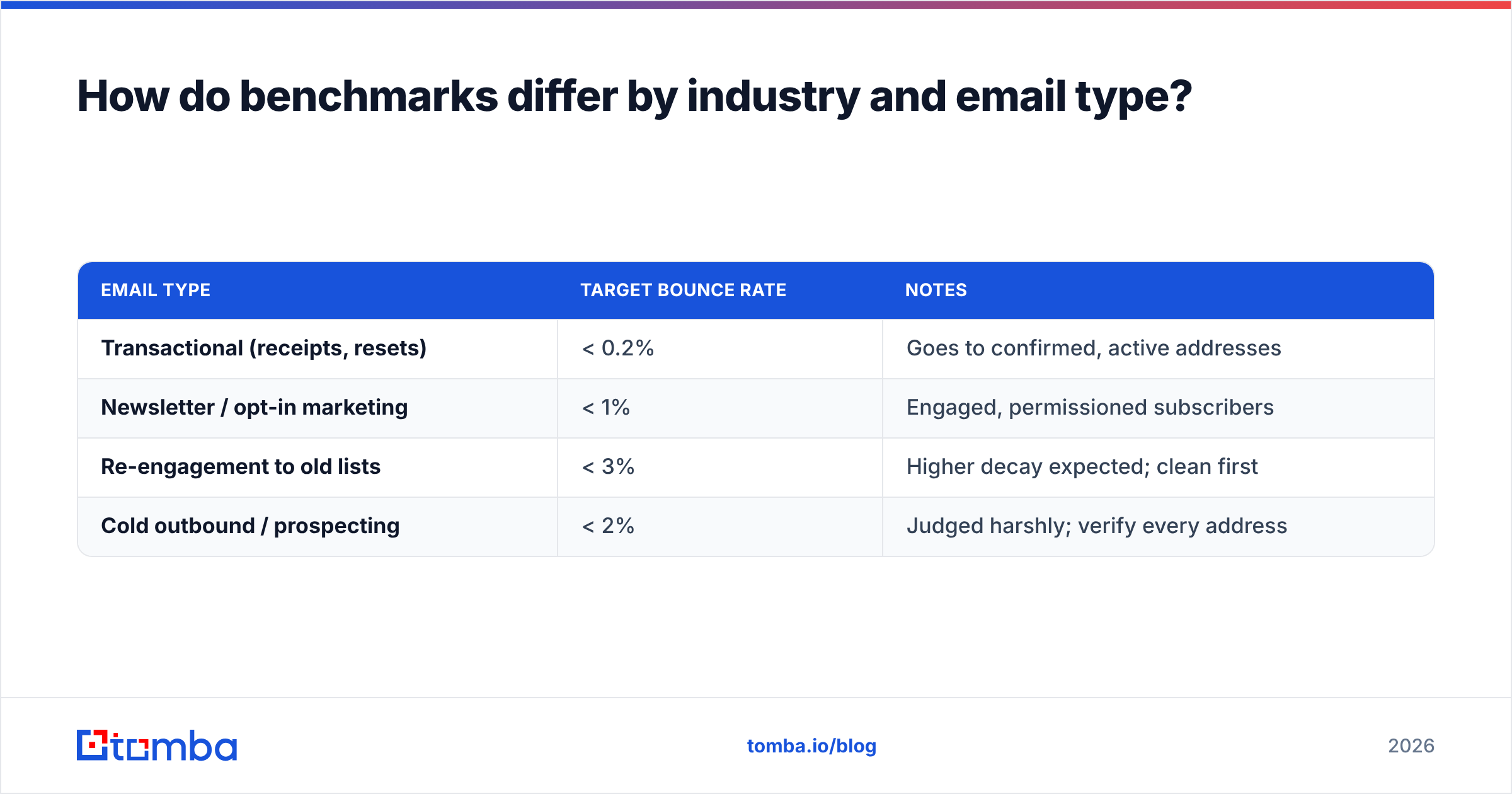
Email type matters more than industry. A transactional password-reset email goes to an address the user just typed, so it should bounce almost never. A cold outbound campaign hits addresses you sourced and guessed at, so providers hold it to a stricter standard even though the raw numbers look similar.
| Email type | Target bounce rate | Notes |
|---|---|---|
| Transactional (receipts, resets) | < 0.2% | Goes to confirmed, active addresses |
| Newsletter / opt-in marketing | < 1% | Engaged, permissioned subscribers |
| Re-engagement to old lists | < 3% | Higher decay expected; clean first |
| Cold outbound / prospecting | < 2% | Judged harshly; verify every address |
Industry-wise, the differences are smaller than vendors suggest. Most published industry tables — software, retail, healthcare, finance — cluster between 0.3% and 1.2% for permissioned mail. The variation you see is driven less by sector and more by how recently the list was cleaned. A SaaS company emailing a two-year-old export will bounce worse than a retailer emailing yesterday's signups.
For a deeper definition of the mechanics behind delivery failures, the email deliverability glossary entry is a useful reference, and Google's own Postmaster Tools guidelines spell out what Gmail expects from bulk senders.
Hard bounces vs soft bounces: which one actually hurts?#
Hard bounces are the ones that wreck your reputation; soft bounces are mostly noise. The distinction is everything when you read your bounce rate.
- Hard bounce — a permanent failure. The address doesn't exist, the domain is dead, or the server permanently rejected you. These count fully against your sender reputation and must be removed immediately.
- Soft bounce — a temporary failure. The mailbox is full, the message was too large, or the server was briefly down. Most ESPs retry these for 24–72 hours before giving up.
- Block bounce — a reputation-based rejection. The receiving server refused you because of your IP or domain history, not the recipient. This is a warning that other metrics are already in trouble.
- Auto-reply / challenge — not a true bounce, but some systems miscount these. Filter them out before calculating your rate.
The practical rule: track your hard bounce rate separately. A 3% total bounce rate that's all soft bounces during a server hiccup is fine. A 3% rate that's all hard bounces means your list is rotting and providers are about to notice.

What bounce rate triggers throttling or blocklisting?#
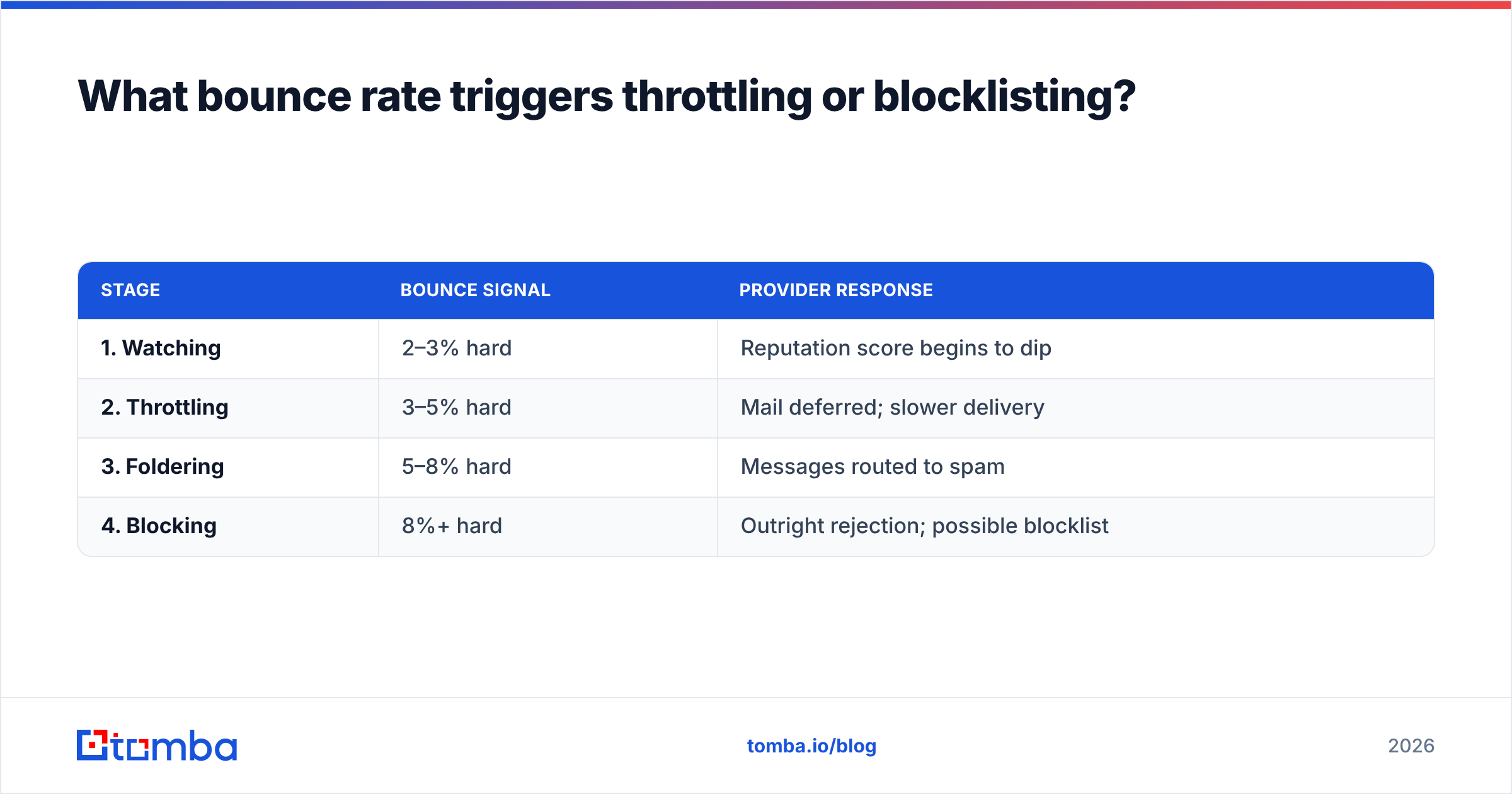
Most mailbox providers start punishing you between 2% and 5% hard bounces, and the penalty escalates fast. Gmail's Postmaster Tools will show your domain reputation dropping from "High" to "Medium" once bounces and spam complaints climb. Microsoft is even less forgiving — its filtering tends to throttle aggressively, deferring your mail with temporary errors before it ever reaches the inbox.
Here's the chain reaction a high bounce rate sets off:
| Stage | Bounce signal | Provider response |
|---|---|---|
| 1. Watching | 2–3% hard | Reputation score begins to dip |
| 2. Throttling | 3–5% hard | Mail deferred; slower delivery |
| 3. Foldering | 5–8% hard | Messages routed to spam |
| 4. Blocking | 8%+ hard | Outright rejection; possible blocklist |
The trap is that recovery is far slower than damage. You can tank a domain's reputation in a single bad send, then spend weeks rebuilding it through low-volume, high-engagement mail. Avoiding the spike in the first place is overwhelmingly cheaper than recovering from it.
How do you lower your bounce rate below the benchmark?#
Verify before you send — that one habit does most of the work. The rest is hygiene and discipline.
- Verify every address before sending. Run new and existing lists through an email verifier to catch dead mailboxes, syntax errors, and risky domains before they bounce. This is the highest-ROI step by a wide margin.
- Handle catch-all domains carefully. Catch-all servers accept everything, so standard verification can't confirm a real mailbox. Use a catch-all verifier to score them instead of guessing.
- Stop buying lists. Purchased lists carry spam traps and dead addresses that spike hard bounces instantly. Build your own with permissioned signups or accurately sourced prospects.
- Re-verify on a schedule. B2B email data decays roughly 22–30% per year as people change jobs. Re-clean active lists every 3–6 months.
- Use double opt-in for marketing. Confirming the address at signup eliminates typos and fake entries at the source.
- Authenticate your domain. Correct SPF, DKIM, and DMARC records reduce block bounces and protect the reputation you're working to keep.
When you're sourcing fresh prospects rather than cleaning existing ones, accuracy at the point of discovery matters just as much. Finding verified addresses up front with an email finder means fewer guesses reaching the send queue — and Tomba returns a confidence score with each result so you can drop the weak ones before they ever bounce. For a sense of where that data comes from and how it's validated, see Tomba's data sources page.
Industry analysts treat list hygiene as a core deliverability discipline rather than an afterthought; review sites like G2 catalog dozens of verification tools precisely because the bounce-rate stakes are so high.
How should you measure and monitor bounce rate over time?#
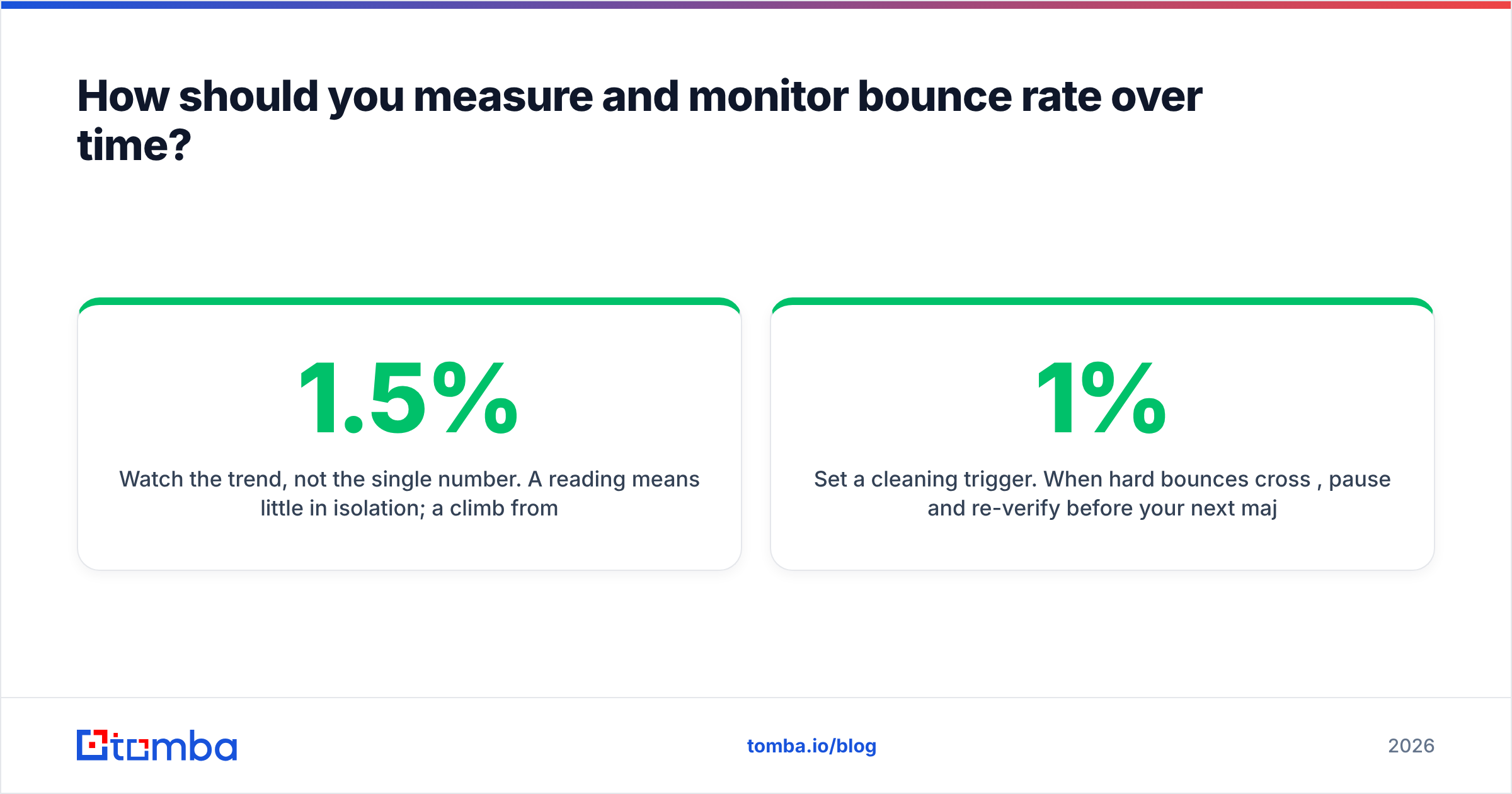
Watch the trend, not the single number. A 1.5% reading means little in isolation; a climb from 0.4% to 1.5% over three sends means your list is decaying and a cleaning is overdue.
- Segment your reporting by campaign type. Don't average transactional and cold outbound together — they have different benchmarks and blending them hides problems.
- Separate hard from soft in every report, and alert on hard-bounce spikes specifically.
- Monitor provider feedback through Gmail Postmaster Tools and Microsoft SNDS to see reputation shifts before they show up as lost revenue.
- Set a cleaning trigger. When hard bounces cross 1%, pause and re-verify before your next major send.
The goal isn't to obsess over a perfect zero. It's to keep the number low enough and stable enough that mailbox providers never have a reason to question you.
The bottom line#
A healthy bounce rate benchmark in 2026 is under 2%, ideally under 0.5%, and the metric that decides your fate is the hard-bounce rate. Providers throttle at 2-4% and block above 8%, and recovery costs far more than prevention. The fix is unglamorous but reliable: verify before you send, re-clean on a schedule, and stop emailing addresses you can't confirm.
If your bounces are climbing because the addresses themselves are wrong at the source, fix it before the send. Tomba's Email Finder returns verified, confidence-scored professional emails so you load clean data into your campaigns from the start — start free with 25 searches a month, and scale up on a Starter plan at $49/mo when you're ready. Lower bounces start with better data, not better excuses.
// get started
Find, verify and enrich your first contacts today
Start on the free plan with 25 searches a month, then scale when your team is ready.
Free plan · No credit card required · GDPR & CCPA
// about the author