Bounceban vs ContactOut 2026: Which Email Tool Wins?
Bounceban verifies risky inboxes; ContactOut finds emails from LinkedIn. We compare accuracy, pricing, and use cases to help you pick the right 2026 stack.
TL;DR
- Bounceban vs ContactOut in one line: Bounceban verifies risky inboxes. ContactOut finds emails from LinkedIn. They are not the same kind of tool.
- Bounceban is an email verification tool. Its strength is validating risky, catch-all, and role-based addresses before you send.
- ContactOut is a LinkedIn-first email and phone finder. It pulls personal and work contacts from profiles and a large stored database.
- They solve different problems. One tells you if an address is safe to email. The other finds the address in the first place. So comparing them means deciding which gap hurts your pipeline more.
- Neither does both jobs well on its own. If you want finding and verification in one stack, a combined platform like Tomba usually beats two single-purpose tools.
- Below: a feature-by-feature table, pricing, accuracy notes, and a clear pick by team type.
Bounceban vs ContactOut: what are they?#
Bounceban and ContactOut get lumped together in "best email tool" lists. But they sit on opposite ends of the outbound workflow.
Bounceban is an email verifier. You feed it an address or a list. It then checks MX records, runs SMTP handshakes, and flags disposable and role-based inboxes. Its headline feature is validating catch-all domains that most verifiers mark "unknown." Think of it as the bouncer at the door. It doesn't bring guests. It decides who gets in without wrecking your sender reputation.
ContactOut is a contact finder. It centers on a Chrome extension that overlays LinkedIn. As you browse profiles, it surfaces personal emails, work emails, and phone numbers. It also has a search portal and an API backed by a large stored database. Think of it as the scout. It finds the address. But it isn't built to deep-validate whether that address still bounces today.
That difference matters because buying the wrong one leaves a hole. A verifier with no finder means you have clean data about contacts you don't have. A finder with weak verification means you have lots of addresses and a rising bounce rate.
How do Bounceban and ContactOut compare at a glance?#
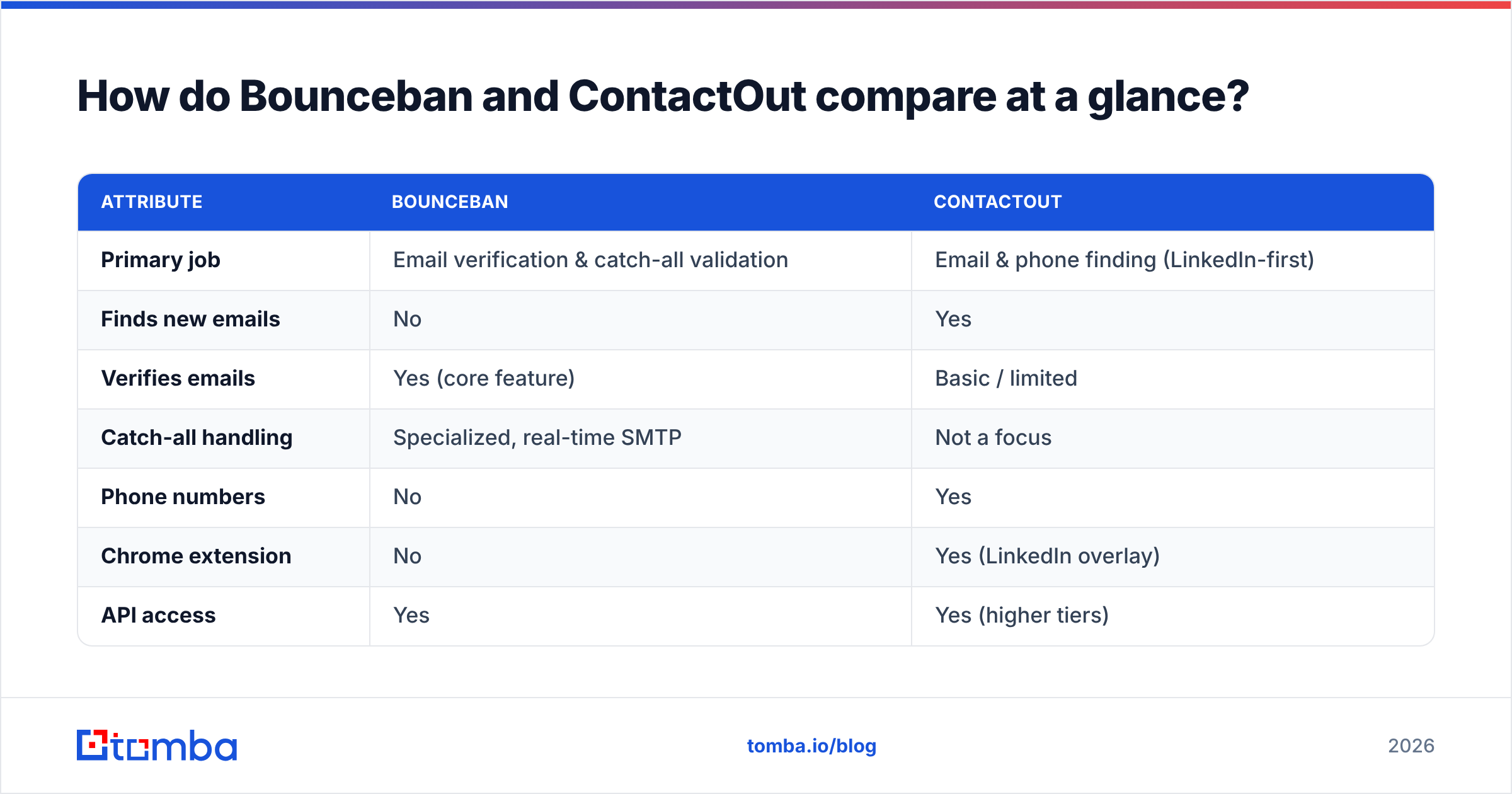
Here's the side-by-side. Treat vendor-published accuracy numbers as marketing claims, not lab results. Always test on your own list.
| Attribute | Bounceban | ContactOut |
|---|---|---|
| Primary job | Email verification & catch-all validation | Email & phone finding (LinkedIn-first) |
| Finds new emails | No | Yes |
| Verifies emails | Yes (core feature) | Basic / limited |
| Catch-all handling | Specialized, real-time SMTP | Not a focus |
| Phone numbers | No | Yes |
| Chrome extension | No | Yes (LinkedIn overlay) |
| API access | Yes | Yes (higher tiers) |
| Best for | Cleaning lists before send | Sourcing contacts from LinkedIn |
| Free option | Limited trial credits | Limited free plan |
The takeaway in one line: these are complementary tools, not substitutes. If you only buy one, buy the one that fixes your current bottleneck: finding contacts or protecting deliverability.

Which one is more accurate?#
Accuracy means two different things here, so split the question.
For ContactOut, accuracy means one thing: "is the email it found real and current?" LinkedIn-sourced data is strong for personal Gmail-style addresses. But it ages fast for work emails when people change jobs. The number that matters is your verified-deliverable rate after a separate verifier checks ContactOut's output. The match rate it advertises matters less.
For Bounceban, accuracy means this: "did it correctly classify the address as deliverable, risky, or invalid?" Its catch-all logic is the differentiator. Catch-all domains accept every address at the server level. So most tools shrug and return "unknown." Bounceban uses deeper SMTP probing to guess whether a mailbox really exists. That's useful. But catch-all validation is a guess everywhere, so expect a confidence score, not a promise.
This is why single-tool stacks struggle. ContactOut hands you an address, but you still need a verifier. Bounceban verifies the address, but you still need something to find it. If you care about end-to-end accuracy, pick a platform that finds and verifies against the same dataset. Then the email verifier sees the same signals the finder used.

If catch-all domains are your real headache, look at a dedicated catch-all verifier. Don't bet your whole list-hygiene process on a finder's built-in check.
How does pricing compare?#
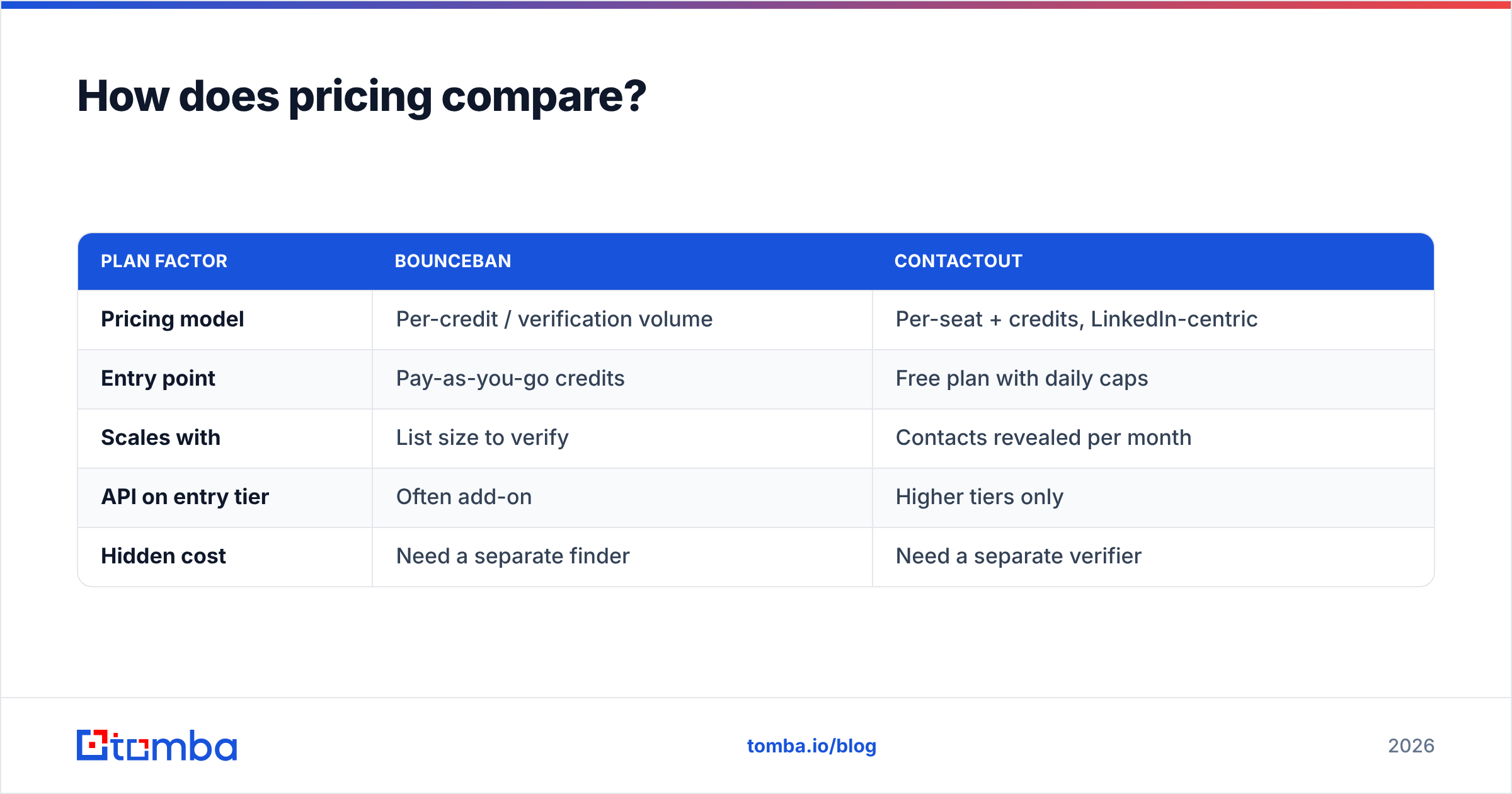
Both vendors gate features behind tiers. Both change prices often, so confirm current numbers on their sites before you buy. Here's the structural comparison most teams care about.
| Plan factor | Bounceban | ContactOut |
|---|---|---|
| Pricing model | Per-credit / verification volume | Per-seat + credits, LinkedIn-centric |
| Entry point | Pay-as-you-go credits | Free plan with daily caps |
| Scales with | List size to verify | Contacts revealed per month |
| API on entry tier | Often add-on | Higher tiers only |
| Hidden cost | Need a separate finder | Need a separate verifier |
The "hidden cost" row is the one finance teams miss. Buying ContactOut for sourcing usually means also paying for verification. Buying Bounceban for hygiene means also paying for a finder. Two subscriptions, two dashboards, two support queues. And data that never shares a source of truth.
That two-tool tax is why combined platforms look cheaper than they first appear. For reference, Tomba pricing bundles finding and verifying: a Free tier with 25 searches/month, Starter at $49/mo, Growth at $99/mo, and Pro at $249/mo. That's one bill covering both jobs instead of two.
When should you pick ContactOut?#
Pick ContactOut if finding contacts is your bottleneck and your motion is LinkedIn-heavy.
It's a strong fit when:
- You prospect inside LinkedIn all day. The extension overlay is fast and native to that workflow. Recruiters and SDRs who live in Sales Navigator get real value.
- You need personal emails and phones, not just work addresses — for recruiting or founder-led outreach where the work inbox is a dead end.
- You already own a verifier and just need a steady supply of fresh contacts feeding it.
It's a weak fit if your prospecting starts from a company domain or a CSV instead of a LinkedIn profile. It's also weak if you need airtight verification baked in. In those cases a domain search workflow wins: start with a company, get every public email pattern. That beats profile-by-profile scraping.
See also Tomba's ContactOut alternative breakdown if you want the finder-vs-finder view specifically.
When should you pick Bounceban?#
Pick Bounceban if deliverability is your bottleneck and you already have a contact source you trust.
It's a strong fit when:
- Your bounce rate is creeping up and you need to scrub lists before every send to protect sender reputation.
- You deal with lots of catch-all domains (common in enterprise and EU targets) and "unknown" results are killing your usable-list size.
- You import lists from many sources — events, partners, scraped CSVs — and need a single hygiene gate before they hit your sequencer.
It's a weak fit if you don't yet have the emails. A verifier can't manufacture contacts. It only judges the ones you bring. Verification is also just half of email deliverability. You still need warmup, SPF/DKIM, and sane sending volume. Tools like Mailchimp on the sending side and Google's Postmaster Tools for reputation monitoring matter just as much as your verifier.
Is there a tool that does both well?#
Yes. For most teams that's the smarter buy than stacking a finder plus a verifier.
The reason is data integrity. When the same platform finds an address and verifies it against the same data sources, you avoid the "find here, verify there, hope they agree" problem. You also get one credit pool, one API, and one place to debug when a campaign underperforms.
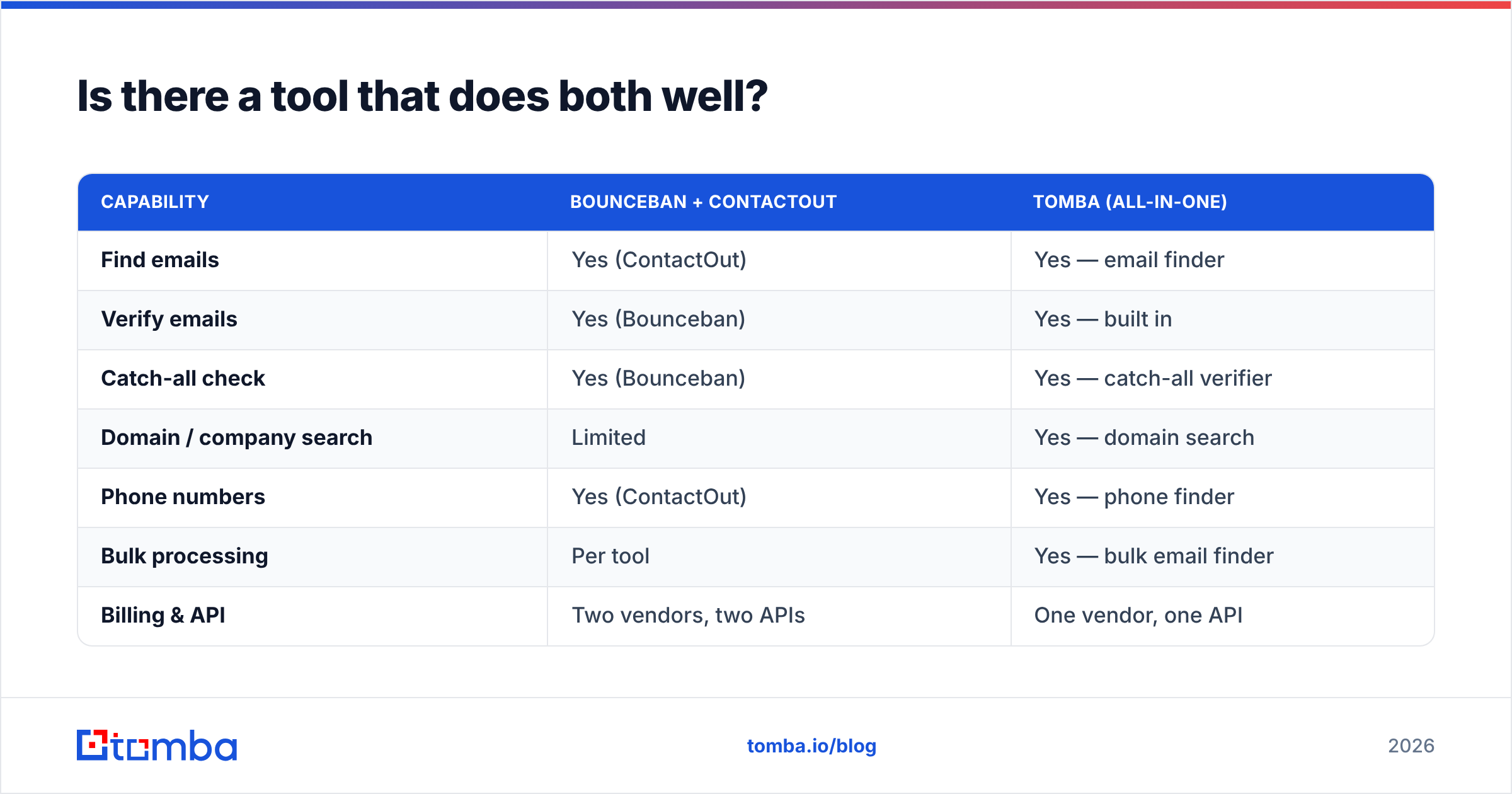
Here's how an all-in-one stacks up in the Bounceban vs ContactOut matchup:
| Capability | Bounceban + ContactOut | Tomba (all-in-one) |
|---|---|---|
| Find emails | Yes (ContactOut) | Yes — email finder |
| Verify emails | Yes (Bounceban) | Yes — built in |
| Catch-all check | Yes (Bounceban) | Yes — catch-all verifier |
| Domain / company search | Limited | Yes — domain search |
| Phone numbers | Yes (ContactOut) | Yes — phone finder |
| Bulk processing | Per tool | Yes — bulk email finder |
| Billing & API | Two vendors, two APIs | One vendor, one API |
| Starting price | Two subscriptions | $49/mo (Starter), free tier available |
This isn't to say Bounceban and ContactOut are bad at their jobs. Bounceban's catch-all focus is genuinely good. ContactOut's LinkedIn overlay is slick. The argument is about total cost and complexity. Two specialized tools make sense at large scale, where you want best-in-class in each slot and have ops to manage the seams. For most SMB and mid-market teams, one platform that covers 90% of both jobs is faster to run and cheaper to own.
If you want an independent read on any of these vendors, check verified user reviews on G2 before committing. Sort by company size to match yours. Enterprise reviews rarely reflect a 5-person SDR team's reality.
How should you decide?#
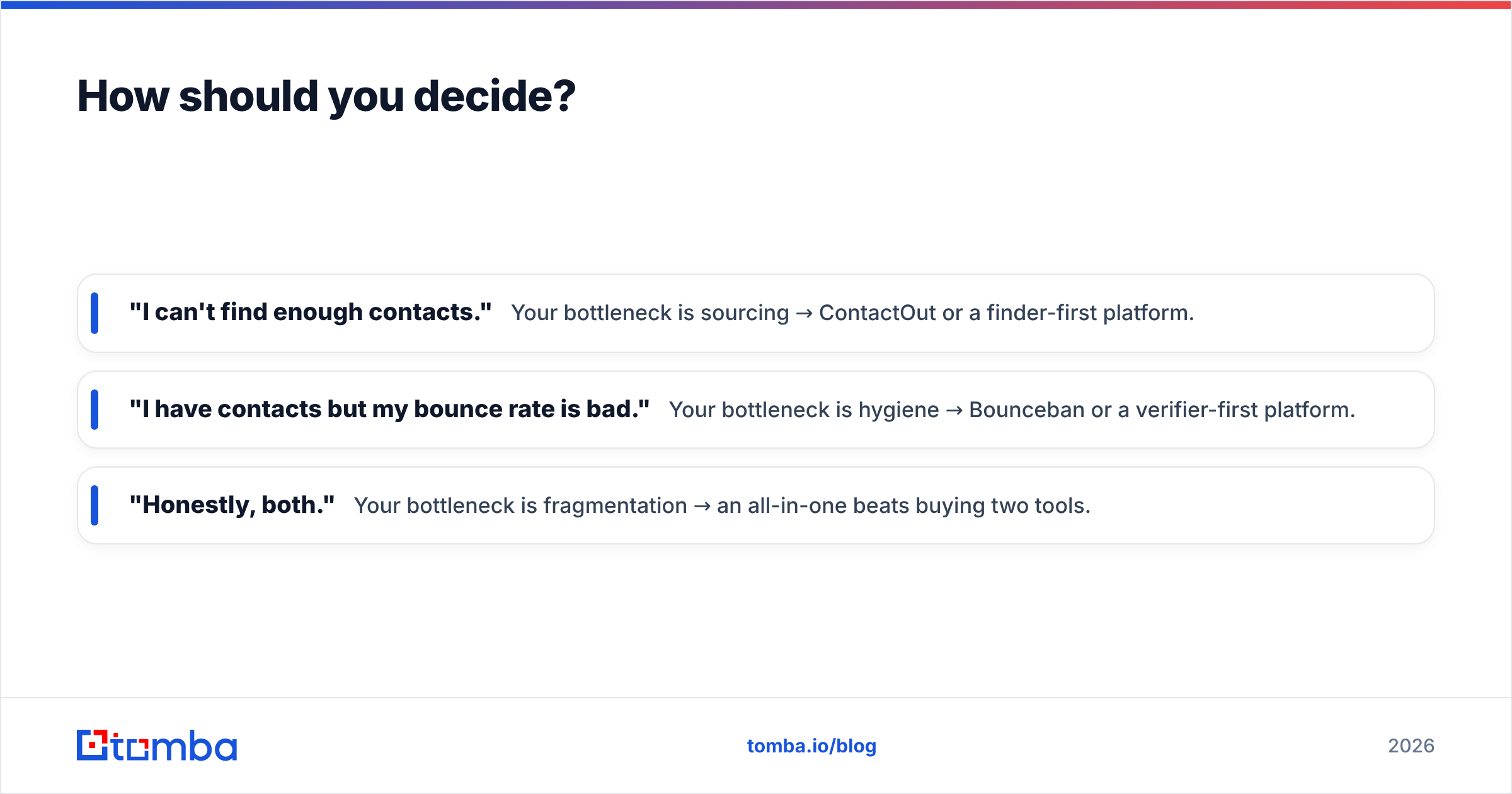
Run this quick test:
- "I can't find enough contacts." Your bottleneck is sourcing → ContactOut or a finder-first platform.
- "I have contacts but my bounce rate is bad." Your bottleneck is hygiene → Bounceban or a verifier-first platform.
- "Honestly, both." Your bottleneck is fragmentation → an all-in-one beats buying two tools.
Most teams that think they need ContactOut actually need both finding and verifying. They just haven't priced the second tool yet. Map your workflow before your budget. Then run a 50-contact test on your shortlist: find, verify, send, and measure the real deliverable rate. Vendor claims don't survive contact with your own list. That 30-minute test will tell you more than any comparison table, including this one.
The bottom line#
The Bounceban vs ContactOut choice comes down to one fact: both are good at narrow jobs and incomplete on their own. ContactOut finds contacts but leans on you to verify them. Bounceban verifies contacts but can't find them. Buying both works, but it means two bills and two dashboards.
If you'd rather find professional emails and verify them in one place, start with the Tomba Email Finder. You get domain search, catch-all checks, phone lookup, bulk lists, and a clean API. The free tier gives you 25 searches a month to test accuracy on your own prospects before you pay a cent. Starter is $49/mo when you're ready to scale. Run the same 50-contact test against your current stack and let the deliverable rate decide.
// get started
Find, verify and enrich your first contacts today
Start on the free plan with 25 searches a month, then scale when your team is ready.
Free plan · No credit card required · GDPR & CCPA
// about the author