Bounceban vs Leadsforge: Which Email Tool Wins in 2026?
Bounceban verifies catch-all emails; Leadsforge builds AI lead lists. Here's an honest 2026 breakdown of accuracy, pricing, and which one your pipeline actually needs.
Bounceban vs Leadsforge: Which Email Tool Wins in 2026?
Choosing between Bounceban and Leadsforge feels like comparing a seatbelt to a car. One verifies that the emails you already have are safe to send; the other tries to generate the leads in the first place. They overlap just enough to confuse buyers, and the wrong pick quietly burns your sender reputation or your budget.
This breakdown cuts through the marketing and tells you which tool fits which job in 2026 — and where a single platform can replace both.
TL;DR#
- Bounceban is an email verification tool with a strong reputation for catch-all (accept-all) verification — the hardest category of address to validate.
- Leadsforge is an AI-assisted lead-generation tool focused on building contact lists from natural-language prompts, not on deep verification.
- They are not direct competitors: one cleans lists, one creates them. Most teams asking "Bounceban vs Leadsforge" actually need both functions.
- If you want sourcing and verification under one roof, a consolidated platform like Tomba usually beats stitching two point tools together.
- Pricing favors Bounceban for pure verification volume; Leadsforge charges for lead credits, which gets expensive at scale.
What is Bounceban?#
Bounceban is a real-time email verification service. You feed it an address (or a list), and it tells you whether sending will bounce, land, or risk your domain reputation. Its headline claim is accurate catch-all verification — validating addresses on domains that accept every message at the SMTP layer, which most verifiers simply flag as "unknown" and give up on.
That niche matters. Catch-all domains can make up 20–40% of a B2B list, and a tool that punts on them leaves you guessing. Bounceban leans into SMTP-level probing, inbox simulations, and proprietary heuristics to return a real verdict instead of a shrug.
If catch-all addresses are the question, you can read more about how catch-all verification works and why most tools struggle with it. The short version: a server that says "yes" to everything tells you nothing on its own, so the verifier has to infer deliverability from secondary signals.

What Bounceban does not do well is find new contacts. It assumes you already have addresses. That's the core distinction in any honest Bounceban vs Leadsforge comparison.

What is Leadsforge?#
Leadsforge is a lead-generation tool built around an AI prompt interface. Instead of filtering a database with dropdown menus, you describe your ideal customer in plain English ("marketing directors at Series B SaaS companies in the US"), and it assembles a list of matching contacts with emails attached.
The appeal is speed for non-technical users. You skip the Boolean-filter learning curve and get a usable list fast. Leadsforge positions itself as a list-builder for founders and small sales teams who don't want to learn a heavyweight prospecting suite.
The trade-off: the emails it returns still need validation before you send. AI sourcing tools optimize for coverage — returning as many plausible contacts as possible — which means a slice of those addresses are guesses, role accounts, or stale. Sending to them unverified is how you land in spam folders and trip email deliverability thresholds.
So Leadsforge fills your pipeline, and something else has to clean it. That something is often a verifier — which is exactly the gap Bounceban fills, and why people compare the two even though they do opposite jobs.
Bounceban vs Leadsforge: How do they actually compare?#
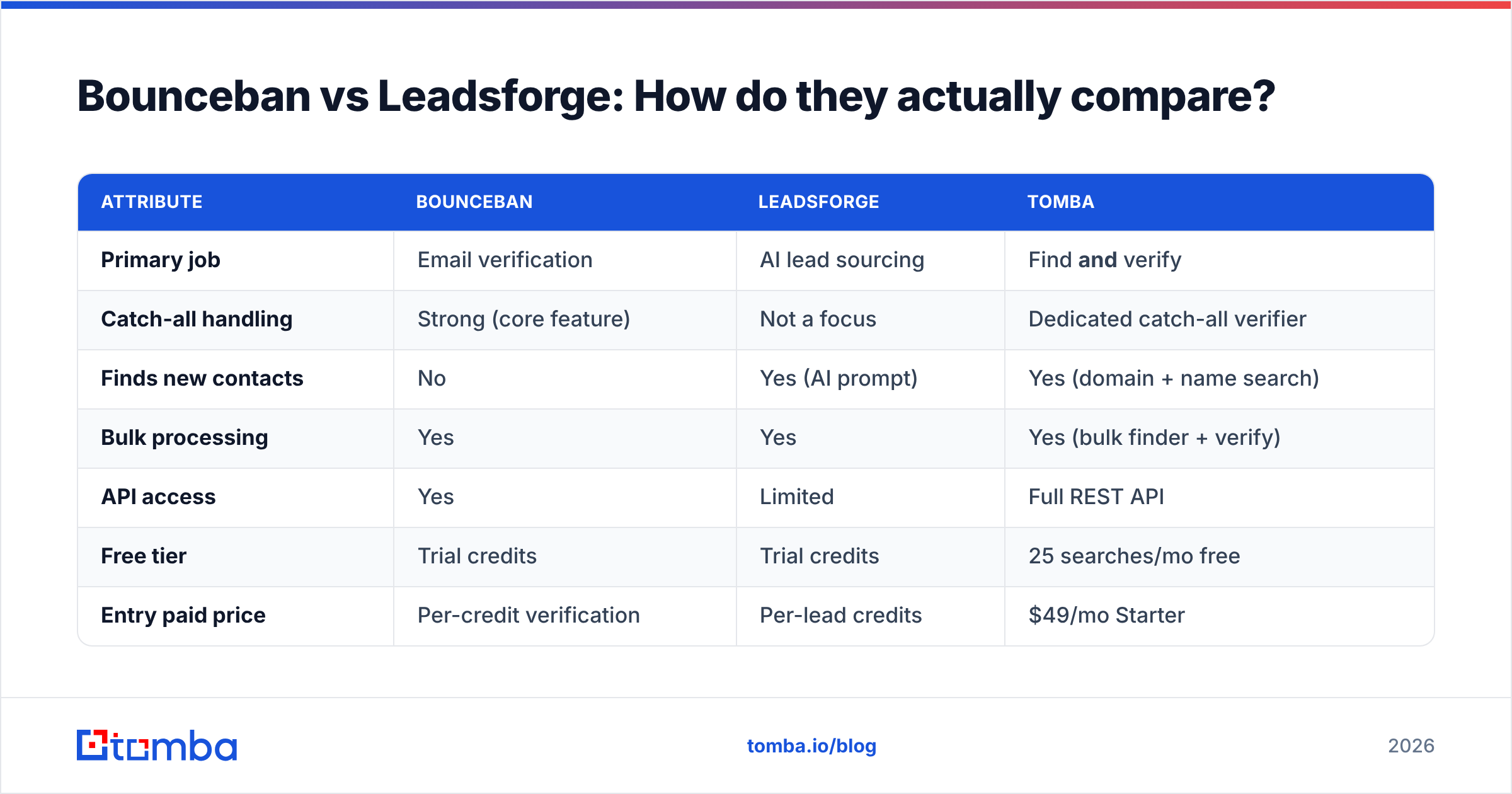
Here's the side-by-side. Treat "primary job" as the deciding column — most of the confusion comes from expecting one tool to do the other's work.
| Attribute | Bounceban | Leadsforge | Tomba |
|---|---|---|---|
| Primary job | Email verification | AI lead sourcing | Find and verify |
| Catch-all handling | Strong (core feature) | Not a focus | Dedicated catch-all verifier |
| Finds new contacts | No | Yes (AI prompt) | Yes (domain + name search) |
| Bulk processing | Yes | Yes | Yes (bulk finder + verify) |
| API access | Yes | Limited | Full REST API |
| Free tier | Trial credits | Trial credits | 25 searches/mo free |
| Entry paid price | Per-credit verification | Per-lead credits | $49/mo Starter |
| Best for | Cleaning existing lists | Fast list building | End-to-end outreach data |
A few things stand out. Bounceban wins on verification depth but can't source. Leadsforge wins on speed-to-list but offloads verification. Neither covers the full find-then-verify loop on its own — you'd run Leadsforge, export, then pipe results into Bounceban or another verifier.
That two-tool dance is the real cost. You pay two subscriptions, manage two exports, and reconcile two data formats. For independent reviews of each category, G2 and Capterra both maintain current user-rated comparisons worth scanning before you commit.
Which one is more accurate?#
Accuracy depends on which problem you're measuring. For verification, the meaningful metric is how a tool handles catch-all and risky addresses — anyone can confirm an obvious valid Gmail. Bounceban's catch-all verdicts are its differentiator, and for that single task it performs well.
For sourcing accuracy, the question is what percentage of Leadsforge's returned emails are actually deliverable. AI sourcing tools rarely publish hard numbers here, and real-world results vary by industry and seniority. Senior and niche roles tend to have thinner data, so coverage drops and guess-rate climbs.
The honest takeaway: a verifier measures accuracy on data you supply, while a sourcing tool's "accuracy" is really coverage minus garbage. They aren't the same metric, so a single accuracy crown for "Bounceban vs Leadsforge" is misleading. You can dig into how data quality is sourced and scored on Tomba's data page, and the general principles of email verification apply to whatever sourcing tool you choose.

When should you choose each tool?#
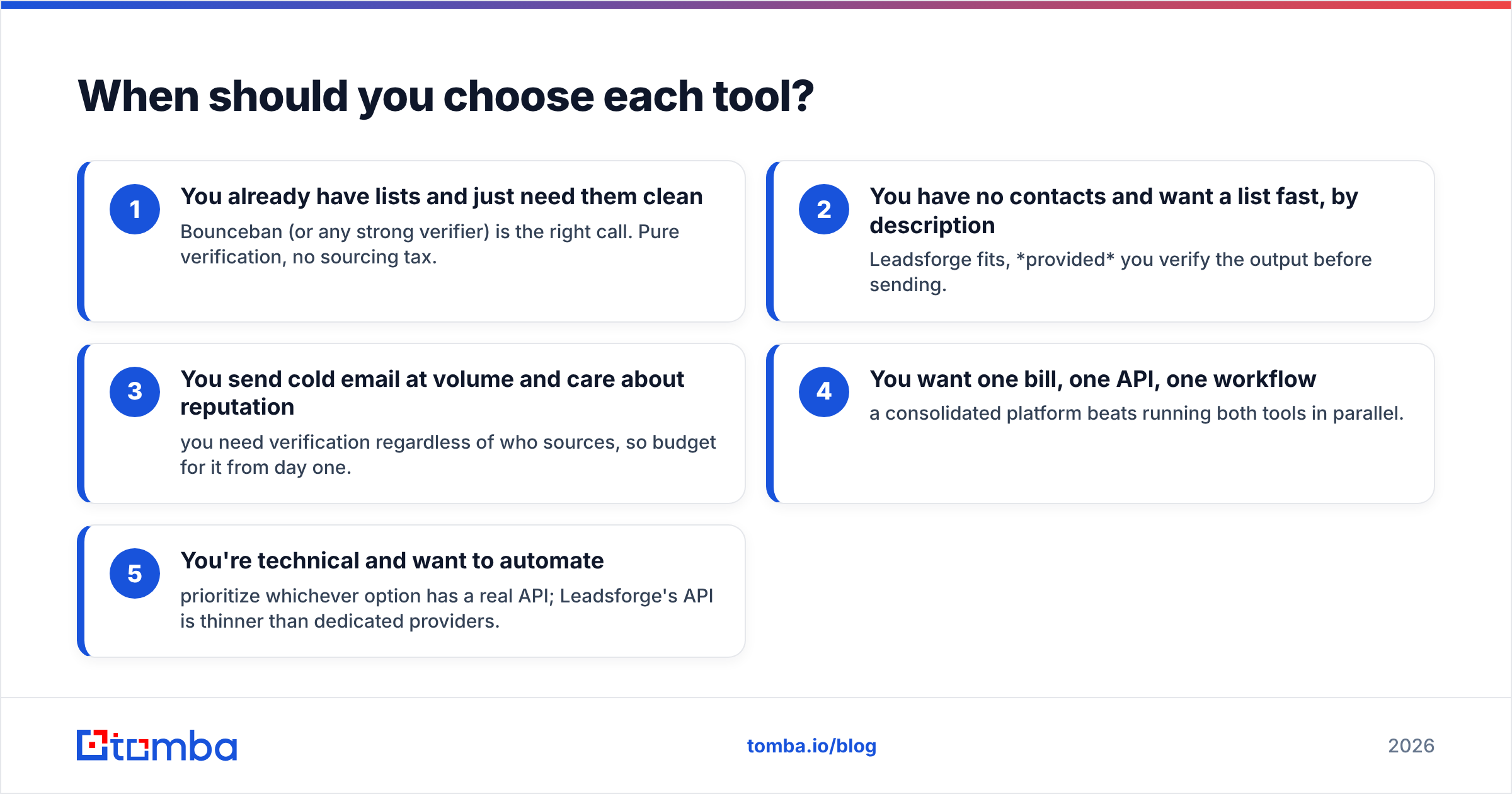
Use this quick decision guide instead of agonizing over feature lists:
- You already have lists and just need them clean — Bounceban (or any strong verifier) is the right call. Pure verification, no sourcing tax.
- You have no contacts and want a list fast, by description — Leadsforge fits, provided you verify the output before sending.
- You send cold email at volume and care about reputation — you need verification regardless of who sources, so budget for it from day one.
- You want one bill, one API, one workflow — a consolidated platform beats running both tools in parallel.
- You're technical and want to automate — prioritize whichever option has a real API; Leadsforge's API is thinner than dedicated providers.
Most teams underestimate point 3. Skipping verification to save money is the single most common cause of a tanked sender domain, and recovery takes weeks.
Is there a single tool that does both?#
Yes — and this is where the two-tool comparison breaks down. If you're evaluating Bounceban vs Leadsforge because you need both sourcing and verification, running two subscriptions is the expensive path. A platform that finds and validates in one flow removes the export-import handoff entirely.
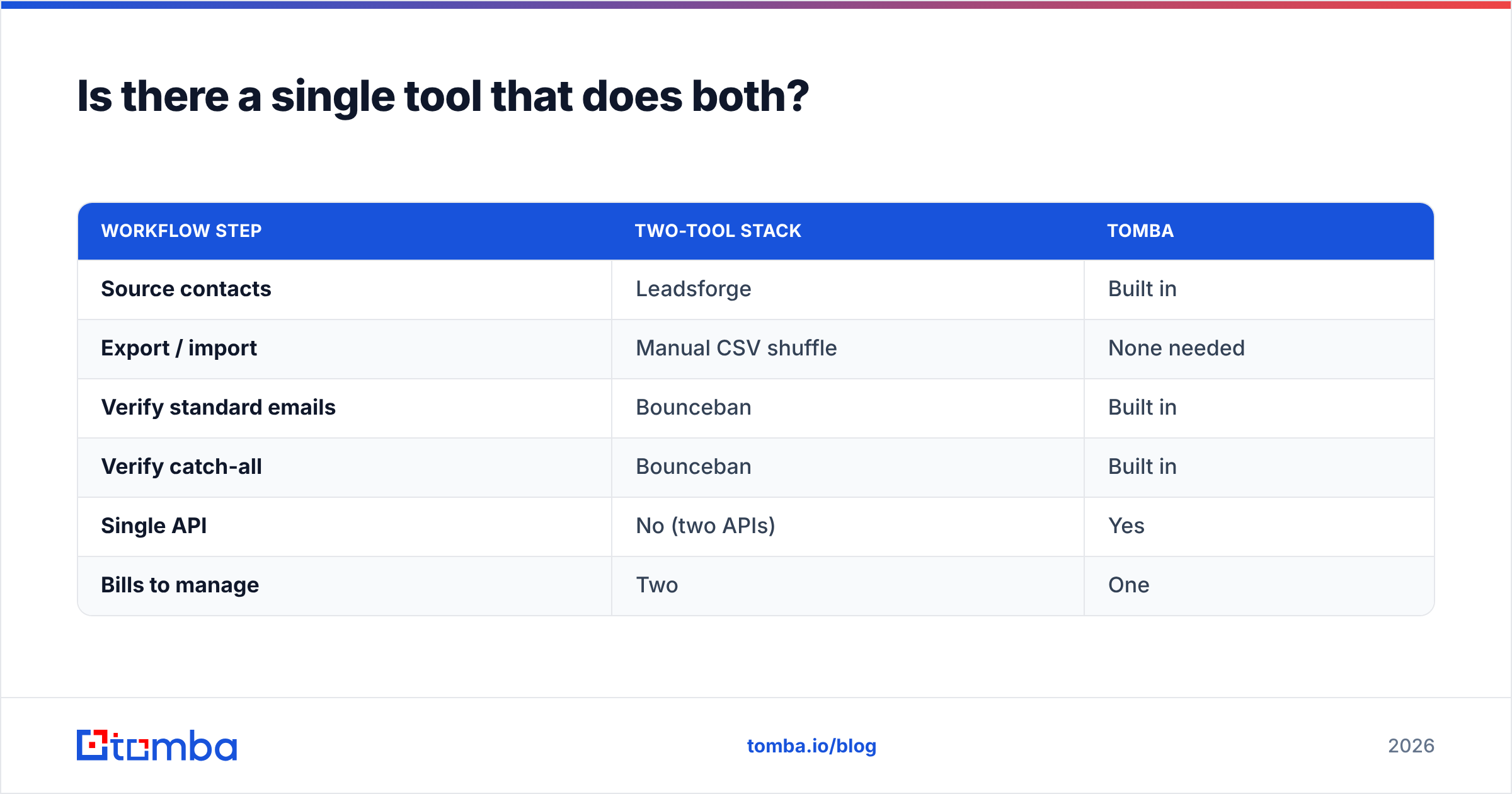
Tomba is built for exactly that loop. You find addresses by domain search or by name, then verify them — including catch-all domains via the dedicated catch-all verifier — without leaving the platform. Here's how the consolidated approach stacks up against the two-tool stack:
| Workflow step | Two-tool stack | Tomba |
|---|---|---|
| Source contacts | Leadsforge | Built in |
| Export / import | Manual CSV shuffle | None needed |
| Verify standard emails | Bounceban | Built in |
| Verify catch-all | Bounceban | Built in |
| Single API | No (two APIs) | Yes |
| Bills to manage | Two | One |
Tomba's pricing also stays predictable: a free tier with 25 searches per month, then paid plans starting at $49/mo (Starter), $99/mo (Growth), and $249/mo (Pro), with custom Enterprise pricing. You're not stacking a per-lead sourcing bill on top of a per-credit verification bill.
For teams that live in spreadsheets or a CRM, the bulk email finder and native integrations mean you can run find-and-verify against thousands of rows without a manual step between tools.
What about deliverability and sender reputation?#
Whichever tool you pick, deliverability is downstream of data quality. A clean, verified list protects your sender reputation; a bloated, unverified one erodes it fast. This is the through-line that connects both products: Leadsforge's value evaporates if its leads bounce, and Bounceban's value is precisely that it prevents those bounces.
If you want a primer on why ISPs weigh bounce rates so heavily, the concept of email bounce handling is well documented. The practical rule of thumb: keep hard bounces under 2%, and verify before every send-heavy campaign rather than once a quarter.
The tools differ, but the discipline doesn't. Source carefully, verify always, send to clean lists only.
The verdict#
Bounceban and Leadsforge aren't really rivals — they're two halves of the same job. Bounceban is the stronger pick if your only problem is verifying lists, especially catch-all-heavy ones. Leadsforge earns its place if you need to spin up a targeted list fast and don't mind verifying separately. Pick Bounceban for cleaning, Leadsforge for sourcing, and accept that choosing one means you'll eventually want the other.
If running two tools sounds like two problems, consolidate. Tomba's Email Finder sources professional emails by domain or name and verifies them — catch-all included — in a single workflow, backed by a full API and a free tier so you can test accuracy on your own list before paying a cent. Start free, find the contacts you need, and send to addresses you've already confirmed are real.
// get started
Find, verify and enrich your first contacts today
Start on the free plan with 25 searches a month, then scale when your team is ready.
Free plan · No credit card required · GDPR & CCPA
// about the author