Bounceban vs Uplead 2026: Which B2B Email Tool Wins?
BounceBan verifies emails; UpLead builds B2B lists. We compare accuracy, pricing, and data coverage so you know which one your pipeline actually needs in 2026.
You typed "bounceban vs uplead" into a search bar because two tools keep showing up in your stack conversations, and you can't tell whether they solve the same problem. They mostly don't. This guide draws the line between them, shows where each one wins, and explains why a lot of teams end up replacing both with a single platform.
TL;DR#
- BounceBan is an email verifier. Its core job is telling you whether an address is deliverable, including the hard case: catch-all domains.
- UpLead is a B2B data platform. Its core job is building contact lists from a database, with verification bundled in as a feature.
- They overlap on one feature (verification) and diverge on everything else. Picking between them depends on whether your bottleneck is finding contacts or cleaning them.
- Pricing models differ sharply — BounceBan leans pay-as-you-go verification credits, UpLead sells monthly contact credits that get expensive at scale.
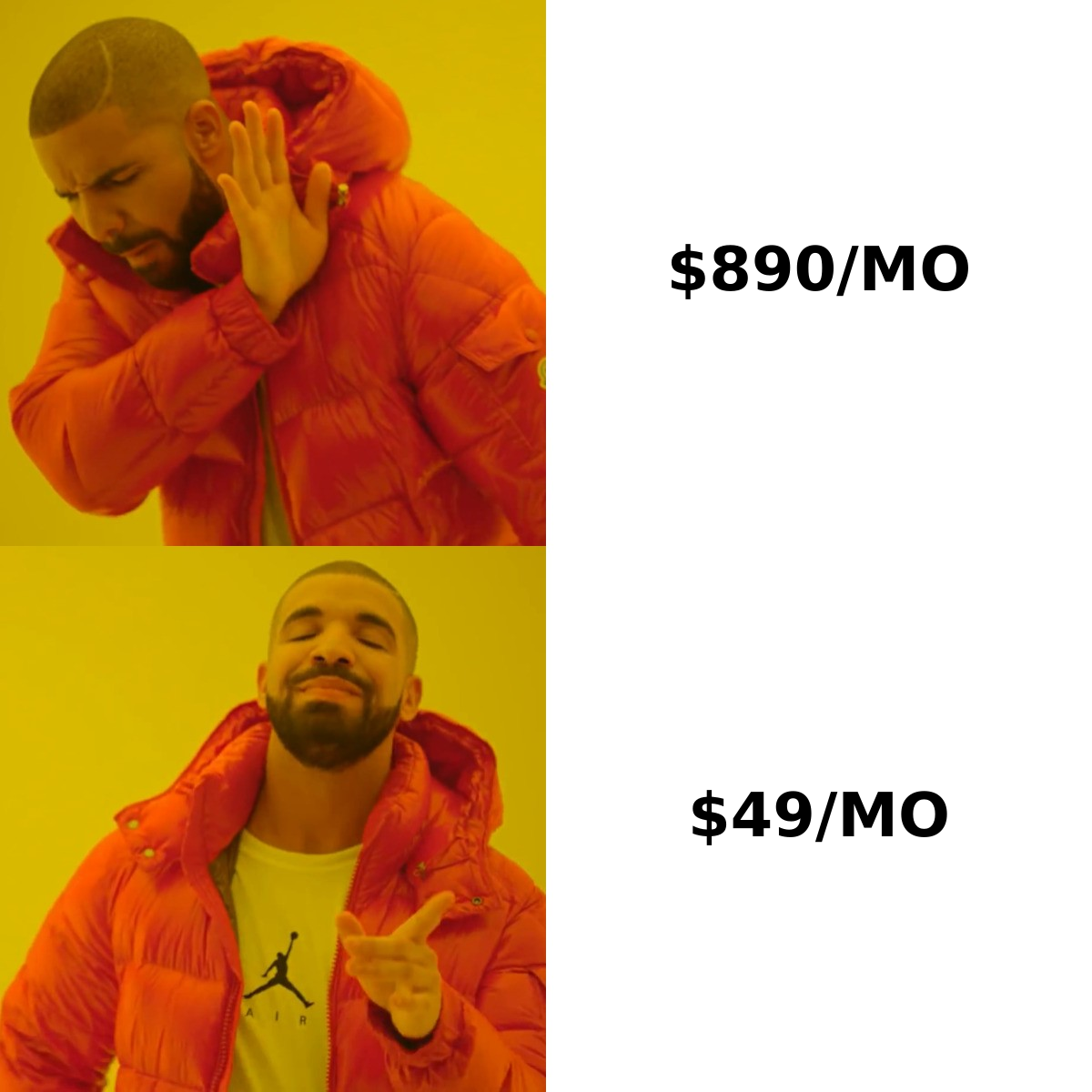
- If you want finding, verifying, and enrichment in one place, a consolidated tool like Tomba covers all three from a single pricing plan starting at $49/mo.
What is BounceBan?#
BounceBan is a dedicated email verification service. You hand it a list of addresses, and it tells you which ones are valid, invalid, risky, or unknown. Its headline differentiator is catch-all verification — the ability to make a confident judgment on domains configured to accept every address at the mail-server level, which most verifiers simply flag as "accept-all" and give up on.
Think of a catch-all domain like a building with no name tags on the mailboxes: the front desk accepts every letter, so a normal verifier can't tell whether "john@" actually reaches a person. BounceBan tries to resolve those cases instead of returning a shrug.
Where BounceBan stops: it does not build your prospect list. It assumes you already have addresses — from a CRM export, a scraper, or another tool — and need them cleaned before you send. That makes it a deliverability instrument, not a lead source. If you want to understand why this matters, the basics of email deliverability explain how bounce rates feed directly into sender reputation.
What is UpLead?#
UpLead is a B2B prospecting and contact database. You filter by industry, title, company size, technology stack, or location, and it returns matching contacts with emails and phone numbers. It advertises real-time email verification at the moment of export, so the records you download are checked before they cost you a credit.
UpLead's value is the database itself: tens of millions of business contacts, intent signals, and technographic filters that help you target accounts likely to buy. Verification is a quality guarantee layered on top — not the product's reason for existing.
Where UpLead stops: it is not a standalone bulk verifier for your existing lists. You generally verify what you pull from UpLead's own data, not a 50,000-row CSV you scraped elsewhere. The two tools sit on opposite ends of the same workflow.

Bounceban vs Uplead: how do they actually compare?#
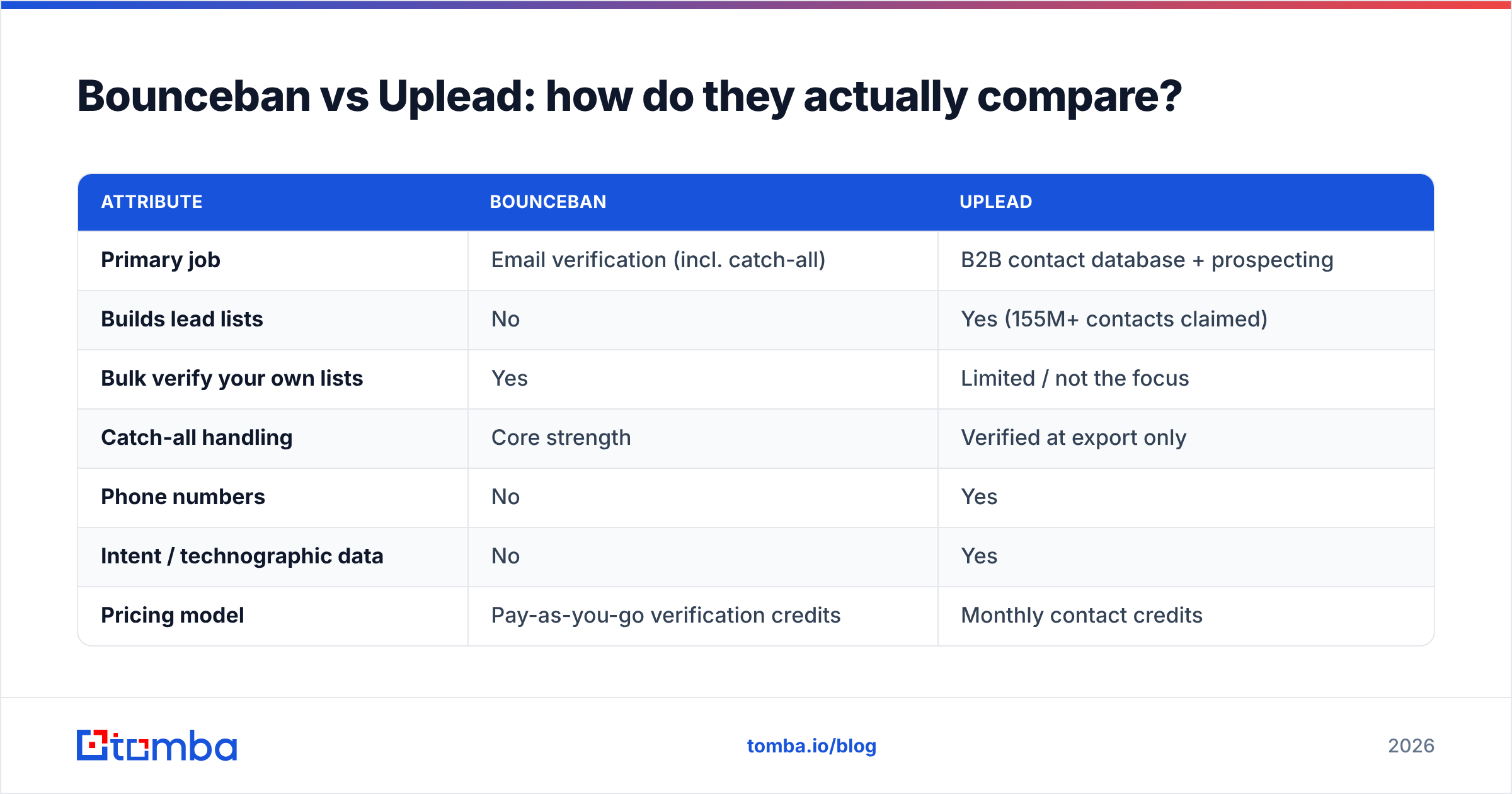
Here is the honest side-by-side. The two products were built for different jobs, so read the "Primary job" row first — it explains every row beneath it.
| Attribute | BounceBan | UpLead |
|---|---|---|
| Primary job | Email verification (incl. catch-all) | B2B contact database + prospecting |
| Builds lead lists | No | Yes (155M+ contacts claimed) |
| Bulk verify your own lists | Yes | Limited / not the focus |
| Catch-all handling | Core strength | Verified at export only |
| Phone numbers | No | Yes |
| Intent / technographic data | No | Yes |
| Pricing model | Pay-as-you-go verification credits | Monthly contact credits |
| Entry price | Low, usage-based | ~$99/mo Essentials tier |
| Best for | Cleaning existing data | Sourcing net-new prospects |
A practical read on this table: if your problem is "I have a list and it's bouncing," BounceBan is the sharper tool. If your problem is "I don't have a list yet," UpLead is the one you actually need. Buying one to do the other's job leads to frustration and wasted spend.
Which one is more accurate?#
Accuracy means two different things here, so don't compare the numbers head to head.
For BounceBan, accuracy is verification precision: what percentage of its valid/invalid verdicts are correct, especially on catch-all domains where guessing is easy and being right is hard. This is its entire pitch, and it tends to do well on that narrow metric.
For UpLead, accuracy is data freshness: how often the contact it hands you still works at the company, and whether the email is current. UpLead leans on real-time verification at export to protect this number, and publishes a high accuracy guarantee on its marketing pages — but a record can be "verified deliverable" and still belong to someone who changed jobs last week.
A few principles to keep your expectations grounded:
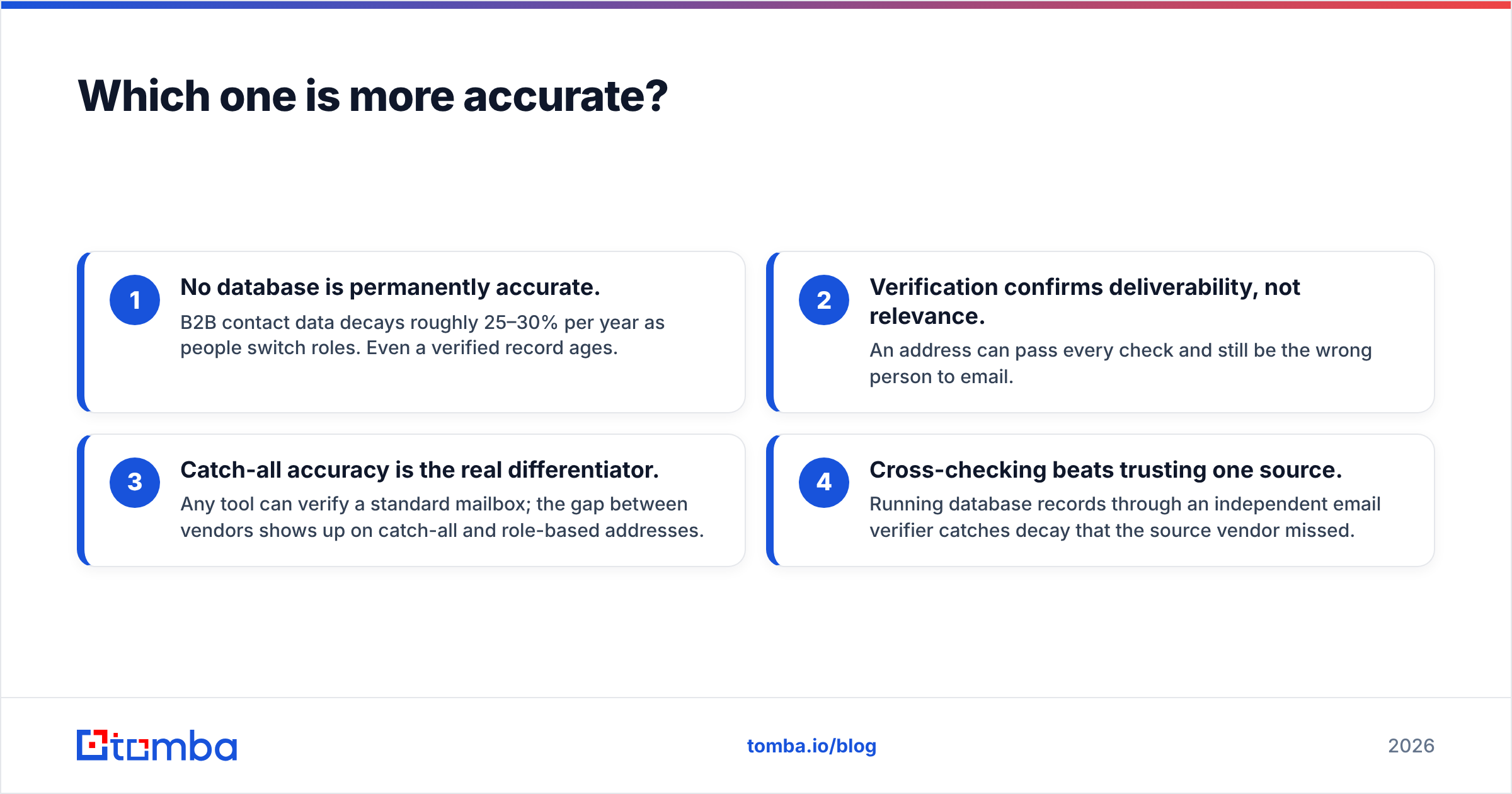
- No database is permanently accurate. B2B contact data decays roughly 25–30% per year as people switch roles. Even a verified record ages.
- Verification confirms deliverability, not relevance. An address can pass every check and still be the wrong person to email.
- Catch-all accuracy is the real differentiator. Any tool can verify a standard mailbox; the gap between vendors shows up on catch-all and role-based addresses.
- Cross-checking beats trusting one source. Running database records through an independent email verifier catches decay that the source vendor missed.
If catch-all domains are your specific headache, look at a dedicated catch-all verifier regardless of which list tool you choose — it's the one verification problem that consistently separates good tools from mediocre ones.
How does pricing compare?#
This is where the two diverge most, and where buyers get surprised.
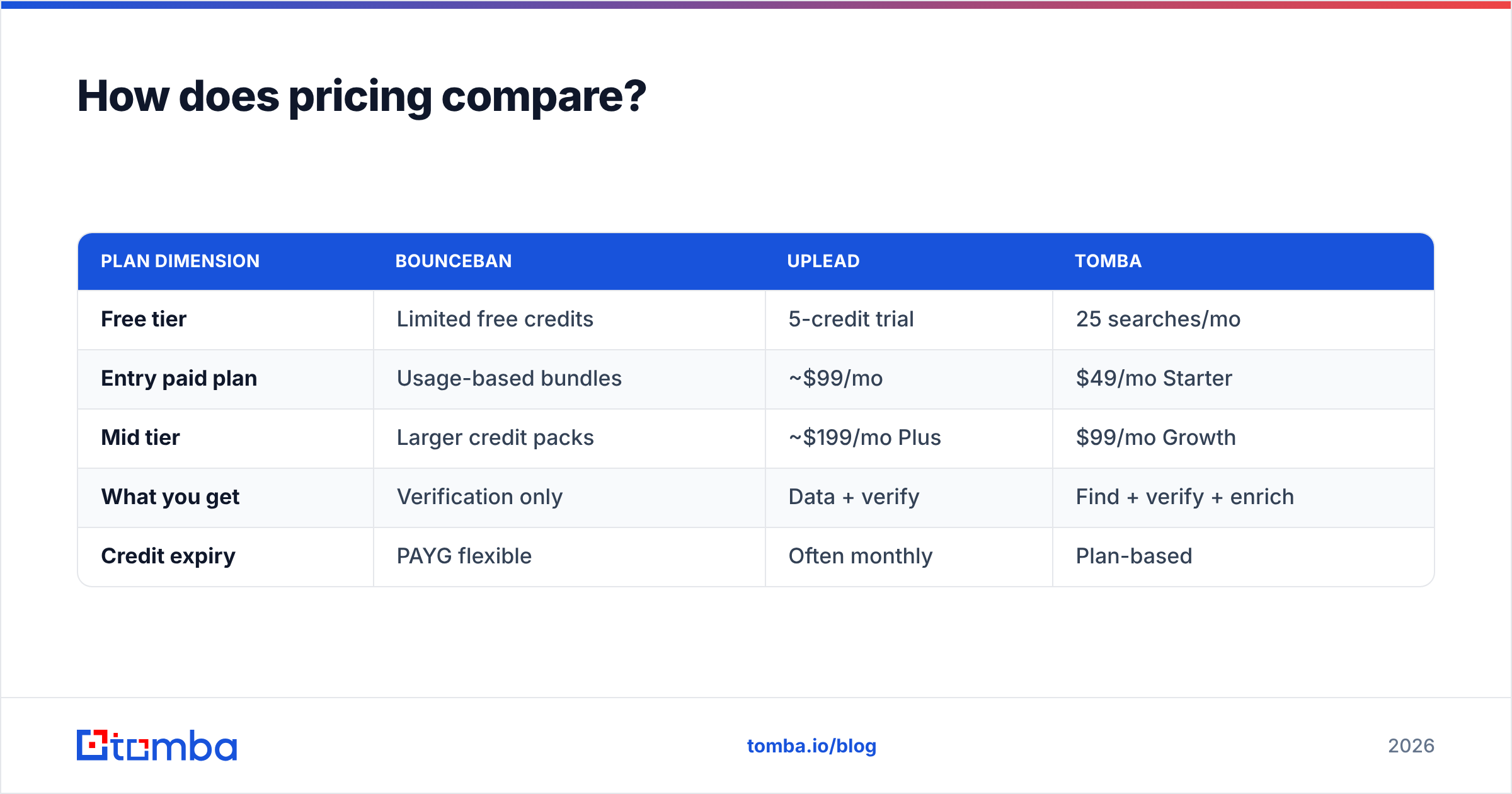
BounceBan uses a verification-credit model: you pay per email checked, often with pay-as-you-go bundles, so cost scales with how much cleaning you do. If you verify in bursts, this is efficient — you're not paying for idle months.
UpLead uses monthly contact credits. Each contact you unlock from the database costs a credit, and plans start around the Essentials tier (~$99/mo) and climb through Plus and custom enterprise pricing as you need more credits, API access, or seats. The trap is that credits expire monthly on many plans, so under-using a big plan wastes money while over-using forces an upgrade.
| Plan dimension | BounceBan | UpLead | Tomba |
|---|---|---|---|
| Free tier | Limited free credits | 5-credit trial | 25 searches/mo |
| Entry paid plan | Usage-based bundles | ~$99/mo | $49/mo Starter |
| Mid tier | Larger credit packs | ~$199/mo Plus | $99/mo Growth |
| What you get | Verification only | Data + verify | Find + verify + enrich |
| Credit expiry | PAYG flexible | Often monthly | Plan-based |
Always confirm current numbers on each vendor's own page before you buy — pricing tiers change. The structural point stands: BounceBan charges for cleaning, UpLead charges for sourcing, and the cost of buying both adds up fast.
Do you actually need both tools?#
Often, yes — and that's the problem. A typical outbound motion needs to find contacts (UpLead's job) and verify them before sending (BounceBan's job). Buying both means two subscriptions, two logins, two billing cycles, and a manual export-import dance between them every time you build a campaign.
That stitched-together workflow is exactly why consolidated platforms exist. If you can get accurate finding, verification, and enrichment under one roof, you remove the integration tax entirely.
Tomba is built for that consolidation. The email finder sources addresses by name, domain, or company; the verifier and catch-all checks clean them in the same flow; and data enrichment fills in the firmographic detail you'd otherwise pull from a separate database. For list building at scale, the B2B database and bulk tools replace the "export from UpLead, import to BounceBan" loop with a single pass.
When should you pick each tool?#
Choose BounceBan if:
- You already have a steady source of contacts and your only pain is bounce rate.
- Catch-all domains make up a large share of your list and other verifiers keep returning "unknown."
- You want pay-as-you-go billing with no monthly commitment.
- You don't need phone numbers, enrichment, or prospecting filters.
Choose UpLead if:
- Your bottleneck is sourcing net-new accounts, not cleaning old ones.
- You rely on intent data and technographic filters to prioritize targets.
- You need phone numbers alongside emails.
- You're comfortable with monthly credit budgeting and the upgrade path that comes with growth.
Choose a consolidated tool like Tomba if:
- You need finding and verification and enrichment without juggling vendors.
- You want predictable pricing that doesn't punish you for verifying your own lists.
- You'd rather hit one email finder API than wire two products together.
How do data sources affect the result?#
The quality of any list tool comes down to where the data originates and how recently it was checked. UpLead aggregates from multiple business data partners and public sources, then verifies on export. BounceBan doesn't source data at all — its quality is purely about verification logic against live mail servers.
When you're evaluating any vendor in this space, ask three questions: where does the data come from, how often is it refreshed, and is verification real-time or cached? A cached "verified" flag from six months ago is nearly worthless. This is why transparency about data sources matters more than a headline accuracy percentage on a landing page. Cross-reference vendor claims on a neutral review site like G2 before committing budget — marketing pages and real user reports often tell different stories.
What does a clean workflow look like?#
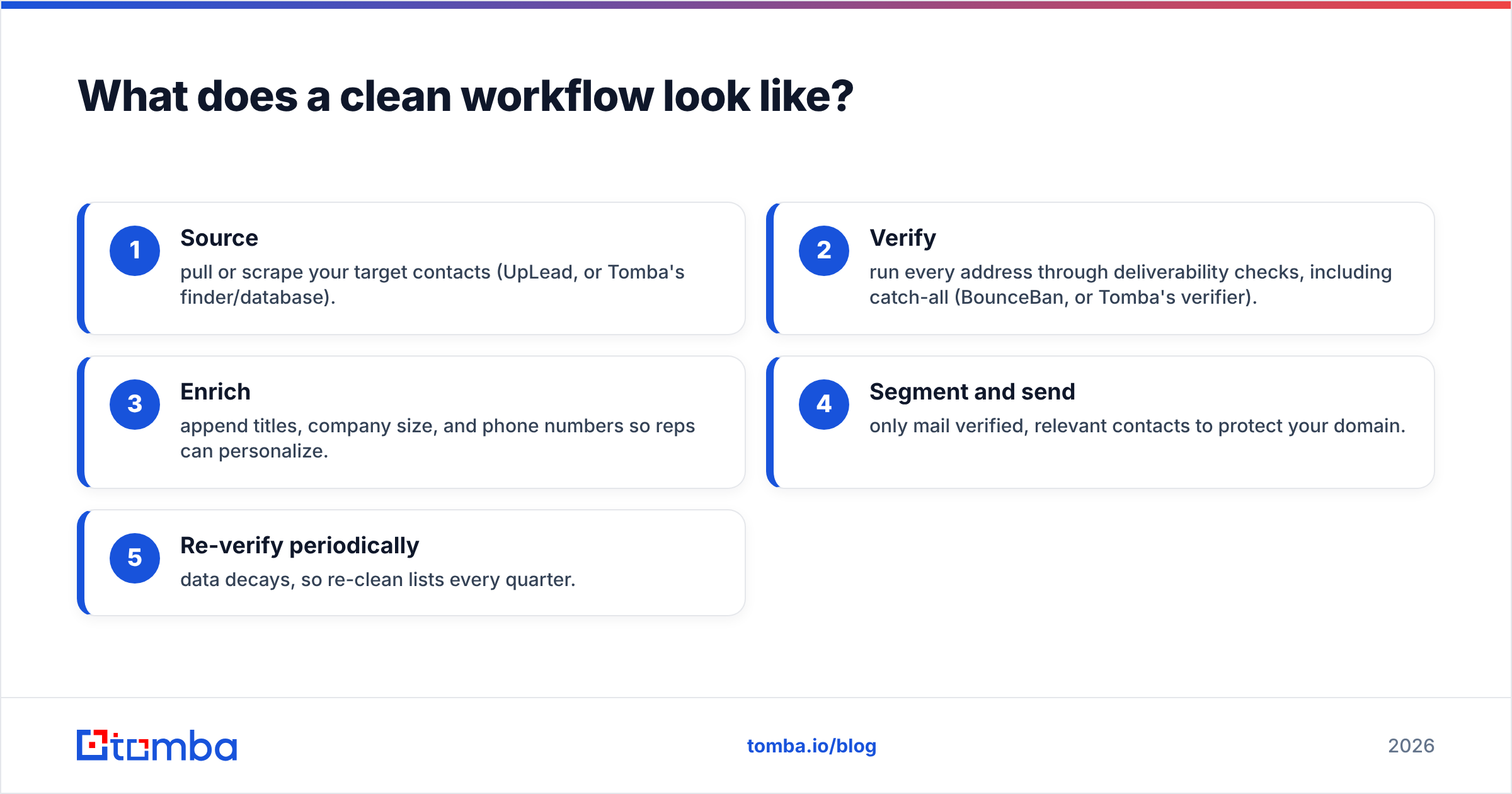
Whichever tools you land on, the sequence is the same:
- Source — pull or scrape your target contacts (UpLead, or Tomba's finder/database).
- Verify — run every address through deliverability checks, including catch-all (BounceBan, or Tomba's verifier).
- Enrich — append titles, company size, and phone numbers so reps can personalize.
- Segment and send — only mail verified, relevant contacts to protect your domain.
- Re-verify periodically — data decays, so re-clean lists every quarter.
The fewer handoffs between steps, the fewer addresses leak through unverified. That's the entire argument for consolidation: every export-import boundary is a place where bad data sneaks into your sends and quietly damages your response rate.
The verdict on bounceban vs uplead#
They aren't really competitors — they're two stages of one pipeline. BounceBan is the better pick if cleaning existing data (especially catch-all domains) is your only problem. UpLead is the better pick if sourcing fresh, filterable B2B contacts is the bottleneck. Buying both works, but you'll pay two bills and manage a manual handoff between them.
If that handoff sounds like overhead you'd rather skip, start with the Tomba Email Finder. It finds professional emails by domain, name, or company, verifies them — catch-all included — and enriches the records in the same workflow, from one plan that begins at $49/mo. Run your next list through the free tier first, see the accuracy for yourself, and decide whether you still need two separate tools at all.
// get started
Find, verify and enrich your first contacts today
Start on the free plan with 25 searches a month, then scale when your team is ready.
Free plan · No credit card required · GDPR & CCPA
// about the author