Bounced Email Checker: How to Stop Email Bounces in 2026
A bounced email checker spots dead, invalid, and risky addresses before you hit send. Here's how bounce checking works and how to keep your bounce rate under 2% in 2026.
Bounced Email Checker: How to Stop Email Bounces in 2026
TL;DR
- A bounced email checker tests an address before you send it, flagging invalid mailboxes, dead domains, and risky catch-alls so they never trigger a bounce.
- Bounce rate is one of the loudest signals mailbox providers use to judge your sender reputation. Push past ~2% and Gmail or Outlook start throttling or junking everything you send.
- Hard bounces (permanent failures) hurt far more than soft bounces (temporary issues) — and a good checker tells the two apart before send, not after.
- Cleaning a list before a campaign is cheaper and safer than burning your domain reputation and rebuilding it for months.
- Tomba's email verifier and bulk tools let you scrub a full list, catch-alls included, before the first send.
If you have ever watched a campaign report fill up with "address not found" replies, you already know the cost of skipping this step. A bounced email checker is the seatbelt you put on before the crash, not the ambulance you call after. Let's break down how it works and how to keep your bounce rate boring.
What is a bounced email checker?#
A bounced email checker is a tool that predicts whether an email will fail to deliver — before you ever press send. Think of it like a bouncer at a club checking IDs at the door instead of letting everyone in and dragging out the troublemakers later. The bad addresses never get on your list in the first place.
Technically, the checker runs a series of validations against each address: it confirms the syntax is legal, that the domain exists and has live mail servers (MX records), and then opens an SMTP conversation with that server to ask, "Does this mailbox actually exist?" — without sending a real message. The server's response tells the checker whether the address is deliverable, undeliverable, or uncertain.
That last bucket matters. Real-world inboxes are messy, so a quality checker returns more than a yes/no:
- Deliverable — the mailbox exists and accepts mail. Safe to send.
- Undeliverable — the mailbox or domain is dead. This is a guaranteed hard bounce; remove it.
- Risky / catch-all — the domain accepts everything at the SMTP layer, so existence can't be confirmed. Send with caution or verify deeper.
- Unknown — the server timed out or blocked the probe. Re-check later before trusting it.
- Role / disposable — addresses like
info@or temporary inboxes that inflate bounce and spam risk.

You feed in a list, the checker sorts it into those buckets, and you send only to the clean ones. If you want to test the workflow on a single address first, a free email checker shows you exactly what the SMTP handshake returns.
Why do email bounces hurt your sender reputation?#
Bounces hurt because mailbox providers treat them as evidence that you don't know who you're emailing — and senders who don't know their audience tend to be spammers. A high bounce rate is the fastest way to tell Gmail "throttle me."
Here's the everyday analogy: imagine mailing physical letters where 1 in 10 comes back marked "no such person." The post office would start wondering if you bought a junk mailing list. Inbox providers run the same logic, automatically and at scale. Every hard bounce chips away at your sender reputation, and once that score drops, even your valid recipients stop seeing you in the primary inbox.
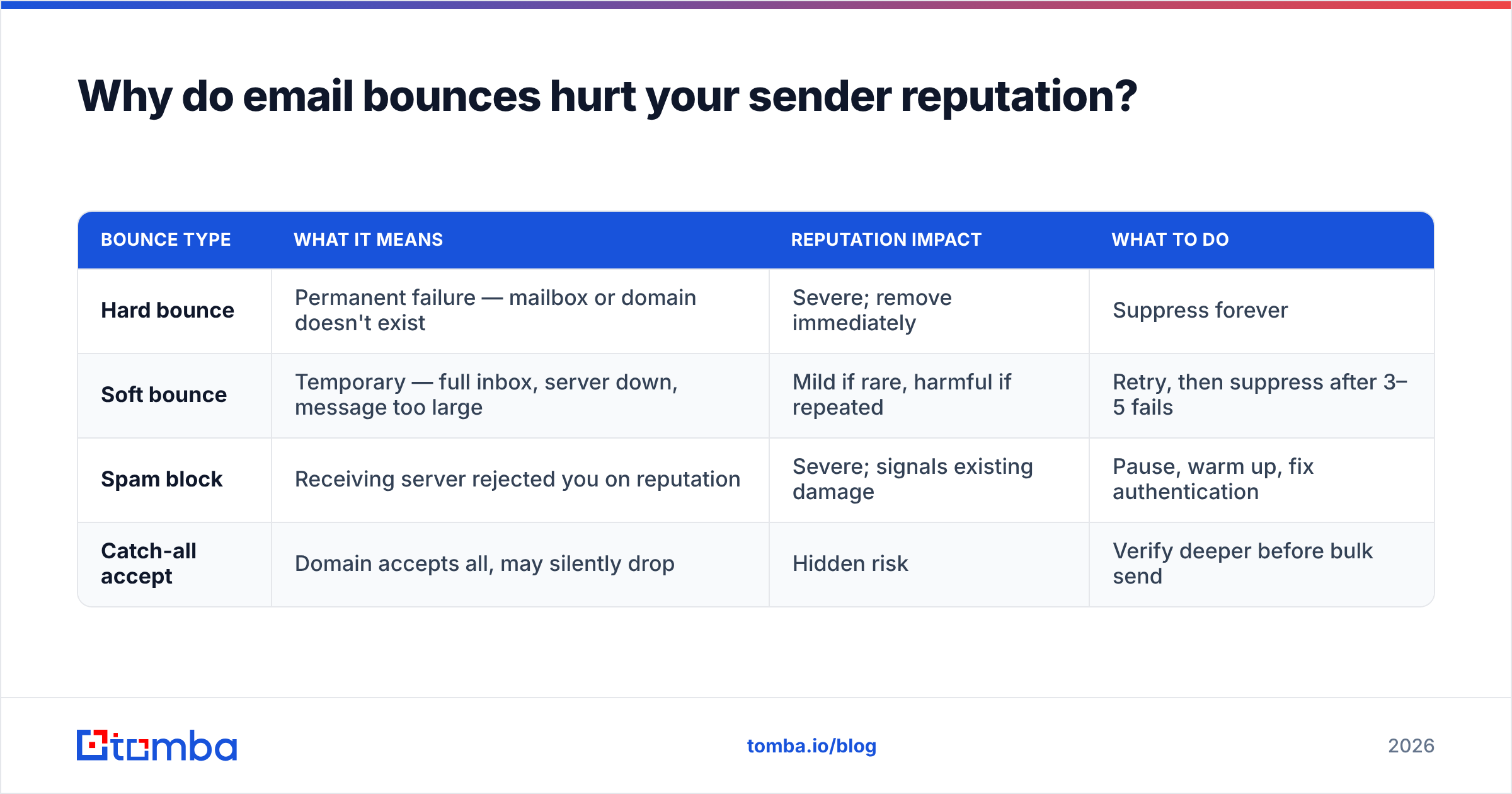
There are two kinds of bounce, and the distinction drives everything:
| Bounce type | What it means | Reputation impact | What to do |
|---|---|---|---|
| Hard bounce | Permanent failure — mailbox or domain doesn't exist | Severe; remove immediately | Suppress forever |
| Soft bounce | Temporary — full inbox, server down, message too large | Mild if rare, harmful if repeated | Retry, then suppress after 3–5 fails |
| Spam block | Receiving server rejected you on reputation | Severe; signals existing damage | Pause, warm up, fix authentication |
| Catch-all accept | Domain accepts all, may silently drop | Hidden risk | Verify deeper before bulk send |
Most email platforms — including HubSpot and the major ESPs — recommend keeping your bounce rate under 2%, and some start restricting accounts above 5%. A bounced email checker is how you stay on the safe side of that line without guessing.
How does bounce checking actually work under the hood?#
Bounce checking works by simulating the first half of an email delivery and reading the server's reaction. No message is ever delivered, but the receiving server reveals whether it would accept one.
A robust checker runs these layers in order, stopping early when a stage fails:
- Syntax check — Is the address structurally valid per RFC rules? Catches typos like
name@gmail,com. - Domain & MX lookup — Does the domain resolve, and does it publish mail-exchange records? No MX, no mailbox.
- SMTP probe — The checker connects to the mail server and issues
RCPT TOto ask if the mailbox exists, then disconnects before sending data. - Catch-all detection — It tests a random fake address on the domain. If the server accepts that too, the domain is catch-all and individual results are uncertain.
- Role and disposable filtering — Flags shared inboxes and throwaway domains that historically bounce or complain.
The tricky part is the catch-all. Roughly a third of business domains are configured to accept any address at the gateway and sort it later, which defeats the simple SMTP probe. That's why dedicated tooling matters — a catch-all verifier uses additional signals and historical data to estimate whether a catch-all address is actually safe, instead of throwing up its hands.
Speed and accuracy trade off here. Aggressive probing gets blocked by providers like Google and Microsoft that rate-limit verification traffic, so quality checkers blend live SMTP checks with a large historical database of known-good and known-bad addresses. That's the difference between a checker that confirms 70% of a list and one that confirms 95%.
When should you run a bounced email checker?#
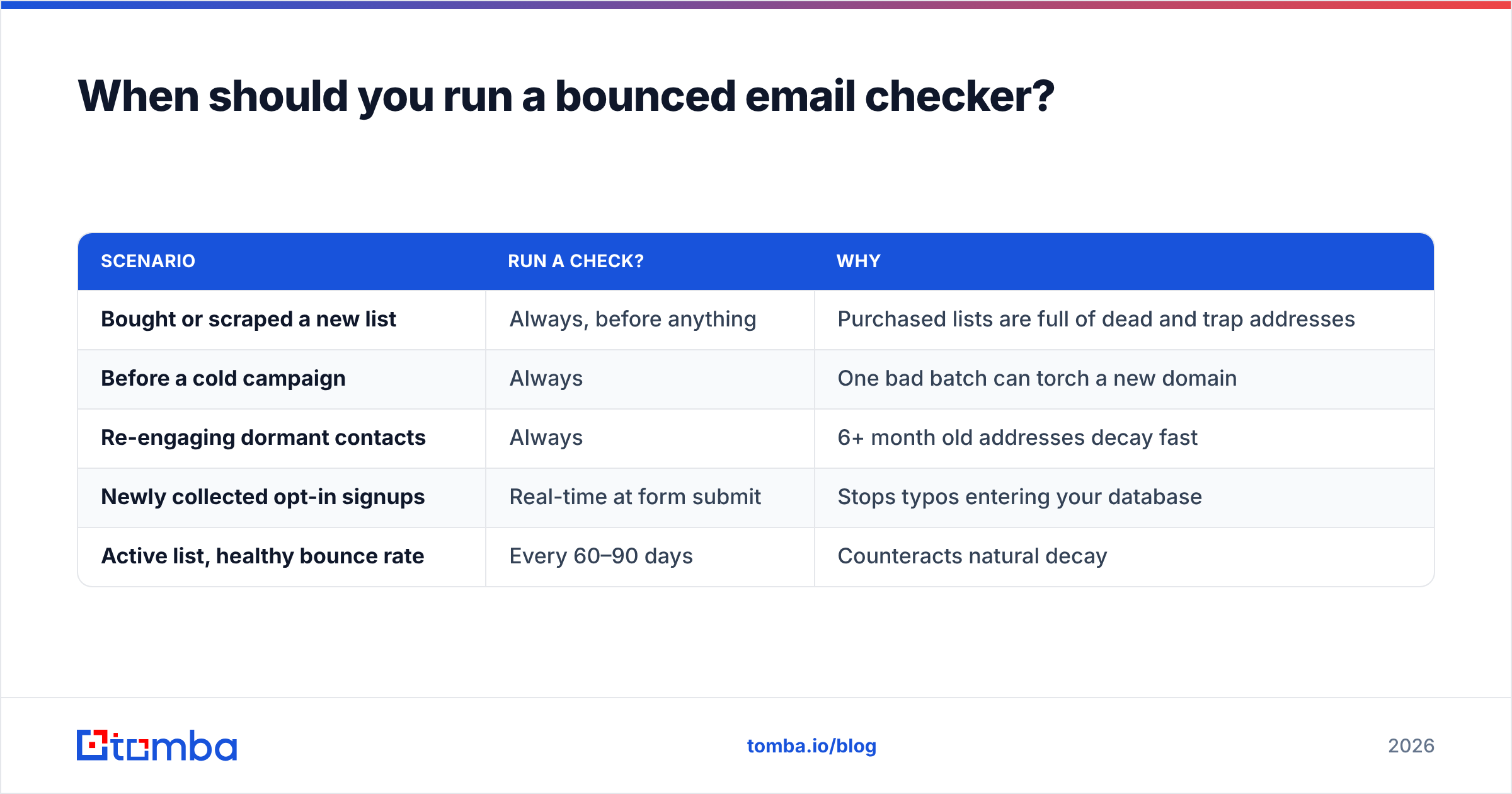
Run a bounced email checker at three moments: when you acquire a list, right before any campaign, and on a recurring schedule for your active database. Email data decays about 2–3% per month as people change jobs, so even a clean list goes stale.
| Scenario | Run a check? | Why |
|---|---|---|
| Bought or scraped a new list | Always, before anything | Purchased lists are full of dead and trap addresses |
| Before a cold campaign | Always | One bad batch can torch a new domain |
| Re-engaging dormant contacts | Always | 6+ month old addresses decay fast |
| Newly collected opt-in signups | Real-time at form submit | Stops typos entering your database |
| Active list, healthy bounce rate | Every 60–90 days | Counteracts natural decay |
The highest-leverage moment is at the point of capture. Wiring a checker into your signup form or CRM means bad addresses never enter your database, so you're not cleaning up the same mess every quarter. For everything else — imported lists, prospecting exports, re-engagement pushes — a bulk verify pass before send is the routine that keeps your reputation intact.
If you're building lists from scratch rather than cleaning existing ones, pairing verification with an accurate email finder means the addresses arrive pre-validated, and you skip a separate cleaning step entirely.

How do you choose a bounced email checker in 2026?#
Choose based on accuracy, catch-all handling, speed, and how the tool fits your existing stack — not on the cheapest per-address price. A checker that's 80% accurate at half the cost still lets bounces through, and bounces are the expensive part.
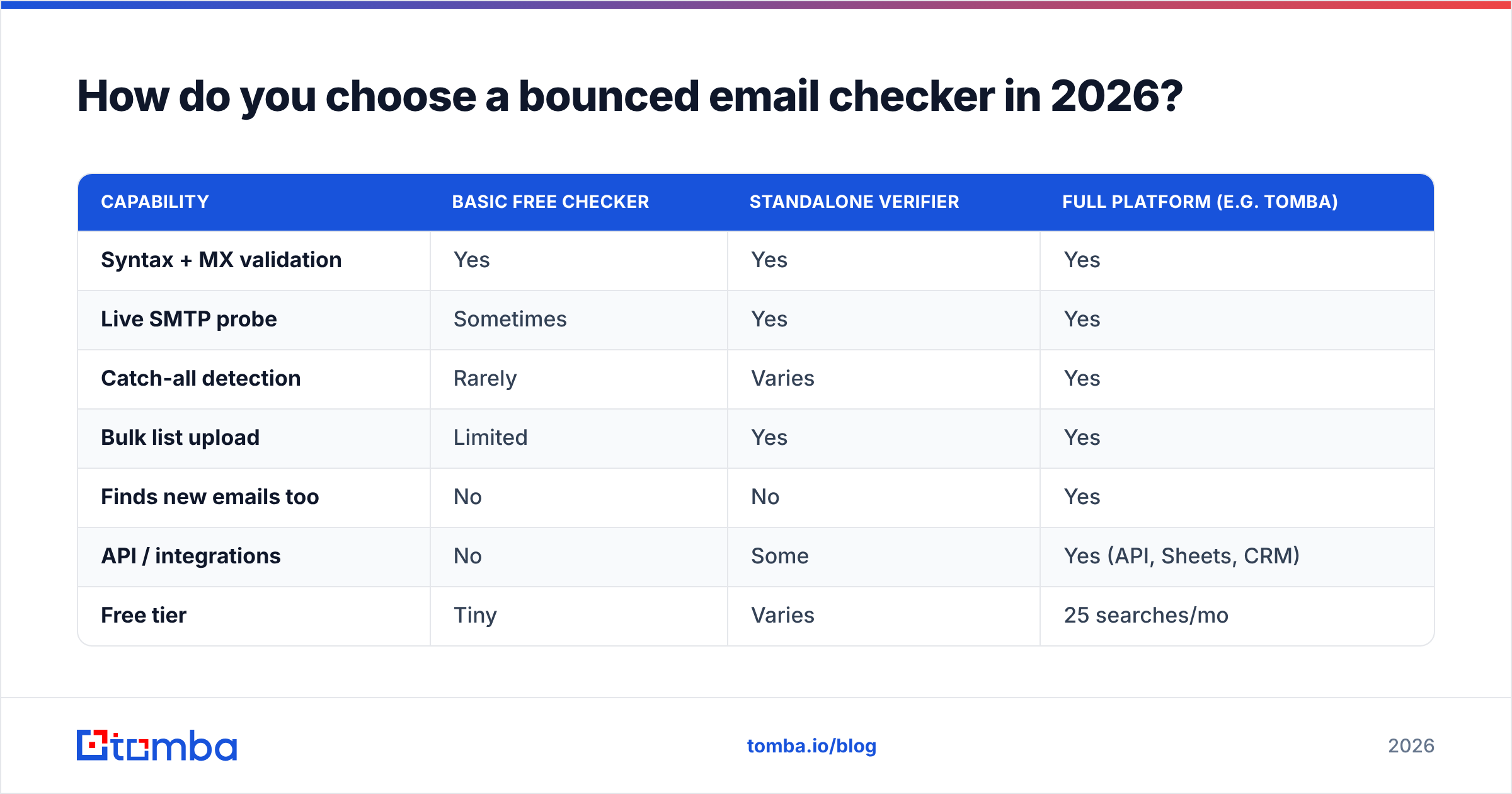
Here's how the main approaches stack up:
| Capability | Basic free checker | Standalone verifier | Full platform (e.g. Tomba) |
|---|---|---|---|
| Syntax + MX validation | Yes | Yes | Yes |
| Live SMTP probe | Sometimes | Yes | Yes |
| Catch-all detection | Rarely | Varies | Yes |
| Bulk list upload | Limited | Yes | Yes |
| Finds new emails too | No | No | Yes |
| API / integrations | No | Some | Yes (API, Sheets, CRM) |
| Free tier | Tiny | Varies | 25 searches/mo |
| Entry paid price | — | $20–$50/mo | $49/mo |
A few buying rules that save regret:
- Demand transparent accuracy claims. Cross-check vendor numbers against independent reviews on G2 before trusting marketing pages.
- Test catch-all handling specifically. Run a known catch-all domain through the trial. If everything comes back "unknown," the tool isn't doing the hard work.
- Check the integration path. A verifier you have to manually export and re-import is one you'll stop using. Look for a native API, Sheets add-on, or CRM connection.
- Match the plan to volume. Don't overbuy. Review the Tomba pricing tiers — Free for testing, Starter at $49/mo, Growth at $99/mo — against your real monthly send volume.
For teams that both find and verify contacts, a combined platform removes the seam between sourcing and cleaning. Tomba's email verifier shares the same data backbone as its finder, so an address you discover is checked against the same intelligence used to validate it.
What bounce rate should you actually aim for?#
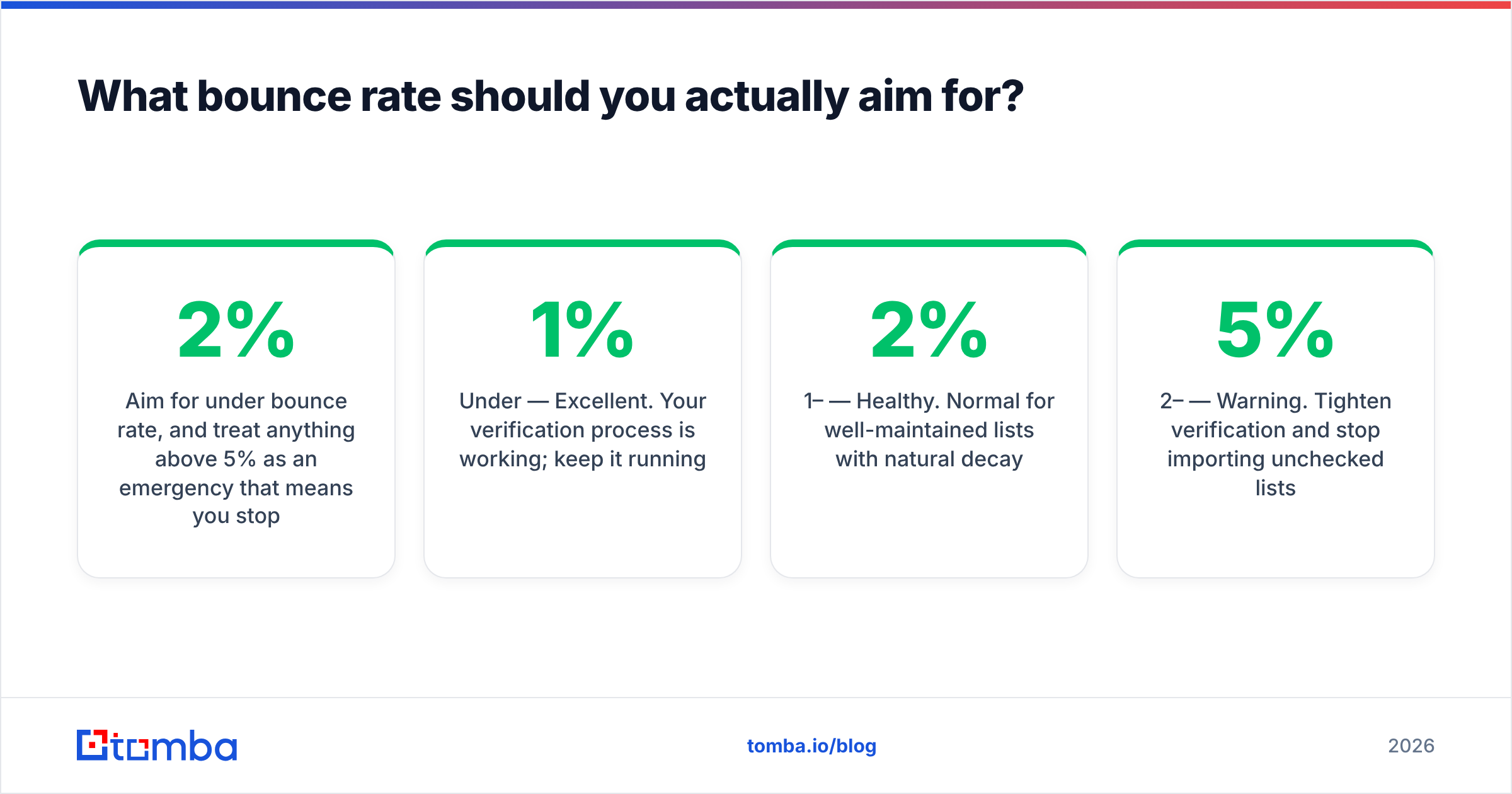
Aim for under 2% bounce rate, and treat anything above 5% as an emergency that means you stopped checking your lists. The lower the number, the more headroom you have with mailbox providers.
A practical scorecard:
- Under 1% — Excellent. Your verification process is working; keep it running.
- 1–2% — Healthy. Normal for well-maintained lists with natural decay.
- 2–5% — Warning. Tighten verification and stop importing unchecked lists.
- Over 5% — Critical. Pause sending, scrub everything, and check your SPF record and authentication before resuming.
Bounce rate never travels alone. It moves with email deliverability as a whole — authentication, content, sending volume, and engagement all feed the same reputation score. But of all those levers, bounce rate is the one you can fix before sending a single message, which makes it the cheapest win available. Monitor it alongside your delivery data in tools like Google Postmaster Tools so you catch a climbing trend before it becomes a deliverability crisis.
The mental model: verification is preventive medicine. Spending a few cents per address to confirm deliverability is trivial next to the months it takes to rehabilitate a domain that providers have learned to distrust.
Common bounce mistakes to avoid#
Most bounce problems come from a handful of avoidable habits. Skip these and you'll stay out of trouble:
- Sending to a list you never verified. The single biggest cause of bounce spikes. Always check first.
- Ignoring soft bounces. A soft bounce that fails repeatedly is a hard bounce wearing a disguise. Suppress after a few retries.
- Treating catch-alls as safe. They're not confirmed deliverable. Verify deeper or segment them separately.
- Mailing role addresses.
sales@,info@, andadmin@bounce and complain more than personal mailboxes. - Cleaning once and forgetting. Decay is constant. A list verified a year ago is a list of guesses today.
- Blaming content for a reputation problem. If your bounce rate is high, no subject-line tweak will save your inbox placement.
The bottom line#
A bounced email checker is the lowest-effort, highest-return habit in email marketing. It converts an invisible, expensive problem — quietly torched deliverability — into a visible, fixable one you handle before send. Verify on capture, verify before every campaign, and re-verify your active list every couple of months, and your bounce rate stops being something you worry about.
Ready to scrub your list before the next send? Start with Tomba's Email Finder to source accurate, pre-validated contacts, then run your existing list through the bulk verifier to catch every dead address before it bounces. The free tier gives you 25 searches a month to test it on your own data — no reason to keep guessing when you can check.
// get started
Find, verify and enrich your first contacts today
Start on the free plan with 25 searches a month, then scale when your team is ready.
Free plan · No credit card required · GDPR & CCPA
// about the author