Bounceless vs Findymail 2026: Which Email Tool Wins?
Bounceless verifies, Findymail finds — but which one actually protects your sender reputation and fills your pipeline in 2026? A neutral, side-by-side breakdown.
Choosing between Bounceless and Findymail feels like a head-to-head, but it usually isn't. One verifies email lists; the other finds new emails. Buying one when you needed the other is the most expensive mistake teams make here. This breakdown shows you which job each tool actually does, where they overlap, and when a single all-in-one platform beats running two subscriptions.
TL;DR#
- Bounceless is a verifier. It cleans existing lists, checks deliverability, and lowers bounce rates. It does not find new contacts.
- Findymail is a finder. It pulls verified work emails from LinkedIn and company domains, with light built-in verification on top.
- They solve different problems. If you compare them feature-for-feature you'll overpay for half a workflow either way.
- The real question is "find + verify in one place." That's where a consolidated platform like Tomba Email Finder changes the math.
- Budget guide: Findymail starts around $49/mo, Bounceless is pay-as-you-go credits, and running both quickly passes $100/mo for modest volume.
What is Bounceless?#
Bounceless is an email verification service. You upload a list you already have — exports from a CRM, a scraped sheet, an old newsletter database — and it runs each address through SMTP checks, syntax validation, MX-record lookups, and spam-trap and disposable-domain detection. You get back a scored list: deliverable, risky, or undeliverable.
The point of a verifier is protecting your sender reputation. Every hard bounce tells inbox providers your data is dirty, and enough of them push your future mail to spam. Bounceless exists to keep your bounce rate under the ~2% threshold most teams aim for before a send.
What Bounceless does not do is generate contacts. Hand it an empty sheet and it has nothing to work with. It's a cleanup layer, not a sourcing layer.

What is Findymail?#
Findymail is an email finder built primarily for sales teams who live in LinkedIn and Sales Navigator. You point it at a profile, a list, or a company domain, and it returns the person's work email. Its calling card is a verification step baked into the find — Findymail markets itself on returning emails that are already validated, so you bounce less without a separate tool.
It leans heavily on integrations: a Chrome extension for LinkedIn, a Sales Navigator list exporter, and native pushes into CRMs and sequencers. For a rep building a prospect list one account at a time, that workflow is tight.
The trade-off is scope. Findymail is excellent at the LinkedIn-to-email motion and lighter on bulk domain research, data enrichment beyond email, or phone numbers. It finds and lightly verifies; it doesn't deeply enrich.
Bounceless vs Findymail: what's the core difference?#
Here's the conclusion first: these tools sit on opposite ends of the same pipeline. You find a contact, then you verify it. Findymail handles the first step (and a bit of the second). Bounceless handles the second step at scale, on data from anywhere.
Think of it like a kitchen. Findymail is the grocery run — it brings home ingredients (contacts). Bounceless is the quality check at the counter — it throws out anything spoiled before you cook (send). You can't replace one with the other; a fridge full of food you never inspected still gives you food poisoning, and a spotless empty fridge still leaves you hungry.
That framing matters because most "Bounceless vs Findymail" searches are really one of two questions in disguise:
- "My list bounces — what cleans it?" → That's a verifier job. Bounceless qualifies; so does a dedicated verifier.
- "I have no list — what builds it?" → That's a finder job. Findymail qualifies; so does a dedicated finder.
If you need both — and most outbound teams do — you're looking at two tools, two bills, and two data formats to reconcile.
Wait — that image is a placeholder for the comparison meme below.
)
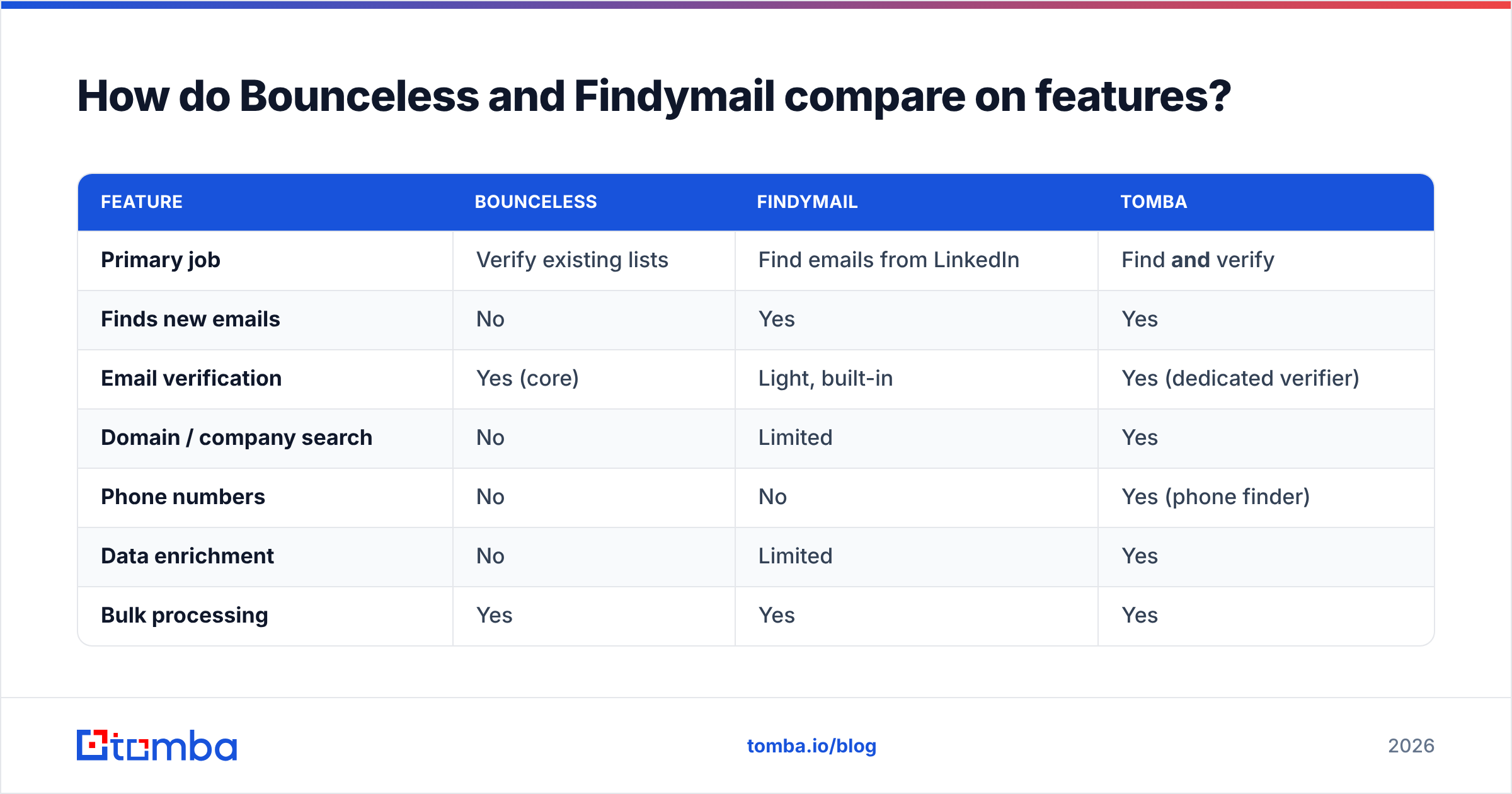
How do Bounceless and Findymail compare on features?#
| Feature | Bounceless | Findymail | Tomba |
|---|---|---|---|
| Primary job | Verify existing lists | Find emails from LinkedIn | Find and verify |
| Finds new emails | No | Yes | Yes |
| Email verification | Yes (core) | Light, built-in | Yes (dedicated verifier) |
| Domain / company search | No | Limited | Yes |
| Phone numbers | No | No | Yes (phone finder) |
| Data enrichment | No | Limited | Yes |
| Bulk processing | Yes | Yes | Yes |
| Catch-all handling | Detects | Detects | Dedicated catch-all verifier |
| Free tier | Trial credits | Limited trial | 25 searches/mo |
| API access | Yes | Yes | Yes |
The pattern is clear: Bounceless and Findymail each own one column well and leave the others blank. The gaps aren't accidental — they're the product boundary. A finder isn't trying to be a verification suite, and a verifier isn't trying to source contacts.
Which one is more accurate?#
Accuracy means different things for each tool, so judge them on their own job.
For Bounceless, accuracy is verification precision: does a "deliverable" verdict actually deliver, and does it avoid flagging good addresses as bad? Dedicated verifiers compete hard here, and the honest answer is that all reputable ones — Bounceless included — land in a similar high-90s range on clean B2B data. The differentiator is catch-all handling, where SMTP checks return ambiguous results and tools diverge.
For Findymail, accuracy is find rate and email validity: of the prospects you search, how many return a real, currently-valid work email? Findymail's built-in verification helps its validity numbers, but find rate on harder personas (non-LinkedIn-active, smaller companies, international domains) is where any finder shows its data ceiling.

The takeaway: you can't compare their accuracy numbers directly because they measure different things. A 98% verification accuracy and a 65% find rate aren't the same metric. What you can compare is whether one tool forces you to trust a second vendor's verdict on the first vendor's data — which is exactly the seam where errors creep in.
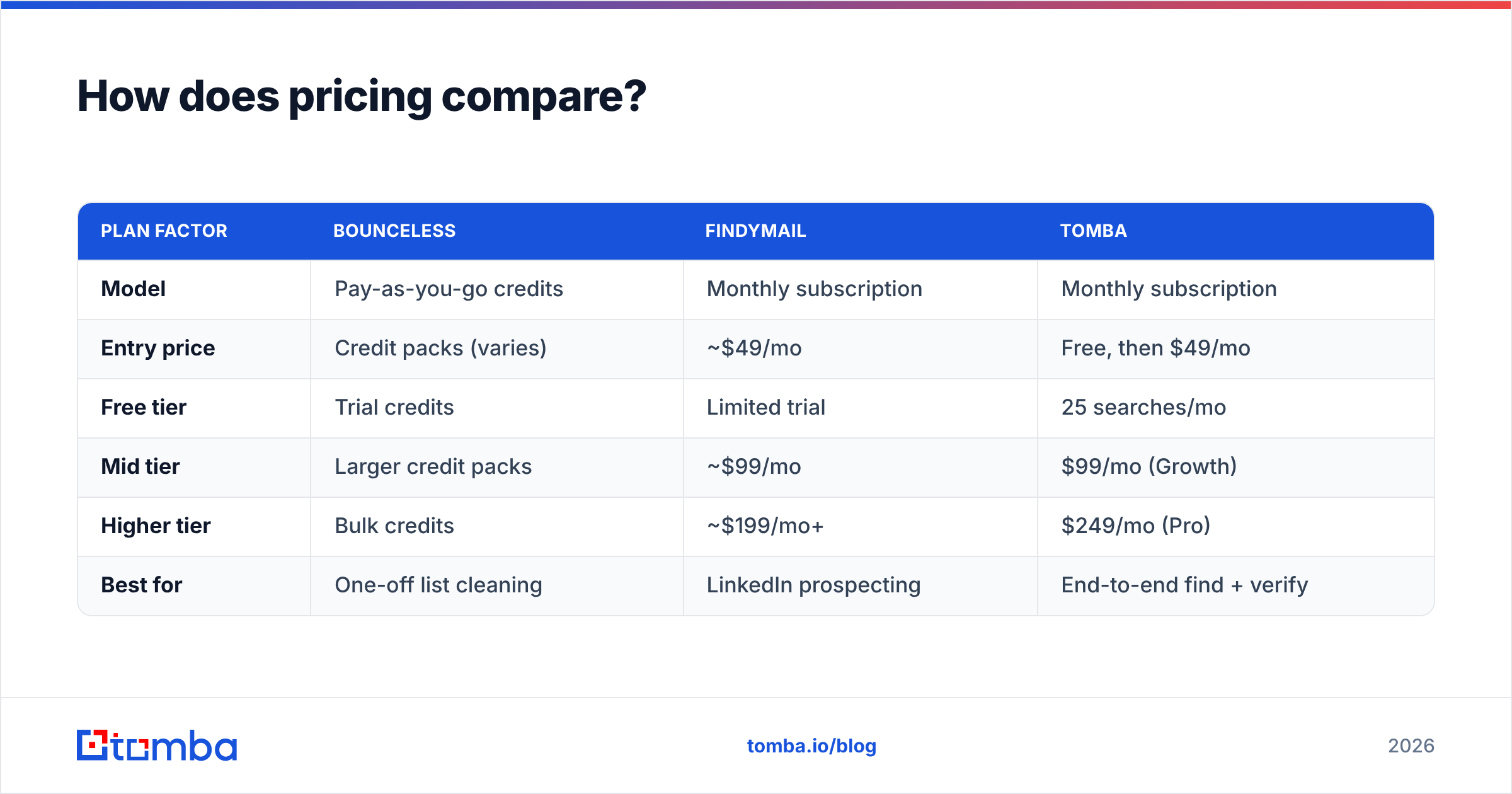
How does pricing compare?#
Pricing is where the "two tools" problem gets concrete.
| Plan factor | Bounceless | Findymail | Tomba |
|---|---|---|---|
| Model | Pay-as-you-go credits | Monthly subscription | Monthly subscription |
| Entry price | Credit packs (varies) | ~$49/mo | Free, then $49/mo |
| Free tier | Trial credits | Limited trial | 25 searches/mo |
| Mid tier | Larger credit packs | ~$99/mo | $99/mo (Growth) |
| Higher tier | Bulk credits | ~$199/mo+ | $249/mo (Pro) |
| Best for | One-off list cleaning | LinkedIn prospecting | End-to-end find + verify |
Bounceless's credit model is genuinely good for sporadic cleanups — verify a list, pay once, done. Findymail's subscription fits reps who source continuously. But stack them: a rep finding emails on Findymail at ~$49/mo who also wants independent verification on Bounceless credits is now past $100/mo for what is conceptually one job — getting good contacts into a sequence. Check current Tomba pricing and you'll see a single $49/mo Starter tier covers both find and verify in one credit pool.
For a fuller cost breakdown across the category, vendor-neutral directories like G2 and Capterra keep updated pricing and review data worth cross-checking before you commit.
When should you pick Bounceless?#
Pick Bounceless — or any dedicated verifier — when:
- You already have lists from events, webinars, partnerships, or legacy CRM exports that need cleaning before a send.
- You verify in bursts, not continuously, so a pay-as-you-go credit model beats a monthly fee.
- Your finding is already handled by another tool, a data provider, or inbound, and you only need the quality-control layer.
- Deliverability is the pain, not sourcing. If your bounce rate is the fire, a verifier is the extinguisher.
If sourcing is also a problem, Bounceless alone leaves you half-equipped.
When should you pick Findymail?#
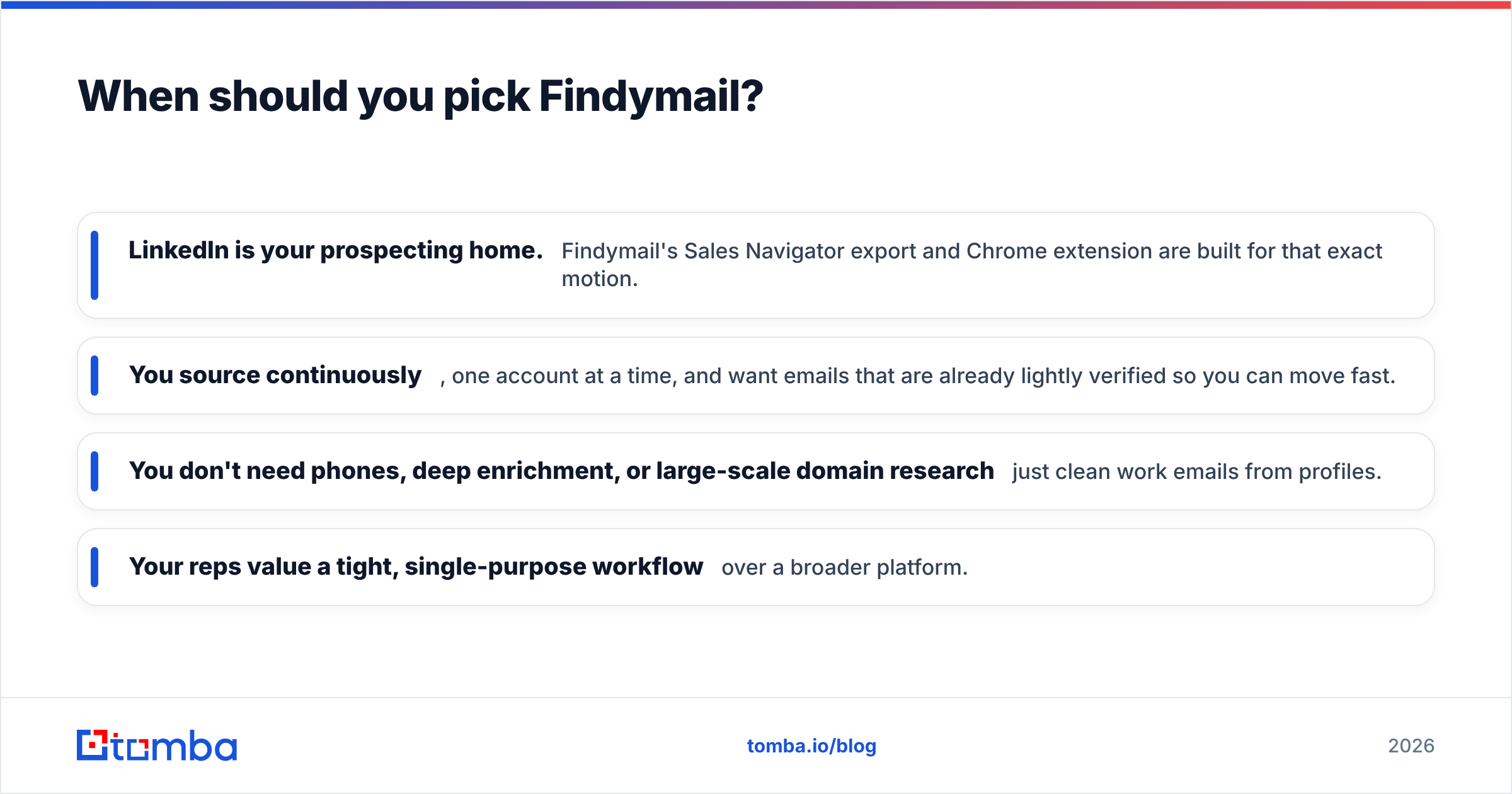
Pick Findymail — or another finder — when:
- LinkedIn is your prospecting home. Findymail's Sales Navigator export and Chrome extension are built for that exact motion.
- You source continuously, one account at a time, and want emails that are already lightly verified so you can move fast.
- You don't need phones, deep enrichment, or large-scale domain research — just clean work emails from profiles.
- Your reps value a tight, single-purpose workflow over a broader platform.
Where Findymail strains is breadth: bulk domain search, phone finding, or enrichment beyond email all push you toward additional tools.
)
Is there a better option than running both?#
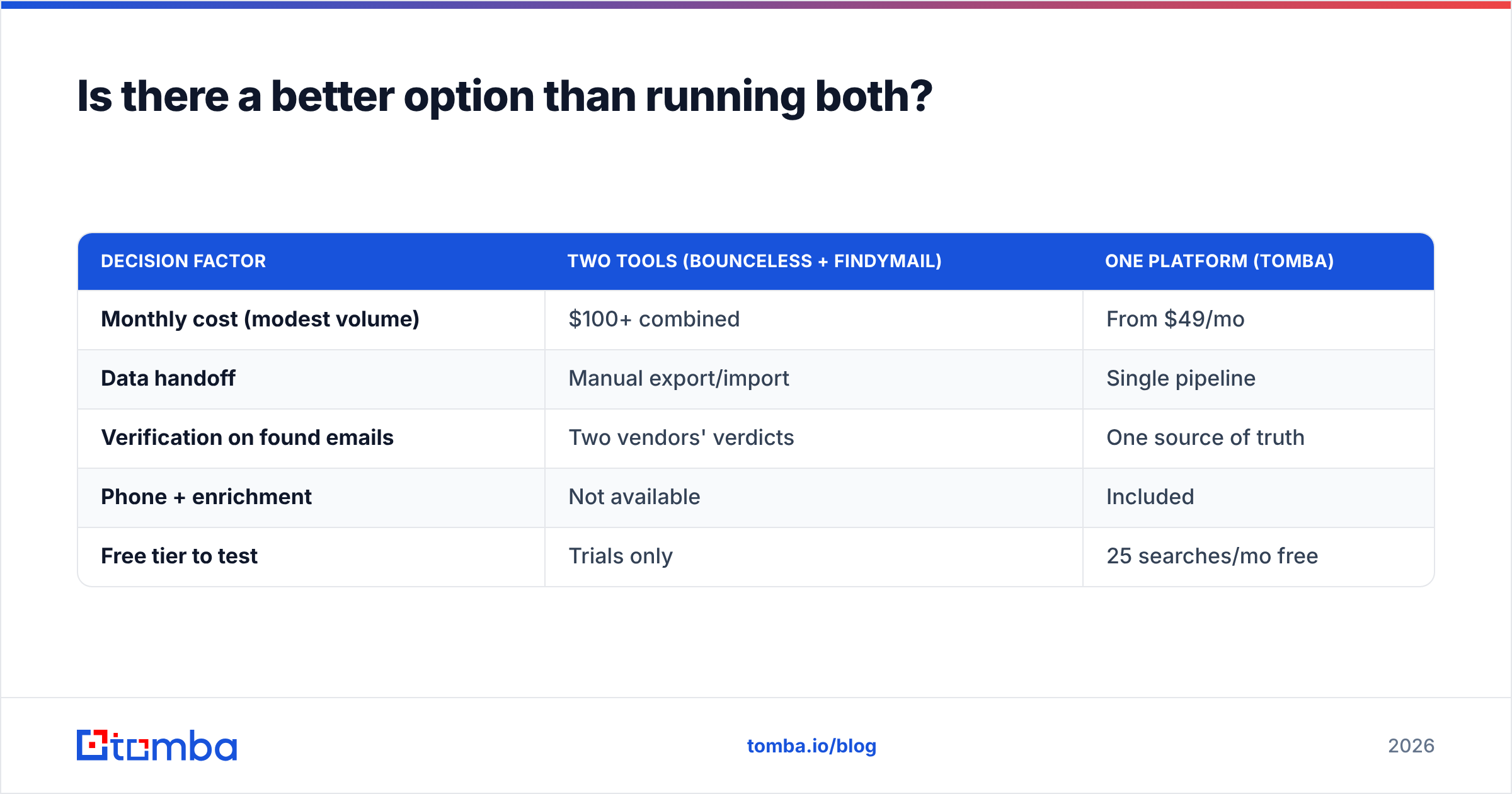
Conclusion first: if you need to find and verify, one platform that does both beats two single-purpose subscriptions on cost, data consistency, and workflow.
This is the case for a consolidated tool like Tomba. Instead of finding on one vendor and verifying on another — reconciling formats, paying two bills, and trusting a handoff between systems — you run the whole motion in one place:
- Find emails by name, company, or domain with the email finder, or pull them from profiles with the LinkedIn finder.
- Verify in the same pool using the built-in email verifier and a dedicated catch-all verifier for the ambiguous cases finders usually punt on.
- Enrich and extend with phone numbers and contact enrichment — the data Bounceless and Findymail simply don't return.
- Scale it through bulk processing, the Tomba API, and native integrations into your CRM and sequencer.
| Decision factor | Two tools (Bounceless + Findymail) | One platform (Tomba) |
|---|---|---|
| Monthly cost (modest volume) | $100+ combined | From $49/mo |
| Data handoff | Manual export/import | Single pipeline |
| Verification on found emails | Two vendors' verdicts | One source of truth |
| Phone + enrichment | Not available | Included |
| Free tier to test | Trials only | 25 searches/mo free |
None of this means Bounceless or Findymail are bad tools — they're focused and good at their lane. It means that if your actual need is "good contacts, verified, ready to send," buying two specialists is the long way around a job one platform finishes.
The honest verdict#
Bounceless wins if your only problem is dirty lists and you clean them occasionally. Findymail wins if your only problem is sourcing emails from LinkedIn and you do it constantly. Neither wins the whole pipeline, because neither was built to.
Most outbound teams have both problems at once. That's the scenario where consolidation pays off — fewer tools, one data standard, one bill, and no fragile handoff between a finder and a verifier that were never designed to talk to each other.
Start by mapping which half of the pipeline actually hurts. If it's both, don't buy two tools to fix it.
Ready to find and verify in one place?#
Stop paying two vendors to do one job. The Tomba Email Finder sources verified work emails by name, company, or domain — and runs them through built-in verification and catch-all checks in the same workflow, so what lands in your sequencer is ready to send. The free tier gives you 25 searches a month to test it against your own list before you decide. Replace the find-here-verify-there shuffle with a single pipeline, and put the saved subscription budget back into actual outreach.
// get started
Find, verify and enrich your first contacts today
Start on the free plan with 25 searches a month, then scale when your team is ready.
Free plan · No credit card required · GDPR & CCPA
// about the author