Bouncer vs Wiza 2026: Email Verifier vs Lead Finder
Bouncer verifies emails; Wiza finds LinkedIn leads. They solve different problems. Here's which one your pipeline actually needs in 2026 — and where one tool beats both.
Bouncer vs Wiza: Which One Does Your Pipeline Actually Need in 2026?
Here's the short version before you read another word: Bouncer and Wiza are not competitors. Bouncer cleans email lists you already have. Wiza builds email lists from LinkedIn. Putting them head-to-head is like comparing a dishwasher to a grocery store — both touch your kitchen, but they do opposite jobs.
So the real question isn't "which is better." It's "which job am I trying to do — and is there a single tool that does both?" This guide answers all three.
TL;DR#
- Bouncer is an email verification tool. It tells you whether an address is valid, risky, or dead before you send.
- Wiza is an email finder / prospecting tool. It pulls contact data (emails, phones) from LinkedIn and Sales Navigator searches.
- They overlap on exactly one thing: Wiza verifies the emails it finds, and Bouncer can verify Wiza's exports. That's the entire relationship.
- Pricing: Bouncer is pay-as-you-go from ~$8 per 1,000 verifications; Wiza runs credit-based plans starting around $83/mo billed annually.
- If you want finding and verification in one place (plus domain search, catch-all checks, and enrichment), an all-in-one like Tomba replaces the need to stitch two tools together.
What Is Bouncer?#
Bouncer (usebouncer.com) is a dedicated email verification platform. You feed it a list — a CSV, an API call, or a real-time form check — and it returns a deliverability verdict for each address: deliverable, undeliverable, risky, or unknown.
Think of Bouncer as a bouncer at a club door (the name is not subtle). It doesn't bring people to the party. It just decides who gets in. Its whole reason to exist is protecting your sender reputation by stopping you from emailing addresses that bounce.
Bouncer's core features:
- Bulk verification — upload lists, get a cleaned file back with status tags.
- Real-time API — verify at the point of signup so junk never enters your database.
- Toxicity / risk scoring — flags spam traps, complainers, and disposable domains.
- Deliverability Kit — monitors blacklists and inbox placement (a paid add-on).
- GDPR-friendly processing — EU data handling is a selling point for European teams.
What Bouncer does not do: it will not find you a single new contact. If your list is empty, Bouncer has nothing to work with.
What Is Wiza?#
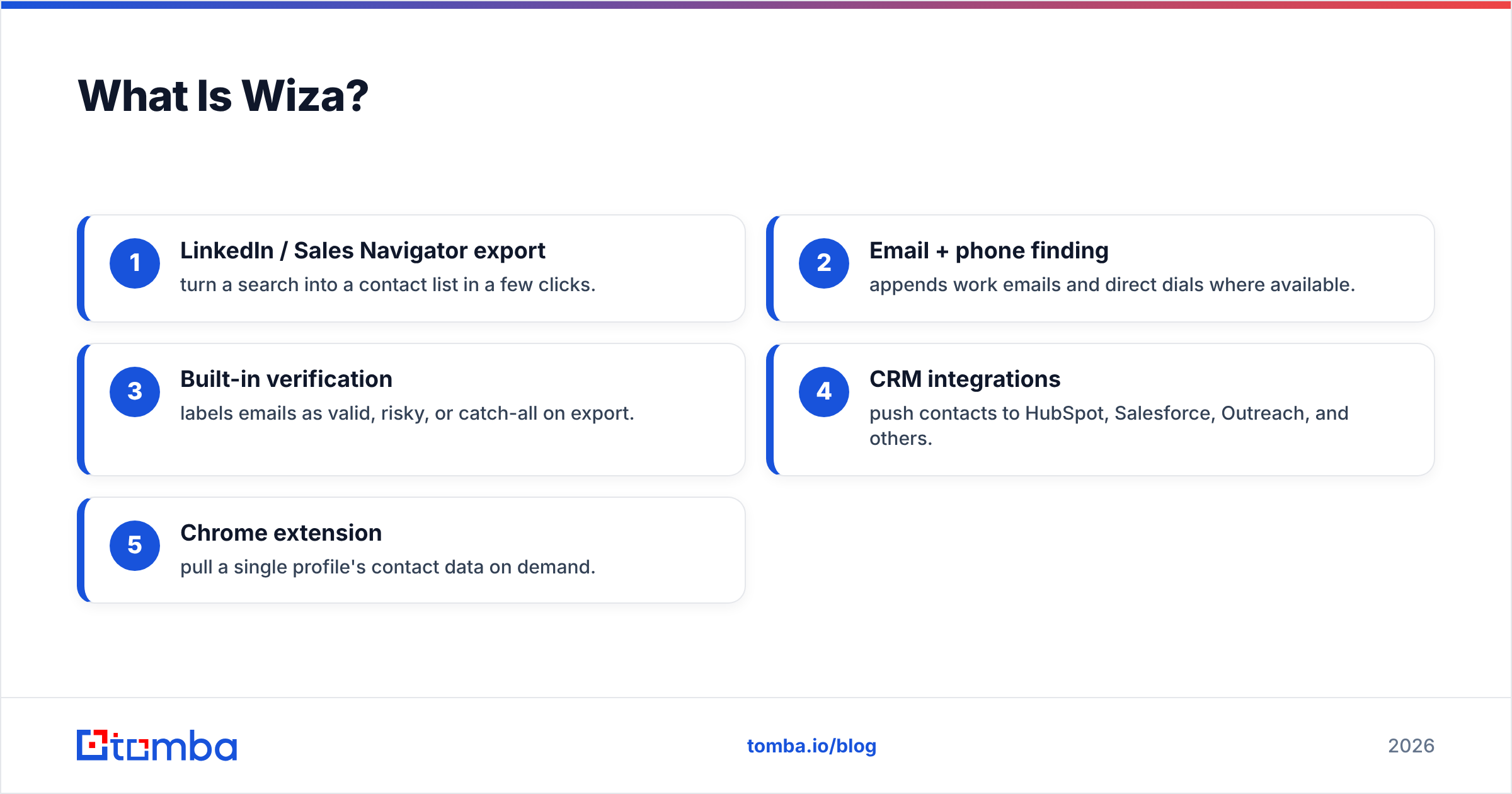
Wiza (wiza.co) is a prospecting and email-finding tool built on top of LinkedIn. You run a search in LinkedIn or Sales Navigator, and Wiza scrapes the results into a clean list of names, job titles, companies, work emails, and sometimes phone numbers.
If Bouncer is the club bouncer, Wiza is the talent scout — its job is to go out and bring you people who don't yet exist in your CRM. Wiza also runs a verification step on the emails it discovers, which is where the apples-to-apples confusion with Bouncer starts.
Wiza's core features:
- LinkedIn / Sales Navigator export — turn a search into a contact list in a few clicks.
- Email + phone finding — appends work emails and direct dials where available.
- Built-in verification — labels emails as valid, risky, or catch-all on export.
- CRM integrations — push contacts to HubSpot, Salesforce, Outreach, and others.
- Chrome extension — pull a single profile's contact data on demand.
What Wiza does not do well: clean a large, pre-existing list that didn't come from LinkedIn. It's a sourcing engine first; its verification is a convenience, not a standalone product.

Bouncer vs Wiza: The Core Difference in One Table#
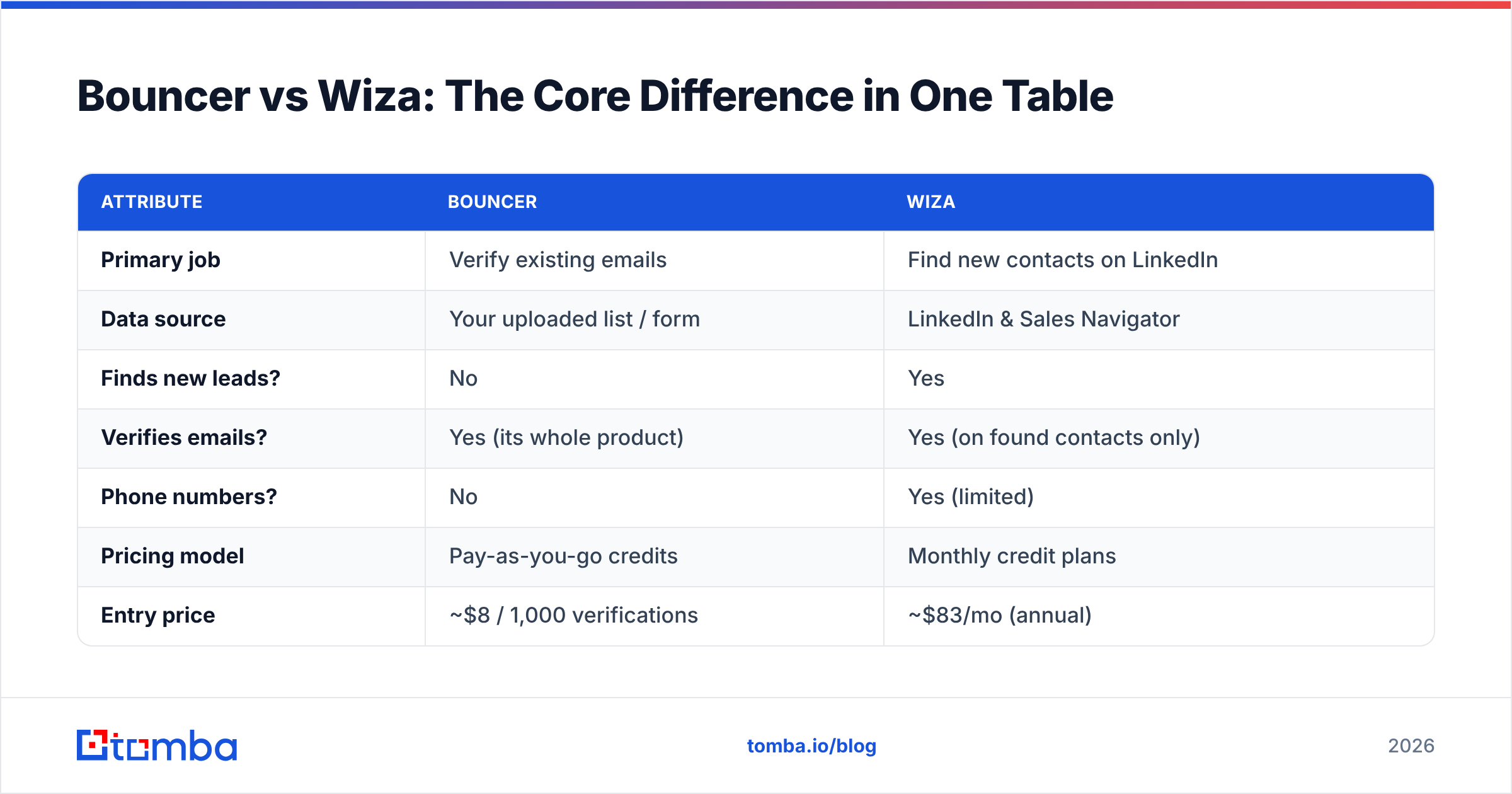
This is the comparison that actually matters — not feature counts, but which job each tool owns.
| Attribute | Bouncer | Wiza |
|---|---|---|
| Primary job | Verify existing emails | Find new contacts on LinkedIn |
| Data source | Your uploaded list / form | LinkedIn & Sales Navigator |
| Finds new leads? | No | Yes |
| Verifies emails? | Yes (its whole product) | Yes (on found contacts only) |
| Phone numbers? | No | Yes (limited) |
| Pricing model | Pay-as-you-go credits | Monthly credit plans |
| Entry price | ~$8 / 1,000 verifications | ~$83/mo (annual) |
| Best for | List hygiene, deliverability | Outbound prospecting |
| API available | Yes | Yes |
| GDPR posture | Strong (EU-based) | Standard |
The pattern is obvious once it's laid out: Bouncer is the back end of your data pipeline, Wiza is the front end. A complete outbound motion needs both jobs done — the only question is whether you buy two tools or one.
Is Bouncer Better Than Wiza?#
Wrong question, but here's the honest answer: Bouncer is better at verification, and it isn't close. Verification is all Bouncer does, so it invests everything into catch-all handling, spam-trap detection, and inbox-placement monitoring. If you already have 200,000 scraped emails of unknown quality, Bouncer is the specialist you want.
But Bouncer is useless at the top of the funnel. It can't tell you who to email — only whether an address you found will bounce. Judging Bouncer on lead generation is like judging a spell-checker on whether it writes the essay.
Is Wiza Better Than Bouncer?#
Also the wrong question — but yes, Wiza is better at finding leads, because Bouncer can't find leads at all. Wiza shines when your motion starts in LinkedIn: a rep builds a Sales Navigator search, exports 500 matching prospects, and gets emails appended automatically.
Where Wiza gets weaker is trust at scale. Its verification is a bundled step, not a hardened product, so deliverability-obsessed teams often re-run Wiza exports through a dedicated verifier anyway. That double-handling is exactly the inefficiency that pushes people toward an all-in-one platform.
When Should You Use Each One?#
Match the tool to the job, not the brand:
- Use Bouncer when you have a list and need to protect deliverability — newsletter re-engagement, cleaning an old CRM, or real-time signup validation. Pair it with a catch-all verifier if your targets use catch-all domains.
- Use Wiza when your prospecting lives inside LinkedIn and you want to turn searches into outreach-ready lists fast.
- Use neither when you want one bill, one API, and one workflow that finds and verifies — see the all-in-one section below.
How Much Do Bouncer and Wiza Cost in 2026?#
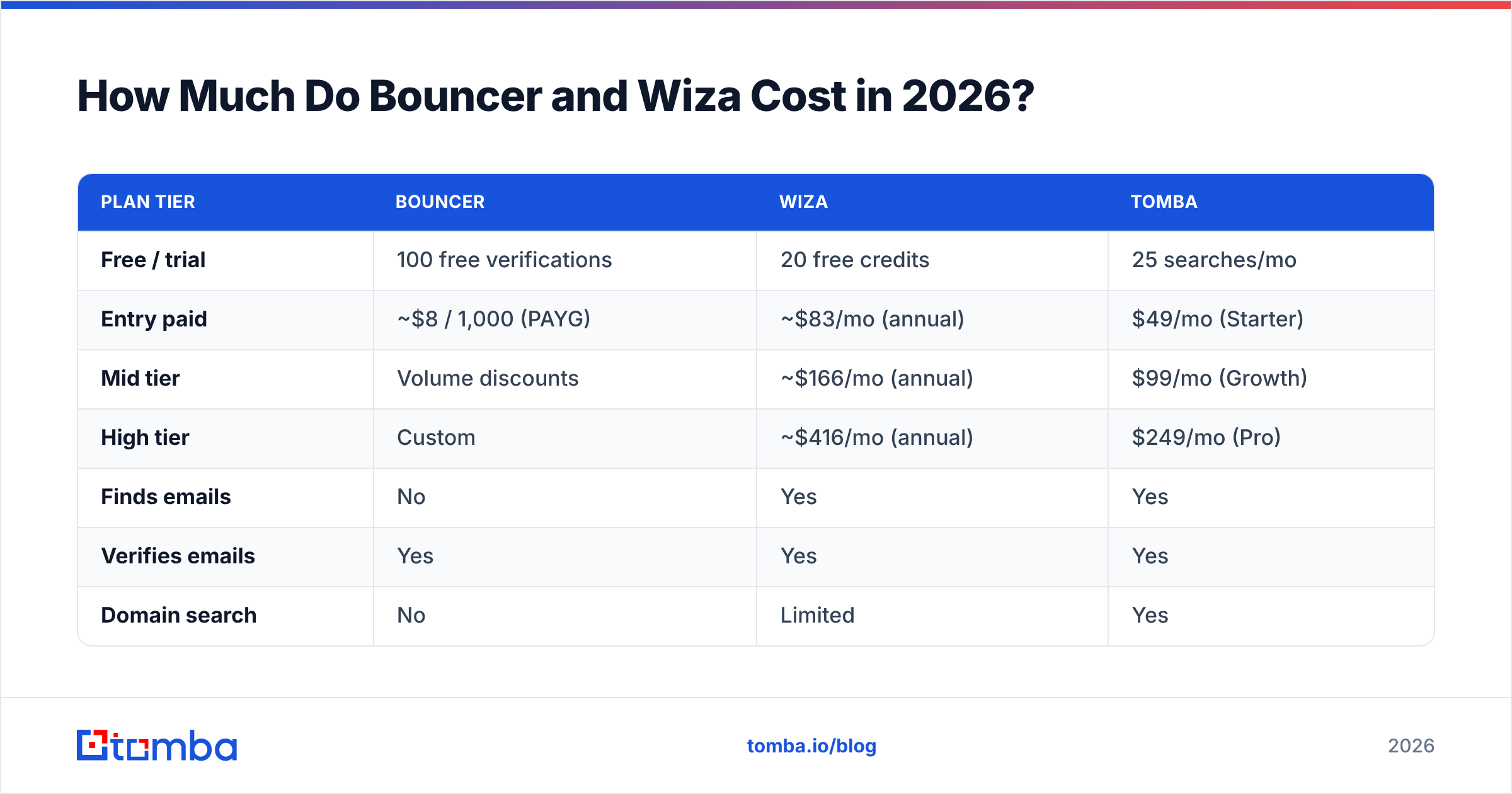
Pricing is where the "two jobs" reality hits your budget. Bouncer charges for volume of verifications; Wiza charges for credits to find and reveal contacts. Stacking both means paying two vendors for one pipeline.
| Plan tier | Bouncer | Wiza | Tomba |
|---|---|---|---|
| Free / trial | 100 free verifications | 20 free credits | 25 searches/mo |
| Entry paid | ~$8 / 1,000 (PAYG) | ~$83/mo (annual) | $49/mo (Starter) |
| Mid tier | Volume discounts | ~$166/mo (annual) | $99/mo (Growth) |
| High tier | Custom | ~$416/mo (annual) | $249/mo (Pro) |
| Finds emails | No | Yes | Yes |
| Verifies emails | Yes | Yes | Yes |
| Domain search | No | Limited | Yes |
Note the correct numbers: Tomba's paid plans start at $49/mo, not the $39 you'll see misquoted in some roundups. Full Tomba pricing is published per plan with credit counts. Bouncer and Wiza pricing shift with promotions, so confirm current rates on their sites and cross-check reviews on G2 before committing.
What If You Need Both Jobs Done? (The All-in-One Case)#
Most B2B teams discover they need both finding and verification within a quarter of starting outbound. At that point, running Bouncer + Wiza means:
- Two subscriptions and two renewal dates.
- Two credit systems to forecast.
- A manual export-import loop between tools.
- Two support queues when something breaks.
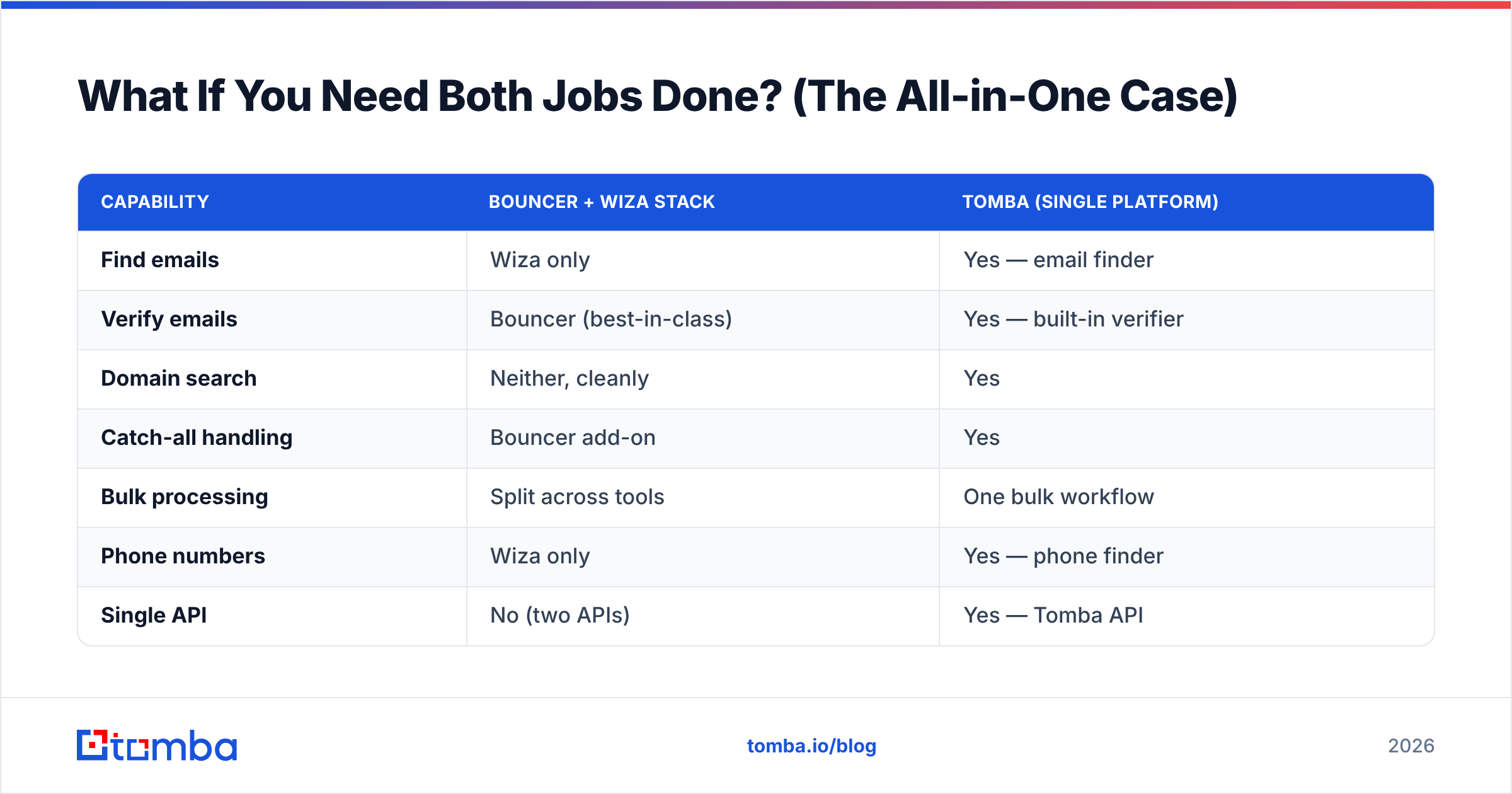
An all-in-one platform collapses that into a single workflow. Here's how the consolidated approach compares to the two-tool stack:
| Capability | Bouncer + Wiza stack | Tomba (single platform) |
|---|---|---|
| Find emails | Wiza only | Yes — email finder |
| Verify emails | Bouncer (best-in-class) | Yes — built-in verifier |
| Domain search | Neither, cleanly | Yes |
| Catch-all handling | Bouncer add-on | Yes |
| Bulk processing | Split across tools | One bulk workflow |
| Phone numbers | Wiza only | Yes — phone finder |
| Single API | No (two APIs) | Yes — Tomba API |
| Renewals to manage | 2 | 1 |
To be fair to the specialists: if email verification is genuinely your only need and you process millions of addresses, Bouncer's focused engine is excellent and worth a standalone line item. And if your entire GTM motion is LinkedIn-native, Wiza's export speed is hard to beat. Consolidation is the right call when you're doing both jobs at moderate volume — which is most teams. If you're specifically shopping around, Tomba publishes direct comparisons as a Bouncer alternative and a Wiza alternative.
How Do You Choose? A 30-Second Decision Guide#
Answer these in order and stop at your first "yes":
- Do I only need to clean a list I already own? → Bouncer.
- Do I only need to scrape LinkedIn into outreach lists? → Wiza.
- Do I need to find new contacts and verify them reliably? → An all-in-one like Tomba.
- Do I want one API powering both jobs in my product? → All-in-one, every time.
The mistake teams make is choosing on price-per-feature instead of price-per-workflow. Two cheap tools that don't talk to each other often cost more in wasted ops time than one platform that does the full loop.
Frequently Asked Questions#
Is Wiza an email verification tool like Bouncer? Not really. Wiza verifies the emails it finds as a convenience step, but it isn't a standalone verification engine. Bouncer is purpose-built for verification at scale and handles edge cases like spam traps and catch-all domains more thoroughly.
Can Bouncer find email addresses? No. Bouncer only checks addresses you already have. To find new ones you need a finder like Wiza or an all-in-one platform with a domain search feature.
Do I need both Bouncer and Wiza? Only if you insist on best-in-class specialists for each job and don't mind two subscriptions plus a manual export loop. Most teams doing both finding and verification at moderate volume are better served by a single platform.
Which is cheaper for a small team? For pure verification, Bouncer's pay-as-you-go pricing is cheap at low volume. For prospecting, Wiza's entry plan is the cost of admission. For both jobs together, a single plan such as Tomba's $49/mo Starter usually undercuts the stacked cost.
The Bottom Line#
Bouncer and Wiza aren't rivals — they're two halves of an outbound pipeline. Bouncer guards deliverability; Wiza fills the top of the funnel. Choose Bouncer if all you do is clean lists, choose Wiza if all you do is scrape LinkedIn, and choose neither if you'd rather not run two tools to do one job.
If you want finding, verification, domain search, catch-all checks, and enrichment behind a single login and one API, start with the Tomba Email Finder. The free tier gives you 25 searches a month to test it against your own data before you ever pay — and you'll be doing both jobs in one place instead of paying two vendors to do one each.
// get started
Find, verify and enrich your first contacts today
Start on the free plan with 25 searches a month, then scale when your team is ready.
Free plan · No credit card required · GDPR & CCPA
// about the author