BounceRemove Pricing, Reviews, Pros and Cons (2026)
A neutral 2026 breakdown of BounceRemove pricing, real user reviews, and the honest pros and cons — plus when a verifier like Tomba is the better fit for clean lists.

TL;DR
- BounceRemove is a list-cleaning and email-verification tool aimed at cutting bounce rates before you hit send. It is priced on a pay-as-you-go credit model, which is cheap to start but gets murky at scale.
- The strongest reasons to use it: a low entry cost, a simple one-list upload flow, and decent bounce detection on standard mailboxes.
- The weak spots reviewers flag most: thin handling of catch-all domains, limited enrichment, no real email-finding, and support that slows down on bigger accounts.
- If you only need to scrub a list, BounceRemove does the job. If you also need to find the right contacts, verify catch-alls, and enrich records, a platform like Tomba covers more ground for a similar spend.
- Use this guide to match the tool to your actual workflow instead of the marketing page.
What is BounceRemove and who is it for?#
BounceRemove is an email verification service: you upload a list, it pings each address, and it hands back a cleaned file marked valid, invalid, risky, or unknown. The goal is straightforward — stop dead addresses from tanking your sender reputation and inflating your bounce rate before a campaign goes out.
The typical buyer is a marketer, agency, or small sales team that bought or built a list and needs it scrubbed once or on a recurring basis. It sits in the same lane as ZeroBounce, NeverBounce, and Tomba's email verifier, but with a narrower feature set focused almost entirely on cleaning rather than finding or enriching.
If your only question is "which of these 50,000 addresses will hard-bounce," BounceRemove is built for exactly that. If your question is broader — "who at this company should I email, what is their address, and is it safe to send" — you are going to outgrow a pure cleaner fast.

How much does BounceRemove cost in 2026?#
BounceRemove uses a credit model: you buy a block of verification credits, one credit clears one address, and unused credits typically expire after a set window. That structure rewards occasional, bulk one-off cleans and punishes steady high-volume sending, because you keep re-buying credits for lists you re-verify every few weeks.
Pricing on credit-based verifiers like this generally lands in the $0.0008–$0.005 per email range depending on volume, with the per-email cost dropping as you buy bigger blocks. Treat any specific figure you see as a list price and confirm it on the vendor's own page and on Capterra before you commit, because verification vendors change tiers often.
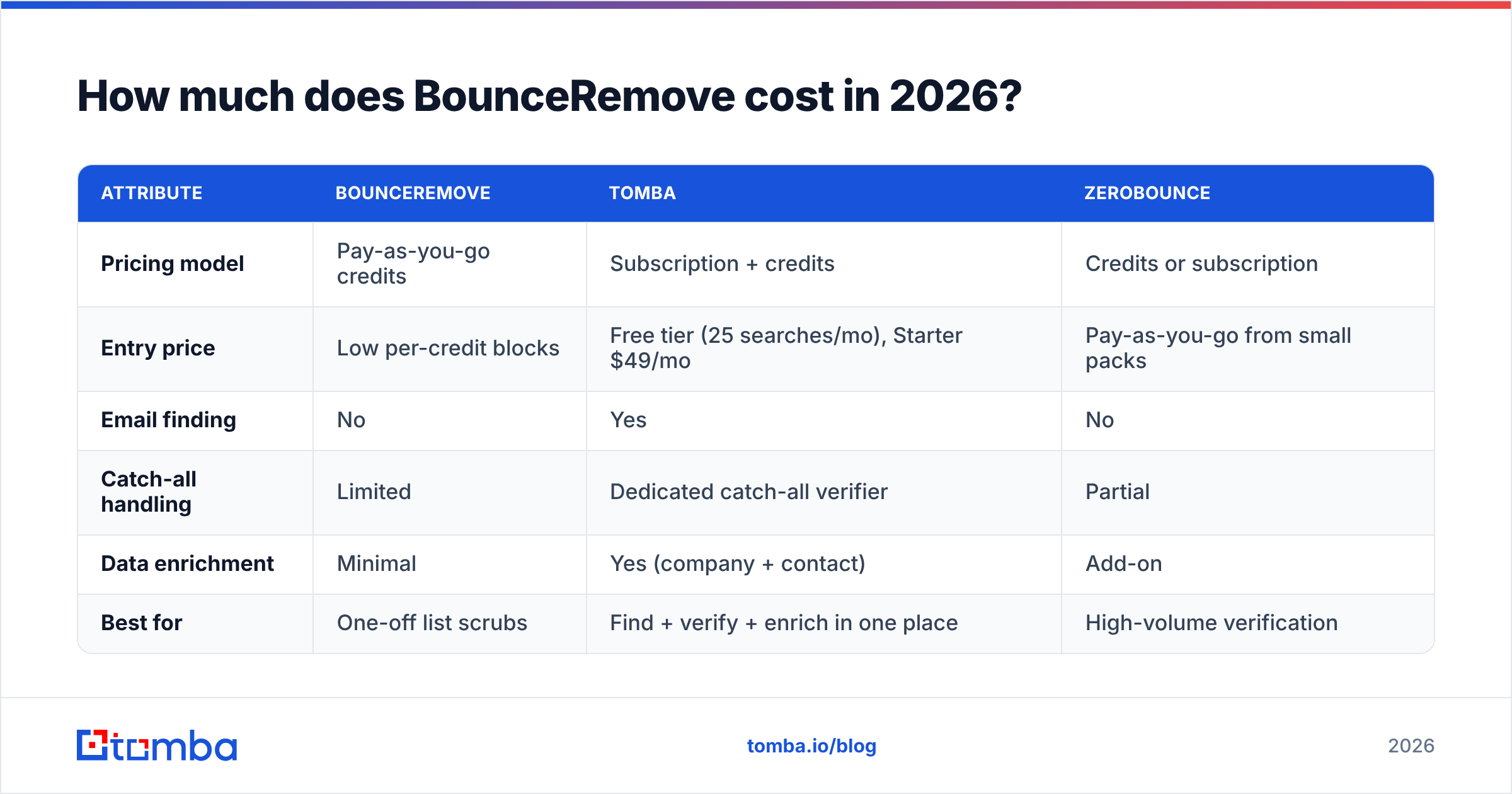
The cost trap is not the headline rate — it is the re-verification cadence. A cold list decays roughly 2–3% per month, so a list you clean in January is partly stale by March. Pure credit tools make you pay again each cycle. Platforms that bundle finding, verifying, and enrichment under a monthly subscription spread that cost differently. Here is how the models compare.
| Attribute | BounceRemove | Tomba | ZeroBounce |
|---|---|---|---|
| Pricing model | Pay-as-you-go credits | Subscription + credits | Credits or subscription |
| Entry price | Low per-credit blocks | Free tier (25 searches/mo), Starter $49/mo | Pay-as-you-go from small packs |
| Email finding | No | Yes | No |
| Catch-all handling | Limited | Dedicated catch-all verifier | Partial |
| Data enrichment | Minimal | Yes (company + contact) | Add-on |
| Best for | One-off list scrubs | Find + verify + enrich in one place | High-volume verification |
The honest read: BounceRemove can be the cheapest line item if you verify rarely and need nothing else. The moment your workflow includes prospecting or recurring sends, a bundled platform is usually better value per outcome, even if the sticker looks higher. Compare it against transparent Tomba pricing before you assume the cheaper credit pack wins.
Is BounceRemove accurate enough to protect your sender reputation?#
For standard mailboxes — Gmail, Outlook, corporate domains with a clear accept/reject SMTP response — BounceRemove performs in line with the category. It catches obvious dead addresses, syntax errors, and disposable domains, and that alone will pull your hard-bounce rate down meaningfully if you are sending to an unverified list.
Accuracy gets shakier on two fronts. First, catch-all domains, which accept every address at the SMTP layer whether or not the mailbox exists. A basic verifier marks these "unknown" or "risky" and leaves you guessing. That is a real gap, because catch-alls are common at mid-market and enterprise companies — exactly the accounts B2B teams care about. A dedicated catch-all verifier applies extra signals to resolve more of those addresses instead of dumping them in an unknown bucket.
Second, greylisting and rate-limited servers can produce timeouts that get scored inconsistently between runs. If you re-verify the same risky list twice and get different counts, that is the cause.
The practical standard to hold any verifier to: does it keep your bounce rate under the ~2% threshold that mailbox providers watch? BounceRemove can clear that bar on clean-ish lists. On messy, catch-all-heavy B2B data, you will want a tool that resolves more of the gray area. Pair verification with the email deliverability basics — SPF, DKIM, warmup — because no verifier fixes a cold domain on its own.
What do BounceRemove reviews say — the pros?#
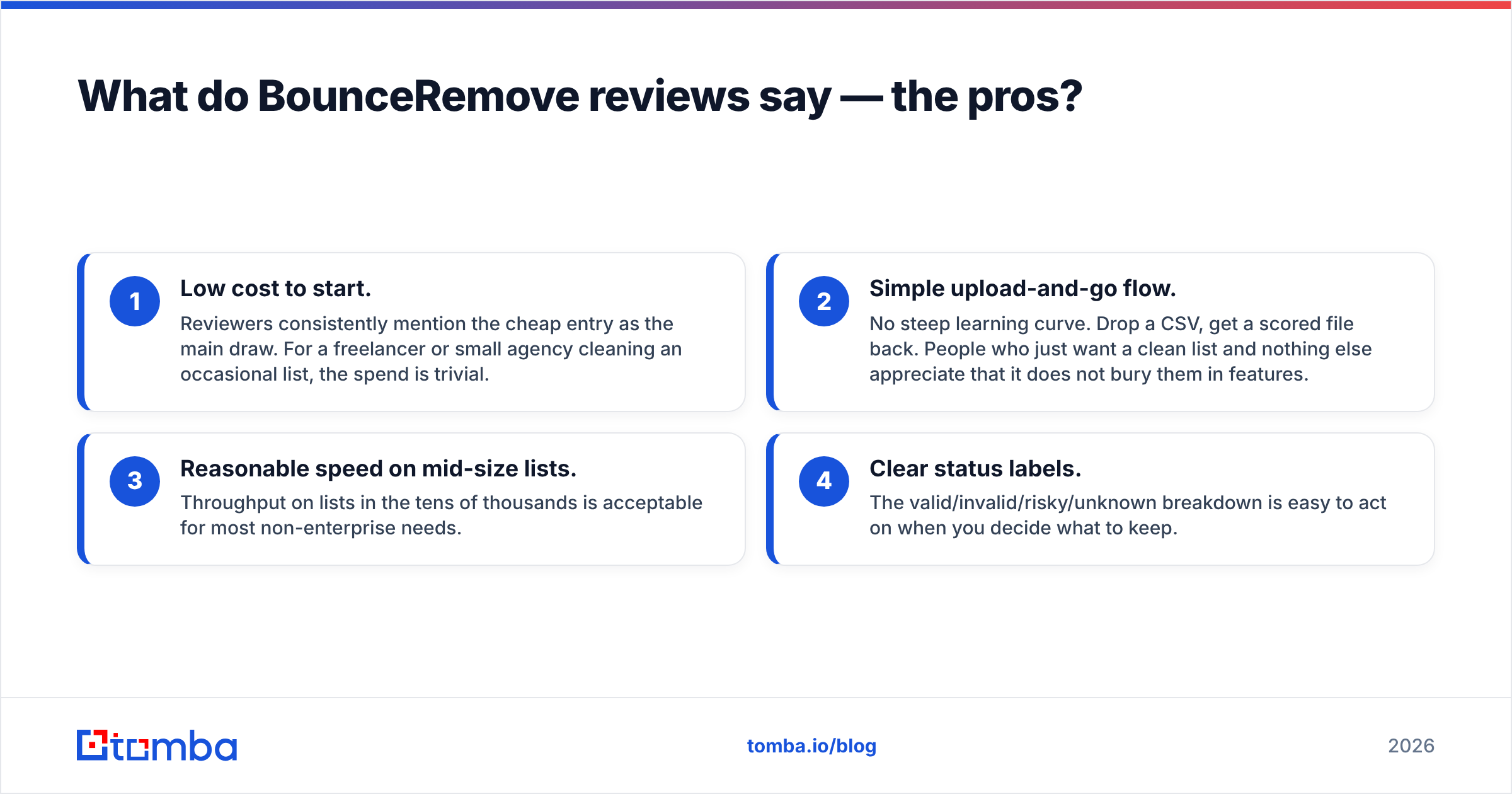
Pulling together the themes from user reviews on directories like G2 and Capterra, the praise clusters around a few points:
- Low cost to start. Reviewers consistently mention the cheap entry as the main draw. For a freelancer or small agency cleaning an occasional list, the spend is trivial.
- Simple upload-and-go flow. No steep learning curve. Drop a CSV, get a scored file back. People who just want a clean list and nothing else appreciate that it does not bury them in features.
- Reasonable speed on mid-size lists. Throughput on lists in the tens of thousands is acceptable for most non-enterprise needs.
- Clear status labels. The valid/invalid/risky/unknown breakdown is easy to act on when you decide what to keep.
In short, the pros are the pros of a focused single-purpose tool: cheap, fast enough, and easy. Nobody buys BounceRemove and complains it was complicated.
What do BounceRemove reviews say — the cons?#
The critical reviews are where the buying decision actually gets made. The recurring complaints:
- Catch-all and "unknown" results pile up. This is the most common gripe. A large unknown bucket means you are still gambling on those sends, which defeats part of the purpose.
- No email finding or enrichment. It cleans what you already have; it cannot tell you who to contact or fill in missing fields. Teams end up stitching it together with a separate finder and a separate enrichment tool.
- Credit expiry frustration. Buying a block and losing the remainder to expiry comes up repeatedly. It nudges you toward over-buying.
- Support latency on larger accounts. Smaller users report fine experiences; higher-volume reviewers mention slow responses when something goes wrong mid-job.
- Limited integrations. Fewer native connectors than the larger platforms, so more manual CSV shuffling.

None of these are dealbreakers for the narrow use case. They become dealbreakers the moment your needs expand past "clean this one file."
How does BounceRemove compare to an all-in-one alternative?#
The core decision is single-purpose cleaner versus a platform that finds, verifies, and enriches. BounceRemove wins on simplicity and rock-bottom occasional cost. It loses when your funnel needs more than a scrub.
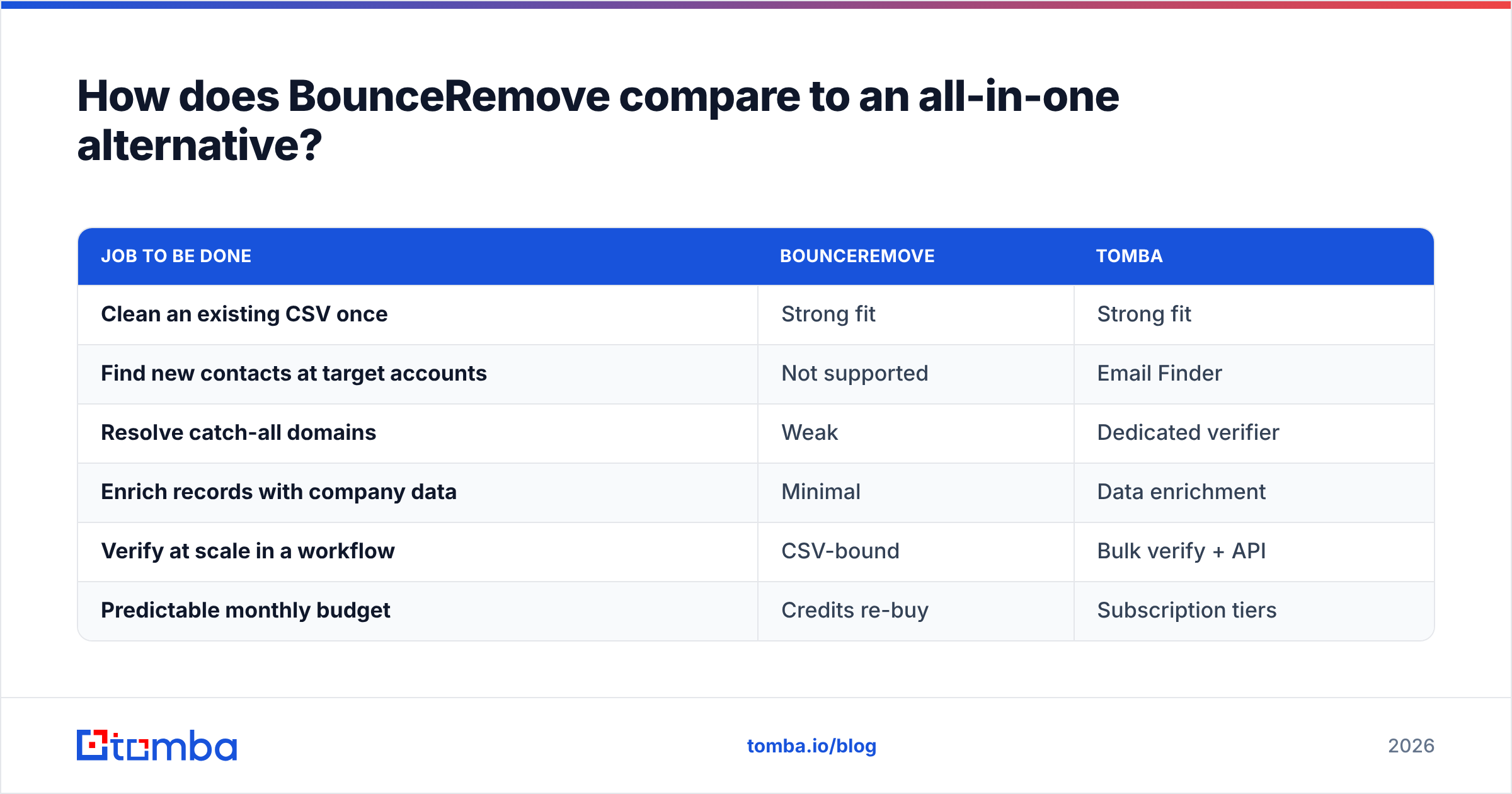
Here is the honest trade-off framed by job-to-be-done:
| Job to be done | BounceRemove | Tomba |
|---|---|---|
| Clean an existing CSV once | Strong fit | Strong fit |
| Find new contacts at target accounts | Not supported | Email Finder |
| Resolve catch-all domains | Weak | Dedicated verifier |
| Enrich records with company data | Minimal | Data enrichment |
| Verify at scale in a workflow | CSV-bound | Bulk verify + API |
| Predictable monthly budget | Credits re-buy | Subscription tiers |
Where Tomba is genuinely the stronger choice: when verification is one step inside a larger prospecting motion. You find the address, confirm it is deliverable, enrich the record, and push it to your CRM without juggling three vendors. Tomba's tiers run Free (25 searches/mo), Starter at $49/mo, Growth at $99/mo, and Pro at $249/mo, so the verification capability rides along with finding and enrichment rather than being a separate per-credit bill.
Where BounceRemove keeps the edge: if you truly only ever clean lists, never prospect, and want the smallest possible occasional invoice, a focused cleaner is hard to beat on raw simplicity. Buy the tool that matches the job, not the longest feature list.
Should you choose BounceRemove? A quick decision guide#
Choose BounceRemove if all of these are true: you already have your lists, you verify infrequently, you do not need to find or enrich contacts, and minimizing per-clean cost is the priority. It is a clean, narrow tool that does its one job acceptably.
Choose an all-in-one platform if any of these are true: you prospect for new contacts, you send to catch-all-heavy B2B domains, you want enrichment, you need API or CRM integrations, or you want one predictable subscription instead of recurring credit purchases. In those cases the bundled value beats the cheaper single tool.
A reasonable middle path: run a free trial of both on the same sample list and compare three numbers — percentage marked valid, percentage left unknown, and the count you would actually feel safe emailing. The tool that turns the most gray-area addresses into confident decisions is the one protecting your reputation, regardless of sticker price. Keep your underlying sender reputation healthy with proper authentication and warmup, since clean data is necessary but not sufficient on its own.
Frequently asked questions#
Is BounceRemove worth it in 2026? For occasional, finding-free list cleaning at low volume, yes. For teams that prospect, send to catch-all domains, or want enrichment in the same tool, a broader platform usually delivers more per dollar.
Does BounceRemove find email addresses? No. It verifies addresses you already have. To find new contacts by name or domain, you need a dedicated email finder.
How does BounceRemove handle catch-all domains? Like most basic verifiers, it tends to mark them risky or unknown rather than resolving them, which leaves a gap on B2B data. A specialized catch-all verifier resolves more of those.
What is a safe bounce rate to aim for? Keep hard bounces under roughly 2%. Above that, mailbox providers start throttling and your deliverability drops. Verification is how you stay under the line.
The bottom line#
BounceRemove is a competent, cheap, single-purpose cleaner — and for someone whose entire need is "scrub this list," that focus is a feature, not a flaw. The pros and cons are exactly what you would expect from a narrow tool: low cost and simplicity on one side, missing finding/enrichment and weak catch-all handling on the other.
If your work stops at cleaning, it is a fine pick. If your work includes finding the right people, confirming their addresses are deliverable, and enriching the record before it hits your sequence, you will get more done with fewer tools by starting at the source. Try the Tomba Email Finder to find verified, ready-to-send contacts — then verify and enrich them in the same place, so a clean list is the start of your pipeline instead of a separate chore.
// get started
Find, verify and enrich your first contacts today
Start on the free plan with 25 searches a month, then scale when your team is ready.
Free plan · No credit card required · GDPR & CCPA
// about the author