Bounceremove vs ContactOut 2026: Which Data Tool Wins?
Bounceremove verifies email lists; ContactOut finds B2B contacts. This 2026 breakdown compares accuracy, pricing, and use cases so you pick the right tool — or skip both.
You are comparing two tools that do not actually do the same job. That is the first thing to understand about Bounceremove vs ContactOut, and it changes how you should read every benchmark, pricing page, and review you find online.
Bounceremove is an email verification service — it cleans lists you already have. ContactOut is a contact-discovery platform built around LinkedIn data — it finds emails and phone numbers you do not have yet. Choosing between them is less "which is better" and more "which problem am I solving this quarter." This guide walks through both, with concrete numbers, so you can decide — and shows where a single all-in-one tool replaces the pair.
TL;DR#
- Bounceremove is a list-cleaning / email verification tool. Use it to scrub bounces before a send.
- ContactOut is a LinkedIn-based prospecting and email-finder tool. Use it to build new contact lists.
- They overlap only slightly — most teams that use one eventually need the other.
- ContactOut is pricier and seat-based; Bounceremove is cheaper but single-purpose.
- If you want finding and verification in one billing line, a combined platform like Tomba usually beats running two subscriptions.
What is Bounceremove?#
Bounceremove is an email verification platform. You upload a list — exports from a CRM, a webinar signup sheet, a scraped spreadsheet — and it checks each address against SMTP servers, syntax rules, domain records, and known-bad patterns. The output is a cleaned list tagged as valid, invalid, risky, or unknown.
The job it does well is narrow and important: protecting your sender reputation. Sending to dead addresses drives hard bounces, and a high bounce rate tells inbox providers you are a careless sender. That hurts email deliverability for every future campaign, not just the bad one. A verifier is insurance against that.
What Bounceremove does not do is find new contacts. If your spreadsheet is empty, a verifier has nothing to verify. That is the core limitation to keep in mind.

What is ContactOut?#
ContactOut is a contact-intelligence and prospecting platform best known for its Chrome extension that surfaces personal and work emails directly on LinkedIn profiles. It leans on a large stored database of professional contacts plus real-time enrichment, and it adds phone numbers, a search portal, and CRM/ATS integrations on top.
ContactOut's strength is the front of the funnel — turning a name or a LinkedIn URL into a usable email and phone number. Recruiters and SDR teams who live inside LinkedIn lean on it heavily. You can read more about its positioning on the official ContactOut site.
Its weakness is the same as any finder: discovered emails still need verifying before you send at volume, and ContactOut's verification is lighter than a dedicated cleaner. That is why "find with one tool, verify with another" became such a common stack — and why an email verifier so often sits next to a finder.
Bounceremove vs ContactOut: how do they compare?#
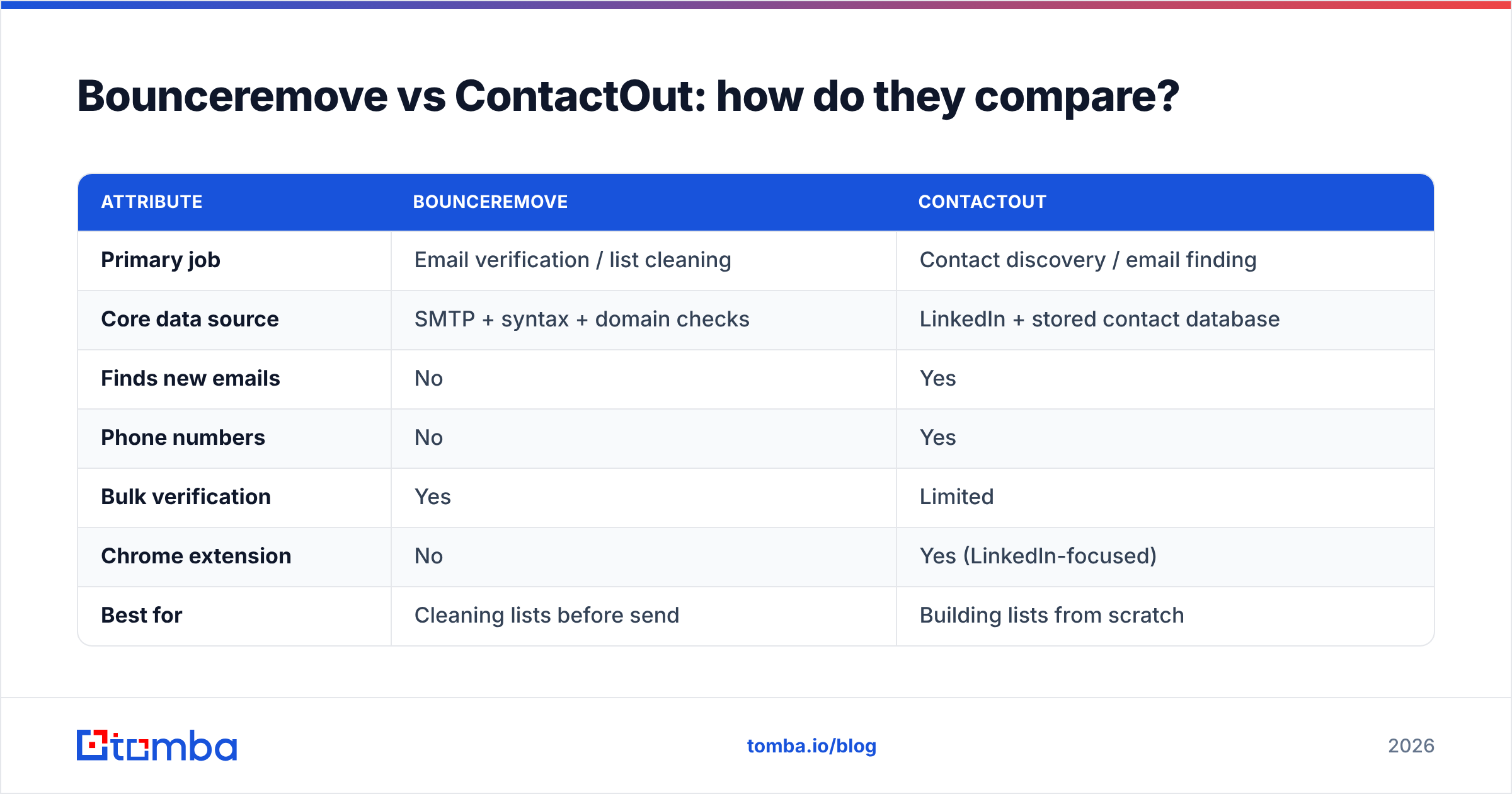
Here is the head-to-head. Read it as "different jobs" rather than "same job, different scores."
| Attribute | Bounceremove | ContactOut |
|---|---|---|
| Primary job | Email verification / list cleaning | Contact discovery / email finding |
| Core data source | SMTP + syntax + domain checks | LinkedIn + stored contact database |
| Finds new emails | No | Yes |
| Phone numbers | No | Yes |
| Bulk verification | Yes | Limited |
| Chrome extension | No | Yes (LinkedIn-focused) |
| Best for | Cleaning lists before send | Building lists from scratch |
| Typical buyer | Email marketers, ops | Recruiters, SDRs |
| Pricing model | Pay-as-you-go / credits | Seat + credit tiers, higher cost |
The pattern is clear: these tools are complements, not substitutes. If you only ever clean lists, Bounceremove is enough. If you only ever prospect, ContactOut covers you — until you hit deliverability problems and reach for a verifier anyway.
Which one is more accurate?#
Accuracy means two different things here, so compare like with like.
For verification accuracy, the question is: of the addresses flagged "valid," how many actually accept mail? Dedicated verifiers — Bounceremove included — tend to score well because that single task is all they do. The catch is catch-all domains, where the server accepts everything and no verifier can be certain. A good catch-all verifier narrows the guess, but no tool hits 100% on catch-alls.
For finding accuracy, the question is: of the emails ContactOut returns, how many are real and current? This is harder, because people change jobs and databases go stale. Finder accuracy depends on data freshness and the verification layer applied at discovery time.

The honest takeaway: a verifier's accuracy claim and a finder's accuracy claim are not the same metric. If a vendor blends them into one marketing number, treat it with suspicion. What matters is whether the tool verifies at the point of discovery — because a found-then-verified email beats a found-then-hoped one every time.
What does each one cost?#
Pricing is where the "two tools" problem bites. Run both and you are paying two bills with two credit systems that rarely line up with each other.
Bounceremove uses verification credits — you pay per address checked, which is cheap at low volume and scales with list size. ContactOut is seat-plus-credit, and its higher tiers climb quickly once you add users and phone-number reveals.
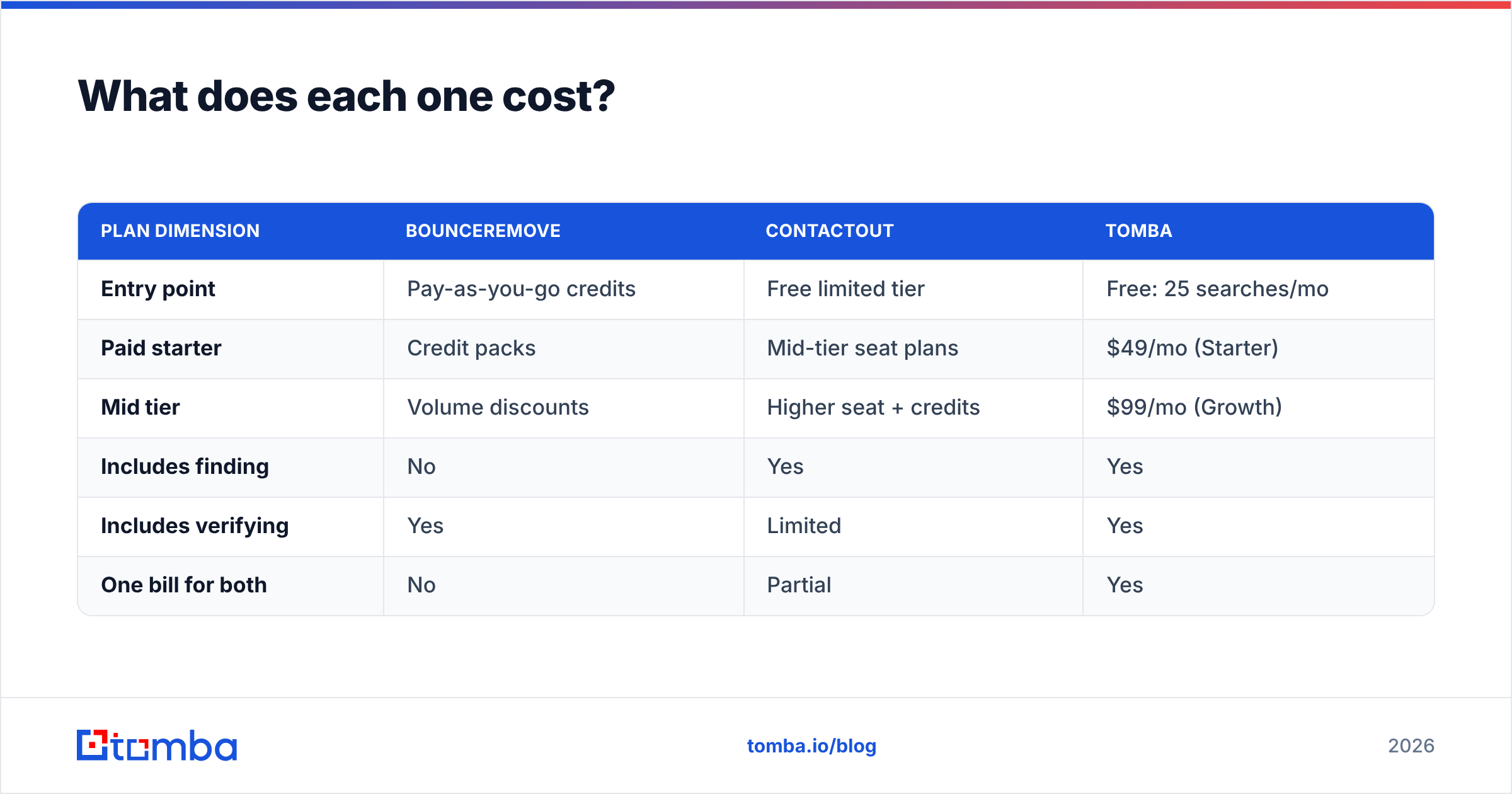
Here is a simplified view (always check current vendor pages — published tiers move):
| Plan dimension | Bounceremove | ContactOut | Tomba |
|---|---|---|---|
| Entry point | Pay-as-you-go credits | Free limited tier | Free: 25 searches/mo |
| Paid starter | Credit packs | Mid-tier seat plans | $49/mo (Starter) |
| Mid tier | Volume discounts | Higher seat + credits | $99/mo (Growth) |
| Includes finding | No | Yes | Yes |
| Includes verifying | Yes | Limited | Yes |
| One bill for both | No | Partial | Yes |
If you only need one capability, the single-purpose tools can be cheaper. The moment you need both finding and verifying — which most outbound teams do — a combined plan like Tomba's pricing usually undercuts two separate subscriptions while collapsing the workflow into one place.
When should you choose Bounceremove?#
Pick Bounceremove (or any focused verifier) when:
- You already own the data. You have lists from events, signups, or a legacy CRM and just need them clean.
- Deliverability is the pain. Bounces are spiking and you need to drop dead addresses before the next send.
- You do not prospect. Your contacts arrive through inbound or partnerships, not cold discovery.
- Budget is tight and scope is narrow. A single-purpose credit model keeps costs predictable.
If that is you, a verifier alone is the right call. You can even start with a free email checker for spot checks before committing to bulk credits.
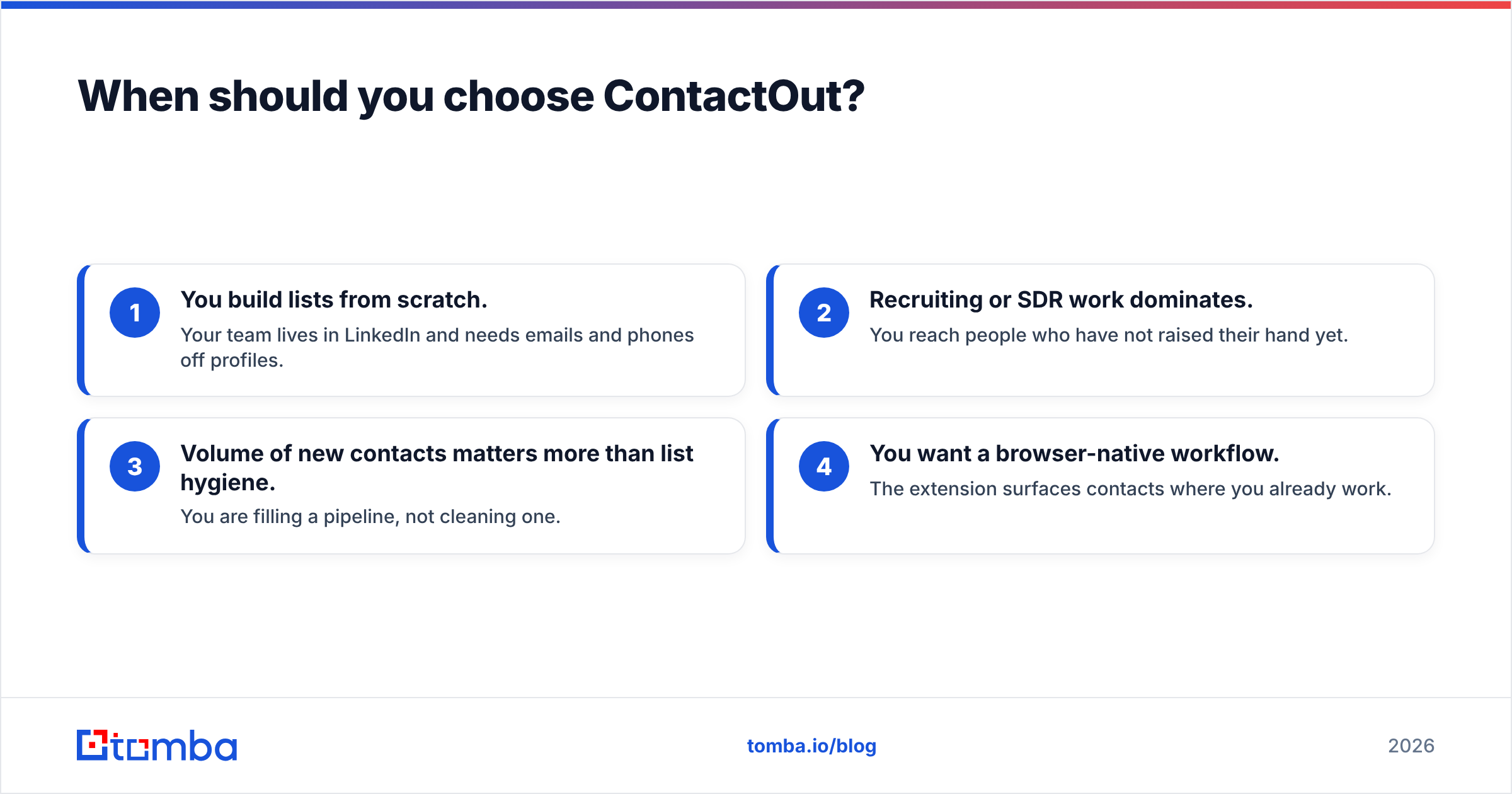
When should you choose ContactOut?#
Pick ContactOut (or another finder) when:
- You build lists from scratch. Your team lives in LinkedIn and needs emails and phones off profiles.
- Recruiting or SDR work dominates. You reach people who have not raised their hand yet.
- Volume of new contacts matters more than list hygiene. You are filling a pipeline, not cleaning one.
- You want a browser-native workflow. The extension surfaces contacts where you already work.
Just remember the follow-on cost: found emails still need verification before high-volume sending. That is the second subscription waiting to happen — unless your finder verifies inline.
Is there a tool that does both?#
Yes — and this is where the "Bounceremove vs ContactOut" framing breaks down. The real question for most teams is "why am I paying for two tools at all?"
A combined platform finds and verifies in one pass. Tomba's email finder discovers addresses by name, company, or domain search, and every result runs through verification before it lands in your list. That removes the find-in-one-tool, verify-in-another shuffle.
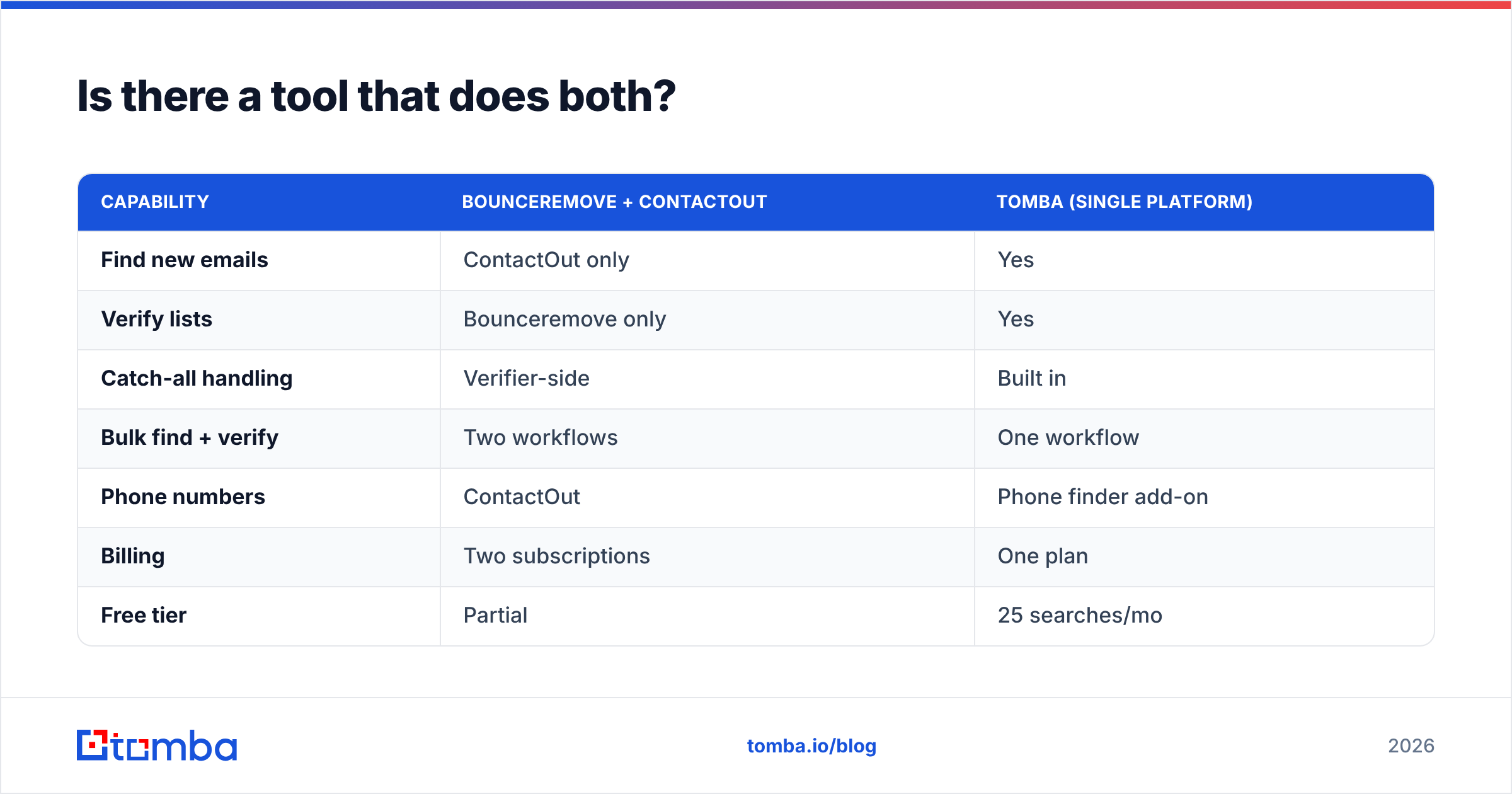
Here is how the combined approach stacks against running Bounceremove and ContactOut side by side:
| Capability | Bounceremove + ContactOut | Tomba (single platform) |
|---|---|---|
| Find new emails | ContactOut only | Yes |
| Verify lists | Bounceremove only | Yes |
| Catch-all handling | Verifier-side | Built in |
| Bulk find + verify | Two workflows | One workflow |
| Phone numbers | ContactOut | Phone finder add-on |
| Billing | Two subscriptions | One plan |
| Free tier | Partial | 25 searches/mo |
Beyond the core, Tomba covers the adjacent jobs both tools push you toward eventually: bulk lead generation, data enrichment, a phone finder for direct dials, and a Chrome extension so you can work from LinkedIn the way ContactOut users expect. If your stack already includes a CRM, the HubSpot integration and Salesforce integration keep verified contacts flowing without manual exports.
This is not to say Bounceremove or ContactOut are bad tools — they are good at their one thing. It is to say that paying for two single-purpose tools often costs more and creates more friction than one platform that does both jobs well. Compare any of them honestly using a third-party source like G2 before you commit.
How do you decide?#
Run this quick decision path:
- I only clean lists → Bounceremove (or a standalone verifier).
- I only build lists from LinkedIn → ContactOut.
- I do both, or expect to within a quarter → a combined platform.
- I want one bill, one workflow, and inline verification → Tomba.
The mistake teams make is buying for today's narrow task and then bolting on a second tool three months later — at which point they are paying two vendors, reconciling two credit systems, and exporting CSVs between them. If you can already see both needs coming, consolidate from the start.
The bottom line#
Bounceremove and ContactOut are not really rivals — one verifies, one finds. Compare them on the job you actually need done, not on a blended "accuracy" headline. If your need is genuinely single-purpose, either tool is a reasonable, focused choice.
But most outbound and recruiting teams need both finding and verifying, and that is exactly where a combined platform pulls ahead on cost and simplicity. Start free with the Tomba Email Finder — 25 searches a month, verified results, no second subscription required — and see whether one tool can replace the two you were about to compare.
// get started
Find, verify and enrich your first contacts today
Start on the free plan with 25 searches a month, then scale when your team is ready.
Free plan · No credit card required · GDPR & CCPA
// about the author