Bounceremove vs Nymeria 2026: Which Data Tool Wins?
Bounceremove cleans lists, Nymeria finds contacts. We compare accuracy, pricing, and use cases in 2026 — plus the all-in-one option that beats both.
Bounceremove and Nymeria get lumped together in "email tool" searches, but they solve opposite halves of the same problem. One cleans the list you already have. The other builds the list from scratch. Picking between them without knowing that difference is how teams end up paying for two subscriptions that still leave a gap.
This breakdown shows you exactly where each tool fits, what it costs in 2026, and why a single platform that finds and verifies usually beats stitching two point tools together.
TL;DR#
- Bounceremove is an email verification tool — it scrubs bounces, spam traps, and invalid addresses from a list you already own.
- Nymeria is a contact discovery and enrichment tool — it finds emails, phone numbers, and social profiles, mostly from LinkedIn.
- They are not direct competitors: Bounceremove cleans, Nymeria sources. Many teams need both jobs done.
- On price, Nymeria runs credit-based plans for finding; Bounceremove charges per volume of emails validated.
- If you want one tool that finds, enriches, and verifies, Tomba covers all three jobs from a free tier up to enterprise — which is where this comparison lands.
What is Bounceremove?#
Bounceremove is a bulk email verification service. You upload a list, it pings each address through SMTP-level checks, and it hands back a cleaned file sorted into valid, invalid, risky, and unknown buckets. The goal is simple: stop you from sending to dead inboxes that wreck your email deliverability and sender reputation.
Think of it like a bouncer at a club door. It doesn't bring guests to your party — it just checks IDs and turns away the fakes before they cause trouble inside. That's the whole job, and for list hygiene it's a useful one.
Core capabilities:
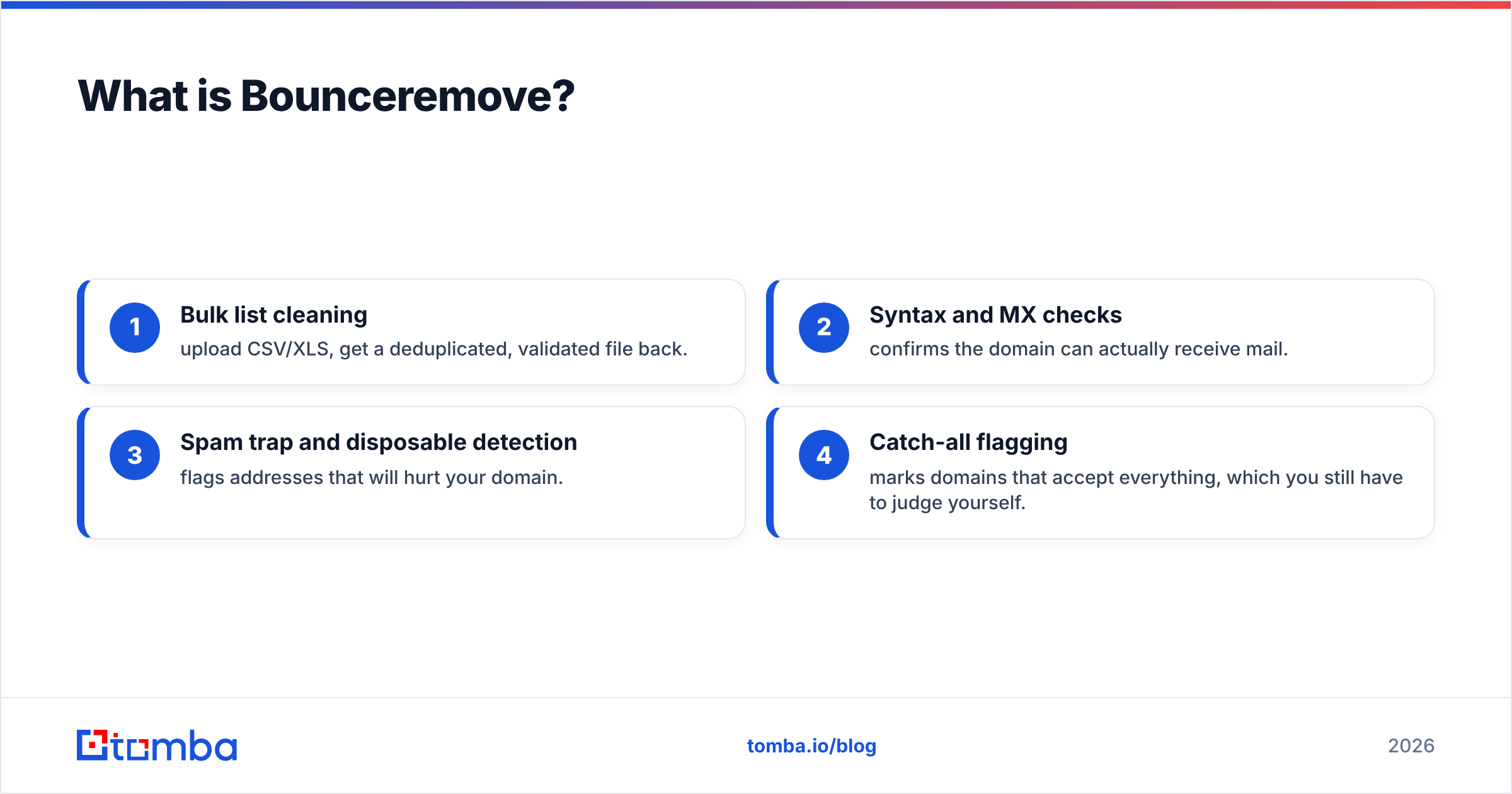
- Bulk list cleaning — upload CSV/XLS, get a deduplicated, validated file back.
- Syntax and MX checks — confirms the domain can actually receive mail.
- Spam trap and disposable detection — flags addresses that will hurt your domain.
- Catch-all flagging — marks domains that accept everything, which you still have to judge yourself.
What Bounceremove does not do: it never finds a single new contact. If your list is empty, Bounceremove has nothing to work with.
)
What is Nymeria?#
Nymeria is a contact data platform built around finding people and enriching what you know about them. Its best-known feature is a browser extension that surfaces emails and phone numbers while you browse LinkedIn profiles, plus an API and bulk enrichment for larger jobs. You can read its feature set on the official Nymeria site.
Where Bounceremove is a bouncer, Nymeria is more like a private investigator — you give it a name and a company, and it comes back with contact details and social handles. According to listings on G2, Nymeria is rated mainly as a lead-intelligence and prospecting tool, not a deliverability product.
Core capabilities:
- Email and phone discovery from names, domains, or LinkedIn URLs.
- LinkedIn extension for one-click contact reveal during prospecting.
- Data enrichment — fill in job titles, company, and social profiles for existing records.
- Bulk and API access for programmatic lookups.
Nymeria does include a layer of validation on the emails it returns, but verification is a byproduct of finding — it isn't a standalone list-cleaning service the way Bounceremove is.
Bounceremove vs Nymeria: what's the core difference?#
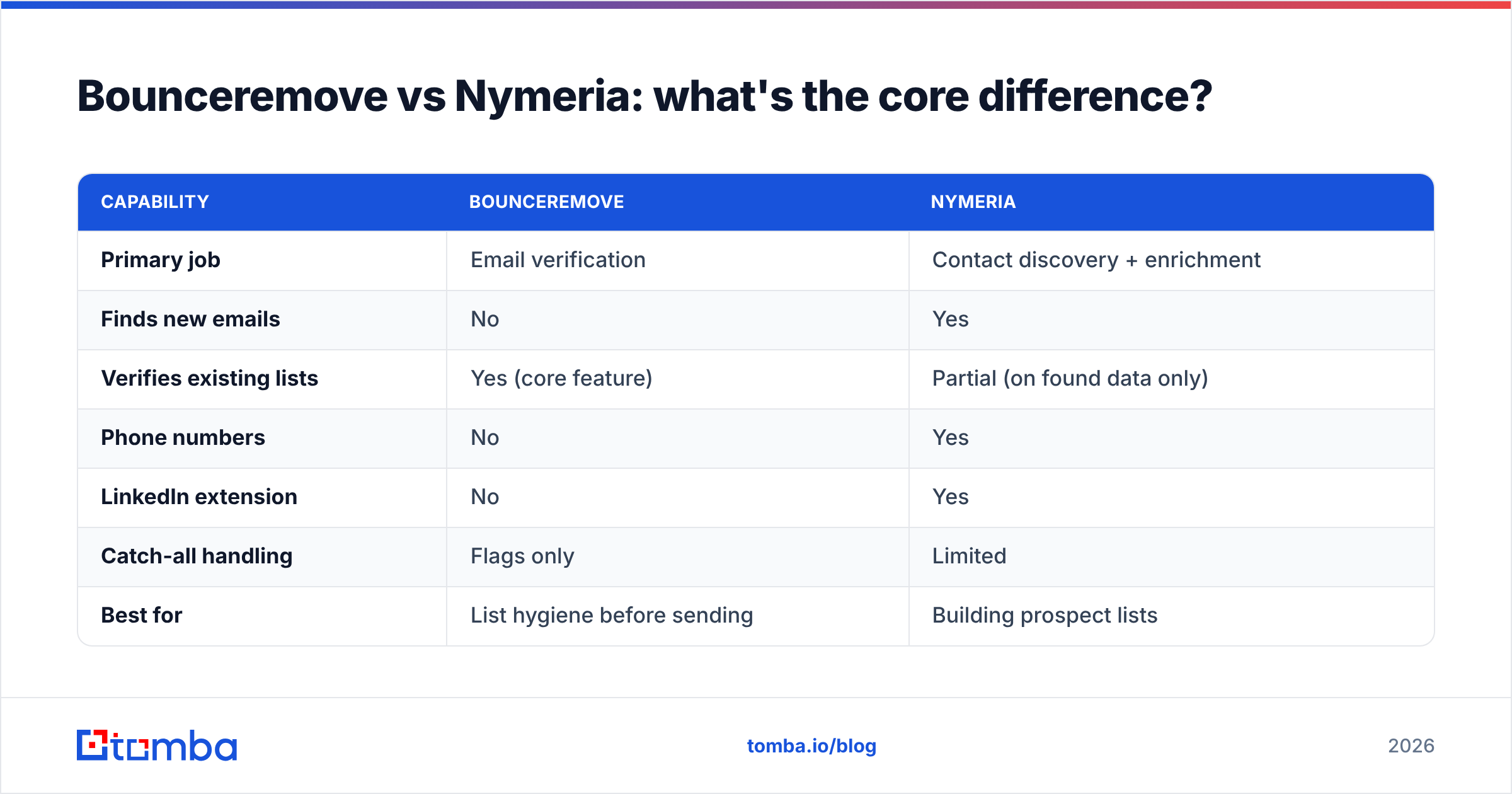
The honest one-liner: Bounceremove cleans lists, Nymeria builds them. You're not really choosing between two versions of the same product — you're deciding which half of the contact-data workflow you need solved right now.
Here is how the two map across the jobs that actually matter:
| Capability | Bounceremove | Nymeria |
|---|---|---|
| Primary job | Email verification | Contact discovery + enrichment |
| Finds new emails | No | Yes |
| Verifies existing lists | Yes (core feature) | Partial (on found data only) |
| Phone numbers | No | Yes |
| LinkedIn extension | No | Yes |
| Catch-all handling | Flags only | Limited |
| Best for | List hygiene before sending | Building prospect lists |
| API access | Yes | Yes |
If your pain is "my campaigns bounce," Bounceremove is the relevant tool. If your pain is "I have no one to email," Nymeria is. The trap is that most outbound teams have both problems, and neither tool fully covers the other's side.
Which one is more accurate?#
Accuracy means two different things here, so compare them on the right axis.
For verification accuracy — correctly labeling an address as valid or invalid — Bounceremove competes with dedicated verifiers, and the benchmark that matters is how well a tool handles catch-all domains and spam traps without dumping everything into "unknown." A good verifier keeps the unknown bucket small.
For discovery accuracy — returning a correct, deliverable email for a named person — Nymeria competes with email finders, where the metric is hit rate (did it find an address at all) multiplied by validity (was the address real). A finder that returns lots of guesses with no verification inflates its hit rate while quietly tanking your bounce rate.

This is the structural weakness of running a finder and a cleaner as separate tools: Nymeria finds an address, you export it, you re-upload to Bounceremove, it gets flagged invalid, and now you've paid twice to learn the contact was never reachable. The data never gets better — it just gets re-checked. A platform that verifies at the moment of finding skips that loop entirely, which is the case for using a combined email verifier alongside discovery.
How do Bounceremove and Nymeria price in 2026?#
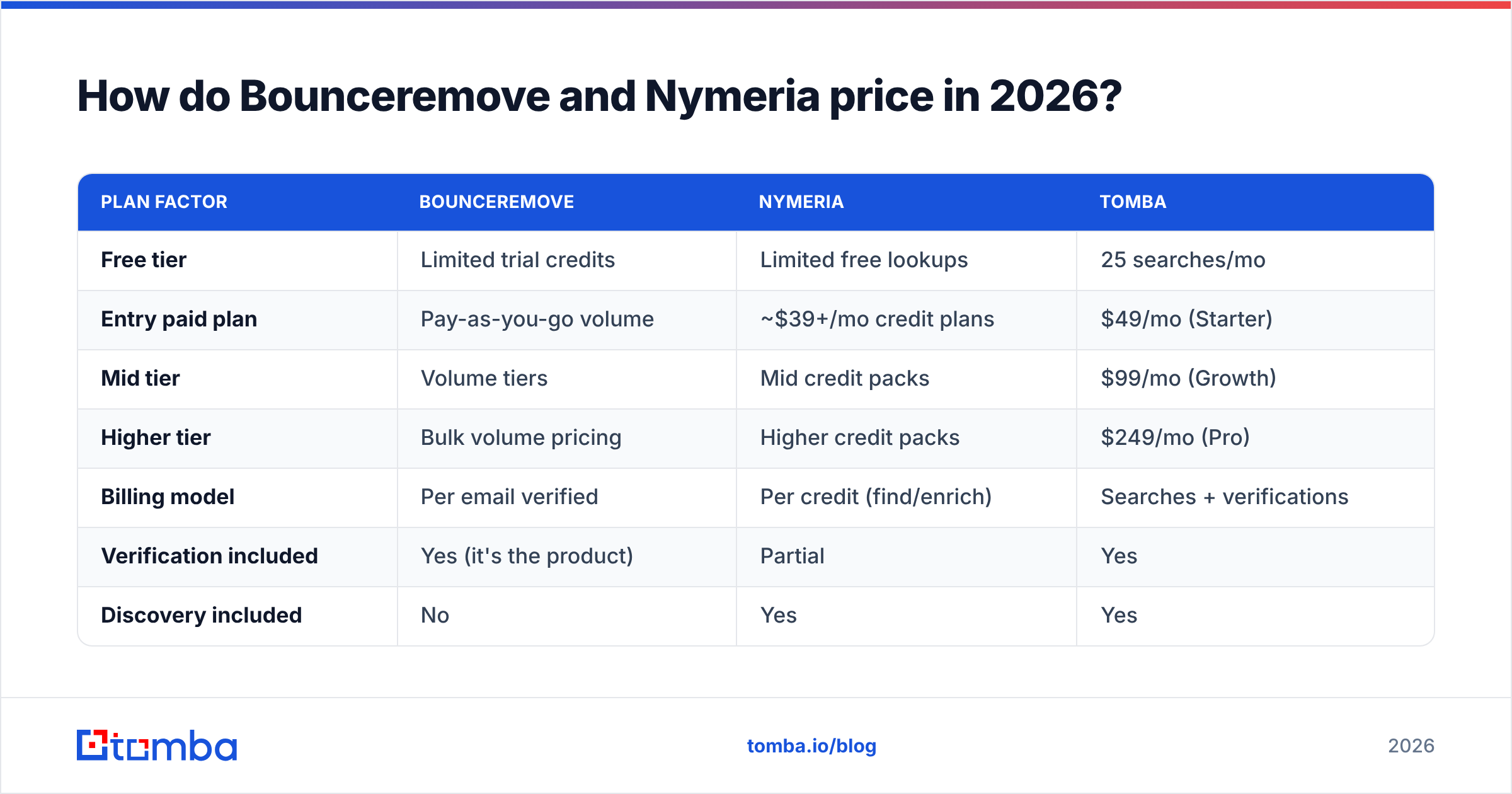
Both use consumption pricing, but they meter different things — Bounceremove charges for emails validated, Nymeria charges for contacts found or enriched via credits. That makes direct dollar comparison misleading unless you anchor on your actual workflow.
| Plan factor | Bounceremove | Nymeria | Tomba |
|---|---|---|---|
| Free tier | Limited trial credits | Limited free lookups | 25 searches/mo |
| Entry paid plan | Pay-as-you-go volume | ~$39+/mo credit plans | $49/mo (Starter) |
| Mid tier | Volume tiers | Mid credit packs | $99/mo (Growth) |
| Higher tier | Bulk volume pricing | Higher credit packs | $249/mo (Pro) |
| Billing model | Per email verified | Per credit (find/enrich) | Searches + verifications |
| Verification included | Yes (it's the product) | Partial | Yes |
| Discovery included | No | Yes | Yes |
Two takeaways. First, if you only need verification, a pay-per-volume verifier can be cheaper than a subscription — but you give up discovery entirely. Second, if you need both, paying for Nymeria credits and Bounceremove volume usually costs more than one combined plan. You can sanity-check the math against full Tomba pricing before committing to two separate vendors.
)
When should you pick Bounceremove?#
Pick Bounceremove when discovery is already handled and you just need clean lists.
- You buy or inherit lists and need them scrubbed before the first send.
- Your bounce rate spiked and you need a one-time deep clean of an existing database.
- You run high-volume email marketing where deliverability is the whole game and contacts come from signups, not prospecting.
- You already have a finder and only want a focused, pay-as-you-go cleaning layer.
In these cases Bounceremove does its one job well. The limitation is that it stays one job — the moment you need new contacts, you're shopping for a second tool.
When should you pick Nymeria?#
Pick Nymeria when your bottleneck is finding people, not cleaning them.
- You prospect heavily on LinkedIn and want emails and phones surfaced as you browse.
- You need phone numbers, which Bounceremove simply doesn't provide.
- You're enriching a thin CRM with job titles, companies, and social profiles.
- Your team lives in the browser and wants a lightweight extension over a bulk pipeline.
Nymeria is a solid discovery tool. Its gap is the inverse of Bounceremove's: verification is along for the ride, not the headline, so high-volume senders still tend to bolt on a dedicated cleaner — which puts you right back in two-tool territory.
Is there a tool that does both jobs?#
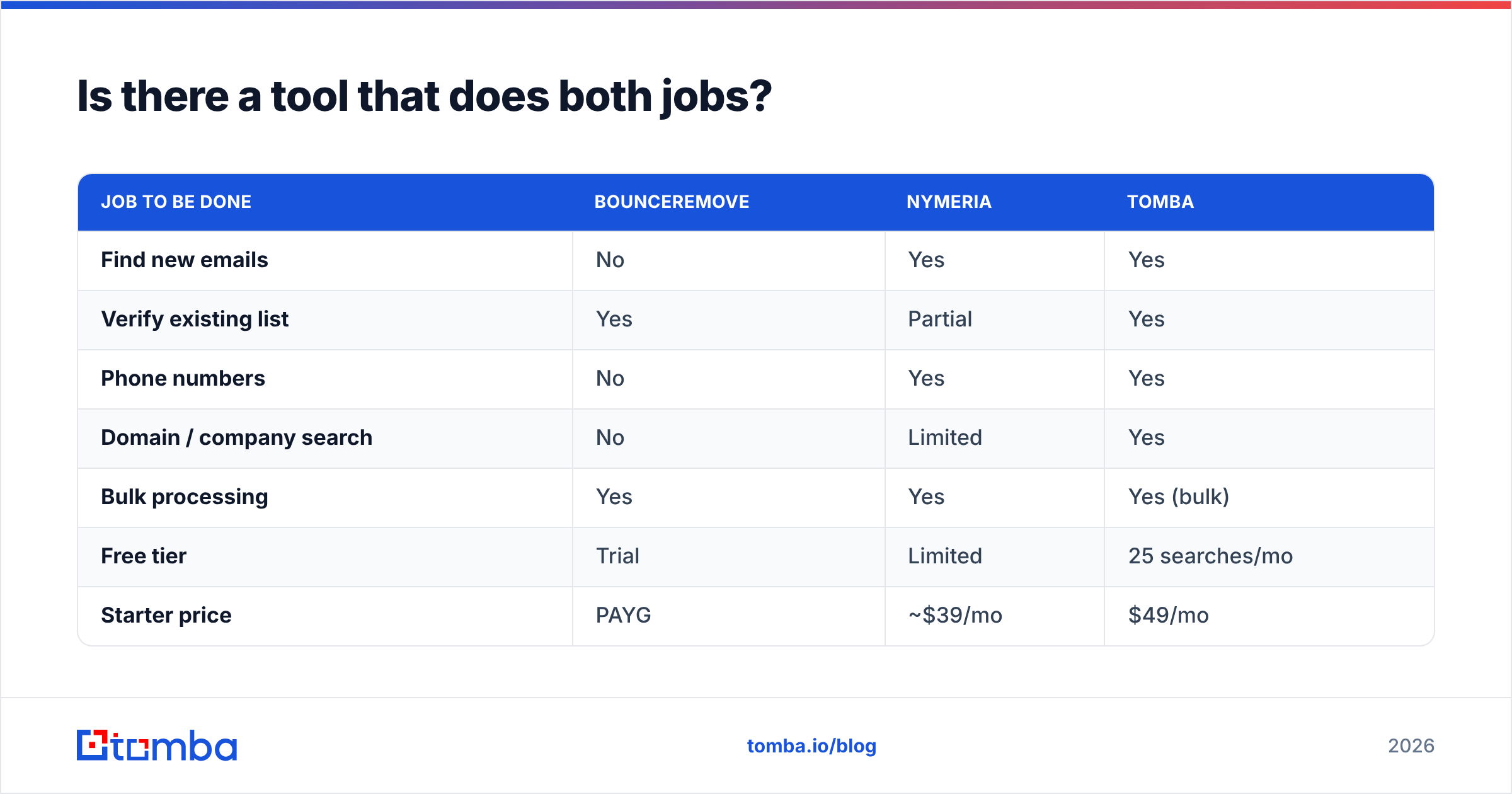
Yes — and this is the real point of comparing a cleaner against a finder. Most teams don't want to choose; they want one bill, one API, and data that's verified the moment it's found.
Tomba is built as that single layer. It finds professional emails by name, company, or domain search, verifies them in the same flow, and adds phone discovery and data enrichment on top — covering Nymeria's discovery job and Bounceremove's cleaning job without the export-reimport loop.
| Job to be done | Bounceremove | Nymeria | Tomba |
|---|---|---|---|
| Find new emails | No | Yes | Yes |
| Verify existing list | Yes | Partial | Yes |
| Phone numbers | No | Yes | Yes |
| Domain / company search | No | Limited | Yes |
| Bulk processing | Yes | Yes | Yes (bulk) |
| Free tier | Trial | Limited | 25 searches/mo |
| Starter price | PAYG | ~$39/mo | $49/mo |
The advantage isn't just feature count — it's that finding and verifying happen together. When an address is validated at discovery, you don't pay a second vendor to tell you the contact was never real. That single-pipeline approach is what makes a combined platform cheaper in practice than the Bounceremove-plus-Nymeria stack, even when the headline prices look similar.
For most outbound and RevOps teams, the decision isn't "Bounceremove or Nymeria" — it's "two narrow tools or one that does both." If you process contacts at any scale, consolidating saves money and removes a brittle handoff between systems. Email verification as a category is well documented if you want the background on why list hygiene matters at all (Email validation on Wikipedia).

The verdict: which should you choose?#
Choose by the job in front of you. If you only ever clean lists, Bounceremove is a focused, capable verifier. If you only ever find contacts, Nymeria is a strong LinkedIn-first discovery tool. But if you do both — and most growing teams do — running them in parallel means two subscriptions, two APIs, and a manual export step where good contacts quietly get lost.
That's the case for consolidating. Start with the Tomba Email Finder: find verified professional emails by name, company, or domain, validate them in the same pass, and enrich with phone and social data — all from a free tier of 25 searches a month before you ever pay. You get Nymeria's discovery and Bounceremove's cleaning in one workflow, priced from $49/mo on the Starter plan. Try it free, run your hardest list through it, and compare the bounce rate yourself.
// get started
Find, verify and enrich your first contacts today
Start on the free plan with 25 searches a month, then scale when your team is ready.
Free plan · No credit card required · GDPR & CCPA
// about the author