Bounceremove vs Reachstream: Which B2B Tool Wins in 2026?
A neutral, side-by-side breakdown of Bounceremove vs Reachstream — accuracy, pricing, data coverage, and verification — so you can pick the right B2B contact stack for 2026.
Bounceremove vs Reachstream: Which B2B Tool Wins in 2026?
You are comparing Bounceremove and Reachstream because you have a list problem and a data problem at the same time — and you are not sure whether you need a cleaner, a contact source, or both. The two tools sit on opposite ends of the same pipeline, so picking one without understanding the other usually means you overpay or under-deliver.
TL;DR#
- Bounceremove is an email verification and list-cleaning tool. It tells you whether the addresses you already have are safe to send to.
- Reachstream is a B2B contact database. It gives you new emails and phone numbers to add to your pipeline, but coverage and freshness vary by region.
- They solve different halves of the same problem — Reachstream sources contacts, Bounceremove (or any verifier) filters them.
- For most teams, paying for two narrow tools is more expensive and slower than one platform that finds and verifies in the same step.
- If you want sourcing plus verification under one roof, Tomba covers both with a free tier and a $49/mo starter plan.
What does Bounceremove actually do?#
Bounceremove is an email verifier. Think of it like airport security for your send list: nothing new is created, but everything that walks through gets checked, and the risky items get pulled aside before they cause trouble.
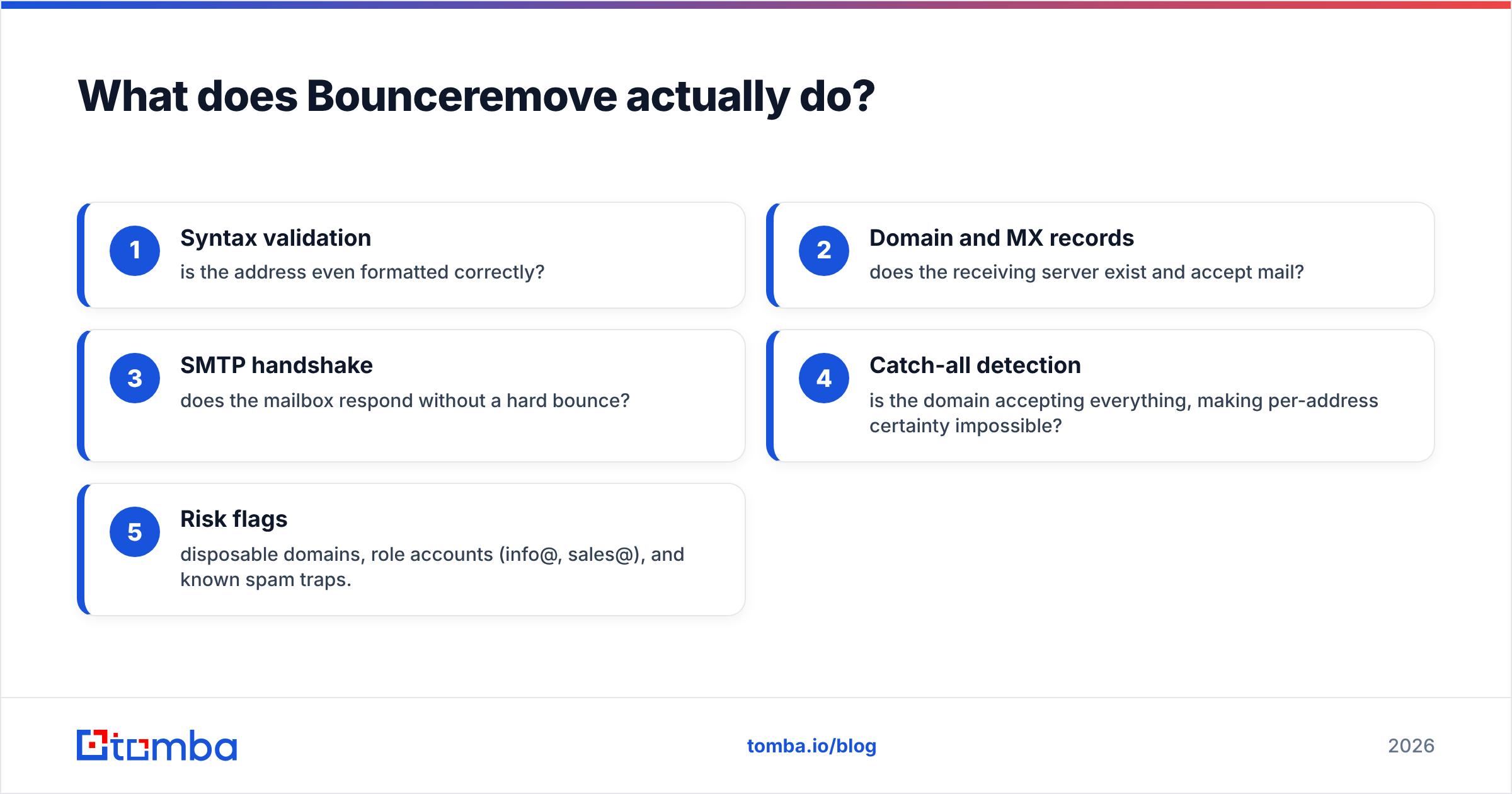
Concretely, a verifier like Bounceremove runs checks such as:
- Syntax validation — is the address even formatted correctly?
- Domain and MX records — does the receiving server exist and accept mail?
- SMTP handshake — does the mailbox respond without a hard bounce?
- Catch-all detection — is the domain accepting everything, making per-address certainty impossible?
- Risk flags — disposable domains, role accounts (info@, sales@), and known spam traps.
The output is a cleaner list and a lower bounce rate. That matters because mailbox providers treat bounces as a signal of a careless sender, and your sender reputation takes the hit. A verifier is a defensive tool — it protects what you already have.
What Bounceremove does not do is find you new contacts. If your CSV is empty, a verifier has nothing to work with. That is the core limitation to keep in mind as you compare.

What does Reachstream actually do?#
Reachstream is a B2B contact data platform. Instead of cleaning a list you bring, it sells you the list. You search by industry, job title, company size, or geography, and it returns contact records — typically name, business email, company, and sometimes a phone number.
This is the offensive side of the pipeline. Reachstream's value depends almost entirely on two things:
- Coverage — does it actually have the people you want to reach, especially outside the US?
- Freshness — B2B data decays fast. People change jobs roughly every two to three years, so a record sourced 18 months ago may already be dead.
Here is the catch that trips up most buyers: database emails still need verification. No provider, Reachstream included, can guarantee every exported address is live on the day you send. That is why teams who buy from a database almost always run the export through a verifier anyway — which is exactly the workflow that makes a two-tool stack feel redundant.
Bounceremove vs Reachstream: how do they compare head to head?#
Because these tools target different jobs, a fair comparison looks at where each one wins, where it leaves a gap, and what it costs to cover that gap.
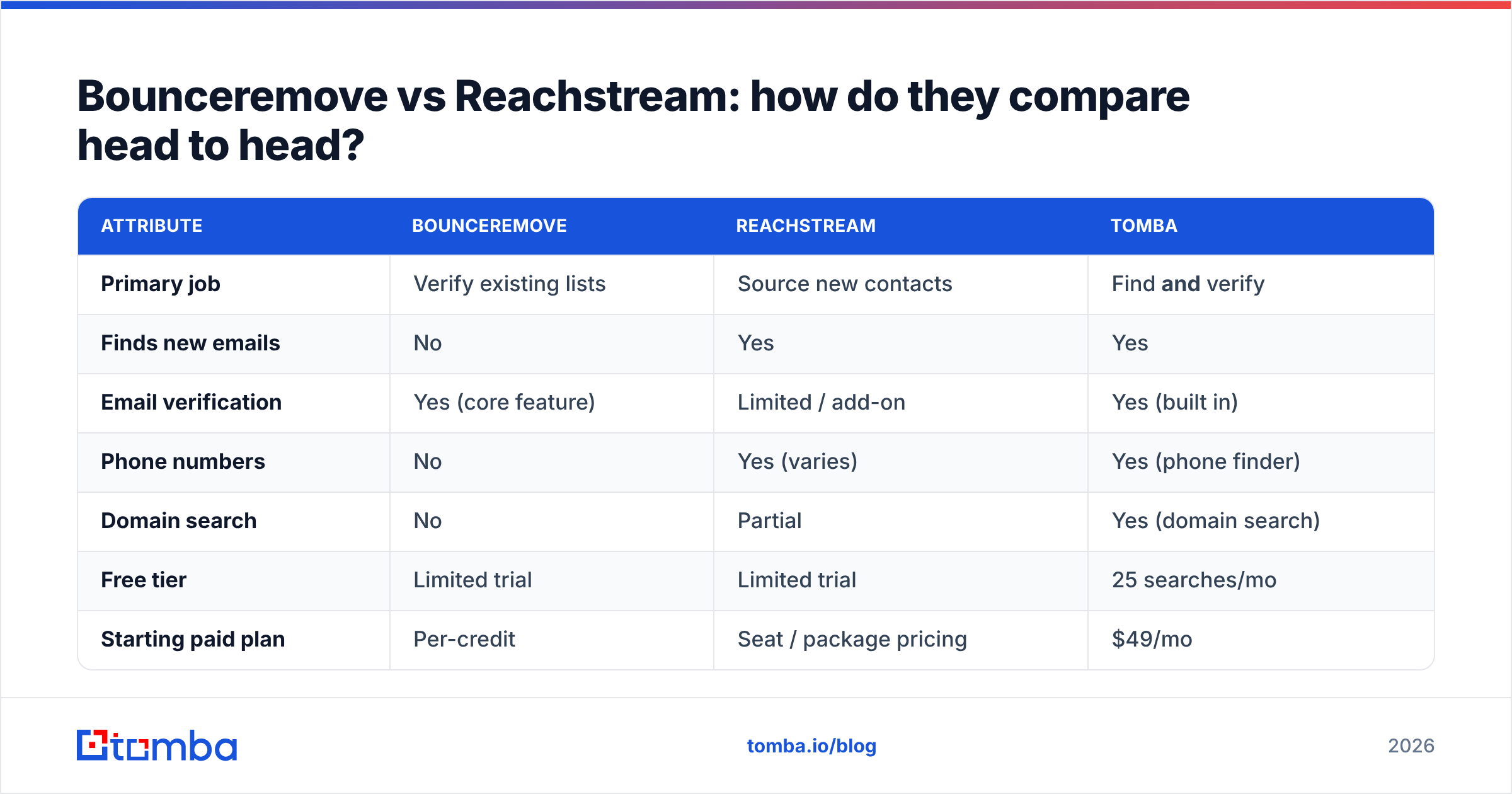
| Attribute | Bounceremove | Reachstream | Tomba |
|---|---|---|---|
| Primary job | Verify existing lists | Source new contacts | Find and verify |
| Finds new emails | No | Yes | Yes |
| Email verification | Yes (core feature) | Limited / add-on | Yes (built in) |
| Phone numbers | No | Yes (varies) | Yes (phone finder) |
| Domain search | No | Partial | Yes (domain search) |
| Free tier | Limited trial | Limited trial | 25 searches/mo |
| Starting paid plan | Per-credit | Seat / package pricing | $49/mo |
| Best for | Cleaning bought lists | Buying lists | End-to-end prospecting |
The pattern is clear: neither standalone tool closes the loop. Bounceremove assumes you already sourced your contacts. Reachstream assumes you will verify elsewhere. Run them together and you are paying two vendors, syncing two exports, and reconciling two billing cycles to do what an email finder with built-in verification does in one pass.
Is accuracy better with a database or a verifier?#
Accuracy is the wrong single number to chase, because the two tools measure different things.
- A verifier's accuracy is about false negatives and false positives — does it correctly flag a dead address, and does it avoid killing a good one? Over-aggressive verifiers quietly delete valid contacts, which costs you pipeline.
- A database's accuracy is about match rate and validity at export — of the contacts it returns, how many are real, current, and reachable today?
The problem is that these compound. If Reachstream returns a list that is 85% valid and you skip verification, 15% of your send bounces. If you do verify, you have now run two tools to reach the same place. The cleanest way to control accuracy is to source and verify against the same fresh dataset, so a found email is checked the moment it is found, not weeks later from a stale CSV.
This is where a platform approach pays off. Tomba's data sourcing and email verifier share the same pipeline, and you can read exactly where the data comes from rather than guessing. Independent reviews on G2 are a useful sanity check before you trust any single vendor's accuracy claim — including this one.
What about catch-all domains?#
Catch-all domains are the silent killer in any verifier-vs-database debate, and most comparison posts skip them.
A catch-all domain accepts mail to every address, real or not, so a standard SMTP check returns "valid" even for a mailbox that does not exist. If a large share of your target accounts use catch-all configurations — common in enterprise — a basic verifier like Bounceremove may pass addresses that still bounce, and a database export gives you no way to tell the difference.
Handling this well requires a dedicated catch-all verifier that uses pattern confidence and historical signal rather than a single SMTP ping. If your ICP skews enterprise, ask any vendor — Bounceremove, Reachstream, or otherwise — exactly how they score catch-all domains before you commit. A vague answer is a red flag.
How should pricing factor into the decision?#
Pricing is where the two-tool stack quietly gets expensive.
Database platforms in Reachstream's category often price by seat or annual package, which front-loads cost before you have proven ROI. Verifiers like Bounceremove price by credit, which is fair but adds a second invoice and a second usage ceiling to manage. Combine them and your real cost is the sum, plus the operational tax of moving data between them.
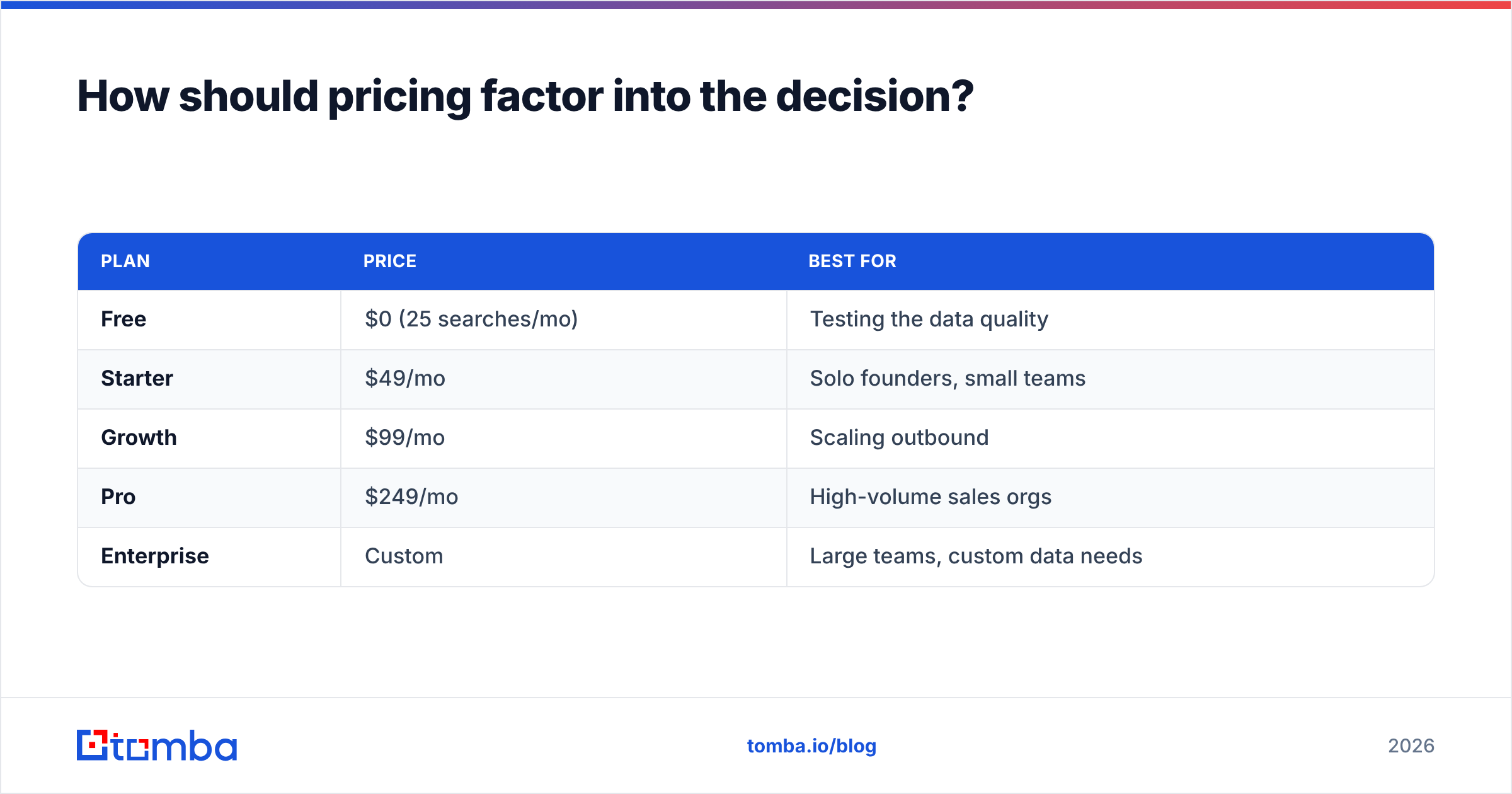
Compare that to a single transparent plan. Tomba's pricing is straightforward:
| Plan | Price | Best for |
|---|---|---|
| Free | $0 (25 searches/mo) | Testing the data quality |
| Starter | $49/mo | Solo founders, small teams |
| Growth | $99/mo | Scaling outbound |
| Pro | $249/mo | High-volume sales orgs |
| Enterprise | Custom | Large teams, custom data needs |
One plan covers finding, verifying, domain search, and enrichment. You are not stitching a sourcing bill and a cleaning bill together to get a working list.

Which tool should you pick for your use case?#
Match the tool to the actual job, not the marketing.
- You already bought a big list and just need it clean. A verifier is the right call. Bounceremove can do this, and so can a dedicated bulk email finder with verification included.
- You have zero contacts and need to build a list from scratch. You need a data source. Reachstream fits here — but budget for verification on top, because raw exports bounce.
- You want to find targeted contacts and know they are deliverable before you send. You want one platform that does both. This is the gap a combined email finder and verifier fills, and it is the most common real-world need.
- You are building this into a product or workflow. Look for an email finder API so sourcing and verification run automatically, not as manual CSV uploads.
Most teams who think they need "Bounceremove vs Reachstream" actually need both functions — which is the strongest argument for not buying two single-purpose tools.
What does a modern prospecting workflow look like?#
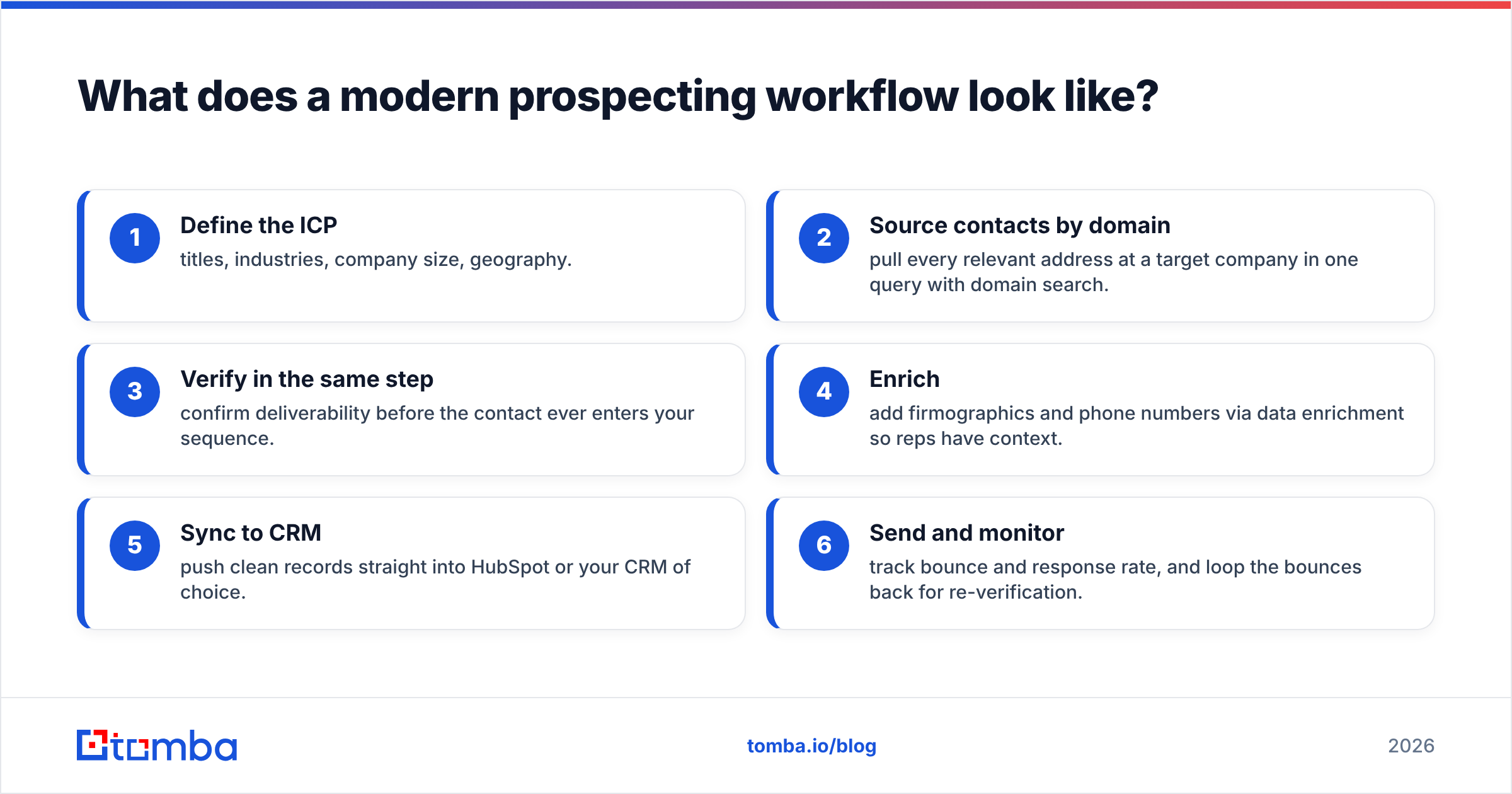
Here is the workflow the two-tool debate misses entirely. A clean 2026 outbound motion looks like this:
- Define the ICP — titles, industries, company size, geography.
- Source contacts by domain — pull every relevant address at a target company in one query with domain search.
- Verify in the same step — confirm deliverability before the contact ever enters your sequence.
- Enrich — add firmographics and phone numbers via data enrichment so reps have context.
- Sync to CRM — push clean records straight into HubSpot or your CRM of choice.
- Send and monitor — track bounce and response rate, and loop the bounces back for re-verification.
Notice that steps 2 and 3 are a single platform action when sourcing and verification live together, and two separate vendor handoffs when they do not. That handoff is the hidden cost of pairing Reachstream with Bounceremove. The fewer seams in your pipeline, the fewer places data goes stale or gets dropped. Industry guides from HubSpot make the same point repeatedly: tool sprawl, not tool choice, is what slows most sales teams down.
Bounceremove vs Reachstream: the honest verdict#
Neither tool is "better" because they do not compete on the same job. Bounceremove is a competent verifier; Reachstream is a competent data source. The real question is whether buying two narrow tools beats one platform that does both — and for the majority of B2B teams, it does not.
If your only need is cleaning a list you already own, a standalone verifier is fine. If your only need is buying a one-time list, a database export is fine. But if you are running ongoing outbound — sourcing new contacts every week and needing them deliverable on day one — a combined approach is faster, cheaper, and has fewer places to fail.
That is the case for consolidating. Tomba's Email Finder sources professional emails by name, domain, or company and verifies them in the same flow, with a free tier so you can benchmark the data against your own ICP before paying a cent. Start with 25 free searches, check the accuracy on accounts you already know, and decide whether you still need a separate cleaner and a separate database — most teams find they don't.
// get started
Find, verify and enrich your first contacts today
Start on the free plan with 25 searches a month, then scale when your team is ready.
Free plan · No credit card required · GDPR & CCPA
// about the author