Bounceremove vs Salesbot 2026: Which Email Tool Wins?
Bounceremove cleans dead emails, Salesbot automates outreach. They solve different halves of the same problem. Here's how they compare in 2026 — and where a data-first stack actually beats both.
Comparing Bounceremove vs Salesbot is a bit like comparing a water filter to a delivery truck. One makes sure what you send is clean; the other makes sure it gets sent at scale. Most teams that ask "which one should I buy?" are actually missing a third piece — the data layer that decides whether either tool has anything worth working with in the first place.
This guide breaks down what each tool does, where each one wins, and how to think about the full pipeline so you don't pay for automation that's just blasting bad data faster.
TL;DR#
- Bounceremove is a verification / list-cleaning tool: its job is to strip out invalid, risky, and dead addresses before you send so your bounce rate stays low.
- Salesbot is an outreach-automation tool: its job is to sequence, personalize, and send messages at scale, then track replies.
- They are not direct competitors — they sit at different stages of the same funnel. Buying one does not replace the other.
- Neither tool sources contacts. If your list is built on guessed emails, both will faithfully process garbage.
- The highest-leverage first move for most teams is fixing the data layer — finding and verifying accurate emails — with a tool like Tomba's email finder before you spend on automation.
What is Bounceremove?#
Bounceremove sits in the email verification category. Tools in this class take a list you already have and run each address through a series of checks: syntax validation, domain and MX record lookups, SMTP handshake probing, and risk flags for role accounts (like info@ or sales@), disposable domains, and catch-all servers.
The output is a cleaned list, usually bucketed into something like deliverable, risky, and undeliverable. You keep the safe addresses, quarantine the risky ones, and drop the dead ones.
Why this matters: mailbox providers watch your bounce rate as a core trust signal. A spike in hard bounces tells Gmail and Outlook that you don't know who you're emailing, and your sender reputation drops. Once that happens, even your good messages start landing in spam. Verification is the seatbelt that keeps a single bad import from wrecking your domain.
The honest limitation: a verifier is only as useful as the list you feed it. It removes bad data — it never creates good data. If you import 5,000 addresses and 40% are invalid, Bounceremove hands you back 3,000 — it doesn't find the 2,000 real ones you're missing.
)
What is Salesbot?#
Salesbot lives in the sales automation category. Its job starts after you have a list. It handles multi-step sequences, send scheduling, merge-field personalization, A/B testing of subject lines, inbox rotation, reply detection, and reporting on opens, clicks, and responses.
Think of it as the engine room of outbound. You load contacts, write a sequence, set sending limits, and the bot runs the campaign on autopilot — pausing threads when someone replies, retrying on the right cadence, and rolling results into a dashboard so you can see response rate by segment.
The honest limitation here is the mirror image of Bounceremove's: automation amplifies whatever you give it. Point a high-volume sequence at an unverified list and you don't get more meetings — you get more bounces, more spam complaints, and a faster route to a blacklisted domain. Speed without data quality is just efficient self-harm.
Bounceremove vs Salesbot: how do they actually compare?#
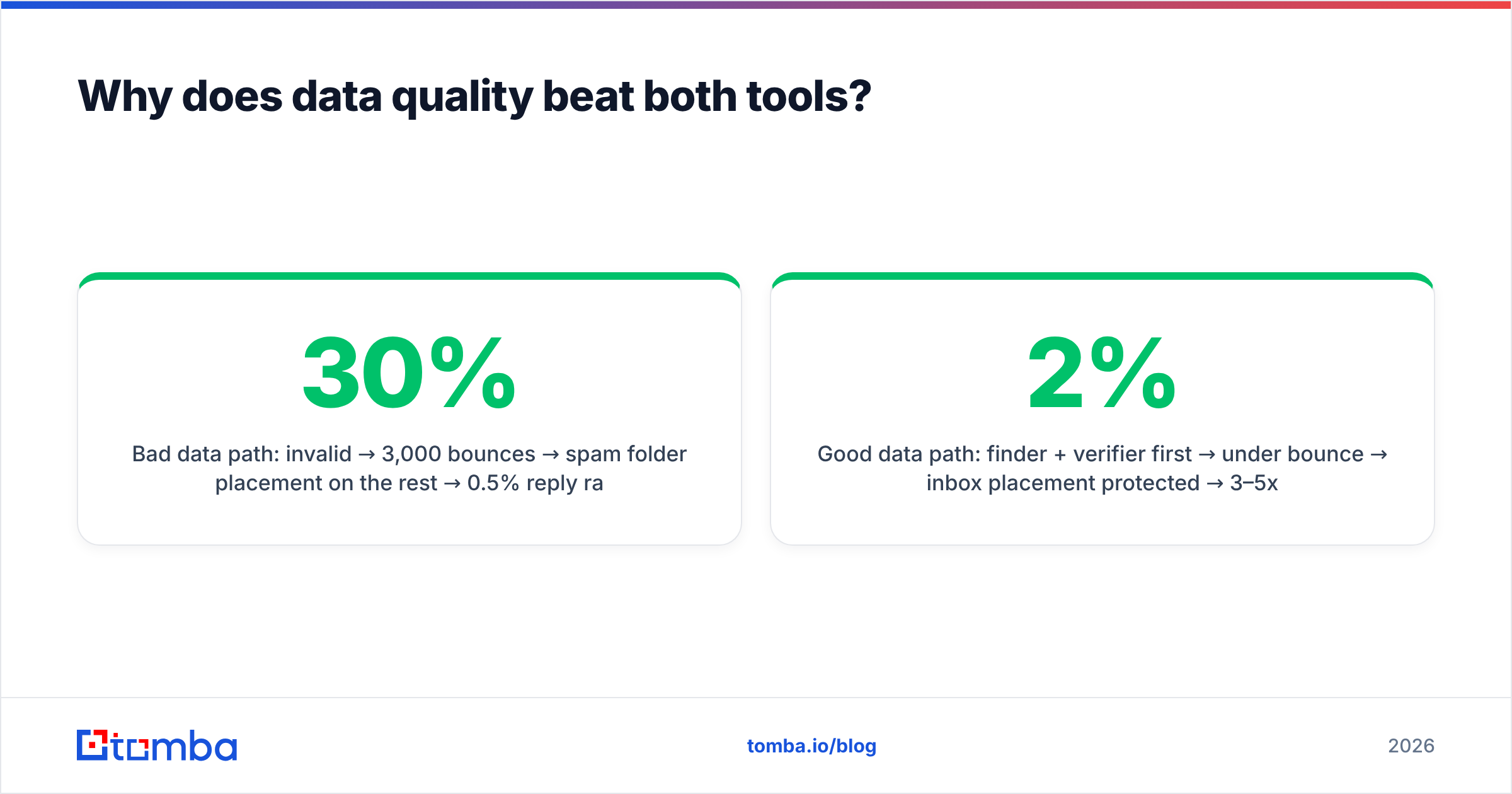
Because these tools solve different problems, a feature-by-feature table makes the split obvious. Here's how each one maps against the jobs an outbound team actually needs done — with Tomba added as the data layer that feeds both.
| Capability | Bounceremove | Salesbot | Tomba |
|---|---|---|---|
| Primary job | Clean existing lists | Send & sequence at scale | Find & verify contacts |
| Finds new emails | No | No | Yes |
| Verifies deliverability | Yes | Limited | Yes |
| Catch-all handling | Basic flag | No | Dedicated catch-all verifier |
| Outreach sequencing | No | Yes | No (integrates) |
| Reply / open tracking | No | Yes | No |
| Bulk processing | Yes | Yes | Yes (bulk finder + verify) |
| Free tier | Usually limited | Usually trial | 25 searches/mo free |
| Best fit | List hygiene | Campaign execution | Pipeline data source |
The pattern is clear: Bounceremove protects you, Salesbot scales you, and neither one supplies the raw material. That third column is where most of the actual win-or-lose math happens, which is why we'll come back to it.
Where Bounceremove wins#
- You inherited a messy database. A CRM with years of decayed contacts is the textbook use case for a verifier.
- You're consolidating lists from multiple sources. Merging exports always introduces duplicates and dead addresses.
- Compliance and bounce thresholds matter. If your ESP enforces a strict bounce ceiling, cleaning first is non-negotiable.
Where Salesbot wins#
- You already have clean, verified data and need to operationalize sending.
- Your team runs many sequences in parallel and needs cadence logic, inbox rotation, and reply handling.
- Reporting drives your process. You want per-step analytics to optimize copy and timing.
Is Bounceremove or Salesbot the right first purchase?#
Neither — at least not first. The question assumes the bottleneck is cleaning or sending, when for most teams the real bottleneck is sourcing accurate contacts. You can't clean a list you don't have, and you can't automate outreach to people you can't reach.
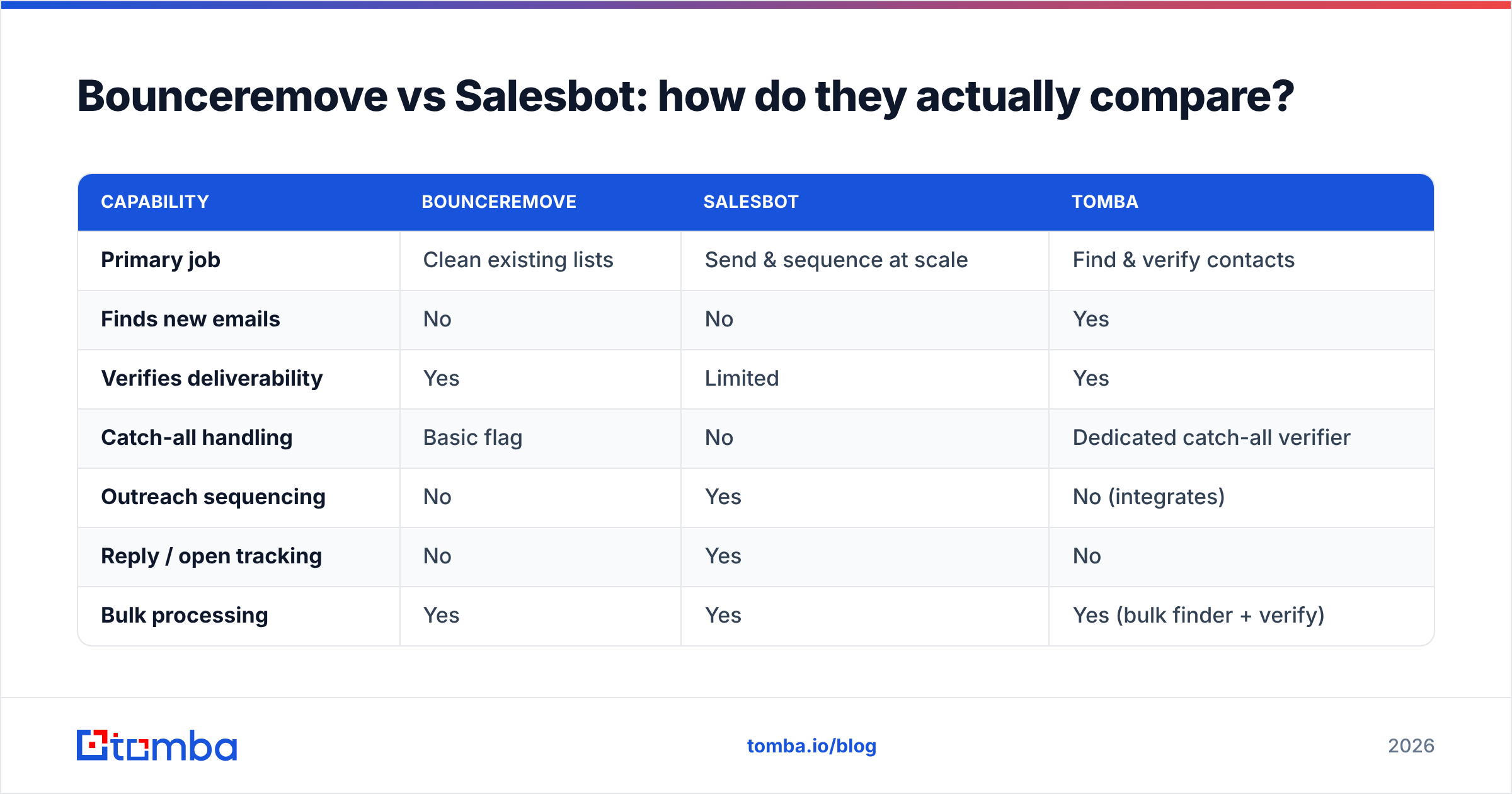
Here's the order of operations that actually compounds, framed as the pipeline these tools plug into:
- Source the right contacts. Use an email finder or domain search to build a list of real decision-makers at your target accounts — by name, company, or domain.
- Verify before you store. Run new finds through an email verifier so only deliverable addresses ever hit your CRM. This is the job Bounceremove does — except you've done it at the source instead of after damage is done.
- Handle catch-all domains deliberately. Many B2B domains accept everything at the server level, which fools basic checks. A dedicated catch-all verifier tells you which catch-all addresses are actually safe.
- Then automate. Load the verified list into Salesbot (or any sequencer) and let it run. Now the automation is amplifying clean data, not bouncing off dead inboxes.
- Enrich and personalize. Layer in data enrichment — job titles, company size, tech stack — so your sequences read like research, not mail-merge.
Do steps 1–3 well and step 4 gets dramatically cheaper, because you're not paying per-send to discover your data was bad.
)
Why does data quality beat both tools?#
Because every downstream metric inherits the quality of your input. A 2026 outbound campaign lives or dies on three numbers: deliverability, reply rate, and cost per meeting. All three are set by data quality long before Bounceremove or Salesbot touch the campaign.
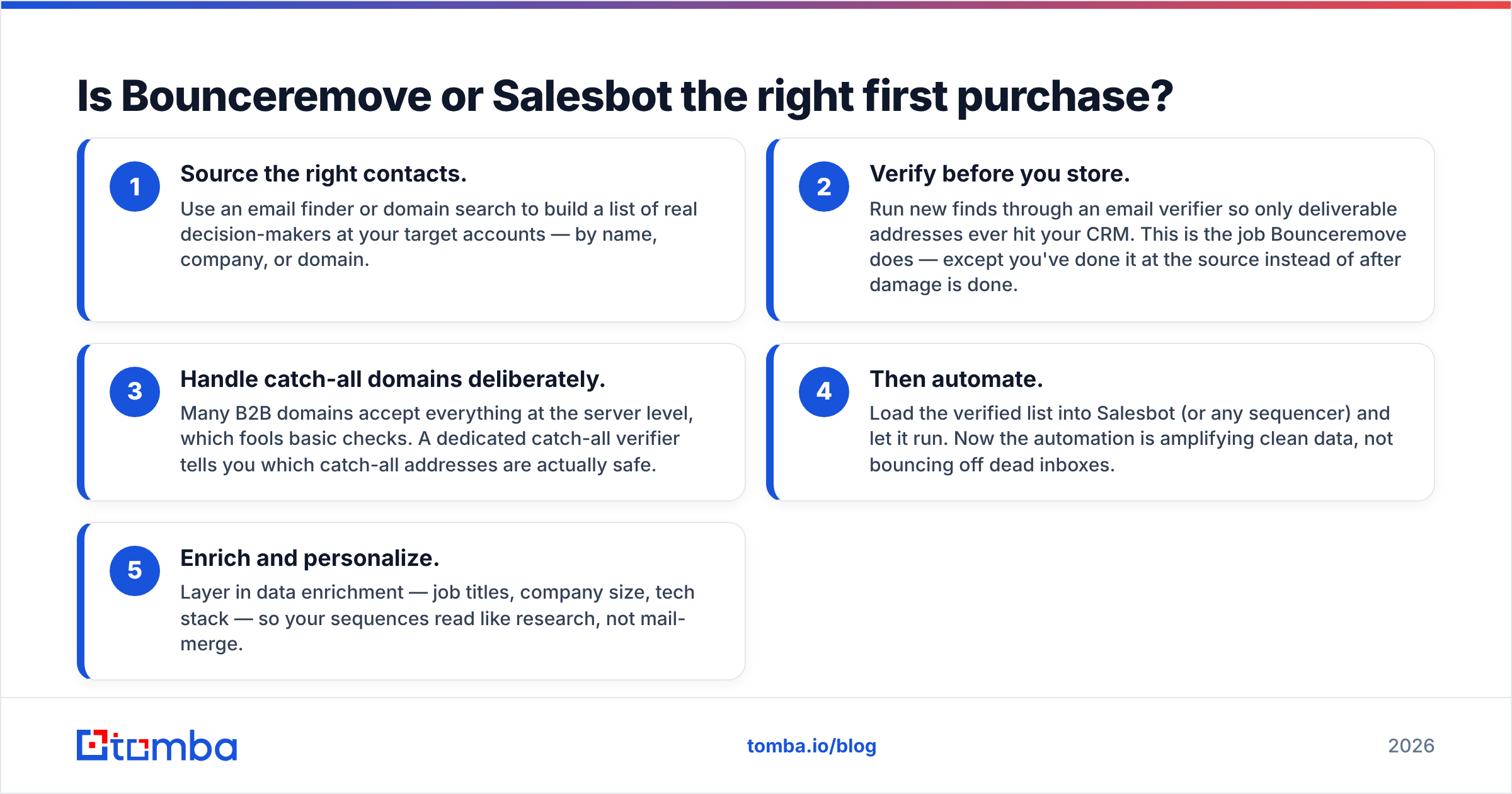
Consider the math. Say you send 10,000 emails:
- Bad data path: 30% invalid → 3,000 bounces → spam folder placement on the rest → 0.5% reply rate on what's left → reputation damage you'll spend weeks repairing.
- Good data path: finder + verifier first → under 2% bounce → inbox placement protected → 3–5x the reply rate → no firefighting.
Same Salesbot, same copy, same effort. The only variable that changed was the quality of the list — and that's a job neither a pure verifier nor a pure sequencer was built to solve at the source.
This is also why "email deliverability" gets treated as a sending problem when it's mostly a data problem. Your authentication records (SPF, DKIM, DMARC) matter, but they're table stakes. The thing that quietly tanks most domains is volume sent to addresses that should never have been on the list. Mailbox providers don't have a "this sender guessed the email" signal — they just see bounces and complaints, and they assume the worst.
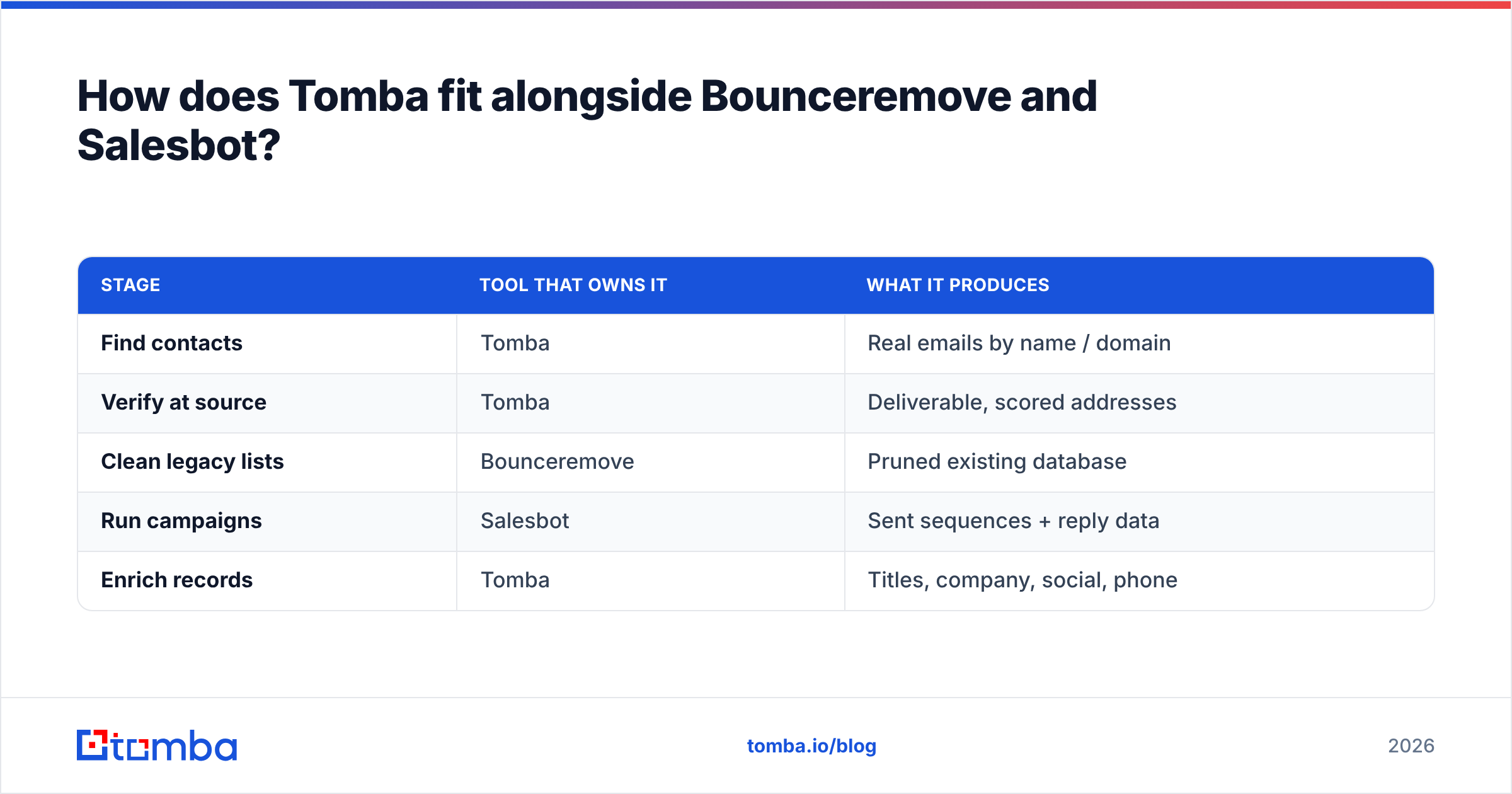
How does Tomba fit alongside Bounceremove and Salesbot?#
Tomba covers the part of the pipeline both tools assume you've already handled: getting accurate, verified contact data into your system in the first place. It's not trying to be a sequencer, and it does more than strip dead addresses from a list you happened to have.
Here's the practical division of labor:
| Stage | Tool that owns it | What it produces |
|---|---|---|
| Find contacts | Tomba | Real emails by name / domain |
| Verify at source | Tomba | Deliverable, scored addresses |
| Clean legacy lists | Bounceremove | Pruned existing database |
| Run campaigns | Salesbot | Sent sequences + reply data |
| Enrich records | Tomba | Titles, company, social, phone |
Tomba's pricing is straightforward and works for teams testing this workflow before committing: a free tier with 25 searches per month, then Starter at $49/mo, Growth at $99/mo, Pro at $249/mo, and custom Enterprise. You can review the full Tomba pricing breakdown to map plans to your volume. Crucially, finding and verification live in the same tool, so you're not stitching together a finder, a separate verifier, and an enrichment vendor.
For teams that work in spreadsheets or want programmatic access, the same data is reachable through the Tomba API, a Chrome extension, and direct integrations — so the verified contacts flow straight into whatever sequencer you're running, including a Salesbot-style automation layer.
Do you still need Bounceremove if you verify at the source?#
Sometimes, yes — and it's worth being honest about when. If you verify every contact the moment you find it, your new data stays clean and a separate bounce-removal pass becomes redundant. But two situations still justify a dedicated cleaning step:
- Legacy databases. If you have a 50,000-row CRM built before you adopted a verify-first habit, a one-time bulk clean is the fastest way to detox it. Tomba's own bulk verify handles this too, so you may not need a second vendor.
- List decay over time. People change jobs. Roughly a quarter of B2B contact data goes stale each year, per most data-quality research. Periodic re-verification keeps an aging list trustworthy regardless of which tool runs it.
So the real question isn't "Bounceremove vs Tomba" for cleaning — it's whether you want cleaning as a separate purchase or bundled with the finder that prevents most of the mess in the first place.
What about Salesbot — is it replaceable?#
Less so, and that's a point in its favor. Sequencing, inbox rotation, reply detection, and cadence logic are a genuinely distinct discipline from data work. A good automation layer is worth paying for once your data is solid. The mistake is sequencing first and sourcing as an afterthought.
If you're evaluating automation platforms specifically, vet them on the things that protect deliverability: per-domain sending limits, inbox rotation, native warmup or warmup integrations, and reply handling that actually pauses threads. Independent review sites like G2 and Capterra are useful for cross-checking real-user feedback before you commit, since automation tools vary widely in how aggressively they let you send. For the deliverability fundamentals themselves, the Gmail sender guidelines are the canonical reference and worth reading once in full.
Bounceremove vs Salesbot: the verdict#
There's no single winner because they're answering different questions:
- Choose Bounceremove when your immediate pain is a dirty existing list and you need bounce rates under control fast.
- Choose Salesbot when your data is already clean and your bottleneck is sending and tracking at scale.
- Choose neither as your first move if you can't yet reliably find verified contacts — that's the gap that makes both tools either redundant or dangerous.
The teams that win outbound in 2026 aren't the ones with the fanciest sequencer or the strictest verifier. They're the ones whose pipeline starts with accurate data, verifies it at the point of capture, and only then automates. Get the order right and the tooling debate mostly resolves itself.
Start with the data layer#
If your bounce rate is high or your reply rate is low, don't start by shopping for a cleaner or a sender — start by fixing what's going into them. The Tomba Email Finder lets you find verified, deliverable business emails by name, company, or domain, with verification built in so bad addresses never reach your CRM or your sequencer. Spin up the free tier (25 searches a month, no card), build one clean list, and measure the difference before you decide which automation or cleaning tool you actually need on top. Fix the source, and Bounceremove and Salesbot both get a lot easier to justify — or skip.
// get started
Find, verify and enrich your first contacts today
Start on the free plan with 25 searches a month, then scale when your team is ready.
Free plan · No credit card required · GDPR & CCPA
// about the author