Bounceremove vs Salesql: Which B2B Data Tool Wins in 2026?
Bounceremove cleans bounces, Salesql finds LinkedIn emails — but they solve different halves of the same problem. Here's which one your pipeline actually needs in 2026.
You typed "bounceremove vs salesql" into a search bar because you have a list problem and a budget, and you want one tool to fix both. Here is the blunt answer before the details: these two tools do not compete — they cover opposite ends of the same pipeline. Salesql finds email addresses from LinkedIn profiles. Bounceremove cleans bounce-prone addresses out of a list you already have. Picking "the winner" is the wrong question. The right question is which gap is bleeding your campaigns, and whether a single platform can close both.
TL;DR#
- Salesql is a LinkedIn-first email finder: install the extension, open a profile or search, pull personal and work emails into a list or CRM.
- Bounceremove is an email verification / list-cleaning tool: feed it addresses you already collected and it removes invalids, duplicates, and risky catch-alls before you send.
- They are complementary, not interchangeable — finding without verifying still burns your domain, and verifying without finding leaves you with no one to email.
- If you only buy one category, buy the one matching your bottleneck: no contacts → finder; high bounce rate → verifier.
- A combined email finder + verifier like Tomba removes the seam between the two steps and keeps both running on one credit balance and one API.

What is Bounceremove and what does it actually do?#
Bounceremove is a verification layer. Think of it like a bouncer at a club door: every address on your list has to prove it is real, deliverable, and not a trap before it gets in. You upload a CSV (or hit an API), and it runs SMTP checks, syntax checks, MX-record lookups, and duplicate removal, then hands back a cleaned file tagged valid / invalid / risky.
What it does not do is generate new contacts. If your list is empty, Bounceremove has nothing to work on. Its entire value sits downstream of acquisition — protecting your sender reputation by stopping you from hammering dead inboxes. That matters, because a bounce rate above roughly 2–3% is the fastest way to get throttled or blocklisted, and mailbox providers weigh hard bounces heavily when scoring your domain. If email deliverability is your pain, a verifier is the tool that addresses it.
Where verifiers differ from each other is mostly in catch-all handling. A catch-all domain accepts every address at the SMTP layer, so naive verifiers mark everything "valid" and you find out the truth only when the bounce lands. The better tools probe deeper or score confidence instead of guessing. That single capability separates a verifier you can trust from one that just launders risk.
What is Salesql and what does it actually do?#
Salesql is an acquisition layer. It lives as a browser extension on top of LinkedIn and Sales Navigator, and when you open a profile it surfaces that person's email addresses — often both a work email and a personal one — which you can save to lists and export or push to your CRM. It is built for the prospecting motion: you are already browsing LinkedIn, you find someone worth contacting, you grab their address without leaving the tab.
The trade-off is that Salesql is LinkedIn-shaped. Its coverage is strongest where LinkedIn data is rich and weaker for contacts who barely use the platform. And like every finder, it returns addresses at varying confidence — some are verified, some are pattern-guesses, and the tool's own export will include both. That is exactly why "found" is not the same as "safe to send," which is the seam Bounceremove (or any verifier) exists to fill.

Bounceremove vs Salesql: how do they compare side by side?#
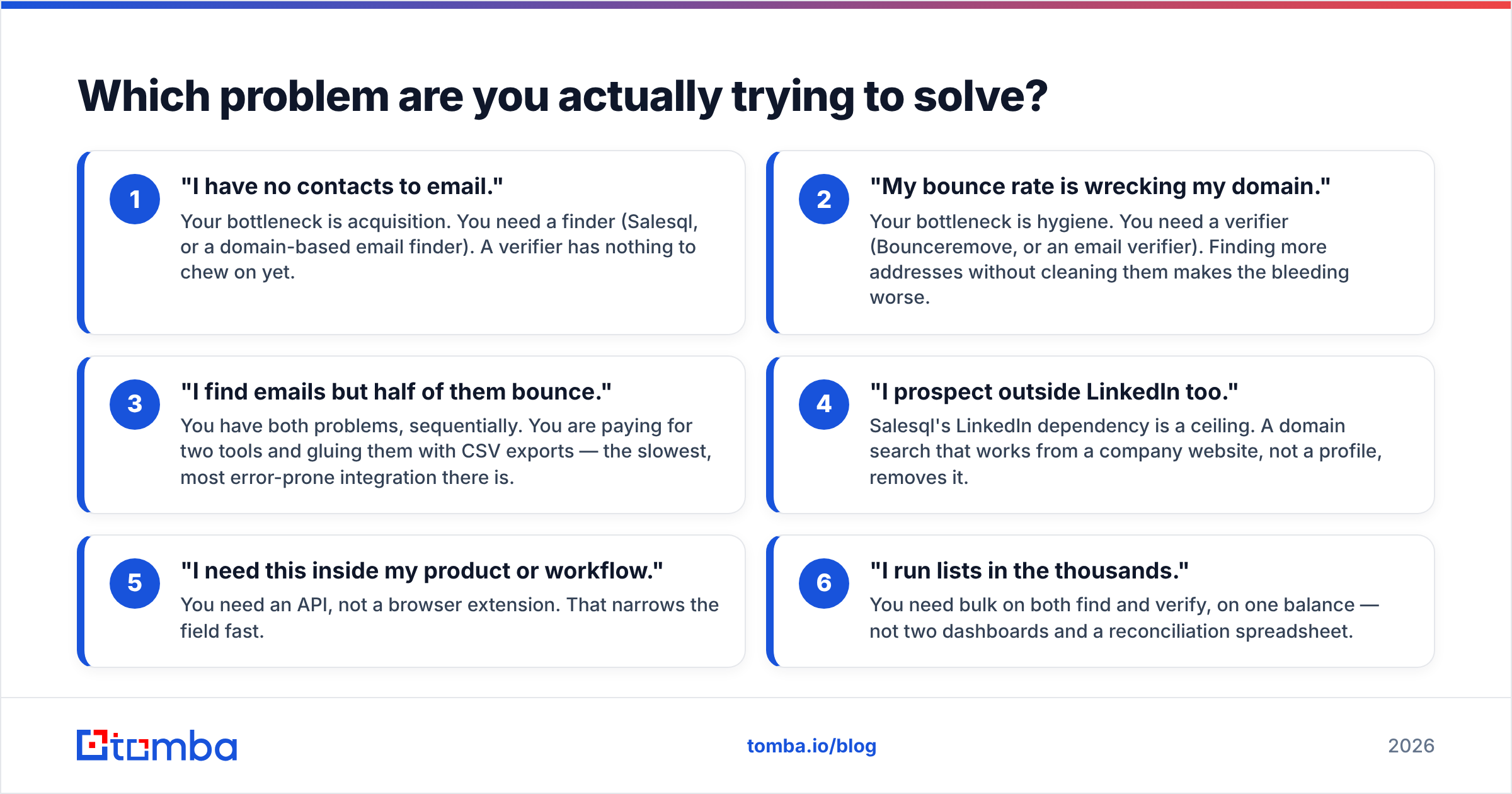
Here is the honest comparison. Notice that most rows are not "better/worse" — they are "different job."
| Attribute | Bounceremove | Salesql | Tomba (finder + verifier) |
|---|---|---|---|
| Primary job | Verify & clean lists | Find emails from LinkedIn | Find and verify |
| Input you provide | A list you already have | A LinkedIn profile / search | Domain, name, or company |
| Output | Cleaned, deliverable list | New email addresses | New + verified addresses |
| Catch-all handling | Core feature | Not its focus | Dedicated catch-all verifier |
| Works without LinkedIn | Yes | No | Yes |
| Bulk workflow | Yes (upload) | Limited / export-based | Bulk finder + bulk verify |
| API access | Yes | Limited | Full REST API |
| Best for | Protecting sender reputation | LinkedIn prospecting | End-to-end pipeline |
| Free tier | Trial credits | Limited free plan | 25 searches/mo free |
The pattern is clear: if you put these two tools in a line, Salesql goes first and Bounceremove goes second. One fills the bucket, the other strains out the junk. Running only one means running half a pipeline.
Which problem are you actually trying to solve?#
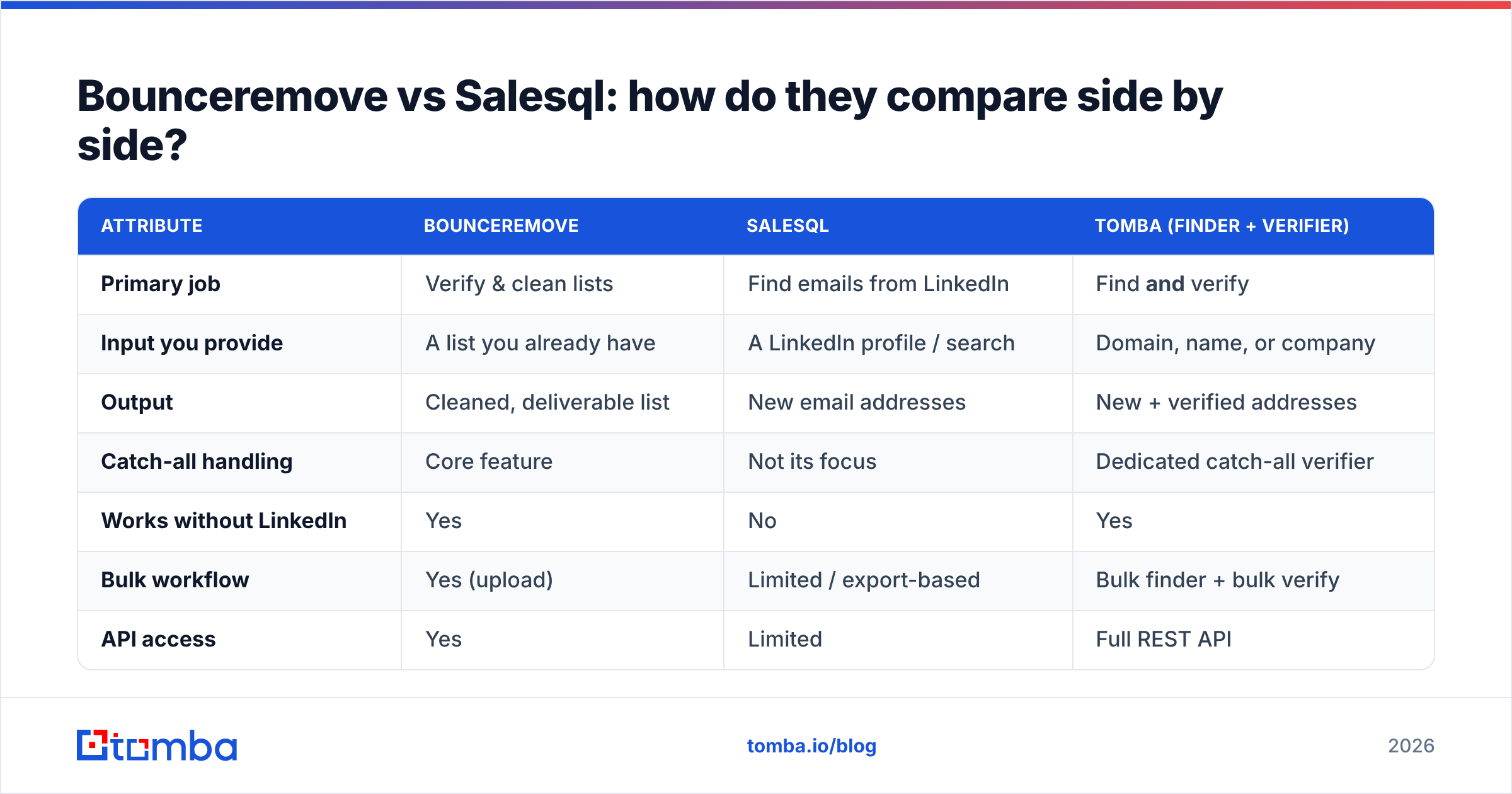
Decide by symptom, not by feature list. Match your situation to the row below:
- "I have no contacts to email." Your bottleneck is acquisition. You need a finder (Salesql, or a domain-based email finder). A verifier has nothing to chew on yet.
- "My bounce rate is wrecking my domain." Your bottleneck is hygiene. You need a verifier (Bounceremove, or an email verifier). Finding more addresses without cleaning them makes the bleeding worse.
- "I find emails but half of them bounce." You have both problems, sequentially. You are paying for two tools and gluing them with CSV exports — the slowest, most error-prone integration there is.
- "I prospect outside LinkedIn too." Salesql's LinkedIn dependency is a ceiling. A domain search that works from a company website, not a profile, removes it.
- "I need this inside my product or workflow." You need an API, not a browser extension. That narrows the field fast.
- "I run lists in the thousands." You need bulk on both find and verify, on one balance — not two dashboards and a reconciliation spreadsheet.
If you landed on item 3, 4, 5, or 6, you have effectively argued yourself out of the "pick one" framing. That is the case for a combined platform.
Is finding or verifying more important?#
Neither — and treating it as a ranking is the mistake that costs teams money. They are two gears in the same machine. A perfectly verified list of zero contacts books zero meetings. A massive found list with a 30% bounce rate gets your domain throttled before the good addresses ever land. The value is in the chain, and the weakest link sets your real performance.
This is where the two-tool approach quietly taxes you. Every time you export from Salesql and import into Bounceremove, you pay in three currencies: time (manual handoffs), money (two subscriptions, two credit pools), and accuracy (stale data between the find and the verify, plus the formatting errors every CSV round-trip introduces). The seam itself is the problem.

How does a combined finder + verifier change the math?#
Conclusion first: collapsing find and verify into one platform removes the seam, the second invoice, and the data staleness in one move. Instead of "find here, export, clean there," you call one service that returns an address already scored for deliverability.
That is the model Tomba runs on. The finder, the email verifier, the catch-all verifier, and bulk processing sit on the same account, the same credits, and the same API. You are not choosing between "the Salesql job" and "the Bounceremove job" — you get both as steps of one request. For teams that live in spreadsheets, the Google Sheets add-on and Chrome extension cover the lightweight workflows, while the API covers the productized ones.
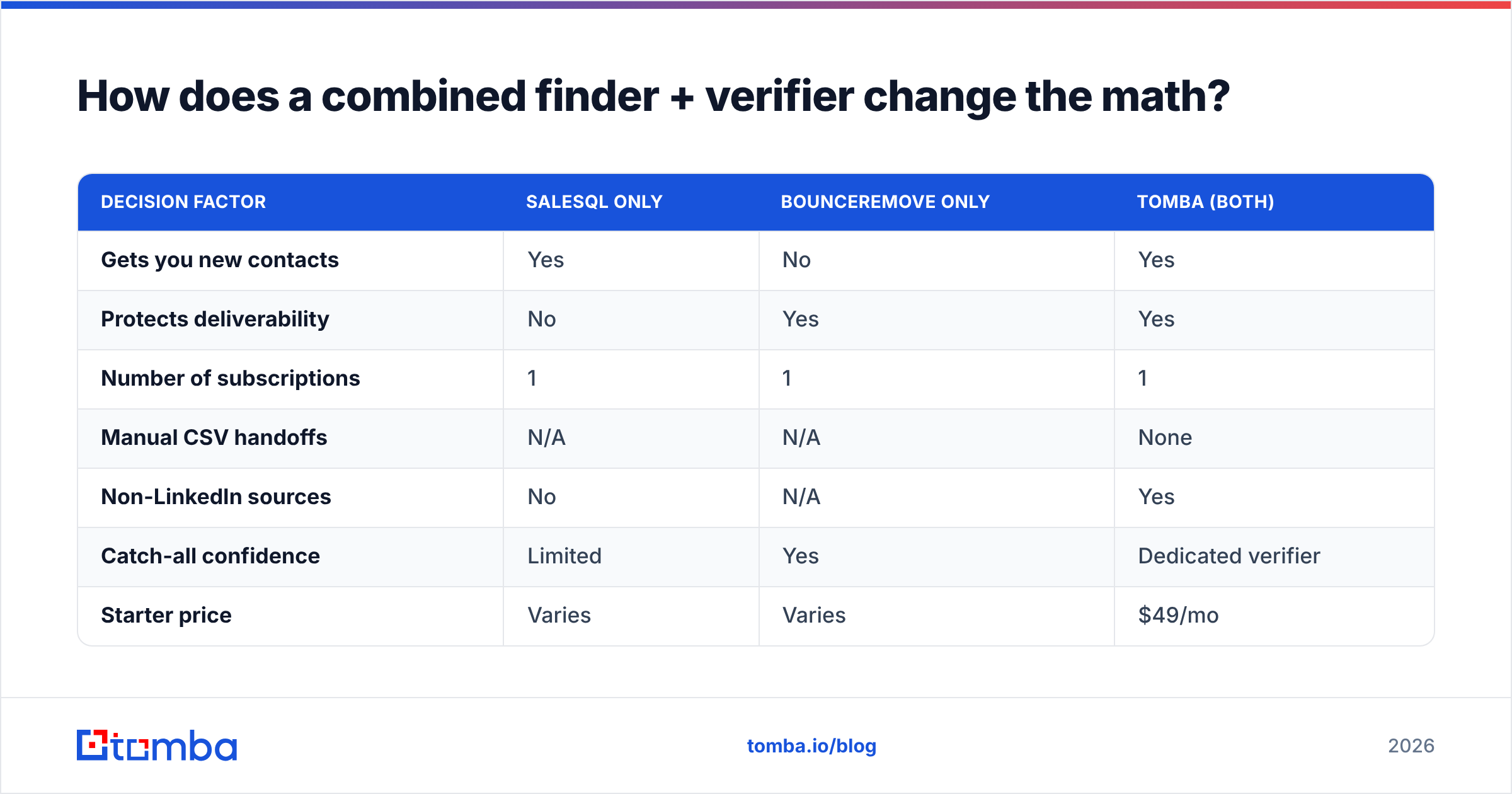
Here is how the three approaches stack up on the things that actually hit your budget and your bounce rate:
| Decision factor | Salesql only | Bounceremove only | Tomba (both) |
|---|---|---|---|
| Gets you new contacts | Yes | No | Yes |
| Protects deliverability | No | Yes | Yes |
| Number of subscriptions | 1 | 1 | 1 |
| Manual CSV handoffs | N/A | N/A | None |
| Non-LinkedIn sources | No | N/A | Yes |
| Catch-all confidence | Limited | Yes | Dedicated verifier |
| Starter price | Varies | Varies | $49/mo |
| Free tier | Limited | Trial | 25 searches/mo |
On pricing specifically, Tomba's published tiers are a free plan (25 searches/month), Starter at $49/mo, Growth at $99/mo, Pro at $249/mo, and custom Enterprise — full Tomba pricing is public, so you can compare credit-for-credit instead of guessing. The point is not that one line item is cheaper; it is that one platform replaces two, and the two it replaces are exactly Salesql's job and Bounceremove's job.

What about accuracy and data sources?#
Accuracy is where comparisons get slippery, because every vendor quotes its own best-case number. The honest way to judge is by method, not marketing. A finder that only pattern-guesses ("first.last@company.com") will look accurate on common formats and fall apart on everything else. A finder that cross-checks multiple sources and runs a live verification before returning the address gives you a confidence score you can actually act on.
Bounceremove's accuracy claim rests on its SMTP and catch-all logic — fair, since that is its whole product. Salesql's rests on LinkedIn data quality, which is excellent for active users and thin for everyone else. Tomba publishes how it sources and validates data on its data page, and pairs every find with a verification step, so the "found" and "deliverable" judgments come from the same system rather than two tools that never talk to each other. For independent signal, cross-reference real user reviews on G2 and Capterra rather than any vendor's own page — including this one.
One more practical note on hygiene: even the best finder benefits from a verification pass before a big send, and a verifier is only as useful as the freshness of the list feeding it. That circularity is the whole argument for keeping both steps under one roof. If you want the deeper background on why bounces hurt so much, the mechanics of sender reputation explain what mailbox providers are actually scoring.
So which should you choose — Bounceremove or Salesql?#
Choose by your bottleneck, and be honest about whether you have one bottleneck or two.
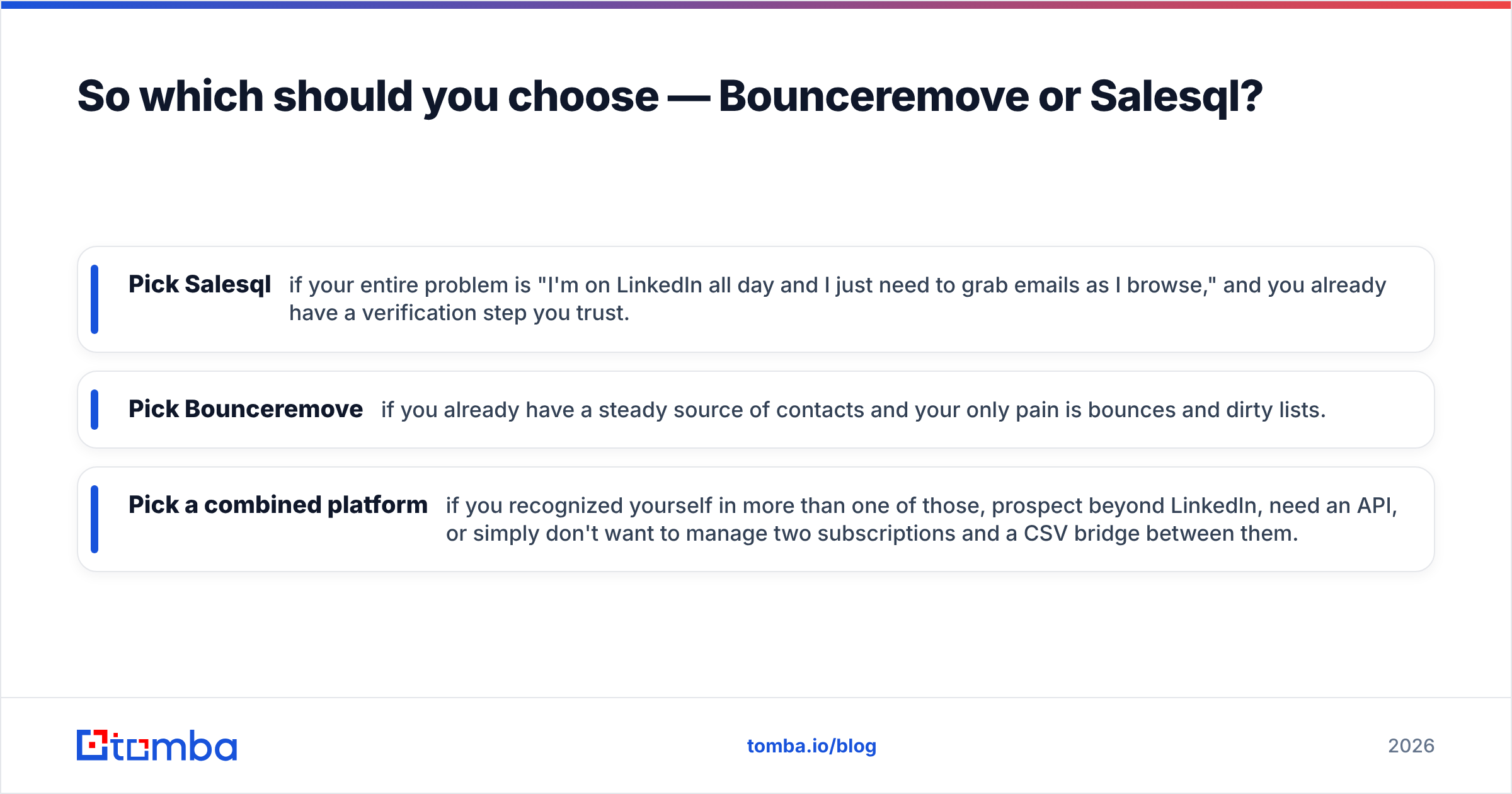
- Pick Salesql if your entire problem is "I'm on LinkedIn all day and I just need to grab emails as I browse," and you already have a verification step you trust.
- Pick Bounceremove if you already have a steady source of contacts and your only pain is bounces and dirty lists.
- Pick a combined platform if you recognized yourself in more than one of those, prospect beyond LinkedIn, need an API, or simply don't want to manage two subscriptions and a CSV bridge between them.
Most growing teams land in that third bucket within a quarter or two — they start with a finder, get burned by bounces, bolt on a verifier, and then spend their afternoons moving files between the two. The combined approach skips that detour.
Get both jobs done with one tool#
If you came here to pick a winner between a finder and a verifier, the real winner is not having to pick. Tomba's Email Finder gives you the acquisition that Salesql handles and the verification that Bounceremove handles, on one account, one API, and one credit balance — starting free with 25 searches a month and scaling at $49/mo when you outgrow it. Find the address, confirm it's deliverable, and send with confidence, all in a single step. Start with the free tier, run your hardest list through it, and judge it on your own bounce rate instead of anyone's marketing claim.
// get started
Find, verify and enrich your first contacts today
Start on the free plan with 25 searches a month, then scale when your team is ready.
Free plan · No credit card required · GDPR & CCPA
// about the author