BounceRemove vs SignalHire (2026): Data, Pricing & Accuracy
BounceRemove cleans lists, SignalHire finds contacts. We break down where each wins on accuracy, pricing, and workflow in 2026 — and when a third option beats both.
BounceRemove vs SignalHire: Which One Actually Belongs in Your Stack?
TL;DR
- They solve different problems. BounceRemove is an email verification tool that scrubs bounces out of lists you already have. SignalHire is a contact finder that pulls emails and phone numbers from a people database and Chrome extension.
- If your list is dirty, BounceRemove helps. If your list is empty, SignalHire helps. Picking between them on price alone is a category error.
- SignalHire is credit-based (~$49/mo for 350 credits) and strong for recruiters scraping LinkedIn; BounceRemove is pay-as-you-go verification with no real finding capability.
- Neither one gives you finding and verification and enrichment in a single workflow — which is exactly the gap a tool like Tomba Email Finder fills.
- Read this before you buy: matching the tool to the job saves more money than chasing the lowest per-credit price.
If you searched "bounceremove vs signalhire," you're probably comparing two tools that look similar in a Google ad but do almost opposite things. This guide cuts through that. We'll define each, compare them head to head, and be honest about where a third option wins.
What Is BounceRemove?#
BounceRemove is an email verification and list-cleaning service. You upload a list of addresses you already collected — from a webinar, a CSV export, a CRM dump — and it tells you which ones are deliverable, which will bounce, and which are risky (catch-all, disposable, role-based).
Think of it like a metal detector at airport security. It doesn't bring people to the airport; it screens the ones already in line. BounceRemove doesn't find new contacts. It removes bad ones so your sender reputation survives.
Core jobs BounceRemove does well:
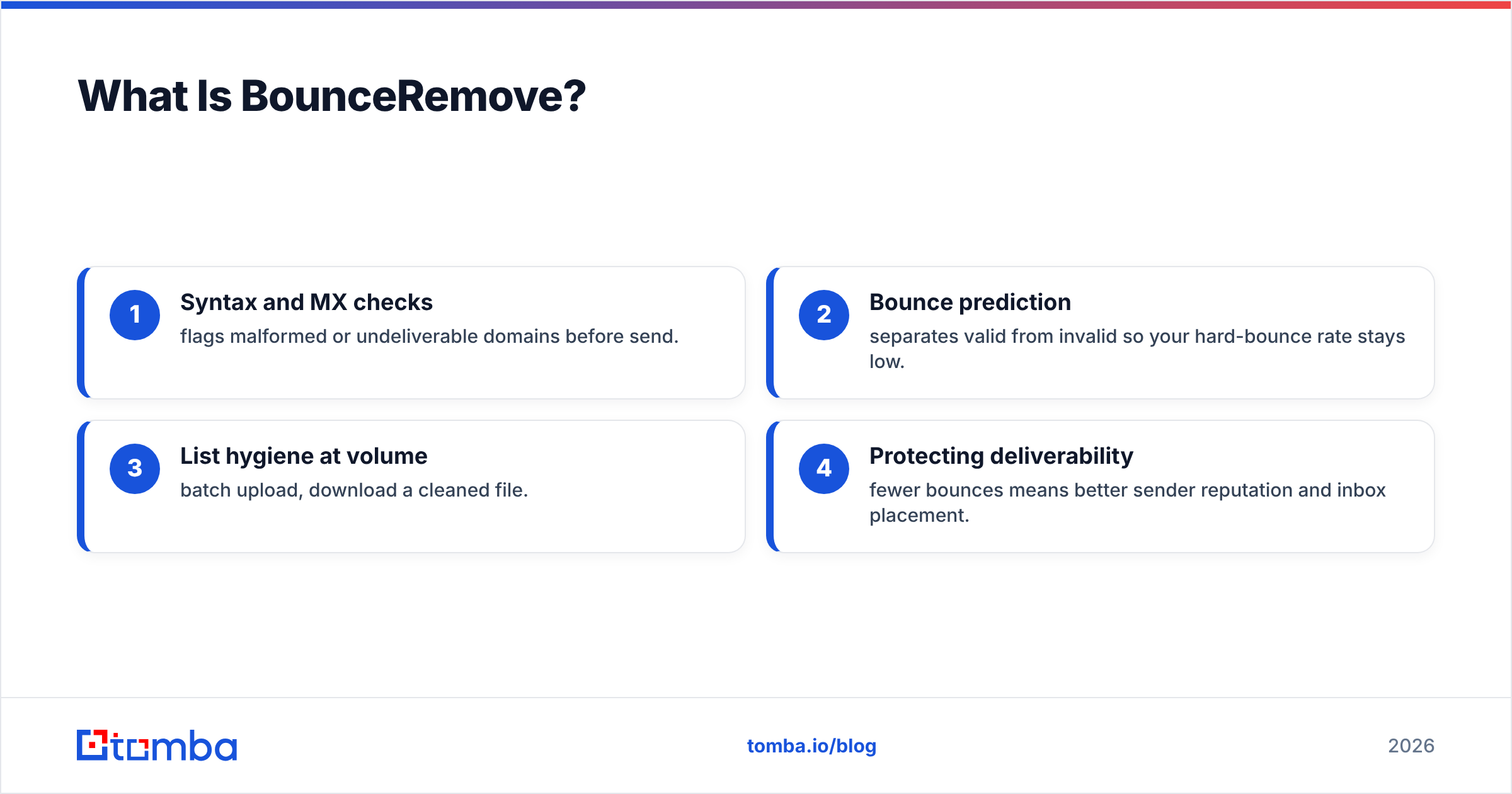
- Syntax and MX checks — flags malformed or undeliverable domains before send.
- Bounce prediction — separates valid from invalid so your hard-bounce rate stays low.
- List hygiene at volume — batch upload, download a cleaned file.
- Protecting deliverability — fewer bounces means better sender reputation and inbox placement.
What it does not do: it won't find a prospect's email from their name and company, it won't pull phone numbers, and it won't enrich a record with job title or LinkedIn URL. It's a one-trick tool — and that trick is useful, but narrow.

What Is SignalHire?#
SignalHire is a contact-finding platform built mostly for recruiters and sales teams. Its headline feature is a Chrome extension that reveals emails and phone numbers when you're browsing LinkedIn, plus a searchable database of professional profiles. You can read more on the official SignalHire site.
If BounceRemove is the metal detector, SignalHire is the talent scout walking the stadium with a list of who to recruit. It generates new contacts rather than cleaning existing ones.
Core jobs SignalHire does well:
- LinkedIn email + phone reveal via browser extension.
- People search across its profile database by title, location, skills.
- Bulk contact export for recruiting pipelines.
- Basic ATS-style features for talent teams.
SignalHire does include light verification on the contacts it surfaces, but it's not a dedicated list-cleaning engine. If you bring your own 200,000-record list to scrub, that's not what SignalHire is built for.

BounceRemove vs SignalHire: The Core Difference#
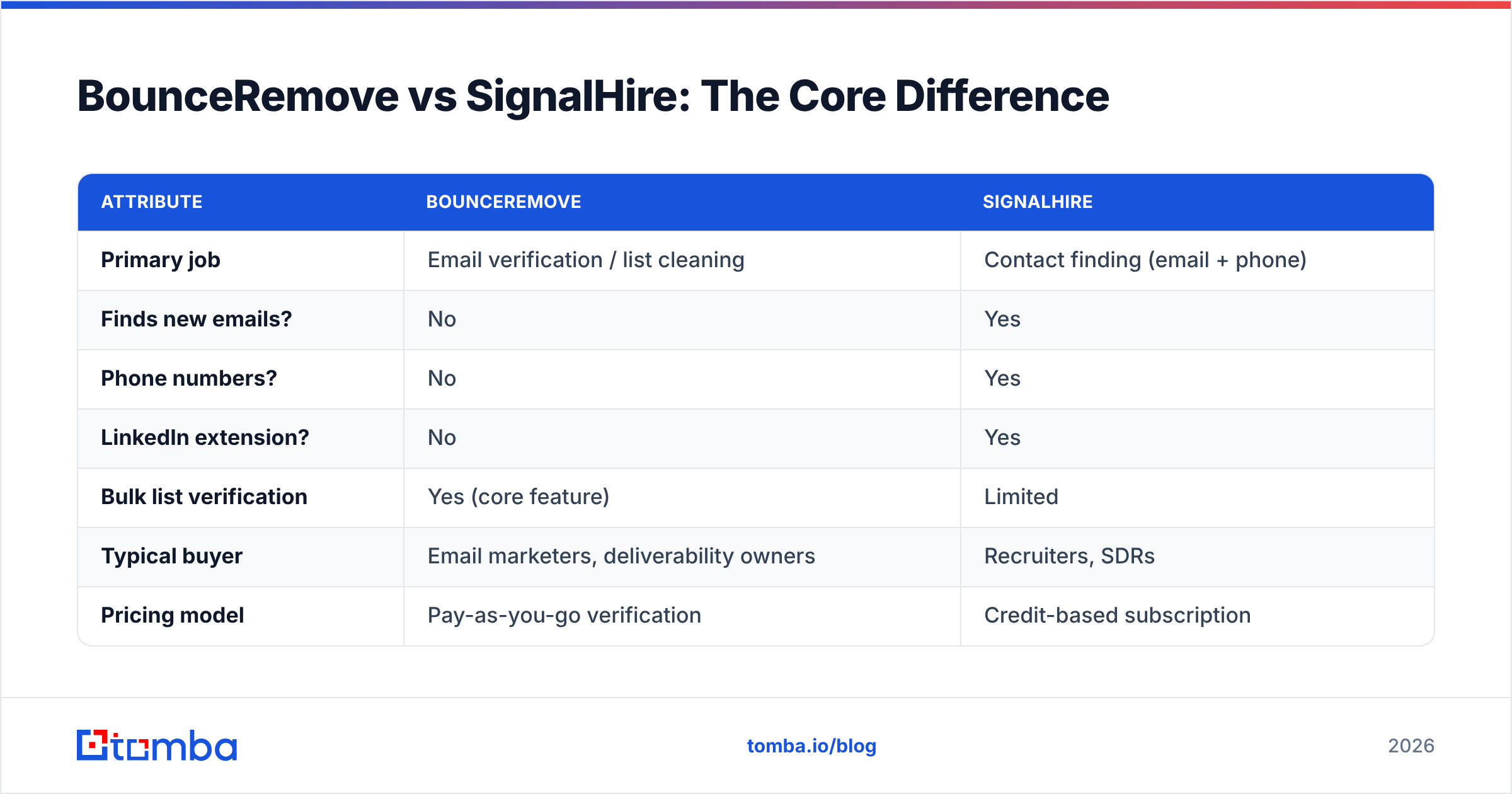
Here's the one-sentence version: BounceRemove validates emails you have; SignalHire finds emails and phones you don't. Comparing them directly is like comparing a dishwasher to a grocery store. Both touch your kitchen, neither replaces the other.
| Attribute | BounceRemove | SignalHire |
|---|---|---|
| Primary job | Email verification / list cleaning | Contact finding (email + phone) |
| Finds new emails? | No | Yes |
| Phone numbers? | No | Yes |
| LinkedIn extension? | No | Yes |
| Bulk list verification | Yes (core feature) | Limited |
| Typical buyer | Email marketers, deliverability owners | Recruiters, SDRs |
| Pricing model | Pay-as-you-go verification | Credit-based subscription |
| Entry price | Per-verification credits | ~$49/mo (≈350 credits) |
| Best at | Lowering bounce rate | Sourcing candidates from LinkedIn |
If you only take one thing from this table: decide whether your bottleneck is a dirty list or an empty list before you spend a dollar.
Is SignalHire Better Than BounceRemove?#
Wrong question — but a common one, so let's answer it honestly. SignalHire is "better" only if your problem is finding people. If you're a recruiter sourcing 50 candidates a week off LinkedIn, BounceRemove can't help you at all; it has no finding capability. SignalHire wins by default.
Flip it. If you're an email marketer with a 100k-record list that's been sitting in HubSpot for two years and your bounce rate just hit 6%, SignalHire is the wrong tool. You need dedicated verification at volume, and BounceRemove (or any serious email verifier) is the better fit.
So the honest scoring:
- Recruiting / sourcing new contacts → SignalHire
- Cleaning an existing list before a send → BounceRemove
- Both, in one workflow → neither, really (more on that below)
The trap is buying SignalHire credits to "also clean lists," or buying BounceRemove and wondering why you still have no prospects. Each tool punishes you for using it outside its lane.
How Do They Compare on Pricing?#
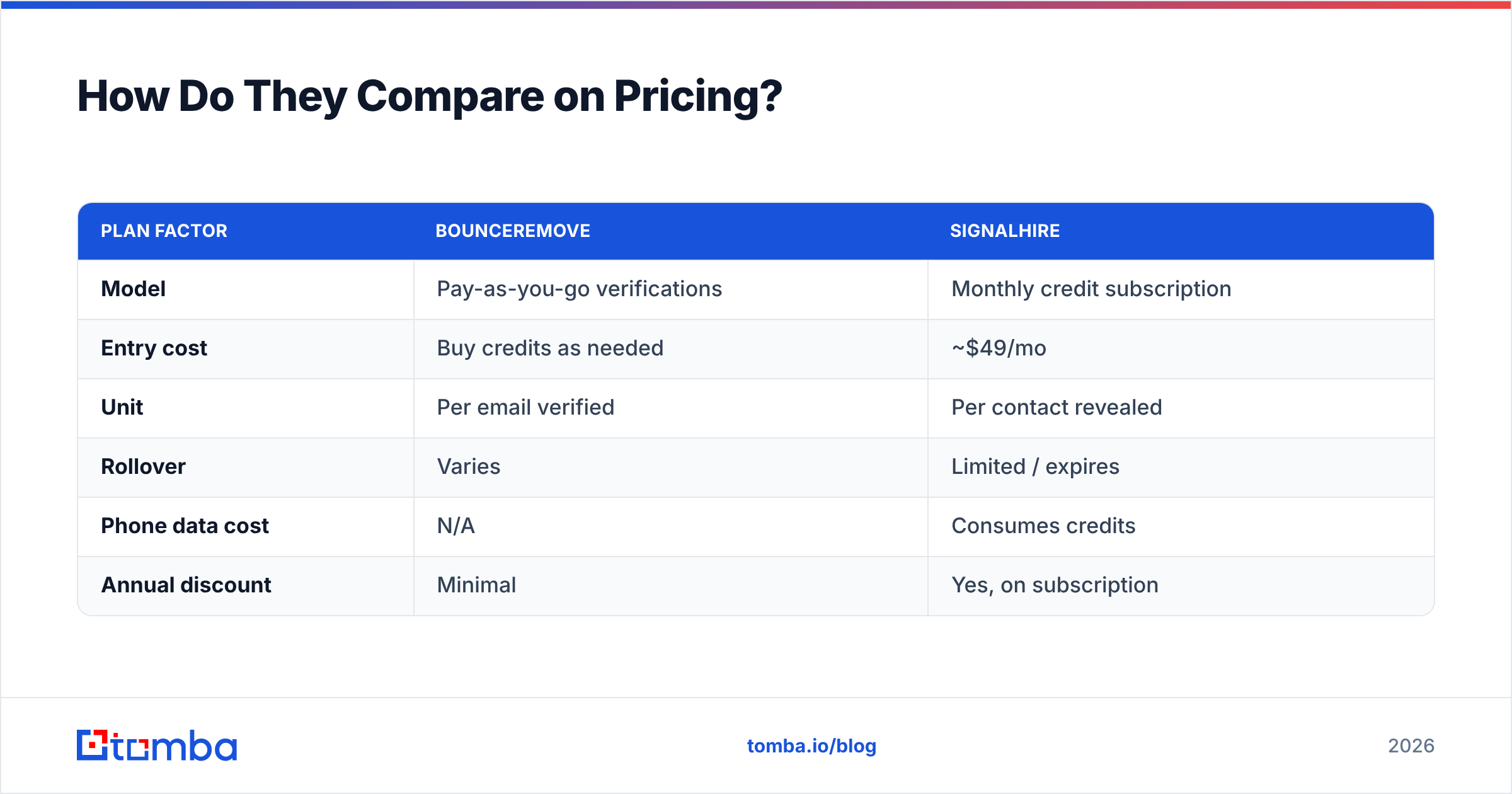
Pricing is where the apples-to-oranges problem gets expensive. SignalHire sells credits on a subscription — roughly $49/month for around 350 credits, scaling up per seat and per volume. One credit ≈ one contact reveal. BounceRemove sells verification volume, typically pay-as-you-go, priced per thousand emails checked.
| Plan factor | BounceRemove | SignalHire |
|---|---|---|
| Model | Pay-as-you-go verifications | Monthly credit subscription |
| Entry cost | Buy credits as needed | ~$49/mo |
| Unit | Per email verified | Per contact revealed |
| Rollover | Varies | Limited / expires |
| Phone data cost | N/A | Consumes credits |
| Annual discount | Minimal | Yes, on subscription |
The hidden cost with SignalHire is credit burn — every reveal spends a credit whether the contact converts or not, and phone reveals can cost more. The hidden cost with BounceRemove is that it's only verification, so you'll still need a separate finding tool, meaning two invoices and two logins.
This is the moment to compare against bundled Tomba pricing: Free (25 searches/mo), Starter $49/mo, Growth $99/mo, Pro $249/mo. The point isn't that one number is lower — it's that finding and verification and enrichment sit under one plan instead of three tools billed separately.

What About Accuracy and Deliverability?#
Accuracy means two different things for these two tools, which is why a single benchmark can't rank them.
For BounceRemove, accuracy = how reliably it predicts a bounce. A good verifier should catch invalid mailboxes, flag catch-all domains, and detect disposable addresses, all while keeping false positives low (don't kill a good lead). The payoff is direct: a clean list protects email deliverability and keeps you out of spam folders. If you want to sanity-check a domain's catch-all behavior, a dedicated catch-all verifier goes deeper than most general cleaners.
For SignalHire, accuracy = how often the email or phone it surfaces is correct and current. Contact databases decay fast — people change jobs, numbers get reassigned. A finder that returns a stale 2023 email is technically "a result" and practically useless. SignalHire's data is decent for LinkedIn-active professionals but thinner outside that pool.
The cross-tool lesson: a finder that doesn't verify, plus a verifier that doesn't find, equals a two-step manual process. You export from the finder, re-upload to the verifier, reconcile the columns, then push to your CRM. That handoff is where leads leak.
For a deeper look at how reliable contact data is sourced and validated, the methodology pages on where the data comes from are a useful reference point — and independent reviews on G2 are worth scanning before you commit to any vendor.
When Should You Choose Each One?#
A quick decision guide, because the "versus" framing hides that most teams need a clear job, not a winner.
- Choose BounceRemove if: you have lists already, your bounce rate is creeping up, and you don't need to source new people. You want a focused scrubber and nothing else.
- Choose SignalHire if: you're a recruiter or sourcer living inside LinkedIn, you need phone numbers, and finding people is the daily grind.
- Choose neither if: your real workflow is find a prospect → confirm the email is valid → enrich with title and company → push to CRM. That's a single pipeline, and stitching two single-purpose tools together to fake it costs you time, money, and data integrity.
That third scenario describes most B2B sales and marketing teams in 2026. It's also exactly why bundled platforms exist.
Where Does Tomba Fit In This Comparison?#
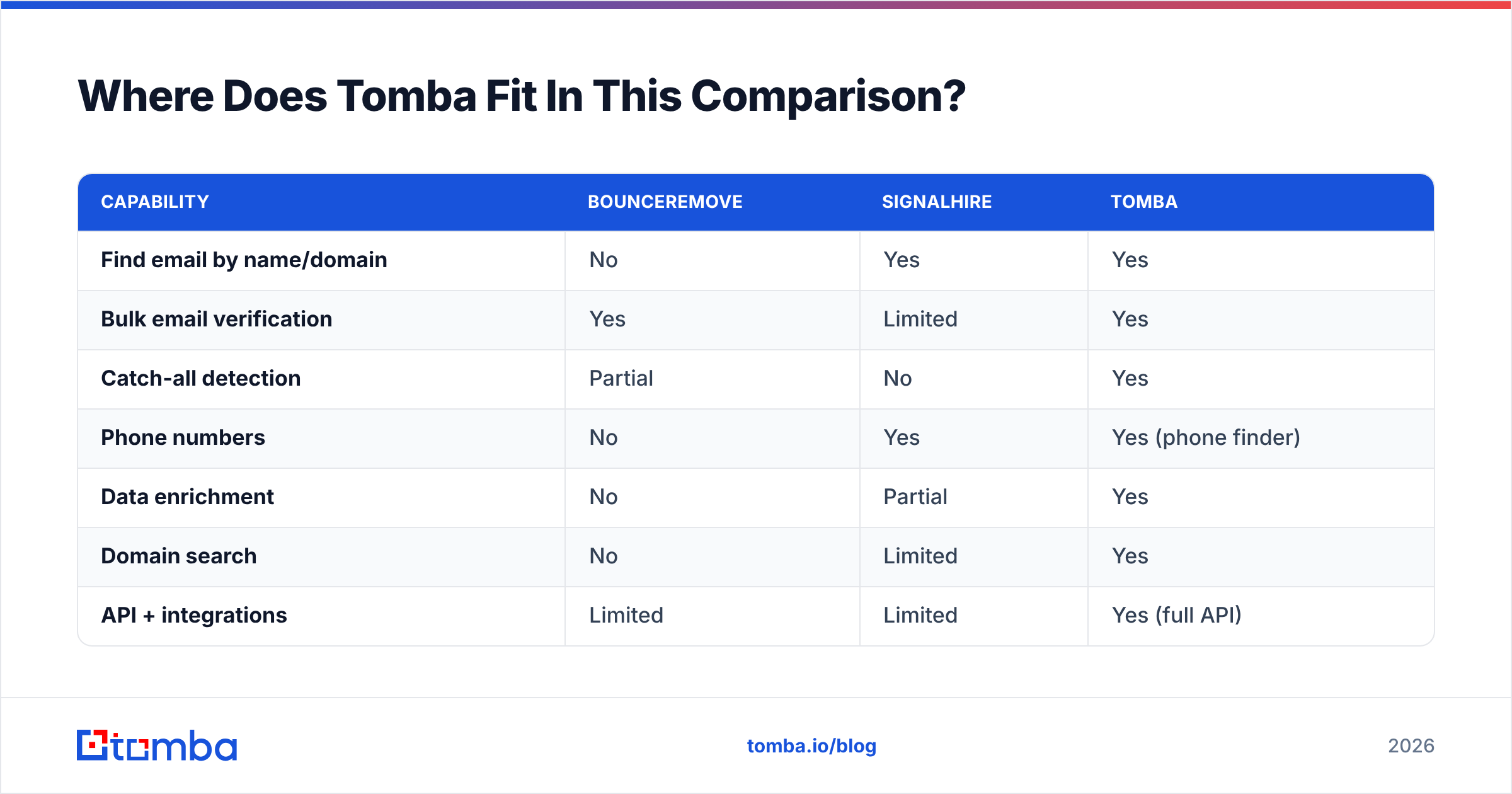
Tomba covers the part where BounceRemove and SignalHire each only do half. Instead of buying a finder and a verifier and gluing them together, you find the email, verify it, and enrich the record in one flow.
| Capability | BounceRemove | SignalHire | Tomba |
|---|---|---|---|
| Find email by name/domain | No | Yes | Yes |
| Bulk email verification | Yes | Limited | Yes |
| Catch-all detection | Partial | No | Yes |
| Phone numbers | No | Yes | Yes (phone finder) |
| Data enrichment | No | Partial | Yes |
| Domain search | No | Limited | Yes |
| API + integrations | Limited | Limited | Yes (full API) |
| Free tier | No | No | 25 searches/mo |
| Starter price | PAYG | ~$49/mo | $49/mo |
Concretely, that means you can run a domain search to pull every public address at a target company, confirm each one with the built-in email verifier, grab phone numbers with the phone finder, and ship it all to your CRM through the Tomba API — without exporting a CSV between three tools.
This isn't a claim that Tomba beats SignalHire at LinkedIn sourcing in every edge case, or that it replaces a hyper-specialized verifier for a one-off 5-million-record scrub. It's that for the combined find-verify-enrich job most teams actually run, one platform beats two narrow ones on time and total cost.
Frequently Asked Questions#
Is BounceRemove the same as SignalHire? No. BounceRemove verifies and cleans existing email lists. SignalHire finds new contacts (emails and phones), mostly from LinkedIn. Different jobs.
Which is cheaper, BounceRemove or SignalHire? They price differently — BounceRemove is pay-as-you-go per verification, SignalHire is a credit subscription around $49/mo. "Cheaper" depends entirely on whether you need finding or cleaning.
Can SignalHire clean my email list? Only lightly. It verifies contacts it surfaces but isn't a dedicated bulk list-cleaning engine like BounceRemove. For serious hygiene, use a real verifier.
Do I need both tools? If you treat them as a stack, you'd need a finder (SignalHire) and a verifier (BounceRemove) — two subscriptions. A combined platform avoids the double bill and the manual export step.
What's a good all-in-one alternative? Tomba bundles email finding, verification, catch-all detection, phone finding, and enrichment under one plan with a free tier and full API access.
The Bottom Line#
BounceRemove and SignalHire aren't really rivals — they're two halves of a workflow sold separately. BounceRemove keeps your list clean; SignalHire fills it with new names. Pick BounceRemove for hygiene, SignalHire for sourcing, and accept that you'll be running two tools and one manual handoff.
If that handoff is the part draining your week, skip the stitching. Tomba Email Finder finds the email, verifies it, and enriches the record in a single flow — start free with 25 searches a month, and only scale to a paid plan once it's proven its value against your real prospecting list.
// get started
Find, verify and enrich your first contacts today
Start on the free plan with 25 searches a month, then scale when your team is ready.
Free plan · No credit card required · GDPR & CCPA
// about the author