Bounceremove vs Wiza 2026: Which B2B Data Tool Wins?
Bounceremove cleans your lists; Wiza finds new leads on LinkedIn. We compare pricing, accuracy, and use cases to show which one your team actually needs in 2026 — and where a third option beats both.
Most teams searching for "Bounceremove vs Wiza" are asking the wrong question. These two tools barely compete. Bounceremove cleans a list you already have; Wiza builds a list you don't have yet. Picking between them is like picking between a dishwasher and a grocery store.
This guide breaks down what each tool actually does, where they overlap, what they cost in 2026, and — honestly — where a single platform replaces both.
TL;DR#
- Bounceremove is an email verifier. It takes a list you already own and flags invalid, risky, and catch-all addresses before you send.
- Wiza is a LinkedIn prospecting tool. It pulls names, emails, and phone numbers off LinkedIn and Sales Navigator searches.
- They solve different problems. You verify with Bounceremove after you source with Wiza — they are sequential, not interchangeable.
- Pricing models differ sharply: Bounceremove charges per-verification credits; Wiza charges per revealed contact with monthly tiers.
- If you want sourcing + verification in one bill, a combined platform like Tomba covers finding, verifying, and enriching from $49/mo — cheaper than stacking two subscriptions.
What is Bounceremove?#
Bounceremove is a bulk email verifier. You upload a CSV of addresses — or hit its API — and it runs each one through syntax checks, MX-record lookups, SMTP handshakes, and disposable/role-account detection. The output tells you which addresses are safe to mail, which will bounce, and which are unknown.
Think of it as the spell-checker for your sending list. It does not find new contacts. It does not scrape LinkedIn. Its only job is keeping your bounce rate low so your sender reputation survives.
That job matters more than it sounds. Mailbox providers throttle or blacklist senders with high bounce rates, and a single dirty import can tank an entire domain's email deliverability. Verification is the cheap insurance that protects expensive infrastructure.
Where Bounceremove gets tricky is catch-all domains — servers that accept every address whether the mailbox exists or not. Most basic verifiers mark these "unknown" and leave you guessing. Resolving them reliably needs a dedicated catch-all verifier, and it's a real differentiator between budget and serious tools.

What is Wiza?#
Wiza is a LinkedIn email extractor and prospecting tool. You run a search inside LinkedIn Sales Navigator, point Wiza at it, and it exports the matching people with work emails, personal emails, and phone numbers attached. It's built for outbound teams who live inside LinkedIn and want to turn a saved search into a contact list in minutes.
Wiza's strength is net-new sourcing. It's the grocery store in our earlier analogy — you walk in empty-handed and leave with leads. Its data quality leans on LinkedIn being the freshest professional dataset on the planet, then layers email-finding and verification on top before export.
The catch: Wiza only works as well as your LinkedIn search. No LinkedIn presence, no Sales Navigator seat, no Wiza value. And because it bills per revealed credit, costs scale directly with how many contacts you pull.
Bounceremove vs Wiza: how do they actually differ?#
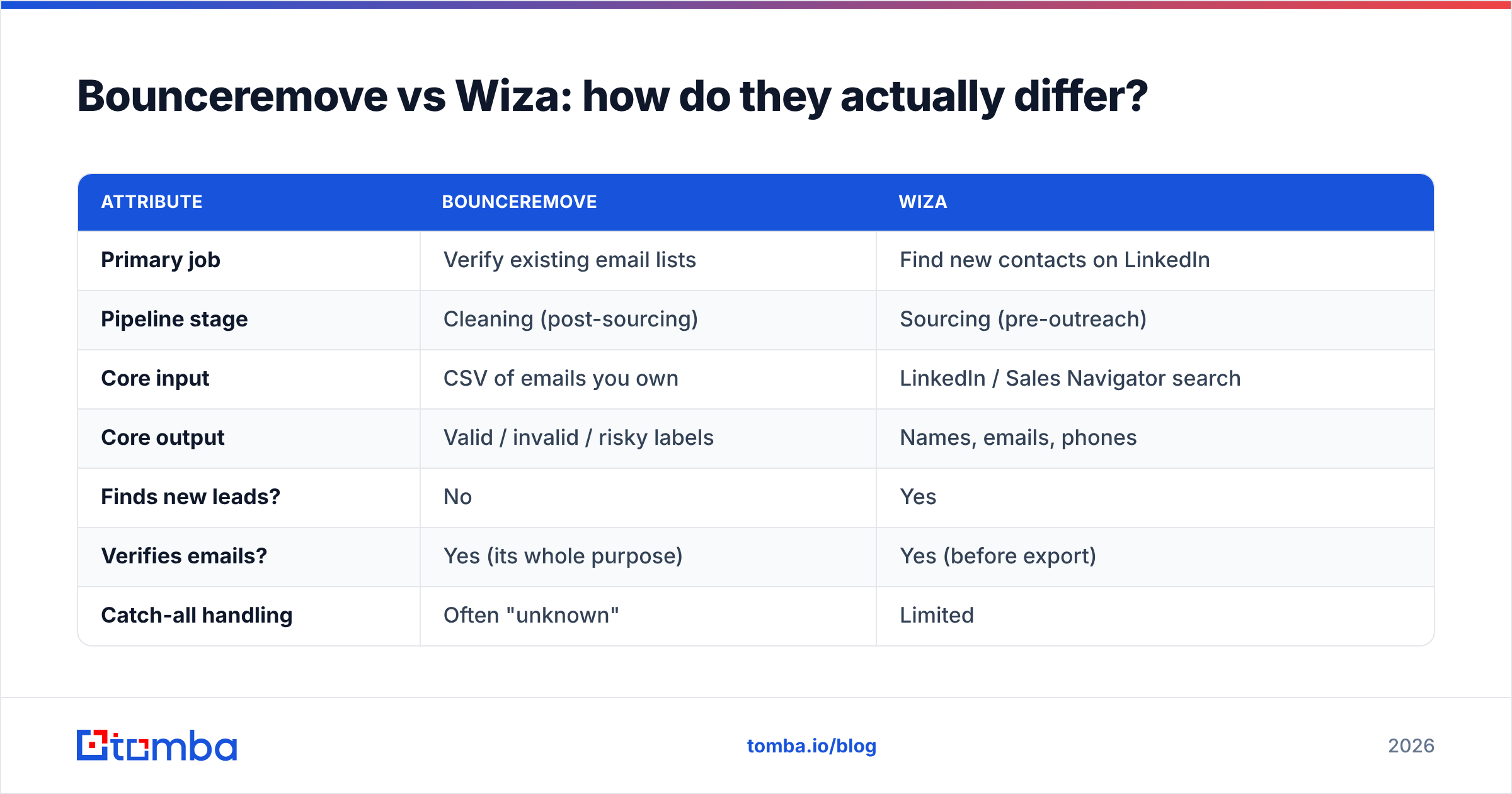
Here's the core distinction in one view. Notice these tools sit at different stages of the same pipeline.
| Attribute | Bounceremove | Wiza |
|---|---|---|
| Primary job | Verify existing email lists | Find new contacts on LinkedIn |
| Pipeline stage | Cleaning (post-sourcing) | Sourcing (pre-outreach) |
| Core input | CSV of emails you own | LinkedIn / Sales Navigator search |
| Core output | Valid / invalid / risky labels | Names, emails, phones |
| Finds new leads? | No | Yes |
| Verifies emails? | Yes (its whole purpose) | Yes (before export) |
| Catch-all handling | Often "unknown" | Limited |
| Pricing model | Per-verification credits | Per revealed contact, monthly tiers |
| Best for | Email/marketing ops protecting deliverability | SDRs prospecting on LinkedIn |
| API access | Yes | Yes |
The practical takeaway: most serious workflows need both functions, not one tool. You source with something Wiza-like, then verify with something Bounceremove-like before the first send.
Where do these tools belong in your workflow?#
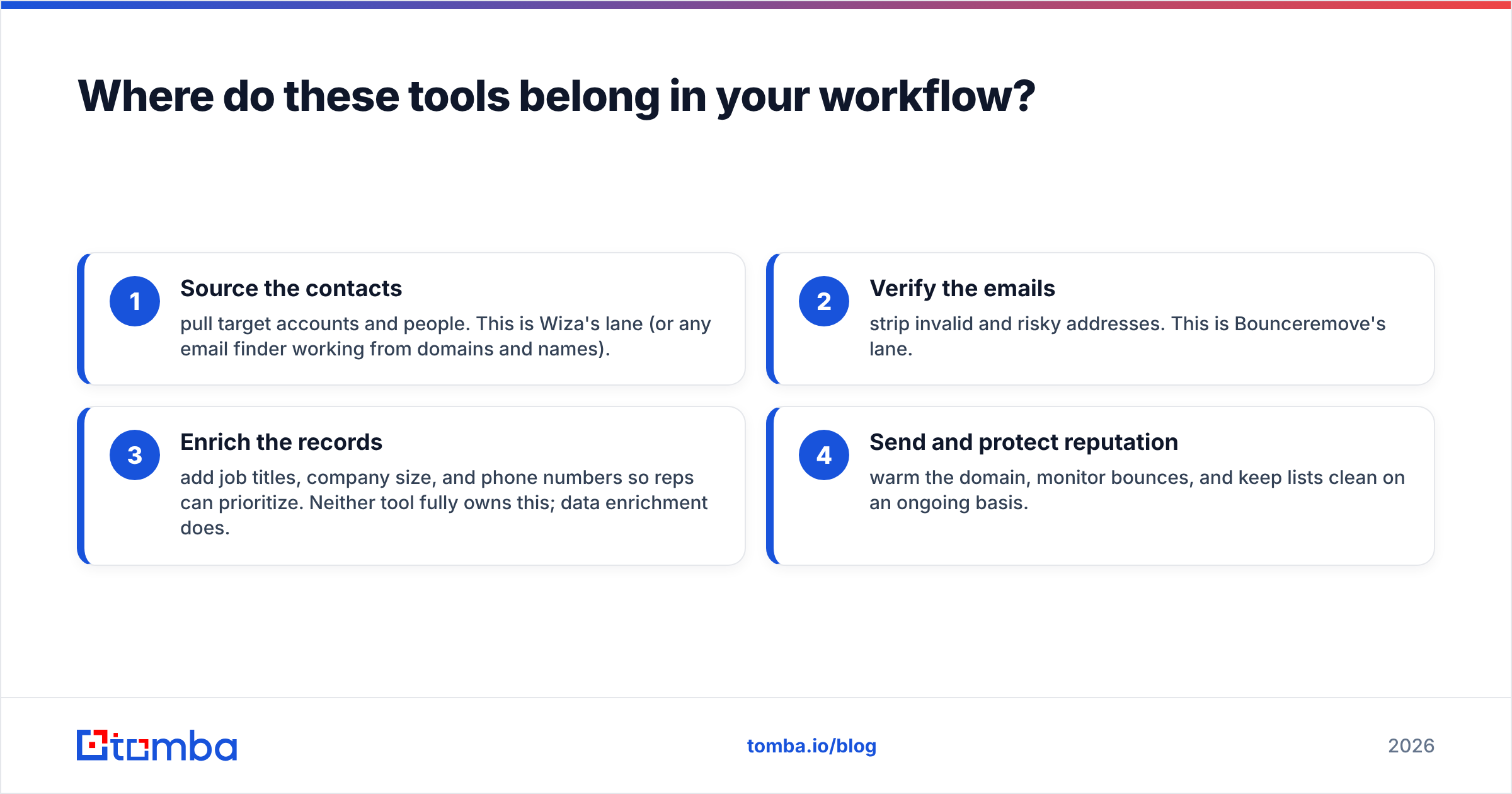
A clean outbound motion runs in four steps. Map the tools to the steps and the overlap question answers itself:
- Source the contacts — pull target accounts and people. This is Wiza's lane (or any email finder working from domains and names).
- Verify the emails — strip invalid and risky addresses. This is Bounceremove's lane.
- Enrich the records — add job titles, company size, and phone numbers so reps can prioritize. Neither tool fully owns this; data enrichment does.
- Send and protect reputation — warm the domain, monitor bounces, and keep lists clean on an ongoing basis.
Bounceremove covers step 2. Wiza covers step 1 and part of 2. Nobody in this matchup owns steps 3 and 4 well, which is exactly why teams end up paying for three or four subscriptions.
Is Bounceremove better than Wiza for accuracy?#
Wrong framing — they measure accuracy on different things. Bounceremove's accuracy is about verification precision: does it correctly catch bounces without false-flagging good addresses? Wiza's accuracy is about find rate: of the LinkedIn profiles you target, how many get a correct, deliverable email?
A verifier with 99% precision is useless if you have no list to verify. A finder with a 70% hit rate is useless if a third of those emails bounce. That's why the two functions are joined at the hip and why standalone tools force a tradeoff.
According to peer reviews on G2, buyers consistently flag the same friction with single-purpose data tools: stitching exports between a finder and a verifier wastes hours and introduces sync errors. The cleaner setups keep finding, verifying, and enriching under one roof.
What does Bounceremove vs Wiza pricing look like in 2026?#
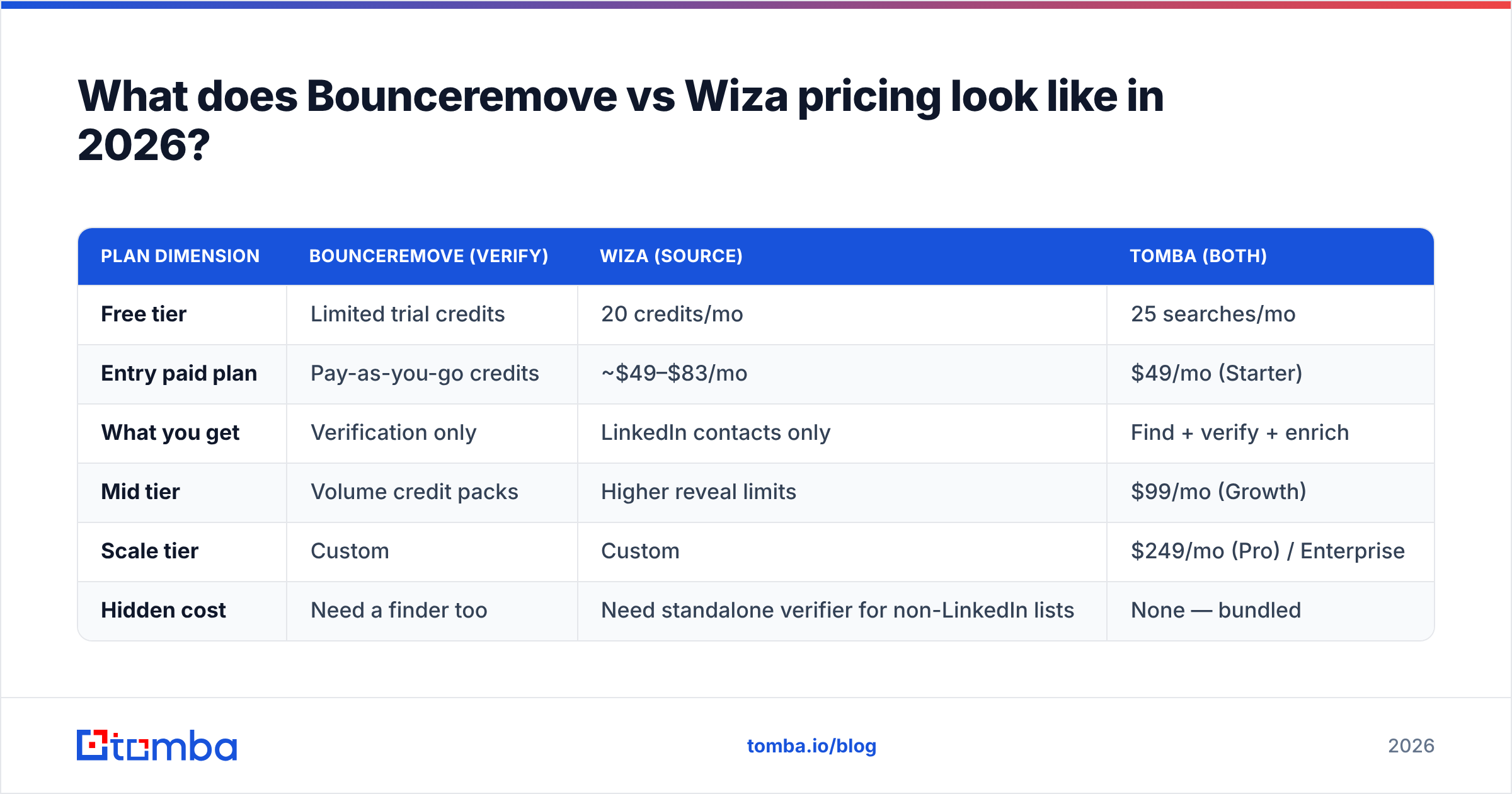
Pricing is where the two diverge hardest, because they bill for different units. Bounceremove sells verification credits (you pay per email checked). Wiza sells reveal credits bundled into monthly tiers (you pay per contact exported). Comparing sticker prices directly is apples-to-oranges — but you can compare what a typical SDR motion costs.
| Plan dimension | Bounceremove (verify) | Wiza (source) | Tomba (both) |
|---|---|---|---|
| Free tier | Limited trial credits | 20 credits/mo | 25 searches/mo |
| Entry paid plan | Pay-as-you-go credits | ~$49–$83/mo | $49/mo (Starter) |
| What you get | Verification only | LinkedIn contacts only | Find + verify + enrich |
| Mid tier | Volume credit packs | Higher reveal limits | $99/mo (Growth) |
| Scale tier | Custom | Custom | $249/mo (Pro) / Enterprise |
| Hidden cost | Need a finder too | Need standalone verifier for non-LinkedIn lists | None — bundled |
The honest summary: if you only ever verify, Bounceremove's pay-as-you-go can be cheap. If you only ever source on LinkedIn, Wiza is purpose-built. But the moment you need both — which is most teams — you're paying two bills, reconciling two exports, and still missing enrichment. You can sanity-check the bundled math against Tomba pricing.
When should you choose Bounceremove?#
Pick Bounceremove (or any dedicated verifier) when:
- You already have large lists from events, sign-ups, CRM exports, or a separate finder, and your only goal is scrubbing them.
- You run a marketing-ops function where deliverability protection is the priority, not net-new prospecting.
- Your bounce rate has crept up and you need a one-time bulk clean before a big campaign.
- You want to bolt verification onto your own app via API and don't need any sourcing features.
If sourcing is handled elsewhere and you just want clean lists, a focused verifier does the job. Just confirm it resolves catch-all domains — many don't.
When should you choose Wiza?#
Pick Wiza (or a LinkedIn-first finder) when:
- LinkedIn Sales Navigator is your primary prospecting surface and you want one-click exports from saved searches.
- Your SDRs build lists by persona and title rather than by company domain.
- You value LinkedIn's data freshness over breadth of non-LinkedIn coverage.
- You're comfortable that costs scale with the number of contacts you reveal each month.
Wiza is strong at what it does. The limitation is scope: it's tethered to LinkedIn, and it isn't built to be your verification or enrichment system of record. Teams that outgrow the LinkedIn-only model often look at a Wiza alternative that adds domain search and bulk verification.
Is there a tool that replaces both Bounceremove and Wiza?#
Yes — and this is the part most comparison posts skip. If your real need is "find good contacts and make sure they're deliverable," a combined platform collapses the two-tool stack into one.
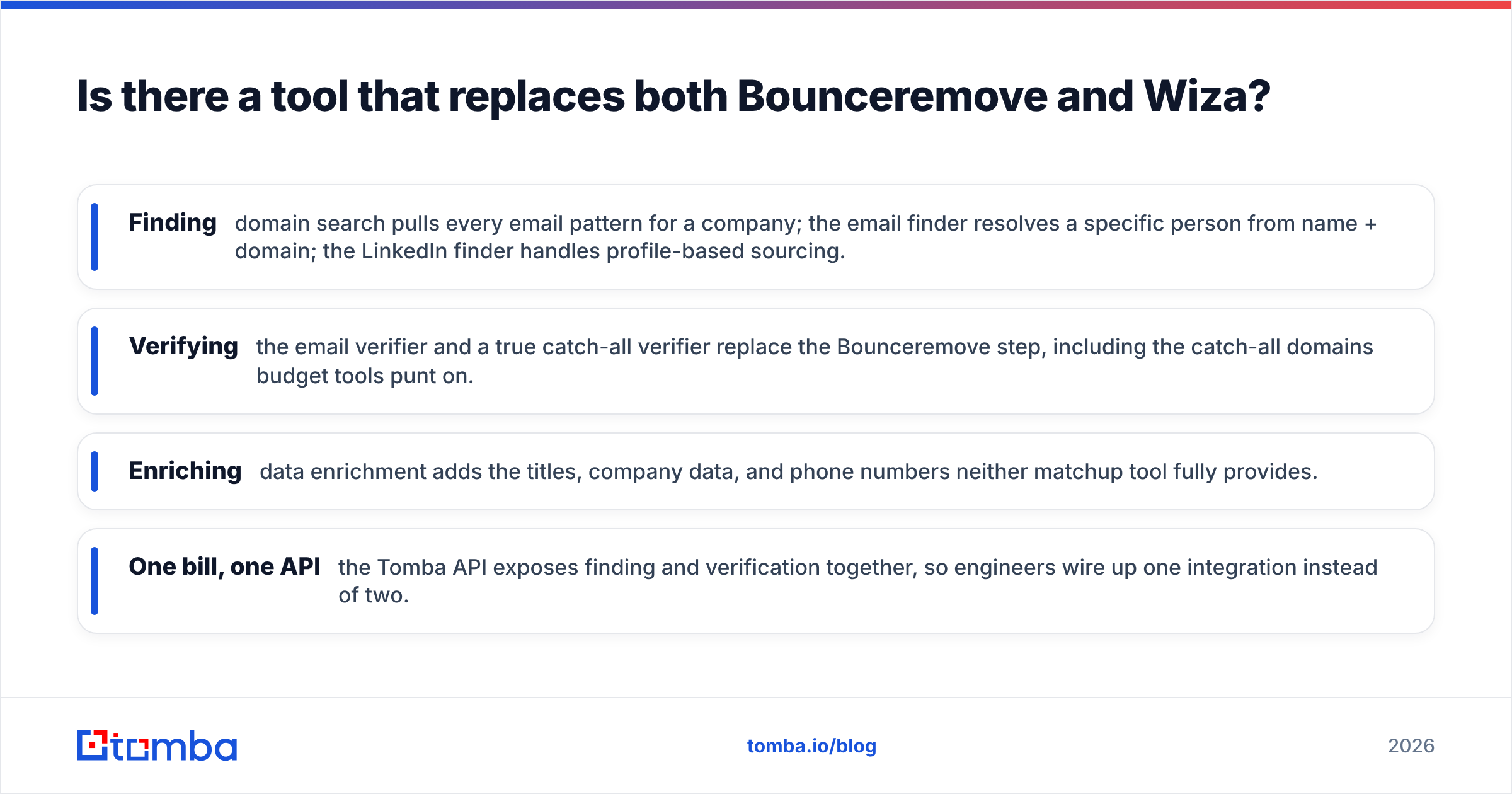
Tomba covers the whole pipeline:
- Finding — domain search pulls every email pattern for a company; the email finder resolves a specific person from name + domain; the LinkedIn finder handles profile-based sourcing.
- Verifying — the email verifier and a true catch-all verifier replace the Bounceremove step, including the catch-all domains budget tools punt on.
- Enriching — data enrichment adds the titles, company data, and phone numbers neither matchup tool fully provides.
- One bill, one API — the Tomba API exposes finding and verification together, so engineers wire up one integration instead of two.
This isn't "Tomba is magic." It's arithmetic: two single-purpose subscriptions plus the time spent moving CSVs between them usually costs more than one platform that does both. Cross-check the feature claims on independent directories like Capterra and you'll see the bundled-platform pattern is where the market is heading.
Bounceremove vs Wiza: the verdict#
There's no winner because there's no head-to-head. Use this decision shortcut:
- Only need to clean lists? A verifier like Bounceremove fits — confirm catch-all support.
- Only prospect on LinkedIn? Wiza is purpose-built — accept per-credit scaling.
- Need to source and verify and enrich without juggling tools or bills? A combined platform wins on cost, speed, and data hygiene.
The biggest hidden expense in this category isn't the subscription price — it's the operational drag of gluing single-purpose tools together and the bounces that slip through the seams.
Get finding and verification in one place#
If you're weighing Bounceremove against Wiza, you're really trying to run a clean outbound motion end-to-end. Skip the two-tool tax. The Tomba Email Finder locates professional emails by name, domain, or company, verifies them in the same pass, and enriches the record — starting free with 25 searches a month and scaling from $49/mo when you're ready. Source clean, send confident, and stop reconciling CSVs between vendors.
// get started
Find, verify and enrich your first contacts today
Start on the free plan with 25 searches a month, then scale when your team is ready.
Free plan · No credit card required · GDPR & CCPA
// about the author