Bounceshield vs ContactOut: The Honest 2026 Comparison
Bounceshield vs ContactOut, broken down by accuracy, coverage, pricing, and deliverability — plus where a third option quietly beats both in 2026.
Choosing between Bounceshield and ContactOut comes down to one question most comparison posts skip: do you need to find emails, verify them, or both? These two tools sit on opposite ends of that workflow, and picking the wrong one means paying for coverage you'll never use — or sending campaigns straight into spam folders.
This guide breaks down both tools on accuracy, pricing, data coverage, and deliverability impact, with a clear-eyed look at where each one earns its keep. We'll also show where a third option fits teams that want finding and verification under one roof.
TL;DR#
- Bounceshield is built around email verification and bounce protection — it shines at cleaning lists before you send, not at sourcing new contacts.
- ContactOut is a LinkedIn-first email finder — strong for sourcing personal and work emails from profiles, weaker as a standalone verification engine.
- Accuracy is the real battleground: ContactOut's coverage is wide but noisy; Bounceshield's verification is precise but only as good as the list you feed it.
- Pricing favors ContactOut for high-volume sourcing but punishes you on per-seat plans; Bounceshield charges per verification credit.
- If you want finding, verification, and catch-all handling in one platform, Tomba is the more complete pick at $49/mo to start.
What is Bounceshield?#
Bounceshield is an email verification and deliverability protection tool. Think of it as the bouncer at the door of your email list — it checks every address before you send, flagging invalids, spam traps, role accounts, and risky catch-all domains so your bounce rate stays low.
Its core job is list hygiene. You upload a list (or connect it via API), and Bounceshield runs SMTP-level checks, syntax validation, MX record lookups, and disposable-domain detection. The output is a clean list segmented into deliverable, risky, and undeliverable buckets.
What Bounceshield does not do well is source new contacts. It assumes you already have emails. If your problem is "I have 5,000 addresses and don't know which are safe to mail," it's a strong fit. If your problem is "I need to find the VP of Sales at 200 target accounts," it's the wrong tool entirely.

What is ContactOut?#
ContactOut is a LinkedIn-centric email finder and contact database. It lives mostly in a Chrome extension that overlays LinkedIn profiles, surfacing personal and work emails plus phone numbers as you browse. It also offers a searchable database and bulk export for prospecting at scale.
The pitch is coverage: ContactOut claims access to a very large pool of professional contacts, and for recruiters and SDRs who live inside LinkedIn, the in-context workflow is genuinely convenient. You're on a profile, you click, you get an email.
The trade-off is verification depth. ContactOut surfaces emails, but the freshness and validity vary — personal Gmail addresses age out, work emails change after job moves, and the tool's built-in verification is lighter than a dedicated email verifier. Many teams pair it with a separate validation step before they trust it for cold outreach. You can read independent user reviews on G2 to see this pattern repeated across recruiting and sales use cases.
Bounceshield vs ContactOut: how do they compare?#
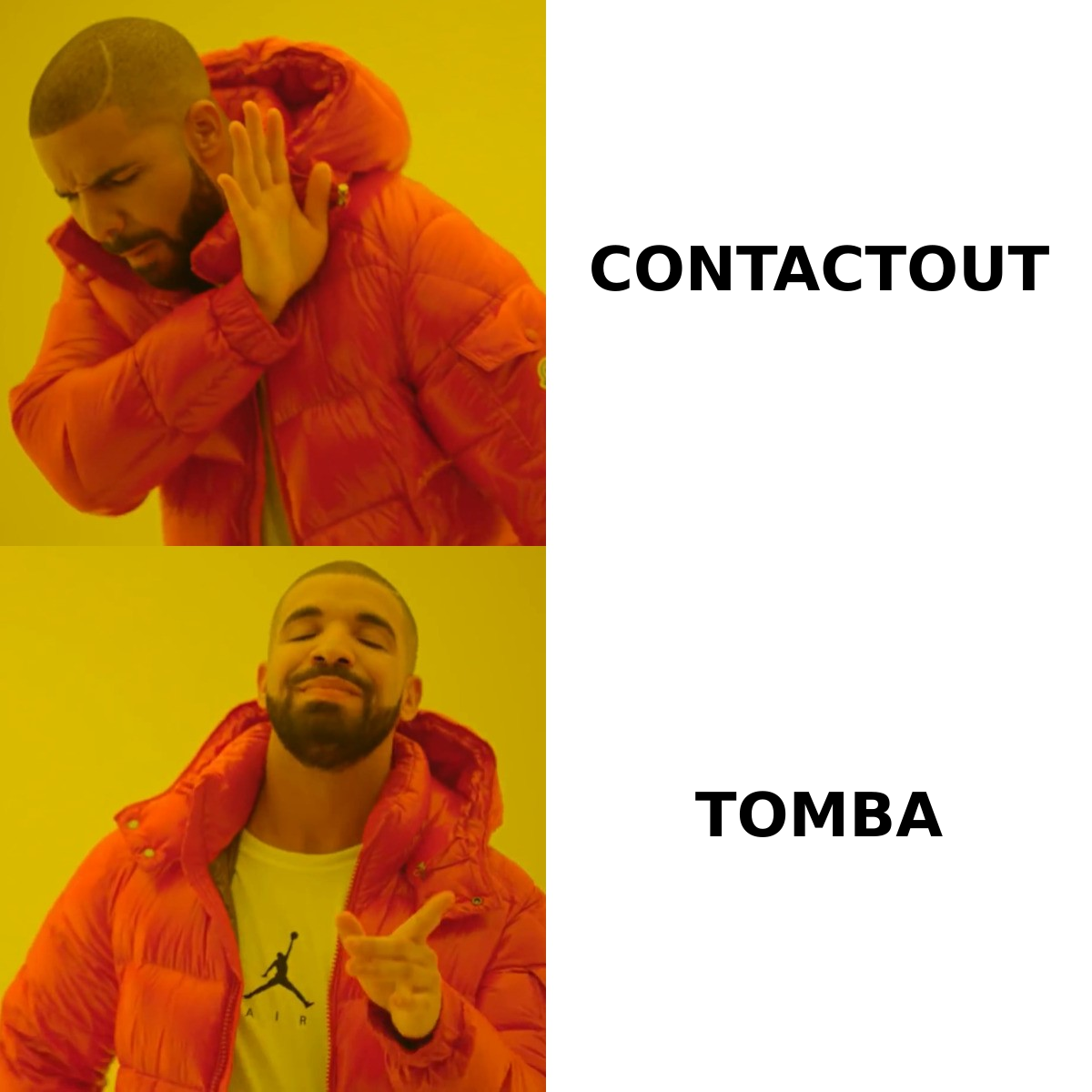
The cleanest way to see the difference is feature by feature. These tools overlap less than their marketing suggests — one cleans, one sources.
| Attribute | Bounceshield | ContactOut |
|---|---|---|
| Primary job | Email verification & bounce protection | LinkedIn email finding |
| Find new emails | No | Yes (LinkedIn-first) |
| Verify existing emails | Yes (core strength) | Light, secondary |
| Catch-all handling | Yes | Limited |
| LinkedIn extension | No | Yes |
| Bulk processing | Yes (verification) | Yes (sourcing) |
| Best for | List hygiene before send | Recruiters & SDRs in LinkedIn |
| Typical weak spot | No sourcing | Verification depth |
Read that table as a fork in the road. If you already have lists and worry about bounces, Bounceshield is the obvious lane. If you're building lists from LinkedIn, ContactOut is the obvious lane. The trouble is that most outbound teams need both jobs done — and running two subscriptions, two logins, and two billing cycles to cover one workflow gets expensive fast.
Which tool is more accurate?#
Accuracy means different things for each tool, so compare them on the job they actually do.
For Bounceshield, accuracy is about catching bad addresses without false-flagging good ones. A strong verifier should confirm deliverable mailboxes, identify catch-all domains correctly, and not bin valid addresses as "risky." Bounceshield performs well here because verification is its only job — but remember, it can only verify what you give it. Garbage in, cleaner garbage out.
For ContactOut, accuracy is about returning a correct, current email for a person. This is harder. Coverage and accuracy pull against each other: the wider the net, the more stale or guessed addresses slip in. ContactOut's LinkedIn matching is good for finding an address, but whether it's the person's active work inbox is a separate question — which is exactly why a dedicated verification pass matters.
Here's the honest take: neither tool closes the full loop alone. ContactOut finds but under-verifies; Bounceshield verifies but doesn't find. Accuracy in the real world is a pipeline — find, then verify, then handle catch-alls — and tools that do one stage well still leave you stitching the rest together.

How does pricing compare?#
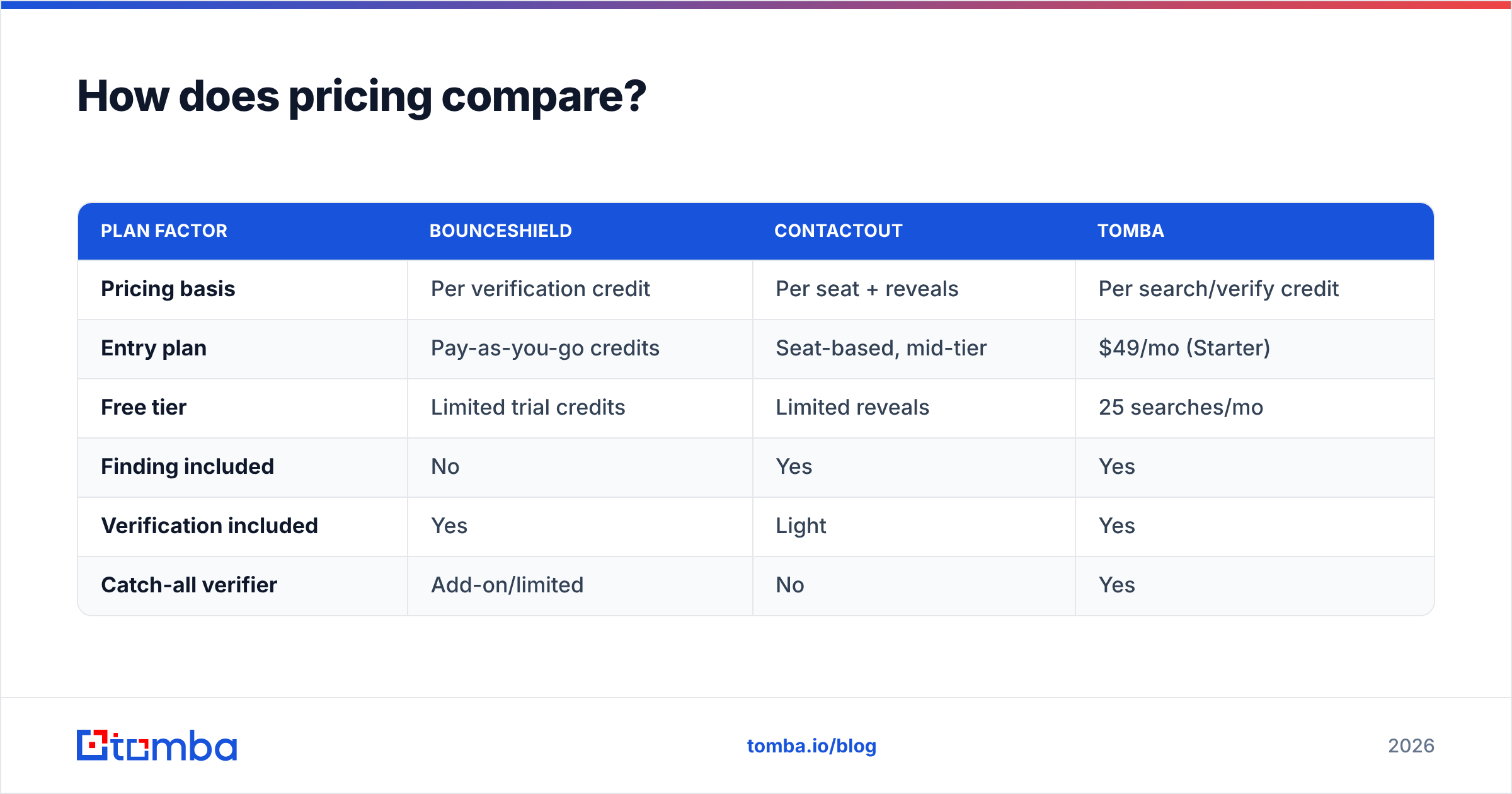
Pricing models differ enough that a flat "X is cheaper" claim would mislead you. Bounceshield charges per verification credit; ContactOut charges per seat with email/phone reveal allotments. Your real cost depends on volume and team size.
| Plan factor | Bounceshield | ContactOut | Tomba |
|---|---|---|---|
| Pricing basis | Per verification credit | Per seat + reveals | Per search/verify credit |
| Entry plan | Pay-as-you-go credits | Seat-based, mid-tier | $49/mo (Starter) |
| Free tier | Limited trial credits | Limited reveals | 25 searches/mo |
| Finding included | No | Yes | Yes |
| Verification included | Yes | Light | Yes |
| Catch-all verifier | Add-on/limited | No | Yes |
A few things stand out. ContactOut's seat-based model scales poorly when you add reps — every new SDR is another full seat. Bounceshield's credit model is fair for verification but means a second tool's bill stacked on top once you need sourcing. For the full breakdown of credit-based pricing that bundles both jobs, see Tomba pricing — the Starter plan is $49/mo, not the $39 some roundups misquote.
The hidden cost in any Bounceshield-vs-ContactOut setup is the integration tax: exporting from one tool, importing to another, reconciling formats, and de-duping. That operational drag rarely shows up in a pricing table but eats hours every week.

What about deliverability?#
Deliverability is where the find-vs-verify split bites hardest. You can source a perfect list and still torch your domain reputation if you mail unverified addresses.
The mechanics are simple. High bounce rates signal to mailbox providers that you're a careless sender, which drags down your sender reputation and pushes future emails toward spam. Spam traps are worse — hit one and you can land on a blocklist. This is the exact failure mode Bounceshield is designed to prevent, and it's the exact gap ContactOut leaves open if you mail its results without a verification pass.
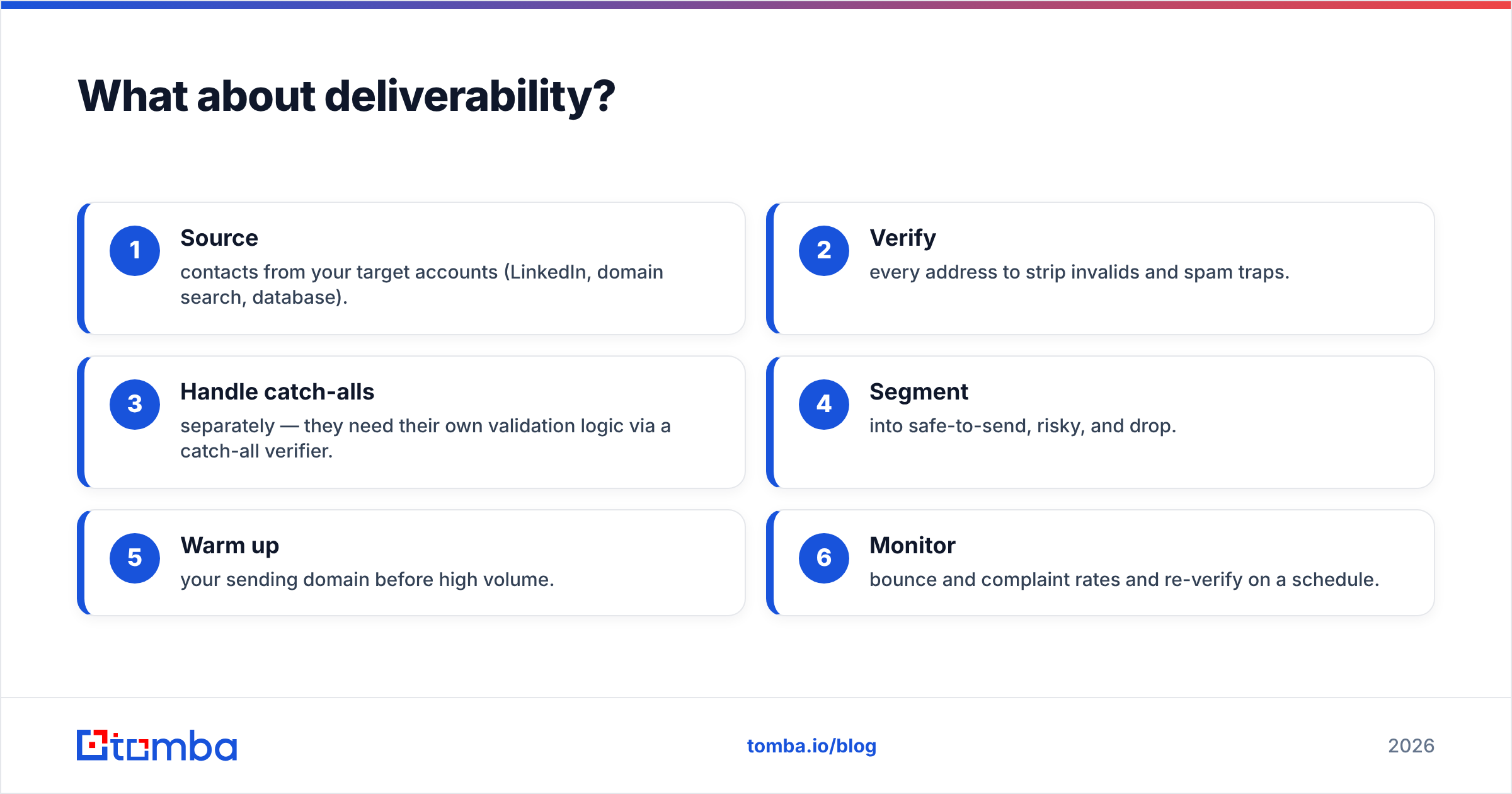
Concretely, a healthy outbound workflow looks like this:
- Source contacts from your target accounts (LinkedIn, domain search, database).
- Verify every address to strip invalids and spam traps.
- Handle catch-alls separately — they need their own validation logic via a catch-all verifier.
- Segment into safe-to-send, risky, and drop.
- Warm up your sending domain before high volume.
- Monitor bounce and complaint rates and re-verify on a schedule.
ContactOut covers step 1. Bounceshield covers steps 2–4. Neither covers the whole chain — which is the structural reason teams end up running both, or looking for a single platform that does the lot. For the underlying concept, the email deliverability glossary entry is a useful primer, and Google's own Postmaster Tools documentation explains how providers actually score senders.
When should you pick each tool?#
Choose Bounceshield if:
- You already have lists from a CRM, event, or past campaigns.
- Your main pain is bounces, spam traps, and protecting a warmed domain.
- You don't need to source new contacts — verification is the whole job.
Choose ContactOut if:
- Your team works primarily inside LinkedIn (recruiting, SDR prospecting).
- In-context email reveal on profiles matters more than verification depth.
- You're comfortable adding a separate validation step before you send.
Choose a combined platform if:
- You need both finding and verification without juggling two vendors.
- You want catch-all handling, domain search, and bulk processing in one place.
- You'd rather pay one predictable bill than stack subscriptions and pay the integration tax.
That third bucket is where most growing outbound teams actually land — and it's the gap neither Bounceshield nor ContactOut fills alone.
Is there a better all-in-one alternative?#
For teams that want the full find-then-verify pipeline under one roof, Tomba covers both jobs that Bounceshield and ContactOut split between them. You get an email finder for sourcing by name, domain, or company; a built-in verifier so you're not bolting on a second tool; and a catch-all finder for the trickiest domains — the ones generic verifiers wave through or block wholesale.
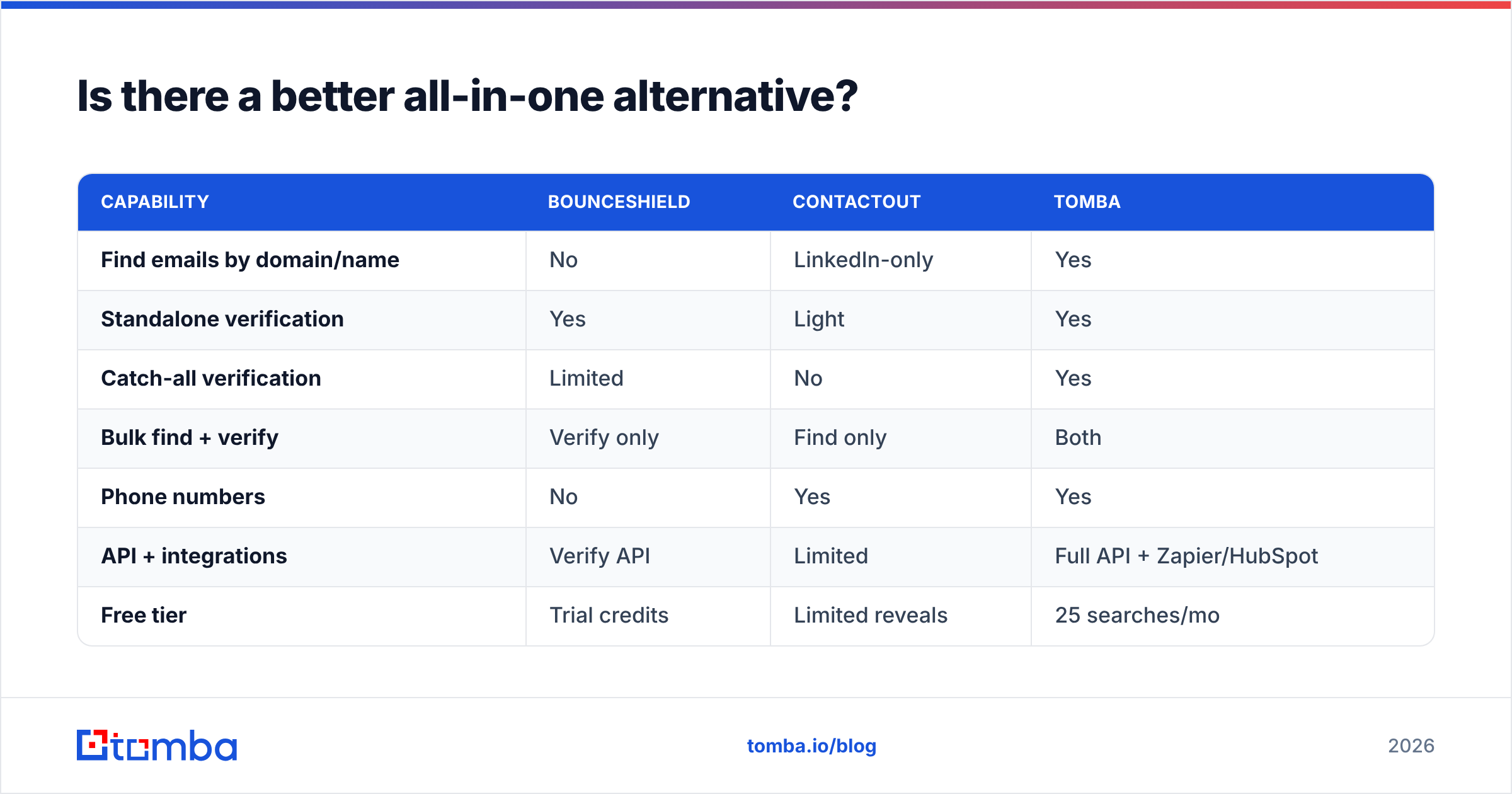
Here's how the three stack up on the jobs that actually matter:
| Capability | Bounceshield | ContactOut | Tomba |
|---|---|---|---|
| Find emails by domain/name | No | LinkedIn-only | Yes |
| Standalone verification | Yes | Light | Yes |
| Catch-all verification | Limited | No | Yes |
| Bulk find + verify | Verify only | Find only | Both |
| Phone numbers | No | Yes | Yes |
| API + integrations | Verify API | Limited | Full API + Zapier/HubSpot |
| Free tier | Trial credits | Limited reveals | 25 searches/mo |
| Starting price | Credit-based | Seat-based | $49/mo |
Tomba isn't the right answer for everyone — if you only ever verify pre-built lists and never source, a dedicated verifier may be all you need. But the moment your workflow includes both finding and validating contacts, consolidating into one platform removes the export/import grind and gives you a single accuracy standard end to end. You can also pull contacts straight from profiles with the LinkedIn finder, covering ContactOut's core use case while keeping verification native.
The bottom line#
Bounceshield and ContactOut solve different halves of the same problem. Bounceshield is a precise verifier that protects deliverability but never sources a contact. ContactOut is a wide-coverage LinkedIn finder that sources fast but leaves verification to you. Pick Bounceshield if you only clean lists; pick ContactOut if you live in LinkedIn and verify elsewhere; pick a combined platform if you do both — which most outbound teams do.
If consolidating find-and-verify into one workflow sounds right, start with the Tomba Email Finder. The free tier gives you 25 searches a month to test accuracy on your own target accounts, verification is built in so you skip the second subscription, and paid plans begin at $49/mo with catch-all handling and a full API. Find the email, verify it, and protect your domain — without stitching three tools together.
// get started
Find, verify and enrich your first contacts today
Start on the free plan with 25 searches a month, then scale when your team is ready.
Free plan · No credit card required · GDPR & CCPA
// about the author