Bounceshield vs GetProspect: Best Email Tool in 2026
Bounceshield protects deliverability by catching bad addresses; GetProspect finds and verifies B2B emails. Here's which one fits your 2026 stack — and where a third option beats both.
You typed "Bounceshield vs GetProspect" into search because you need clean, deliverable B2B contacts — and you're not sure which of these two tools actually gets you there. The honest answer is that they solve different halves of the same problem, and picking the wrong one means either bounced campaigns or empty lead lists.
This breakdown compares both on what matters: accuracy, pricing, real use cases, and where each one quietly falls short. We'll also show where a combined finder-plus-verifier setup outperforms either tool alone.
TL;DR#
- Bounceshield is a verification-first tool: it scrubs lists you already have so they don't bounce and torch your sender reputation. It does not build lists for you.
- GetProspect is a finder-first tool: it pulls B2B emails from LinkedIn and company domains, with verification bolted on. Coverage is solid; verification depth is average.
- If you only have a dirty list, lean Bounceshield. If you have no list yet, lean GetProspect.
- If you want both jobs done in one place with higher accuracy, a dedicated finder-plus-verifier stack like Tomba beats running two half-tools — fewer credits wasted, one billing line, one API.
- Pricing-wise, GetProspect starts cheap but charges per verified contact; Bounceshield bills per verification volume. Read the per-credit math before you commit.
What is Bounceshield?#
Bounceshield is an email verification and bounce-protection service. Think of it like a bouncer at a club door: it checks every address against SMTP, MX records, and known-bad patterns before you let it into your campaign. Its core promise is protecting your sender reputation by stopping invalid, catch-all, and risky addresses from ever hitting send.
What it does well:
- Real-time and bulk verification — drop a CSV in, get a scored list back.
- Risk grading — addresses are labeled valid, invalid, risky, or unknown.
- Catch-all detection — flags domains that accept everything so you can decide how aggressive to be.
What it does not do: find new contacts. Bounceshield assumes you already have addresses. If your problem is "I have 10,000 emails and a 9% bounce rate," it's a strong fit. If your problem is "I need 10,000 emails," it's the wrong tool entirely.

What is GetProspect?#
GetProspect is a B2B email finder and lead-generation platform. Its bread and butter is pulling professional emails from LinkedIn profiles and company domains, then enriching them with job title, company size, and location. Verification exists, but it's a secondary feature layered on top of finding.
What it does well:
- LinkedIn email extraction via a Chrome extension — browse profiles, capture emails.
- Domain and company search — give it a company, get a list of contacts.
- Built-in CRM-lite — store and segment lists without leaving the app.
- Enrichment — appends firmographic data to raw contacts.
Where it's average: verification is good enough for warm lists but not as deep as a dedicated verifier on catch-all and risky domains. If deliverability is your single biggest pain, GetProspect's verification alone may not get your bounce rate under the 2% threshold most ESPs reward.

Bounceshield vs GetProspect: how do they compare?#
Here's the head-to-head on the attributes that actually change your results. Read this before you read any pricing page.
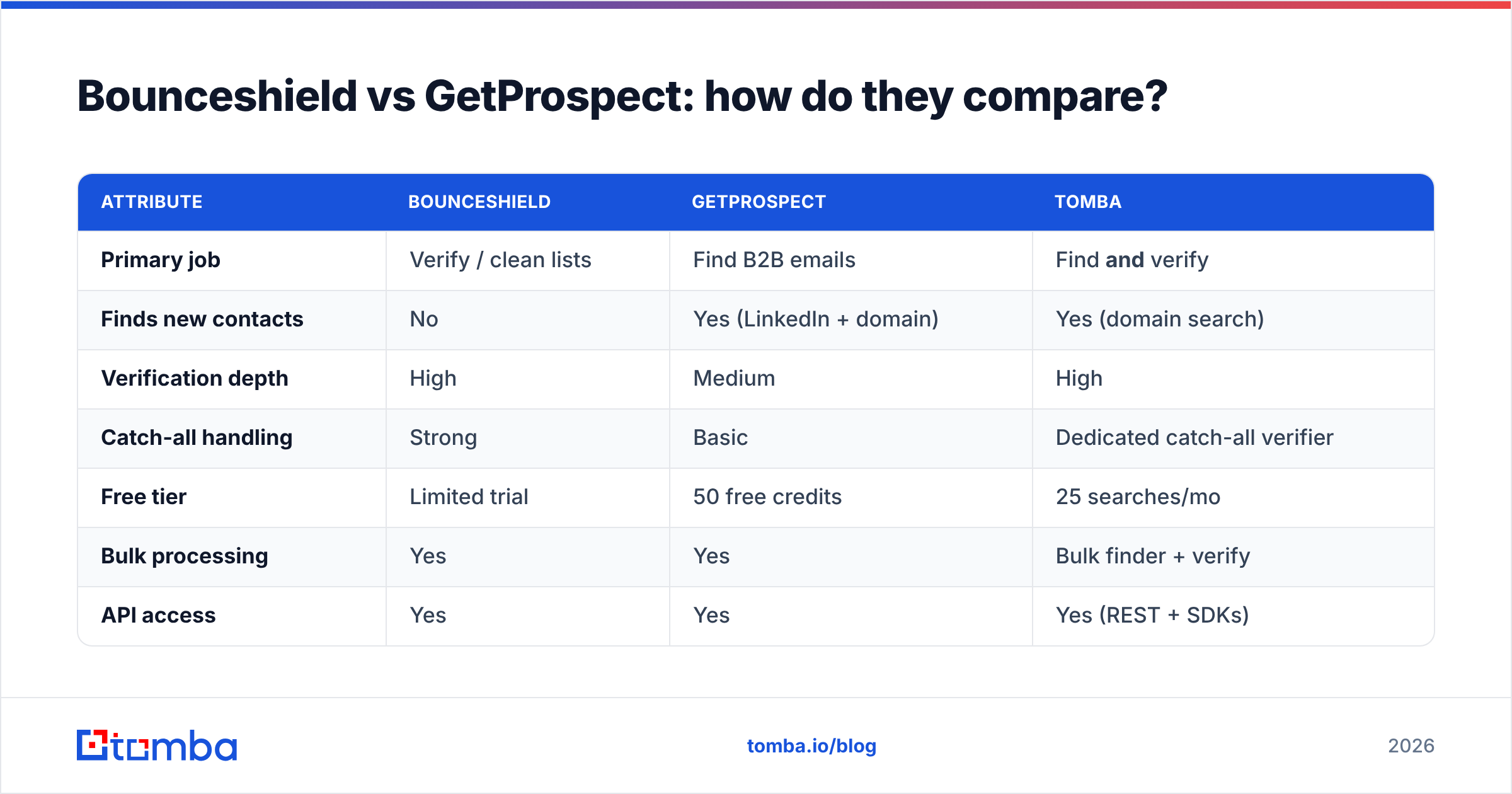
| Attribute | Bounceshield | GetProspect | Tomba |
|---|---|---|---|
| Primary job | Verify / clean lists | Find B2B emails | Find and verify |
| Finds new contacts | No | Yes (LinkedIn + domain) | Yes (domain search) |
| Verification depth | High | Medium | High |
| Catch-all handling | Strong | Basic | Dedicated catch-all verifier |
| Free tier | Limited trial | 50 free credits | 25 searches/mo |
| Bulk processing | Yes | Yes | Bulk finder + verify |
| API access | Yes | Yes | Yes (REST + SDKs) |
| Starting paid price | Per-volume | ~$49/mo range | $49/mo Starter |
The pattern is clear: Bounceshield wins on pure verification, GetProspect wins on finding, and neither single-handedly covers the full pipeline from "no contacts" to "verified, deliverable contacts." That gap is the whole argument for a unified tool.
)
Which tool fits which use case?#
Decision is easier when you map it to your actual situation. Pick the row that sounds like you.
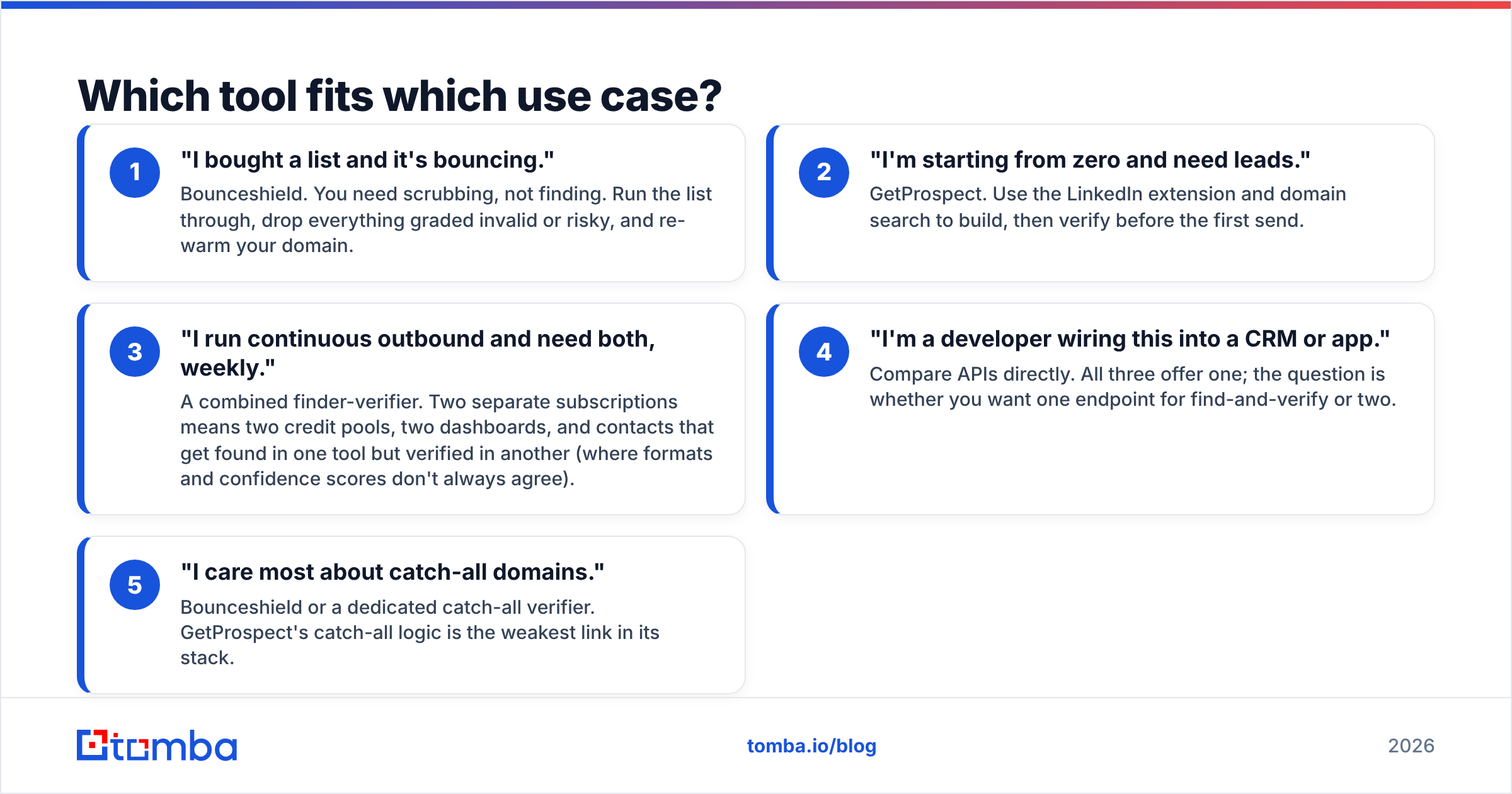
- "I bought a list and it's bouncing." — Bounceshield. You need scrubbing, not finding. Run the list through, drop everything graded invalid or risky, and re-warm your domain.
- "I'm starting from zero and need leads." — GetProspect. Use the LinkedIn extension and domain search to build, then verify before the first send.
- "I run continuous outbound and need both, weekly." — A combined finder-verifier. Two separate subscriptions means two credit pools, two dashboards, and contacts that get found in one tool but verified in another (where formats and confidence scores don't always agree).
- "I'm a developer wiring this into a CRM or app." — Compare APIs directly. All three offer one; the question is whether you want one endpoint for find-and-verify or two.
- "I care most about catch-all domains." — Bounceshield or a dedicated catch-all verifier. GetProspect's catch-all logic is the weakest link in its stack.
The friction with the two-tool approach is real. When you find an email in GetProspect and verify it in Bounceshield, you pay twice and you reconcile two confidence scores. A single platform that finds and verifies in the same pass removes that reconciliation step entirely.
How accurate are they, really?#
Accuracy is the number that decides whether your campaign lands or bounces — so treat vendor claims skeptically. Both Bounceshield and GetProspect advertise high accuracy, but the meaningful metric is bounce rate on real sends, not lab percentages.
A few honest realities:
- No tool is 100% accurate on catch-all domains. Any vendor claiming otherwise is rounding up. Catch-all servers accept everything at the SMTP layer, so verification becomes probabilistic. This is exactly why a dedicated email verifier with separate catch-all logic matters.
- Finder accuracy and verifier accuracy are different metrics. GetProspect can find an email correctly (right format, right person) that still bounces because the mailbox was deactivated. Finding and verifying are two separate guarantees.
- Freshness beats raw database size. A smaller, recently-refreshed dataset outperforms a giant stale one. Ask any vendor when their data was last validated, not how many millions of records they claim.
For independent signal instead of vendor marketing, check verified reviews on G2 and read how each tool scores on the "accuracy" and "data quality" sub-ratings specifically — those are more honest than the headline star count.
)
What does each one cost in 2026?#
Pricing is where the two-tool tax shows up. Here's the structure for each, simplified.
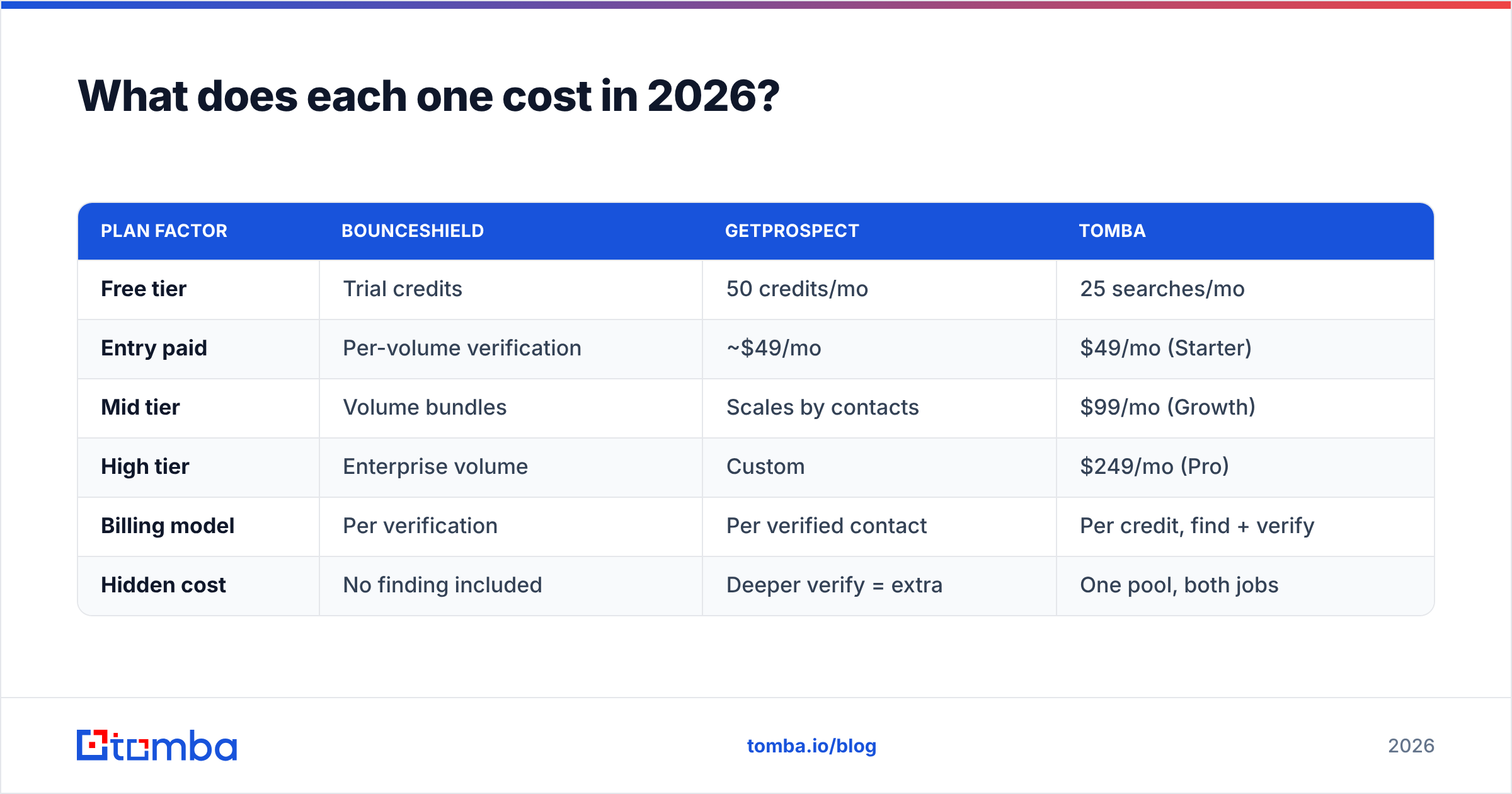
| Plan factor | Bounceshield | GetProspect | Tomba |
|---|---|---|---|
| Free tier | Trial credits | 50 credits/mo | 25 searches/mo |
| Entry paid | Per-volume verification | ~$49/mo | $49/mo (Starter) |
| Mid tier | Volume bundles | Scales by contacts | $99/mo (Growth) |
| High tier | Enterprise volume | Custom | $249/mo (Pro) |
| Billing model | Per verification | Per verified contact | Per credit, find + verify |
| Hidden cost | No finding included | Deeper verify = extra | One pool, both jobs |
The thing the table can't show: if you run both tools, your true cost is Bounceshield plus GetProspect, and your effective per-deliverable-contact cost is higher than either sticker price suggests. A platform like Tomba folds finding and verification into one credit pool — see the full Tomba pricing for the per-credit math. For high-volume teams, one billing line and one credit type is not a minor convenience; it's a measurable cost reduction.
Is there a better alternative to running both?#
Yes — for most B2B teams, a single find-and-verify platform beats stapling a finder to a separate verifier. The reason is structural, not just convenience.
When finding and verification happen in the same engine, the verification step uses the same fresh source data the finder just pulled from. You're not handing a found email to a second tool that re-checks it against a different, possibly staler dataset. That's why a unified approach typically yields a lower real-world bounce rate than two best-of-breed tools chained together.
Tomba covers the full path:
- Find — by domain, name, or company, with domain search for whole-company contact lists.
- Verify — a dedicated email verifier with separate catch-all handling, the exact weak spot in finder-only tools.
- Scale — bulk processing for find-and-verify in one upload instead of two.
- Integrate — one API for both jobs, so your CRM or sequencer calls a single endpoint.
This isn't to say Bounceshield and GetProspect are bad tools — they're good at their respective halves. The argument is narrower: if you need both halves regularly, paying for and reconciling two specialists is rarely worth it versus one platform that does both well. If you genuinely only ever clean lists, Bounceshield is fine. If you genuinely only ever find, GetProspect is fine. Most outbound teams need both, most weeks.
How do you choose in five minutes?#
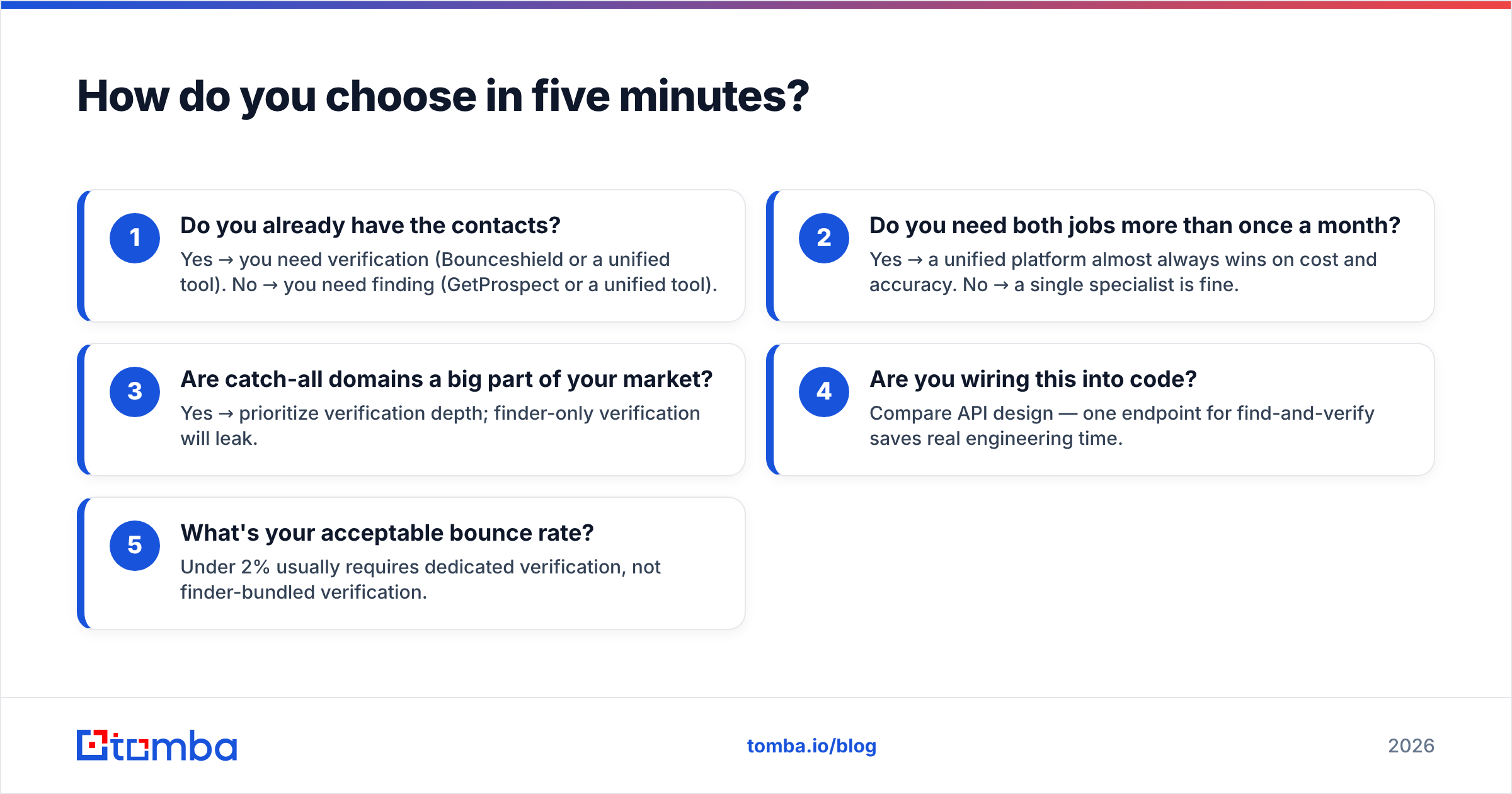
Run this checklist and the answer falls out:
- Do you already have the contacts? Yes → you need verification (Bounceshield or a unified tool). No → you need finding (GetProspect or a unified tool).
- Do you need both jobs more than once a month? Yes → a unified platform almost always wins on cost and accuracy. No → a single specialist is fine.
- Are catch-all domains a big part of your market? Yes → prioritize verification depth; finder-only verification will leak.
- Are you wiring this into code? Compare API design — one endpoint for find-and-verify saves real engineering time.
- What's your acceptable bounce rate? Under 2% usually requires dedicated verification, not finder-bundled verification.
Be honest about steps 1 and 2. Most teams answer "no contacts yet" and "need both regularly" — which points away from either single tool and toward a combined stack.
Final verdict#
Bounceshield and GetProspect aren't really competitors — they're two halves of one workflow. Bounceshield is the better pure verifier; GetProspect is the better pure finder. The mistake is buying one and discovering you needed the other, or buying both and paying the two-tool tax in credits, dashboards, and mismatched confidence scores.
If your work is split-and-occasional, pick the specialist that matches today's task. If you run continuous B2B outbound — finding new contacts and keeping bounce rates low, every week — stop stapling tools together. Use one platform that finds and verifies in the same pass.
The Tomba Email Finder does exactly that: find professional emails by domain, name, or company, then verify them with dedicated catch-all logic before you ever hit send — all on one credit pool, one dashboard, one API. Start free with 25 searches a month, no card required, and see your real deliverable-contact cost drop versus running a finder and a verifier side by side.
// get started
Find, verify and enrich your first contacts today
Start on the free plan with 25 searches a month, then scale when your team is ready.
Free plan · No credit card required · GDPR & CCPA
// about the author