Bounceshield vs SalesQL 2026: Which Email Tool Wins?
A neutral, hands-on breakdown of Bounceshield vs SalesQL in 2026 — accuracy, pricing, LinkedIn coverage, and which tool actually fits your outbound stack.
TL;DR
- Bounceshield is built around email verification and bounce protection — it shines when your problem is list hygiene, not contact discovery.
- SalesQL is a LinkedIn-first email finder — it shines when your problem is pulling contacts off profiles, not deep validation.
- Neither tool does both jobs well, so most teams end up paying for two subscriptions or living with gaps.
- On accuracy and pricing, both are mid-market: fine for small lists, expensive at scale.
- If you want finding and verification in one platform with a real API, a consolidated tool like Tomba Email Finder is usually the cheaper, simpler answer.
When you put Bounceshield vs SalesQL side by side, the honest takeaway is that they are not really competitors — they solve adjacent problems. The mistake teams make is buying one and expecting it to cover the other. This guide breaks down what each does, where each breaks, and how to decide without wasting a quarter of trial credits.
What is Bounceshield?#
Bounceshield is an email verification and deliverability-protection tool. Its core promise is simple: feed it a list of addresses, and it tells you which ones are valid, risky, or dead before you hit send. The point is to protect your sender reputation and keep your bounce rate under the thresholds that mailbox providers enforce.
Verification tools like this typically run a chain of checks — syntax, MX records, SMTP handshake, role-account detection, and disposable-domain filtering. The better ones also attempt catch-all resolution, which is the hardest part of the job because catch-all domains accept everything at the gateway and reveal nothing.
Where Bounceshield fits:
- Cleaning a purchased or scraped list before your first campaign.
- Ongoing hygiene on a CRM that accumulates stale contacts.
- Protecting deliverability when your bounce rate creeps toward the danger zone.
What it is not built to do: discover new contacts. If you hand Bounceshield a company name, it cannot return the decision-maker's address. That is a finding job, and it sits outside the verification lane.

What is SalesQL?#
SalesQL is a LinkedIn-centric email finder. It installs as a browser extension and pulls personal and professional email addresses (and sometimes phone numbers) directly from LinkedIn profiles and search results. For SDRs who live inside LinkedIn Sales Navigator, that workflow feels native.
Its strength is the source. Because it works off the profile you are already looking at, SalesQL ties a contact to a real person with a verified job title and company — which reduces the "who is this address even for?" problem that plagues raw domain scraping. You can also build lists as you browse and export them in bulk.
The trade-offs are equally real:
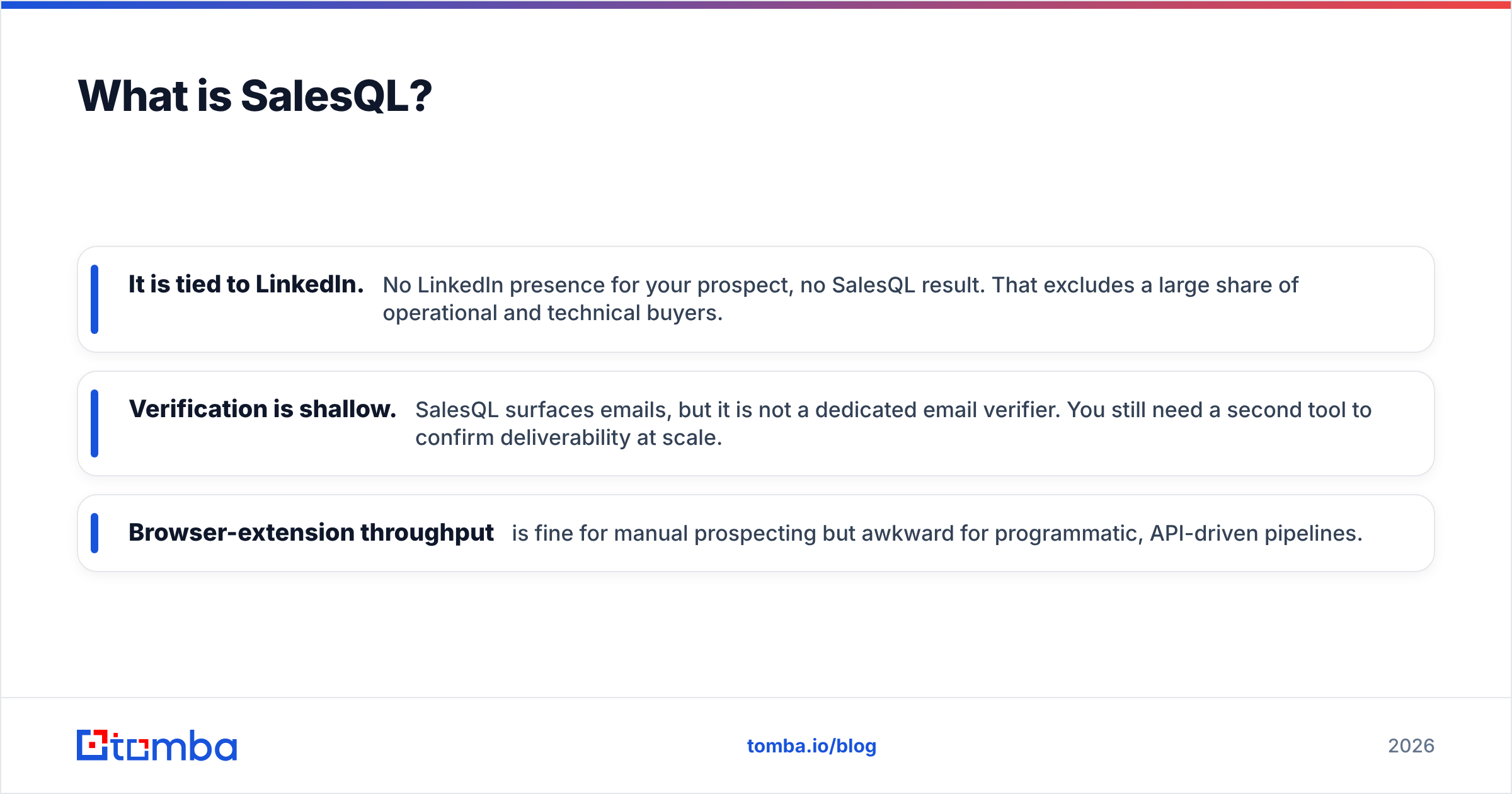
- It is tied to LinkedIn. No LinkedIn presence for your prospect, no SalesQL result. That excludes a large share of operational and technical buyers.
- Verification is shallow. SalesQL surfaces emails, but it is not a dedicated email verifier. You still need a second tool to confirm deliverability at scale.
- Browser-extension throughput is fine for manual prospecting but awkward for programmatic, API-driven pipelines.
So already you can see the shape of the Bounceshield vs SalesQL question: one verifies, one finds. Picking "the better tool" without naming your actual bottleneck is how budgets get wasted.
Bounceshield vs SalesQL: how do they compare head-to-head?#
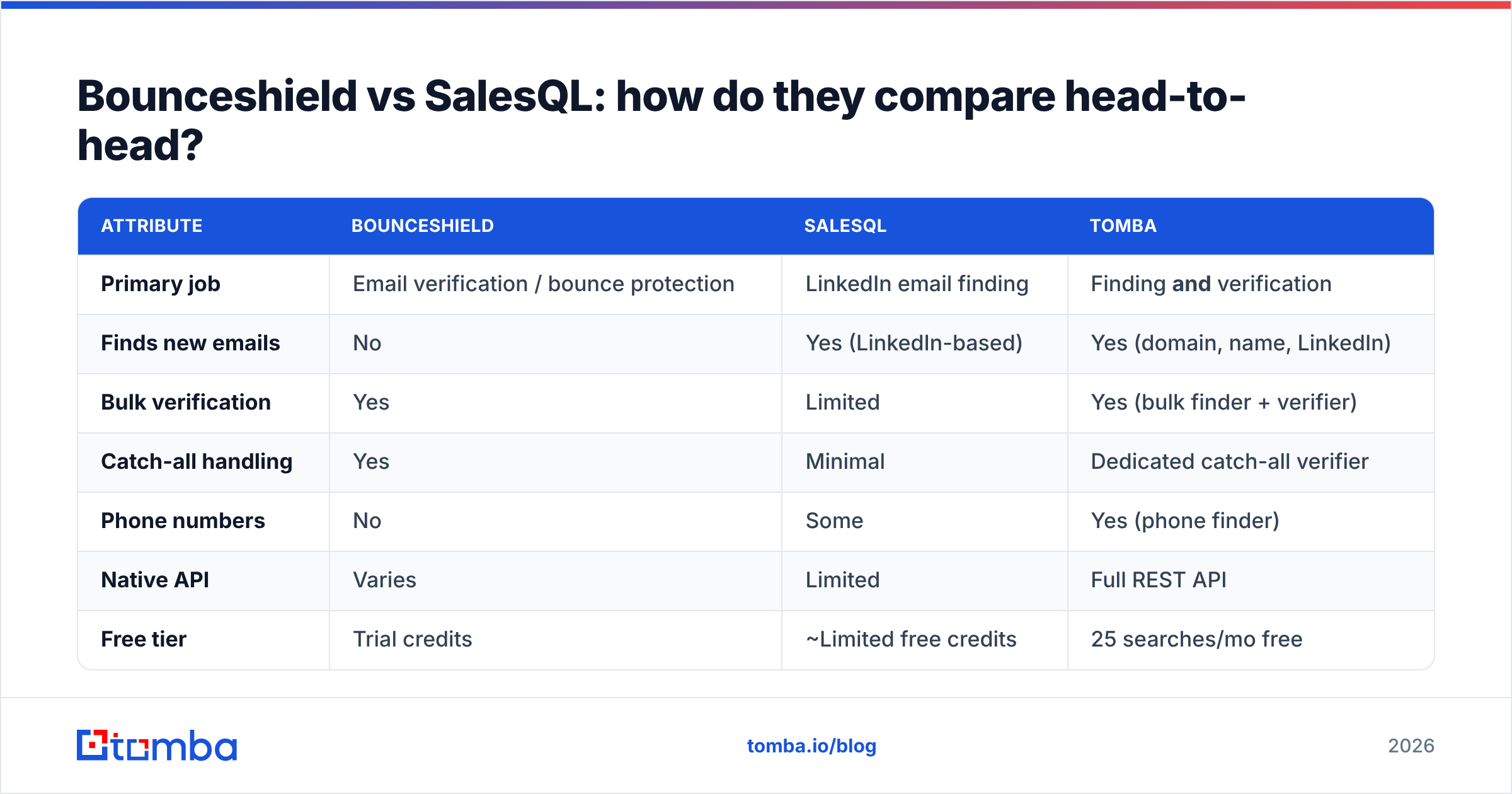
Here is the core comparison. Treat exact pricing as directional — vendors change tiers often, so confirm on their sites before you buy.
| Attribute | Bounceshield | SalesQL | Tomba |
|---|---|---|---|
| Primary job | Email verification / bounce protection | LinkedIn email finding | Finding and verification |
| Finds new emails | No | Yes (LinkedIn-based) | Yes (domain, name, LinkedIn) |
| Bulk verification | Yes | Limited | Yes (bulk finder + verifier) |
| Catch-all handling | Yes | Minimal | Dedicated catch-all verifier |
| Phone numbers | No | Some | Yes (phone finder) |
| Native API | Varies | Limited | Full REST API |
| Free tier | Trial credits | ~Limited free credits | 25 searches/mo free |
| Entry paid price | Mid-market | Mid-market | $49/mo Starter |
| Best for | List hygiene teams | LinkedIn SDRs | Full-funnel outbound |
The pattern is clear. Bounceshield is a specialist on the right side of the funnel (cleaning what you already have). SalesQL is a specialist on the left side (getting contacts in the first place). If your workflow needs both — and most outbound motions do — you are looking at two bills, two dashboards, and two failure points.
Which one is more accurate?#
Accuracy means different things for each tool, so compare them on their own turf.
For Bounceshield, accuracy is verification precision: does a "valid" verdict actually deliver, and does it correctly flag catch-all and risky addresses instead of waving them through? Dedicated verifiers generally do this well on standard domains. The weak spot for nearly every verifier is catch-all domains, where a definitive answer is impossible without sending. Tools that pretend otherwise are guessing.
For SalesQL, accuracy is match rate and freshness: of the profiles you process, how many return a correct, current email? LinkedIn-sourced data is strong on attribution but can lag when someone changes jobs and the profile is stale. You also inherit LinkedIn's coverage gaps.
This is exactly why combined platforms publish blended accuracy benchmarks — the number that matters is correct emails delivered end to end, not finding rate or verification rate in isolation. You can read more about where Tomba gets its data and how sources are blended to raise that end-to-end figure.

Independent reviews are your friend here. Cross-check vendor claims against user ratings on G2 and Capterra before trusting any single accuracy headline — including this one.
What about pricing and value?#
Pricing is where the "two specialists" problem hurts. Run the math on the combined cost of doing both jobs, not the sticker price of one.
- SalesQL charges by credits, scaling with how many contacts you reveal. Heavy LinkedIn prospecting eats credits fast.
- Bounceshield charges by verification volume. Cleaning a large list periodically adds up.
- Buy both, and you pay twice for what overlapping platforms bundle.
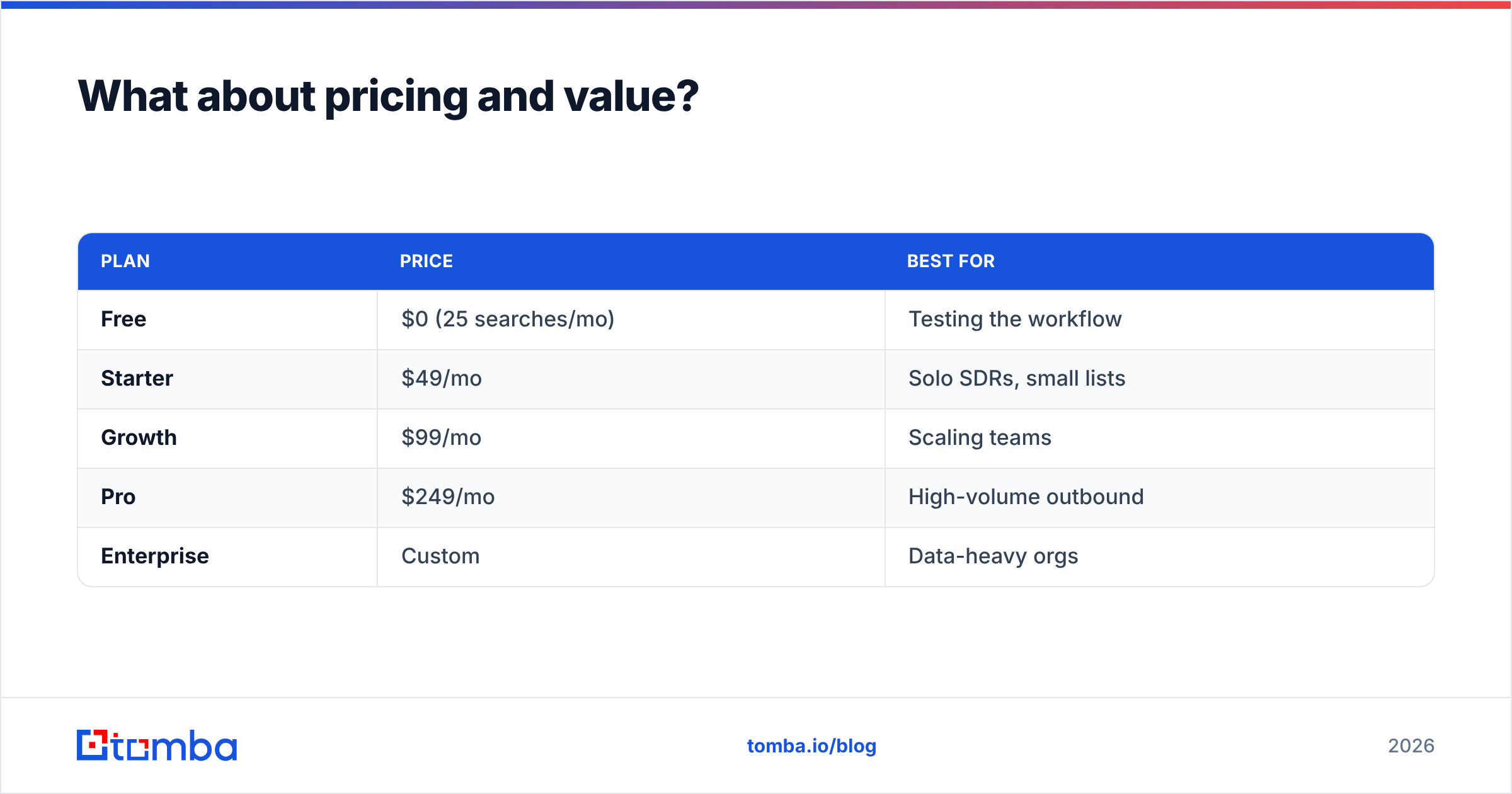
For comparison, a consolidated tool's pricing folds finding and verification into one plan. Tomba's tiers, for reference:
| Plan | Price | Best for |
|---|---|---|
| Free | $0 (25 searches/mo) | Testing the workflow |
| Starter | $49/mo | Solo SDRs, small lists |
| Growth | $99/mo | Scaling teams |
| Pro | $249/mo | High-volume outbound |
| Enterprise | Custom | Data-heavy orgs |
The value question is not "which is cheaper per credit" — it is "what does my full finding-plus-verifying workflow cost per month, including the second tool I'd otherwise need?" When you frame it that way, single-purpose tools often lose on total cost even when their headline price looks low.
When should you choose Bounceshield?#
Pick Bounceshield (or any dedicated verifier) when verification is genuinely your only gap:
- You already have a strong contact source — an existing CRM, an enrichment vendor, or a data team — and you just need clean lists.
- Your bounce rate is the fire you are fighting, and deliverability protection is the priority.
- You send high volumes and need verification as a standalone, repeatable hygiene step.
In that scenario, layering a focused verifier on top of your existing stack is reasonable. Just don't expect it to fill your pipeline — it won't find a single new contact.
When should you choose SalesQL?#
Pick SalesQL when LinkedIn is your prospecting motion:
- Your reps work inside Sales Navigator all day and want emails extracted from the exact profiles they are viewing.
- Your ICP is well represented on LinkedIn (common for sales, marketing, and exec buyers; weaker for technical and operational roles).
- You prospect manually in modest volumes rather than running large API-driven campaigns.
If that's you, SalesQL's browser-native flow is genuinely convenient. Pair it with a separate verification step before you launch, because finding an address is only half the job. A quick pass through a bulk email verifier keeps your bounce rate honest.
Is there a single tool that does both jobs?#
Yes — and that's the real alternative to running Bounceshield and SalesQL in parallel. Consolidated platforms cover the full funnel: discovery, enrichment, and verification under one login and one bill.
Tomba is one such option. It finds emails by domain search, by name, and from LinkedIn via the LinkedIn finder; it verifies them — including catch-all domains — and it exposes everything through a real email finder API for teams that want to automate. That removes the two-tool tax that the Bounceshield-plus-SalesQL combo quietly imposes.
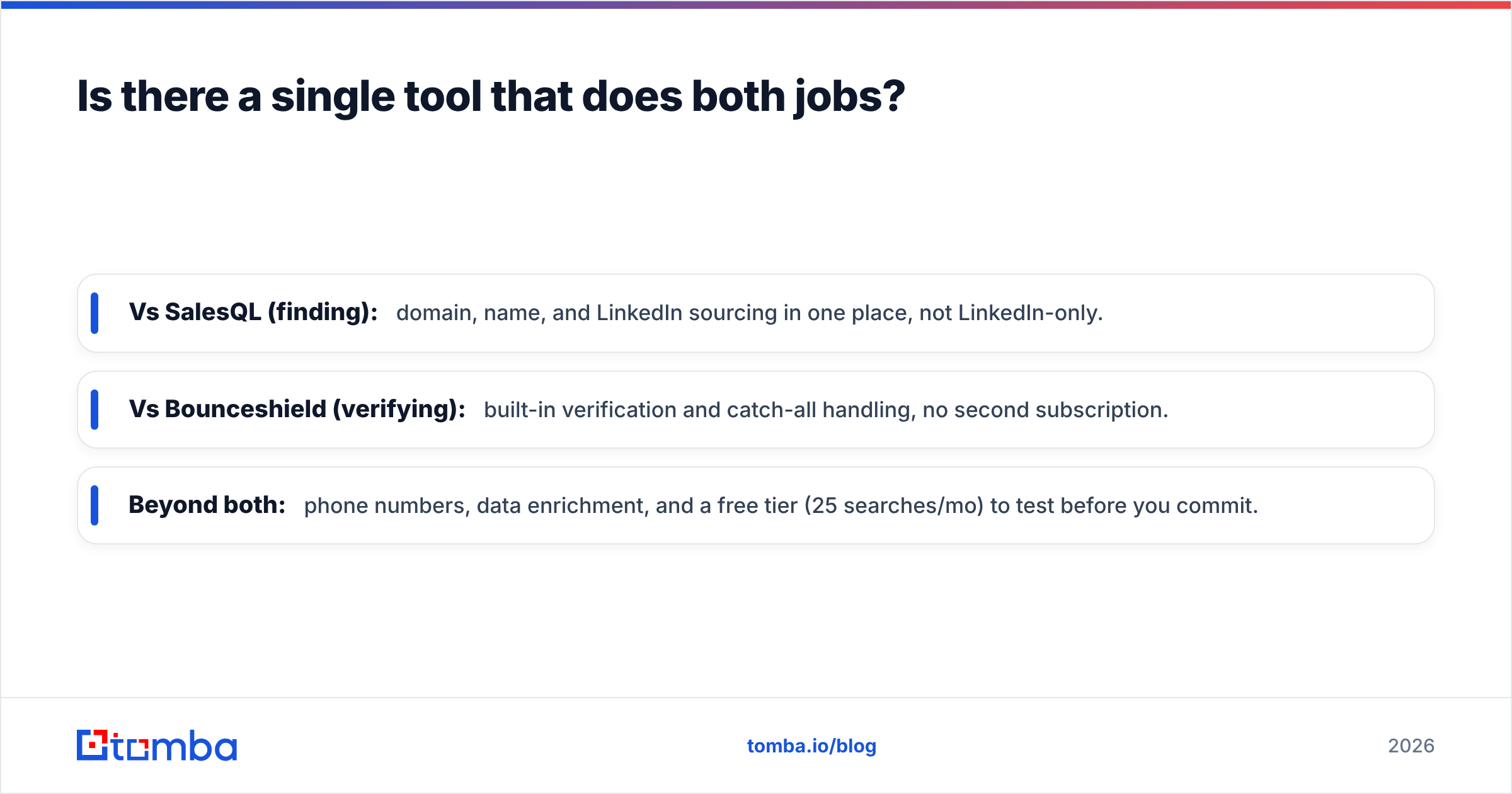
How the consolidated approach maps to each specialist's strength:
- Vs SalesQL (finding): domain, name, and LinkedIn sourcing in one place, not LinkedIn-only.
- Vs Bounceshield (verifying): built-in verification and catch-all handling, no second subscription.
- Beyond both: phone numbers, data enrichment, and a free tier (25 searches/mo) to test before you commit.
This isn't to say specialists are bad. If you only ever do one job, a specialist is fine. But the moment your workflow spans find and verify — which is most outbound — the consolidated route is usually simpler and cheaper. For deeper context on validation specifically, see how email verification and catch-all checks affect deliverability.
Bounceshield vs SalesQL: the verdict#
There is no universal winner because they answer different questions:
- Choose Bounceshield if you have contacts and need them clean.
- Choose SalesQL if you live on LinkedIn and need to extract contacts there.
- Choose a consolidated platform if you need both and would rather not maintain two tools, two budgets, and two integration points.
Be skeptical of any "X destroys Y" framing — including from vendors. Run a small real test against your own ICP, measure end-to-end delivered emails, and check current pricing yourself. Five hundred real prospects through each tool will tell you more than any comparison table, this one included.
Ready to skip the two-tool tax?#
If your outbound motion needs both finding and verification, start with one platform instead of stitching two together. Tomba's Email Finder locates professional addresses by domain, name, company, or LinkedIn, verifies them — catch-all domains included — and scales through a full API when you're ready to automate. The free tier gives you 25 searches a month to test it against your own list before paying a cent. Try it on your next 25 prospects and compare the delivered-email count to whatever you're running today.
Ready to find emails that actually work?
Join 150,000+ professionals who stopped guessing and started sending. Free credits on signup — no credit card required.
Get the Tomba newsletter
Practical outbound tactics and product updates — once every two weeks.
About the author