Bounceshield vs SignalHire 2026: Data & Accuracy Compared
Bounceshield vs SignalHire: one cleans your list, the other finds contacts. See which tool fits your workflow, where each falls short, and the all-in-one option that beats both.
TL;DR
- Bounceshield and SignalHire solve different problems. Bounceshield is an email verification / bounce-protection layer; SignalHire is a contact finder that pulls emails and phone numbers from profiles. Comparing them head-to-head only makes sense if you're trying to decide where your budget goes first.
- Pick Bounceshield-style verification when you already have a list and your bounce rate is hurting deliverability.
- Pick SignalHire when you need net-new contacts (especially phone numbers) sourced from LinkedIn and the open web.
- The catch: running two narrow tools means two bills, two integrations, and two data-quality standards. Most teams want finding and verification in one place.
- The all-in-one option: Tomba bundles email finding, verification, catch-all checking, and phone lookup from $49/mo — closing the gap both single-purpose tools leave open.
What are Bounceshield and SignalHire?#
Short version: Bounceshield protects your sending reputation, SignalHire builds your contact list. They sit at opposite ends of the same pipeline.
Bounceshield is positioned as a deliverability and verification tool. Its job is to inspect email addresses you already have — flagging invalid, risky, disposable, and catch-all addresses before you hit send. Think of it as the bouncer at the door of your email list: it doesn't bring guests, it just keeps the troublemakers out so your party (your sender reputation) doesn't get shut down.
SignalHire is a contact-discovery platform. You search by name, company, or LinkedIn profile, and it returns professional emails plus mobile and direct-dial phone numbers. It leans heavily on browser-extension workflows and bulk profile exports. If Bounceshield is the bouncer, SignalHire is the recruiter out on the street handing you names and numbers.
That distinction matters because "Bounceshield vs SignalHire" is really a question about which stage of your outbound you're fixing. Verifying a list you can't grow is a dead end; growing a list you never verify wrecks your email deliverability. You usually need both.

How do Bounceshield and SignalHire compare at a glance?#
Here's the core trade-off in one table. Pricing for niche tools shifts often, so treat figures as directional and confirm on each vendor's site before you buy.
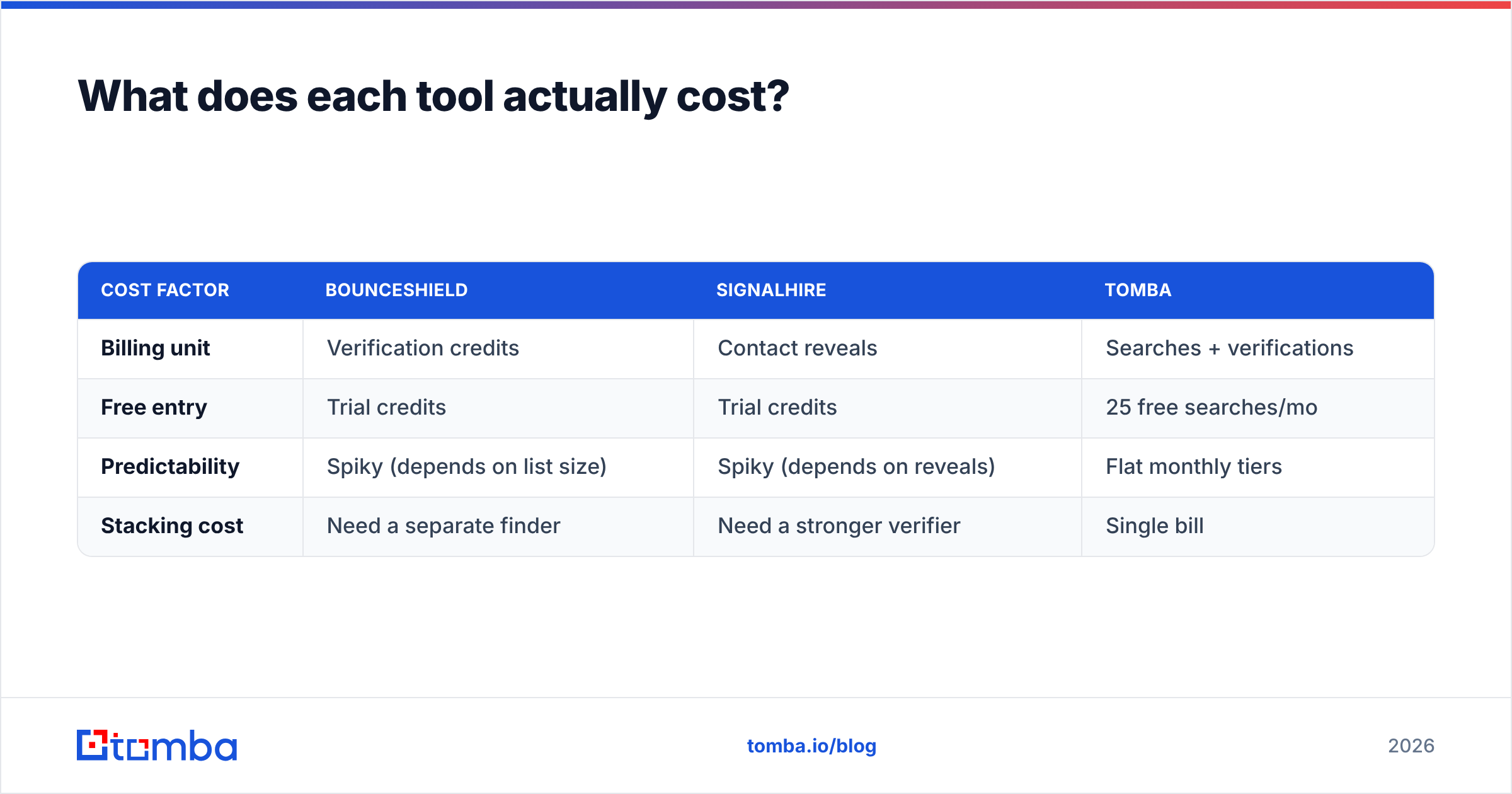
| Attribute | Bounceshield | SignalHire | Tomba (all-in-one) |
|---|---|---|---|
| Primary job | Email verification / bounce protection | Contact finding (email + phone) | Finding and verification |
| Finds new emails | No | Yes | Yes |
| Phone numbers | No | Yes | Yes (phone finder) |
| Email verification | Yes (core) | Basic / add-on | Yes (core) |
| Catch-all handling | Verification only | Limited | Dedicated catch-all verifier |
| Free tier | Limited trial | Limited credits | 25 searches/mo |
| Entry paid price | Verification-credit based | Per-credit, contact-based | $49/mo Starter |
| API access | Yes | Yes | Yes (REST + SDKs) |
| Best for | Cleaning existing lists | Sourcing phone-first leads | Teams wanting one stack |
The pattern is obvious once it's laid out: each single-purpose tool wins its own column and loses everywhere else. Tomba's pitch is that you stop paying for two columns.
Is Bounceshield better than SignalHire?#
Neither is "better" — they're better at different jobs. Asking which wins is like asking whether a lock is better than a key.
Bounceshield wins when:
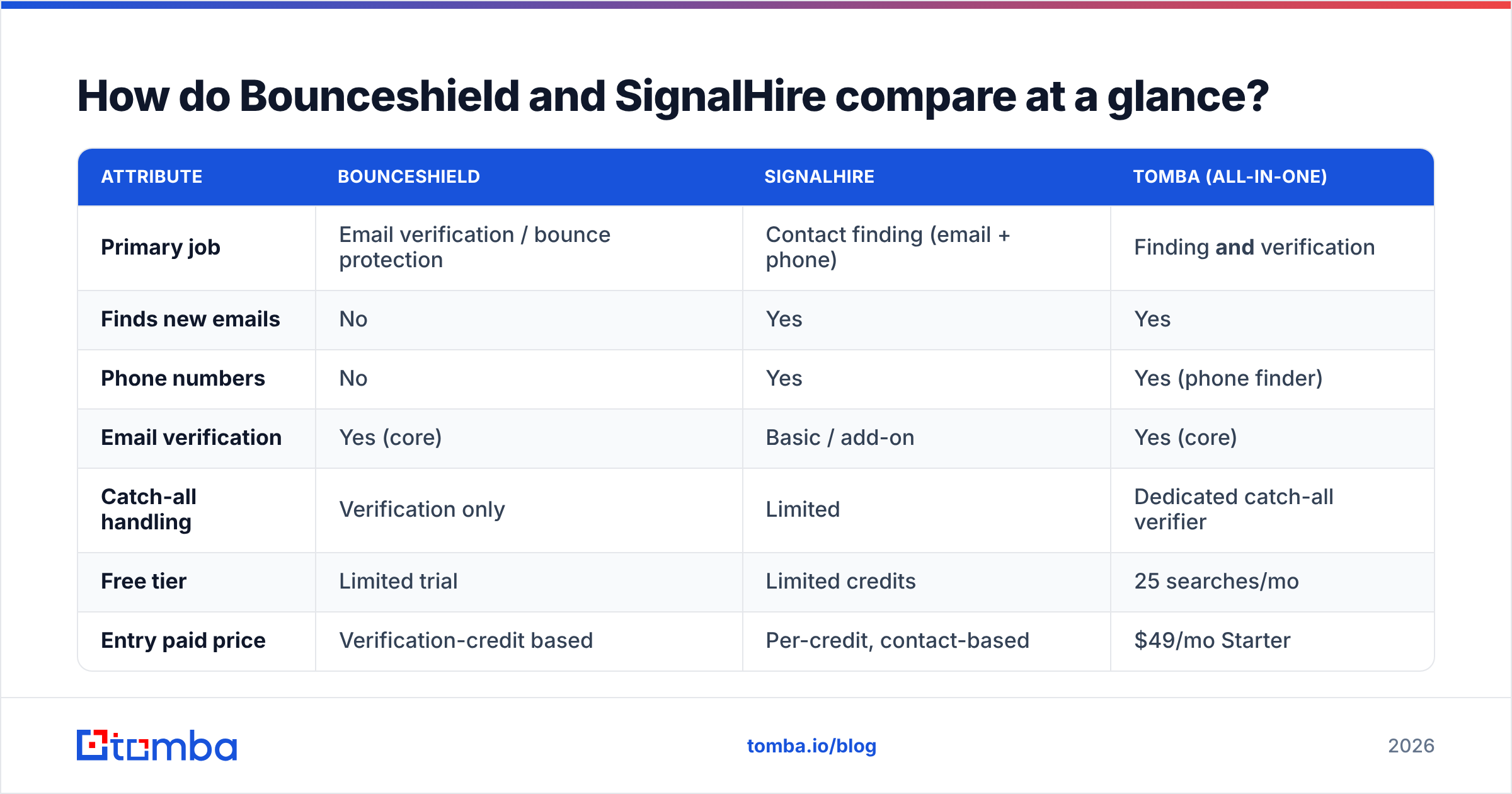
- Your bounce rate is already a problem. If mailbox providers are throttling you, verification is the emergency fix. A clean list protects the sender reputation you've spent months building.
- You buy or inherit lists. Imported data is the highest-risk data. Run it through verification before it ever touches your sending domain.
- You don't need new contacts right now. If your pipeline is full and you just need to mail it safely, a verifier is all you need.
SignalHire wins when:
- You need phone numbers. This is SignalHire's real differentiator. For cold calling and multichannel outreach, direct dials matter.
- You prospect from LinkedIn. The extension-driven workflow fits recruiters and SDRs living in profiles all day.
- You're starting from zero. A verifier can't help with an empty list.
The honest weakness of both: a verification-only tool leaves you hunting for a finder, and a finder-first tool like SignalHire gives you verification that's thinner than a dedicated email verifier. You end up bolting on whatever the other tool lacks.

Wait — that's the trap. Two tools, two contracts, two places where data quality can silently drift.
What does each tool actually cost?#
Cost is where the "two narrow tools" problem bites. Pricing models differ enough that direct comparison is tricky, so here's the structural difference rather than a false apples-to-apples number.
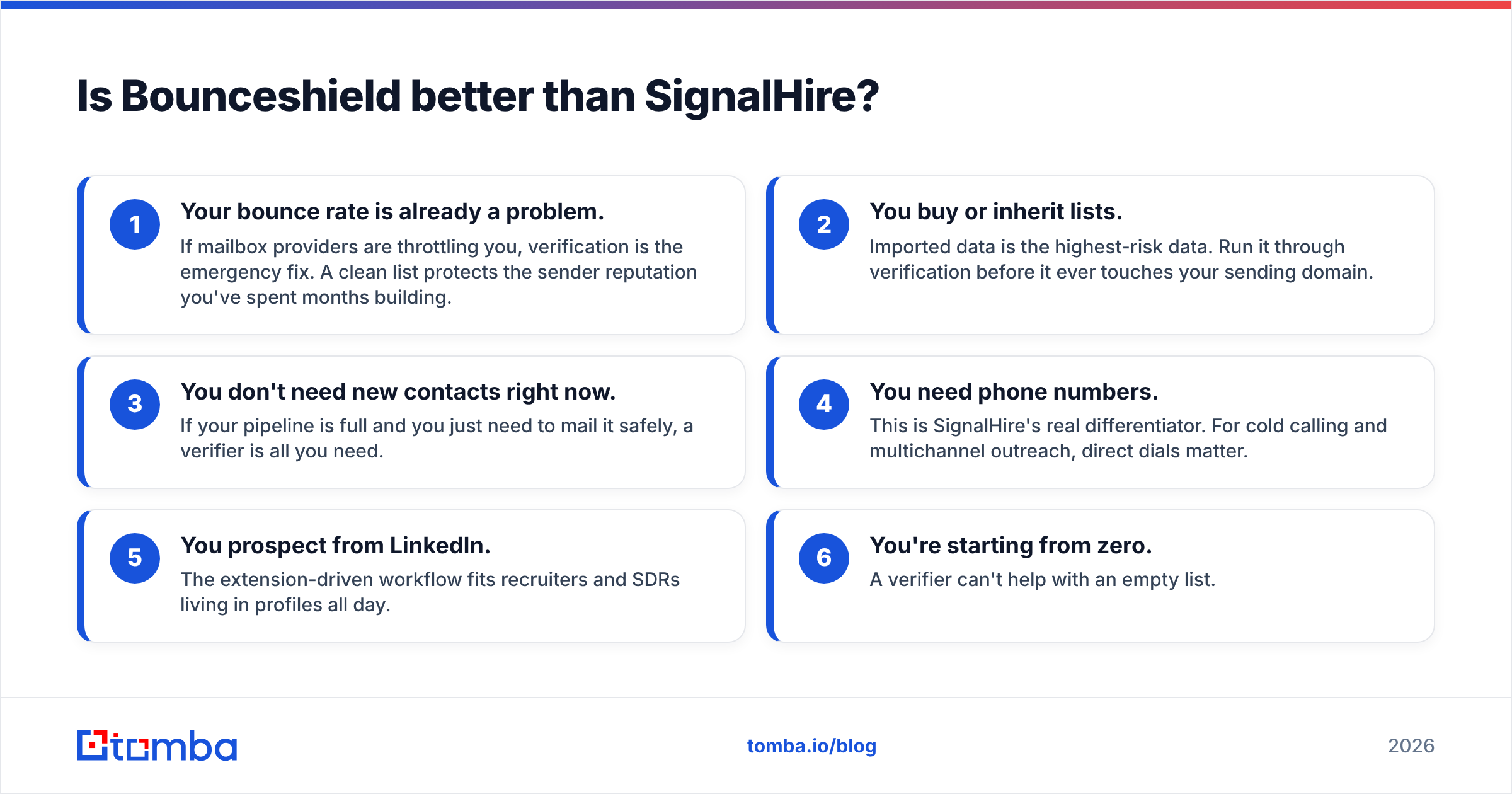
| Cost factor | Bounceshield | SignalHire | Tomba |
|---|---|---|---|
| Billing unit | Verification credits | Contact reveals | Searches + verifications |
| Free entry | Trial credits | Trial credits | 25 free searches/mo |
| Predictability | Spiky (depends on list size) | Spiky (depends on reveals) | Flat monthly tiers |
| Stacking cost | Need a separate finder | Need a stronger verifier | Single bill |
The hidden line item with a two-tool setup is integration and reconciliation. When your finder and your verifier are separate products, someone has to move data between them, deduplicate, and decide which tool's "valid" verdict to trust. That's real time. Tomba's pricing folds finding and verification into one tier — Free (25 searches), Starter $49/mo, Growth $99/mo, Pro $249/mo, and custom Enterprise — so there's one number to forecast and one data standard to trust.
How accurate is the data?#
Accuracy is the whole game, and it's where single-purpose tools quietly disagree with each other.
A contact finder like SignalHire optimizes for coverage — surfacing as many emails and phones as possible. A verifier like Bounceshield optimizes for precision — telling you which of those are safe to use. The problem appears in the gap: SignalHire might hand you an address, Bounceshield might flag it risky, and now you're stuck arbitrating between two vendors who each insist they're right.
Three accuracy traps to watch with any vendor:
- Catch-all addresses. These accept everything at the SMTP layer, so naive verifiers mark them "valid" when they're really "unknown." A dedicated catch-all verifier applies extra signals instead of guessing.
- Stale data. Phone numbers and job-title-based emails decay fast. A finder that scraped a profile 18 months ago is selling you a ghost.
- Disposable and role addresses.
info@,sales@, and temporary inboxes inflate "found" counts but tank reply rates.
When you find and verify inside one system, those signals share a pipeline — the same engine that locates an address also scores it. That's the structural reason an integrated tool can be more internally consistent than a finder plus a separate verifier. See how Tomba sources its data for the methodology behind that.

What's the best Bounceshield and SignalHire alternative?#
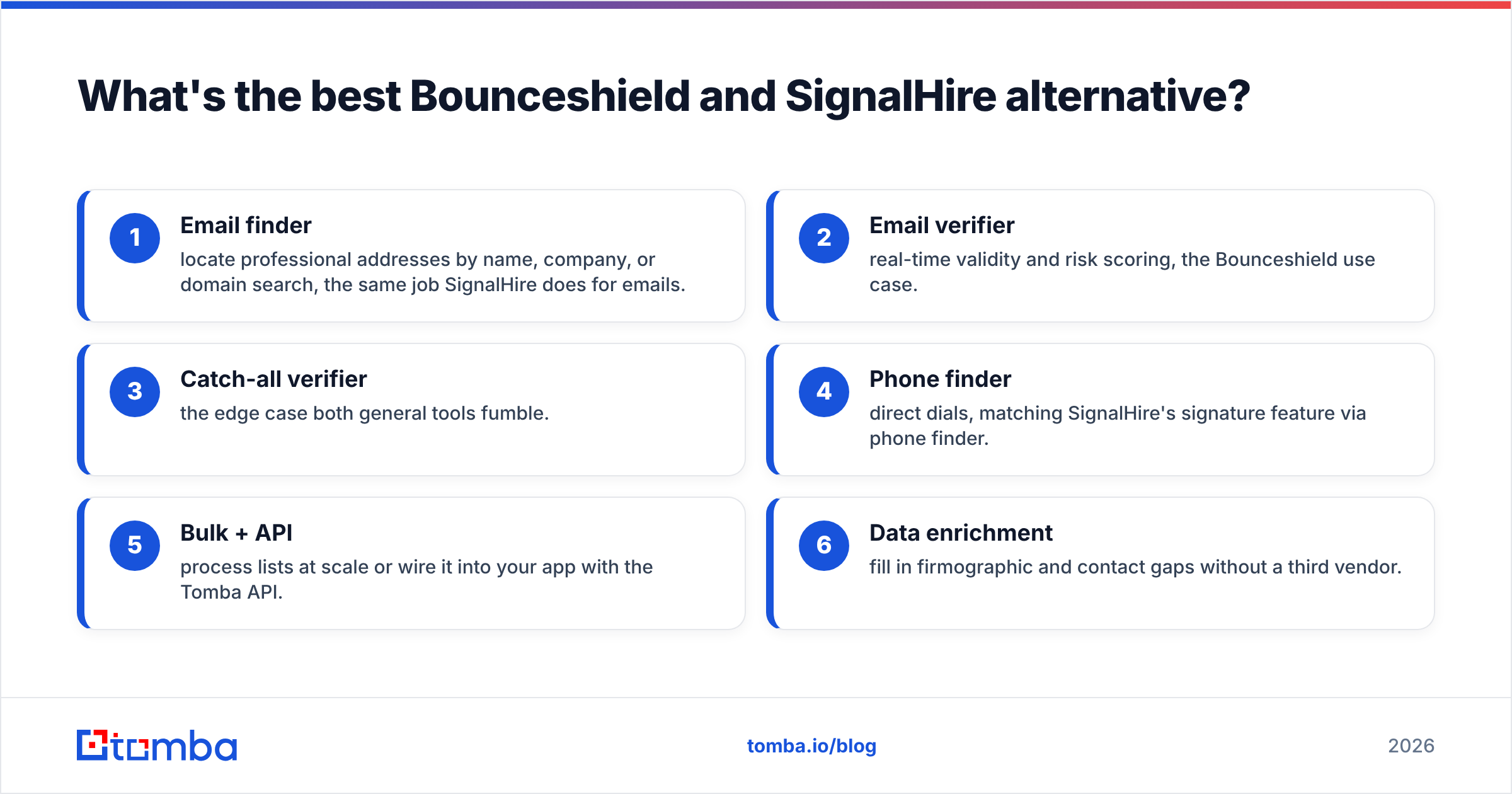
If you'd otherwise buy both, an all-in-one is the cheaper and cleaner answer. Tomba covers the finding side that Bounceshield lacks and the verification depth that SignalHire skimps on.
What you get in one stack:
- Email finder — locate professional addresses by name, company, or domain search, the same job SignalHire does for emails.
- Email verifier — real-time validity and risk scoring, the Bounceshield use case.
- Catch-all verifier — the edge case both general tools fumble.
- Phone finder — direct dials, matching SignalHire's signature feature via phone finder.
- Bulk + API — process lists at scale or wire it into your app with the Tomba API.
- Data enrichment — fill in firmographic and contact gaps without a third vendor.
It also plugs into the tools you already run — HubSpot, Salesforce, Pipedrive, Google Sheets, and Zapier — so you're not exporting CSVs between two products. For teams comparing the broader market, it's worth reading independent reviews on G2 alongside the official SignalHire site before committing.
When should you still use a dedicated tool?#
To be fair — an all-in-one isn't always the right call.
- Stick with Bounceshield-style verification only if you have a massive static list, never prospect, and your single need is hygiene at volume. A specialist with aggressive verification-credit pricing might edge out a bundled tool on pure per-check cost.
- Stick with SignalHire if phone-first recruiting is your entire motion and you live inside its LinkedIn workflow. Switching costs for an entrenched recruiting team are real.
- Go all-in-one the moment you're doing both finding and verifying — which describes most B2B sales and marketing teams. Two narrow subscriptions almost always cost more in dollars and friction than one tool that does the whole job.
The deciding question isn't "Bounceshield or SignalHire." It's "how many tools do I want to maintain to run one outbound motion?"
Frequently asked questions#
Is Bounceshield a contact finder? No. Bounceshield is built for email verification and bounce protection. It cleans lists you already have rather than sourcing new contacts — that's SignalHire's territory.
Does SignalHire verify emails? SignalHire offers basic verification, but it's a finder first. For deliverability-critical sending, a dedicated verifier (or an all-in-one with a real verification engine) gives you more confidence on catch-all and risky addresses.
Can I replace both with one tool? Yes — that's the main argument for an integrated platform. Tomba does finding, verification, catch-all checks, and phone lookup in a single subscription starting at $49/mo, removing the need to run a finder and a verifier separately.
What about phone numbers? SignalHire is strong on direct dials. If phone data is essential, confirm any alternative includes a phone finder before switching — Tomba does.
The bottom line#
Bounceshield and SignalHire are good at narrow jobs: one guards your list, the other grows it. The problem is that real outbound needs both, and stitching two specialists together costs more than it looks once you count integration, reconciliation, and conflicting "valid" verdicts.
If you want one stack that finds the contact, verifies the address, checks the catch-all, and pulls the phone number — start with the Tomba Email Finder. The free tier gives you 25 searches a month to test accuracy on your own list before you pay a cent, and plans scale to bulk and API when you're ready. Stop paying two bills to do one job.
// get started
Find, verify and enrich your first contacts today
Start on the free plan with 25 searches a month, then scale when your team is ready.
Free plan · No credit card required · GDPR & CCPA
// about the author