Bouncify Pricing, Reviews, Pros and Cons (2026 Guide)
An honest 2026 breakdown of Bouncify pricing, real user reviews, and the pros and cons of this bulk email verifier — plus where it falls short.
You found Bouncify on a "best email verifiers" list, the pricing looked cheap, and now you want to know if it actually holds up before you drop your list into it. This is the honest version — pricing, what real reviewers say, and where it quietly costs you more than the sticker price.
TL;DR#
- Bouncify is a pay-as-you-go bulk email verifier. It is cheap at low volume, simple to use, and fine for occasional list cleaning — but it is verification-only, with no email-finding or enrichment.
- Pricing is volume-based credits, not seats. You buy blocks of verifications; unused credits on pay-as-you-go don't expire the way monthly subscription quotas do.
- Reviews are mostly positive on price and UI, mixed on catch-all handling and support response times.
- Biggest gap: if you also need to find and enrich contacts, you'll end up paying for a second tool. A platform like Tomba bundles finding and email verification under one roof.
- Verify before you buy: exact Bouncify prices shift, so confirm current numbers on their site and weigh accuracy, not just cost-per-thousand.
What is Bouncify?#
Bouncify is a single-purpose tool: it checks whether email addresses are valid, deliverable, and safe to send to. Think of it as a bouncer at the door of your email list — it inspects each address and decides who gets in (valid), who's turned away (invalid), and who's "we're not sure" (catch-all, unknown, role-based).
It does this through the standard verification stack: syntax checks, domain and MX-record lookups, SMTP handshakes, and filters for disposable domains, role accounts (like info@ or sales@), and known spam traps. You upload a CSV or connect via API, Bouncify processes the list, and you download a file scored by deliverability.
What it does not do is find emails. Bouncify cleans a list you already have; it can't build one. That distinction matters for the pros and cons later, because the cost of "I also need a bulk email finder" is the hidden line item most reviews skip.
How much does Bouncify cost in 2026?#
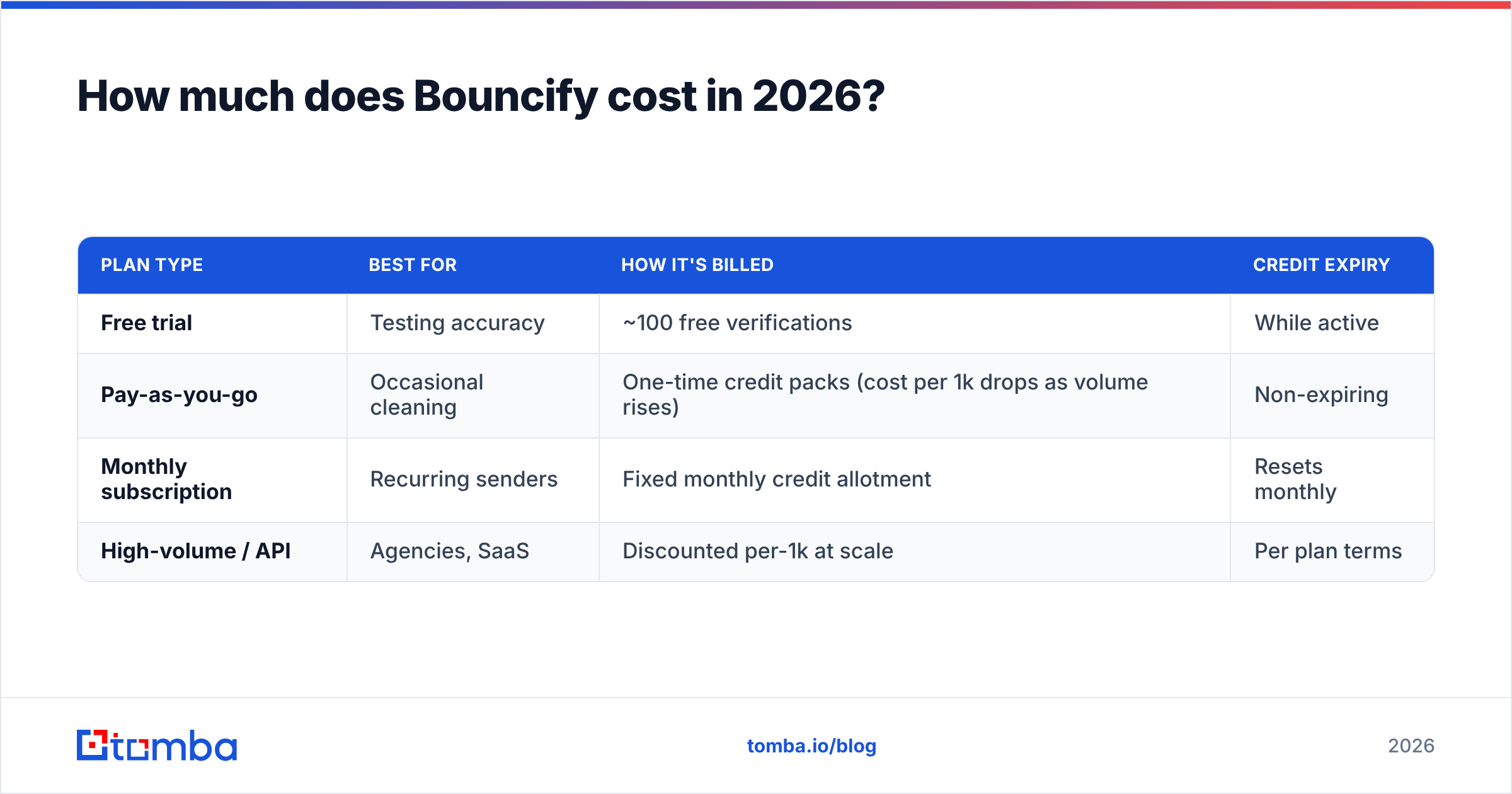
Short answer: Bouncify is one of the cheaper verifiers per thousand emails, sold as credits rather than seats. Pricing comes in two shapes — pay-as-you-go credit packs that don't expire, and monthly subscriptions for recurring senders. Because vendor pricing changes, treat the figures below as the structure to expect and confirm exact rates on the official Bouncify site before purchasing.
| Plan type | Best for | How it's billed | Credit expiry |
|---|---|---|---|
| Free trial | Testing accuracy | ~100 free verifications | While active |
| Pay-as-you-go | Occasional cleaning | One-time credit packs (cost per 1k drops as volume rises) | Non-expiring |
| Monthly subscription | Recurring senders | Fixed monthly credit allotment | Resets monthly |
| High-volume / API | Agencies, SaaS | Discounted per-1k at scale | Per plan terms |
The pay-as-you-go model is the genuine selling point. If you clean a list once a quarter, non-expiring credits mean you don't pay for a subscription you barely touch. The per-1,000 rate also scales down as you buy bigger packs, which rewards agencies running large one-off cleans.
The catch — and it's the same catch with most cheap verifiers — is that the headline cost-per-thousand only tells you what you pay, not what you get. A verifier that's 3% less accurate on a 100,000-address list lets 3,000 bad addresses through, and those bounces hurt your sender reputation far more than the few dollars you saved. Price per thousand is the wrong number to optimize alone.
What do Bouncify reviews actually say?#
Pulling from public review sites like G2 and user threads, the sentiment clusters into a few consistent themes:
- Praised for price. The recurring compliment is value — reviewers who switched from pricier incumbents cite Bouncify as "good enough at a fraction of the cost" for basic list hygiene.
- Praised for simplicity. Upload, wait, download. The UI is uncluttered and the learning curve is near zero. Non-technical marketers get it immediately.
- Mixed on catch-all accuracy. Several reviews note that catch-all (accept-all) domains come back as "unknown" more often than they'd like, leaving a chunk of the list undecided. This is an industry-wide hard problem, but it's a frequent friction point.
- Mixed on support. Smaller team, slower replies. Fine when nothing's wrong; frustrating when a large job stalls and you need a human.
- Occasional API rough edges. Developers report the API works but documentation and edge-case handling lag behind larger competitors.
None of these are dealbreakers on their own. The pattern that emerges is "a solid budget tool that does one job," which is exactly what you'd expect — and exactly why the comparison below matters if your needs are broader than cleaning.
What are the pros and cons of Bouncify?#
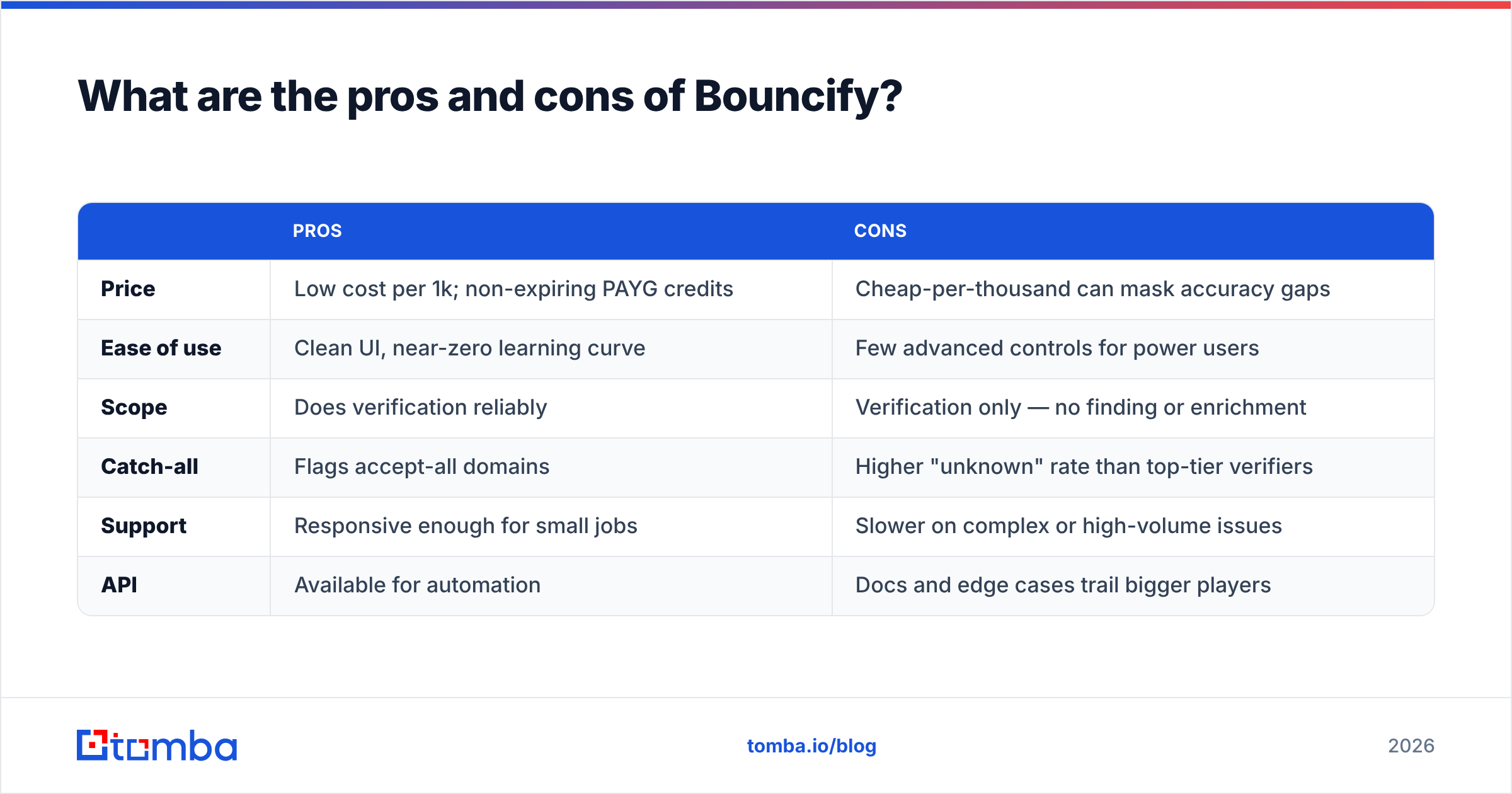
Here's the balanced ledger. Use it to decide whether Bouncify fits your workflow, not someone else's.
| Pros | Cons | |
|---|---|---|
| Price | Low cost per 1k; non-expiring PAYG credits | Cheap-per-thousand can mask accuracy gaps |
| Ease of use | Clean UI, near-zero learning curve | Few advanced controls for power users |
| Scope | Does verification reliably | Verification only — no finding or enrichment |
| Catch-all | Flags accept-all domains | Higher "unknown" rate than top-tier verifiers |
| Support | Responsive enough for small jobs | Slower on complex or high-volume issues |
| API | Available for automation | Docs and edge cases trail bigger players |
The honest summary: Bouncify is a good single-purpose verifier for teams whose only job is cleaning a list they already own. The moment your workflow includes building lists, enriching contacts, or pulling phone numbers and company data, a one-trick verifier becomes one tab in a five-tab tool stack — and you're paying five bills.

How does Bouncify compare to an all-in-one platform?#
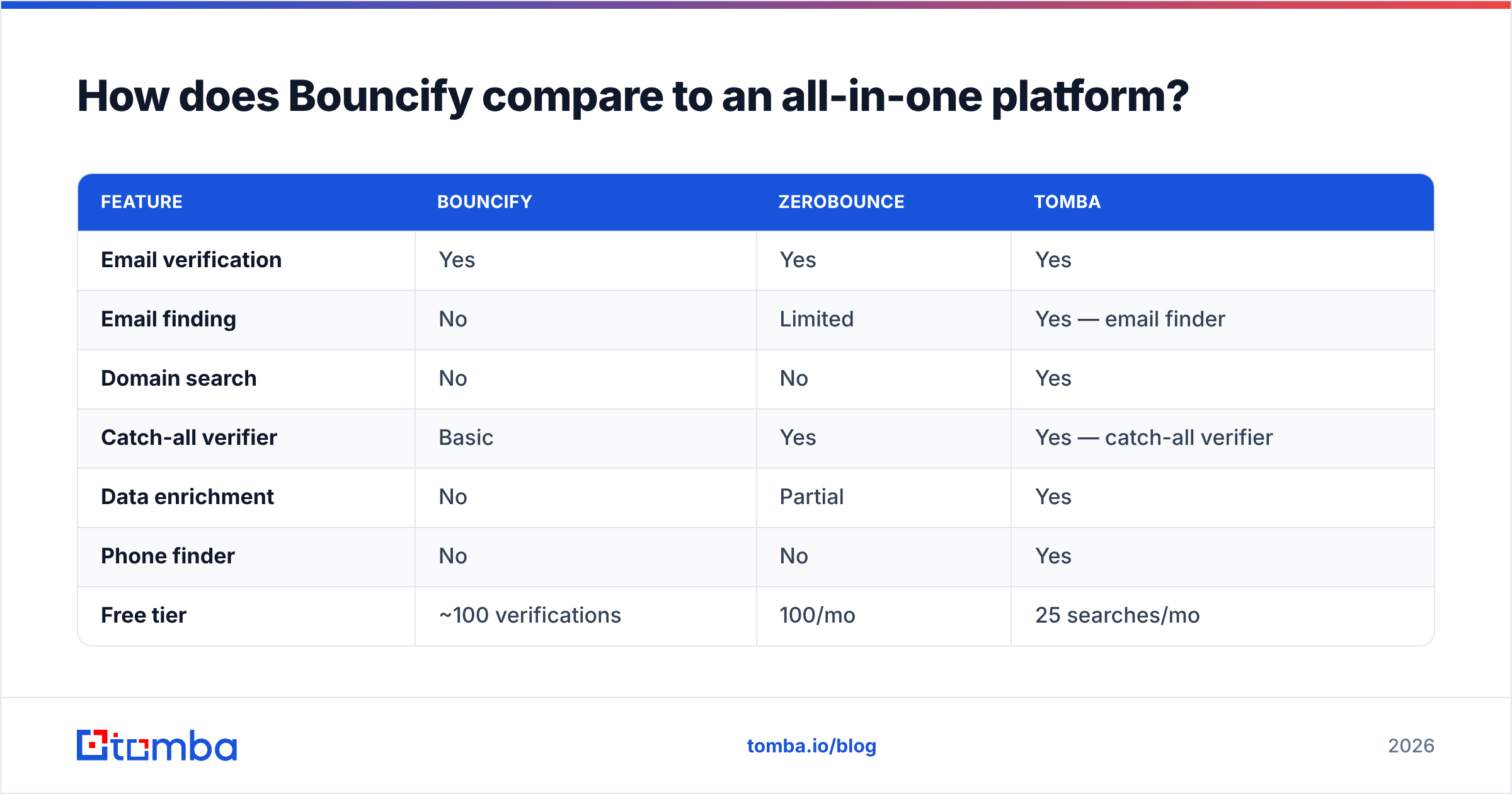
This is where the buying decision actually gets made. A standalone verifier and an all-in-one finder-plus-verifier solve overlapping but different problems. Below is a direct comparison so you can see what you trade when you optimize for cheapest-verification-only.
| Feature | Bouncify | ZeroBounce | Tomba |
|---|---|---|---|
| Email verification | Yes | Yes | Yes |
| Email finding | No | Limited | Yes — email finder |
| Domain search | No | No | Yes |
| Catch-all verifier | Basic | Yes | Yes — catch-all verifier |
| Data enrichment | No | Partial | Yes |
| Phone finder | No | No | Yes |
| Free tier | ~100 verifications | 100/mo | 25 searches/mo |
| Entry paid price | PAYG credits | From ~$18/mo | Starter $49/mo |
| Billing model | Credits / PAYG | Subscription / PAYG | Subscription |
A few things to read out of this table:
- If verification is genuinely all you need, ever, Bouncify's pay-as-you-go pricing is hard to beat and you can stop reading. Buy credits, clean your list, move on.
- If verification is one step in a prospecting workflow, paying for a verifier and a finder and an enrichment tool separately costs more than a single platform — both in money and in the time lost stitching CSVs between tools.
- Catch-all handling is where budget verifiers most often leave you guessing. If a large share of your list sits on accept-all domains (common in enterprise), a dedicated catch-all finder saves the addresses a basic verifier would mark "unknown" and discard.
For context on why deliverability hygiene matters at all, the fundamentals of email deliverability explain how bounce rates, sender reputation, and authentication compound — clean lists are upstream of everything else.
Is Bouncify accurate enough for cold outreach?#
For warm, opt-in lists: yes, comfortably. For cold outreach at scale: verify a sample first. Cold lists are riskier because you didn't collect the addresses yourself, so the share of stale, role-based, and catch-all addresses is higher — exactly the categories where budget verifiers wobble.
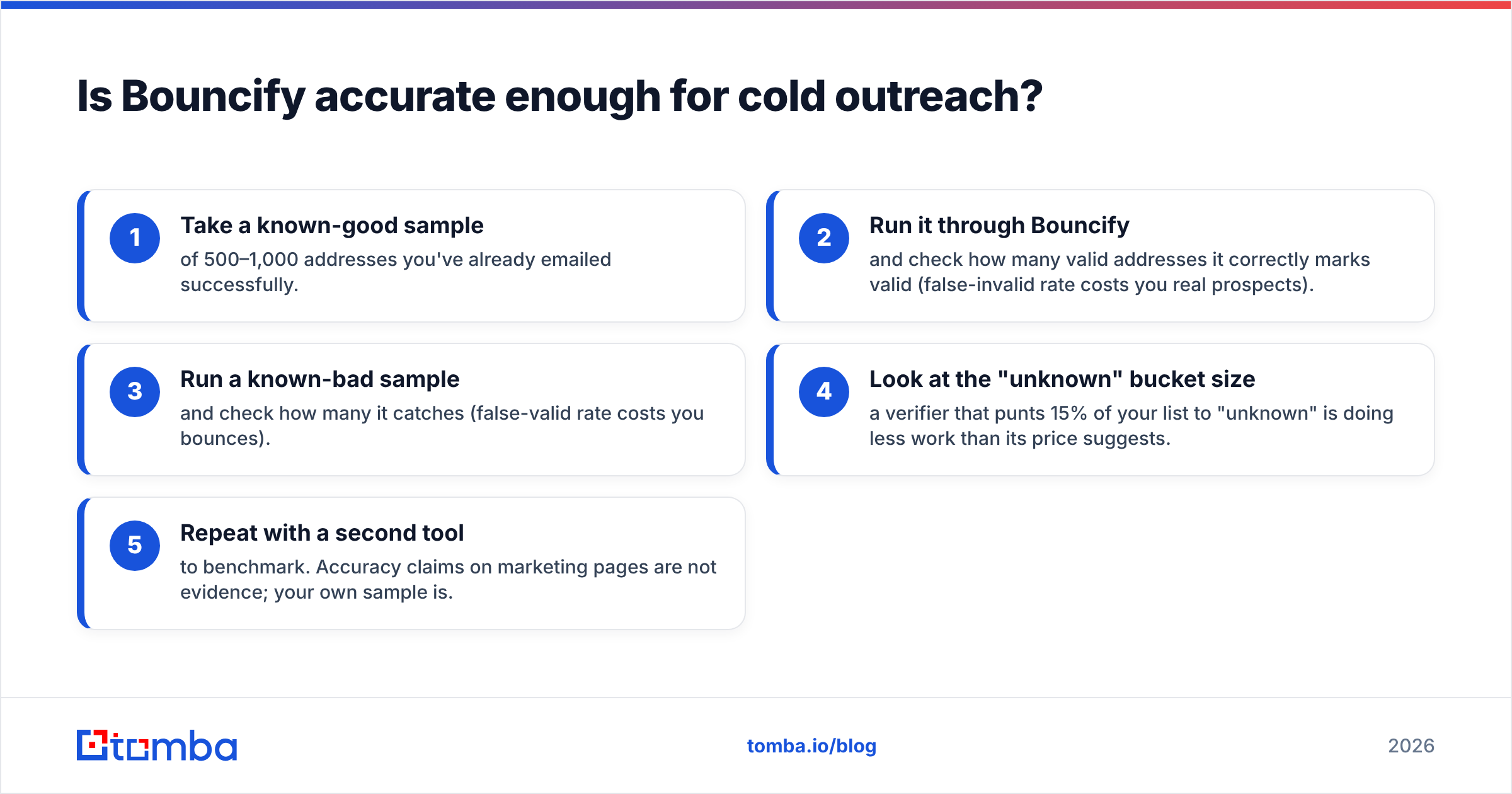
A practical test before committing budget:
- Take a known-good sample of 500–1,000 addresses you've already emailed successfully.
- Run it through Bouncify and check how many valid addresses it correctly marks valid (false-invalid rate costs you real prospects).
- Run a known-bad sample and check how many it catches (false-valid rate costs you bounces).
- Look at the "unknown" bucket size — a verifier that punts 15% of your list to "unknown" is doing less work than its price suggests.
- Repeat with a second tool to benchmark. Accuracy claims on marketing pages are not evidence; your own sample is.
This five-minute test tells you more than any review, including this one. Verifiers are not interchangeable, and the only accuracy number that matters is the one measured on your data. If you want a deeper hygiene workflow, pairing verification with a real email verifier that exposes per-address status codes lets you make per-segment send decisions instead of a blunt keep/drop.
Who should use Bouncify, and who shouldn't?#
Use Bouncify if: you own your lists, you clean them occasionally rather than continuously, your senders are warm or opt-in, and verification is the only job you're hiring a tool for. The non-expiring PAYG credits genuinely shine for this profile, and you'll spend less than on a subscription verifier you'd underuse.
Look past Bouncify if: you're running outbound prospecting, you need to find and enrich contacts (not just clean them), you deal with a lot of catch-all enterprise domains, or you'd rather not maintain a separate tool for every step of list-building. In those cases the per-thousand savings evaporate against the cost and friction of a multi-tool stack.
Compare the full Tomba pricing tiers against what you'd assemble from a verifier plus a finder plus an enrichment add-on, and the all-in-one math usually wins once finding enters the picture. If you only verify, Bouncify's math wins. Match the tool to the job honestly and you won't overpay either way.
The bottom line#
Bouncify is a competent, affordable, single-purpose email verifier. Its pros are real — low cost, simple UI, non-expiring credits — and its cons are equally real: verification-only scope, a higher catch-all "unknown" rate, and support that scales with the price you pay. For occasional list cleaning on lists you already own, it's a sensible pick.
But most teams reading a "pricing, reviews, pros and cons" post aren't only cleaning — they're trying to grow a pipeline, which means finding contacts, verifying them, and enriching them. If that's you, consolidating into one platform beats stitching a verifier to a finder to a database.
Start with Tomba Email Finder — find professional emails by domain, name, or company, verify them in the same workflow, and enrich them with phone and company data without juggling four tools. The free tier gives you 25 searches a month to test accuracy on your own list before you spend a dollar, and the Starter plan at $49/mo covers the finding and verifying that Bouncify alone can't. Clean lists are good; lists you can build, verify, and enrich in one place are better.
// get started
Find, verify and enrich your first contacts today
Start on the free plan with 25 searches a month, then scale when your team is ready.
Free plan · No credit card required · GDPR & CCPA
// about the author