Bouncify vs Generect 2026: Email Verify vs Lead Finder
Bouncify cleans your list; Generect builds it. See where each tool wins on data, pricing, and accuracy in 2026 — and the smarter all-in-one option.
You typed "Bouncify vs Generect" into a search bar because two tools landed on your shortlist and you can't tell if they actually compete. Short answer: they barely do. One scrubs the list you already have; the other builds the list you don't. Picking between them without knowing that difference is how teams end up paying for two tools and still missing the one job that matters — getting verified, reachable contacts into a sequence.
TL;DR — Bouncify vs Generect at a glance#
- Bouncify is an email verification tool. It takes a list you already own and tells you which addresses are valid, risky, or dead. It does not find new contacts.
- Generect is a lead generation and B2B data tool. It pulls company and people data (heavy on LinkedIn-sourced contacts) so you can build prospecting lists. Verification is secondary.
- They solve different problems. Comparing them head-to-head is like comparing a car wash to a car dealership — both touch cars, neither replaces the other.
- If you only buy one tool, buy the one that finds and verifies. A standalone verifier leaves you list-less; a list-builder with weak verification leaves you bouncing.
- Tomba covers both jobs — find emails by domain or name, then verify them in the same workflow, starting on a free tier of 25 searches/month.
What is Bouncify and who is it for?#
Bouncify is a bulk and real-time email verification service. You upload a CSV (or hit the API), and it runs each address through syntax checks, MX record lookups, SMTP handshakes, and spam-trap/disposable filtering. The output is a clean status for every row: deliverable, undeliverable, risky, or unknown.
That's the whole product, and it's a legitimately useful one. If you have an aging newsletter list of 80,000 subscribers and your bounce rate is creeping toward the danger zone, Bouncify is exactly the kind of scrub tool you want before your next send. Clean lists protect sender reputation, and protecting reputation protects email deliverability.
What Bouncify does not do: give you contacts you didn't already have. If your list is empty, Bouncify has nothing to verify. It's the dishwasher, not the grocery store.

What is Generect and who is it for?#
Generect is a B2B lead generation platform. Its pitch is data: company firmographics, people profiles, and LinkedIn-sourced contact details you can filter into targeted lists. You search by criteria — industry, headcount, role, location — and Generect returns prospects with associated emails and other attributes you can export into your CRM or outreach tool.
In other words, Generect sits at the front of the funnel. It answers "who should I email?" — not "are these emails real?" Most lead databases run some verification before handing you an address, but verification is a feature, not the mission. Data freshness, match rate, and coverage are where a tool like Generect lives or dies.
So the honest framing of "bouncify vs generect" is: one tool ends your list-building process, the other starts it. A team that has prospects but dirty data wants Bouncify. A team staring at an empty spreadsheet wants something like Generect — or better, a tool that finds and confirms in one pass.
Bouncify vs Generect: side-by-side comparison#
Here's the core difference laid out. Note how little overlap there actually is in the primary job each tool was built for.
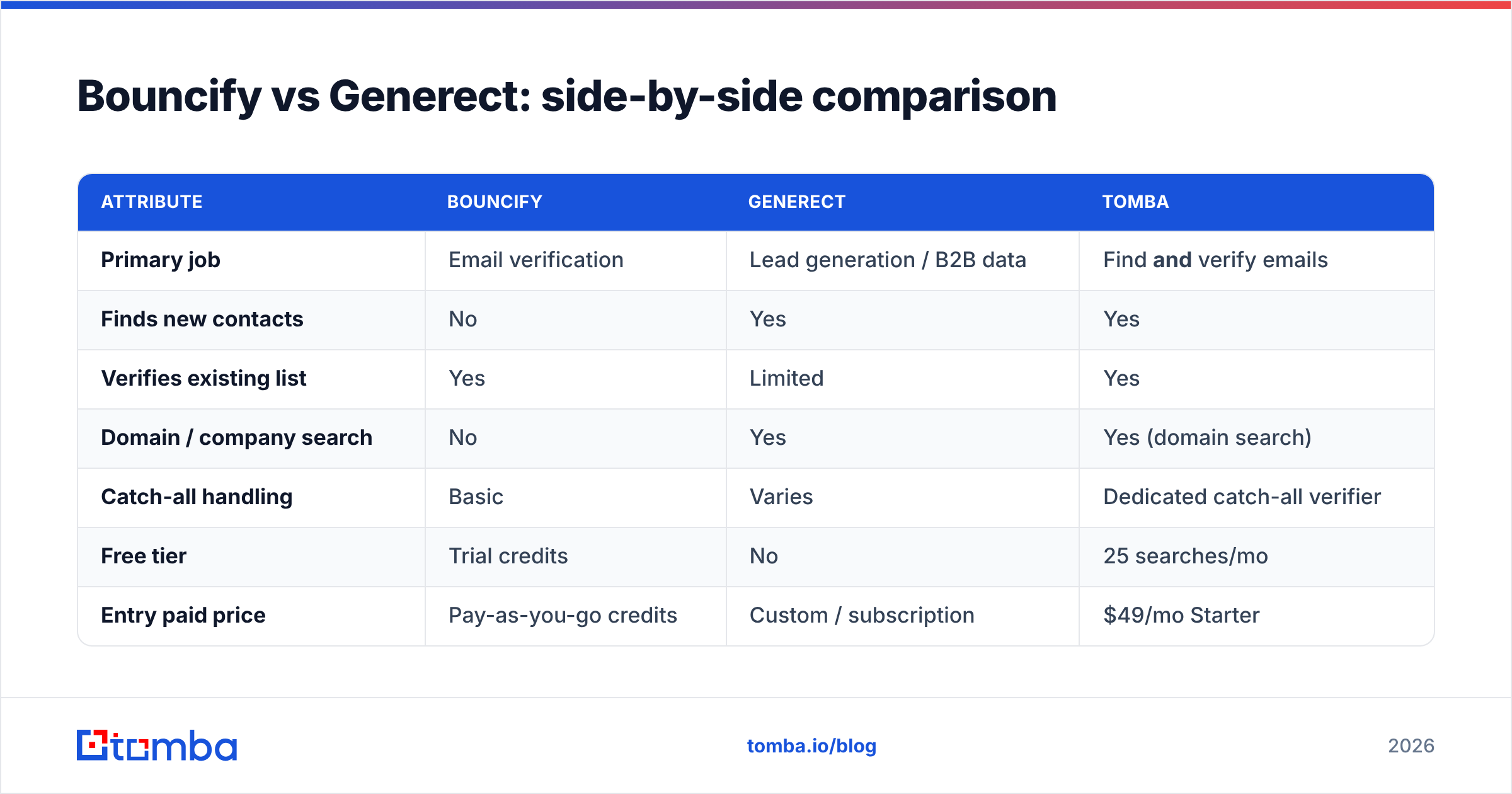
| Attribute | Bouncify | Generect | Tomba |
|---|---|---|---|
| Primary job | Email verification | Lead generation / B2B data | Find and verify emails |
| Finds new contacts | No | Yes | Yes |
| Verifies existing list | Yes | Limited | Yes |
| Domain / company search | No | Yes | Yes (domain search) |
| Catch-all handling | Basic | Varies | Dedicated catch-all verifier |
| Free tier | Trial credits | No | 25 searches/mo |
| Entry paid price | Pay-as-you-go credits | Custom / subscription | $49/mo Starter |
| Best for | Cleaning aging lists | Building cold lists | Doing both in one workflow |
The pattern is obvious once it's in a grid: neither Bouncify nor Generect does the other tool's job well. Buy Bouncify and you still need a source of contacts. Buy Generect and you still want an independent verification pass before you trust the data — because no lead database is 100% accurate, and bouncing on cold sends is what gets domains blacklisted.
)
Is Bouncify better than Generect?#
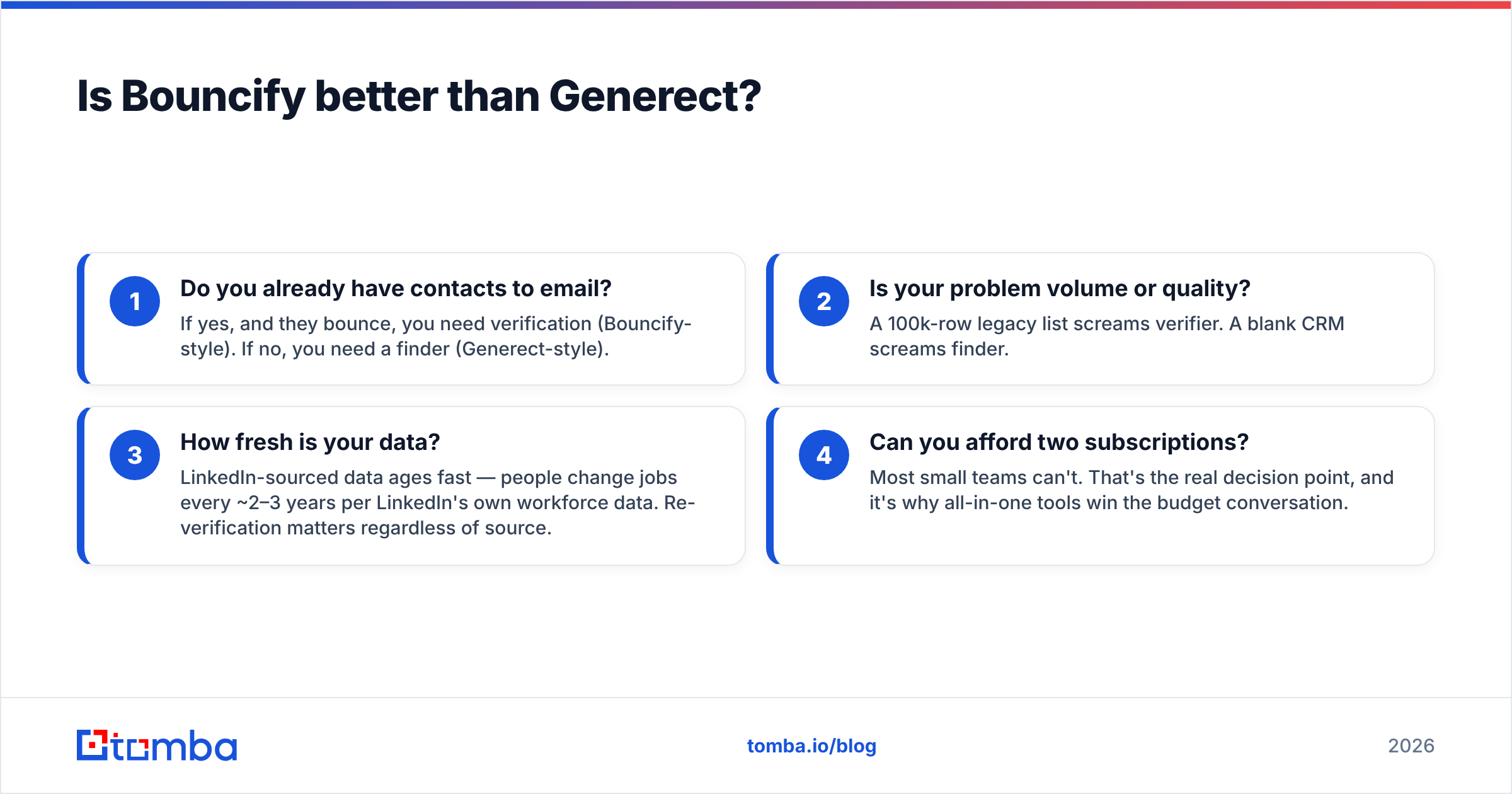
Wrong question — but here's the useful version of the answer. Bouncify is "better" only if your bottleneck is list hygiene. Generect is "better" only if your bottleneck is list supply. Ranking them on a single axis is meaningless because they're on different axes.
Decide with this four-step gut check:
- Do you already have contacts to email? If yes, and they bounce, you need verification (Bouncify-style). If no, you need a finder (Generect-style).
- Is your problem volume or quality? A 100k-row legacy list screams verifier. A blank CRM screams finder.
- How fresh is your data? LinkedIn-sourced data ages fast — people change jobs every ~2–3 years per LinkedIn's own workforce data. Re-verification matters regardless of source.
- Can you afford two subscriptions? Most small teams can't. That's the real decision point, and it's why all-in-one tools win the budget conversation.
If you answered "I need both," you've discovered why a lot of buyers who start at "bouncify vs generect" end up choosing neither — and pick a platform that collapses both jobs into one bill.
Why do teams end up needing both — and what's the smarter move?#
The trap is sequencing. You buy Generect, build a 5,000-prospect list, and feel productive. Then your first cold campaign posts a 9% bounce rate, your domain reputation dips, and now you're shopping for a Bouncify-style verifier in a panic. Two tools, two logins, two contracts, two CSV exports to reconcile.
The smarter move is to verify at the moment you find. When the email is sourced and confirmed in the same step, you never ship a list you haven't checked. That's the entire argument for an integrated email finder plus email verifier stack instead of stitching a finder to a separate scrubber.
)
Consider the workflow math. A separate finder + separate verifier means: export from finder → reformat → import to verifier → run → export → reformat → import to outreach tool. An integrated tool means: search → verified results → push to CRM. Fewer steps is fewer places for data to rot between handoffs.
How does Tomba compare to Bouncify and Generect?#
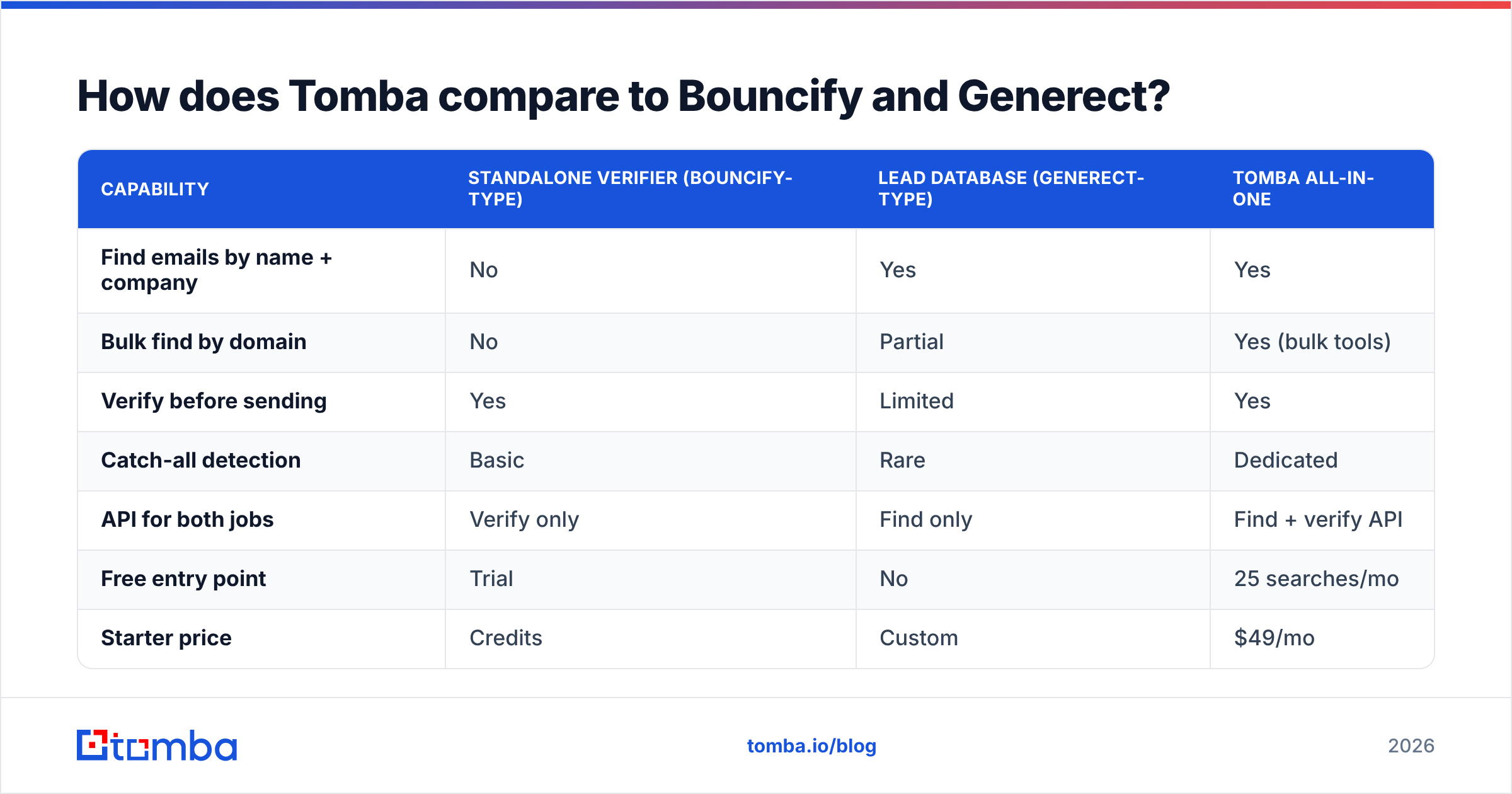
Tomba does both jobs Bouncify and Generect split between them, which is the whole point of putting it in this comparison. You can find contacts by company with domain search, find a specific person's address with the email finder, then run those addresses through verification — including the hard case of catch-all domains — without ever leaving the platform or touching a second invoice.
| Capability | Standalone verifier (Bouncify-type) | Lead database (Generect-type) | Tomba all-in-one |
|---|---|---|---|
| Find emails by name + company | No | Yes | Yes |
| Bulk find by domain | No | Partial | Yes (bulk tools) |
| Verify before sending | Yes | Limited | Yes |
| Catch-all detection | Basic | Rare | Dedicated |
| API for both jobs | Verify only | Find only | Find + verify API |
| Free entry point | Trial | No | 25 searches/mo |
| Starter price | Credits | Custom | $49/mo |
On accuracy specifically — the metric that actually decides whether your campaign lands — Tomba's verification combines SMTP checks, MX validation, and catch-all logic, the same depth a dedicated verifier offers, but applied automatically to the contacts it finds. You're not trusting a lead database's "we probably checked it" badge; you're getting a fresh verification status on every address. Tomba is transparent about where its data comes from, which matters when you're staking a domain's reputation on the results.
Pricing is the other place the gap shows. Standalone verifiers bill per credit, lead databases often hide behind "contact sales," and you stack both. Tomba's pricing is one ladder: Free (25 searches/mo), Starter $49/mo, Growth $99/mo, Pro $249/mo, and Enterprise custom — covering find and verify on every tier. You can sanity-check vendors against public reviews on G2 before committing, but the structural advantage of one tool doing two jobs is hard to argue with on a startup budget.
Which should you choose: Bouncify, Generect, or Tomba?#
Pick by your actual bottleneck, then sanity-check against cost:
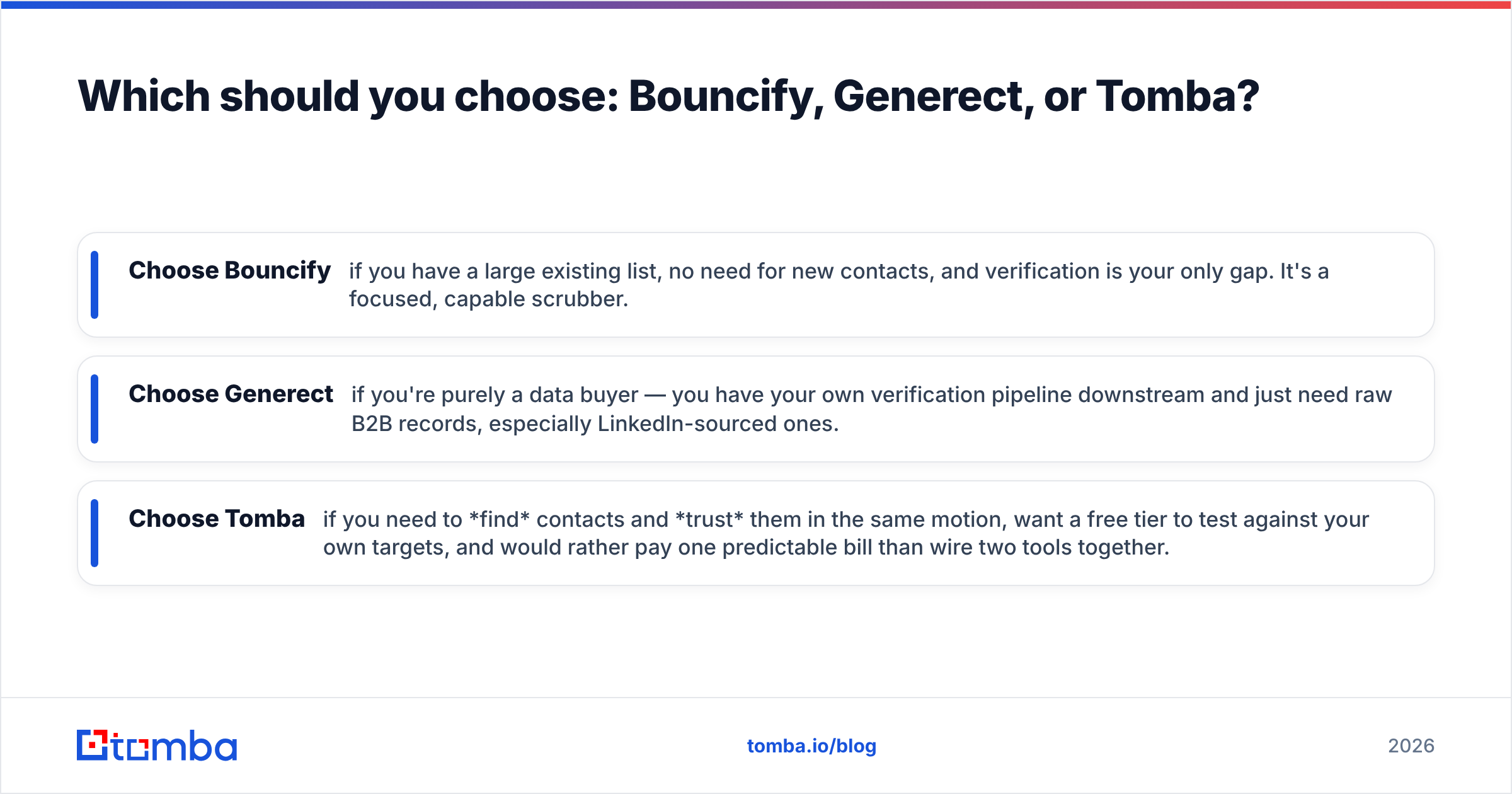
- Choose Bouncify if you have a large existing list, no need for new contacts, and verification is your only gap. It's a focused, capable scrubber.
- Choose Generect if you're purely a data buyer — you have your own verification pipeline downstream and just need raw B2B records, especially LinkedIn-sourced ones.
- Choose Tomba if you need to find contacts and trust them in the same motion, want a free tier to test against your own targets, and would rather pay one predictable bill than wire two tools together.
For most B2B teams running outbound — especially anyone earlier than a dedicated data-ops function — the integrated path wins because it removes the handoff where data goes stale and the second invoice where budget goes to die. You can also pull contacts straight into your stack with Tomba's HubSpot and Salesforce integrations, or work from a Chrome extension while you prospect.
The bottom line#
"Bouncify vs Generect" isn't really a versus — it's a checklist of two separate jobs you probably both need done. Bouncify cleans, Generect supplies, and running both means twice the tools and twice the bill. If you'd rather find verified emails in one workflow, start with the Tomba Email Finder: search by domain, name, or company, get a verification status on every result, and test it free with 25 searches a month before you spend a dollar. Build the list and trust it in the same step — that's the tool worth buying.
// get started
Find, verify and enrich your first contacts today
Start on the free plan with 25 searches a month, then scale when your team is ready.
Free plan · No credit card required · GDPR & CCPA
// about the author