Bouncify vs Leadsforge 2026: Verify or Find Leads First?
Bouncify cleans your list; Leadsforge builds it. Here's a neutral 2026 breakdown of pricing, accuracy, and which tool your pipeline actually needs first.
Picking between Bouncify and Leadsforge feels like a head-to-head, but it usually isn't one. They sit at opposite ends of the same workflow. This guide breaks down what each does, where each wins, and the trap most teams fall into when they treat them as interchangeable.
TL;DR#
- Bouncify is an email verifier — it cleans a list you already have, dropping invalid and risky addresses before you send.
- Leadsforge is a lead-generation tool — it builds a list of prospects and their contact data from scratch.
- Comparing them directly is like comparing a water filter to a well: one finds the water, the other makes it safe to drink.
- If your problem is bounce rate, you want a verifier. If your problem is empty pipeline, you want a finder.
- Most teams need both jobs done — which is why an all-in-one platform like Tomba (find and verify in one place) often beats stitching two single-purpose tools together.
What is Bouncify?#
Bouncify is a dedicated email verification service. You upload a list — exported from a CRM, a signup form, or a scraped spreadsheet — and it checks each address against a series of tests: syntax, domain and MX records, mailbox existence via SMTP, and flags for disposable or role-based addresses (like info@ or support@).
The output is a cleaned list bucketed into deliverable, undeliverable, risky, and unknown. The goal is simple: protect your sender reputation and keep your bounce rate under the ~2% threshold that inbox providers punish.
Bouncify is built for one job and does it competently. It does not find new contacts. If your spreadsheet is empty, Bouncify has nothing to work with.
)
What is Leadsforge?#
Leadsforge sits on the other side of the funnel. It's a lead-generation and prospecting tool that helps you build a list — search for companies and people matching your ICP, then surface their work emails and other contact details so you can reach out.
Where Bouncify assumes you already have addresses, Leadsforge assumes you don't. Its value is discovery: turning "I sell to mid-market SaaS RevOps leaders" into an actual list of names, companies, and emails you can load into a sequence.
The catch is that any finder produces some guesses. Pattern-matched emails (first.last@company.com) and catch-all domains slip through. That's exactly the gap a verifier is supposed to close — which is why a finder without solid verification baked in still leaves you exposed to bounces.
Bouncify vs Leadsforge: what's the real difference?#
The honest answer: they're not competitors, they're consecutive steps. Here's the core distinction in one line — Bouncify validates contacts you have; Leadsforge generates contacts you don't.
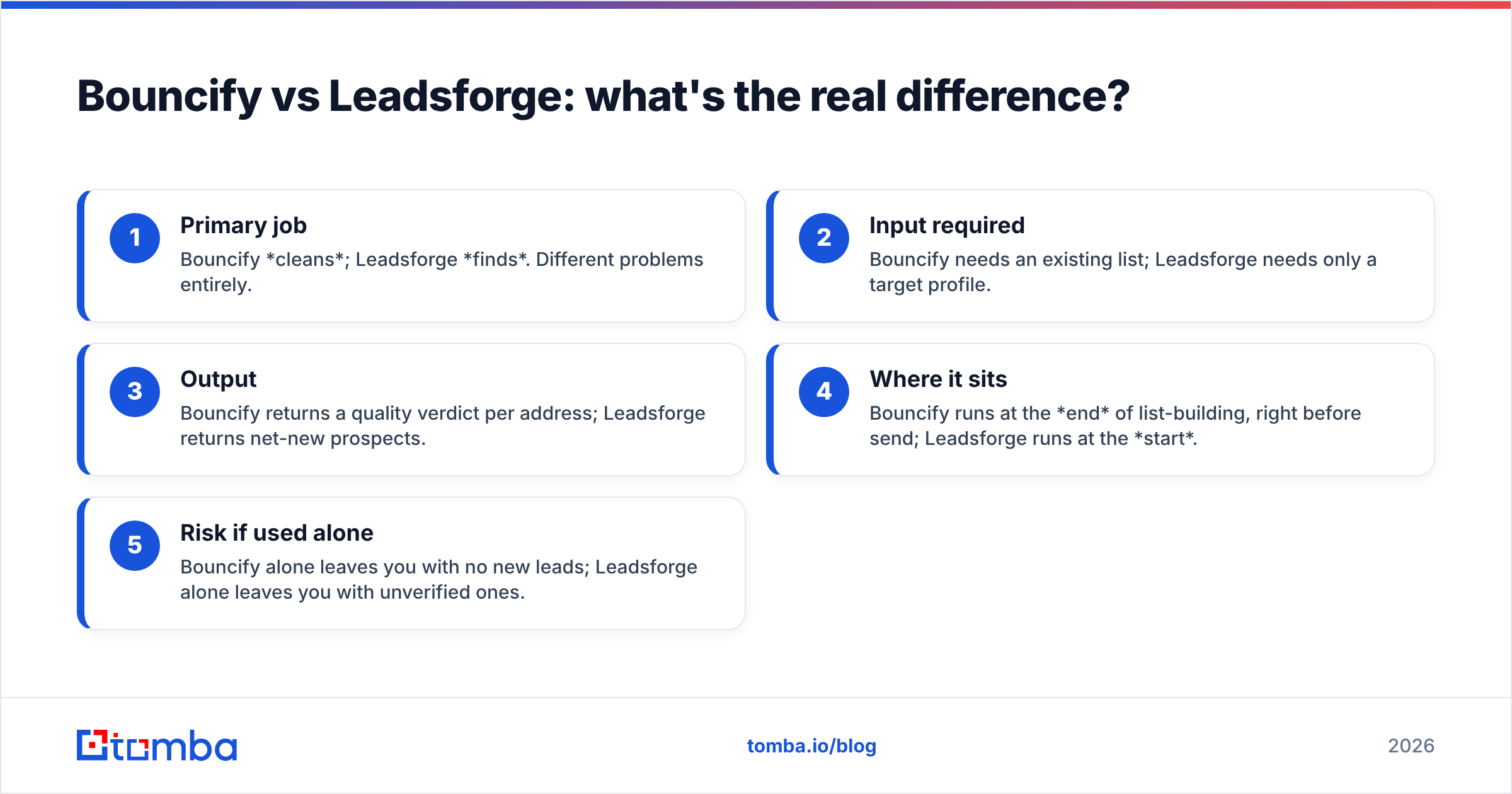
- Primary job — Bouncify cleans; Leadsforge finds. Different problems entirely.
- Input required — Bouncify needs an existing list; Leadsforge needs only a target profile.
- Output — Bouncify returns a quality verdict per address; Leadsforge returns net-new prospects.
- Where it sits — Bouncify runs at the end of list-building, right before send; Leadsforge runs at the start.
- Risk if used alone — Bouncify alone leaves you with no new leads; Leadsforge alone leaves you with unverified ones.
So the question isn't "which is better." It's "which job am I missing right now — and do I want to buy two tools to cover both?"
How do they compare side by side?#
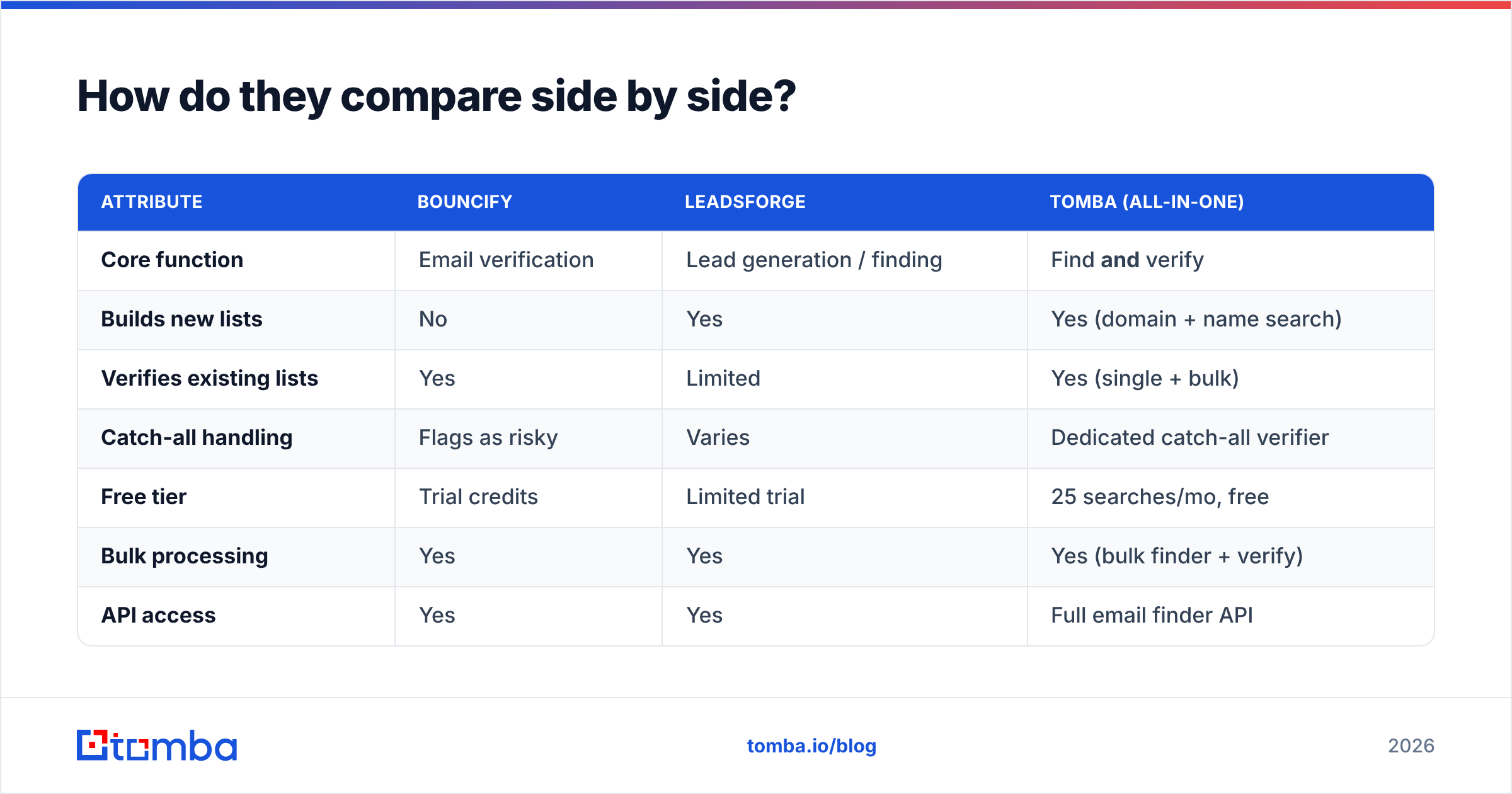
| Attribute | Bouncify | Leadsforge | Tomba (all-in-one) |
|---|---|---|---|
| Core function | Email verification | Lead generation / finding | Find and verify |
| Builds new lists | No | Yes | Yes (domain + name search) |
| Verifies existing lists | Yes | Limited | Yes (single + bulk) |
| Catch-all handling | Flags as risky | Varies | Dedicated catch-all verifier |
| Free tier | Trial credits | Limited trial | 25 searches/mo, free |
| Bulk processing | Yes | Yes | Yes (bulk finder + verify) |
| API access | Yes | Yes | Full email finder API |
| Best for | Cleaning bought/old lists | Filling an empty pipeline | Teams that need both |
The pattern is clear: each single-purpose tool covers one column, and you'd buy both to cover the workflow. An integrated platform collapses that into one subscription and one data pipeline — no CSV ping-pong between vendors.
Which one is more accurate?#
Accuracy means different things for each tool, so judge them on the right metric.
For Bouncify, accuracy is verification precision — how often its "deliverable" verdict actually lands, and how few good addresses it wrongly kills. Strong verifiers separate genuine catch-all uncertainty from real failures instead of dumping everything into "unknown."
For Leadsforge, accuracy is match rate and freshness — what percentage of your target prospects get a correct, current email versus a stale or guessed one. A finder that returns an address for 90% of prospects but is wrong a third of the time is worse than one that returns 70% verified-correct.
This is the structural weakness of running two separate tools: the finder doesn't know what the verifier knows, and vice versa. When discovery and validation live in the same engine, a flagged catch-all can be re-checked against the provider's own data sources instead of being thrown over the wall as a CSV. Fewer handoffs, fewer addresses lost in translation.
)
What about pricing?#
Both tools price on usage, but they're metering different things — Bouncify charges per address verified, Leadsforge per lead found/exported. That makes a raw per-credit comparison misleading. The real question is total cost to get a clean, send-ready list.
Run two separate vendors and you pay twice: once to find, once to verify, plus the hidden cost of moving data between them and reconciling mismatches. Here's how a consolidated plan stacks up against buying point tools:
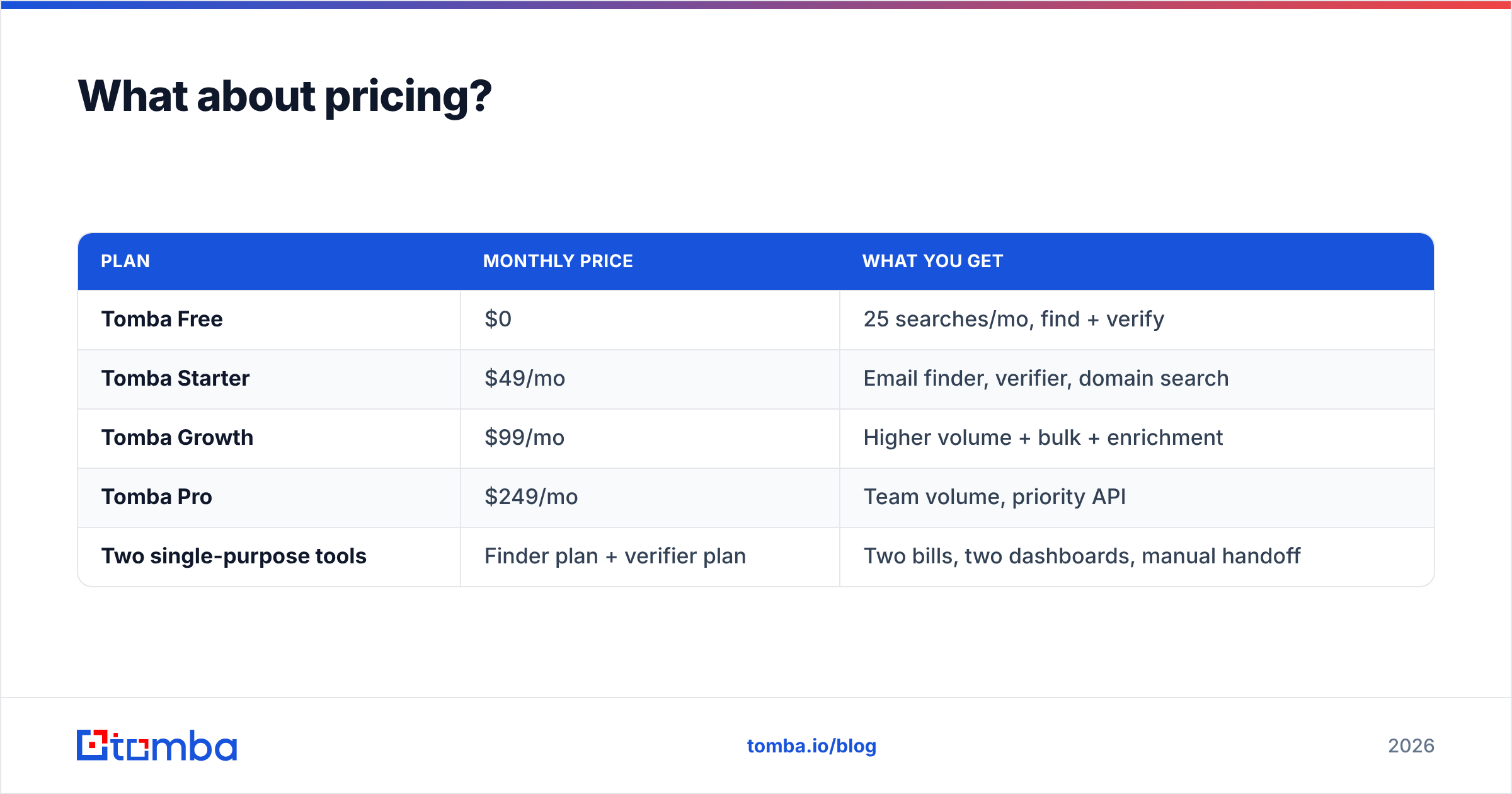
| Plan | Monthly price | What you get |
|---|---|---|
| Tomba Free | $0 | 25 searches/mo, find + verify |
| Tomba Starter | $49/mo | Email finder, verifier, domain search |
| Tomba Growth | $99/mo | Higher volume + bulk + enrichment |
| Tomba Pro | $249/mo | Team volume, priority API |
| Two single-purpose tools | Finder plan + verifier plan | Two bills, two dashboards, manual handoff |
You can see full Tomba pricing for exact credit allocations. The takeaway isn't that one number beats another — it's that paying one vendor for two consecutive jobs usually beats paying two vendors for one job each, before you even count the time saved.
When should you choose a dedicated verifier like Bouncify?#
Pick a standalone verifier when:
- You already have a large list — a CRM export, an event lead-scan dump, or a purchased database — and your only problem is quality.
- You're seeing high bounce rates and need to clean before your next campaign to protect email deliverability.
- Your finding workflow is handled elsewhere and you just need a verification API to plug in.
In those cases Bouncify is a reasonable, focused choice. You're not asking it to find anyone — you're asking it to scrub what exists, and that's its lane.
When should you choose a lead finder like Leadsforge?#
Pick a finder-first tool when:
- Your pipeline is thin and the bottleneck is not having enough prospects, not list quality.
- You're entering a new market or segment and need to build a contact list from an ICP definition.
- Your team spends hours manually hunting emails on LinkedIn and company sites and you want to automate discovery.
Leadsforge earns its place here — but remember it solves only the front half. You'll still need verification before you hit send, or your shiny new list will bounce.
Why do most teams end up wanting both?#
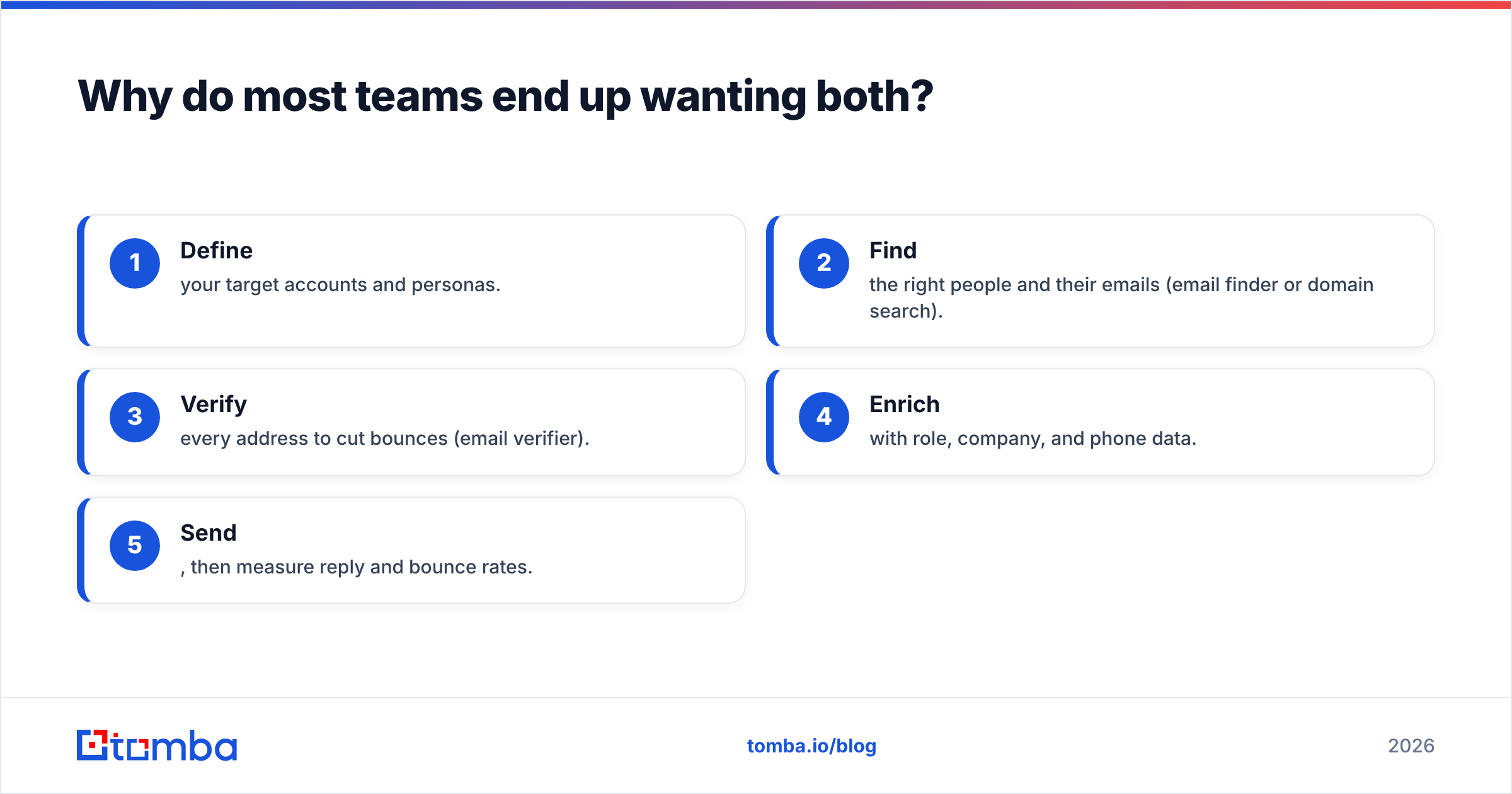
Because the workflow demands both, and buying them separately is the expensive way to get there. A normal outbound cycle looks like:
- Define your target accounts and personas.
- Find the right people and their emails (email finder or domain search).
- Verify every address to cut bounces (email verifier).
- Enrich with role, company, and phone data.
- Send, then measure reply and bounce rates.
Bouncify covers step 3. Leadsforge covers step 2. Neither covers both, and steps 2 and 3 are the ones that feed each other most tightly. Splitting them across vendors means exporting from one, importing to the other, and hoping the formats line up.
This is where a unified platform changes the math. Tomba runs steps 2 through 4 in one place: find emails by domain search, verify them (including catch-all domains), and enrich the records — without a single CSV handoff. You trade two narrow tools for one workflow.
How do you decide in one sentence?#
If you only ever clean lists, a verifier like Bouncify fits. If you only ever build lists, a finder like Leadsforge fits. If you do outbound for real — find, verify, and send on a repeating cycle — stop buying half-tools and run the whole motion in one engine.
For an outside read on either product, check independent reviews on G2 or Capterra before committing; both list verified user feedback on accuracy and support that's worth scanning.
The bottom line#
Bouncify and Leadsforge aren't rivals — they're two halves of the same job, sold separately. Bouncify keeps your existing list clean; Leadsforge fills an empty one. Choose a single-purpose tool only if you genuinely have only one of those problems and expect to keep it that way.
Most growing teams don't. They need to find prospects and verify them, week after week — and stitching two subscriptions together adds cost, friction, and a fragile CSV handoff between the exact two steps that should be tightest.
If that's you, skip the split stack. Tomba's Email Finder finds professional emails by name, company, or domain and verifies them in the same pass — with a free tier (25 searches/month) and plans from $49/mo. Build the list and clean it in one place, and let your reps spend their time selling instead of reconciling spreadsheets. Start free and run your next list end to end without leaving the dashboard.
// get started
Find, verify and enrich your first contacts today
Start on the free plan with 25 searches a month, then scale when your team is ready.
Free plan · No credit card required · GDPR & CCPA
// about the author