Brandnav vs Heybounce: Email Verifier Comparison (2026)
Brandnav vs Heybounce compared head-to-head on verification accuracy, catch-all handling, pricing, and integrations — plus where Tomba fits if you need finding and verification in one tool.
Choosing an email verification tool sounds simple until you load a real list, run it through two vendors, and get two different verdicts on the same address. That is the situation most teams face with Brandnav vs Heybounce — two email verification services that promise lower bounce rates but handle catch-alls, pricing, and accuracy in noticeably different ways.
This guide breaks down how the two compare on the metrics that actually move your sender reputation, and where a combined finder-plus-verifier like Tomba changes the math.
TL;DR#
- Brandnav leans toward an all-in-one data and verification angle, useful if you also want enrichment alongside list cleaning.
- Heybounce positions itself as a focused, deliverability-first email verifier built to protect sender reputation before a send.
- Accuracy on catch-all domains is the single biggest differentiator — test both on your own list before committing, because aggregate "99%" claims rarely survive contact with your data.
- Pricing models differ: pay-as-you-go credits vs subscriptions change the cost a lot depending on volume.
- If you also need to find the emails (not just verify them), neither tool is built for that — Tomba's email verifier plus its email finder covers both jobs in one workflow.
What do Brandnav and Heybounce actually do?#
Both are email verification tools. In plain terms, an email verifier is like a bouncer at the door of your campaign: before you let an address onto the guest list, it checks the ID, confirms the address exists, and turns away the ones that will cause trouble. The "trouble" here is a hard bounce, and too many bounces tank your sender reputation with mailbox providers.
A verifier typically runs a chain of checks:
- Syntax check — is the address even formatted correctly?
- Domain and MX records — does the domain exist and accept mail?
- SMTP handshake — does the mailbox respond as deliverable without actually sending anything?
- Catch-all detection — does the domain accept every address, making per-mailbox verification ambiguous?
- Risk flags — disposable domains, role accounts (info@, sales@), spam traps, and known complainers.
Where Brandnav and Heybounce diverge is how confidently they grade the gray areas — catch-alls and risky addresses — and what they wrap around the core verification engine.
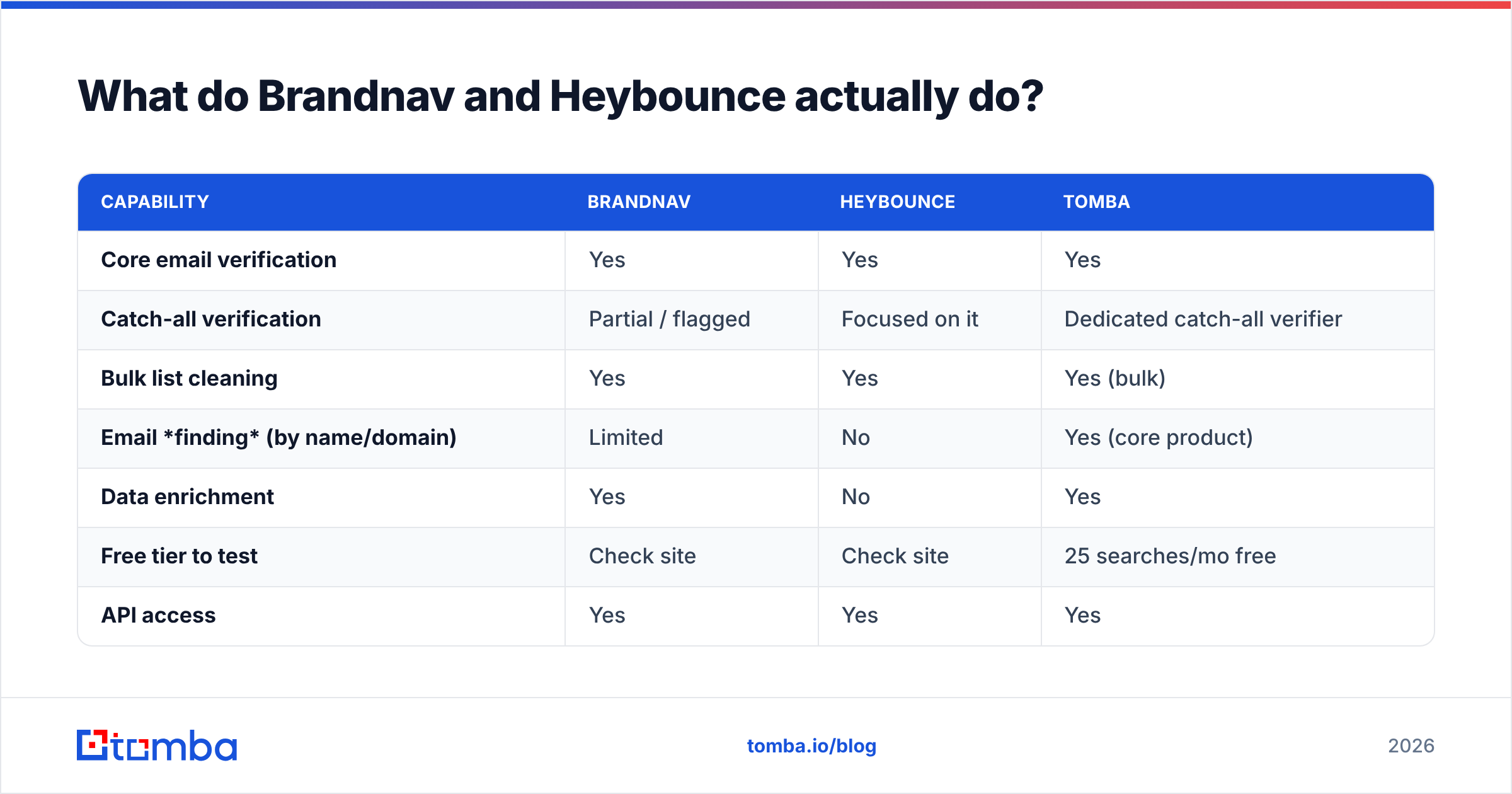
| Capability | Brandnav | Heybounce | Tomba |
|---|---|---|---|
| Core email verification | Yes | Yes | Yes |
| Catch-all verification | Partial / flagged | Focused on it | Dedicated catch-all verifier |
| Bulk list cleaning | Yes | Yes | Yes (bulk) |
| Email finding (by name/domain) | Limited | No | Yes (core product) |
| Data enrichment | Yes | No | Yes |
| Free tier to test | Check site | Check site | 25 searches/mo free |
| API access | Yes | Yes | Yes |
)
Is Brandnav or Heybounce more accurate?#
Accuracy is the only metric that matters at send time, and it is also the most abused number in this category. Every vendor quotes a high-90s accuracy figure, but those numbers are measured against their own curated test sets, not your scraped, aged, or event-list data.

Here is the honest way to compare Brandnav vs Heybounce on accuracy:
- Build a known-answer sample. Take 200–500 addresses where you already know the outcome (real recipients you've emailed, plus deliberately broken addresses).
- Run the same list through both tools. Compare not just valid/invalid, but how each one labels catch-all and risky. A tool that dumps everything into "unknown" is offloading the decision back to you.
- Send a controlled batch to the "valid" verdicts from each and watch the real bounce rate. That is your ground truth.
In practice, the gap between two reputable verifiers on clean corporate domains is small. The gap explodes on catch-all domains, freemail, and older lists. A tool that aggressively marks catch-alls as "valid" will flatter its accuracy score while quietly raising your bounce risk. A tool that marks them all "unknown" is safe but leaves usable contacts on the table. The sweet spot is a verifier that can probe catch-all domains intelligently — which is exactly why catch-all handling deserves its own section.
How do they handle catch-all domains?#
Catch-all domains are the hardest problem in verification. A catch-all server says "yes" to every address you test, so a naive SMTP check can't tell a real mailbox from a typo. This is where many lists silently rot: addresses pass verification, then bounce or hit a spam trap weeks later.
Heybounce markets itself heavily around deliverability protection, which usually implies a cautious stance on catch-alls — flagging them clearly so you decide the risk tolerance. Brandnav's broader data platform may attempt enrichment-assisted resolution, cross-referencing other signals to make a call.
Tomba approaches this with a dedicated catch-all verifier that scores catch-all addresses rather than throwing up its hands, so you keep more reachable contacts without blindly trusting the domain. If your lists are heavy on mid-market and enterprise domains (which are disproportionately catch-all), this single feature can change your usable-contact count more than a one-point accuracy difference anywhere else.
A quick rule of thumb when you evaluate any of the three:
- Green light: the tool labels valid, invalid, and catch-all distinctly, with a confidence score on catch-alls.
- Yellow light: it lumps catch-alls into "unknown" with no further signal.
- Red light: it marks catch-alls "valid" by default — that's how you end up emailing dead mailboxes with a clean conscience.
Brandnav vs Heybounce: pricing compared#
Pricing is where the decision often gets made, because verification is a volume game. The two tools use different mental models, so the cheaper option flips depending on how you buy.
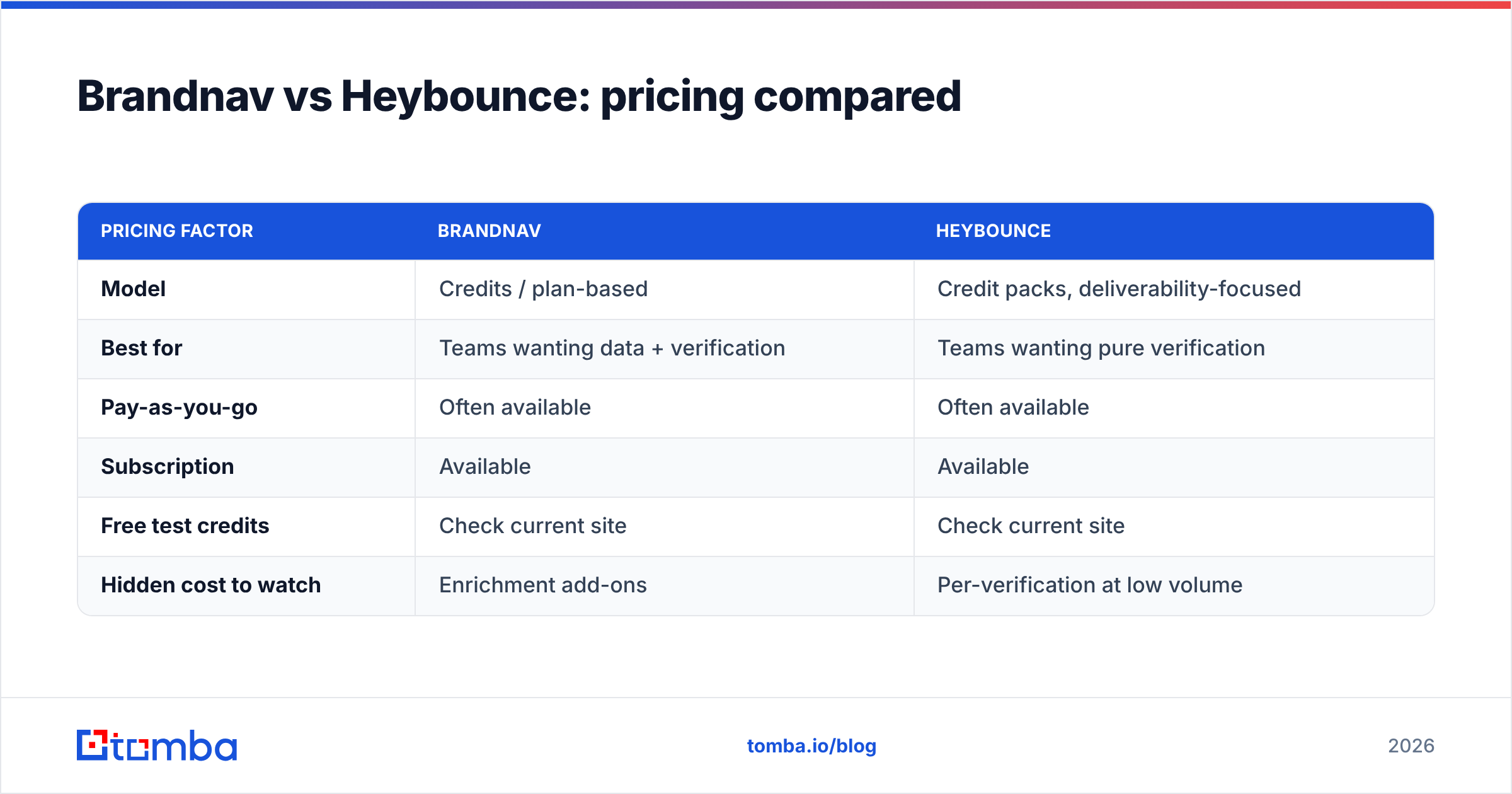
| Pricing factor | Brandnav | Heybounce |
|---|---|---|
| Model | Credits / plan-based | Credit packs, deliverability-focused |
| Best for | Teams wanting data + verification | Teams wanting pure verification |
| Pay-as-you-go | Often available | Often available |
| Subscription | Available | Available |
| Free test credits | Check current site | Check current site |
| Hidden cost to watch | Enrichment add-ons | Per-verification at low volume |
Because both vendors change prices over time, confirm the live numbers on the official Heybounce and Brandnav sites rather than trusting any third-party table — including this one. What rarely changes is the shape of the cost: pay-as-you-go wins for occasional bulk cleans, subscriptions win for steady monthly volume.
For comparison, Tomba's pricing bundles finding and verification: Free (25 searches/mo), Starter at $49/mo, Growth at $99/mo, Pro at $249/mo, and custom Enterprise. If you are paying separately for a finder and a verifier today, a combined plan often costs less than the two line items it replaces.
)
When should you pick a dedicated verifier vs an all-in-one?#
Conclusion first: pick a dedicated verifier if your emails already arrive from another source and you only need a final cleaning pass. Pick an all-in-one if you are still building the list and want to find, enrich, and verify without stitching tools together.
Think of it like buying a car. A dedicated verifier is a great set of tires — essential, but only useful once you already have the car. An all-in-one platform is the whole vehicle: it gets you from "I have a company name" to "I have a verified inbox" in one trip.
Use this checklist to decide:
- You already pull emails from a CRM or scraper, lists are large and recurring → a focused verifier like Heybounce fits cleanly.
- You want enrichment and firmographics attached → Brandnav's data angle is relevant.
- You start from a domain or a name and need the email first → you need a finder, then a verifier. That's where neither pure-play tool helps, and Tomba's email finder plus its verifier covers the full path.
- You run high-volume outbound and care most about bounce rate → whatever you choose, verify in bulk right before send, not weeks ahead.
How does Tomba compare to Brandnav and Heybounce?#
Tomba plays a slightly different game. Brandnav and Heybounce are primarily about verifying addresses you already have. Tomba is built to find professional emails by name, domain, or company first — and then verify them in the same workflow.

That matters because verification is only half the job. A perfectly clean list of zero emails is still zero pipeline. With Tomba you can run a domain search to pull a company's addresses, confirm each with the email verifier, and handle ambiguous domains with the catch-all verifier — without exporting to a second vendor.
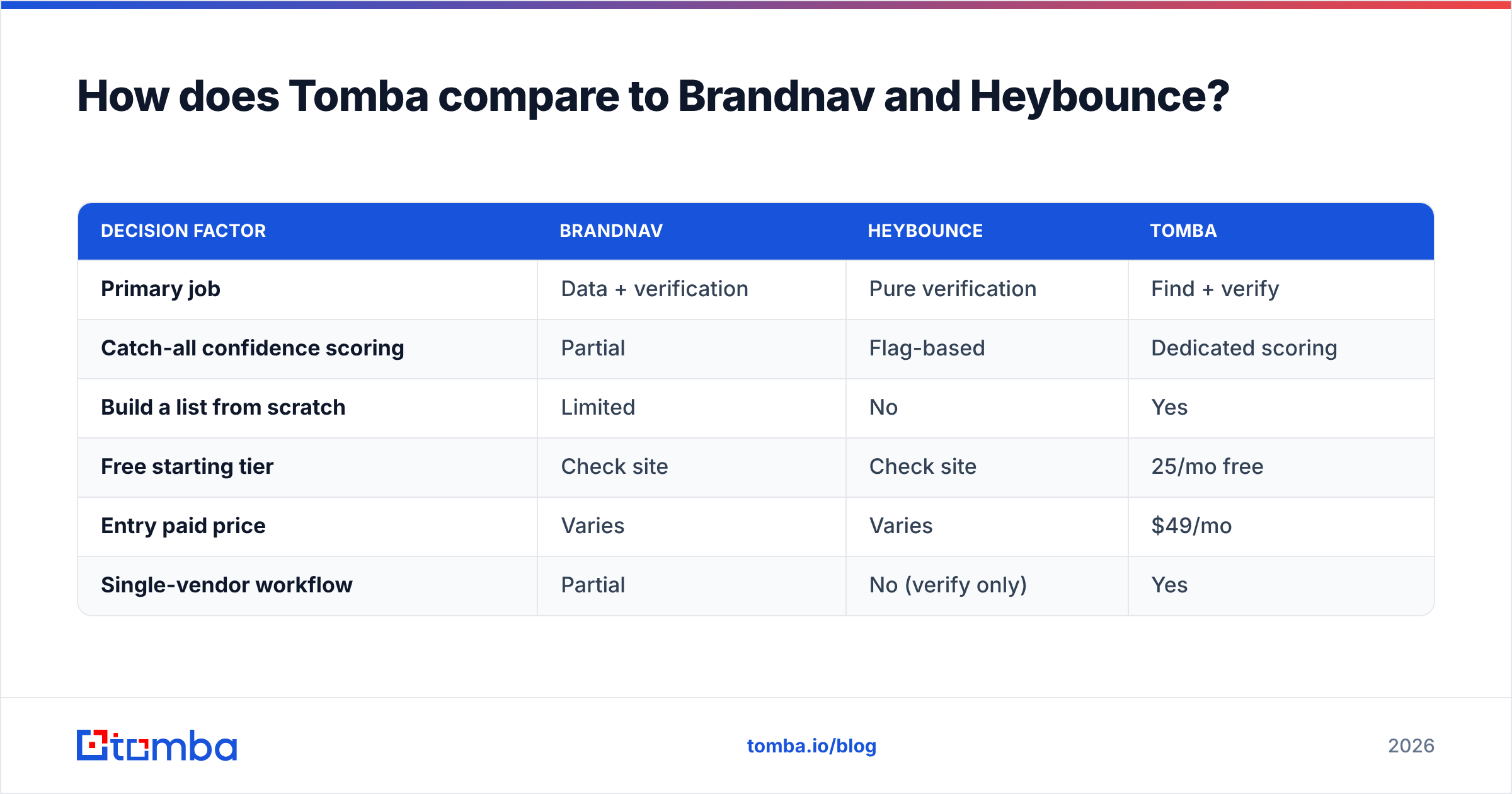
| Decision factor | Brandnav | Heybounce | Tomba |
|---|---|---|---|
| Primary job | Data + verification | Pure verification | Find + verify |
| Catch-all confidence scoring | Partial | Flag-based | Dedicated scoring |
| Build a list from scratch | Limited | No | Yes |
| Free starting tier | Check site | Check site | 25/mo free |
| Entry paid price | Varies | Varies | $49/mo |
| Single-vendor workflow | Partial | No (verify only) | Yes |
If your only pain is bounces on an existing list, a focused verifier may be all you need. If your pain is the whole motion — sourcing, enriching, and verifying B2B contacts — paying for a standalone verifier on top of a separate finder is usually the more expensive and slower setup.
What about deliverability beyond verification?#
Verification reduces bounces, but it does not fix a cold domain, a missing SPF record, or aggressive sending. Treat any of these three tools as one layer of a deliverability stack, not the whole thing. Cross-reference vendor reviews on G2 before you commit, and remember that the SMTP probing every verifier relies on is the same underlying mechanism described in the public SMTP standard — accuracy differences come from how each vendor interprets ambiguous responses, not from secret access.
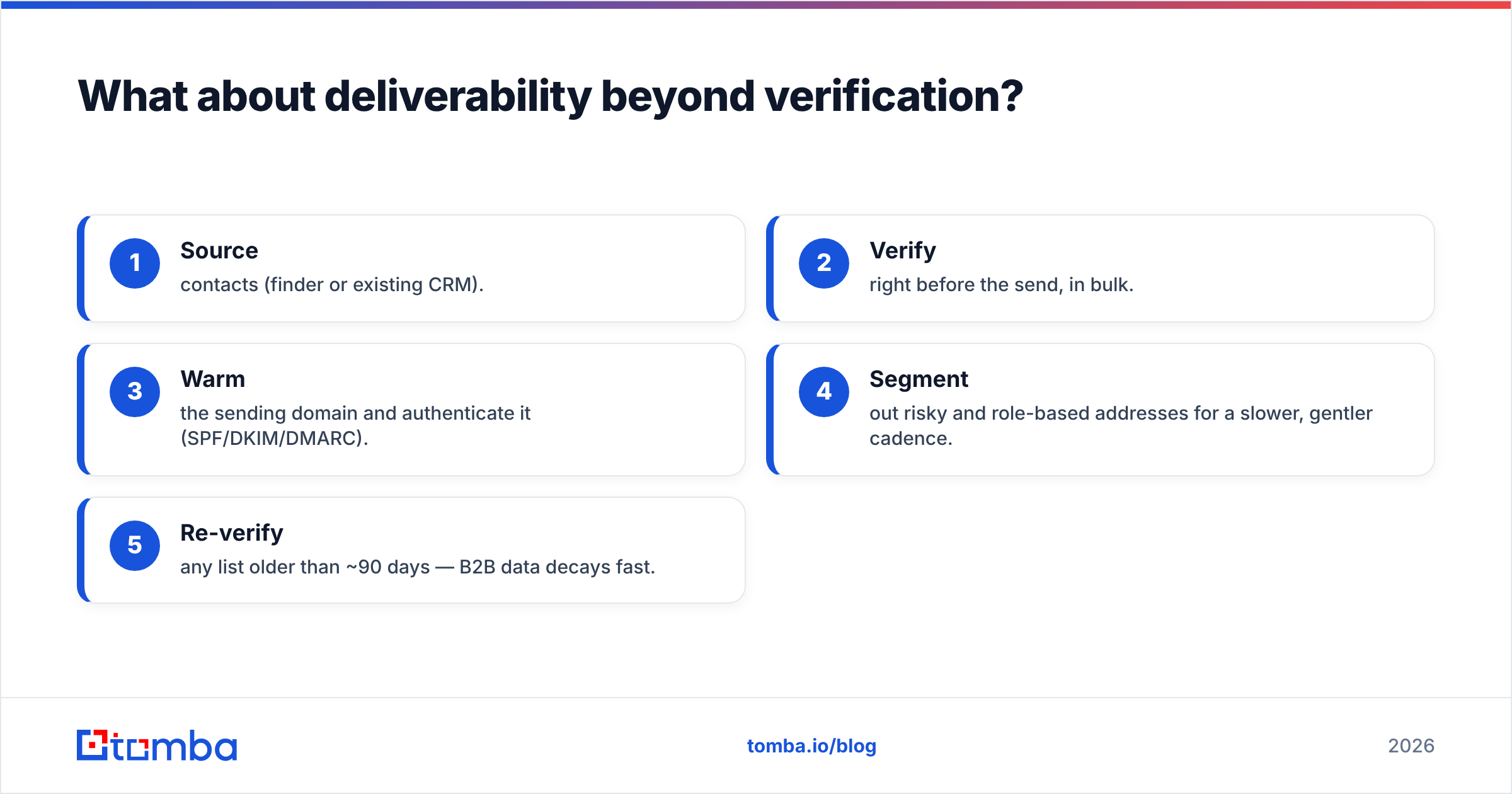
A sensible workflow:
- Source contacts (finder or existing CRM).
- Verify right before the send, in bulk.
- Warm the sending domain and authenticate it (SPF/DKIM/DMARC).
- Segment out risky and role-based addresses for a slower, gentler cadence.
- Re-verify any list older than ~90 days — B2B data decays fast.
Skipping step 2 is the classic mistake; skipping steps 3–5 is the quieter one that still gets you filtered.
So which should you choose?#
If you want a single sentence: choose Heybounce for pure, deliverability-first verification, choose Brandnav if you want data and enrichment bundled with it, and choose Tomba if you need to find the emails in the first place and verify them in one workflow.
There is no universal winner because the three tools answer slightly different questions. The expensive mistake is buying a verifier when your real bottleneck is finding contacts — or buying a finder when your list is already full of unverified, bounce-prone addresses. Match the tool to the actual gap in your pipeline.
Whatever you pick, do the 200-address bake-off described earlier. Aggregate accuracy claims are marketing; your bounce rate on your data is truth.
Ready to find and verify in one place?#
If your bottleneck isn't just cleaning a list but building one, start with Tomba's Email Finder. Search by domain, name, or company to surface professional addresses, confirm them with the built-in email verifier, and clean ambiguous domains with the catch-all checker — all on one plan that starts free with 25 searches a month and scales to $49/mo when you're ready. You can also gut-check any single address right now with the free email checker. Stop paying for a finder and a verifier separately; do both in one workflow.
// get started
Find, verify and enrich your first contacts today
Start on the free plan with 25 searches a month, then scale when your team is ready.
Free plan · No credit card required · GDPR & CCPA
// about the author