Brandnav vs Power Almanac: B2B Data Compared (2026)
Brandnav vs Power Almanac, compared head-to-head on coverage, data freshness, pricing, and use cases — plus where each one falls short for modern outbound teams.
Choosing between Brandnav and Power Almanac usually means you have two very different problems wearing the same coat. One is a broad B2B brand-and-contact data layer; the other is a narrow, deep database of U.S. local-government officials. Picking the wrong one wastes a quarter of prospecting time, so this guide compares them on what actually matters: coverage, freshness, pricing, and the workflows they were built for.
TL;DR#
- Brandnav is a general B2B data and brand-intelligence provider — company firmographics, contact records, and enrichment across many industries.
- Power Almanac is a specialist: a database of U.S. local-government officials (city, county, township) with verified titles and contacts. If you sell to the public sector, it is purpose-built.
- They are not really competitors. Brandnav fits commercial B2B outbound; Power Almanac fits govtech, civic, and municipal sales.
- Both share the same weakness: static records age fast. Email accuracy on any list decays roughly 2–3% per month, so neither replaces real-time verification at send time.
- Best move for most teams: pair your chosen list source with a live email finder and verifier so you act on data that is true today, not the day it was scraped.
What is Brandnav?#
Brandnav is a B2B data platform focused on company and brand intelligence. It aggregates firmographic attributes (industry, size, location, tech signals) alongside contact records, then exposes them for list-building and enrichment. The pitch is breadth: one place to research a company, find decision-makers, and append the missing fields your CRM left blank.
Teams reach for Brandnav when they want a wide commercial net — SaaS, ecommerce, agencies, manufacturers — rather than one vertical. It behaves like a horizontal data layer you query by segment, then export or push into your sequencing tool.
The trade-off with any broad aggregator is depth per record. Wide coverage means more rows, but the confidence on any single email or direct dial varies by how recently that record was sourced. That is not a Brandnav-specific flaw; it is physics for static databases. It is also why data enrichment works best as a continuous process, not a one-time import.
What is Power Almanac?#
Power Almanac is a contact database of U.S. local-government officials — roughly the mayors, city managers, council members, clerks, public-works directors, and department heads across tens of thousands of municipalities. Each record carries the official's title, jurisdiction, and contact details, refreshed on a regular cycle because government rosters change with elections and appointments.
If your buyers wear a government badge, this specialization is the entire value. General B2B databases under-index hard on township clerks and county commissioners; Power Almanac is built around exactly those roles. You can filter by population, region, government type, and department, then export a clean list for civic outreach, grants, RFP awareness, or govtech sales.
The flip side is scope. Outside U.S. local government, Power Almanac is not the tool. There are no commercial SaaS buyers, no overseas firms, no private-sector org charts. It is a scalpel, not a Swiss Army knife.
Brandnav vs Power Almanac: how do they compare?#
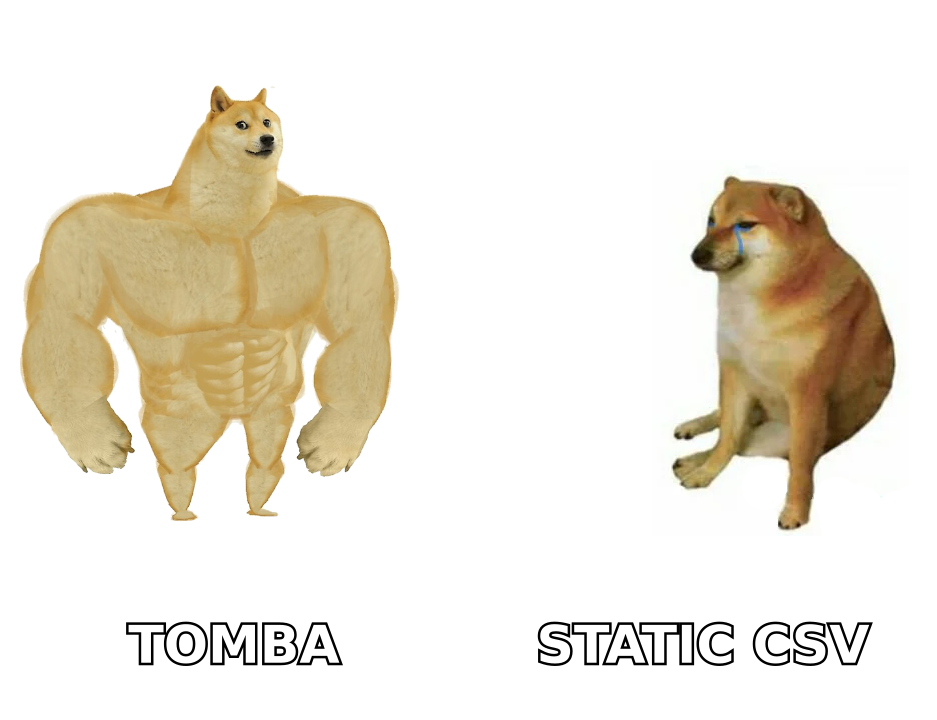
Here is the head-to-head on the attributes that drive a buying decision. Treat the specifics as directional — vendors revise plans and coverage — and confirm current numbers on each Brandnav and Power Almanac site before you commit.
| Attribute | Brandnav | Power Almanac |
|---|---|---|
| Primary data type | Broad B2B firmographics + contacts | U.S. local-government officials |
| Best-fit buyer | Commercial B2B / SaaS / agencies | Govtech, civic, public-sector sales |
| Coverage breadth | Wide, many industries | Narrow, very deep in one vertical |
| Geographic scope | Multi-region B2B | United States, local government |
| Refresh cadence | Varies by source | Regular roster-driven updates |
| Export / list-building | Yes | Yes (filter by jurisdiction) |
| Real-time verification | Limited | Limited |
| Ideal companion | Live finder + verifier | Live finder + verifier |
The honest summary: this is not "which is better," it is "which problem do you have." Selling badge-readers gets you to Power Almanac. Selling everyone else gets you to Brandnav. The only place they truly overlap is the moment you export a list and discover some of it is already stale.
Which one should you choose?#
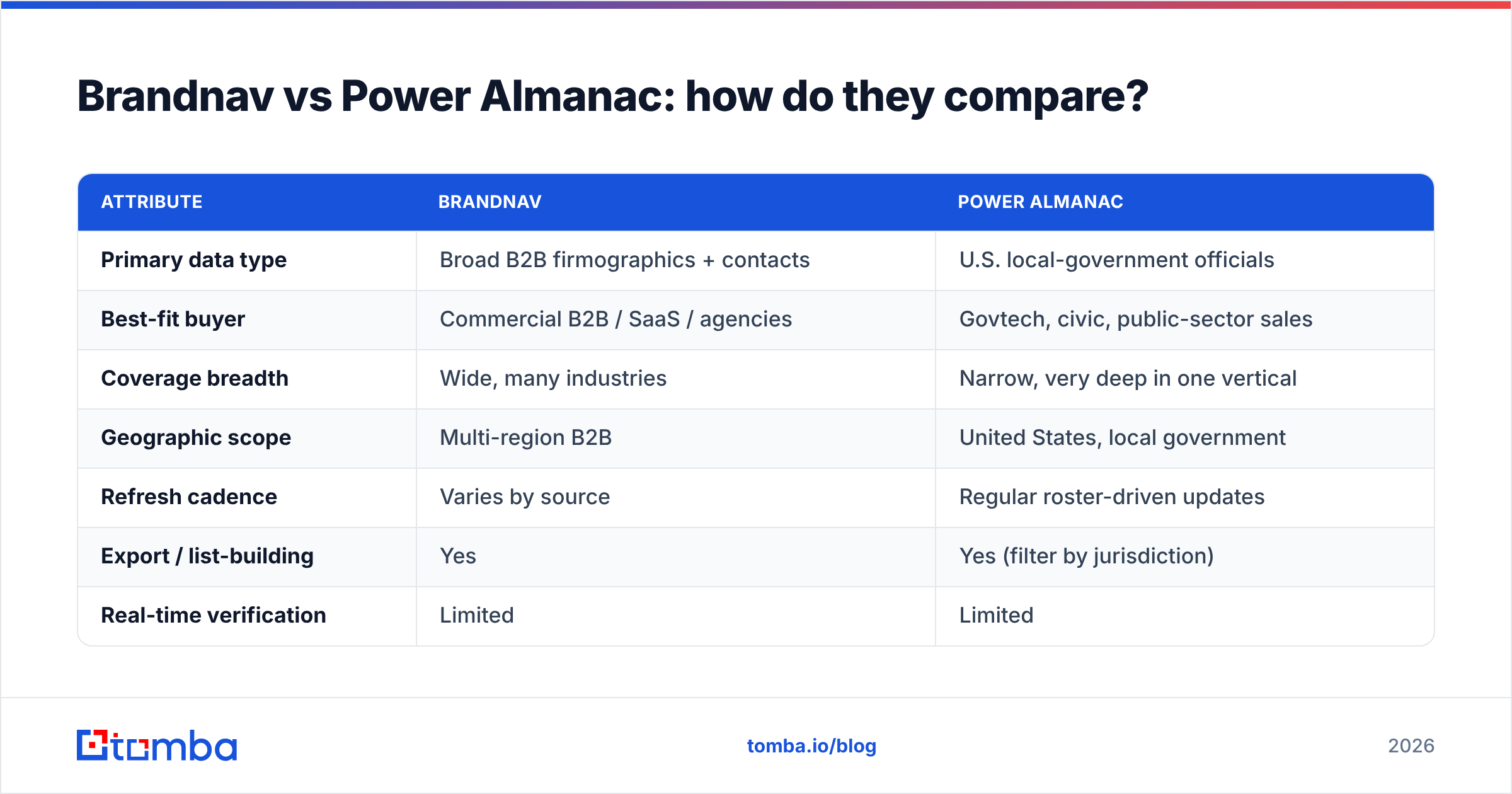
Match the tool to your motion rather than the marketing. Use this five-point checklist:
- Who is your buyer? Local-government roles → Power Almanac. Commercial B2B → Brandnav. Mixed pipeline → Brandnav plus a verification layer.
- How wide is your territory? National public-sector campaigns reward Power Almanac's jurisdiction filters. Multi-industry outbound rewards Brandnav's breadth.
- How fresh must contacts be? Election cycles churn government rosters; commercial job changes churn even faster. Whoever you pick, plan to re-verify before each send.
- What is your enrichment workflow? If you push lists into a CRM and sequence them, prioritize clean exports and API access over raw row counts.
- What is your budget model? Specialist databases often price per seat or per export; horizontal platforms price by credits or records. Map cost to usable contacts, not total rows.
Most teams over-weight database size and under-weight freshness. A 50,000-row list that is 80% accurate gives you 40,000 reachable people. A 20,000-row list verified at send time gives you ~19,500. The smaller, fresher list wins on replies almost every time — which is the whole argument for a B2B database that you treat as a starting point rather than gospel.
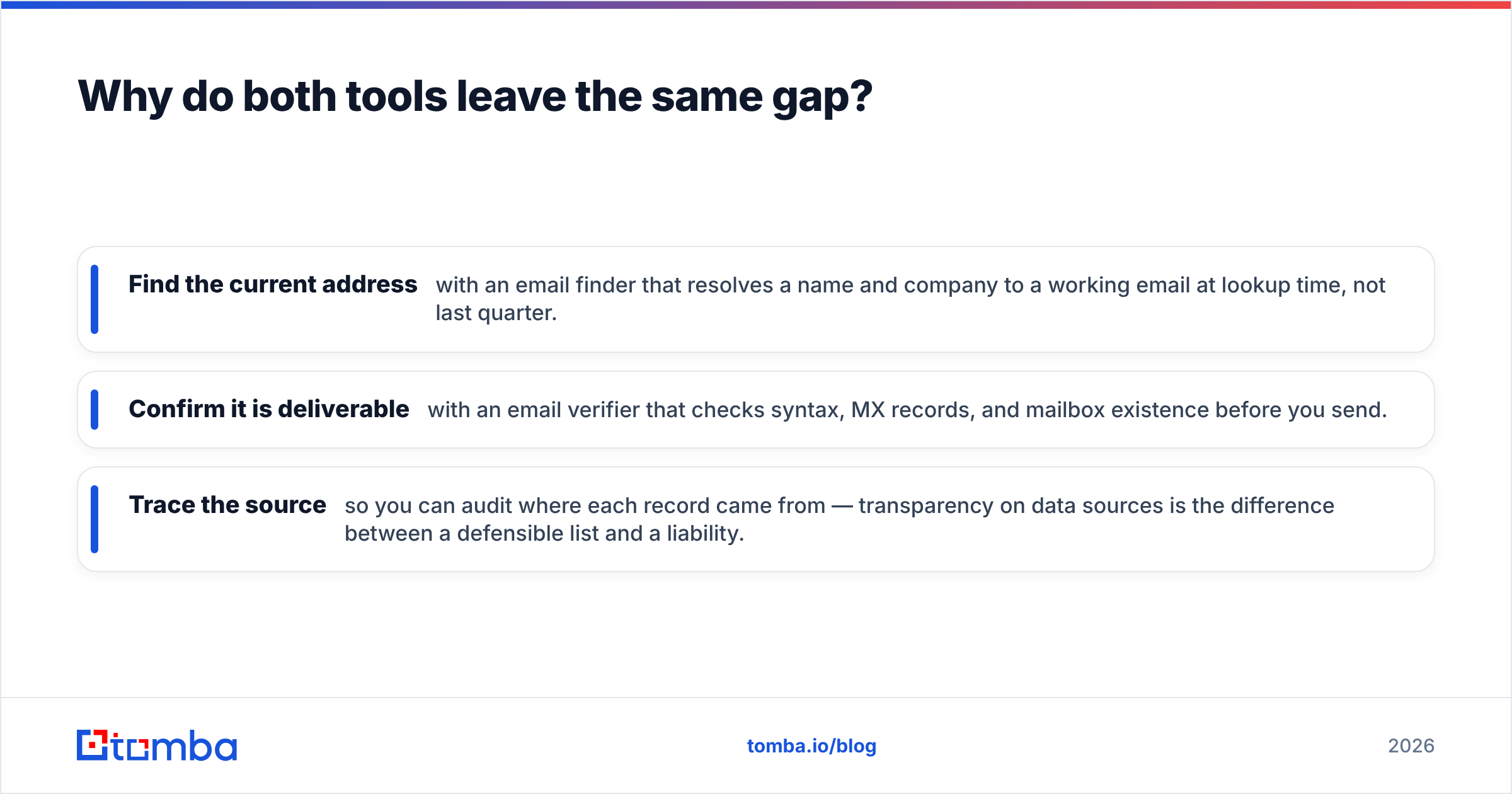
Why do both tools leave the same gap?#
Both Brandnav and Power Almanac sell you a snapshot. The gap is everything that happens between the snapshot and your send button.
Think of a purchased list like a printed phone book: accurate the day it shipped, quietly wrong a few months later. People change jobs, municipalities swear in new officials, domains migrate, and catch-all servers swallow messages without bouncing. According to widely cited industry figures, B2B data degrades around 30% per year. That decay is invisible until your bounce rate climbs and your domain reputation takes the hit.
This is where a real-time layer earns its keep:
- Find the current address with an email finder that resolves a name and company to a working email at lookup time, not last quarter.
- Confirm it is deliverable with an email verifier that checks syntax, MX records, and mailbox existence before you send.
- Trace the source so you can audit where each record came from — transparency on data sources is the difference between a defensible list and a liability.
None of that competes with Brandnav or Power Almanac as a list. It sits on top of either one and makes the list true again.
How does Tomba fit alongside Brandnav or Power Almanac?#
Tomba is not a directory you browse — it is the verification and discovery layer you run against the lists you already have. That makes it complementary to both tools rather than a like-for-like swap.
A practical workflow:
- Build your raw list in Brandnav (commercial) or Power Almanac (government).
- Enrich and de-risk it by running the records through Tomba's finder and verifier to catch role changes, dead mailboxes, and catch-all domains before they cost you.
- Push the clean set into your CRM or sequencer and start outreach with a list you trust.
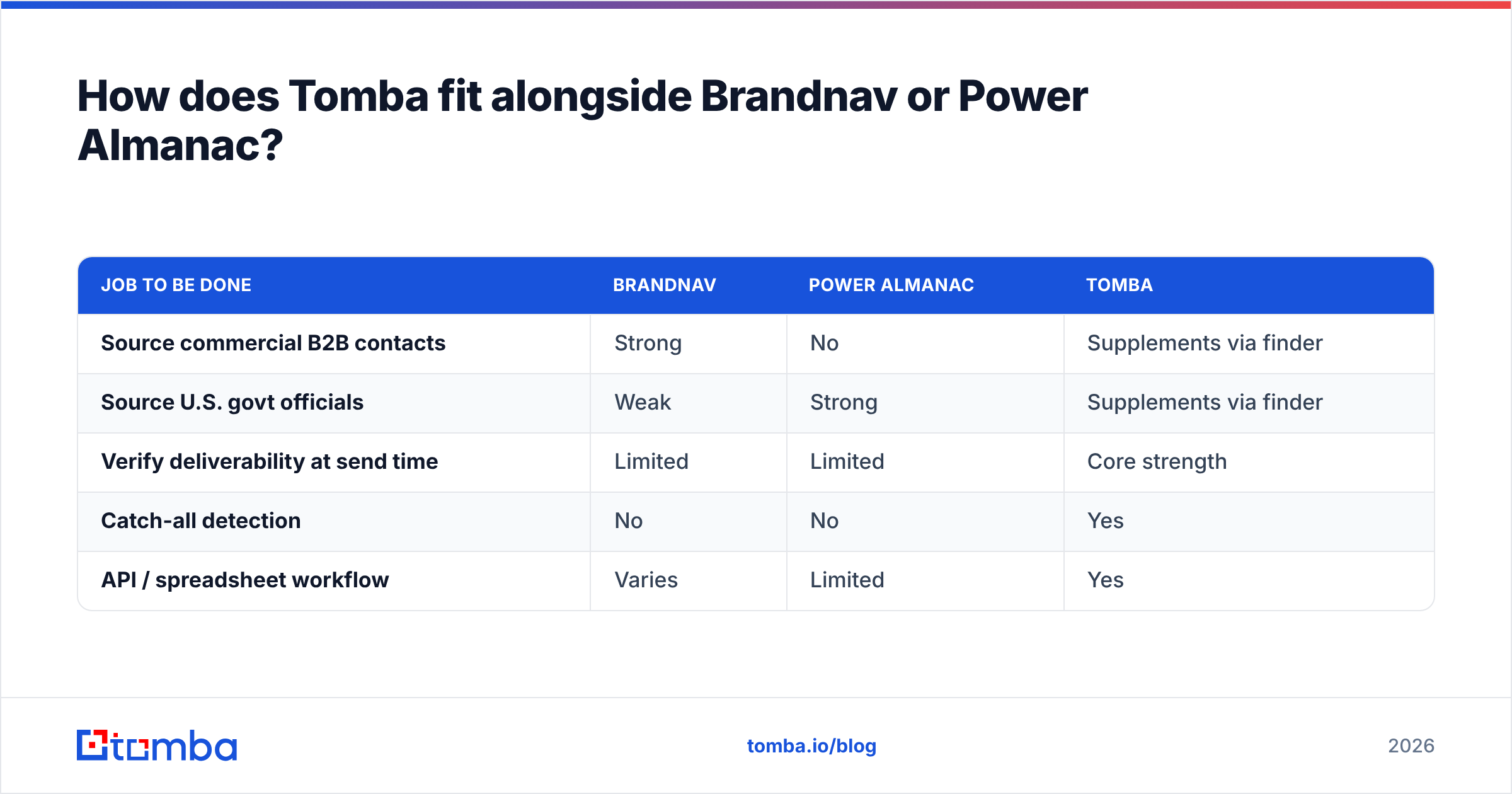
Here is how the layers line up:
| Job to be done | Brandnav | Power Almanac | Tomba |
|---|---|---|---|
| Source commercial B2B contacts | Strong | No | Supplements via finder |
| Source U.S. govt officials | Weak | Strong | Supplements via finder |
| Verify deliverability at send time | Limited | Limited | Core strength |
| Catch-all detection | No | No | Yes |
| API / spreadsheet workflow | Varies | Limited | Yes |
For pricing context, Tomba runs a free tier (25 searches/month), then Starter at $49/mo, Growth at $99/mo, and Pro at $249/mo, with custom Enterprise plans — full Tomba pricing is public. The point is not to replace your data vendor's budget line but to protect it: every bounce you prevent is sender reputation you keep.
Is a purchased list enough on its own?#
No — and treating it that way is the most common reason cold campaigns underperform. A list is inventory; deliverability is the supply chain that gets it to the door. You can validate that thinking against neutral sources: directories like G2 show how buyers separate "data provider" from "data quality" in their reviews, and most reputable vendors publish freshness or accuracy claims you should pressure-test rather than accept.
Run this quick gut-check before any send:
- Have these contacts been verified in the last 30 days?
- Do you know which records sit on catch-all domains?
- Can you trace where each email came from?
- Is your list deduped and free of role-based traps (info@, sales@)?
If you answered "no" to any of them, the issue is not which database you bought — it is that you skipped the verification layer. Both Brandnav and Power Almanac get you a credible starting list; the work after the export is what determines reply rates.
The bottom line#
Brandnav and Power Almanac solve different problems, so the "winner" is whichever one matches your buyer: Brandnav for broad commercial B2B, Power Almanac for U.S. local government. What they share is a ceiling — static data ages, and neither tool was built to verify deliverability the moment you hit send.
That last mile is exactly what the Tomba Email Finder was built for. Pair it with whichever list source fits your market, verify every address before you send, and you turn a decent database into a campaign that actually lands in the inbox. Start free with 25 searches and run your existing list through it — the bounces you prevent will tell you everything you need to know.
// get started
Find, verify and enrich your first contacts today
Start on the free plan with 25 searches a month, then scale when your team is ready.
Free plan · No credit card required · GDPR & CCPA
// about the author