Brandnav vs Saleshandy 2026: Which B2B Sales Tool Wins?
Brandnav vs Saleshandy compared on data accuracy, outreach features, pricing, and deliverability — plus where a dedicated email finder beats both in 2026.
Choosing between Brandnav and Saleshandy is really a choice between two different jobs. One is built to find and enrich contact data; the other is built to send and automate cold email at scale. Putting them side by side only makes sense once you know which problem you are actually solving — and where a dedicated data layer beats both.
TL;DR — Brandnav vs Saleshandy in 2026#
- Brandnav is a B2B data and email-finder tool — its core value is sourcing emails, enriching records, and verifying contacts before you reach out.
- Saleshandy is a cold email and sequencing platform — its core value is sending automated multi-step campaigns, rotating inboxes, and tracking replies.
- They overlap less than the "vs" suggests: many teams run both, feeding Brandnav-sourced data into Saleshandy sequences.
- If your bottleneck is data accuracy, neither is a pure-play specialist — a focused email finder usually returns higher hit rates at lower cost.
- For a unified, API-first data layer that plugs into either tool, Tomba Email Finder is the option we recommend testing alongside both.
What is Brandnav and who is it for?#
Brandnav positions itself as a B2B prospecting and data platform. The pitch is straightforward: give it a domain, a company, or a name, and it returns business email addresses, enriched company attributes, and verification signals. It targets SDRs, recruiters, and growth marketers who need to build lists before any outreach happens.
Where Brandnav earns its keep is the front of the funnel — turning a vague target account into a usable contact record. It competes less with sending tools and more with data providers like Apollo, RocketReach, and email finders generally. If you already have a sequencer you like, Brandnav slots in as the supply of names and addresses.
The trade-off is the one every all-in-one data tool faces: breadth over depth. A platform juggling enrichment, scraping, and verification rarely matches a specialist on any single metric — and data accuracy is the metric that quietly decides your bounce rate.
What is Saleshandy and who is it for?#
Saleshandy is a cold email outreach platform. Its job starts after you have a list. You import contacts, write a sequence, connect a pool of sending mailboxes, and Saleshandy handles the rest: scheduling, follow-ups, inbox rotation, reply detection, and unified analytics. It also bundles a built-in warmup feature and a basic lead-finder database.
The audience is teams running volume outbound — agencies, lead-gen shops, and SDR pods sending thousands of personalized emails a week. The strengths are sequence logic, sending infrastructure, and email deliverability management across many inboxes. If you have ever tried to run cold campaigns out of raw Gmail, the value of a tool like this is obvious within a day.
Saleshandy does include a contact database, but treat it as a convenience, not a reason to buy. The platform's gravity is in sending, and that is where its engineering attention goes.
Is Brandnav better than Saleshandy?#
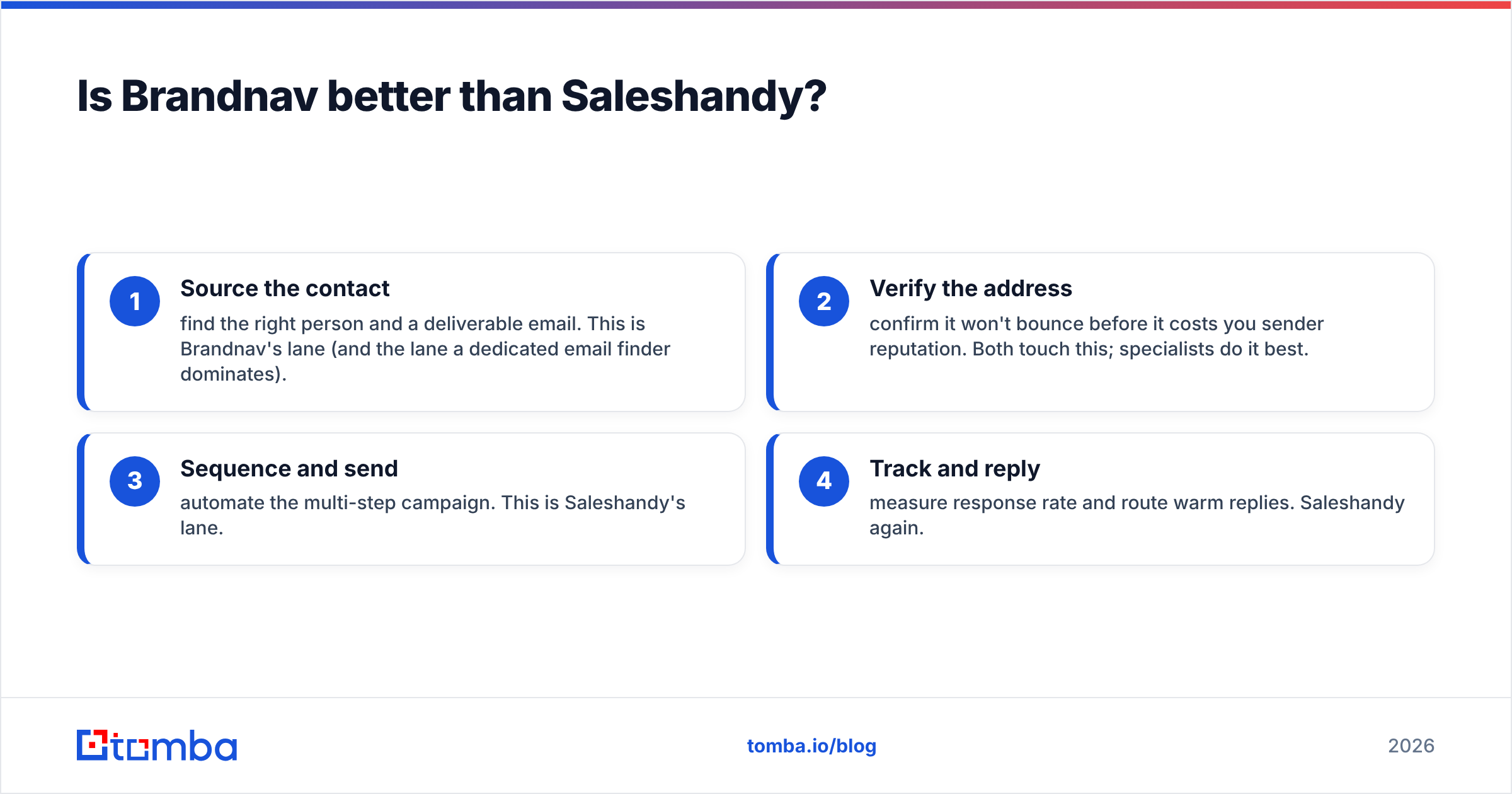
Neither is "better" — they sit at different stages of the same workflow. The honest framing is a funnel:
- Source the contact — find the right person and a deliverable email. This is Brandnav's lane (and the lane a dedicated email finder dominates).
- Verify the address — confirm it won't bounce before it costs you sender reputation. Both touch this; specialists do it best.
- Sequence and send — automate the multi-step campaign. This is Saleshandy's lane.
- Track and reply — measure response rate and route warm replies. Saleshandy again.
A team that buys Saleshandy expecting it to replace a data provider ends up with a great sending engine pointed at a mediocre list. A team that buys Brandnav expecting it to run campaigns finds no real sequencing. The "vs" is mostly a category mismatch.
How do Brandnav and Saleshandy compare on features?#
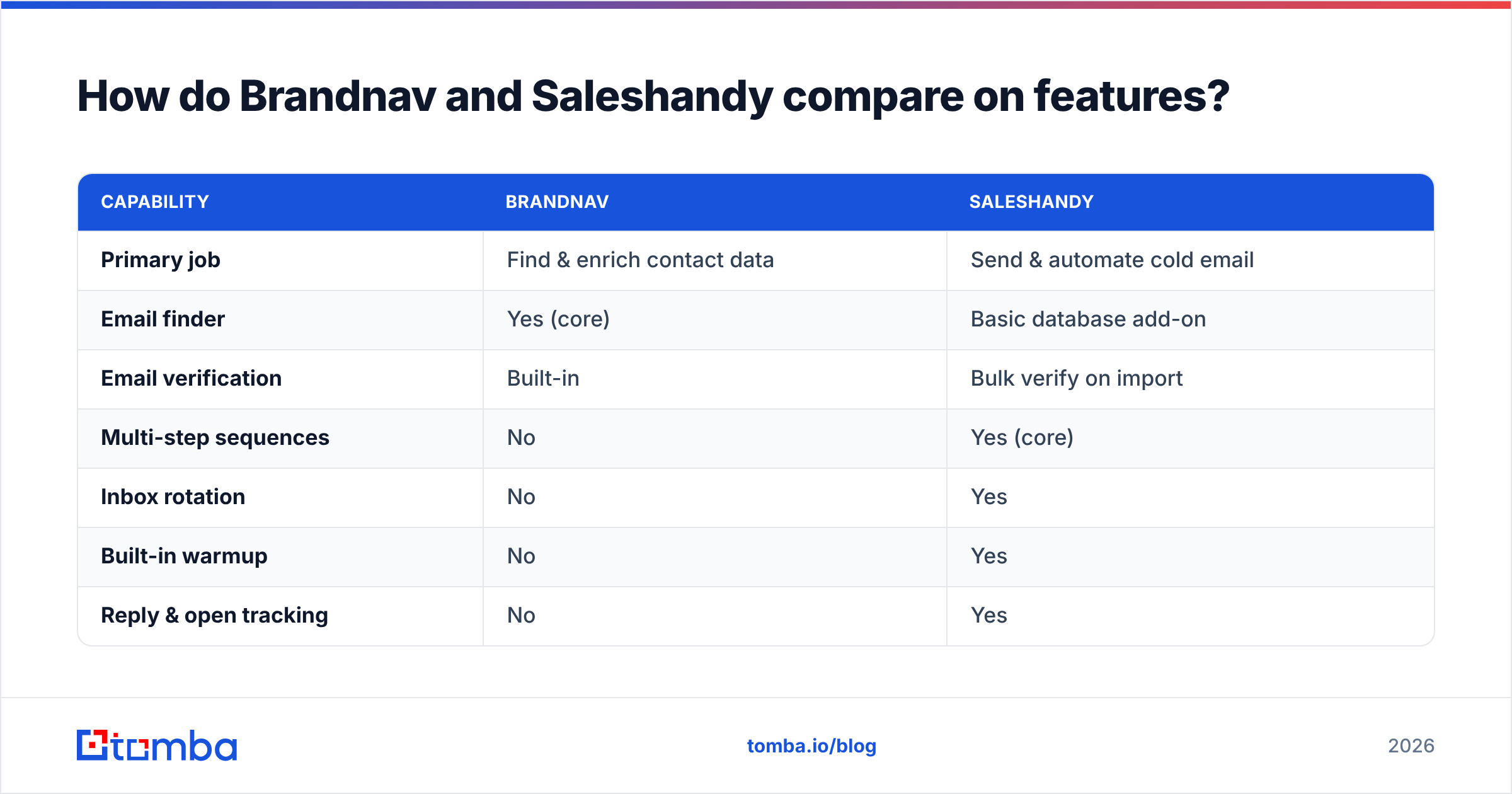
Here is the head-to-head on the attributes that actually change your numbers:
| Capability | Brandnav | Saleshandy |
|---|---|---|
| Primary job | Find & enrich contact data | Send & automate cold email |
| Email finder | Yes (core) | Basic database add-on |
| Email verification | Built-in | Bulk verify on import |
| Multi-step sequences | No | Yes (core) |
| Inbox rotation | No | Yes |
| Built-in warmup | No | Yes |
| Reply & open tracking | No | Yes |
| Native API for data | Limited | Limited (sending-focused) |
| Best fit | List building | Campaign execution |
The table makes the split clear: the column with "Yes" under data is mostly Brandnav, and the column with "Yes" under sending is mostly Saleshandy. The empty cells are where teams bolt on a second tool — and where a clean data API matters most.
Where does a dedicated email finder fit?#
A dedicated data layer fixes the weakest cell in both products: accuracy at the source. Brandnav's finder is one feature among many; Saleshandy's database is an afterthought to its sending engine. A specialist exists to do one thing — return correct, deliverable, verified addresses — and it shows in the hit rate and bounce numbers.
Consider the practical stack:
- Find the email with a domain search across your target accounts, or one-by-one with the email finder.
- Verify every address with a real-time email verifier so catch-all and risky domains get flagged before send.
- Pipe clean records straight into Saleshandy (or any sequencer) via the Tomba API or a no-copy-paste integration.
That last point is the quiet advantage. When your data tool exposes a proper API, you stop exporting CSVs and start automating the handoff into your sender.
How do Brandnav, Saleshandy, and Tomba compare on pricing?#
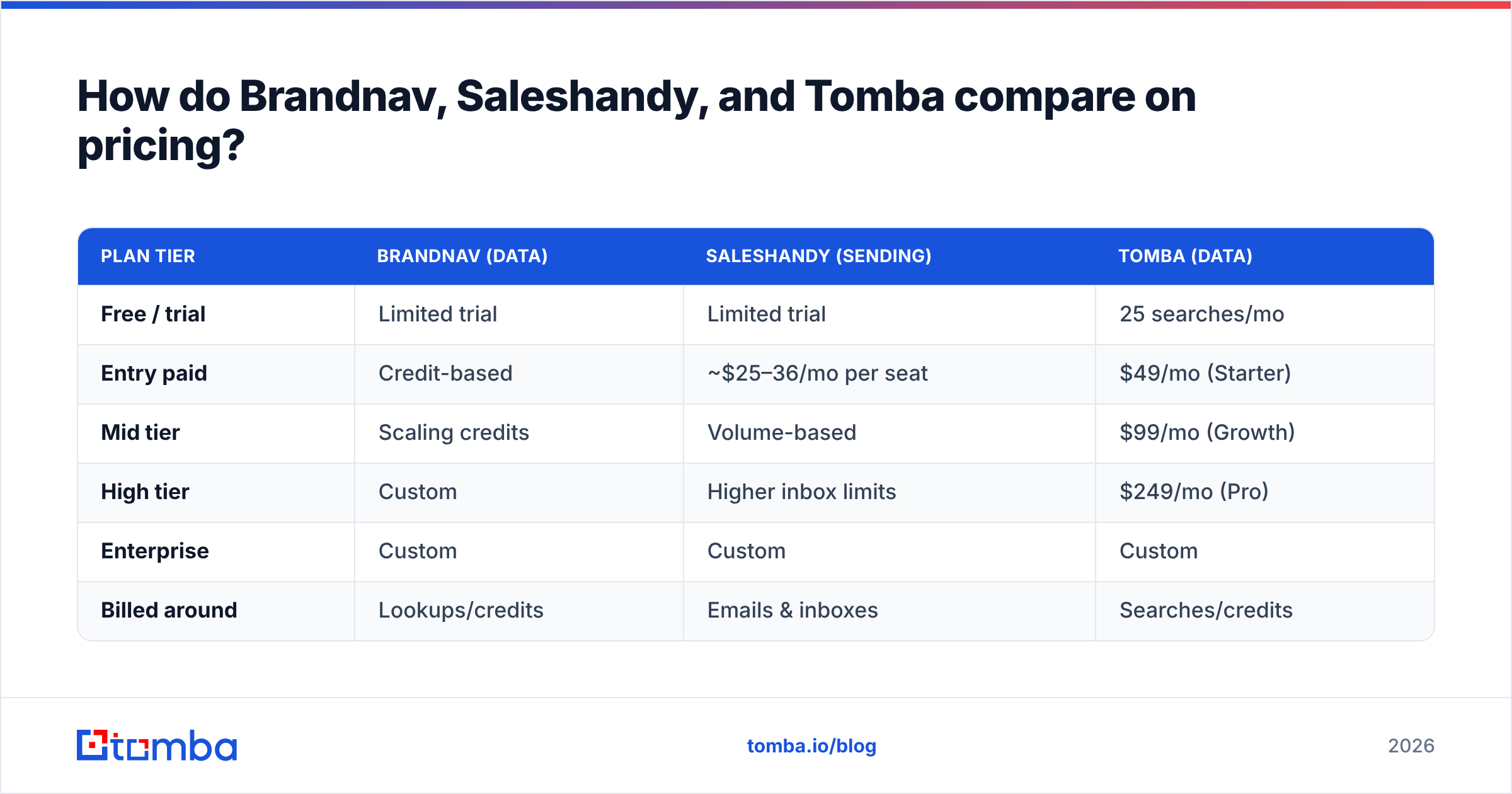
Pricing models differ because the jobs differ — Saleshandy charges around sending volume and inboxes, while data tools charge around lookups and credits. Treat the numbers below as the shape of each model rather than a frozen quote; always confirm on the vendor's own page.
| Plan tier | Brandnav (data) | Saleshandy (sending) | Tomba (data) |
|---|---|---|---|
| Free / trial | Limited trial | Limited trial | 25 searches/mo |
| Entry paid | Credit-based | ~$25–36/mo per seat | $49/mo (Starter) |
| Mid tier | Scaling credits | Volume-based | $99/mo (Growth) |
| High tier | Custom | Higher inbox limits | $249/mo (Pro) |
| Enterprise | Custom | Custom | Custom |
| Billed around | Lookups/credits | Emails & inboxes | Searches/credits |
The takeaway: you are not really comparing one price against another, you are comparing a data budget against a sending budget. Most serious outbound teams pay for both. The question is whether your data line item is buying genuine accuracy or just a feature checkbox. You can see the full Tomba pricing breakdown to benchmark the data side.
Which tool is better for deliverability?#
For sending deliverability — warmup, inbox rotation, throttling — Saleshandy is purpose-built and clearly ahead of Brandnav, which does not send at all. If your emails are landing in spam because of how you send, Saleshandy (or a comparable sequencer) is the fix.
But the most common deliverability killer is upstream: bad addresses. Every hard bounce chips away at sender reputation, and no amount of warmup undoes a list full of invalid contacts. This is why verification belongs before the sequencer, not inside it. Catching invalid and risky addresses with a catch-all verifier protects the reputation that Saleshandy then works hard to maintain.
In other words: Saleshandy keeps your sending clean; a real data layer keeps your list clean. Skip either and your inbox-placement suffers. For the mechanics of how providers score senders, HubSpot's email deliverability guide is a solid, vendor-neutral primer.
What do real reviews say about Brandnav vs Saleshandy?#
Buyer sentiment tracks the category split. On public review sites, Saleshandy users praise sequencing, warmup, and unified inbox management, while wishing the built-in lead database were deeper. Brandnav-style data tools get credit for fast list building but draw the usual complaints about variable accuracy and credit burn on misses. Cross-check current ratings on G2 and Capterra before you commit, since both products iterate quickly.
The recurring theme in reviews of any combined tool: people eventually separate the jobs. They keep the sender they like and shop the data layer independently — because a 10% accuracy difference on a 10,000-contact campaign is 1,000 wasted sends and a measurable reputation hit.
Brandnav vs Saleshandy: which should you choose?#
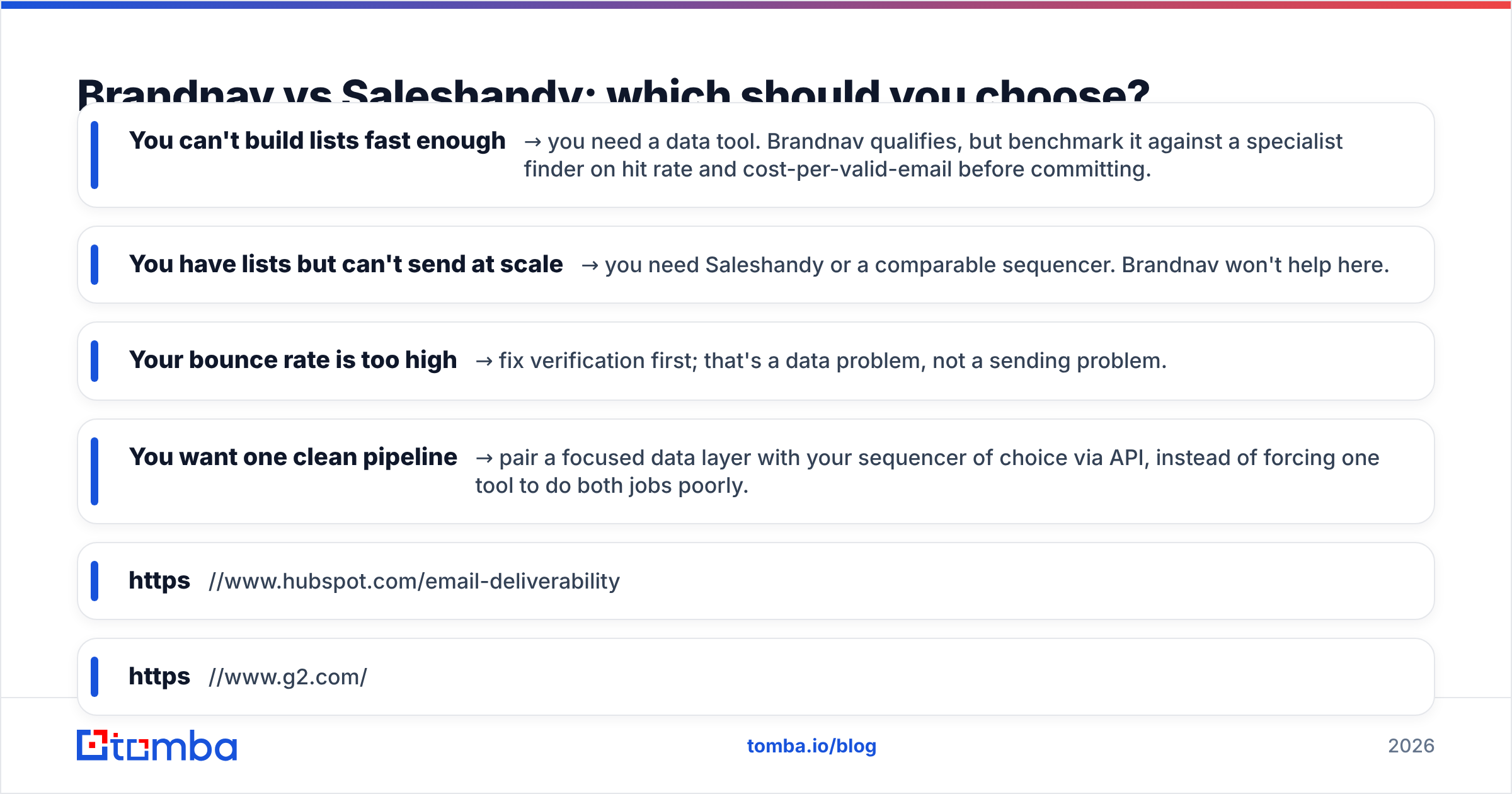
Decide by your actual bottleneck:
- You can't build lists fast enough → you need a data tool. Brandnav qualifies, but benchmark it against a specialist finder on hit rate and cost-per-valid-email before committing.
- You have lists but can't send at scale → you need Saleshandy or a comparable sequencer. Brandnav won't help here.
- Your bounce rate is too high → fix verification first; that's a data problem, not a sending problem.
- You want one clean pipeline → pair a focused data layer with your sequencer of choice via API, instead of forcing one tool to do both jobs poorly.
For most outbound teams in 2026, the winning setup is not "Brandnav vs Saleshandy" at all — it's a specialist data source feeding a specialist sender. Saleshandy handles the send. A dedicated finder-plus-verifier handles the supply. The two together beat either tool stretched across both jobs.
If the data side is where you want the strongest link, start with Tomba Email Finder. It's API-first, includes real-time verification, ships with a free tier (25 searches a month) to test accuracy before you pay, and drops straight into Saleshandy or any sequencer you already run. Find the right person, confirm the address is deliverable, and hand a clean list to your sending engine — so the campaign you spent money building actually reaches a human.
Sources:
// get started
Find, verify and enrich your first contacts today
Start on the free plan with 25 searches a month, then scale when your team is ready.
Free plan · No credit card required · GDPR & CCPA
// about the author