BriteVerify vs FinalScout: Which Email Tool Wins in 2026?
BriteVerify verifies the emails you already have; FinalScout finds new ones from LinkedIn. Here's how they really compare in 2026 — plus the tool that does both.
You typed "BriteVerify vs FinalScout" into a search bar expecting a head-to-head winner. The honest answer is that these two tools barely compete — they solve different halves of the same problem. BriteVerify cleans the list you already have. FinalScout builds a list you don't. Pick the wrong one and you'll either email a pile of bounces or verify a database that doesn't exist yet.
This breakdown shows you exactly where each tool fits, what they cost in 2026, and where a single platform can cover both jobs without paying two vendors.
TL;DR#
- BriteVerify is a pure email verification tool — it tells you whether an address you already own is valid, risky, or dead. It does not find new contacts.
- FinalScout is an email finder built on top of LinkedIn — it extracts and predicts professional emails from profiles, with built-in AI outreach.
- They're complements, not rivals: you'd realistically use a finder then a verifier, not choose one over the other.
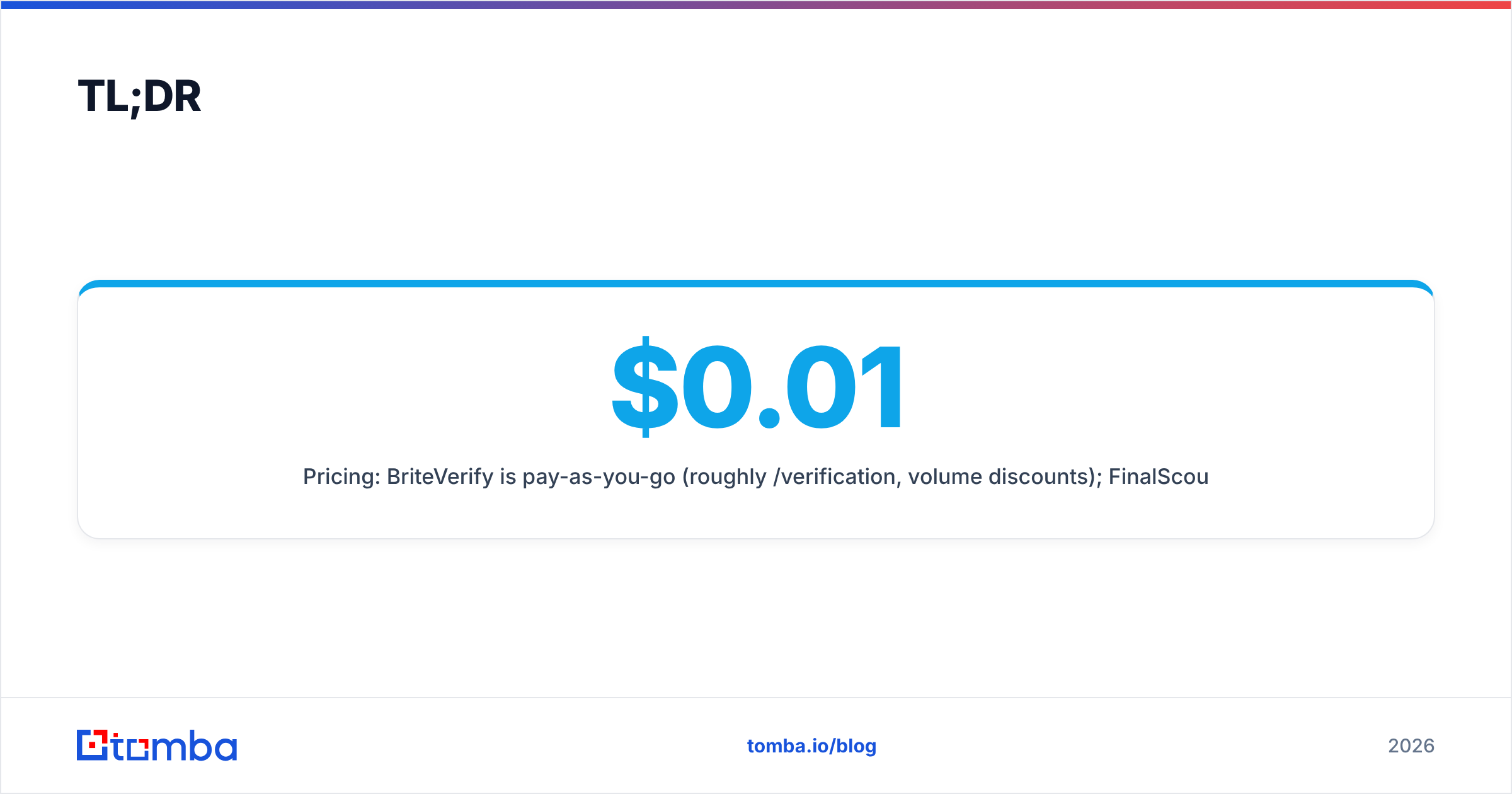
- Pricing: BriteVerify is pay-as-you-go (roughly $0.01/verification, volume discounts); FinalScout runs on monthly credit tiers starting around $35–$49/mo.
- If you want finding and verification in one place, an all-in-one platform like Tomba covers both for less than stacking two single-purpose tools.
What is BriteVerify?#
BriteVerify, owned by Validity, is one of the oldest names in email verification. Think of it as a bouncer at the door of your sending list: it checks every address against syntax rules, domain MX records, and mailbox-level SMTP pings, then tells you who gets in and who gets turned away.
It does one job and does it cleanly. You upload a CSV (or call the API), and BriteVerify returns each address tagged as valid, invalid, accept-all (catch-all), or unknown. That's the entire product. There's no prospecting, no LinkedIn scraping, no contact database — just hygiene.
Where BriteVerify earns its reputation is reliability and integrations. It plugs directly into Marketo, HubSpot, Salesforce, Mailchimp, and most ESPs, so marketing teams can scrub forms in real time before a bad address ever enters the CRM. If your problem is "my email deliverability is slipping because old lists are full of dead addresses," BriteVerify is a proven fix.
What it will never do is hand you a new lead. You bring the emails; BriteVerify grades them.

What is FinalScout?#
FinalScout sits at the opposite end of the funnel. It's an email finder that lives largely inside LinkedIn (and LinkedIn Sales Navigator), pulling professional email addresses from profiles and company pages, then layering AI-written outreach on top.
The typical FinalScout workflow: browse LinkedIn, run FinalScout's Chrome extension on a profile or a search result, and it returns a predicted business email with a confidence label. It claims high deliverability because it only surfaces addresses it believes will land. From there you can drop contacts into AI-generated email sequences without leaving the tool.
So FinalScout is really two things bolted together: a LinkedIn-based contact finder and a lightweight cold-email assistant. It's aimed at founders and SDRs who live on LinkedIn and want to go from "interesting profile" to "email in outbox" in a couple of clicks.
What FinalScout is not is a bulk list-hygiene engine. It verifies the emails it discovers, but you wouldn't feed it a 200,000-row marketing database to clean. That's BriteVerify's turf.
BriteVerify vs FinalScout: how do they actually compare?#
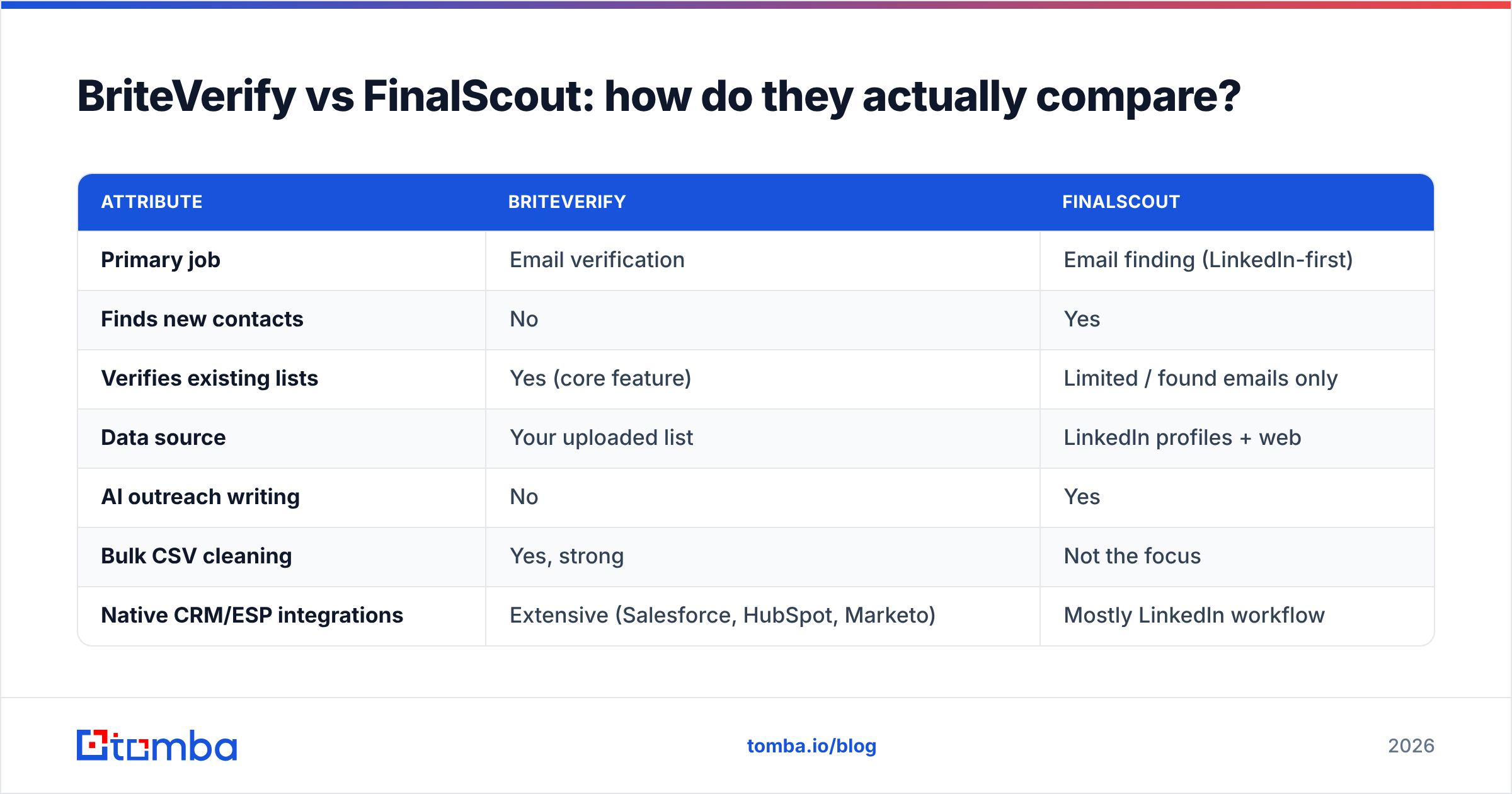
Here's the side-by-side. Notice how few rows the two tools genuinely contest — most features belong to one product or the other.
| Attribute | BriteVerify | FinalScout |
|---|---|---|
| Primary job | Email verification | Email finding (LinkedIn-first) |
| Finds new contacts | No | Yes |
| Verifies existing lists | Yes (core feature) | Limited / found emails only |
| Data source | Your uploaded list | LinkedIn profiles + web |
| AI outreach writing | No | Yes |
| Bulk CSV cleaning | Yes, strong | Not the focus |
| Native CRM/ESP integrations | Extensive (Salesforce, HubSpot, Marketo) | Mostly LinkedIn workflow |
| Pricing model | Pay-as-you-go per verification | Monthly credit tiers |
| Entry cost | ~$0.01 per email, no subscription | ~$35–$49/mo |
| Best for | Marketing list hygiene | LinkedIn prospecting |
The takeaway: if a row matters to you, it usually points to only one tool. A marketer scrubbing a newsletter list has no use for LinkedIn extraction. An SDR sourcing 50 new prospects a day doesn't need an enterprise-grade verification API. The "vs" framing breaks down because they were built for different people.
)
Is accuracy the real difference between them?#
Accuracy means two different things here, and conflating them is the most common mistake buyers make.
For BriteVerify, accuracy is about verification precision — when it says an address is valid, how often does mail actually deliver? Verification tools live and die on their catch-all handling and their ability to safely SMTP-probe without getting blocked. BriteVerify is conservative and accurate, which is exactly what you want before a big send.
For FinalScout, accuracy is about discovery — of the emails it predicts from a LinkedIn profile, what share are real and reachable? Finder accuracy depends on the size and freshness of the underlying data, plus the quality of the pattern-matching engine. A finder that guesses first.last@company.com and never confirms it will quietly tank your bounce rate.
This is why mature teams chain the two functions: find with one engine, then verify with another before sending. If your finder doesn't confirm addresses against live SMTP checks, you need a dedicated email verifier in the loop regardless of which finder you chose.

When you benchmark finders, watch three numbers:
- Hit rate — what percentage of searches return any email at all.
- Verified rate — of those, how many are confirmed deliverable, not just guessed.
- Bounce rate in production — the only metric that actually protects your sender reputation.
A tool with a flashy 95% hit rate and a 30% bounce rate is worse than one that returns fewer, fully verified addresses.
What does each tool cost in 2026?#
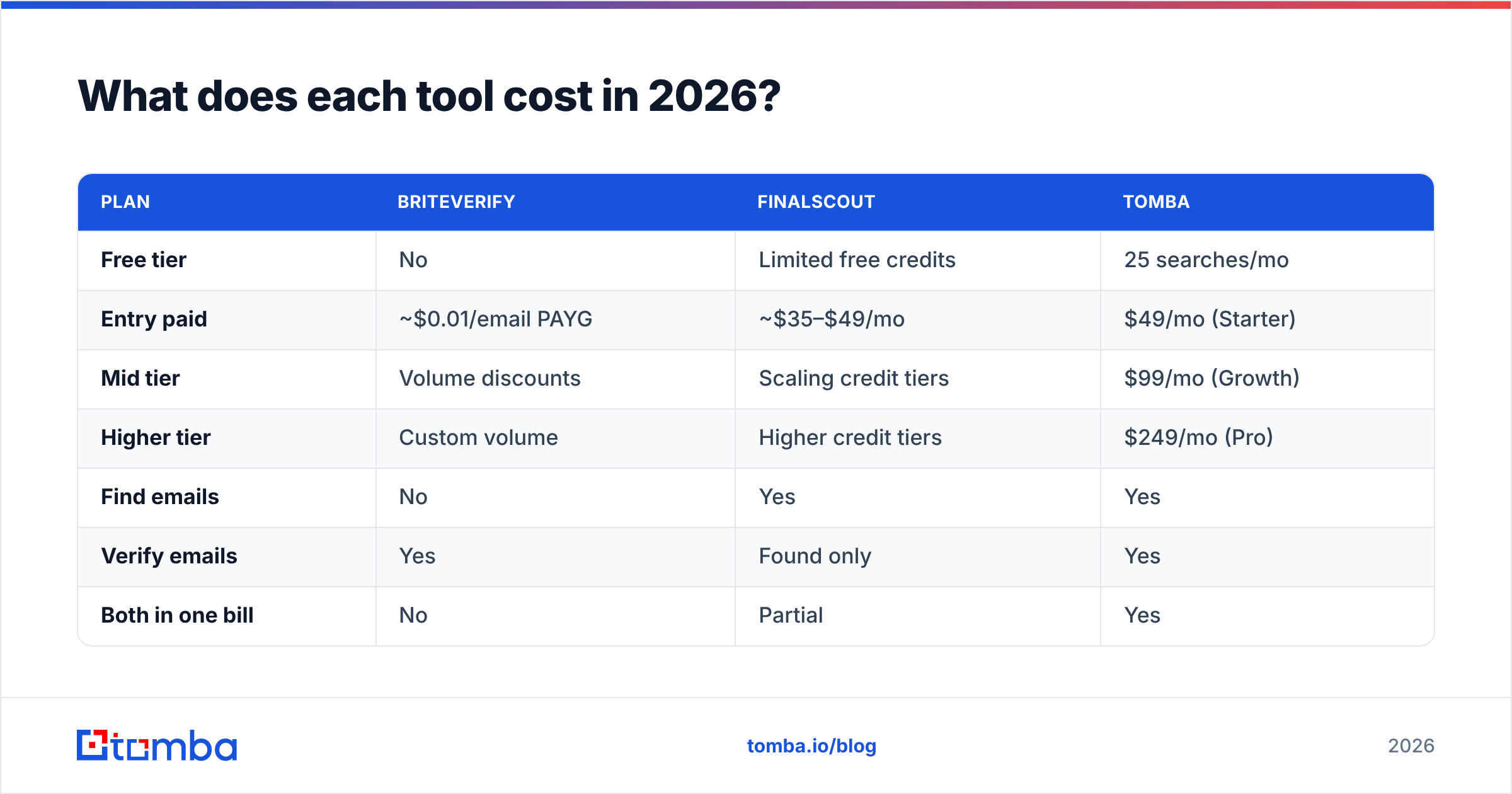
Pricing is where the two diverge most, because they're billed on different logic.
BriteVerify is consumption-based. You pay roughly a cent per verification with no forced subscription, and the per-email rate drops as volume climbs. That's ideal for spiky usage — clean a big list once a quarter and pay only for what you process. It's less friendly if you want predictable monthly costs or you verify continuously.
FinalScout is subscription-and-credits. You choose a monthly tier, get a credit allotment for finds and AI emails, and top up or upgrade when you run dry. Predictable, but you pay whether or not you hit your credit ceiling, and a single LinkedIn-heavy month can blow through an entry plan fast.
Now stack them. A team that needs both finding and verification ends up paying two vendors — a FinalScout subscription plus per-email BriteVerify charges. That's the hidden cost of single-purpose tools, and it's the case for consolidating.
| Plan | BriteVerify | FinalScout | Tomba |
|---|---|---|---|
| Free tier | No | Limited free credits | 25 searches/mo |
| Entry paid | ~$0.01/email PAYG | ~$35–$49/mo | $49/mo (Starter) |
| Mid tier | Volume discounts | Scaling credit tiers | $99/mo (Growth) |
| Higher tier | Custom volume | Higher credit tiers | $249/mo (Pro) |
| Find emails | No | Yes | Yes |
| Verify emails | Yes | Found only | Yes |
| Both in one bill | No | Partial | Yes |
Compare the Tomba pricing line against a stacked BriteVerify-plus-FinalScout setup and the consolidation math usually wins for teams doing both jobs.
When should you choose BriteVerify?#
Choose BriteVerify when verification is the project. Specifically:
- You already have a large list — newsletter subscribers, trade-show scans, an aging CRM — and bounces are hurting deliverability.
- You want real-time form validation so junk addresses never enter your database.
- You live inside Salesforce, Marketo, or HubSpot and want a native, set-and-forget integration.
- You verify in bursts and prefer pay-as-you-go over a subscription.
BriteVerify is the safe, boring, correct answer for marketing operations teams whose job is keeping a known list clean. It will not generate pipeline, and it doesn't pretend to.
When should you choose FinalScout?#
Choose FinalScout when LinkedIn is your prospecting ground and you want speed from profile to outbox:
- You're a founder or SDR sourcing contacts one profile or one search at a time.
- Your daily motion is "find someone interesting on LinkedIn, get their email, send a message."
- You value built-in AI drafting so you're not switching to a separate writing tool.
- Your volume is modest enough that monthly credits make sense.
FinalScout is a strong LinkedIn-native finder for solo operators and small teams. Where it strains is scale, multichannel data (phone numbers, firmographics), and bulk hygiene — none of which are its design center. If your outbound grows past LinkedIn, you'll feel the ceiling.
Is there one tool that does both?#
Yes — and that's the practical resolution to a comparison that isn't really a contest. If you need to find contacts and verify them, a unified platform removes the two-vendor problem entirely.
Tomba was built as an end-to-end contact-data stack rather than a single feature:
- Find emails by name, company, or domain search — including bulk discovery, not just one LinkedIn profile at a time.
- Verify every address with a built-in email verifier and dedicated catch-all verifier, so you're not paying BriteVerify separately.
- Enrich beyond email with data enrichment and a phone finder for multichannel outreach.
- Scale through the Tomba API, Chrome extension, and bulk tools when one-off searches aren't enough.
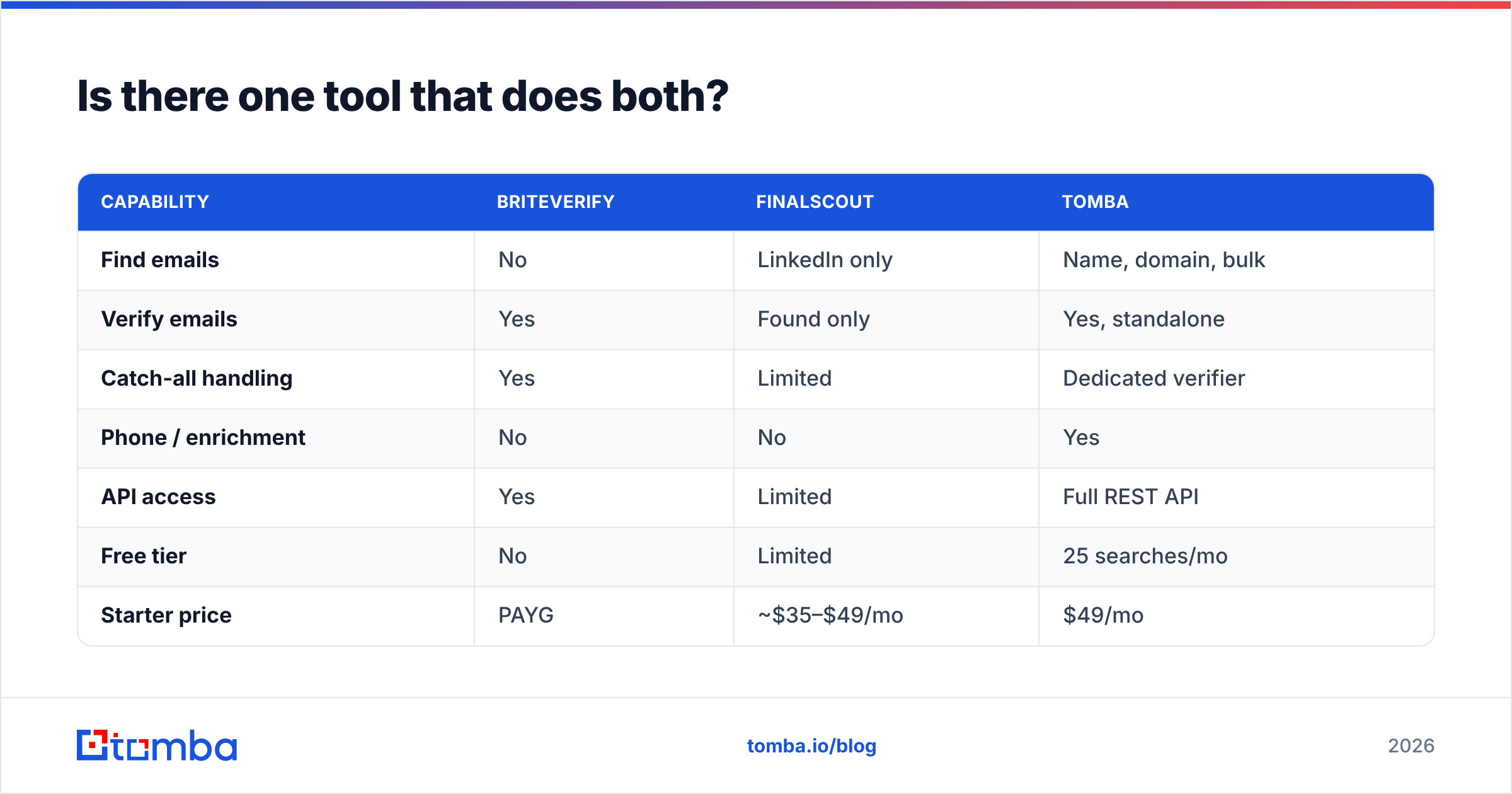
| Capability | BriteVerify | FinalScout | Tomba |
|---|---|---|---|
| Find emails | No | LinkedIn only | Name, domain, bulk |
| Verify emails | Yes | Found only | Yes, standalone |
| Catch-all handling | Yes | Limited | Dedicated verifier |
| Phone / enrichment | No | No | Yes |
| API access | Yes | Limited | Full REST API |
| Free tier | No | Limited | 25 searches/mo |
| Starter price | PAYG | ~$35–$49/mo | $49/mo |
The point isn't that Tomba beats BriteVerify at pure verification volume or out-LinkedIns FinalScout on a single profile. It's that for the common real-world workflow — source leads, confirm they're deliverable, then send — one subscription replaces two, with a free tier to test before you commit.
)
How do you decide in five minutes?#
Strip it down to one question: which half of the problem do you have?
- "I have a list and it bounces." → You need verification. BriteVerify is a solid pick; Tomba's verifier does the same job inside a broader stack.
- "I need new contacts from LinkedIn." → You need a finder. FinalScout works for one-at-a-time LinkedIn motion; Tomba scales it to bulk and adds verification.
- "I need to find and verify, at volume, without two invoices." → You need an all-in-one. That's where consolidating on Tomba pays off.
Don't overthink the "vs." These tools aren't fighting for the same seat — they're standing in different parts of your funnel. The expensive mistake is buying a finder when you needed hygiene, or buying a verifier and wondering why no new leads appeared.
For most growing outbound teams in 2026, the cleanest setup is a single platform that finds, verifies, and enriches in one place. Start with the Tomba Email Finder free tier — 25 searches a month, built-in verification, no card required — and see whether one tool can quietly retire two line items from your stack. If it can't, you'll at least know precisely which specialist — BriteVerify or FinalScout — your workflow actually demands.
For deeper reading on how verification protects deliverability, see Validity's BriteVerify documentation and the broader category landscape on G2.
// get started
Find, verify and enrich your first contacts today
Start on the free plan with 25 searches a month, then scale when your team is ready.
Free plan · No credit card required · GDPR & CCPA
// about the author