Browse AI vs Octoparse: Best No-Code Web Scraper in 2026
Browse AI vs Octoparse, compared on pricing, ease of use, scale, and data quality — plus where each one fits in a real B2B data workflow in 2026.
You found two no-code scrapers that promise the same thing — pull data off any website without writing code — and now you have to pick one. Browse AI and Octoparse both do that. They do it very differently, and the wrong choice costs you weeks of rebuilt robots and broken exports.
This is a direct, hands-on comparison of Browse AI vs Octoparse for 2026: pricing, learning curve, scale, maintenance, and the part most reviews skip — what happens to your data after it leaves the scraper.
TL;DR#
- Browse AI is the faster on-ramp: point-and-click "robots," scheduled monitoring, and clean change-tracking. Best for non-technical teams watching a known set of pages.
- Octoparse is the heavier engine: visual workflow builder, pagination, IP rotation, and deep crawls. Best for large one-off extractions and complex site structures.
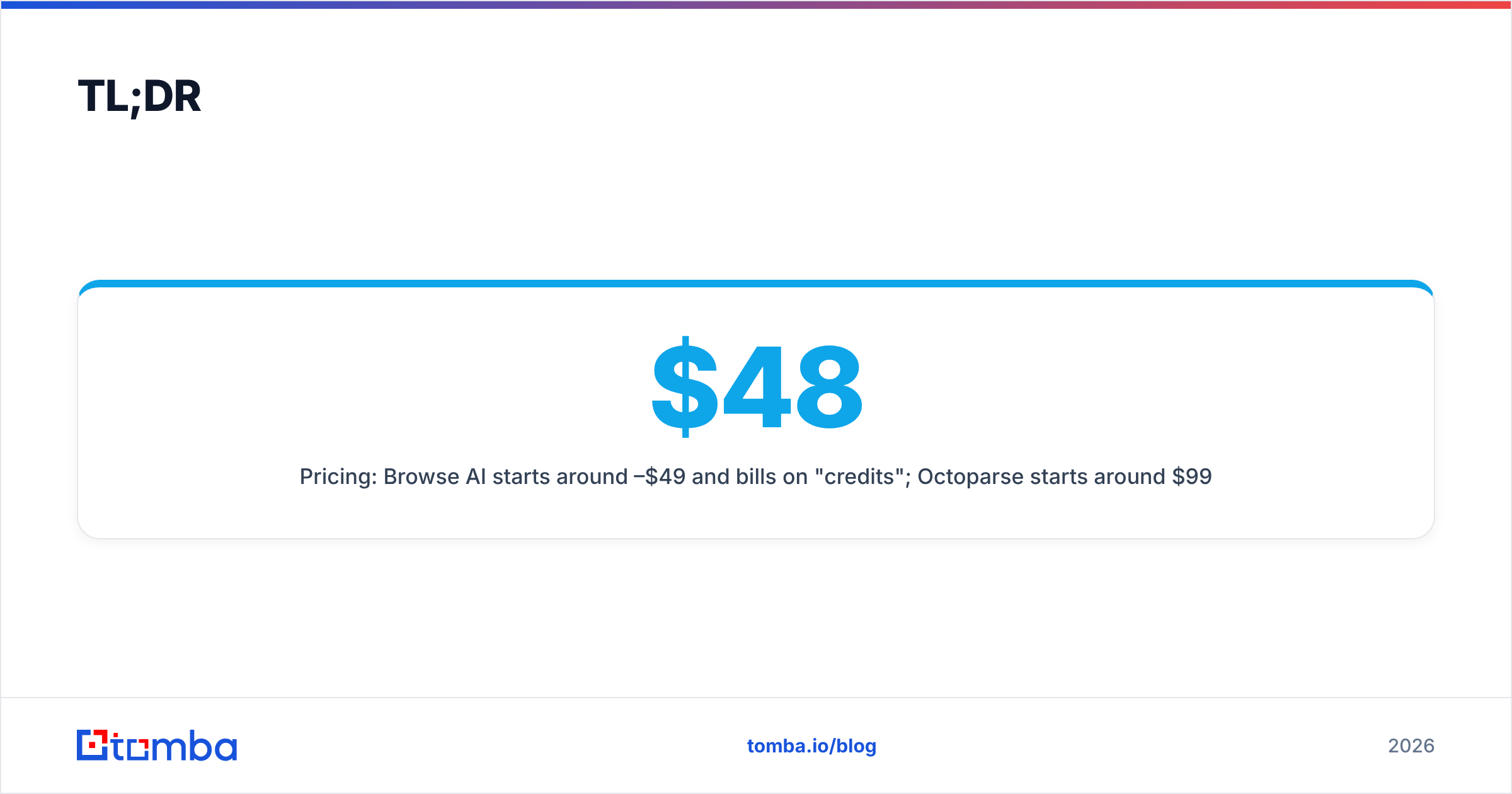
- Pricing: Browse AI starts around $48–$49/mo and bills on "credits"; Octoparse starts around $99/mo and bills on concurrency/cloud tasks. Both have limited free tiers.
- Neither tool verifies contact data. Scraped emails and phones are raw strings — you still need a verification and enrichment layer before outreach.
- Pick by job: monitoring + alerts → Browse AI. Bulk structured crawls → Octoparse. Reliable B2B contact data → a purpose-built finder, not a generic scraper.
What are Browse AI and Octoparse?#
Both are no-code web scrapers — software that reads a web page the way a browser does and turns the visible content into structured rows you can export. The pitch for each is "no engineers required," and both deliver on that to a point.
Browse AI frames everything around two primitives:
- Extract — pull a list or table from a page once or on a schedule.
- Monitor — watch a page and alert you when something changes (price, stock, a new job listing).
You train a "robot" by clicking the elements you want. It records the selectors, and from then on the robot replays that recipe. The mental model is one robot per page type.
Octoparse is closer to a visual ETL tool. You build a workflow — open URL, loop through a list, click into each item, paginate, extract fields — as a flowchart. It supports deeper crawls, login flows, and cloud extraction with IP rotation. The mental model is one workflow per site you want to harvest.
That difference in primitives is the whole story. Browse AI optimizes for recurring, narrow tasks. Octoparse optimizes for broad, structural extraction.
Browse AI vs Octoparse: the at-a-glance comparison#
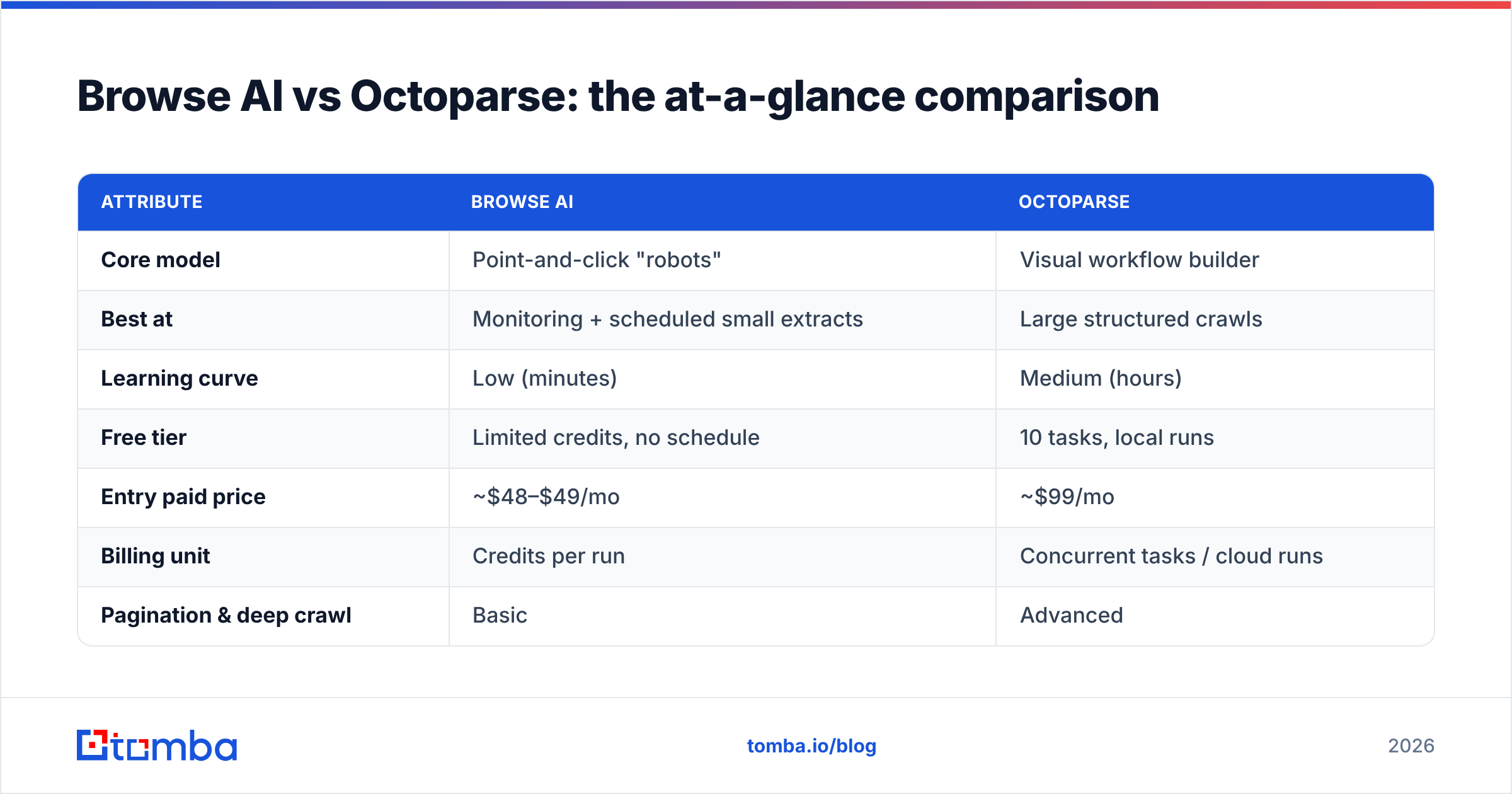
Here's the side-by-side before we go deeper. Treat the numbers as 2026 list pricing — both vendors run promotions and change tiers, so confirm on their pricing pages before you buy.
| Attribute | Browse AI | Octoparse |
|---|---|---|
| Core model | Point-and-click "robots" | Visual workflow builder |
| Best at | Monitoring + scheduled small extracts | Large structured crawls |
| Learning curve | Low (minutes) | Medium (hours) |
| Free tier | Limited credits, no schedule | 10 tasks, local runs |
| Entry paid price | ~$48–$49/mo | ~$99/mo |
| Billing unit | Credits per run | Concurrent tasks / cloud runs |
| Pagination & deep crawl | Basic | Advanced |
| IP rotation | On higher tiers | Yes, built in |
| Change monitoring + alerts | Native, strong | Possible but clunky |
| Integrations | 7,000+ via webhooks/Zapier | API, Zapier, database export |
| Data verification | None | None |
The pattern: Browse AI wins on speed-to-first-result and monitoring; Octoparse wins on depth and scale. Neither cleans or verifies what it pulls.
Is Browse AI easier to use than Octoparse?#
Yes — measurably. If "I just want data out of this page by lunch" is the goal, Browse AI gets a non-technical user there faster.
The reason is the constraint. Browse AI gives you fewer knobs: you pick elements, set a schedule, choose an output. That narrowness is a feature for marketers, analysts, and founders who don't want to think about loops and XPaths.
Octoparse's power is also its tax. The workflow canvas exposes loops, conditional branches, pagination logic, and "action" blocks. For a list-of-products-across-50-pages crawl, that control is exactly what you need. For "watch this competitor's pricing page," it's overkill, and you'll spend an afternoon wiring something Browse AI does in five clicks.
A simple heuristic:
- One page, watched over time → Browse AI.
- Thousands of pages, harvested once → Octoparse.
- A login wall or multi-step navigation → Octoparse.
- You'll hand this to a non-technical teammate → Browse AI.
- You need IP rotation to avoid blocks at scale → Octoparse.
How do Browse AI and Octoparse handle scale?#
Octoparse is built for volume; Browse AI is built for frequency. They're optimizing different axes, and conflating them is the most common buying mistake.
Octoparse runs cloud extraction with concurrent tasks and rotating IPs, so a single workflow can crawl deep catalogs, real-estate listings, or directory sites with tens of thousands of rows. You pay for concurrency — more parallel tasks, higher tier.
Browse AI bills in credits per run. That model is elegant for monitoring 200 pages every morning, but it gets expensive fast if you try to use it as a bulk harvester. You can absolutely pull large lists, but the unit economics push you toward "many small scheduled jobs," not "one giant crawl."
So the real question isn't "which scales better" — it's "scales on which dimension?"
- Need the same 500 URLs checked daily? Browse AI's scheduling and change-tracking is cleaner and cheaper.
- Need one 80,000-row dump of a marketplace? Octoparse's concurrency model wins on both speed and cost.
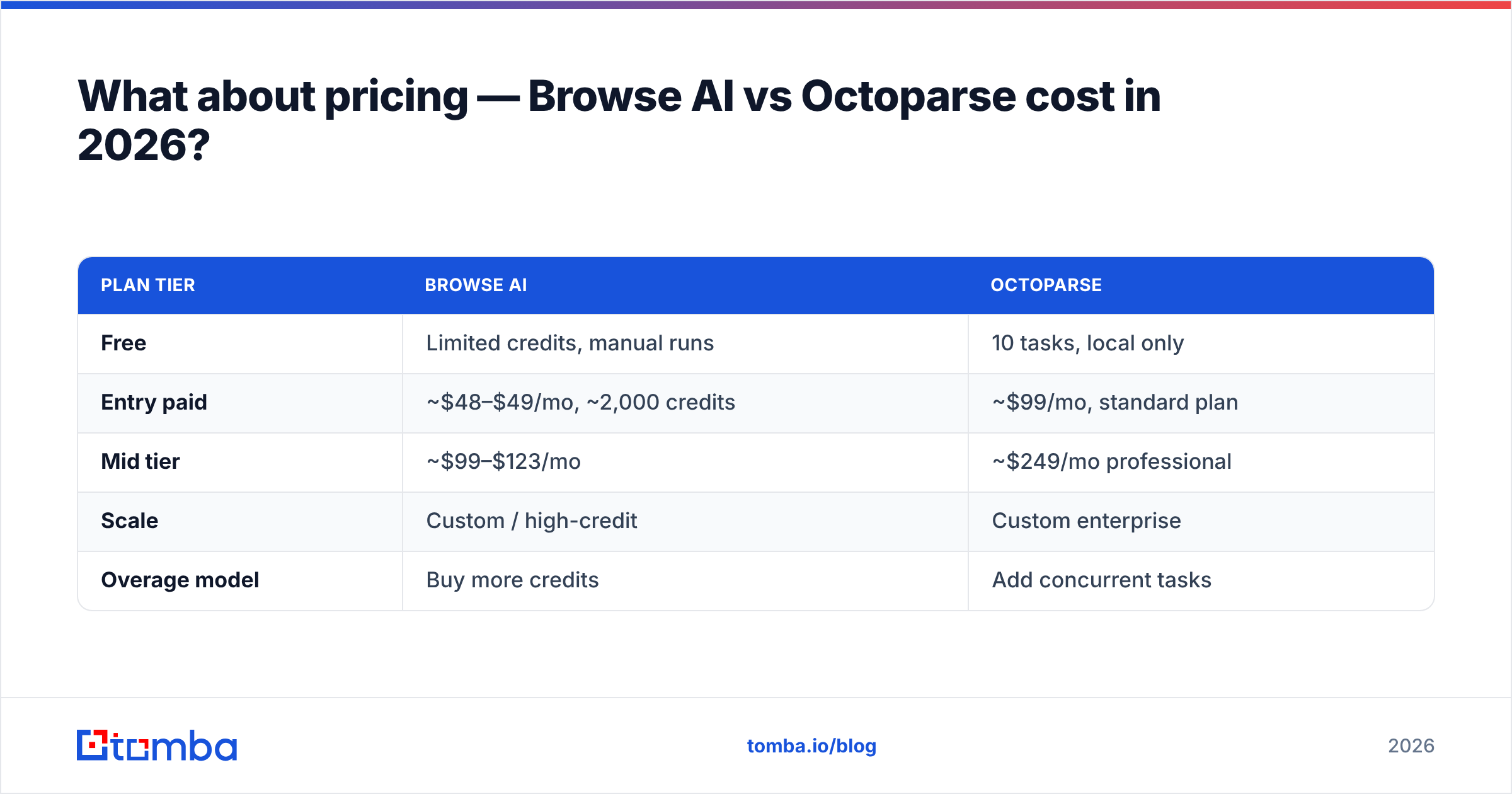
What about pricing — Browse AI vs Octoparse cost in 2026?#
Browse AI is cheaper to start; Octoparse is cheaper per row at volume. Below is the practical breakdown.
| Plan tier | Browse AI | Octoparse |
|---|---|---|
| Free | Limited credits, manual runs | 10 tasks, local only |
| Entry paid | ~$48–$49/mo, ~2,000 credits | ~$99/mo, standard plan |
| Mid tier | ~$99–$123/mo | ~$249/mo professional |
| Scale | Custom / high-credit | Custom enterprise |
| Overage model | Buy more credits | Add concurrent tasks |
Two traps to avoid:
- Credit math on Browse AI. A "run" can consume multiple credits depending on rows and pages. Estimate your monthly run count and row count before committing, or the entry tier evaporates.
- Concurrency math on Octoparse. A cheap plan with one concurrent task means big crawls run serially and slowly. The price you compare should be the one that actually finishes your job in a reasonable window.
For a defensible decision, run the exact job you need on each free tier first. Synthetic benchmarks lie; your target sites don't.
Browse AI vs Octoparse: which should you choose?#
Choose based on the shape of your work, not the brand:
- Choose Browse AI if you're monitoring known pages, you want alerts on change, your team is non-technical, and your volumes are modest-but-recurring. The 7,000+ integration surface and webhook support make it a clean trigger source for automations.
- Choose Octoparse if you're doing deep, structural crawls, you hit login walls and pagination, you need IP rotation to avoid blocks, and you're comfortable spending a few hours building a robust workflow that runs at scale.
Most teams that do serious data work end up using a scraper for collection and a separate stack for cleaning, verifying, and enriching. Which brings us to the part both tools leave to you.
What neither Browse AI nor Octoparse does: clean, verified contact data#
Here's the honest limitation: a scraper gives you strings, not validated records. When you scrape a directory or a company site for emails and phone numbers, you get exactly what the page shows — typos, role accounts (info@, sales@), out-of-date addresses, and catch-all domains that accept everything and bounce later.
If your end goal is outreach, that raw output is a liability:
- Sending to scraped, unverified addresses tanks your sender reputation and inflates bounce rates.
- Catch-all domains pass a naive syntax check but still fail silently. You need a real catch-all verifier to know what's deliverable.
- Scraped data has no source provenance, so you can't tell a fresh email from a five-year-old one.
This is where a generic scraper and a purpose-built data tool part ways. A scraper answers "what's on this page?" A contact-data platform answers "is this person reachable, and is this the right address?"
In practice, the cleanest B2B workflow looks like a pipeline, not a single tool:
- Collect structure with Browse AI or Octoparse (or skip scraping entirely for contacts and use a domain search).
- Verify every address with an email verifier before it touches a sequence.
- Enrich thin records — job title, company size, LinkedIn — via data enrichment.
- Dedupe and load into your CRM with a bulk job so you're not paying credits to re-process the same rows.
Scrapers are great at step one for content. For contacts, a finder that's already indexing verified B2B records skips the scrape-then-clean dance entirely.
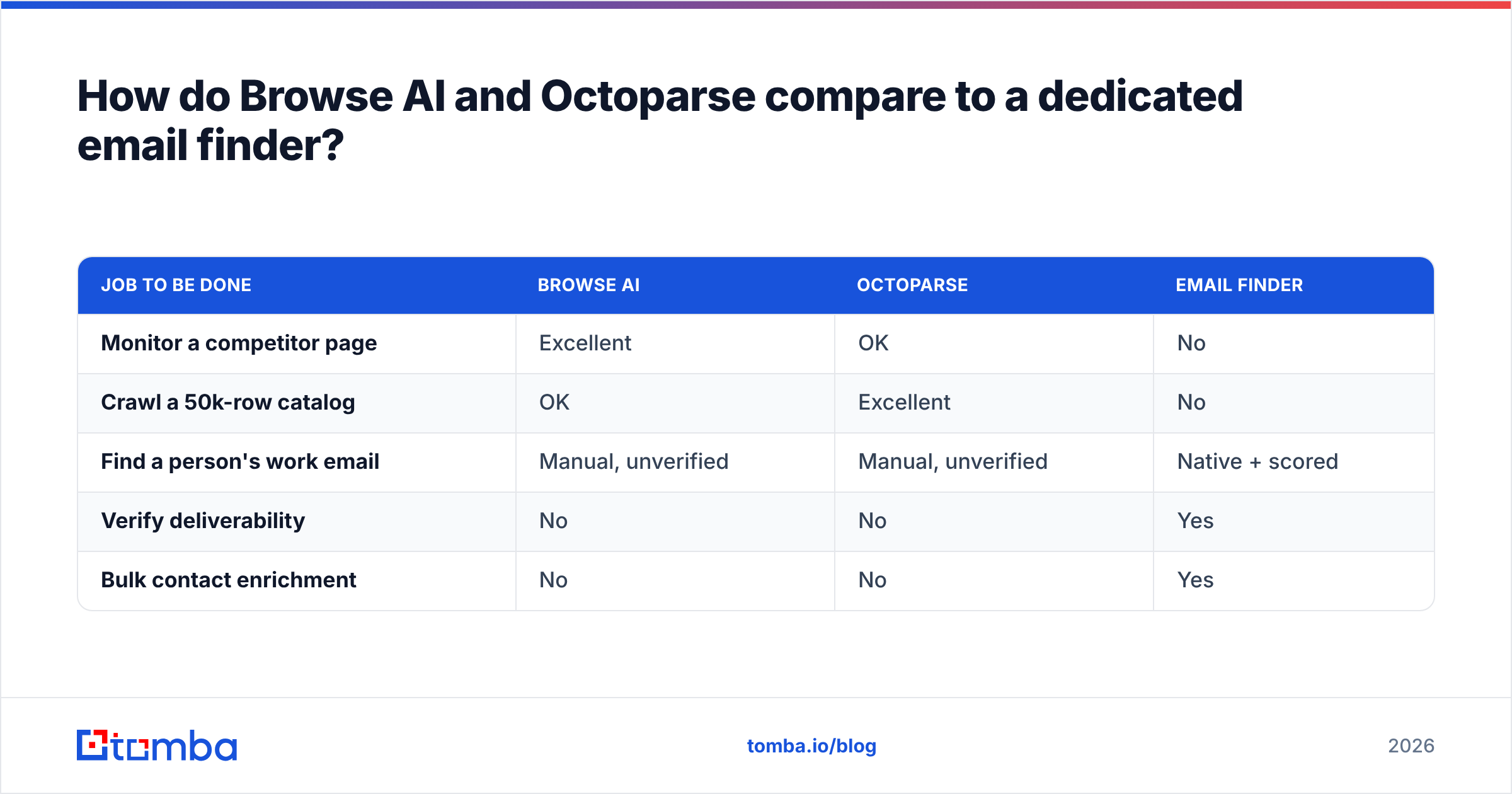
How do Browse AI and Octoparse compare to a dedicated email finder?#
If contacts — not prices or listings — are what you're after, a generic scraper is the slow path. You'd build a robot, target each site, extract whatever email text appears, then spend more time verifying than you spent scraping.
A dedicated finder inverts that. Instead of reading one page at a time, it searches across a maintained B2B database keyed by domain and name, and returns addresses with a confidence score and sources attached.
| Job to be done | Browse AI | Octoparse | Email finder |
|---|---|---|---|
| Monitor a competitor page | Excellent | OK | No |
| Crawl a 50k-row catalog | OK | Excellent | No |
| Find a person's work email | Manual, unverified | Manual, unverified | Native + scored |
| Verify deliverability | No | No | Yes |
| Bulk contact enrichment | No | No | Yes |
The takeaway isn't "scrapers are bad." It's that scrapers and finders solve different problems, and people waste months trying to bend a scraper into a contact database. Use Browse AI/Octoparse for web content. Use a finder for people.
Frequently asked questions#
Is Browse AI or Octoparse better for beginners? Browse AI. The point-and-click robot model and short setup time make it the gentler start. Octoparse rewards patience with more power, but the workflow builder has a real learning curve.
Can either tool scrape behind a login? Octoparse handles login flows and multi-step navigation more reliably. Browse AI can record sessions on higher tiers, but complex authenticated crawls are Octoparse's territory.
Are scraped emails safe to send to? No — not without verification. Scraped addresses include role accounts, typos, and stale data. Always run them through an email verifier and check catch-all domains before outreach.
Which is cheaper, Browse AI or Octoparse? Browse AI is cheaper to enter (~$49/mo vs ~$99/mo) and better for recurring small jobs. Octoparse is usually cheaper per row for large one-time crawls. Match the billing model — credits vs concurrency — to your actual workload.
Do I still need an email finder if I have a scraper? If you're collecting contacts for sales, yes. Scrapers extract text; they don't verify deliverability or enrich records. A finder gives you scored, source-backed addresses without the scrape-and-clean overhead.
The bottom line#
Browse AI and Octoparse are both legitimate no-code scrapers, and the right pick is unromantic: Browse AI for monitoring and recurring small extracts, Octoparse for deep structural crawls at scale. Compare them on the exact job you need done, on their free tiers, with the billing model that matches your volume — not on feature-list length. You can sanity-check vendor claims against real user reviews on G2 before you commit.
But if the data you actually want is people you can email, neither scraper finishes the job. They hand you raw strings; you still own verification, enrichment, and deduplication.
Skip that overhead. Tomba's Email Finder searches verified B2B records by domain or name and returns addresses with confidence scores and sources — no robot to train, no workflow to maintain, no separate cleaning step. Start free with 25 searches a month, then scale on a plan ($49/mo Starter, $99/mo Growth) that bills for results instead of credits. Let the scrapers handle pages; let Tomba handle people.
// get started
Find, verify and enrich your first contacts today
Start on the free plan with 25 searches a month, then scale when your team is ready.
Free plan · No credit card required · GDPR & CCPA
// about the author