Bulk Email Providers in 2026: Pricing, Features & Top Picks
A no-fluff guide to choosing bulk email providers in 2026 — compare pricing, send volume, deliverability, and which ESP fits cold outreach vs. marketing.
Bulk email providers let you send thousands — sometimes millions — of emails from a single platform without your messages collapsing into spam folders or torching your domain reputation. But "send a lot of email" is where the similarities end. The provider built for a Black Friday newsletter blast is not the provider built for a 50-step cold outreach sequence, and picking the wrong one is an expensive, slow mistake.
This guide breaks down what bulk email providers actually do, how the major categories differ, what you should pay, and the one input that decides whether any of them work: the quality of the list you feed in.
TL;DR#
- Bulk email providers are platforms that send high-volume email (marketing, transactional, or cold outreach) with deliverability infrastructure you don't have to build yourself.
- They split into three camps: marketing ESPs (Mailchimp, Brevo, HubSpot), transactional/API senders (SendGrid, Postmark, Amazon SES), and cold-outreach platforms (Instantly, Smartlead, Saleshandy).
- Pricing is driven by contacts, monthly send volume, and seats — expect anywhere from free tiers to $300+/mo as you scale.
- Deliverability beats volume. A clean, verified list on a cheap sender outperforms a dirty list on a premium one.
- Verify and enrich your list before you send. Use an email verifier to strip bounces and protect your sender reputation.
What are bulk email providers?#
A bulk email provider is a service that sends large batches of email on your behalf while managing the infrastructure that keeps those emails landing in inboxes — IP warmup, authentication (SPF, DKIM, DMARC), bounce handling, and reputation monitoring.
Think of it like shipping. You could hand-deliver every package yourself, but a carrier already has the trucks, the routes, and the relationships with every regional depot. A bulk email provider is that carrier for your messages: it owns the sending IPs, negotiates the trust with inbox providers like Gmail and Outlook, and absorbs the operational pain so you just hand over the payload.
What separates a real provider from "I'll just BCC 500 people from my Gmail":
- Authentication handling — SPF, DKIM, and DMARC configured correctly so mailbox providers trust your mail.
- Reputation management — dedicated or pooled IPs, automatic warmup, and feedback-loop monitoring.
- Throttling and queueing — sending in waves instead of one suspicious spike.
- Compliance tooling — one-click unsubscribe, list-unsubscribe headers, and suppression lists to stay CAN-SPAM and GDPR compliant.
- Analytics — opens, clicks, bounces, and complaint rates so you can course-correct.
Send a few hundred cold emails straight from a personal inbox and you'll get throttled, flagged, and eventually blacklisted. That's the gap these platforms fill.
)
What are the main types of bulk email providers?#
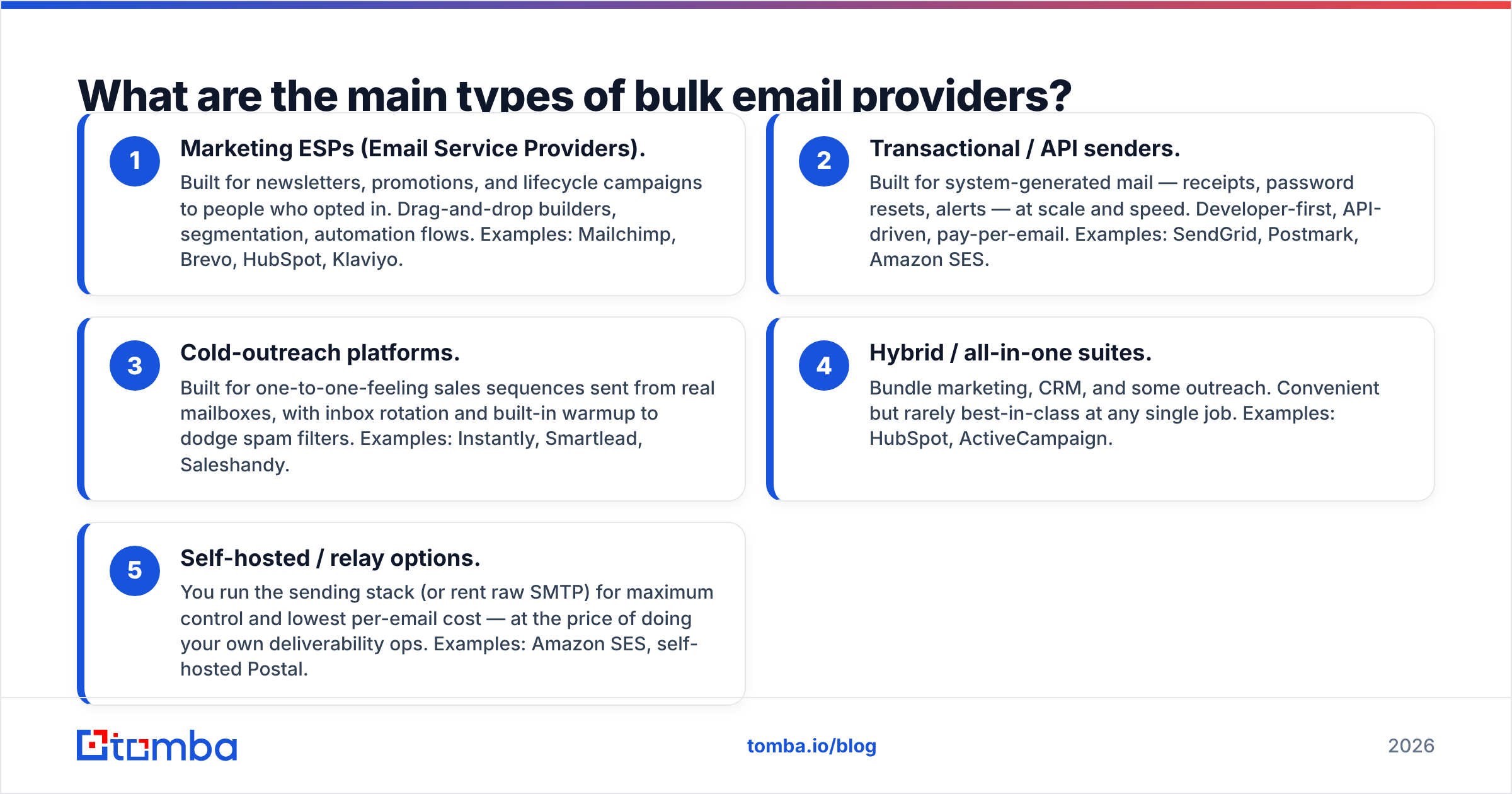
Not every "bulk email" tool is built for the same job. Picking from the wrong category is the most common mistake teams make. There are three broad types, and they optimize for genuinely different things.
- Marketing ESPs (Email Service Providers). Built for newsletters, promotions, and lifecycle campaigns to people who opted in. Drag-and-drop builders, segmentation, automation flows. Examples: Mailchimp, Brevo, HubSpot, Klaviyo.
- Transactional / API senders. Built for system-generated mail — receipts, password resets, alerts — at scale and speed. Developer-first, API-driven, pay-per-email. Examples: SendGrid, Postmark, Amazon SES.
- Cold-outreach platforms. Built for one-to-one-feeling sales sequences sent from real mailboxes, with inbox rotation and built-in warmup to dodge spam filters. Examples: Instantly, Smartlead, Saleshandy.
- Hybrid / all-in-one suites. Bundle marketing, CRM, and some outreach. Convenient but rarely best-in-class at any single job. Examples: HubSpot, ActiveCampaign.
- Self-hosted / relay options. You run the sending stack (or rent raw SMTP) for maximum control and lowest per-email cost — at the price of doing your own deliverability ops. Examples: Amazon SES, self-hosted Postal.
The practical rule: match the tool to the permission level of your list. Opted-in subscribers go to a marketing ESP. App notifications go to a transactional sender. Cold prospects go to an outreach platform designed to protect your domain — never to a marketing ESP, which will suspend you the moment complaint rates spike.
How do the top bulk email providers compare?#
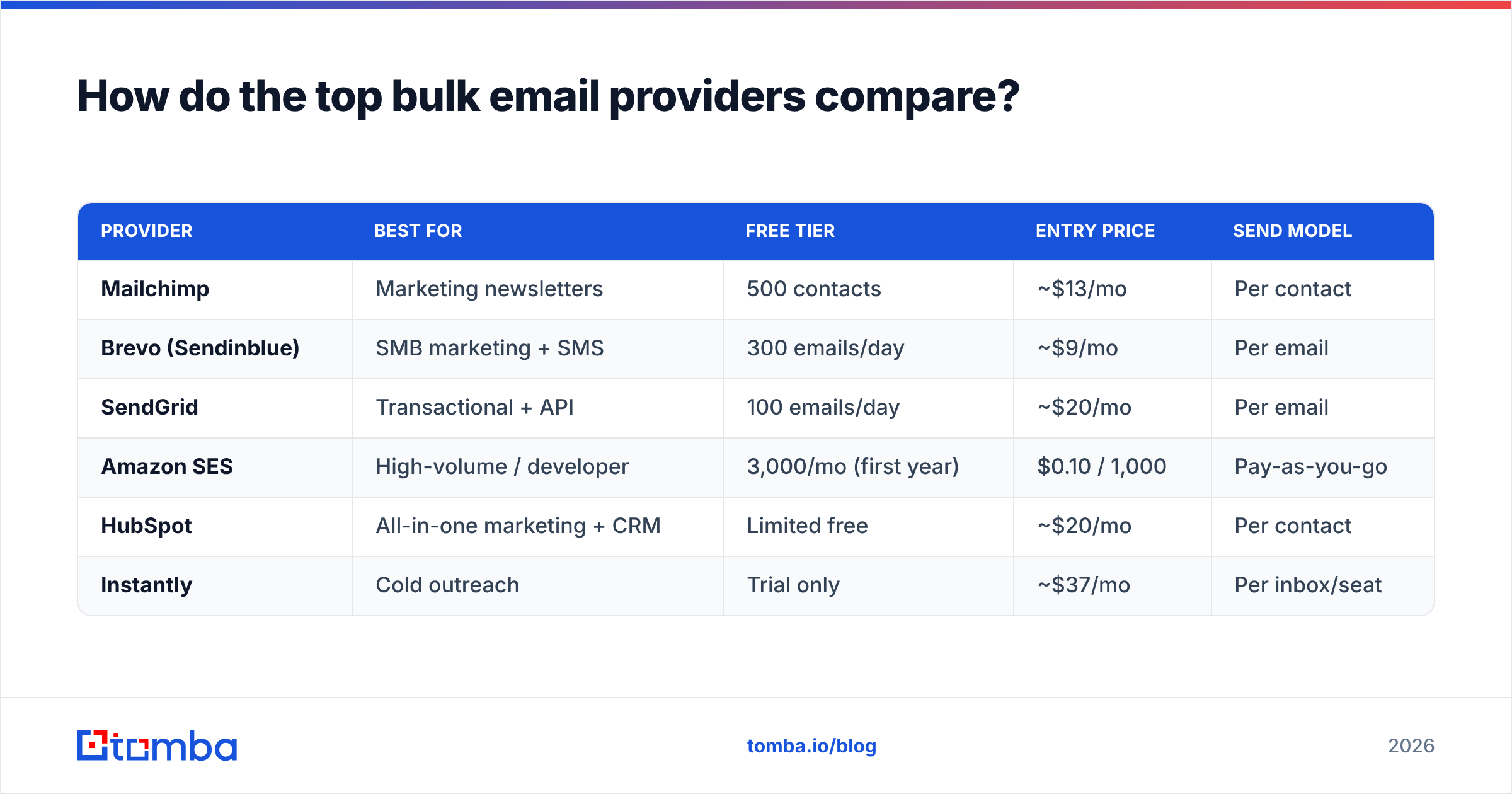
Here's a side-by-side of representative providers across the categories. Pricing reflects published entry tiers as of 2026 and moves with volume — always confirm on the vendor's own page.
| Provider | Best for | Free tier | Entry price | Send model |
|---|---|---|---|---|
| Mailchimp | Marketing newsletters | 500 contacts | ~$13/mo | Per contact |
| Brevo (Sendinblue) | SMB marketing + SMS | 300 emails/day | ~$9/mo | Per email |
| SendGrid | Transactional + API | 100 emails/day | ~$20/mo | Per email |
| Amazon SES | High-volume / developer | 3,000/mo (first year) | $0.10 / 1,000 | Pay-as-you-go |
| HubSpot | All-in-one marketing + CRM | Limited free | ~$20/mo | Per contact |
| Instantly | Cold outreach | Trial only | ~$37/mo | Per inbox/seat |
A few things this table makes obvious:
- Per-contact pricing (Mailchimp, HubSpot) punishes big lists. If you have 100k contacts but email them rarely, per-email pricing is far cheaper.
- Amazon SES is the cost floor — pennies per thousand — but it's raw infrastructure. You bring your own templates, dashboards, and deliverability discipline.
- Cold-outreach tools price by mailbox, not contact, because the strategy is many small sends across rotated inboxes, not one giant blast.
There's no universal winner. The winner is the one whose pricing model matches your send pattern.
What should you actually pay for bulk email?#
Conclusion first: budget for the variable that scales fastest in your use case — contacts for marketing, volume for transactional, mailboxes for outreach — and ignore the headline "starting at" price.
Cost drivers to model before you commit:
- List size vs. send frequency. A 50k list emailed weekly behaves very differently on per-contact vs. per-email pricing. Run both numbers.
- Overage penalties. Some ESPs auto-bump you to the next tier the moment you cross a threshold. Read the overage policy.
- Deliverability add-ons. Dedicated IPs, priority support, and validation often sit behind higher tiers.
- Hidden verification costs. Many providers charge per address to validate your list — or worse, don't validate at all and let bounces wreck your reputation.
That last point is where most teams quietly bleed money. Sending to invalid addresses doesn't just waste credits; it raises your bounce rate, which lowers your sender reputation, which lands your good emails in spam. The fix is to clean the list before it ever touches the provider — and that's cheaper to do upstream. Compare it against transparent Tomba pricing and you'll often find front-loading verification costs less than paying for bounced sends.
Is deliverability more important than the provider you choose?#
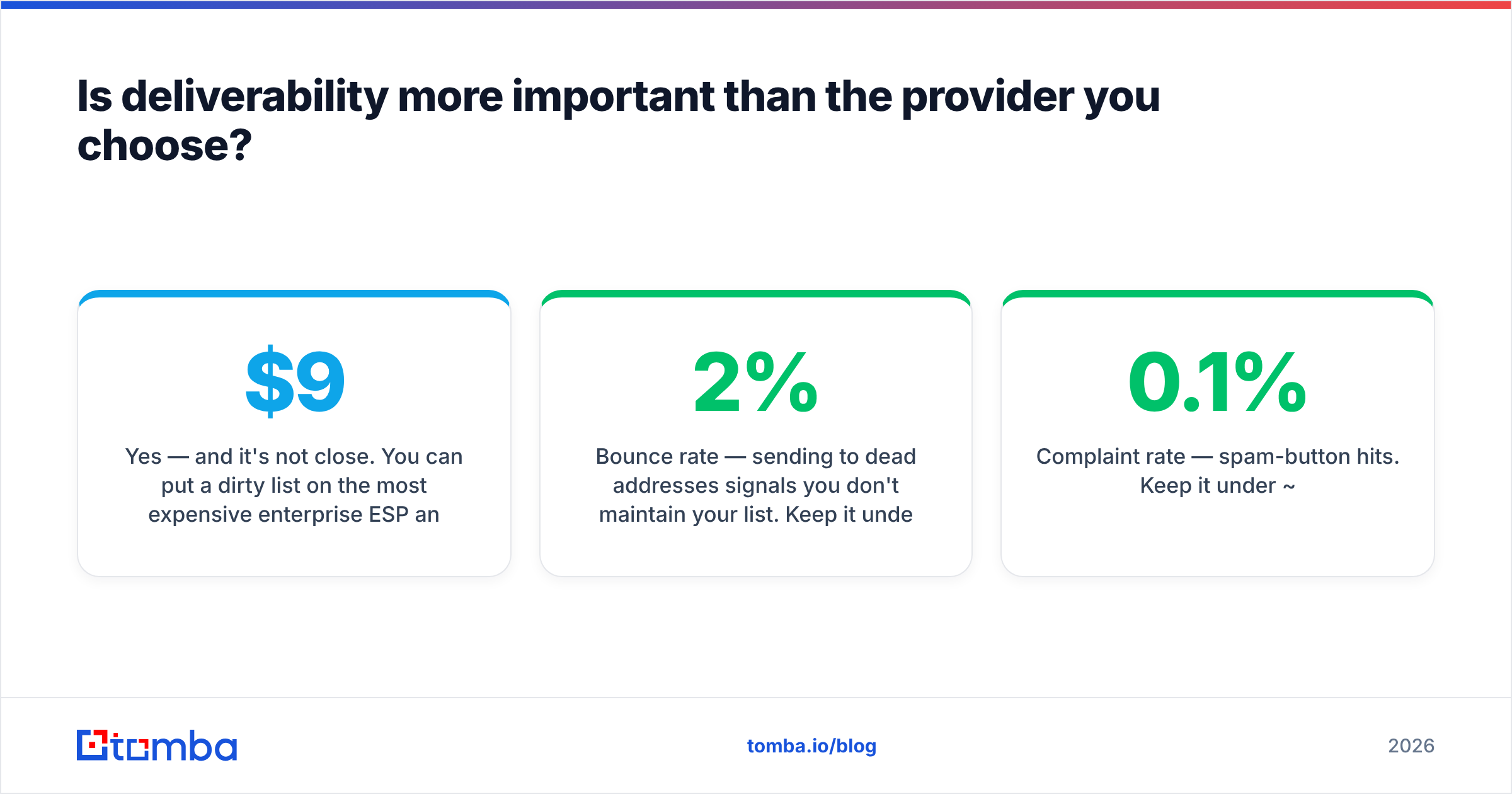
Yes — and it's not close. You can put a dirty list on the most expensive enterprise ESP and still land in spam. You can put a clean, verified, well-segmented list on a $9/mo plan and hit the primary inbox. The list quality dominates the platform choice.
Mailbox providers score your domain on signals you control regardless of vendor:
- Bounce rate — sending to dead addresses signals you don't maintain your list. Keep it under ~2%.
- Complaint rate — spam-button hits. Keep it under ~0.1%.
- Engagement — opens and replies tell Gmail your mail is wanted.
- Authentication — valid SPF, DKIM, and DMARC are table stakes in 2026; Google and Yahoo now enforce them for bulk senders.
- Consistency — steady volume beats erratic spikes.
Every one of those improves when your list is verified and your targeting is tight. For a deeper primer, the email deliverability glossary covers the mechanics, and authoritative vendor docs like HubSpot's deliverability guides and G2's ESP category are worth bookmarking for benchmarks.
)
How do you keep your bulk email list clean?#
A bulk email provider sends what you give it. Garbage in, spam folder out. The workflow that protects your reputation runs before the send, not after the bounces roll in.
A practical pre-send checklist:
- Verify every address. Run the full list through an email verification pass to remove invalid, role-based, and risky addresses. Re-verify lists older than 90 days.
- Catch the catch-alls. Domains that accept everything hide dead addresses. A dedicated catch-all verifier tells you which are safe to mail.
- Deduplicate. Remove duplicate rows so you don't double-send and inflate complaint risk.
- Segment by engagement. Mail your most active contacts first to build positive signal, then expand.
- Warm up new domains and IPs. Ramp volume gradually over 2–4 weeks.
- Source contacts accurately. Garbage lists usually start with bad data — finding accurate, current contacts with a real email finder beats scraping a stale CSV.
For large lists, batch the whole verification and finding workflow with a bulk email finder so you're not processing addresses one at a time. The goal is simple: only valid, deliverable, permissioned addresses ever reach your provider.
Which bulk email provider should you choose?#
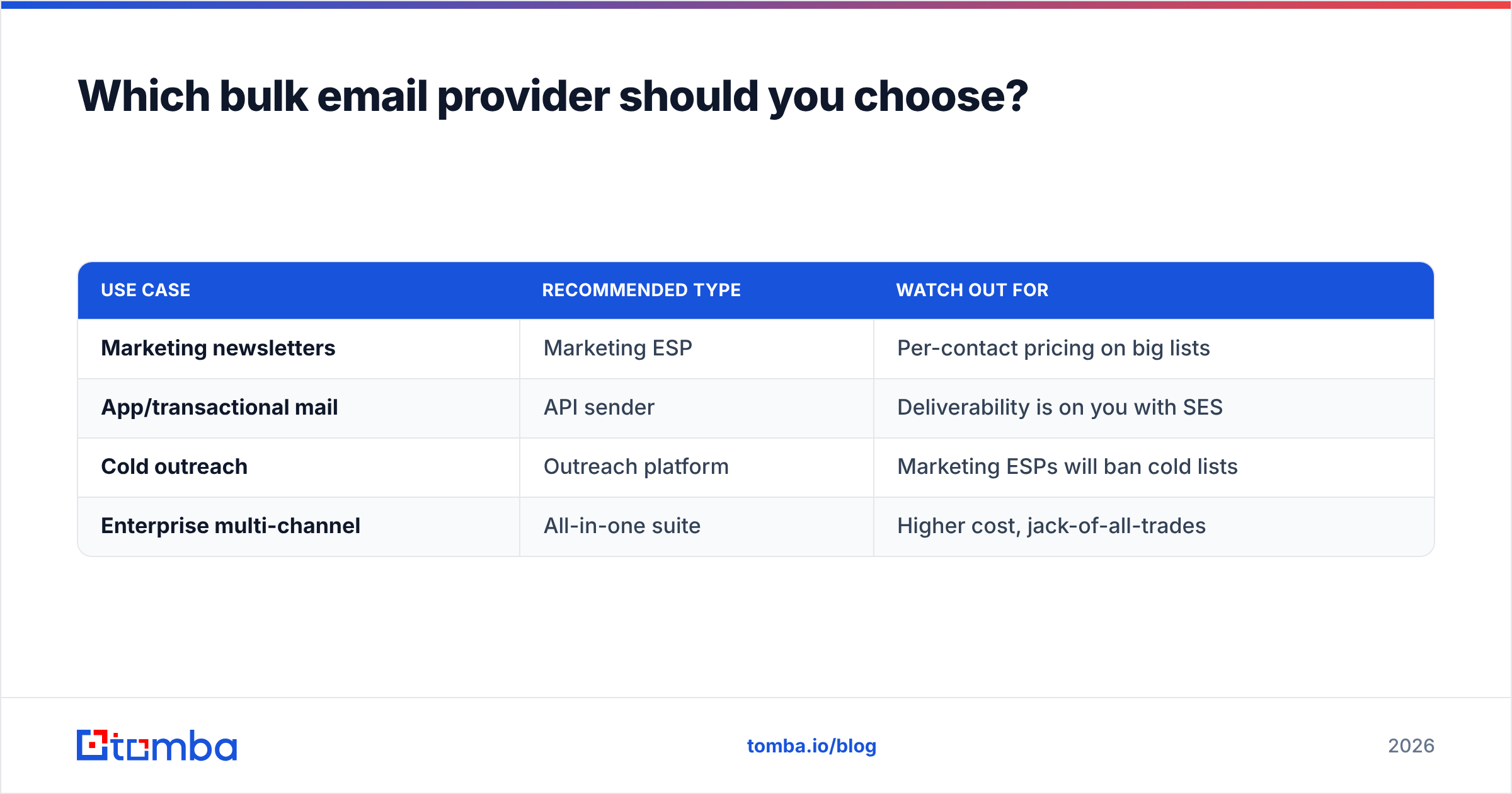
Decision shortcut by use case:
- Newsletters and marketing to opted-in subscribers → Mailchimp or Brevo. Brevo wins on price for large lists thanks to per-email billing; Mailchimp wins on ecosystem and templates.
- Transactional email from your app → SendGrid for ease, Amazon SES for the lowest cost at scale, Postmark for the fastest transactional delivery.
- Cold sales outreach → a dedicated outreach platform (Instantly, Smartlead) with inbox rotation and warmup — never a marketing ESP.
- All-in-one with CRM → HubSpot if you want marketing, sales, and contacts under one roof and can absorb the per-contact cost.
- Maximum control, minimum cost, engineering on staff → Amazon SES.
| Use case | Recommended type | Watch out for |
|---|---|---|
| Marketing newsletters | Marketing ESP | Per-contact pricing on big lists |
| App/transactional mail | API sender | Deliverability is on you with SES |
| Cold outreach | Outreach platform | Marketing ESPs will ban cold lists |
| Enterprise multi-channel | All-in-one suite | Higher cost, jack-of-all-trades |
Whatever you pick, the provider is the last mile. The first mile — and the one that decides whether you land in the inbox — is the accuracy of your contact data.
Frequently asked questions#
What is the cheapest bulk email provider? Amazon SES at roughly $0.10 per 1,000 emails is the cost floor, but it requires technical setup. For non-developers, Brevo's per-email pricing is the cheapest practical option for large lists.
Can I send cold email through Mailchimp or SendGrid? No. Marketing ESPs and transactional senders prohibit cold/unsolicited email and will suspend your account when complaint rates rise. Use a dedicated cold-outreach platform with mailbox rotation instead.
How many emails can I send per day? It depends on your domain reputation and warmup status, not just the plan. New domains should start at 20–50 per day per mailbox and ramp up; established marketing domains can send hundreds of thousands.
Do I need to verify my list if the provider has deliverability features? Yes. No provider can make a dead address deliverable. Verification is your job, upstream of the send.
Start with data your provider can actually deliver to#
The best bulk email provider in the world can't fix a list full of bounces. Before you compare another pricing page, fix the input: find accurate, current contacts and verify every address so your sends build reputation instead of burning it.
Tomba's Email Finder helps you source professional email addresses by domain, name, or company — then pair it with the email verifier to ship a clean, deliverable list to whichever provider you choose. Start on the free tier (25 searches/mo), and scale into Starter at $49/mo when your outreach grows. Clean data in, inbox out.
// get started
Find, verify and enrich your first contacts today
Start on the free plan with 25 searches a month, then scale when your team is ready.
Free plan · No credit card required · GDPR & CCPA
// about the author