Bulk Email Services in 2026: Best Platforms Compared
Bulk email services let you send thousands of messages without torching your domain. Here's how the top platforms compare on price, deliverability, and list hygiene in 2026.
Bulk Email Services in 2026: Best Platforms Compared
Sending one email is easy. Sending fifty thousand without landing in spam, getting your domain blacklisted, or torching your sender reputation is the hard part — and that is exactly what a bulk email service is built to solve.
TL;DR#
- Bulk email services handle the infrastructure (IPs, authentication, throttling, bounce handling) so you can send thousands of messages reliably.
- They split into three lanes: marketing/newsletter (Mailchimp, Brevo), transactional (SendGrid, Postmark), and cold outreach (Instantly, Smartlead). Picking the wrong lane is the #1 deliverability mistake.
- Price scales with volume and contacts, not features — expect $0 to $300+/mo depending on list size and send frequency.
- Your list quality matters more than your platform. A verified, accurate list on a cheap tool beats a dirty list on a premium one. Clean before you send.
- Use a verification step (like Tomba's email verifier) before any bulk send to strip bounces and protect your domain.
What is a bulk email service?#
A bulk email service is a platform that sends large volumes of email on your behalf while managing the technical machinery that keeps those emails out of spam folders. Think of it like a postal sorting facility: you hand over a stack of letters, and the facility handles routing, postage, address validation, and delivery confirmation — at a scale your home mailbox could never manage.
Without one, sending 10,000 emails from your own Gmail or company server would get you rate-limited, flagged, and likely blacklisted within hours. Bulk email services solve this with dedicated sending infrastructure and a set of core capabilities:
- Authentication setup — SPF, DKIM, and DMARC records that prove you are who you say you are, so mailbox providers trust your mail.
- IP and domain reputation management — warming up sending IPs gradually and spreading volume so you don't trip spam filters.
- Throttling and queuing — drip-feeding sends instead of dumping 50,000 emails in one burst that screams "spammer."
- Bounce and complaint handling — automatically suppressing addresses that hard-bounce or mark you as spam, which protects your sender reputation.
- Analytics — open, click, bounce, and unsubscribe tracking so you can measure what's working.
- Compliance tooling — automatic unsubscribe links and consent records to keep you on the right side of CAN-SPAM and GDPR.
The mistake most teams make is treating all bulk email services as interchangeable. They are not. A newsletter tool will throttle or ban you for cold outreach, and a cold-email tool will frustrate you if you're sending password resets.

What are the different types of bulk email services?#
There are three distinct categories, and matching your use case to the right one is the single biggest decision you'll make.
Marketing / newsletter platforms are built for opt-in audiences — your subscribers, customers, and leads who explicitly signed up. Tools like Mailchimp and Brevo focus on templates, automation flows, segmentation, and brand-heavy design. They have strict anti-cold-email policies and will suspend accounts with high complaint rates.
Transactional email services handle system-triggered messages: receipts, password resets, shipping notifications, OTP codes. Speed and reliability matter more than design. SendGrid and Postmark dominate here, usually accessed via API rather than a drag-and-drop editor.
Cold outreach platforms are designed for sales teams emailing prospects who haven't opted in. They emphasize inbox rotation, automated warmup, and reply detection. Instantly and Smartlead lead this space. Crucially, these tools assume you've sourced your own verified contact data — which is where a bulk email finder and verifier become part of the stack.
Which bulk email service is best in 2026?#
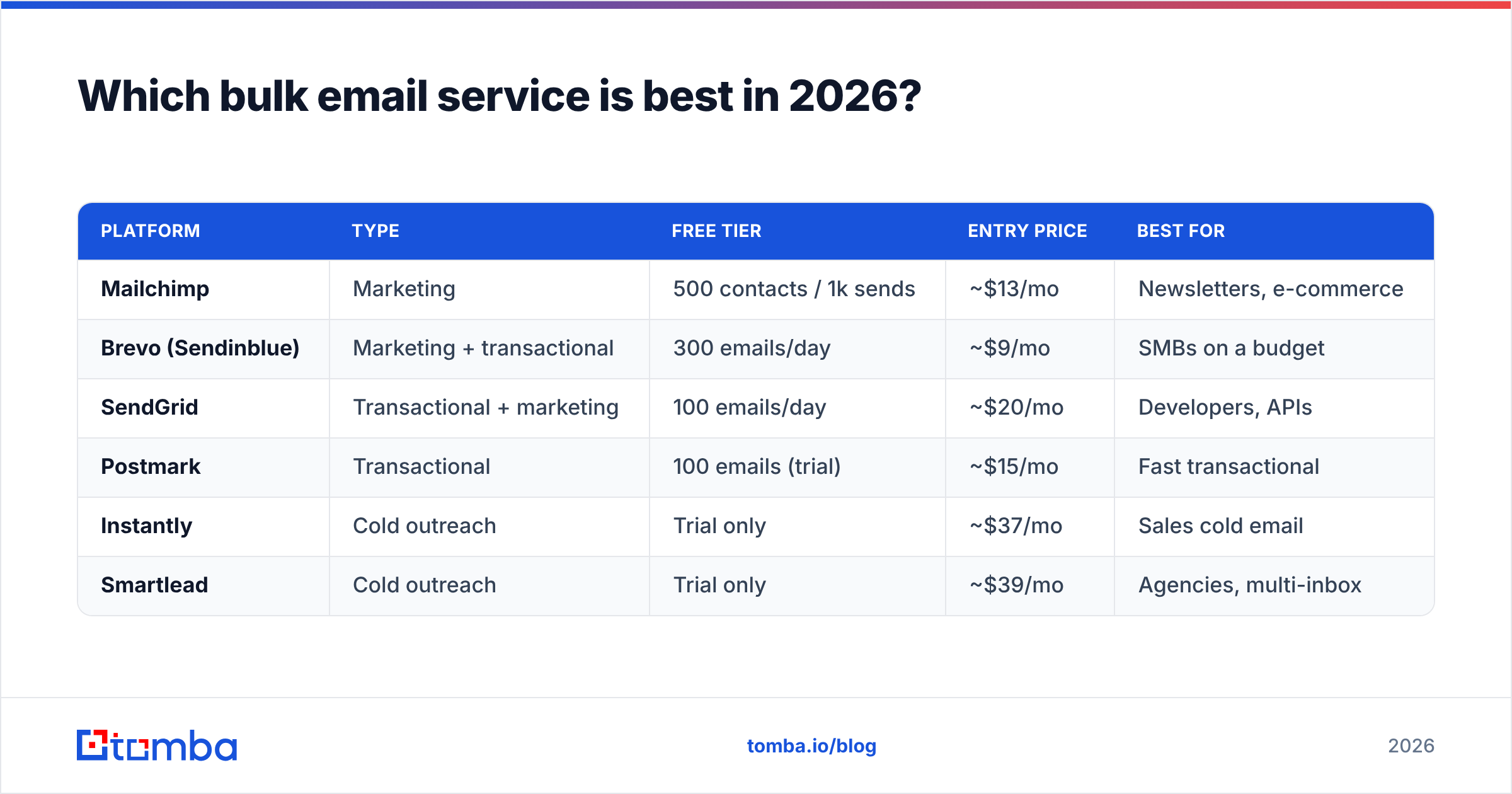
The honest answer: it depends on what you're sending and to whom. Here's a side-by-side comparison of the most-used platforms across the three categories.
| Platform | Type | Free tier | Entry price | Best for |
|---|---|---|---|---|
| Mailchimp | Marketing | 500 contacts / 1k sends | ~$13/mo | Newsletters, e-commerce |
| Brevo (Sendinblue) | Marketing + transactional | 300 emails/day | ~$9/mo | SMBs on a budget |
| SendGrid | Transactional + marketing | 100 emails/day | ~$20/mo | Developers, APIs |
| Postmark | Transactional | 100 emails (trial) | ~$15/mo | Fast transactional |
| Instantly | Cold outreach | Trial only | ~$37/mo | Sales cold email |
| Smartlead | Cold outreach | Trial only | ~$39/mo | Agencies, multi-inbox |
A few things stand out. Marketing tools price on contact count — you pay for the size of your list whether you email it or not. Transactional and cold-outreach tools price on send volume or inbox count. That difference can flip the cheapest option depending on your sending pattern: a 100,000-contact list you email twice a year is cheap on a pay-per-send tool and expensive on Mailchimp.
For an unbiased breakdown of features and verified reviews, G2's email marketing category is a solid neutral reference before you commit.
How much do bulk email services cost?#
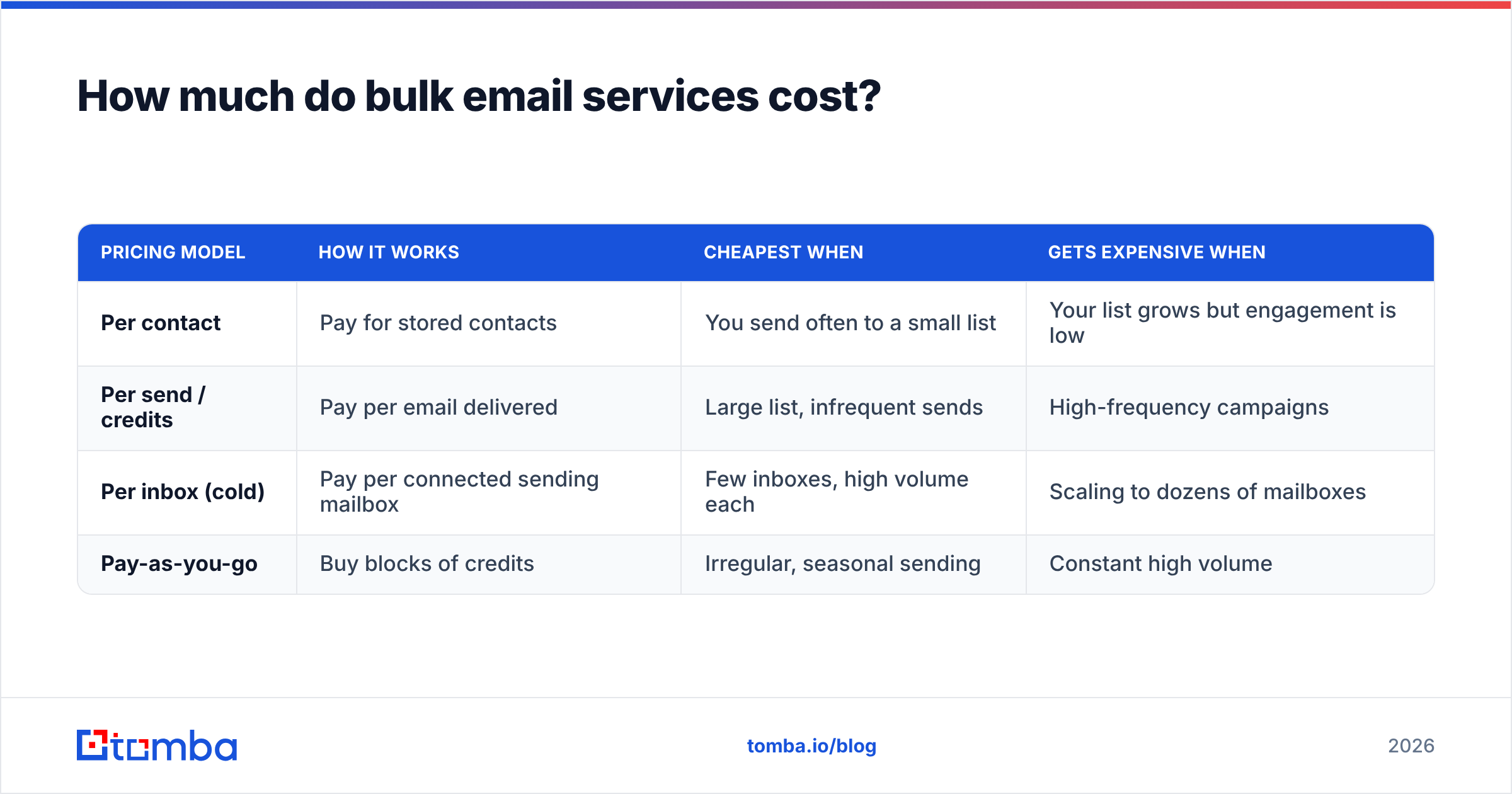
Pricing follows two models, and understanding which one you're being charged under prevents nasty surprises at scale.
| Pricing model | How it works | Cheapest when | Gets expensive when |
|---|---|---|---|
| Per contact | Pay for stored contacts | You send often to a small list | Your list grows but engagement is low |
| Per send / credits | Pay per email delivered | Large list, infrequent sends | High-frequency campaigns |
| Per inbox (cold) | Pay per connected sending mailbox | Few inboxes, high volume each | Scaling to dozens of mailboxes |
| Pay-as-you-go | Buy blocks of credits | Irregular, seasonal sending | Constant high volume |
The trap is "free" tiers. Free plans cap you at 100–500 sends per day and often strip authentication controls, which means worse deliverability exactly when you can least afford it. Treat free tiers as testing sandboxes, not production infrastructure.
One cost most teams forget to budget for: list verification. Sending to a list with 20% invalid addresses doesn't just waste sends — it spikes your bounce rate, which directly damages deliverability and can get your account throttled. A verification pass before each campaign typically costs a fraction of a cent per address and saves you far more in protected reputation.

Does the platform or the list matter more for deliverability?#
Your list matters more. This is the most counterintuitive — and most expensive — lesson in bulk email.
You can pay for the best bulk email service on the market, configure perfect SPF/DKIM/DMARC, warm your domain for eight weeks, and still land in spam if you're emailing stale, unverified, or scraped-without-validation addresses. Mailbox providers like Gmail and Outlook weigh your bounce rate and complaint rate heavily. A few thousand bounces in a single send tells their filters you're working from a bad list — a classic spammer signal.
Here's the deliverability hierarchy, in order of impact:
- List quality — verified, accurate, recently-validated addresses with genuine permission or relevance.
- Authentication — correctly configured SPF, DKIM, and DMARC records.
- Sender reputation — built through consistent volume, low complaints, and engaged recipients.
- Content and design — spam-trigger words, image-to-text ratio, broken links.
- Platform infrastructure — the IP and domain reputation your provider maintains.
Notice the platform is last. That's not because it's unimportant — it's because every reputable bulk email service handles infrastructure competently. The variable you actually control, and the one that wrecks campaigns, is list quality. For a deeper primer, see the fundamentals of email deliverability.
How do I prepare a list for a bulk send?#
Building and cleaning your list is the work that happens before you ever log into a bulk email service. Skip it and the best platform in the world can't save you. Here's the workflow that protects your domain:
- Source accurate contacts. Whether you're enriching a CRM export or building a prospect list from scratch, start with a reliable email finder rather than guessing patterns or buying scraped lists of unknown age.
- Verify every address. Run the full list through an email verifier to remove hard bounces, role accounts, and invalid syntax. Aim for a bounce rate under 2% before you send.
- Handle catch-all domains carefully. Catch-all servers accept every address, so standard verification can't confirm them. Treat these as a separate, lower-confidence segment.
- Deduplicate and segment. Remove duplicates, then split by engagement, role, or industry so you can tailor content and spot problem segments early.
- Warm up gradually. For a new domain or IP, ramp volume over weeks rather than blasting your full list on day one.
This front-end discipline is why teams that pair a data tool with their sending platform consistently outperform teams that rely on the platform alone. The domain search feature, for example, lets you pull verified contacts for a target company in one step instead of stitching together guesses.
What about cold email versus marketing email?#
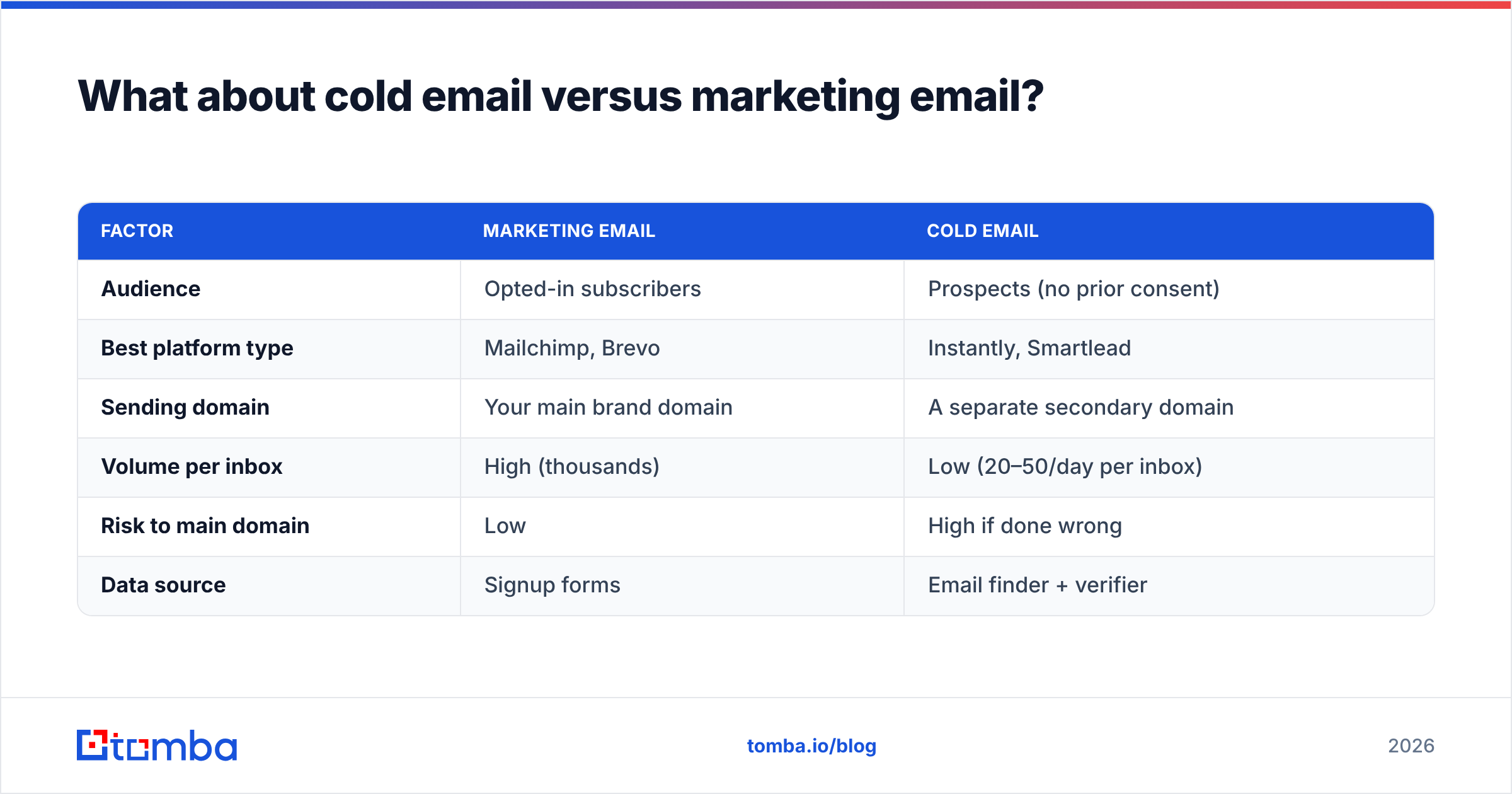
Treat them as completely separate systems. Mixing them is how good domains get burned.
| Factor | Marketing email | Cold email |
|---|---|---|
| Audience | Opted-in subscribers | Prospects (no prior consent) |
| Best platform type | Mailchimp, Brevo | Instantly, Smartlead |
| Sending domain | Your main brand domain | A separate secondary domain |
| Volume per inbox | High (thousands) | Low (20–50/day per inbox) |
| Risk to main domain | Low | High if done wrong |
| Data source | Signup forms | Email finder + verifier |
The golden rule: never run cold outreach from your primary domain. Use a dedicated secondary domain (e.g., getyourbrand.com instead of yourbrand.com), so that if reputation takes a hit, your transactional and marketing mail stay safe. Cold-email platforms enforce low per-inbox volume and rotate across multiple mailboxes precisely because high-volume cold sending from one address is a reputation death sentence.
For sales teams, the data layer is non-negotiable. Cold platforms don't supply contacts — you bring them. That means your pipeline quality is capped by your sourcing quality. Pairing a cold-email tool with bulk lead generation and verification keeps your bounce rate low and your sequences landing.
How do I avoid the spam folder when sending in bulk?#
Deliverability isn't luck — it's a checklist. Hit these consistently and you'll keep your inbox placement high:
- Authenticate everything. Set up SPF, DKIM, and DMARC before your first send. Most platforms walk you through it.
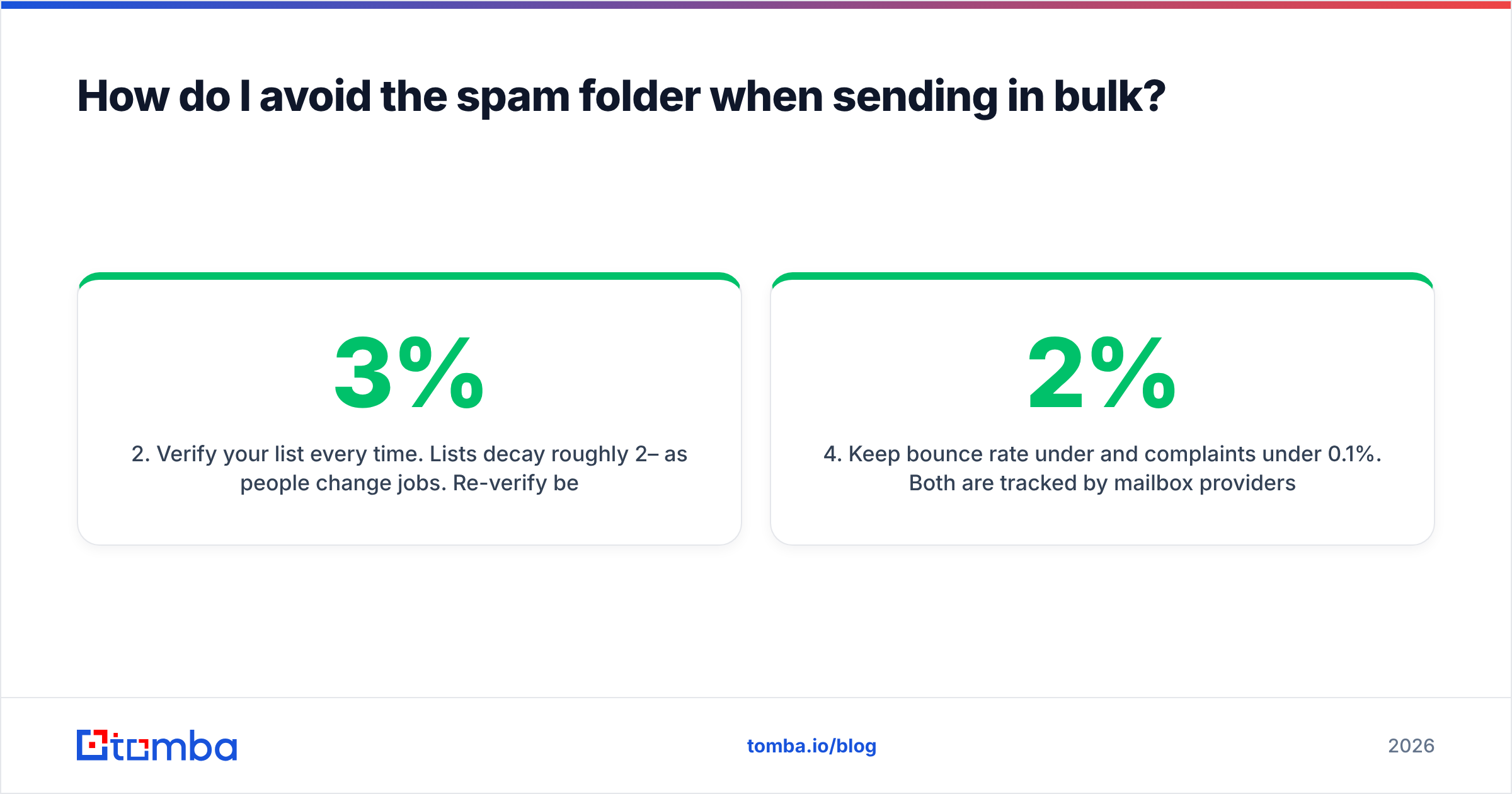
- Verify your list every time. Lists decay roughly 2–3% per month as people change jobs. Re-verify before each major campaign.
- Warm up new domains and IPs. Start small, increase volume gradually, and prioritize engaged recipients first.
- Keep bounce rate under 2% and complaints under 0.1%. Both are tracked by mailbox providers and both sink reputation fast.
- Make unsubscribing easy. A visible unsubscribe link reduces spam complaints, which matters more to filters than a slightly smaller list.
- Monitor and prune. Suppress non-openers over time and remove repeat bouncers immediately.
Vendor documentation backs this up — both Mailchimp's deliverability guidance and SendGrid's best practices emphasize list hygiene and authentication above all else. The tools differ; the fundamentals don't.
Which bulk email service should you choose?#
Decide by use case, not by brand:
- Newsletters and e-commerce to opted-in subscribers → Mailchimp or Brevo. You're paying for design, automation, and segmentation.
- Transactional system mail (receipts, resets, alerts) → SendGrid or Postmark. You're paying for API speed and reliability.
- Sales cold outreach to sourced prospects → Instantly or Smartlead. You're paying for inbox rotation and warmup — and you'll need your own verified data.
- Tight budget, mixed needs → Brevo, which straddles marketing and transactional affordably.
Whatever you pick, the platform is only half the equation. The other half — the half that determines whether your campaign delivers or bounces — is the quality of the list you feed it.
Start with a clean, accurate list#
The fastest way to improve any bulk email program is to fix the data going into it. Before your next campaign, build and verify your list with the Tomba Email Finder: find professional email addresses by domain, name, or company, then verify them so only deliverable contacts reach your sending platform. Pair it with the bulk verifier to keep bounce rates low and your sender reputation intact. Check the Tomba pricing — a Free tier covers 25 searches a month, and paid plans start at $49/mo — and stop letting a dirty list waste your sends. Your domain reputation is the one asset no bulk email service can rebuild for you. Protect it by sending only to addresses you've verified.
// get started
Find, verify and enrich your first contacts today
Start on the free plan with 25 searches a month, then scale when your team is ready.
Free plan · No credit card required · GDPR & CCPA
// about the author