Business Contact Search: The 2026 B2B Data Playbook
A practical 2026 guide to business contact search: the data sources, the tools, the accuracy traps, and a repeatable workflow that turns names into verified, reachable B2B contacts.
TL;DR
- Business contact search is the process of turning a name, company, or domain into a verified, reachable contact record — email, phone, role, and company context.
- The hard part isn't finding a contact; it's finding the right contact and proving the data is still valid before you send.
- The three data sources that matter in 2026 are crawled public web data, user-contributed datasets, and real-time verification (SMTP + catch-all handling).
- A good search stack pairs a finder (to get the address) with a verifier (to confirm it) and an enrichment layer (to add context for personalization).
- Below: a tool comparison, an accuracy framework, and a repeatable workflow you can run today.
What is business contact search?#
Business contact search is the work of locating a decision-maker and confirming how to reach them. Think of it like a phone book that rebuilds itself every night: people change jobs, companies rename domains, and inboxes get deactivated, so the "directory" you searched last quarter is partly fiction today.
In practical terms, a single contact record you care about has four layers:
- Identity — the person's name, title, and seniority.
- Company context — domain, industry, headcount, location, tech stack.
- Reach data — work email, direct phone, LinkedIn profile.
- Validity — proof the reach data still resolves to a live mailbox or line.
Most teams stop at layer three. The ones who actually book meetings treat layer four as non-negotiable, because an unverified address quietly burns your sender reputation long before a human ever flags it.

Why is business contact search so hard in 2026?#
Three forces make this harder than it looks.
First, data decays fast. B2B contact data degrades roughly 25–30% per year as people switch roles. A list you bought 18 months ago is mostly noise now, even if every row looked perfect on purchase day.
Second, catch-all domains hide the truth. A growing share of companies accept mail to any address at their domain, so a naive verifier returns "valid" for an inbox that doesn't exist. Without a dedicated catch-all verifier, you can't tell a real mailbox from a black hole.
Third, mailbox providers got stricter. Google and Yahoo's 2024 bulk-sender rules raised the cost of guessing. Send to too many dead addresses and your email deliverability tanks for every recipient, not just the bad ones. Search quality is now a deliverability problem, not just a productivity one.
The takeaway: business contact search is no longer "find an email." It's "find the right person, get a current address, and prove it's safe to send" — in one motion.
What are the main ways to search for business contacts?#
There are five common approaches, and most teams blend them.
- Domain-first search. You know the company; you want everyone relevant. A domain search returns all discoverable addresses at
company.complus the email pattern (e.g.,first.last@), which lets you infer addresses for people who aren't indexed yet. - Person-first search. You know the name and company; you want their address. The tool applies the company's known pattern and verifies the result.
- Reverse lookup. You have an email or phone and need to know who and where it belongs to — useful for inbound leads and list cleaning via reverse email lookup.
- Bulk search. You upload a list of names + domains and get back verified contacts at scale through a bulk email finder.
- Trigger-based search. You enrich contacts only when an event fires — a form fill, a website visit, a funding round — so you spend credits on warm intent instead of cold guesses.
No single method wins. Domain-first is best for account-based plays; person-first suits one-to-one outreach; bulk powers list builds; reverse lookup cleans the mess.
How do business contact search tools actually work?#
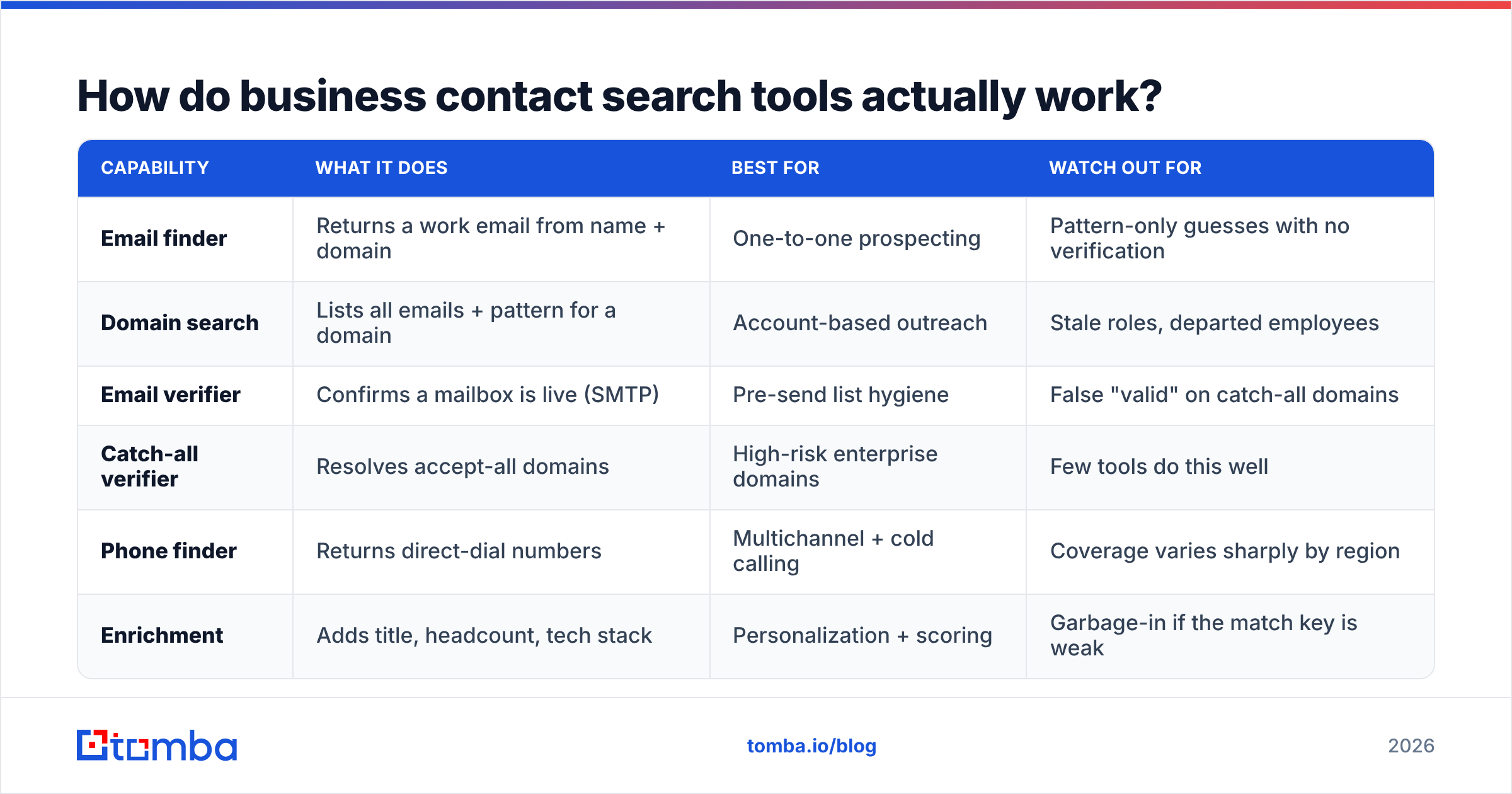
Under the hood, a finder runs a pipeline: it collects candidate addresses from public sources and contributed data, generates likely patterns, then verifies each candidate before returning it. Quality lives in two places — the breadth of the source data and the rigor of the verification step.
Here's how the common building blocks compare on what they do and where they fall short:
| Capability | What it does | Best for | Watch out for |
|---|---|---|---|
| Email finder | Returns a work email from name + domain | One-to-one prospecting | Pattern-only guesses with no verification |
| Domain search | Lists all emails + pattern for a domain | Account-based outreach | Stale roles, departed employees |
| Email verifier | Confirms a mailbox is live (SMTP) | Pre-send list hygiene | False "valid" on catch-all domains |
| Catch-all verifier | Resolves accept-all domains | High-risk enterprise domains | Few tools do this well |
| Phone finder | Returns direct-dial numbers | Multichannel + cold calling | Coverage varies sharply by region |
| Enrichment | Adds title, headcount, tech stack | Personalization + scoring | Garbage-in if the match key is weak |
The honest read: a finder without a verifier is half a tool. If a vendor can't tell you how they verify catch-all domains, assume they don't, and discount their accuracy claims accordingly.

How accurate is business contact search — and how do you measure it?#
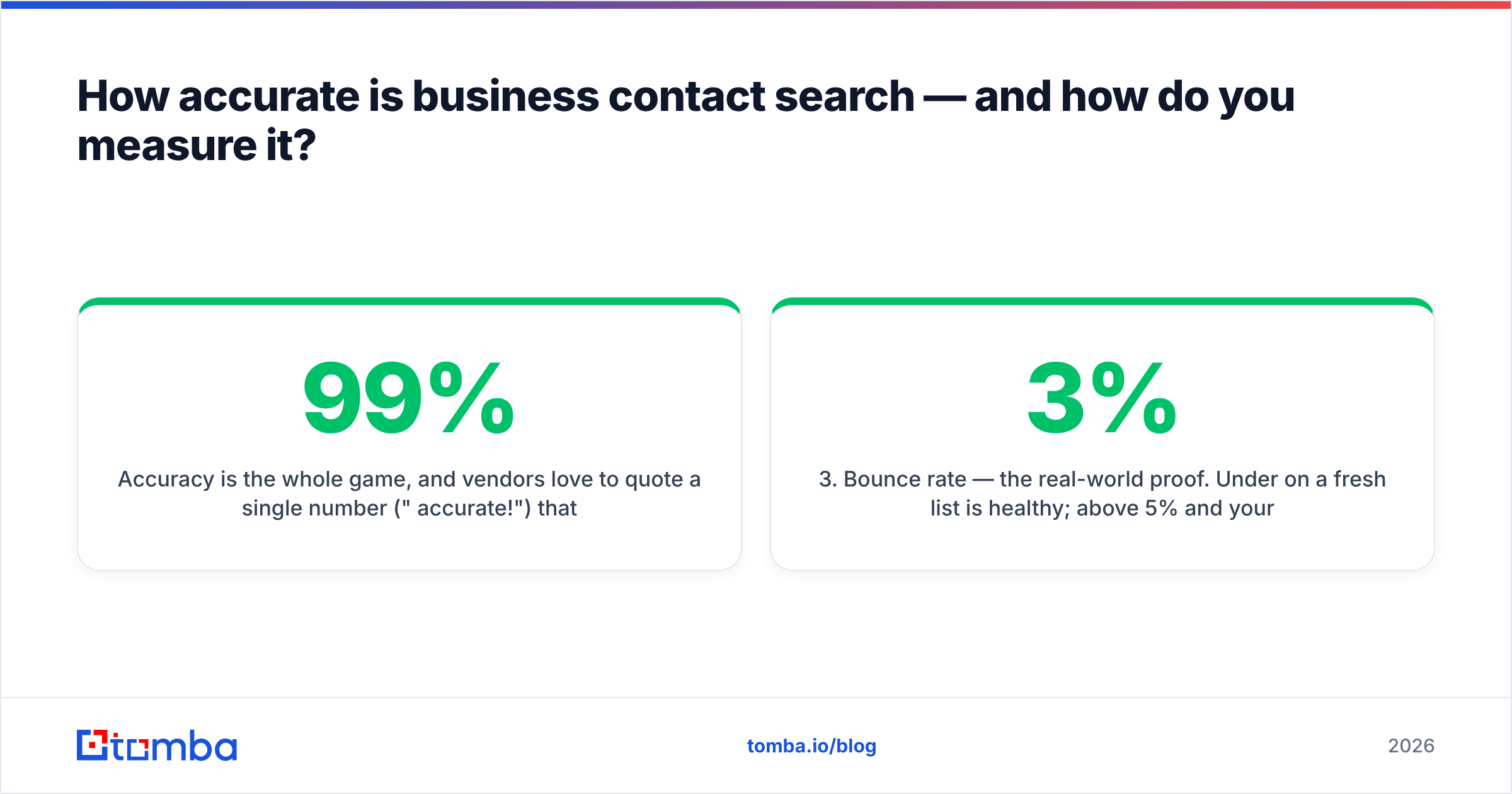
Accuracy is the whole game, and vendors love to quote a single number ("99% accurate!") that means nothing without context. Pin them down on four metrics instead:
- Match rate — of the contacts you searched, how many returned any result? A high match rate with low verification is just confident guessing.
- Verification rate — of the matches, how many were confirmed live, not merely formatted correctly?
- Bounce rate — the real-world proof. Under 3% on a fresh list is healthy; above 5% and your reputation is bleeding.
- Catch-all handling — does the tool flag accept-all domains separately, or silently mark them "valid"?
A simple way to audit any vendor: pull 100 contacts you can independently confirm, run them through the tool, and check the verified results against ground truth. The vendor's marketing number and your measured number will rarely match — and your number is the one that pays your salary.
This is also why data sources matter more than feature lists. Two tools with identical UIs can return wildly different results because one crawls and verifies continuously while the other resells a frozen dataset. When you evaluate, ask where the data comes from and how often it refreshes. For a deeper benchmarking methodology, vendor-neutral review sites like G2 aggregate verified user feedback across hundreds of tools, which is a useful sanity check against any single vendor's self-reported stats.
How does Tomba compare on business contact search?#
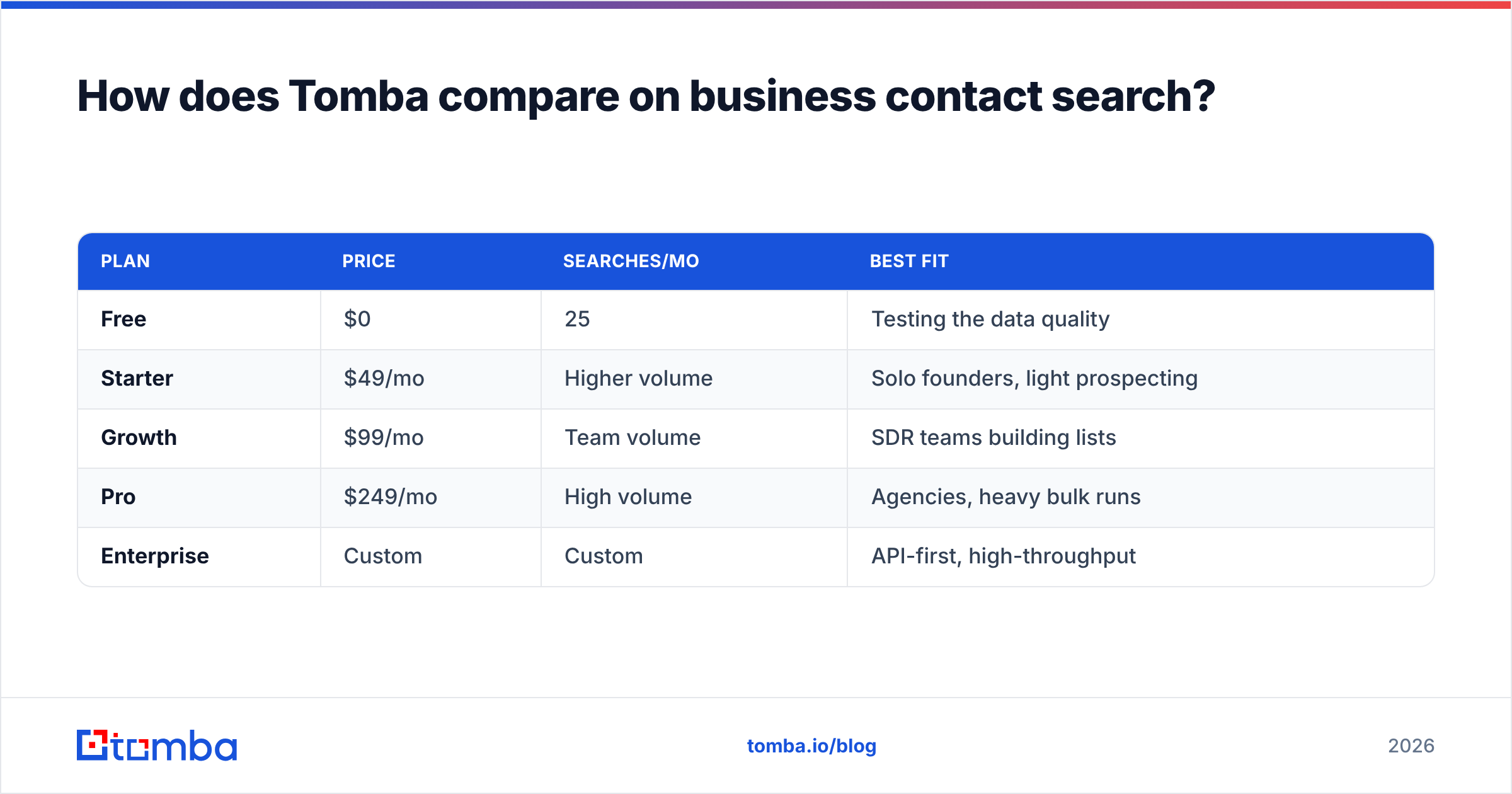
Tomba is built around the finder-plus-verifier pairing that the accuracy section above demands, with a single API surface so you don't stitch together three vendors. Here's how its plan structure maps to common search needs:
| Plan | Price | Searches/mo | Best fit |
|---|---|---|---|
| Free | $0 | 25 | Testing the data quality |
| Starter | $49/mo | Higher volume | Solo founders, light prospecting |
| Growth | $99/mo | Team volume | SDR teams building lists |
| Pro | $249/mo | High volume | Agencies, heavy bulk runs |
| Enterprise | Custom | Custom | API-first, high-throughput |
A few things to know before you commit anywhere:
- Verification is bundled, not bolted on. Finder results pass through an email verifier and catch-all logic, so what you export is closer to send-ready.
- The API is the product, not an afterthought. If you're enriching inside a CRM or workflow tool, the Tomba API and native integrations (HubSpot, Salesforce, Sheets, Zapier) keep search inside your existing stack.
- The free tier is a real test, not a teaser. 25 searches is enough to run the 100-contact audit on a sample and judge data quality before you pay. See full Tomba pricing for credit details.
The point isn't that one tool wins every category — it's that a unified finder + verifier + enrichment flow beats duct-taping single-purpose tools whose data never agrees.
What's a repeatable business contact search workflow?#
Here's a workflow you can run today, whether you're sourcing 10 contacts or 10,000.
- Define the target precisely. Title, seniority, department, company size, and region. "VP of Sales at 50–200-person SaaS firms in North America" beats "decision-makers." Precision upstream saves credits downstream.
- Start domain-first for named accounts. Run a domain search to pull the email pattern and existing contacts, then fill gaps person-by-person.
- Verify before you store. Never let an unverified address reach your CRM. Verification at search time is cheaper than a bounce later.
- Flag catch-all domains separately. Route them into a slower, send-carefully bucket instead of treating them as confirmed.
- Enrich for personalization. Add title, recent role change, and company triggers so the first line of your email earns the reply. Use data enrichment to append context in one pass.
- Re-verify before every campaign. Data you searched 60 days ago needs a fresh pass. Bake re-verification into your sequence launch, not your wishlist.
Run this loop consistently and your bounce rate stays low, your sender reputation stays clean, and your reply rate reflects the quality of your targeting rather than the noise in your list.
Business contact search vs. buying a list — which is better?#
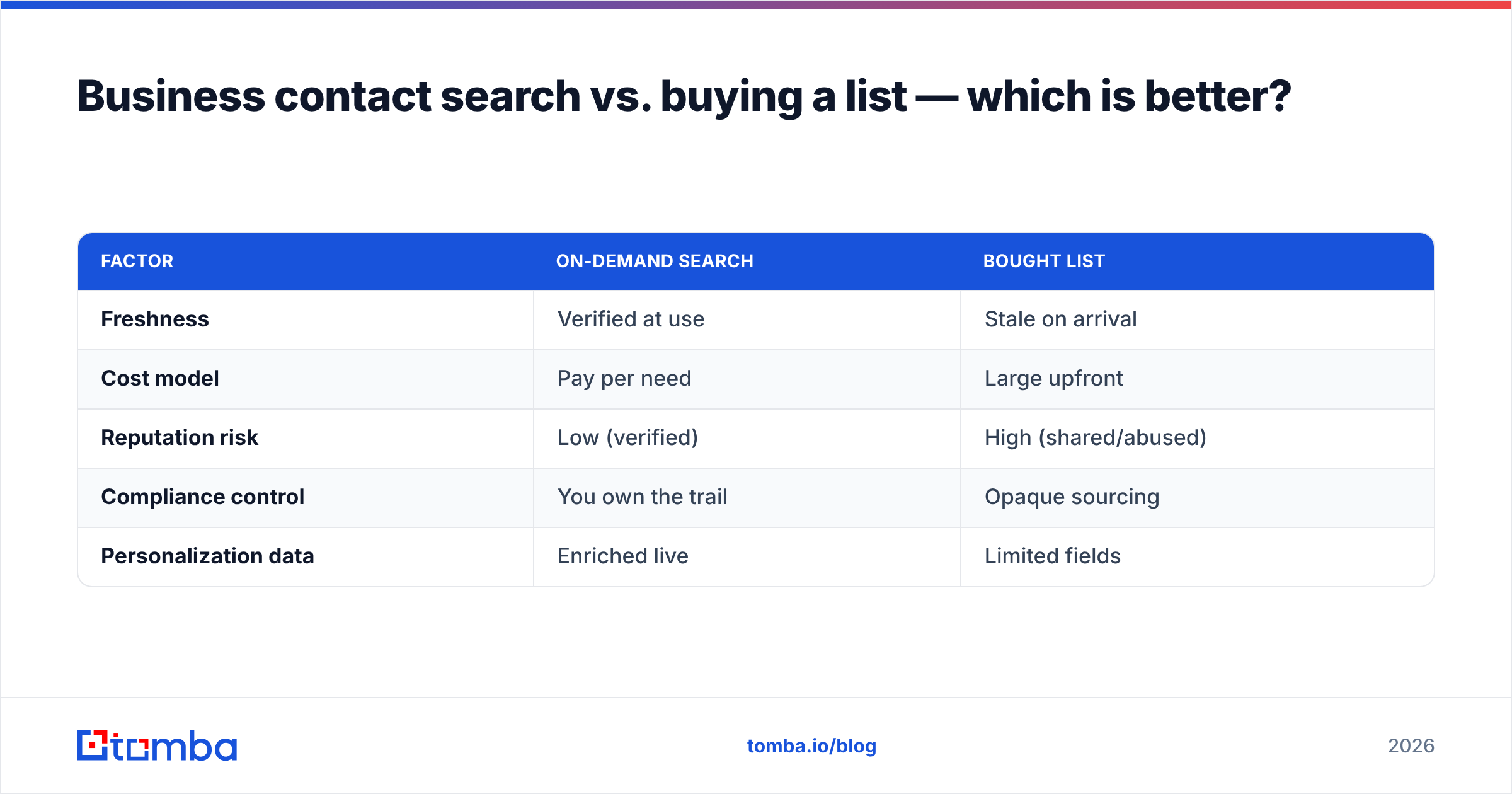
Buying a static list feels faster and is almost always worse. A purchased list is a snapshot of a moving target: by the time it's invoiced, a chunk of it is already wrong, and you have no way to re-verify rows you didn't source yourself. You also inherit whatever sending reputation the list's other buyers have already damaged.
On-demand search flips the economics. You pull contacts when you need them, verify at the moment of use, and only spend on records you'll actually contact. The tradeoff is that you do the work continuously instead of once — but "continuously fresh" is exactly what a decaying dataset requires.
| Factor | On-demand search | Bought list |
|---|---|---|
| Freshness | Verified at use | Stale on arrival |
| Cost model | Pay per need | Large upfront |
| Reputation risk | Low (verified) | High (shared/abused) |
| Compliance control | You own the trail | Opaque sourcing |
| Personalization data | Enriched live | Limited fields |
For anything beyond a one-time blast, on-demand search wins on every axis that affects deliverability. Compliance frameworks add weight here too: under regimes summarized well by resources like the GDPR overview on Wikipedia, you need a defensible record of where contact data came from — something a black-box list rarely provides and a sourced, logged search does.
Frequently asked questions#
Is business contact search legal? Searching publicly available business contact data is broadly permissible, but how you use it is regulated. Honor opt-outs, keep a sourcing trail, and follow regional rules (GDPR, CAN-SPAM, CASL). The search is rarely the legal risk; the outreach is.
What's the difference between a finder and a verifier? A finder locates a likely address; a verifier confirms the mailbox is live. You need both — a finder alone returns plausible guesses, and unverified guesses bounce.
How do I handle catch-all domains? Treat them as "unconfirmed" rather than "valid." Use a dedicated catch-all check, send to them more cautiously, and watch their bounce behavior separately from confirmed addresses.
How often should I re-verify contacts? Before every campaign, and at minimum every 60–90 days for any stored list. Decay is constant, so verification can't be a one-time event.
Start your business contact search the right way#
If you take one thing from this guide: pair finding with verifying, and never let an unconfirmed address into your CRM. That single discipline protects your deliverability more than any clever subject line.
The fastest way to put this into practice is to run the 100-contact audit on a tool that bundles verification into search. Spin up the Tomba Email Finder on the free tier, point it at a sample of accounts you can independently confirm, and measure the verified results against ground truth. If the numbers hold up on your own data, scale the workflow — domain-first sourcing, verify-at-search, enrich-for-personalization — and let your reply rate reflect a list that's actually real.
// get started
Find, verify and enrich your first contacts today
Start on the free plan with 25 searches a month, then scale when your team is ready.
Free plan · No credit card required · GDPR & CCPA
// about the author