Business Email Validation in 2026: The Complete Guide
Bad business emails quietly wreck your sender reputation and waste rep time. Here's how business email validation works, which checks matter, and a clean 2026 workflow.
TL;DR
- Business email validation is the process of confirming that a work email address is real, deliverable, and safe to send to — before you hit send.
- It is not the same as email finding. Finding gets you the address; validation tells you whether it will bounce.
- The core checks are syntax, domain/MX records, SMTP response, role-account detection, disposable-domain filtering, and catch-all handling.
- A clean list keeps your bounce rate under 2-3%, which protects your sender reputation and inbox placement.
- You can validate one address with a free checker or millions through a bulk API — the workflow below covers both.
If you send cold outreach, run newsletters, or push leads into a CRM, you have a list-hygiene problem whether you know it or not. People change jobs, companies fold, and typos slip in at signup. Business email validation is the quiet, unglamorous step that keeps all of that from torching your deliverability.
What is business email validation?#
Business email validation is the process of verifying that a professional email address — firstname@company.com rather than a personal Gmail — actually exists and can receive mail. Think of it like calling ahead to confirm a restaurant is open before driving across town. You can guess, but the guess costs you a wasted trip; validation costs a fraction of a second and saves the bounce.
Validation answers three questions:
- Is it formatted correctly? Does it follow the rules of a real email address?
- Does the domain accept mail? Does the company's mail server exist and respond?
- Will this specific mailbox accept a message? Or will it hard-bounce?
The distinction that trips people up: validation is different from email verification in name only — the terms are used interchangeably across the industry — but both are different from finding an email. An email finder discovers a likely address from a name and domain. Validation then confirms whether that address is safe to use. You usually do them back to back.
Why does business email validation matter in 2026?#
Because mailbox providers got stricter, and the penalty for a dirty list is now immediate. Conclusion first: a high bounce rate doesn't just lose you a few sends — it tells Gmail, Outlook, and Yahoo that you don't maintain your list, and they start routing all your mail to spam.
Here's the chain reaction:
- You send to dead addresses. Each hard bounce is logged against your sending domain.
- Your bounce rate climbs past 2-3%. That's the rough industry red line.
- Your sender reputation drops. Providers treat you as a low-quality sender.
- Inbox placement collapses. Even your valid recipients stop seeing your mail.
In 2024 Google and Yahoo rolled out bulk-sender requirements that explicitly cap spam complaint rates and demand authenticated, low-bounce sending. By 2026 those expectations are the baseline, not the exception. Validating before you send is the cheapest insurance you can buy against landing on a blocklist.
There's a revenue angle too. If your SDRs are working a list where 15% of addresses bounce, you're paying salaries to email ghosts. Clean data means every send has a chance of landing.
What checks does email validation actually run?#
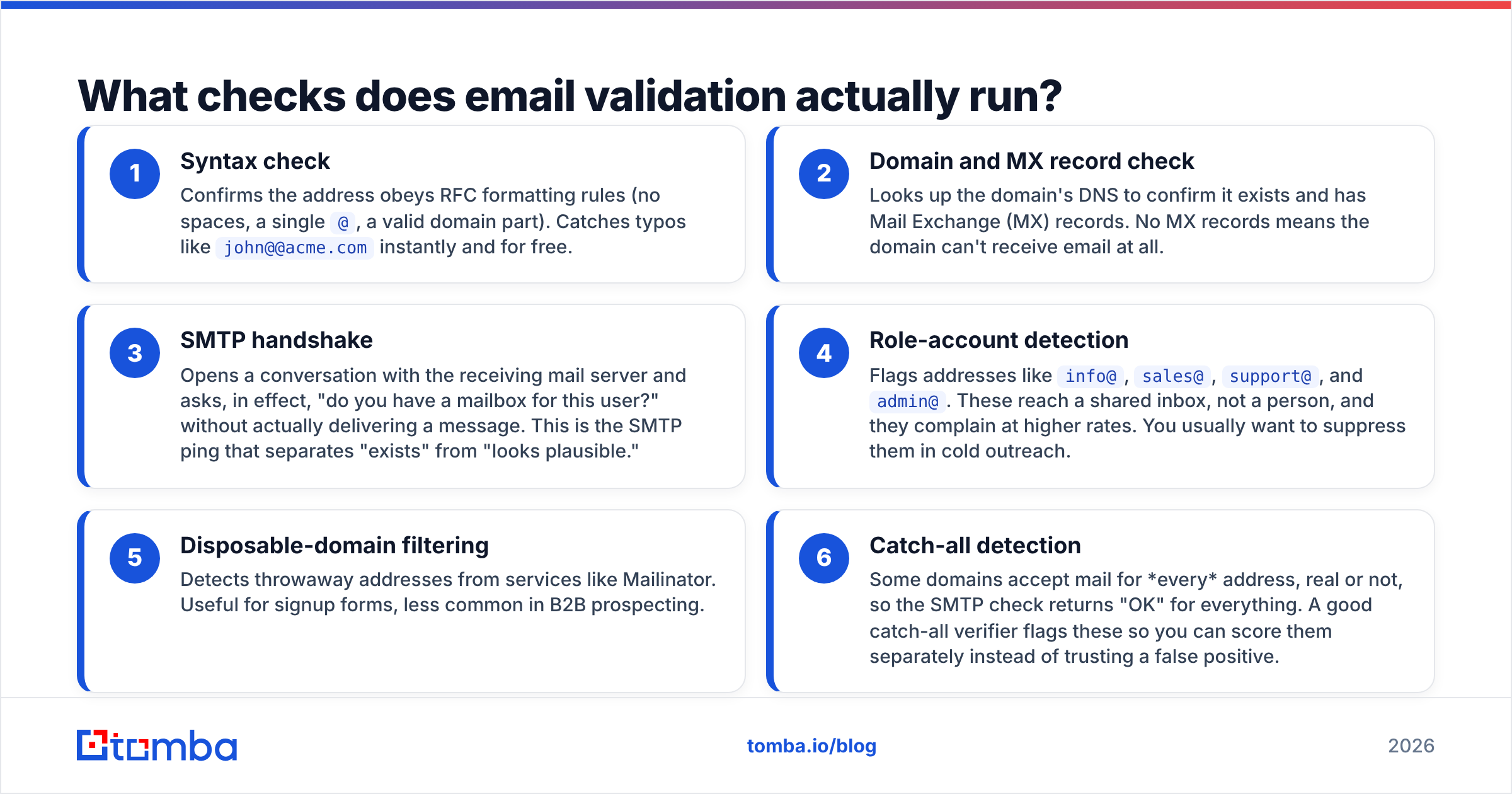
A real validation engine runs a stack of checks, fast to slow, cheap to expensive. Here are the six that matter, in the order most tools apply them:
- Syntax check — Confirms the address obeys RFC formatting rules (no spaces, a single
@, a valid domain part). Catches typos likejohn@@acme.cominstantly and for free. - Domain and MX record check — Looks up the domain's DNS to confirm it exists and has Mail Exchange (MX) records. No MX records means the domain can't receive email at all.
- SMTP handshake — Opens a conversation with the receiving mail server and asks, in effect, "do you have a mailbox for this user?" without actually delivering a message. This is the SMTP ping that separates "exists" from "looks plausible."
- Role-account detection — Flags addresses like
info@,sales@,support@, andadmin@. These reach a shared inbox, not a person, and they complain at higher rates. You usually want to suppress them in cold outreach. - Disposable-domain filtering — Detects throwaway addresses from services like Mailinator. Useful for signup forms, less common in B2B prospecting.
- Catch-all detection — Some domains accept mail for every address, real or not, so the SMTP check returns "OK" for everything. A good catch-all verifier flags these so you can score them separately instead of trusting a false positive.
That last one is where cheap tools fall apart. A catch-all domain will happily tell you madeupname@company.com is valid. Without dedicated catch-all verification, you ship those straight into a bounce.
How accurate is business email validation?#
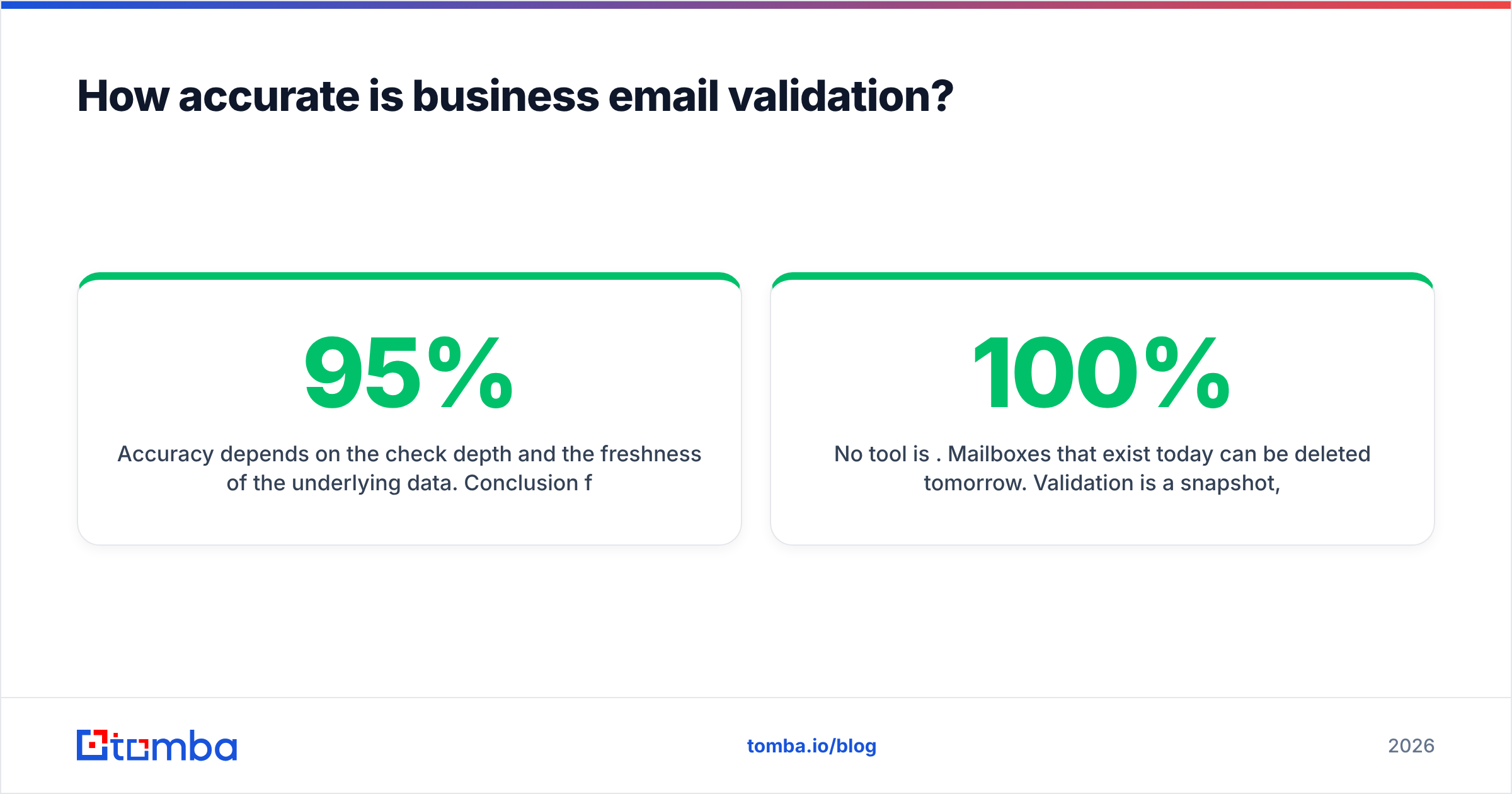
Accuracy depends on the check depth and the freshness of the underlying data. Conclusion first: expect 95%+ accuracy from a quality SMTP-level validator on standard domains, dropping into the 70-85% range on catch-all domains where certainty is mathematically impossible.
A few honest caveats:
- No tool is 100%. Mailboxes that exist today can be deleted tomorrow. Validation is a snapshot, so revalidate before big sends.
- Greylisting and rate limits cause some servers to temporarily refuse the SMTP check, returning "unknown" rather than valid/invalid. Good tools retry; bad ones mark these as invalid and you lose real contacts.
- Catch-all domains can only be scored by probability, not confirmed. Treat "accept-all" results as medium-confidence, not gospel.
The data source behind the tool matters as much as the algorithm. Validators that cross-reference live mail-server responses with a maintained B2B dataset — like Tomba's data sources — catch stale addresses that a pure SMTP ping would pass.
Which business email validation tools should you compare?#
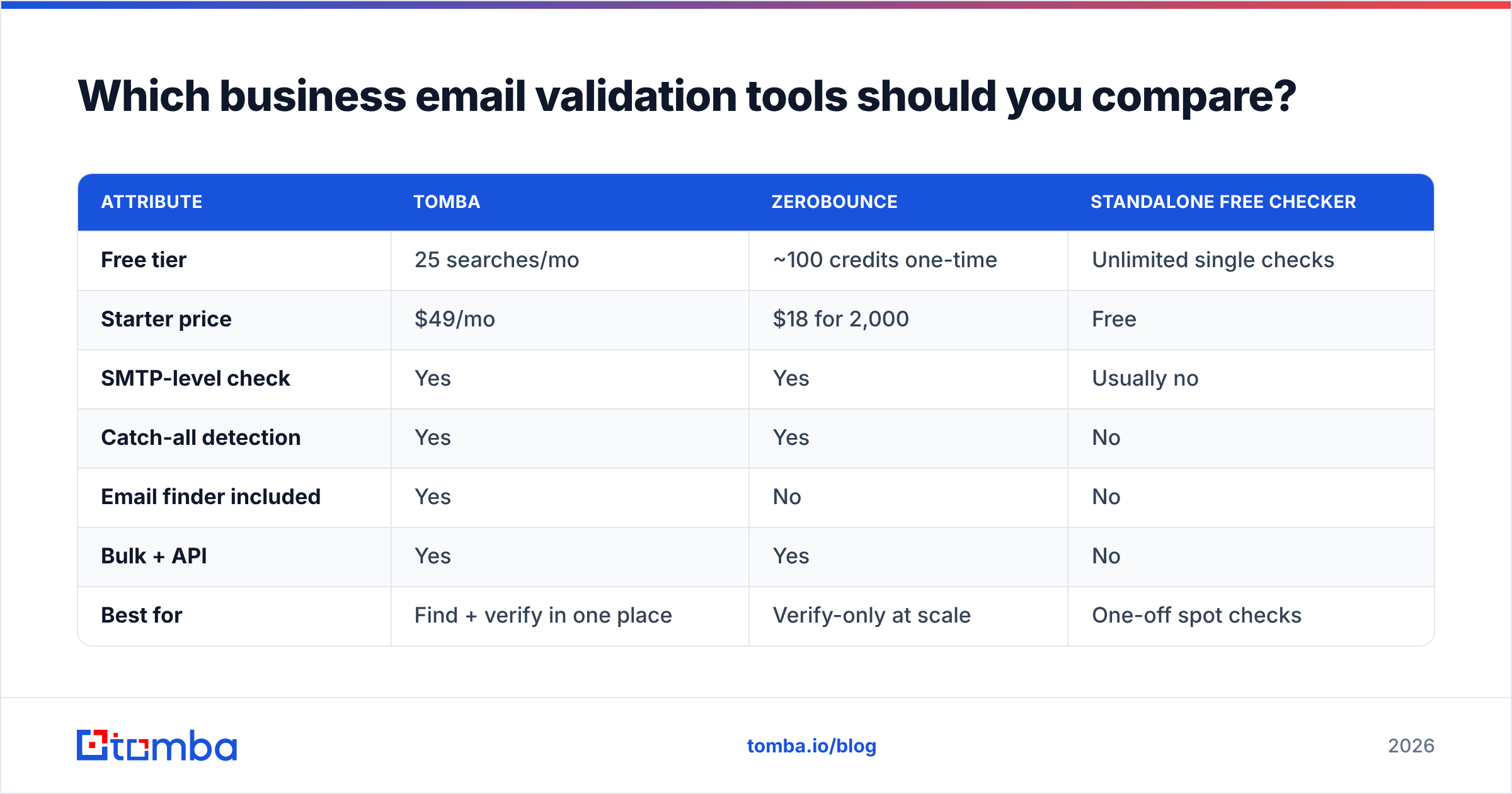
Most teams choose between a standalone verifier, an all-in-one finder-plus-verifier, and a high-volume API. Here's how the common options stack up on the attributes that actually drive a buying decision.
| Attribute | Tomba | ZeroBounce | Standalone free checker |
|---|---|---|---|
| Free tier | 25 searches/mo | ~100 credits one-time | Unlimited single checks |
| Starter price | $49/mo | $18 for 2,000 | Free |
| SMTP-level check | Yes | Yes | Usually no |
| Catch-all detection | Yes | Yes | No |
| Email finder included | Yes | No | No |
| Bulk + API | Yes | Yes | No |
| Best for | Find + verify in one place | Verify-only at scale | One-off spot checks |
The pattern: free checkers are fine for confirming a single address before an important email, dedicated verifiers excel at cleaning an existing list, and a combined platform makes sense when you're both sourcing and cleaning contacts. If you only need to confirm one address right now, Tomba's free email checker handles it without an account. Compare full Tomba pricing when you're ready for volume.
For independent reviews of any vendor on this list, G2 and HubSpot's deliverability resources are reliable, non-salesy starting points.

Single email vs. bulk validation: which do you need?#
Both, at different moments. The decision comes down to volume and where the address enters your funnel.
- Single (real-time) validation fits form signups, a CRM "verify" button, or confirming one prospect before a high-stakes email. It runs in milliseconds via an API call at the point of entry.
- Bulk validation fits cleaning an imported list, scrubbing a CRM quarterly, or prepping a campaign send. You upload a CSV — or pipe it through the API — and get back a scored file.
A practical rule: validate at the door (real time, on every new address) and in batches (bulk, before every major send). The door check stops garbage from entering; the batch check catches addresses that decayed since they entered.
For large jobs, a bulk email finder and verifier processes thousands of rows at once, and the email verification API lets you wire validation directly into your signup flow or data pipeline so it happens without anyone clicking a button.
How do you build a business email validation workflow?#
Here's a six-step workflow that works whether you're a solo founder or running a 20-person sales floor.
- Capture or source the address. From a form, a domain search, or an email finder. Source quality sets your ceiling.
- Validate at point of entry. Run a real-time check so obvious junk never reaches your database. Reject failures or queue them for review.
- Enrich and store the result. Save not just valid/invalid but the reason (catch-all, role account, unknown) so you can segment later.
- Suppress the risky buckets. Pull role accounts and disposable addresses out of cold-outreach segments. Hold catch-alls in a lower-confidence tier.
- Revalidate before each campaign. Addresses decay roughly 2-3% per month as people change jobs. A list that was clean in January isn't clean in June.
- Monitor your bounce rate. If it creeps over 2%, stop and re-clean before it damages your email deliverability.
The teams that win at outbound treat this as a loop, not a one-time cleanup. Validation is plumbing — it only gets noticed when it stops working and your campaign bounces into the spam folder.
What does email validation cost, and is it worth it?#
Cheaper than the alternative, by a wide margin. Standalone verification typically runs a fraction of a cent per check at volume; combined finder-and-verifier platforms bundle it into a monthly plan. Tomba starts free with 25 searches a month, then $49/mo for Starter, $99/mo for Growth, and $249/mo for Pro, with custom Enterprise pricing for high-volume teams.
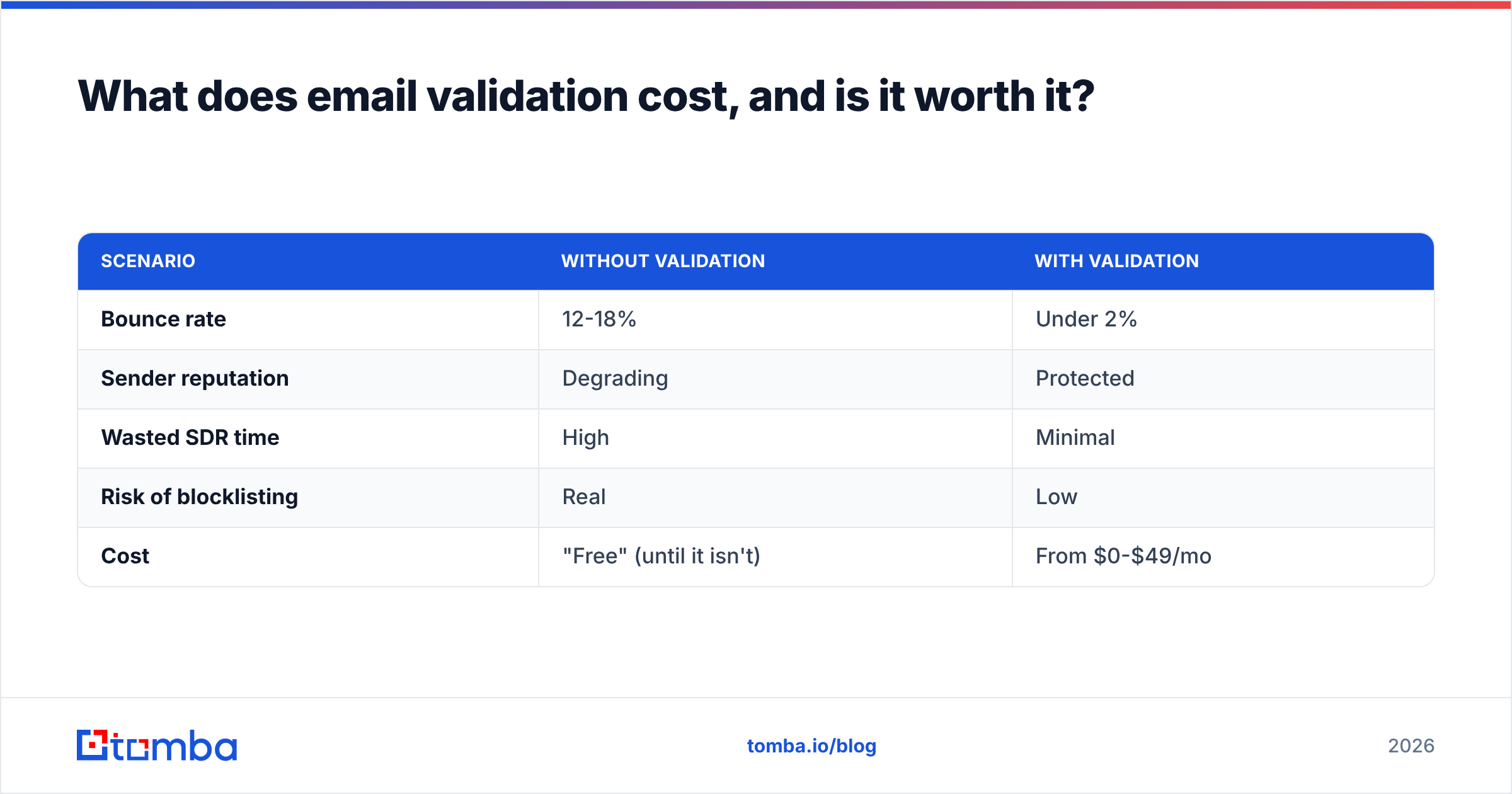
Run the math the other way. Suppose you send 10,000 cold emails with a 15% invalid rate — that's 1,500 hard bounces. Push your bounce rate that high and you don't just lose 1,500 sends; you risk every domain you send from getting throttled for weeks. The cost of not validating is measured in deliverability, not credits.
| Scenario | Without validation | With validation |
|---|---|---|
| Bounce rate | 12-18% | Under 2% |
| Sender reputation | Degrading | Protected |
| Wasted SDR time | High | Minimal |
| Risk of blocklisting | Real | Low |
| Cost | "Free" (until it isn't) | From $0-$49/mo |
Common mistakes to avoid#
- Trusting catch-all "valid" results blindly. They're probabilistic. Score them separately.
- Validating once and never again. Lists rot. Revalidate before each send.
- Marking "unknown" as "invalid." Greylisting causes temporary unknowns; deleting those throws away real contacts. Retry instead.
- Skipping role-account suppression.
info@andsales@inflate complaint rates and skew your metrics. - Buying a list and skipping validation entirely. Purchased lists are the dirtiest input there is. If you must use one, validate every row first.
Frequently asked questions#
Is business email validation the same as email verification? In practice, yes — the industry uses the terms interchangeably. Both confirm an address is real and deliverable. The only nuance is that "validation" sometimes emphasizes the syntax/format layer while "verification" emphasizes the SMTP/mailbox layer, but most tools do both.
Can I validate emails without sending a test message? Yes. The SMTP handshake asks the receiving server whether a mailbox exists without delivering anything to the inbox. The recipient never sees a thing.
How often should I clean my list? Validate new addresses in real time, and re-clean your full list before every major campaign — at minimum quarterly. Address decay of 2-3% per month adds up fast.
Will validation guarantee zero bounces? No. It dramatically reduces them, but mailboxes can be deleted between your check and your send. Treat it as risk reduction, not a guarantee.
Clean your list before your next send#
Business email validation isn't a luxury step — it's the difference between landing in the inbox and quietly dying in spam. If you're sourcing prospects and want both the address and the confidence that it's deliverable, start with the Tomba Email Finder: it finds professional emails by name, domain, or company and runs them through SMTP-level verification in the same workflow. Grab the free tier, validate your next 25 contacts, and watch your bounce rate fall before you commit to a paid plan.
// get started
Find, verify and enrich your first contacts today
Start on the free plan with 25 searches a month, then scale when your team is ready.
Free plan · No credit card required · GDPR & CCPA
// about the author