Business Emails 2026: Find, Verify, and Format Them Right
Business emails are still the backbone of B2B outreach in 2026. Here is how the formats work, how to find the right address, and how to verify it before you hit send.
TL;DR
- A business email is a professional address tied to a company domain (you@company.com), not a free inbox like Gmail or Outlook.com.
- Most companies use one of about six predictable formats, which makes the right address easier to find than people assume.
- Finding an address is only half the job — you have to verify it, or bounces will wreck your sender reputation.
- Catch-all domains and role addresses (info@, sales@) are the two traps that quietly tank reply rates.
- A finder-plus-verifier workflow beats manual guessing on both accuracy and time, and it scales without extra headcount.
What is a business email?#
A business email is an address that lives on a company-owned domain — firstname@acme.com instead of acme.team@gmail.com. That single distinction drives everything that follows: deliverability, trust, brand consistency, and whether your outreach lands in a real human's inbox.
Think of it like a street address versus a P.O. box. A free webmail account is a P.O. box anyone can rent in five minutes; a domain email is a fixed address that proves the company actually exists and that the person works there. Buyers know the difference, spam filters know the difference, and so do the systems you use to reach them.
Technically, a business email is just a mailbox on a domain that publishes MX records and usually authenticates with SPF, DKIM, and DMARC. Practically, it's the unit of currency in B2B sales: no valid business email, no conversation.

Why do business emails still matter in 2026?#
Because the inbox is still where deals get worked. Social DMs, community channels, and AI agents all play a role now, but the verified business email remains the one identifier that ties a person to a company, a CRM record, and a buying decision.
Three reasons it hasn't been replaced:
- Deliverability is identity. Mailbox providers weigh domain reputation heavily. Sending to and from real domains is what keeps you out of spam — a topic worth understanding through the lens of email deliverability fundamentals.
- CRMs run on email. Your HubSpot or Salesforce records are keyed on email. A wrong or missing address means a broken record and a lost attribution trail.
- Compliance needs a real contact. GDPR and CAN-SPAM both assume you're reaching an identifiable business contact, not a scraped personal inbox.
The shift in 2026 isn't away from email — it's toward clean email. Volume-based blasting is dead; precise, verified, low-bounce sending is what works.
What are the most common business email formats?#
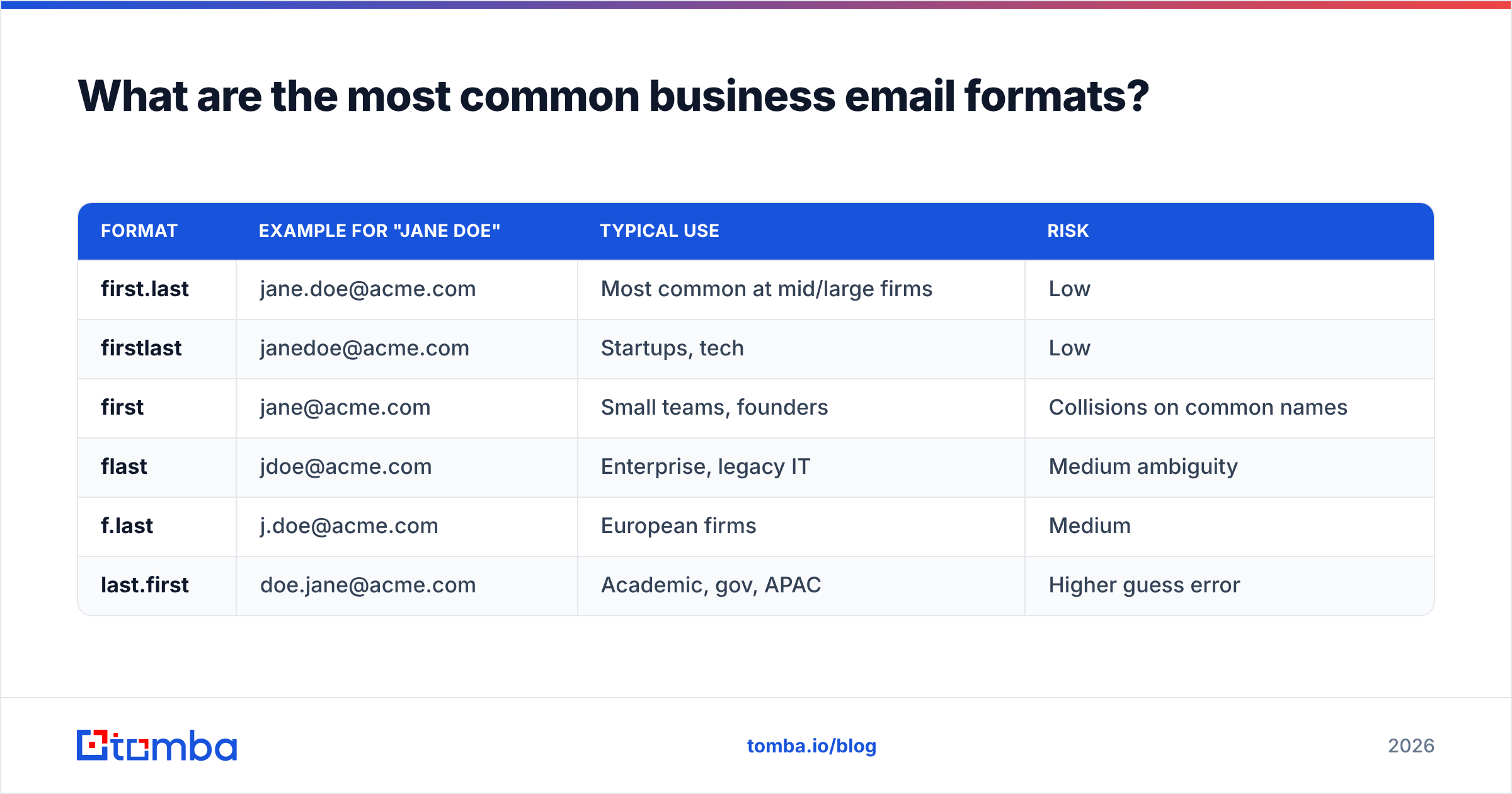
Most organizations standardize on a single pattern across the company. Once you know the pattern, you can predict almost any colleague's address. Here are the formats you'll meet most often, ranked roughly by prevalence.
| Format | Example for "Jane Doe" | Typical use | Risk |
|---|---|---|---|
| first.last | jane.doe@acme.com | Most common at mid/large firms | Low |
| firstlast | janedoe@acme.com | Startups, tech | Low |
| first | jane@acme.com | Small teams, founders | Collisions on common names |
| flast | jdoe@acme.com | Enterprise, legacy IT | Medium ambiguity |
| f.last | j.doe@acme.com | European firms | Medium |
| last.first | doe.jane@acme.com | Academic, gov, APAC | Higher guess error |
A few notes that save you from bad guesses:
- Role addresses like
info@,sales@, orsupport@are shared mailboxes, not people. They convert poorly for outreach because no single owner feels responsible to reply. - Common-name collisions force exceptions: the second "Jane Doe" hire might become
jane.doe2@orjdoe2@. Never assume the clean version is free. - Subdomains (
jane@mail.acme.comvsjane@acme.com) trip up automated guessers — always confirm the sending domain.
If you just need the pattern for one company, a free company email pattern checker resolves it in seconds without any guesswork.
How do you find someone's business email?#
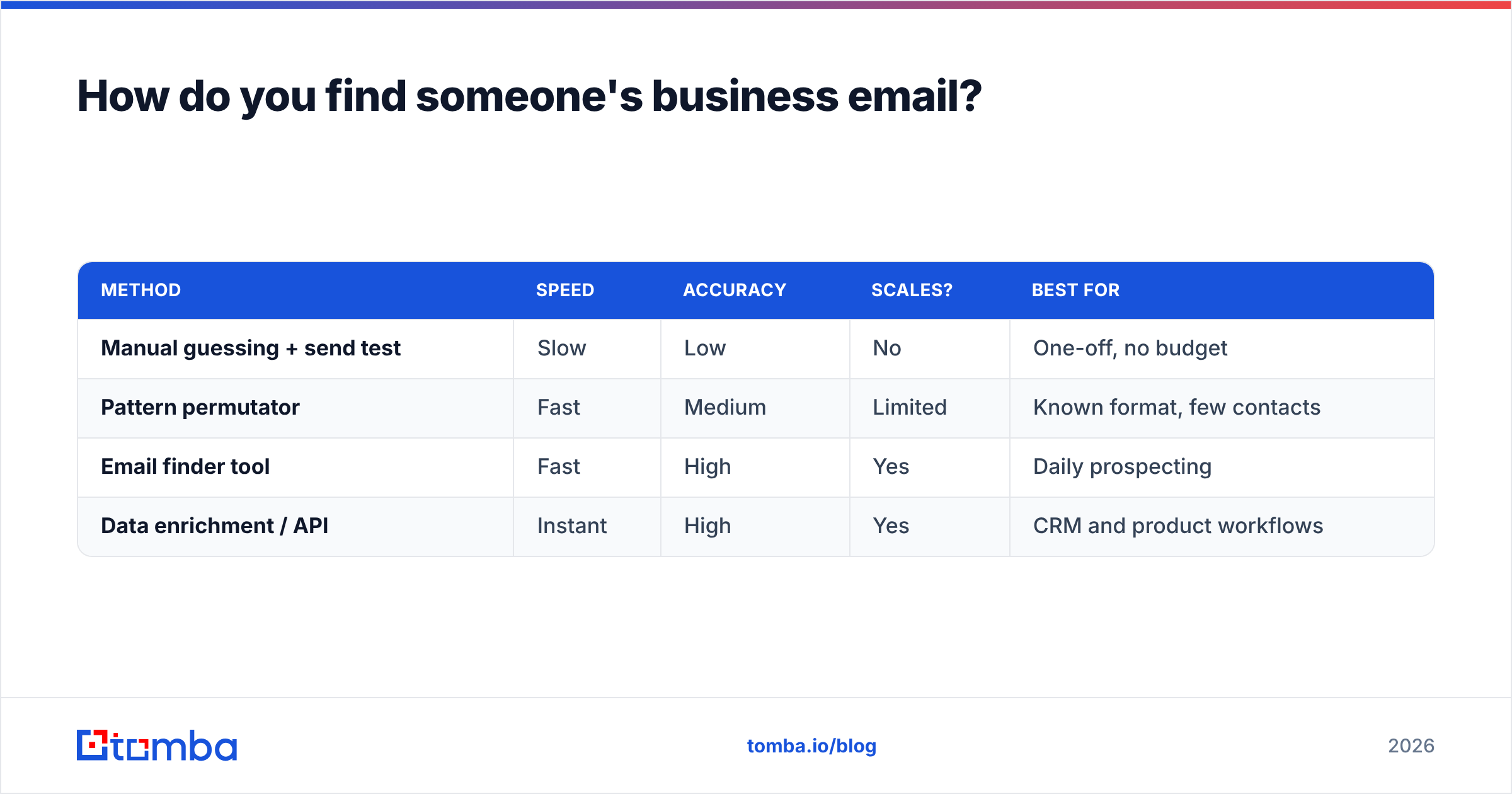
You have four realistic paths, and they trade off speed against accuracy. The fastest reliable method combines a finder with a verifier so you never act on an unconfirmed guess.
| Method | Speed | Accuracy | Scales? | Best for |
|---|---|---|---|---|
| Manual guessing + send test | Slow | Low | No | One-off, no budget |
| Pattern permutator | Fast | Medium | Limited | Known format, few contacts |
| Email finder tool | Fast | High | Yes | Daily prospecting |
| Data enrichment / API | Instant | High | Yes | CRM and product workflows |
Here's how each works in practice:
- Manual guessing. Take the pattern, build the address, send a low-stakes test, and watch for a bounce. It works, but it burns your domain reputation and your time.
- Permutators. Tools like an email permutator generate every plausible combination of a name and domain. You still need to verify which one is real.
- Email finder. A dedicated email finder takes a name and a domain (or a LinkedIn profile) and returns the most likely verified address, with a confidence score and the sources behind it.
- Enrichment at scale. When you have a list of companies or domains, domain search pulls every public address on a domain, and bulk enrichment fills gaps across thousands of records at once.
For most sales and recruiting teams, option 3 or 4 is the right default. Manual methods feel free but cost you in bounces, blocked domains, and hours you could spend selling.
How do you verify a business email before sending?#
Verification is the step most people skip and then regret. A finder tells you an address probably exists; a verifier confirms the mailbox will accept mail without bouncing. Skipping it is like mailing a contract to an address you found on a napkin — it might arrive, or it might come back stamped "no such recipient" while your reputation takes the hit.
A solid verification check runs these tests:
- Syntax — is the address even validly formatted?
- Domain and MX — does the domain exist and accept mail?
- SMTP probe — does the mailbox respond as deliverable without actually sending?
- Disposable check — is it a throwaway address that will vanish next week?
- Role detection — is it a shared
info@-style box rather than a person?
Run every address through an email verifier before it enters a campaign. Keep your overall bounce rate under roughly 2% — mailbox providers start throttling and filtering well before that climbs.
What about catch-all domains?#
Catch-all (or "accept-all") domains are the single biggest source of false confidence. The server accepts mail for any address — realperson@ and nonsense123@ both come back "valid" — so a standard verifier can't tell a real mailbox from a typo.
This matters because a large share of corporate domains are catch-all. Treating every catch-all "valid" as deliverable is how lists that looked 98% clean still bounce 15% on send. Use a dedicated catch-all verifier that applies deeper signals to separate genuine mailboxes from the noise, and segment catch-all hits into a lower-confidence tier you warm into slowly.
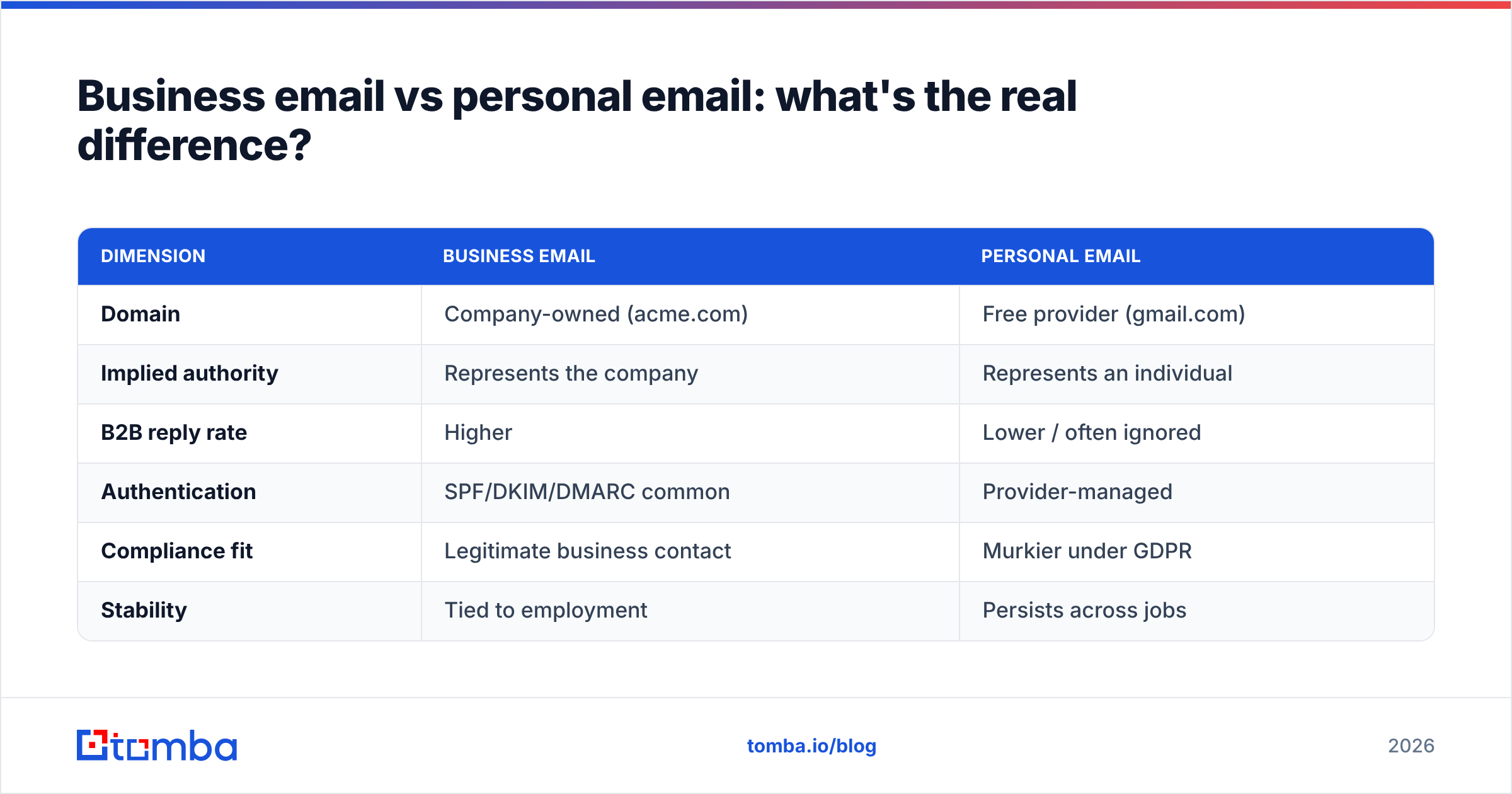
Business email vs personal email: what's the real difference?#
The gap is bigger than the domain name. It shows up in trust, deliverability, and what you're actually allowed to do with the address.
| Dimension | Business email | Personal email |
|---|---|---|
| Domain | Company-owned (acme.com) | Free provider (gmail.com) |
| Implied authority | Represents the company | Represents an individual |
| B2B reply rate | Higher | Lower / often ignored |
| Authentication | SPF/DKIM/DMARC common | Provider-managed |
| Compliance fit | Legitimate business contact | Murkier under GDPR |
| Stability | Tied to employment | Persists across jobs |
The practical takeaway: for B2B outreach, prospect into business emails. They signal that you've done your homework, they route to the right person in their work context, and they hold up better under privacy rules. Personal addresses have their place — recruiting passive candidates, reconnecting with someone who's changed jobs — but they shouldn't be your cold-outreach default.
How do you keep a business email list healthy over time?#
Email data decays fast. People change jobs, companies rebrand, domains lapse. Industry estimates put B2B data decay at roughly 22–30% per year, which means a list you built last winter is materially wrong by now. Treat your list like fresh produce, not canned goods.
A maintenance routine that actually holds up:
- Re-verify quarterly. Run your active list through verification every 90 days and quarantine anything that flips to risky.
- Suppress hard bounces immediately. One hard bounce means remove, not retry. Repeated sends to dead addresses are a reputation killer.
- Watch role and catch-all ratios. If a segment is mostly
info@addresses or catch-all domains, expect weak replies and adjust expectations. - Enrich, don't just collect. Pair each address with title, company, and phone via data enrichment so a stale email doesn't orphan an otherwise good record.
- Deduplicate on every import. Merge duplicates before they fragment your CRM and inflate your send counts.
Compare your own hygiene against the benchmarks the major review sites track — G2's email verification category is a reasonable yardstick for what "good" deliverability and accuracy numbers look like across tools.
How much should finding and verifying business emails cost?#
Less than the cost of a damaged domain. The math that matters isn't price per credit — it's price per deliverable, replied-to contact. A cheap tool that returns 70% accuracy is more expensive than a pricier one at 95% once you count wasted sends and burned reputation.
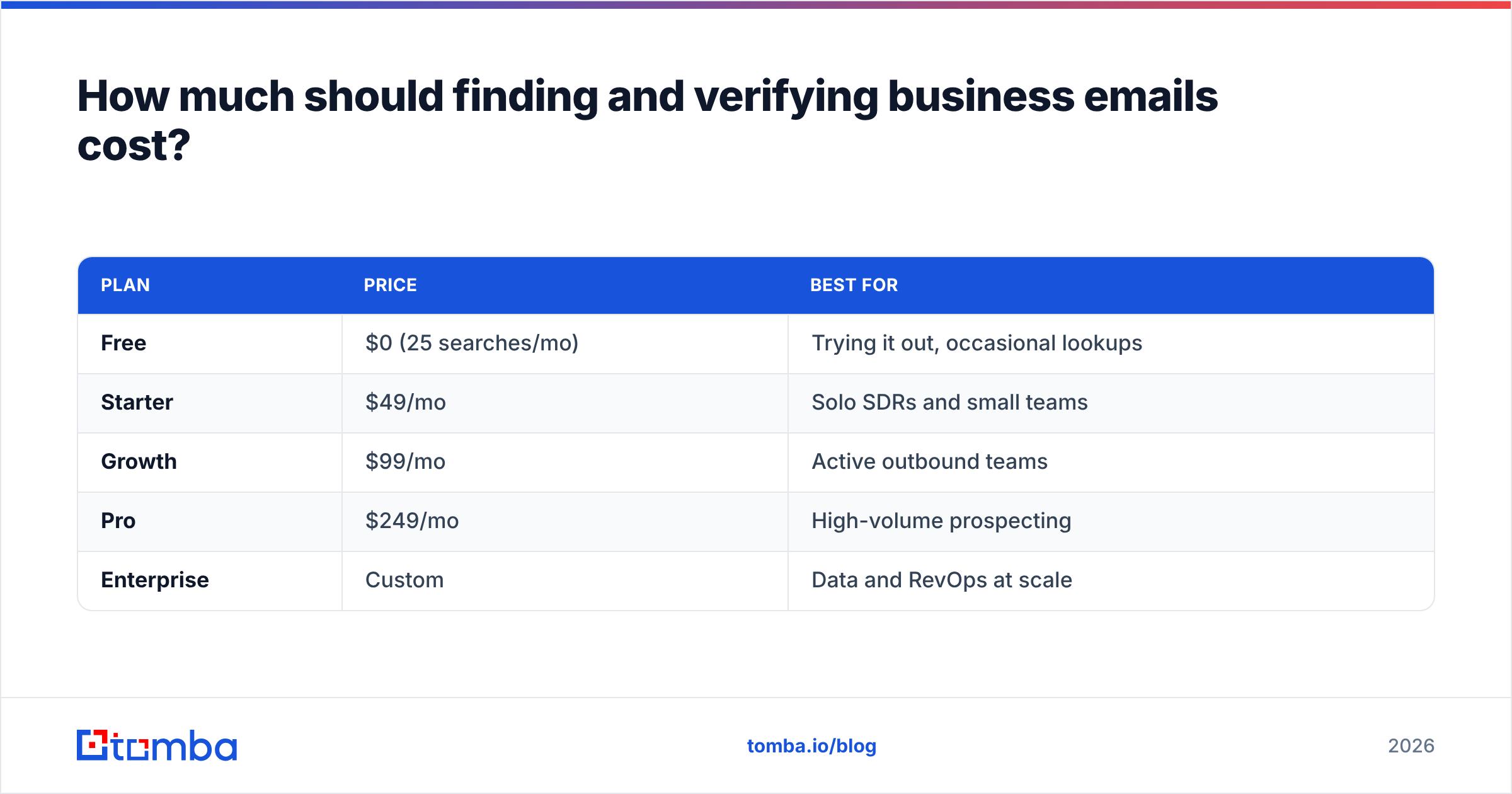
Most teams want a finder and verifier under one roof so a found address can be verified in the same step. Tomba bundles both, and the tiers map cleanly to team size:
| Plan | Price | Best for |
|---|---|---|
| Free | $0 (25 searches/mo) | Trying it out, occasional lookups |
| Starter | $49/mo | Solo SDRs and small teams |
| Growth | $99/mo | Active outbound teams |
| Pro | $249/mo | High-volume prospecting |
| Enterprise | Custom | Data and RevOps at scale |
You can see the full breakdown on the Tomba pricing page. Whatever tool you choose, judge it on verified accuracy and bounce rate, not headline credit counts — and start on a free tier before you commit budget.
Putting it together: a clean business-email workflow#
Tie the pieces into one repeatable loop and the whole thing stops being guesswork:
- Identify the company and its email pattern — confirm the format before you build any address.
- Find the contact — use a finder or domain search to get the most likely address with a confidence score.
- Verify — push every address through verification, with catch-all handling, before it touches a campaign.
- Enrich — attach title, company, and phone so the record survives a job change.
- Maintain — re-verify quarterly and suppress bounces on sight.
Do this consistently and your bounce rate stays low, your sender reputation stays high, and your replies come from people who actually exist at the companies you're targeting.
Start finding accurate business emails today#
If you're still copy-pasting names into a permutator and hoping, you're leaving deliverability on the table. The Tomba Email Finder turns a name and a domain into a verified business email with a confidence score and source citations, and pairs natively with verification and enrichment so every address you add is one you can actually send to. Start on the free tier, find your first 25 contacts this afternoon, and only scale up once you've seen the accuracy for yourself. Your inbox placement — and your pipeline — will thank you.
// get started
Find, verify and enrich your first contacts today
Start on the free plan with 25 searches a month, then scale when your team is ready.
Free plan · No credit card required · GDPR & CCPA
// about the author