Business Introduction Email: Templates That Work in 2026
A weak business introduction email gets deleted in two seconds. Learn the structure, real templates, and the data work that gets replies in 2026.
Business Introduction Email: Templates That Work in 2026
A business introduction email is the first impression you don't get to redo. Send a generic one and you join the 99% that get archived unread. Send a sharp, relevant one and you open a door — to a sale, a partnership, a job, or a referral.
This guide breaks down the exact structure that earns replies, gives you copy-paste templates for every scenario, and shows you the unglamorous prerequisite most "10 best templates" posts skip: getting the email to the right person, at the right address, that actually exists.
TL;DR#
- A business introduction email introduces you, your company, or a mutual connection to someone who doesn't yet know you — with one clear reason for them to reply.
- The winning formula is five parts: a specific subject line, a personalized opener, a one-sentence value pitch, social proof, and a single low-friction call to action.
- Personalization beats volume. A relevant email to 50 verified contacts outperforms a blast to 5,000 scraped addresses every time.
- Deliverability is half the battle. Bounces and spam traps tank your sender reputation, so verified, accurate contact data is non-negotiable.
- Tools matter. Use an email finder to get the right address and an email verifier to confirm it lands before you hit send.
What is a business introduction email?#
A business introduction email is a message you send to start a professional relationship with someone who has no prior context about you. Think of it like walking up to a stranger at a conference: you have about three seconds before they decide whether to keep listening or look for an exit. The email version is even less forgiving — your reader can leave with one keystroke.
There are three common flavors, and the structure shifts slightly for each:
- Self-introduction — You reach out cold to introduce yourself and your offer (sales, partnerships, networking).
- Connector introduction — You introduce two other people to each other ("Sarah, meet Marcus").
- Company or product introduction — You introduce your business or a new product to a prospect, partner, or existing contact.
Each one has the same job: earn enough trust and curiosity in a few short lines that the reader takes the next small step. That step is almost never "buy now." It's "reply," "book 15 minutes," or "forward this to the right person."

What makes a business introduction email actually get replies?#
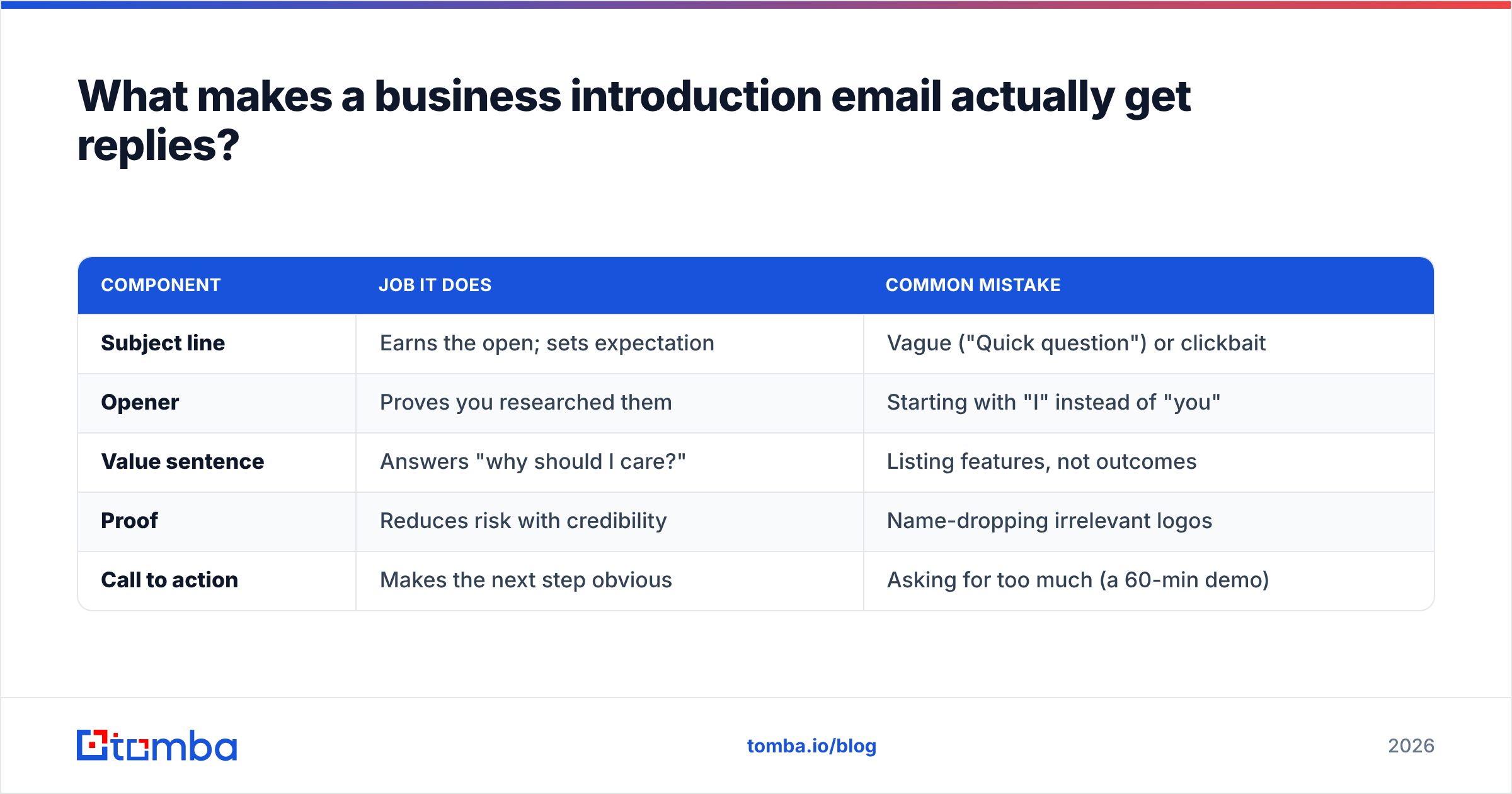
The difference between a 2% reply rate and a 20% reply rate is rarely the wording — it's relevance and reach. Below is the anatomy that consistently performs, broken into the five components every strong intro email shares.
| Component | Job it does | Common mistake |
|---|---|---|
| Subject line | Earns the open; sets expectation | Vague ("Quick question") or clickbait |
| Opener | Proves you researched them | Starting with "I" instead of "you" |
| Value sentence | Answers "why should I care?" | Listing features, not outcomes |
| Proof | Reduces risk with credibility | Name-dropping irrelevant logos |
| Call to action | Makes the next step obvious | Asking for too much (a 60-min demo) |
Notice that four of the five components are about the reader, not you. The most common failure mode in a business introduction email is making it a monologue about your company. Flip the ratio: spend 80% of your words on their world and 20% on yours.
A few rules that hold up across thousands of sent emails:
- Keep it under 125 words. Long intros signal you want a lot before you've given anything.
- One CTA only. Two asks split attention and halve your response rate.
- Write for mobile. More than half of first opens happen on a phone, so short paragraphs win.
- Match formality to industry. A fintech CFO and a startup founder expect different tones.
How do you structure a business introduction email step by step?#
Here is the skeleton you can reuse for almost any scenario. Fill the brackets and cut anything that doesn't earn its place.
1. Subject line (5–8 words). Reference a trigger, a mutual connection, or a specific outcome. Examples: "Idea for [Company]'s Q3 pipeline" or "[Mutual name] suggested I reach out."
2. Personalized first line. Mention something true and specific — a recent funding round, a podcast they were on, a product launch. This is where your research shows.
3. The bridge. Connect what you noticed to what you do, in one sentence. "Because you're scaling the SDR team, the way reps source verified contacts is about to matter a lot."
4. Proof point. One stat or one comparable customer. "We helped [similar company] cut bounce rates from 12% to under 2%."
5. Single CTA. Make it tiny and specific. "Worth a 15-minute call next Tuesday or Thursday?"
6. Signature. Real name, role, company, and a link. No 600px banner image — it triggers spam filters and clutters mobile.
If you want a head start, you can pull proven frameworks from a library of cold email templates and adapt them to your voice rather than writing from a blank page.
What are the best business introduction email templates?#
Below are five templates covering the most common situations. Swap the brackets, keep them short, and personalize the first line every single time.
Template 1 — Cold sales introduction#
Subject: Cutting [Company]'s email bounce rate
Hi [First name],
Saw [Company] just opened a new SDR pod — congrats on the growth. When teams scale outbound fast, deliverability usually slips because of bad contact data.
We help B2B teams reach verified decision-makers, so reps spend time selling instead of guessing addresses. [Similar company] cut wasted sends by 40% in a month.
Worth a quick 15-minute call Thursday to see if it fits?
[Your name]
Template 2 — Mutual-connection introduction#
Subject: [Mutual name] thought we should connect
Hi [First name],
[Mutual name] mentioned you're rethinking how your team sources leads and suggested I reach out.
I run partnerships at [Company] — we help [type of team] find and verify contact data at scale. Happy to share what's working for teams like yours.
Open to a short call next week?
[Your name]
Template 3 — Partnership / collaboration#
Subject: Partnership idea: [Your company] + [Their company]
Hi [First name],
Your audience of [their customer type] overlaps almost perfectly with the teams we serve, with zero product conflict.
I'd love to explore a co-marketing or integration play. Could share two or three concrete ideas in 15 minutes.
Does early next week work?
[Your name]
Template 4 — Introducing two people (connector)#
Subject: Intro: [Person A] ↔ [Person B]
[Person A], meet [Person B], who leads RevOps at [Company] and is solving exactly the data problem you described last week.
[Person B], [Person A] built the outbound motion at [Company] from scratch and knows this space cold.
I'll step back and let you two take it from here.
[Your name]
Template 5 — New product / feature announcement to existing contacts#
Subject: New: [feature] for [their use case]
Hi [First name],
You mentioned catch-all domains were hard to verify. We just shipped a catch-all verifier that resolves them with high confidence.
Want me to turn it on for your account so you can test it this week?
[Your name]
Why does your contact data decide whether the email works?#
The best-written business introduction email in the world is worthless if it bounces. This is the part most copywriting guides ignore, and it's where deals quietly die.
Picture it like mailing a beautiful handwritten letter to an address where nobody lives. The effort is real; the result is zero. Worse, in email, repeated bounces and spam-trap hits damage your domain's sender reputation, so even your good emails start landing in spam.
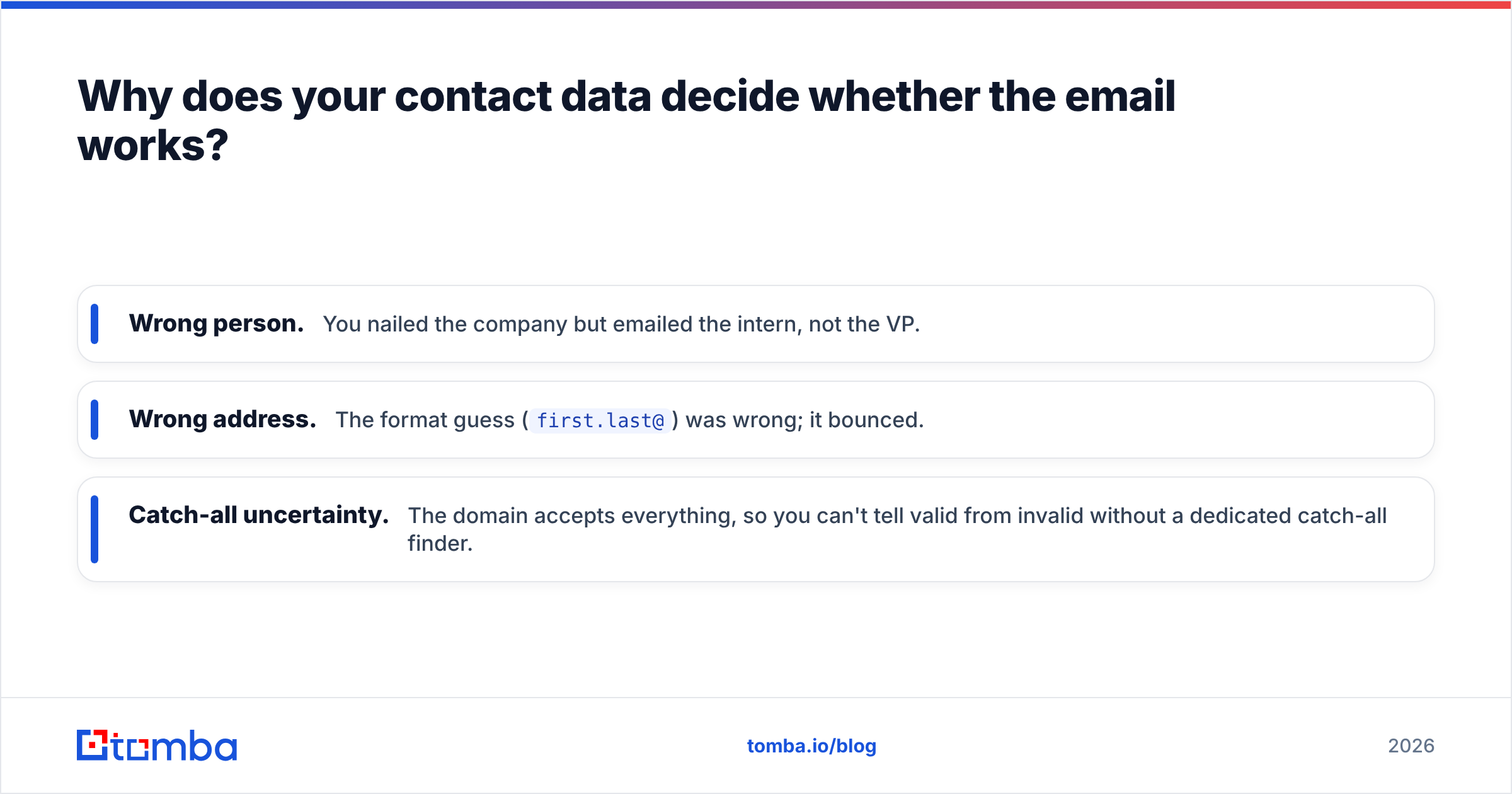
Three data problems sink intro campaigns:
- Wrong person. You nailed the company but emailed the intern, not the VP.
- Wrong address. The format guess (
first.last@) was wrong; it bounced. - Catch-all uncertainty. The domain accepts everything, so you can't tell valid from invalid without a dedicated catch-all finder.
The fix is a short, boring workflow that runs before you write a single word of copy: find the right contact, confirm the address resolves, and only then personalize and send.

How do free guessing and a verified workflow compare?#
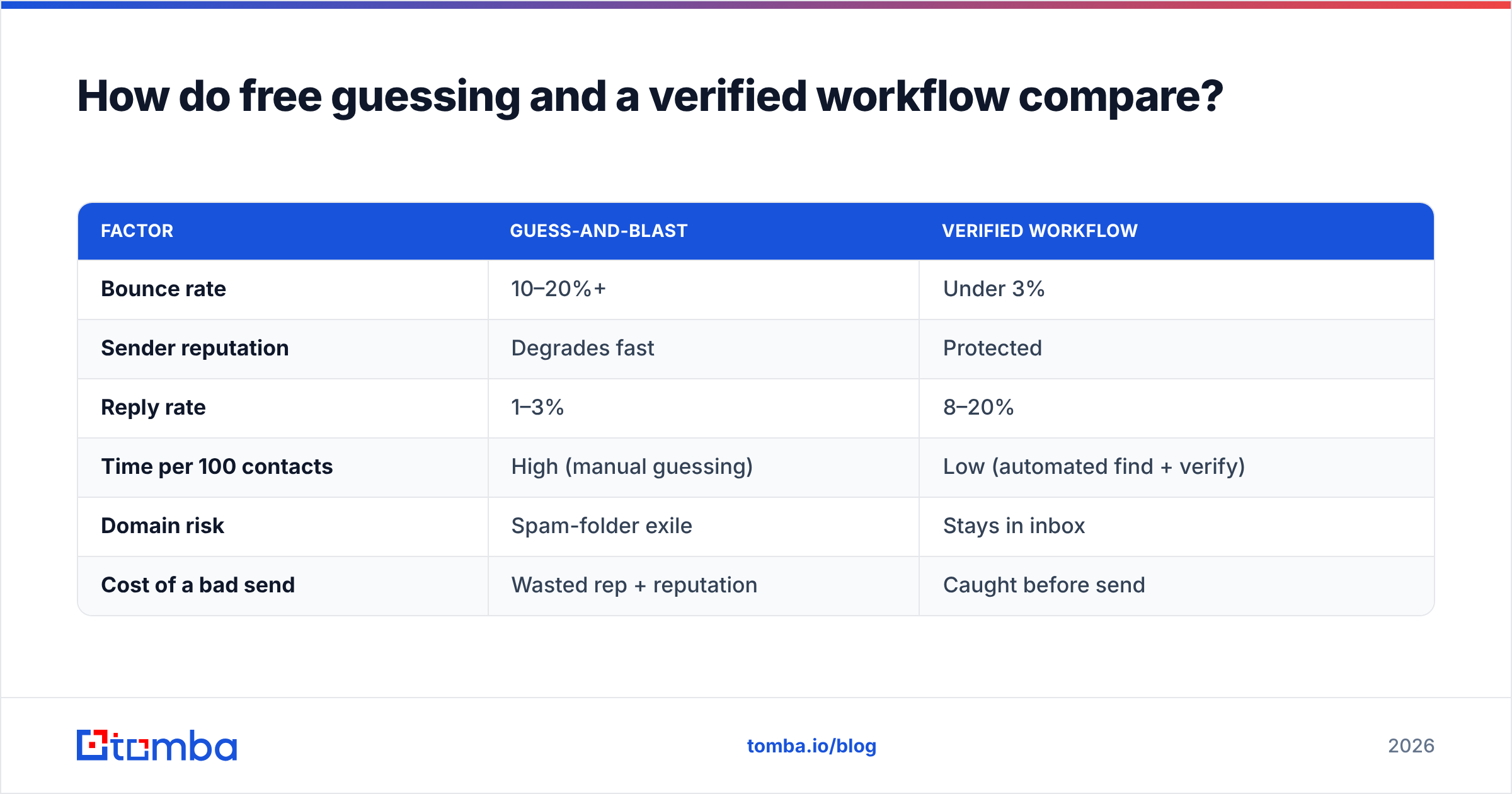
Many people still build their intro lists by guessing email patterns or scraping whatever they can. Here's how that stacks up against a verified data workflow.
| Factor | Guess-and-blast | Verified workflow |
|---|---|---|
| Bounce rate | 10–20%+ | Under 3% |
| Sender reputation | Degrades fast | Protected |
| Reply rate | 1–3% | 8–20% |
| Time per 100 contacts | High (manual guessing) | Low (automated find + verify) |
| Domain risk | Spam-folder exile | Stays in inbox |
| Cost of a bad send | Wasted rep + reputation | Caught before send |
The verified column isn't theoretical. According to deliverability guidance from providers like HubSpot, keeping your bounce rate low and your list clean is one of the strongest levers on whether your messages reach the inbox at all. And independent reviews on G2 consistently rank list accuracy as the top differentiator buyers cite when choosing prospecting tools.
Which subject lines get business introduction emails opened?#
No open, no read, no reply. Your subject line carries disproportionate weight, so test these patterns:
- The mutual connection: "[Name] suggested I reach out" — borrowed trust is the highest-converting opener.
- The specific outcome: "Cutting [Company]'s bounce rate" — concrete and self-interested for the reader.
- The trigger event: "Congrats on the Series B" — proves timing and research.
- The genuine question: "How is [team] handling catch-all domains?" — curiosity, not clickbait.
Avoid all-caps, "FREE," exclamation points, and anything that sounds like a newsletter. If you want to pressure-test options before sending, run them through a subject line tester and compare predicted performance.
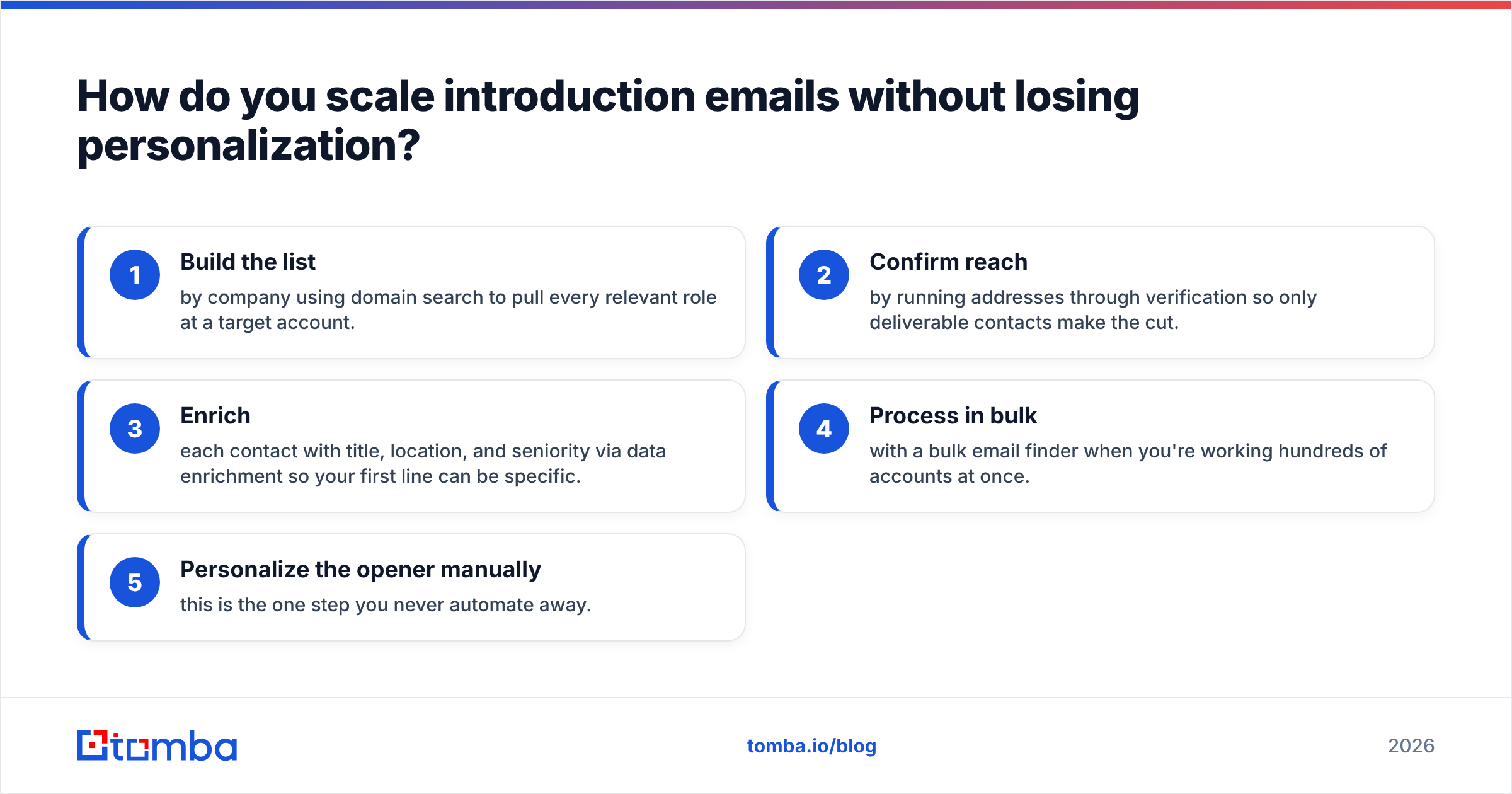
How do you scale introduction emails without losing personalization?#
The tension in outbound is volume versus relevance. You resolve it not by writing fewer emails, but by automating the data work so your human time goes entirely into personalization.
A practical pipeline looks like this:
- Build the list by company using domain search to pull every relevant role at a target account.
- Confirm reach by running addresses through verification so only deliverable contacts make the cut.
- Enrich each contact with title, location, and seniority via data enrichment so your first line can be specific.
- Process in bulk with a bulk email finder when you're working hundreds of accounts at once.
- Personalize the opener manually — this is the one step you never automate away.
This is the same logic behind treating outbound as a system rather than a guessing game. For context on why clean inputs drive the whole motion, see how teams approach sales automation without sacrificing the human touch that makes intros work.
Pricing matters here too. A clean workflow shouldn't cost a fortune — you can review the full Tomba pricing tiers, from the free plan (25 searches/month) up through Starter at $49/mo and Growth at $99/mo, and pick the volume that matches your outreach.
What mistakes kill a business introduction email?#
Even with a great template, these errors quietly sink response rates:
- Talking about yourself first. If your first sentence starts with "I" or "We," rewrite it.
- Asking for too much. A cold intro should ask for a reply or 15 minutes, never a signed contract.
- Sending to unverified addresses. Every bounce is a credibility and reputation cost.
- No clear next step. "Let me know your thoughts" is not a CTA. Propose a specific time.
- Over-designing. Image-heavy HTML signatures look corporate and trip spam filters.
- Forgetting follow-up. Most replies come on the second or third touch, not the first.
Fix these six and you'll outperform the majority of senders who never get past the template stage.
Frequently asked questions#
How long should a business introduction email be? Under 125 words for cold outreach. Long enough to make one clear point and one clear ask, short enough to read on a phone in ten seconds.
What is the best time to send one? Mid-morning on Tuesday through Thursday tends to perform best for B2B, but your audience's habits matter more than any rule. Test and track your own reply rates.
Should I personalize every email? Personalize the subject line and first sentence at minimum. The body can be templated; the opener proves you're a human who did the research.
How do I find the right person's email address? Use a dedicated email finder to search by name and company domain, then verify the result before sending so it doesn't bounce.
Start with the right address, then write the perfect intro#
The most persuasive business introduction email still fails if it never reaches a real inbox. Get the foundation right first: find the decision-maker's verified email, confirm it's deliverable, and enrich the record so your opening line lands as specific and relevant.
Tomba's Email Finder does exactly that — search by name, company, or domain to surface accurate, verified professional emails, then send your intro knowing it will actually arrive. Start free with 25 searches a month, and turn your next cold introduction into a real conversation.
// get started
Find, verify and enrich your first contacts today
Start on the free plan with 25 searches a month, then scale when your team is ready.
Free plan · No credit card required · GDPR & CCPA
// about the author