Business Introduction Email Format: Templates & Examples (2026)
The exact business introduction email format that gets replies in 2026 — structure, subject lines, copy-paste templates, and the mistakes that send your message to trash.
A business introduction email is the first impression you get to make in writing — and most people waste it. They open with their own resume, bury the ask, and forget the reader has roughly eight seconds of patience. The good news: a strong introduction email follows a predictable format. Once you learn the structure, you can adapt it to investors, prospects, new teammates, or partners in minutes.
This guide breaks down the exact business introduction email format that works in 2026, with subject lines, a section-by-section template, real examples, and the errors that quietly kill your reply rate.
TL;DR#
- A business introduction email has six parts: subject line, greeting, hook, value, ask, and sign-off. Skip any one and the message weakens.
- Keep it under 150 words. Decision-makers skim on mobile, so front-load the reason you're writing.
- Personalize the first line with something specific to the recipient — not "I hope this finds you well."
- Make the ask small and singular: one clear next step, not three.
- Verified, accurate contact data matters as much as the copy — a perfect email to the wrong address gets you nothing.
What is a business introduction email?#
A business introduction email is a message you send to start a professional relationship with someone who doesn't know you yet — or to introduce two parties to each other. It's the digital equivalent of walking up, extending your hand, and explaining in one breath who you are and why the other person should care.
There are two common flavors:
- Self-introduction — you reach out directly to a prospect, hiring manager, investor, or potential partner.
- Third-party introduction — you connect two contacts (for example, "I'd like to introduce you to Sara, who leads ops at Acme").
Both share the same DNA: be brief, be relevant, and give the reader an obvious reason to respond. The format below works for either, with small adjustments to the ask.

What is the correct business introduction email format?#
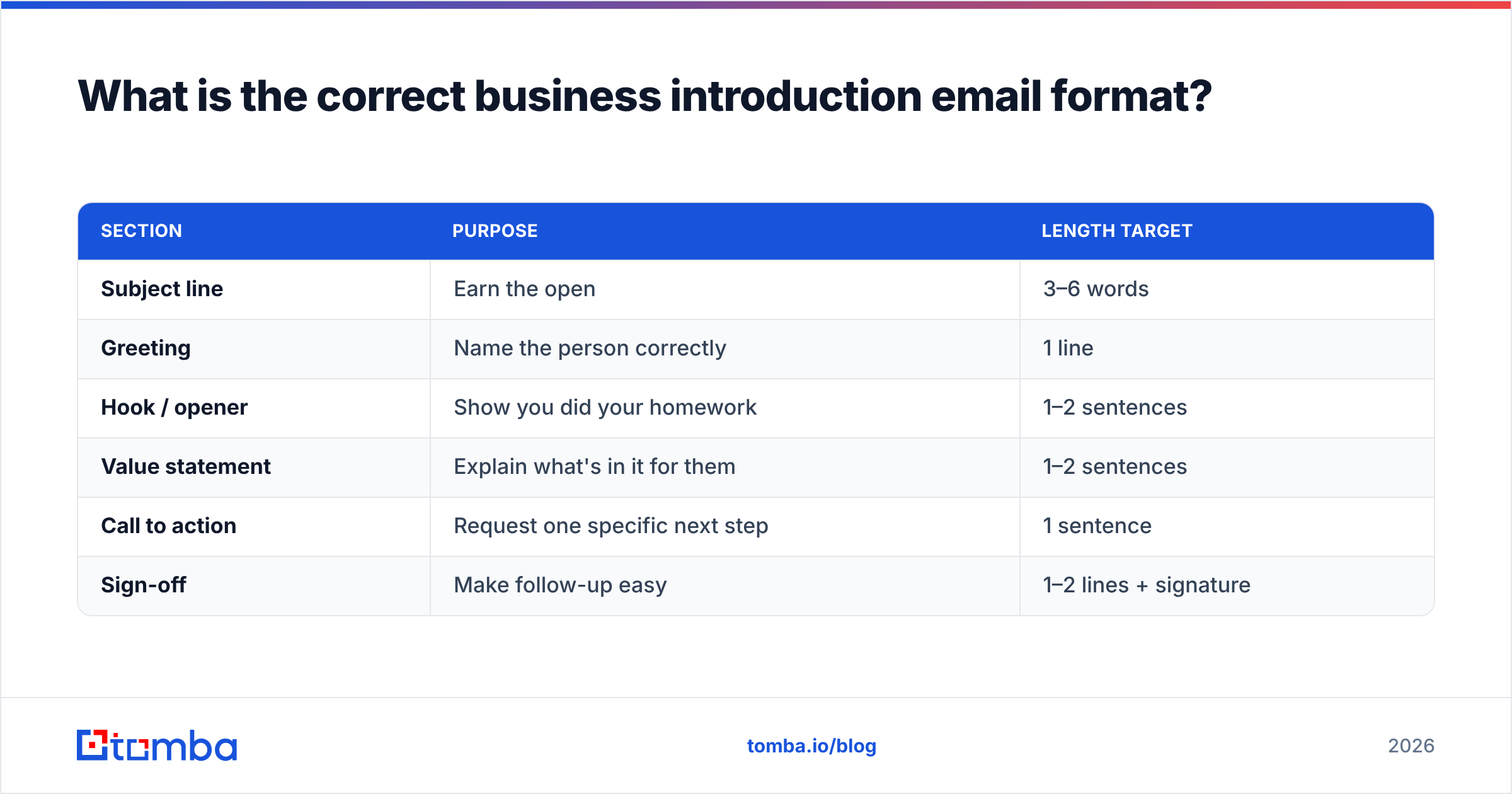
The conclusion first: every effective introduction email has six building blocks, in this order. Think of it like a sandwich — the subject and sign-off are the bread, and the hook-value-ask is the filling that actually matters.
| Section | Purpose | Length target |
|---|---|---|
| Subject line | Earn the open | 3–6 words |
| Greeting | Name the person correctly | 1 line |
| Hook / opener | Show you did your homework | 1–2 sentences |
| Value statement | Explain what's in it for them | 1–2 sentences |
| Call to action | Request one specific next step | 1 sentence |
| Sign-off | Make follow-up easy | 1–2 lines + signature |
Here is how each block works in practice:
- Subject line — Specific beats clever. "Quick question about Acme's onboarding flow" outperforms "Hello!" every time. Avoid spammy punctuation and ALL CAPS.
- Greeting — Use the recipient's first name and spell it correctly. A wrong name is an instant delete.
- Hook — Reference something real: a recent funding round, a blog post they wrote, a mutual connection, a problem their industry faces. This proves you're not blasting a list.
- Value statement — Tie your introduction to a benefit for them. Lead with their outcome, not your job title.
- Call to action — Ask for exactly one thing: a 15-minute call, a reply, a quick yes/no. Choice paralysis kills conversions.
- Sign-off — Close warmly, add your name, title, company, and one link (calendar or site). Keep your signature clean.
What subject line should a business introduction email use?#
Your subject line decides whether the rest of your work gets read. Roughly half of recipients judge whether to open based on the subject alone, so treat it as the most important sentence you write.
Patterns that consistently earn opens:
- The mutual connection: "[Name] suggested I reach out"
- The specific question: "Question about your Q3 expansion"
- The clear value: "Cutting onboarding time for SaaS teams"
- The local/relevance angle: "Fellow [city] founder — quick intro"
Avoid vague openers like "Introduction," "Touching base," or "Hello from [Company]." They tell the reader nothing and read like every ignored email before yours. If you get stuck, a subject line generator can give you tested starting points to adapt.

What does a business introduction email template look like?#
Here's a copy-paste self-introduction template using the six-part format. Replace the brackets and trim ruthlessly.
Subject: Quick idea for [Company]'s [specific area]
Hi [First Name],
I read that [Company] just [specific trigger event — launched X, raised Y, expanded to Z]. Congratulations on that.
I work with [type of company] to [clear outcome], and teams like [comparable customer] saw [concrete result] within [timeframe].
Would you be open to a 15-minute call next week to see if it's a fit? If not, no worries — happy to send a short summary instead.
Best,
[Your Name]
[Title], [Company]
[Calendar link]
And a third-party introduction template:
Subject: Intro: [Person A] ↔ [Person B]
Hi [Person A] and [Person B],
I wanted to connect you two. [Person A], meet [Person B], who leads [role] at [Company] — [one sentence on why they're relevant]. [Person B], [Person A] is [one sentence].
I think a quick conversation about [shared topic] could be valuable for you both. I'll let you take it from here.
Best,
[Your Name]
You can store reusable versions like these in a shared library — browse cold email templates for more starting points you can adapt to each scenario.
How do you personalize a business introduction email?#
Personalization is the difference between a 2% reply rate and a 20% one. The conclusion: one genuinely specific detail beats a paragraph of generic flattery.
Sources worth mining for that detail:
- Their recent content — a LinkedIn post, podcast appearance, or article they published.
- Company news — funding, hiring, product launches, awards, expansion.
- Shared context — a mutual connection, the same alma mater, a conference you both attended.
- A specific pain point — something visible in their job posting, reviews, or industry trend.
What personalization is not: "I love what you're doing at [Company]." That's filler. Compare these openers:
| Generic opener | Personalized opener |
|---|---|
| "I hope this email finds you well." | "Your talk at SaaStr on retention loops stuck with me." |
| "I wanted to reach out about our product." | "Noticed you're hiring three SDRs — scaling outbound?" |
| "We help companies like yours grow." | "Your G2 reviews mention slow onboarding twice this month." |
Personalization at scale requires real data about who you're contacting and what's happening at their company. That's where data enrichment earns its keep — pulling role, company, and firmographic context so each intro feels one-to-one even when you send many.
Why do business introduction emails get ignored?#
Most introduction emails fail for boring, fixable reasons. The single biggest one isn't the copy at all — it's reaching the wrong inbox or a dead address. Even a flawless message bounces if the email is outdated or guessed.
The most common killers:
- Wrong or invalid address. The email never lands, or it hits a catch-all and silently disappears. Verifying before you send protects your sender reputation and your response rate.
- It's all about you. Three sentences about your company before any mention of the reader.
- No clear ask. The reader finishes and thinks, "Okay… and?"
- Too long. Anything past 150–200 words on a first touch is a gamble.
- Weak subject line. Never opened, never read.
- Obvious mass mail. No name, no context, the same pitch everyone got.
Before any campaign, run your list through an email verifier to strip invalid and risky addresses. According to deliverability guidance from HubSpot, keeping bounce rates low is one of the strongest signals mailbox providers use to decide whether you reach the inbox at all.
How long should a business introduction email be?#
Short. Aim for 50–125 words for a cold first touch, and no more than 200 for a warmer introduction with context. The reason is behavioral: a large share of business email is now read on mobile, where a long message becomes an instant scroll-past.
A useful test — if your email doesn't fit on a single phone screen without scrolling, cut it. Every sentence should justify its place by answering one of three reader questions: Who are you? Why should I care? What do you want? Anything that doesn't serve those gets deleted.
Formatting helps too:
- Use short paragraphs (1–2 sentences each).
- Put the ask on its own line so it's impossible to miss.
- Skip attachments on a first email — they trigger spam filters and hesitation.
- One link maximum; more than that dilutes the click.
Business introduction email format: tool and channel comparison#
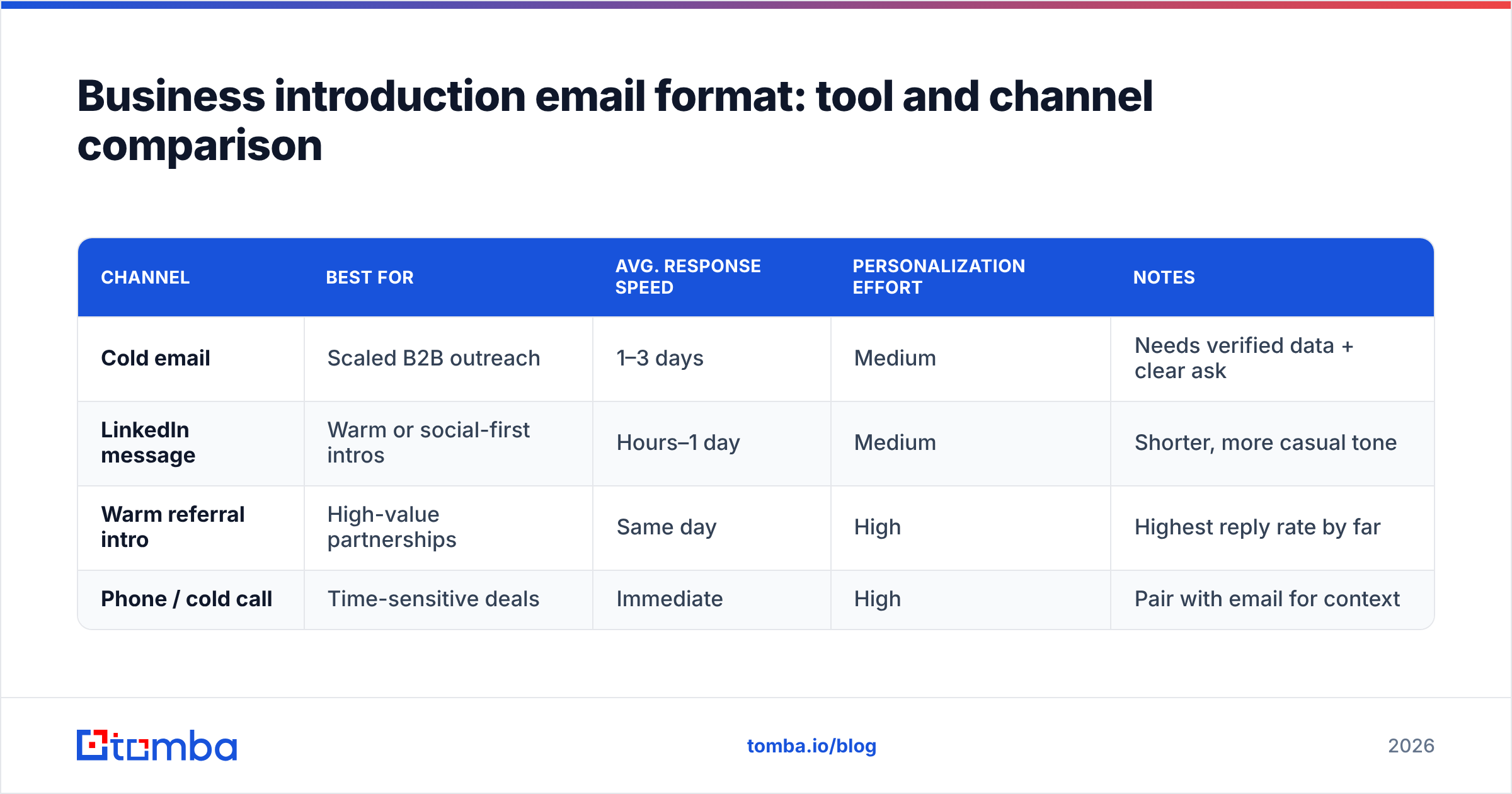
Different introductions call for different channels. Here's how the most common ones stack up for a first touch in 2026:
| Channel | Best for | Avg. response speed | Personalization effort | Notes |
|---|---|---|---|---|
| Cold email | Scaled B2B outreach | 1–3 days | Medium | Needs verified data + clear ask |
| LinkedIn message | Warm or social-first intros | Hours–1 day | Medium | Shorter, more casual tone |
| Warm referral intro | High-value partnerships | Same day | High | Highest reply rate by far |
| Phone / cold call | Time-sensitive deals | Immediate | High | Pair with email for context |
Email still wins on scale and documentation, which is why getting the format right matters most there. For social-first plays, the same six-part structure applies — you just compress it further. Tools like G2 are useful for researching which outreach platforms fit your team's stack and reading honest user reviews before you commit.
How do you find the right person to introduce yourself to?#
The best-formatted email in the world is useless if it goes to a generic info@ inbox. You need the decision-maker's actual, verified address.
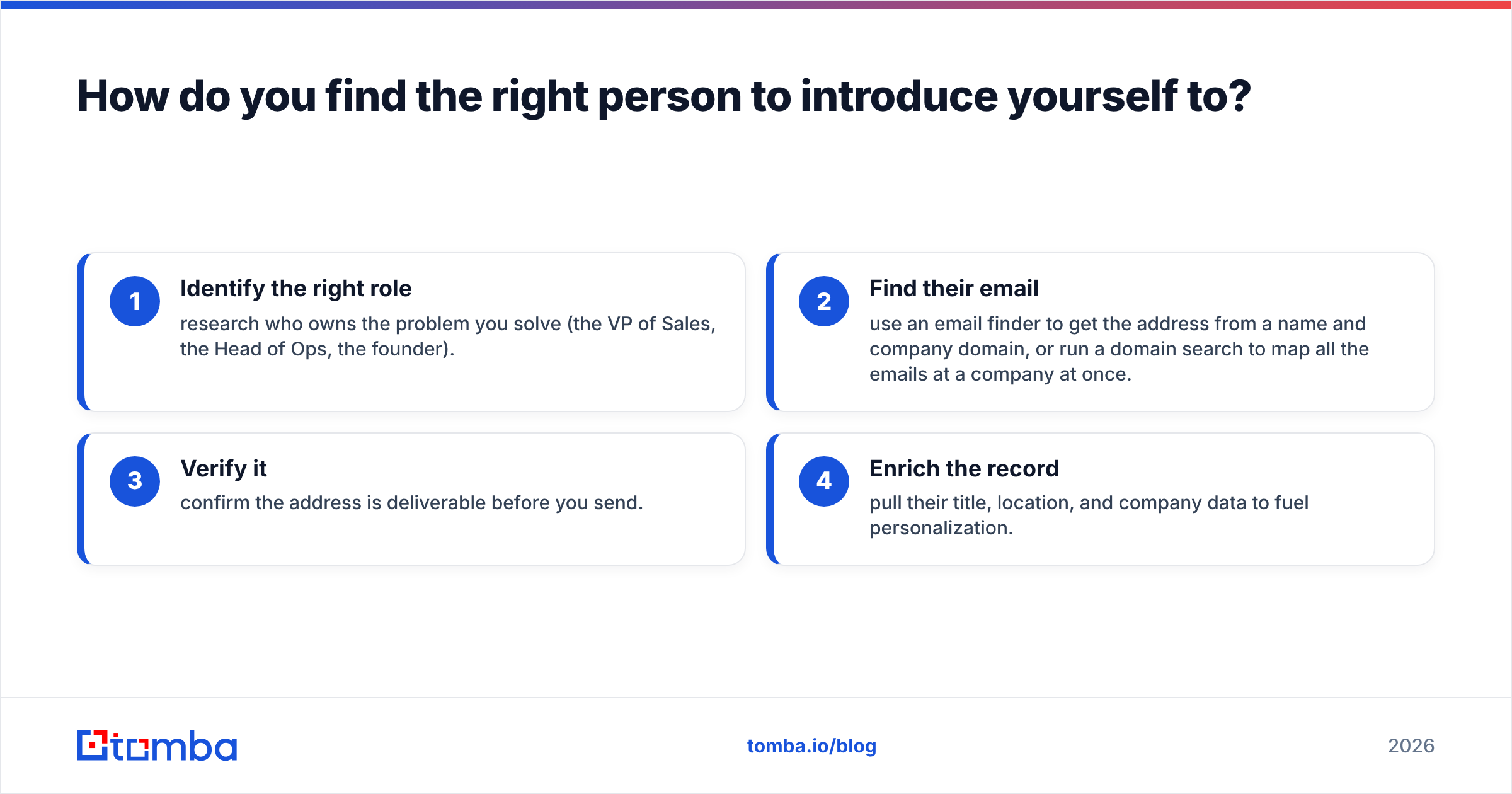
The workflow most teams use:
- Identify the right role — research who owns the problem you solve (the VP of Sales, the Head of Ops, the founder).
- Find their email — use an email finder to get the address from a name and company domain, or run a domain search to map all the emails at a company at once.
- Verify it — confirm the address is deliverable before you send.
- Enrich the record — pull their title, location, and company data to fuel personalization.
This data layer is invisible to the reader but decisive for you. A clean, verified, enriched list means your carefully formatted introduction actually reaches a human who can say yes. For broader guidance on outreach mechanics, vendor documentation from established players and review sites like Capterra can help you benchmark accuracy claims before trusting any provider's numbers.
What are the most common business introduction email mistakes?#
Run this checklist before you hit send:
- Wrong name or company — the fastest way to the trash.
- No personalization — generic intros read as spam.
- Multiple asks — pick one next step and stick to it.
- Burying the value — your reader shouldn't have to dig for the point.
- Skipping verification — bounces hurt deliverability and waste effort.
- No follow-up plan — most replies come after the second or third touch, so plan a polite sequence.
- Over-formatting — colored text, big logos, and three links scream "marketing blast."
Fix these and your introduction emails will already outperform the majority of what lands in any decision-maker's inbox.
Frequently asked questions#
How do you start a business introduction email? Open with the recipient's name, then a one-sentence hook that proves relevance — a recent event, mutual connection, or specific observation about their work. Save your own background for after you've earned attention.
Should a business introduction email be formal or casual? Match the recipient's industry and seniority. Finance and legal lean formal; startups and creative fields lean casual. When unsure, stay professional but conversational — write like a competent human, not a press release.
How many times should you follow up? Two to three follow-ups, spaced 3–5 business days apart, is standard. Each should add a small new angle rather than just "bumping" the thread.
What's the ideal send time? Mid-morning on Tuesday through Thursday generally performs best for B2B, but test against your own audience — your data beats any benchmark.
Put the format to work#
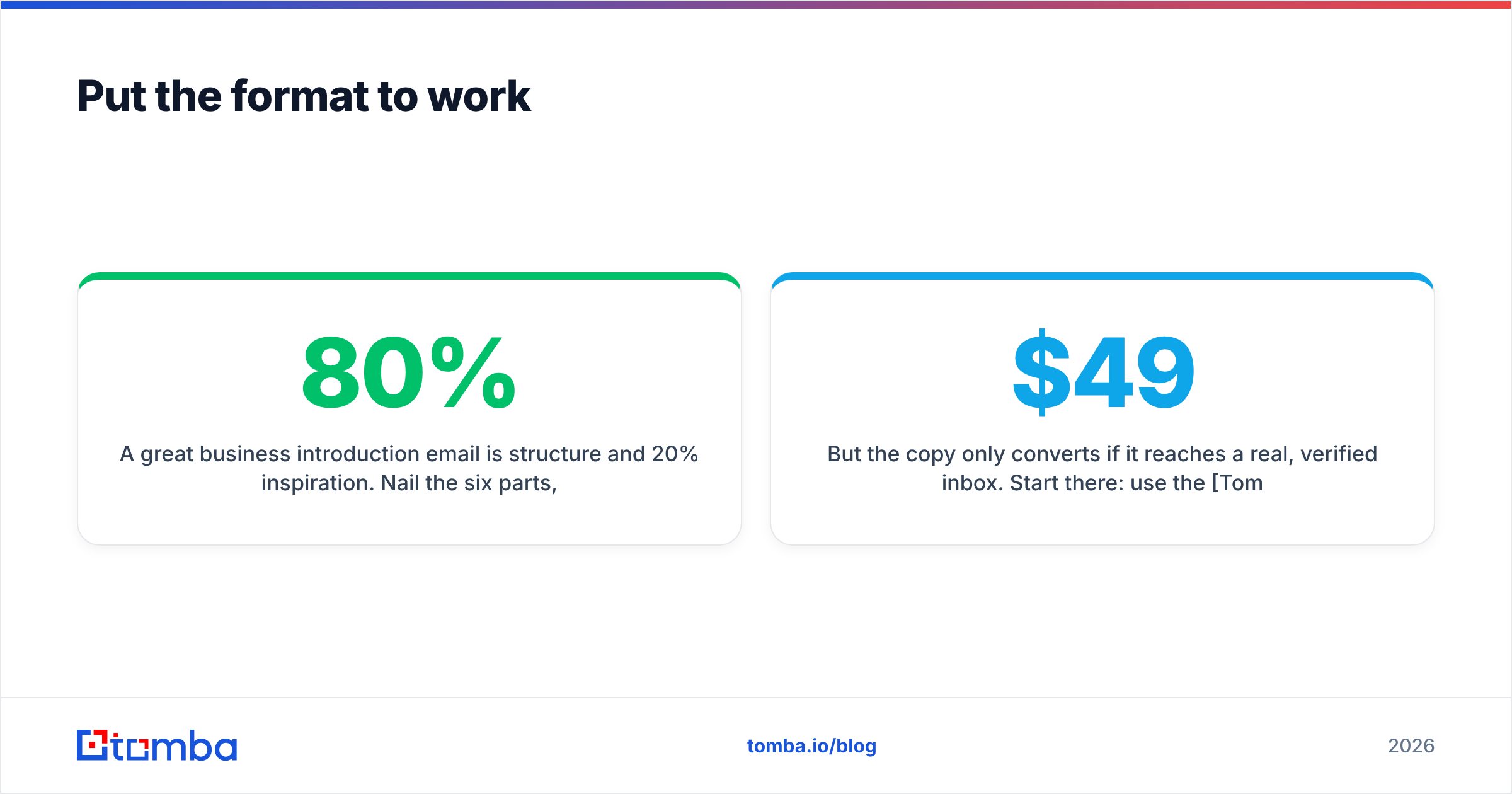
A great business introduction email is 80% structure and 20% inspiration. Nail the six parts, keep it short, personalize the opener, and make one clean ask — and you'll stand out simply by being clear and relevant.
But the copy only converts if it reaches a real, verified inbox. Start there: use the Tomba Email Finder to pull accurate, professional email addresses by name or company domain, verify them before you send, and enrich each contact with the details that make your introduction feel one-to-one. Begin on the free tier (25 searches per month) and scale up through the Starter plan at $49/mo as your outreach grows — see full Tomba pricing for the right fit. Get the data right, and your perfectly formatted introduction finally gets the reply it deserves.
// get started
Find, verify and enrich your first contacts today
Start on the free plan with 25 searches a month, then scale when your team is ready.
Free plan · No credit card required · GDPR & CCPA
// about the author