Buy Data in 2026: The Smart B2B Data Buyer's Guide
Buying B2B data can rocket your pipeline or wreck your deliverability. Here's how to buy data in 2026 without torching your domain or your budget.
Buying B2B data is one of the fastest ways to fill a pipeline — and one of the fastest ways to wreck a sending domain. The difference is entirely in how you buy. This guide walks through every option, the real costs, and the traps that quietly burn money.
TL;DR#
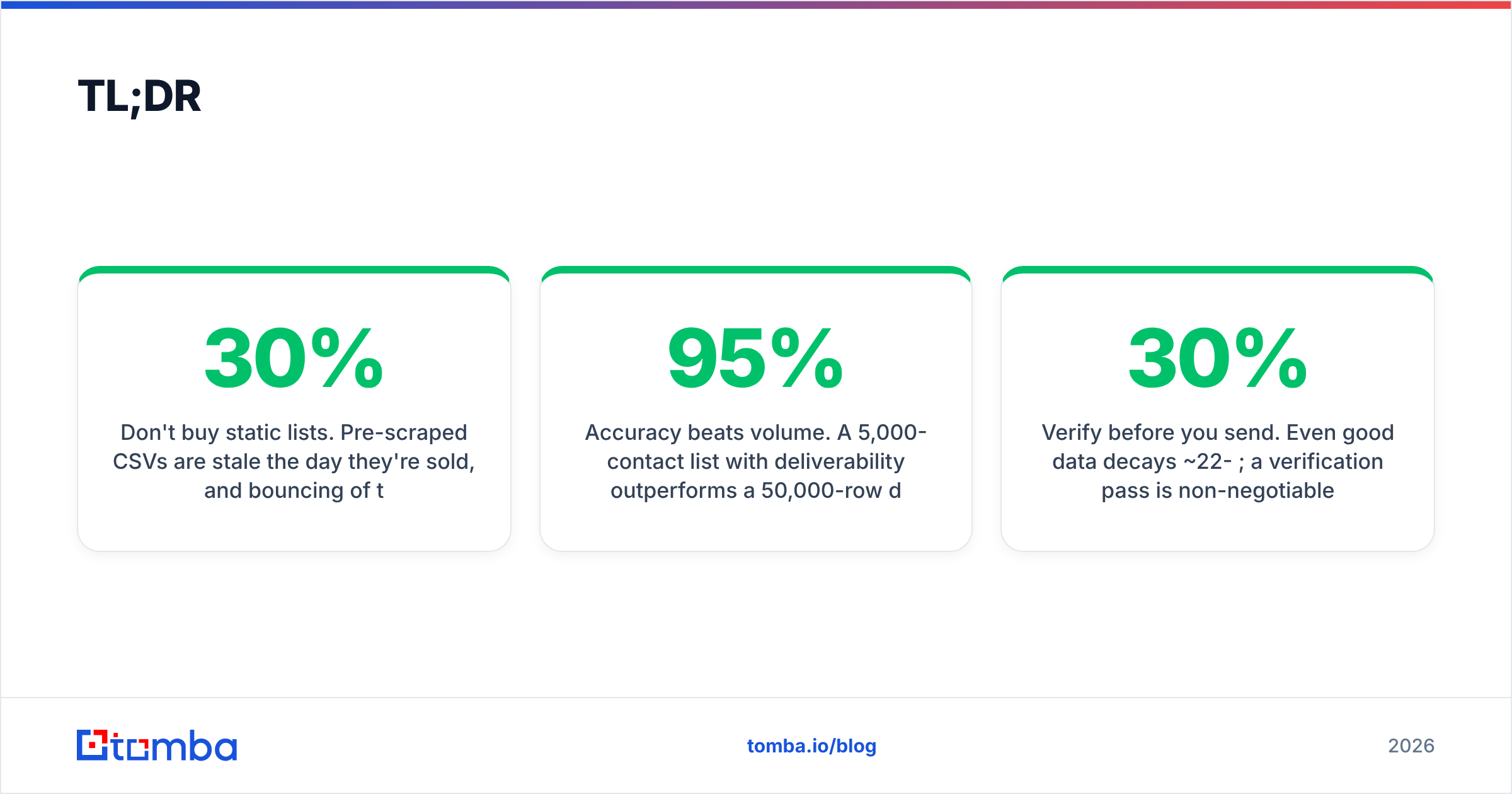
- Don't buy static lists. Pre-scraped CSVs are stale the day they're sold, and bouncing 30% of them shreds your sender reputation.
- Buy access, not files. API-based and on-demand data — found and verified at the moment you use it — beats any list you can download.
- Accuracy beats volume. A 5,000-contact list with 95% deliverability outperforms a 50,000-row dump at 60% every single time.
- Verify before you send. Even good data decays ~22-30% per year; a verification pass is non-negotiable.
- Watch the legal line. GDPR, CCPA, and CAN-SPAM all touch how you buy and use B2B contact data.
What does it actually mean to "buy data"?#
"Buy data" covers three very different transactions, and people conflate them constantly.
- Buying a static list — a one-time CSV/Excel file of contacts you own forever. Cheap up front, decays fast, often non-compliant.
- Buying data access (subscription/API) — you pay for the right to find and pull contacts on demand from a maintained database. Data is fresher because it's resolved when you request it.
- Buying enrichment — you already have partial records (a domain, a name, a LinkedIn URL) and pay to fill in the missing fields (email, phone, title, company size).
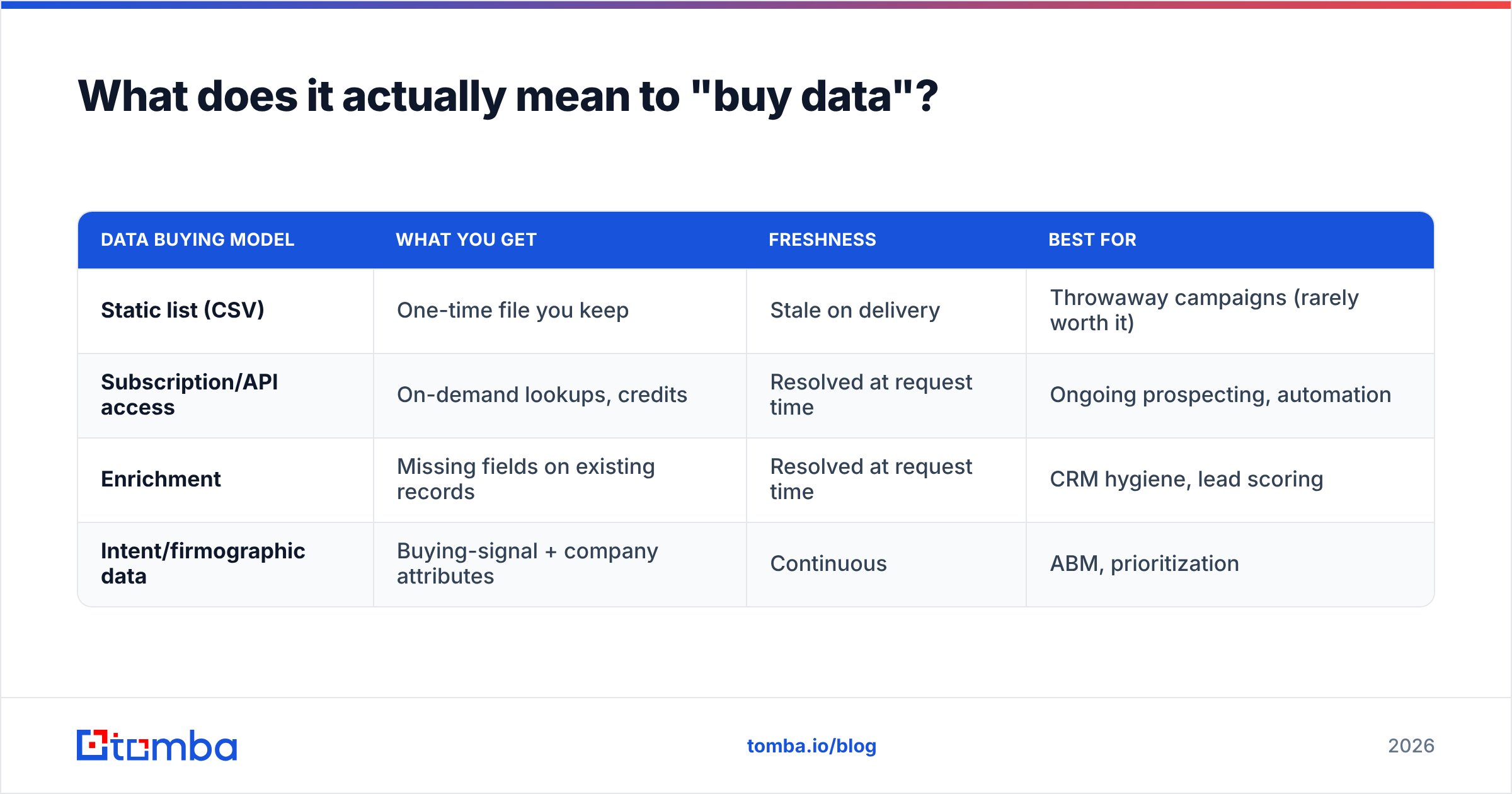
The mistake most teams make is treating #1 as the default. It's the worst of the three for almost every modern use case. The reason is simple: a list is a photograph of a database from the day it was exported. People change jobs, companies fold, and emails get retired. Buying access or enrichment is like having a live phone book instead of one printed in 2021.
| Data buying model | What you get | Freshness | Best for |
|---|---|---|---|
| Static list (CSV) | One-time file you keep | Stale on delivery | Throwaway campaigns (rarely worth it) |
| Subscription/API access | On-demand lookups, credits | Resolved at request time | Ongoing prospecting, automation |
| Enrichment | Missing fields on existing records | Resolved at request time | CRM hygiene, lead scoring |
| Intent/firmographic data | Buying-signal + company attributes | Continuous | ABM, prioritization |
Why are bought email lists so risky?#
Because a bad list doesn't just underperform — it actively damages assets you can't easily repair.
When you blast a purchased list, a chunk of those addresses are dead, recycled into spam traps, or belong to people who never opted in. Mailbox providers read that pattern fast. Hard bounces above 2-3% and spam-trap hits tell Gmail and Outlook your domain behaves like a spammer, and your sender reputation tanks. Once that happens, even your legitimate emails to engaged customers start landing in spam.
The math is brutal. Say you buy 50,000 contacts at "60% accuracy" (a generous claim for most cheap lists). That's 20,000 undeliverable addresses. Send to all 50,000 and you'll trigger throttling, blocklisting, and possibly a domain you have to abandon. The "cheap" list just cost you your primary sending domain.
This is why serious teams treat purchased data as raw material that must be processed, never as a finished product. You run it through an email verifier before a single message goes out, and you segment by confidence score so you're never gambling your domain on a low-quality batch.
For the deliverability fundamentals behind all of this, the Hubspot and Google guides are worth bookmarking — see Google's Postmaster sender guidelines for the thresholds providers actually enforce.
How do I buy data without destroying deliverability?#
Five rules, in priority order:
- Find on demand, don't download in bulk. Use a provider that resolves and verifies contacts when you request them, so you're never sitting on a decaying file.
- Verify everything before the first send. Treat every address as guilty until proven deliverable. Real-time SMTP checks catch most dead addresses.
- Handle catch-all domains separately. Catch-all servers accept every address, so standard verification can't confirm them. Route them through a dedicated catch-all verifier instead of trusting or discarding blindly.
- Warm up and segment. Send to your highest-confidence contacts first, ramp volume gradually, and keep bounce rates under 2%.
- Log your source and consent basis. If you can't say where a record came from and why you're allowed to contact it, you shouldn't send to it.
The teams that get burned skip straight to step 4 with an unverified file. The teams that win make steps 1-3 boring and automatic.
What should I look for in a B2B data provider?#
Evaluate providers on the attributes that survive contact with reality — not the headline contact count on the pricing page.
- Accuracy/deliverability guarantee — Does the provider verify in real time, or just resell an old database? A real guarantee comes with a verification step, not a marketing claim.
- Coverage for your segment — A vendor strong in US tech may be thin in EU manufacturing. Test your actual target accounts before committing.
- Data freshness — Ask how often records are re-validated. "Resolved at request time" beats "updated quarterly."
- Pricing model — Credits vs flat seats vs per-record. Credits that roll over and cover both finding and verifying are usually the most honest.
- Compliance posture — Documented data sources, opt-out handling, GDPR/CCPA stance. If they can't tell you where the data comes from, walk away.
- Integration surface — API, CRM connectors, spreadsheet add-ons. Data you can't get into your workflow is data you won't use.
Transparency about data sources is the single most underrated signal. A provider that publishes where its data comes from is making a claim it can be held to. One that hides behind "proprietary methods" usually scraped something it shouldn't have.
How much does it cost to buy data in 2026?#
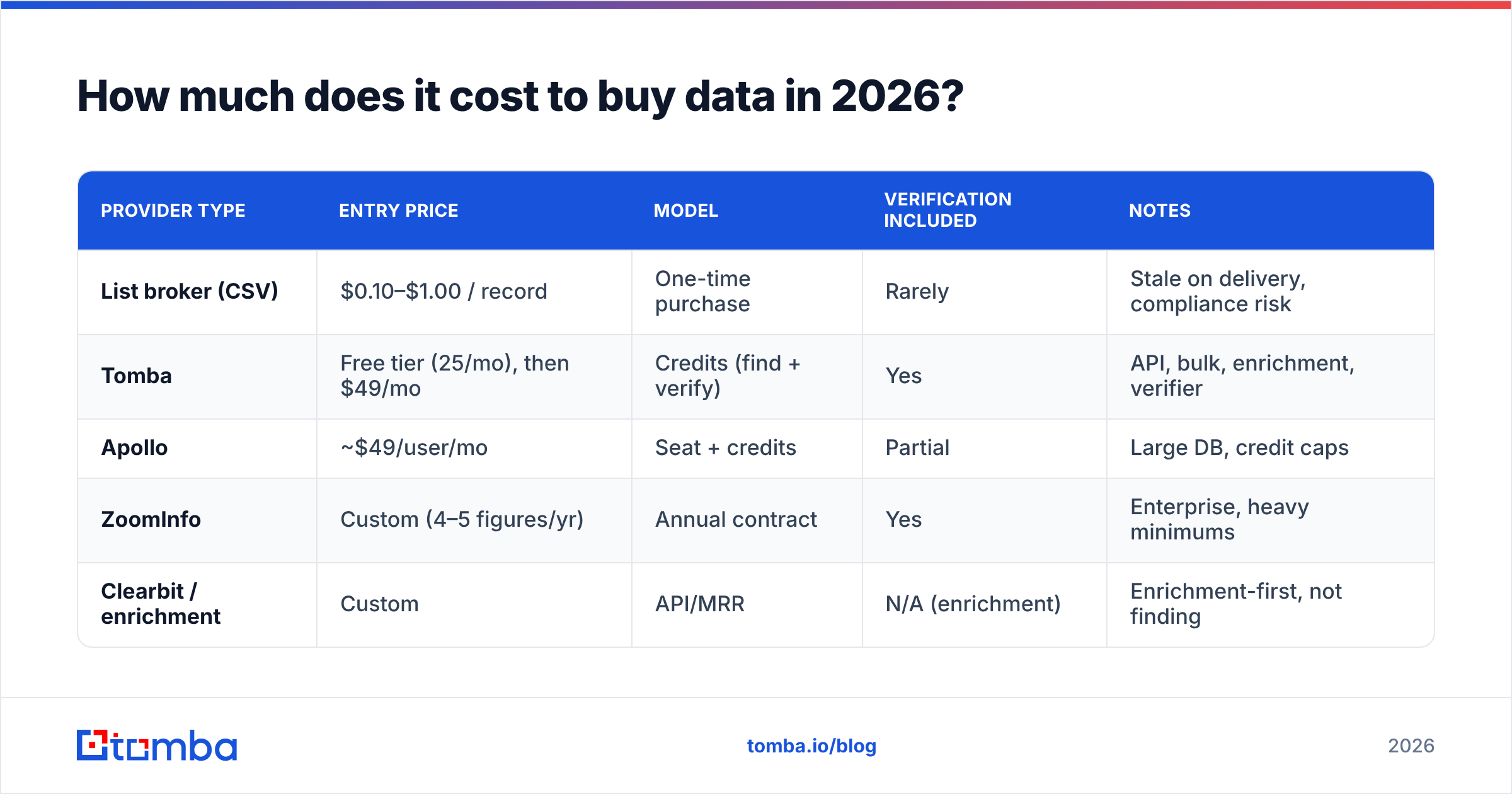
Pricing splits cleanly between one-time list brokers and access-based platforms. Here's how the common options compare for a mid-market team buying B2B contact data.
| Provider type | Entry price | Model | Verification included | Notes |
|---|---|---|---|---|
| List broker (CSV) | $0.10–$1.00 / record | One-time purchase | Rarely | Stale on delivery, compliance risk |
| Tomba | Free tier (25/mo), then $49/mo | Credits (find + verify) | Yes | API, bulk, enrichment, verifier |
| Apollo | ~$49/user/mo | Seat + credits | Partial | Large DB, credit caps |
| ZoomInfo | Custom (4–5 figures/yr) | Annual contract | Yes | Enterprise, heavy minimums |
| Clearbit / enrichment | Custom | API/MRR | N/A (enrichment) | Enrichment-first, not finding |
The pattern: list brokers look cheap per record but cost you in bounces and risk; enterprise platforms are accurate but lock you into annual minimums you may never use; credit-based tools sit in the middle and only charge for what you pull.
Tomba's pricing runs Free (25 searches/month), Starter at $49/mo, Growth at $99/mo, Pro at $249/mo, and custom Enterprise — with finding and verifying covered by the same credits, so you're not paying twice to get usable data. If you want to test before paying, the free tier and free email checker let you sample accuracy on your own target accounts first.
For independent pricing and review comparisons across the category, G2's sales intelligence grid is a useful neutral reference.
Is it legal to buy B2B contact data?#
Mostly yes — with conditions that vary by region, and the conditions are where people get caught.
In the EU and UK, GDPR treats business email addresses as personal data. You generally need a lawful basis to process them — for cold B2B outreach that's usually "legitimate interest," which requires relevance, a clear opt-out, and documentation. You can't just buy a list and blast it.
In the US, CAN-SPAM doesn't require prior consent for B2B email, but it does require a valid physical address, a working unsubscribe, no deceptive headers, and honoring opt-outs within 10 days. CCPA/CPRA gives California residents rights over their data, including deletion requests you must be able to honor.
Practical takeaways when you buy data:
- Prefer providers that document their sources and consent basis.
- Keep records of where each contact came from and why you're contacting them.
- Always include a real opt-out and suppress anyone who uses it.
- Don't buy lists of consumers and pretend they're B2B — that's where fines live.
This is the strongest argument for buying access over buying files. When data is resolved on demand from a transparent source, you have a defensible answer to "where did you get this?" A random CSV from a broker rarely does.
What's the smarter alternative to buying lists?#
Build a fresh, verified list on demand instead of renting a stale one. The workflow looks like this:
- Define the segment — target titles, industries, company sizes, and the domains that match.
- Find contacts by domain — pull the right people at each target company with a domain search rather than buying a generic dump.
- Verify in the same pass — confirm deliverability before anything enters your sequencing tool.
- Enrich the record — add phone, title, and firmographics so reps can prioritize, using data enrichment on the records you keep.
- Push to your stack — sync straight into your CRM or sequencer through the Tomba API or a native integration.
The output is identical in form to a bought list — rows of contacts — but every row was found and verified now, tied to a real company you targeted, with a traceable source. That's the difference between a list that converts and a list that bounces.
For higher volume, a bulk email finder runs the same find-and-verify logic across thousands of domains at once, so you get the speed of a purchased list without inheriting its rot. And because each lookup is resolved live, your "list" never goes stale sitting in a folder.
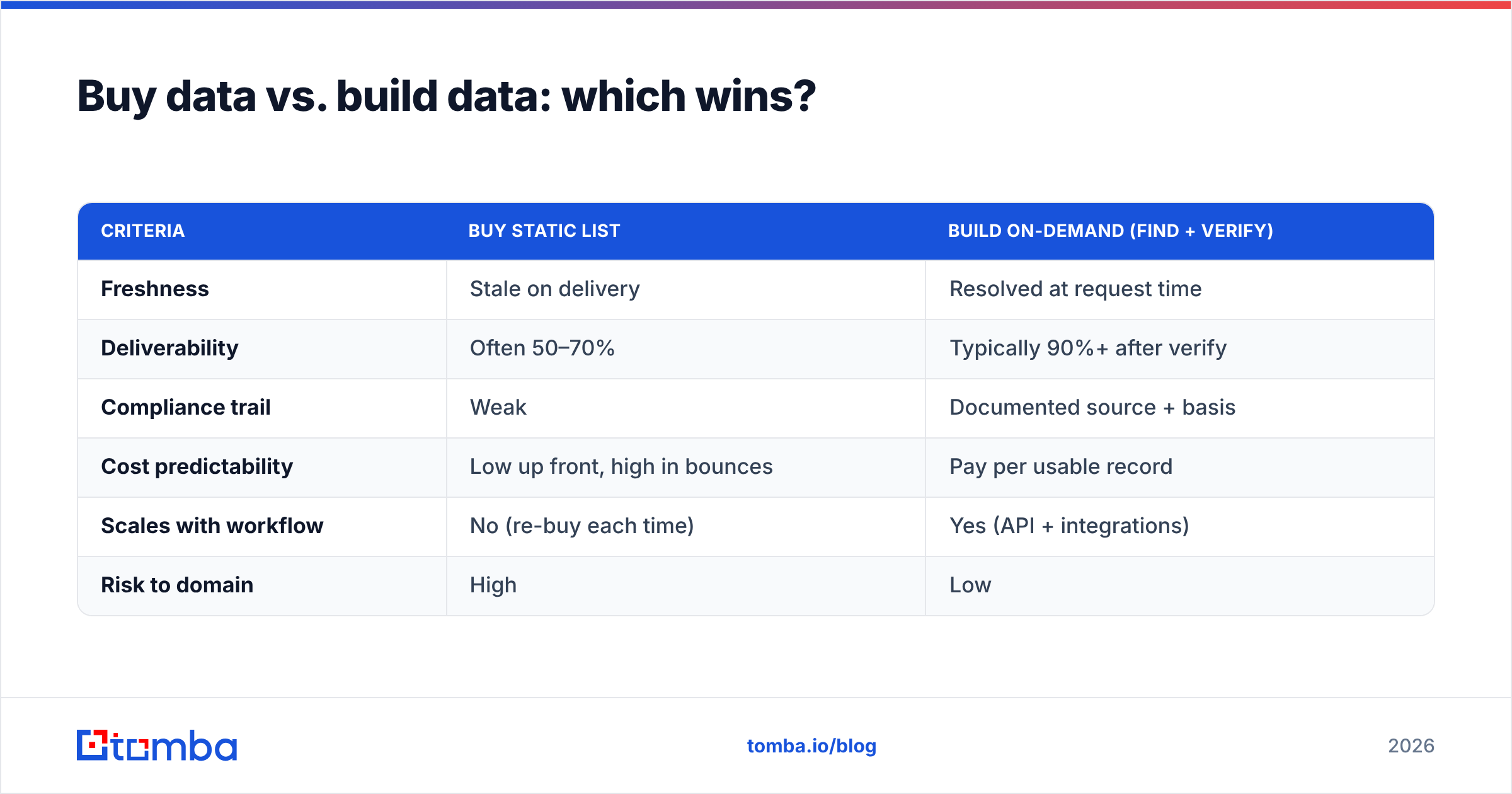
Buy data vs. build data: which wins?#
| Criteria | Buy static list | Build on-demand (find + verify) |
|---|---|---|
| Freshness | Stale on delivery | Resolved at request time |
| Deliverability | Often 50–70% | Typically 90%+ after verify |
| Compliance trail | Weak | Documented source + basis |
| Cost predictability | Low up front, high in bounces | Pay per usable record |
| Scales with workflow | No (re-buy each time) | Yes (API + integrations) |
| Risk to domain | High | Low |
Build wins on every axis except the illusion of cheapness. The only scenario where buying a static list makes sense is a genuinely disposable, one-off project on a throwaway domain — and even then, you'd verify it first.
Start buying data the right way#
If you take one thing from this guide: stop buying files, start buying verified access. A small, fresh, deliverable list will out-convert a giant stale one and won't put your domain at risk.
The cleanest way to do that is to find and verify contacts at the moment you need them. The Tomba Email Finder pulls professional emails by domain, name, or company and verifies them in the same step — so what lands in your CRM is already deliverable, already sourced, and ready to send. Start on the free tier, test it against your own target accounts, and scale up only when the accuracy proves itself. That's how you buy data in 2026 without the regret.
// get started
Find, verify and enrich your first contacts today
Start on the free plan with 25 searches a month, then scale when your team is ready.
Free plan · No credit card required · GDPR & CCPA
// about the author