Buying Group Data in 2026: The Complete B2B GTM Playbook
Single-lead targeting is dead. Learn how buying group data maps every stakeholder in a B2B deal, why it lifts win rates, and how to build it in 2026.
TL;DR
- Buying group data maps every person involved in a B2B purchase — champion, economic buyer, technical evaluator, blocker — instead of one "lead."
- The average B2B deal now involves 6–11 stakeholders. Targeting a single contact leaves most of the committee untouched and quietly kills win rates.
- Good buying group data combines firmographics, job-role intelligence, verified contact details, and intent signals into one connected account view.
- Accuracy is the whole game: stale titles and bad emails make a "group" worthless. Verified emails and enrichment are non-negotiable.
- You can build buying group data today by pairing domain-level contact discovery with role mapping and verification — no six-figure platform required.
What is buying group data?#
Buying group data is the set of records that describes every human involved in a single B2B purchase decision, plus the relationships between them. Think of it as the cast list for a deal, not a single headshot.
Here's the everyday analogy: buying a house as a couple is not a one-person decision. There's the person who falls in love with the kitchen, the partner who scrutinizes the mortgage, the inspector who can veto the whole thing, and the relative whose opinion secretly matters. Sell only to the kitchen-lover and you'll be surprised when the deal collapses over financing. B2B deals work the same way — buying group data is your map of who's in the room.
Technically, a buying group record ties together several layers:
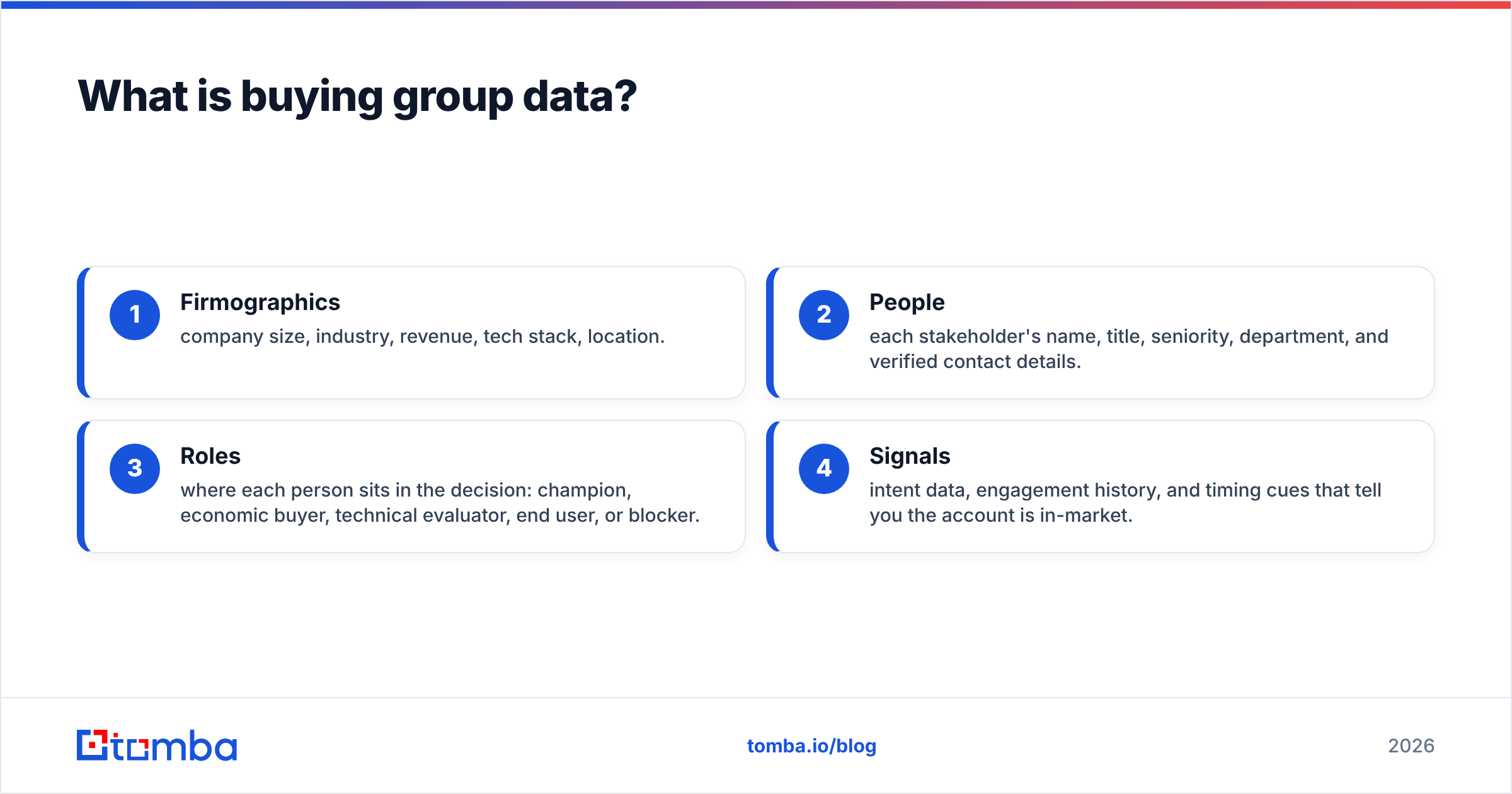
- Firmographics — company size, industry, revenue, tech stack, location.
- People — each stakeholder's name, title, seniority, department, and verified contact details.
- Roles — where each person sits in the decision: champion, economic buyer, technical evaluator, end user, or blocker.
- Signals — intent data, engagement history, and timing cues that tell you the account is in-market.
Most teams already have layer one. The gap — and the reason deals stall — is that they treat layers two through four as an afterthought. If you want a primer on the underlying contact-discovery mechanics, our domain search breakdown shows how a single company domain expands into a full roster of people.
Why does single-lead targeting fail in 2026?#
Single-lead targeting fails because the decision was never made by one person. Gartner's research on B2B buying has consistently put the typical buying group at six to ten stakeholders, and complex deals push well past that. When you log one contact in your CRM and call it "the account," you're tracking roughly 10–15% of the actual decision.
The failure shows up in three predictable ways:
- Phantom pipeline. Your champion loves you, forecasts the deal, then goes quiet because procurement and security entered the chat and nobody briefed them.
- Slow cycles. Every new stakeholder who surfaces late restarts the evaluation. You discover the CFO in month four instead of week two.
- Low win rates. Forrester and others have repeatedly linked multi-threaded deals to materially higher close rates. One thread is a single point of failure.
Buying group data fixes the root cause: it forces you to identify the whole committee before the deal depends on someone you've never spoken to. You can read more on how this connects to broader revenue operations practice, where account-level (not lead-level) thinking is the entire premise.
What does a buying group actually look like?#
Every buying group has recurring roles. Naming them is what turns a pile of contacts into usable buying group data. Here's the standard cast for a mid-market software purchase:
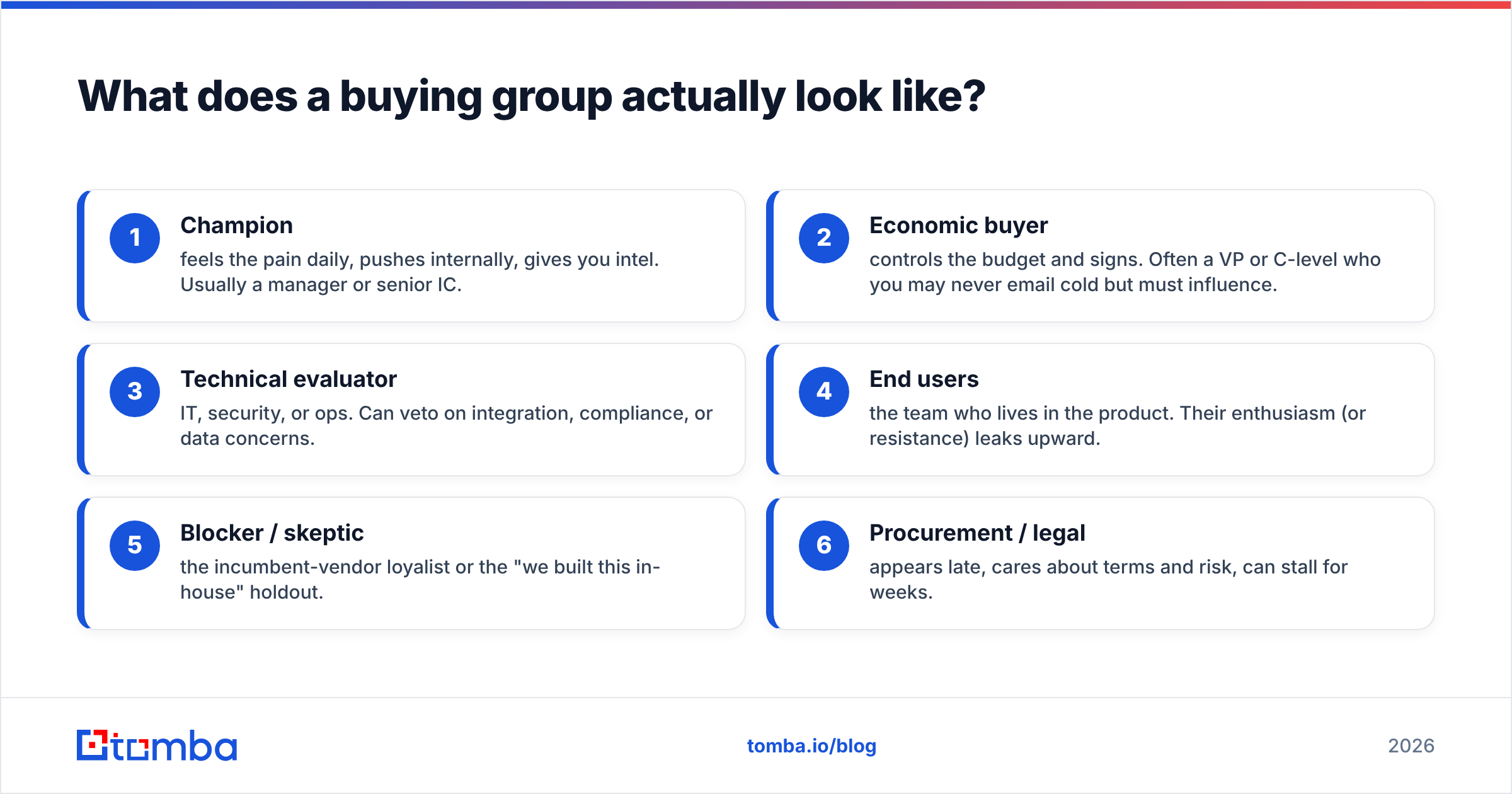
- Champion — feels the pain daily, pushes internally, gives you intel. Usually a manager or senior IC.
- Economic buyer — controls the budget and signs. Often a VP or C-level who you may never email cold but must influence.
- Technical evaluator — IT, security, or ops. Can veto on integration, compliance, or data concerns.
- End users — the team who lives in the product. Their enthusiasm (or resistance) leaks upward.
- Blocker / skeptic — the incumbent-vendor loyalist or the "we built this in-house" holdout.
- Procurement / legal — appears late, cares about terms and risk, can stall for weeks.
The practical job is to attach a real, verified person to each role at each target account. That means finding the right names, confirming current titles, and validating that the email actually lands — which is exactly where most lead lists fall apart.
How is buying group data different from a lead list?#
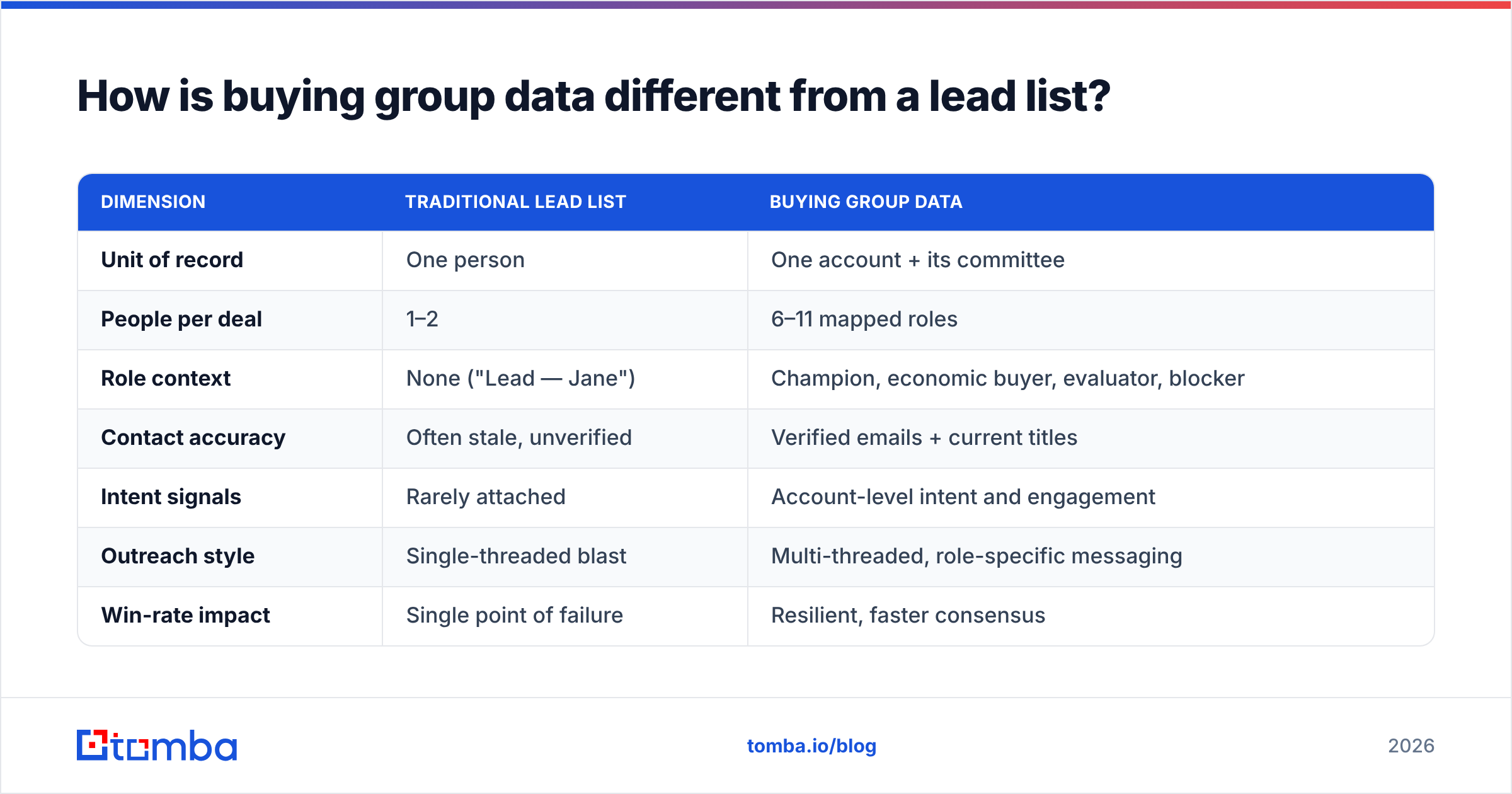
The difference is structural, not cosmetic. A lead list is a flat spreadsheet of individuals. Buying group data is a graph: people connected to an account, connected to roles, connected to signals. The table below makes the contrast concrete.
| Dimension | Traditional lead list | Buying group data |
|---|---|---|
| Unit of record | One person | One account + its committee |
| People per deal | 1–2 | 6–11 mapped roles |
| Role context | None ("Lead — Jane") | Champion, economic buyer, evaluator, blocker |
| Contact accuracy | Often stale, unverified | Verified emails + current titles |
| Intent signals | Rarely attached | Account-level intent and engagement |
| Outreach style | Single-threaded blast | Multi-threaded, role-specific messaging |
| Win-rate impact | Single point of failure | Resilient, faster consensus |
| Typical cost | Cheap, low value | Higher value, requires enrichment |
A lead list answers "who can I email?" Buying group data answers "who do I need to win, and what does each of them care about?" The second question is the one that closes revenue.
What data sources feed accurate buying group data?#
Accurate buying group data is assembled, not bought off a shelf. Five inputs do the heavy lifting:
- Domain-level contact discovery. Start from the company domain and surface everyone with a corporate email, then filter by department and seniority. A bulk email finder makes this scalable across hundreds of target accounts.
- Email verification. A name and a guessed address are worthless if they bounce. Run every contact through an email verifier so your group is built on deliverable addresses, not hopeful permutations.
- Role and seniority enrichment. Titles tell you the role. Data enrichment fills in seniority, department, and function so you can label each stakeholder correctly.
- Intent and engagement signals. Third-party intent (topic surges, review-site activity) and first-party engagement (site visits, opens) tell you when the group is in-market.
- Phone and social fallbacks. When email stalls, a phone finder or LinkedIn touch keeps the thread alive with a stakeholder you can't reach by inbox.
The order matters: discover, verify, enrich, then layer signals. Skip verification and you'll build a beautiful org map full of dead addresses.
How do you build buying group data step by step?#
You don't need a six-figure data platform to start. Here's a workflow that runs on tools most teams can adopt this quarter.
- Define the ideal account, not the ideal lead. Lock your firmographic criteria — size, industry, region, tech stack. This is your account universe.
- Pull the roster per domain. For each target account, run domain-level discovery to list corporate contacts. Filter to the departments that touch your purchase (e.g., RevOps, IT, Finance for a sales-tech buy).
- Map names to roles. Tag each contact: champion candidate, likely economic buyer, technical evaluator, probable blocker. Seniority and department drive the first pass; conversations refine it.
- Verify every address. Validate emails before outreach. Treat catch-all domains carefully and confirm them with a catch-all verifier so you're not gambling on a server that accepts everything and delivers nothing.
- Enrich the gaps. Add missing phone numbers, LinkedIn profiles, and seniority flags so each role has a usable channel.
- Layer signals and sequence. Attach intent and engagement, then build role-specific messaging — the CFO gets ROI, the IT lead gets security and integration, the end user gets day-to-day relief.
- Keep it fresh. People change jobs constantly. Re-verify quarterly; a buying group is a living record, not a one-time export.
Run this loop and your CRM stops being a graveyard of orphaned leads and starts reflecting how deals actually get decided.
What does buying group data cost — and is it worth it?#
The honest answer: it costs more than a raw lead list and far less than a stalled pipeline. The expensive part isn't the data, it's the waste — reps multi-threading by guesswork, deals dying over a stakeholder nobody mapped.
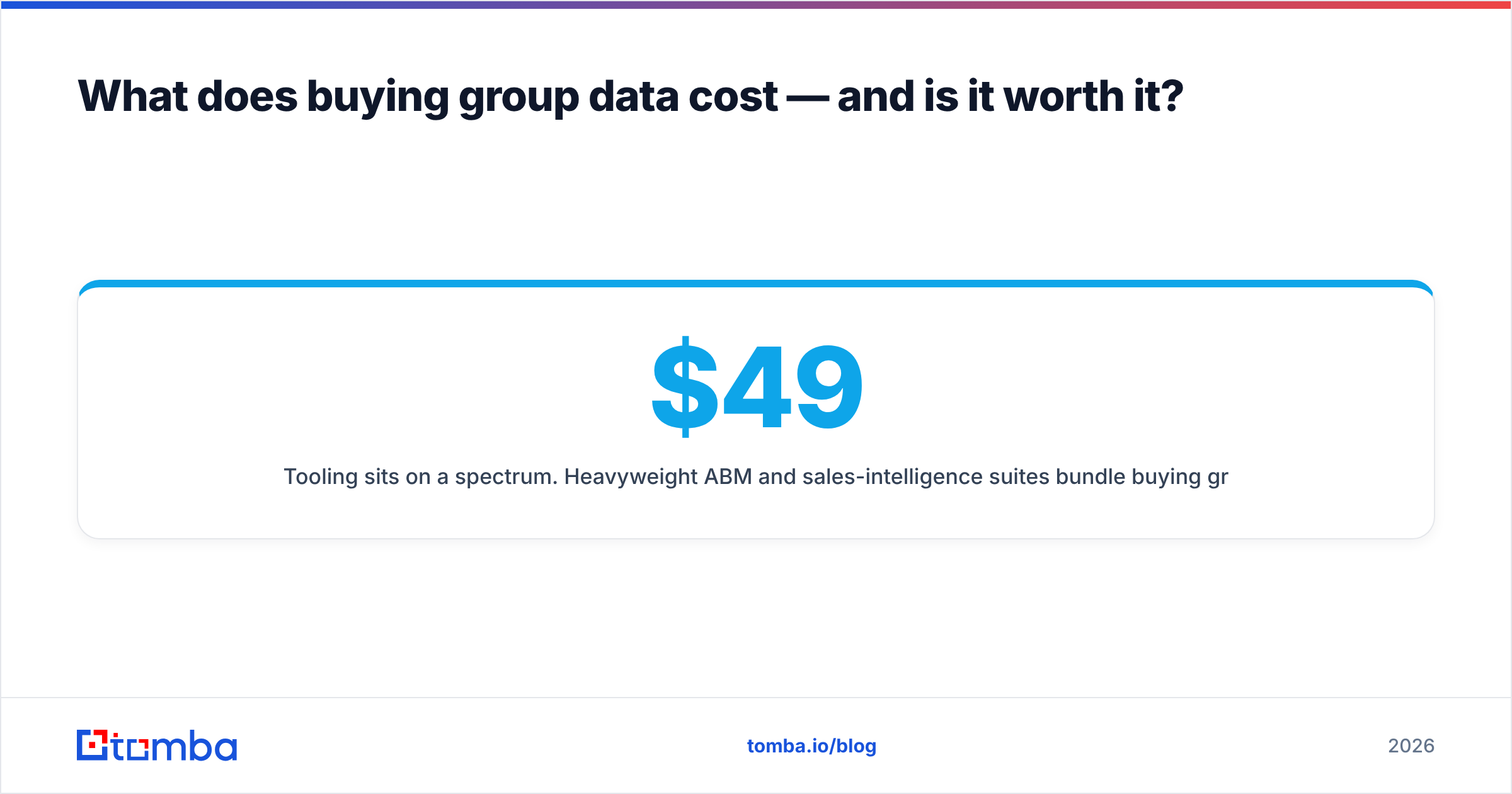
Tooling sits on a spectrum. Heavyweight ABM and sales-intelligence suites bundle buying group features into enterprise contracts. At the practical end, you can assemble the same outcome with focused discovery and verification tools. For reference, Tomba pricing runs a Free tier at 25 searches/month, Starter at $49/mo, Growth at $99/mo, and Pro at $249/mo — enough to map and verify hundreds of accounts without an enterprise commitment.
The ROI math is simple. If multi-threading lifts your win rate even a few points on deals worth thousands each, the data pays for itself on the first closed deal. The teams that struggle are the ones who buy data and skip verification — they pay for volume and inherit bounce rates. Quality over quantity is the rule; a verified group of six beats an unverified list of six hundred.
How do you keep buying group data accurate over time?#
Accuracy decays fast. Roughly a quarter of professional contacts change roles or companies each year, which means a buying group you mapped in January is partly fiction by summer. Three habits keep it honest:
- Re-verify on a schedule. Quarterly verification catches departures before you email a stranger. Build it into your RevOps cadence, not your to-do list.
- Trigger off job changes. When a champion moves companies, that's two signals: a warm new account at their destination, and a vacancy to re-map at the old one.
- Close the loop from sales calls. Reps learn the real org chart in conversations. Feed that back into the record so the data improves with every deal.
Treat buying group data like a garden, not a statue — it needs regular tending or it quietly dies. Anchoring your process to verified emails and current titles is the difference between a map you trust and a map that embarrasses you on a discovery call. For deeper background on what drives deliverability and accuracy, Tomba documents its data sources openly, and industry directories like G2 and Capterra are useful for benchmarking vendors against your own results. Gartner's B2B buying journey research remains the canonical source on why committees, not individuals, control the outcome.
Where should you start?#
Start with one tier of target accounts and prove the loop end to end: discover the roster, label the roles, verify every email, sequence by stakeholder. The mechanics that make this work — turning a domain into a verified, role-mapped committee — are exactly what the Tomba Email Finder is built for. Pair it with the email verifier so every name in your buying group is a deliverable contact, not a guess, and you'll replace single-threaded hope with a repeatable, multi-threaded process. Spin up the free tier, map your first ten accounts, and watch how differently those deals move when you're selling to the whole room instead of one seat in it.
// get started
Find, verify and enrich your first contacts today
Start on the free plan with 25 searches a month, then scale when your team is ready.
Free plan · No credit card required · GDPR & CCPA
// about the author