Bytemine vs FindThatLead (2026): Email Finder Showdown
A no-fluff 2026 comparison of Bytemine and FindThatLead — accuracy, pricing, features, and where each email finder wins (and loses) for B2B prospecting.
Choosing between Bytemine and FindThatLead comes down to one question: do you need a lightweight scraping-and-outreach tool, or a verified data source you can trust at scale? This guide breaks down both, then shows where a dedicated email finder fits the gaps neither fully closes.
TL;DR#
- Bytemine is a lean prospecting and email-finding tool built for solo founders and small teams who want scrape-to-send in one place.
- FindThatLead is an older, broader platform that bundles email finding, a Chrome extension, lead search, and a built-in cold-email sender (Scrab.in / Email Sender).
- Accuracy is the deciding factor: both rely heavily on pattern-guessing, so verification before send matters more than raw volume.
- Pricing favors FindThatLead for all-in-one outreach; Bytemine is simpler but thinner on data depth.
- If deliverability and verified emails are your priority, pair either tool with a dedicated email verifier — or skip the guesswork and use a finder with built-in SMTP verification.
What is Bytemine?#
Bytemine is a B2B prospecting tool that combines lead discovery with email finding. The pitch is speed: search for companies or people, pull likely email addresses, and push them into your outreach flow without bouncing between five tabs. It targets indie founders, agencies, and small sales teams who want a single affordable subscription rather than a stacked enterprise contract.
Its strengths are simplicity and price. You get a domain-to-email lookup, basic filtering, and export to CSV. The trade-off is depth — Bytemine's database is smaller than the incumbents, and its email results lean on permutation-and-pattern inference rather than a large verified corpus. That means you will find an address, but you need to confirm it lands before you hit send.
What is FindThatLead?#
FindThatLead (FTL) has been around since the mid-2010s and packs more into the box. The core is an email finder by name + domain, a "Domain Search" mode that returns every email pattern for a company, a Chrome extension for grabbing prospects off the web, and a built-in cold-email sender. It also offers a "Prospector" that lets you build lists by role, location, and industry.
That breadth is the appeal — FTL wants to be the only tool a small team needs from list-building to first reply. The cost is focus. Reviews on G2 repeatedly flag inconsistent email accuracy and credits burned on unverified results. The sender is convenient but basic compared with dedicated cold-email platforms, and large lists can return a high share of "guessed" addresses that need a second verification pass.
Bytemine vs FindThatLead: how do they compare?#
Here is the side-by-side on the attributes that actually move your reply rate. Treat vendor-published accuracy claims skeptically — the only number that counts is how many of your emails don't bounce.
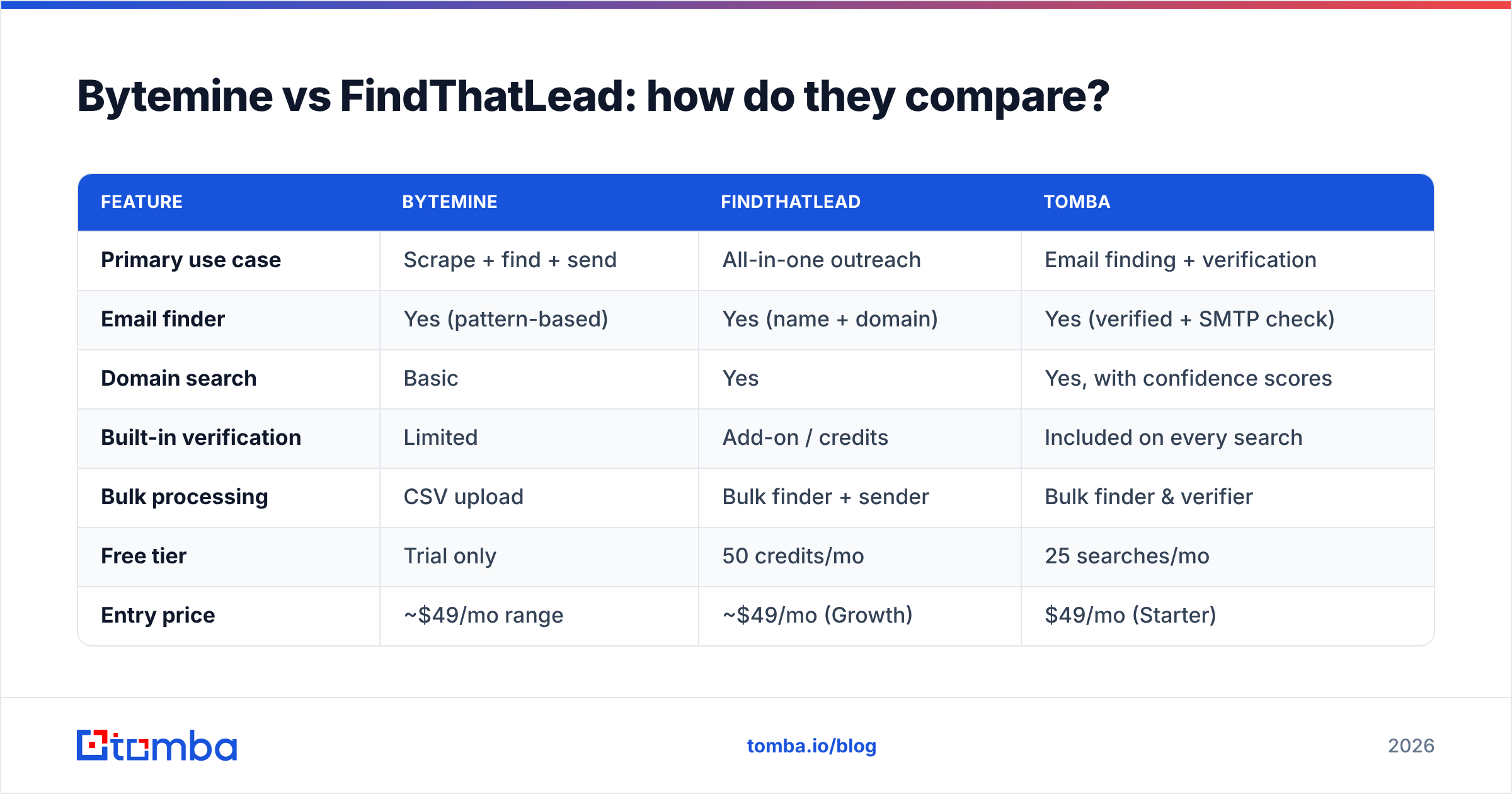
| Feature | Bytemine | FindThatLead | Tomba |
|---|---|---|---|
| Primary use case | Scrape + find + send | All-in-one outreach | Email finding + verification |
| Email finder | Yes (pattern-based) | Yes (name + domain) | Yes (verified + SMTP check) |
| Domain search | Basic | Yes | Yes, with confidence scores |
| Built-in verification | Limited | Add-on / credits | Included on every search |
| Bulk processing | CSV upload | Bulk finder + sender | Bulk finder & verifier |
| Free tier | Trial only | 50 credits/mo | 25 searches/mo |
| Entry price | ~$49/mo range | ~$49/mo (Growth) | $49/mo (Starter) |
| Native API | Limited | Yes | Yes, documented |
| Best for | Solo founders | SMB outreach teams | Accuracy-first teams |
The pattern is clear: FindThatLead wins on feature breadth, Bytemine wins on simplicity, and neither makes verified accuracy the default. That last gap is the one that costs you sender reputation.
Which tool is more accurate?#
Accuracy is where both tools force a compromise, and it's the single biggest reason teams add a third tool. Both Bytemine and FindThatLead generate a large portion of results by guessing the email pattern (first.last@, flast@, etc.) and returning the most probable match. When that guess isn't checked against a live mail server, you ship bounces.

Bounces are not a cosmetic problem. Once your bounce rate crosses roughly 2–3%, inbox providers start throttling you, and your sender reputation takes a hit that can take weeks to repair. A tool that hands you 1,000 "found" emails with no verification status is handing you a deliverability risk, not a lead list.
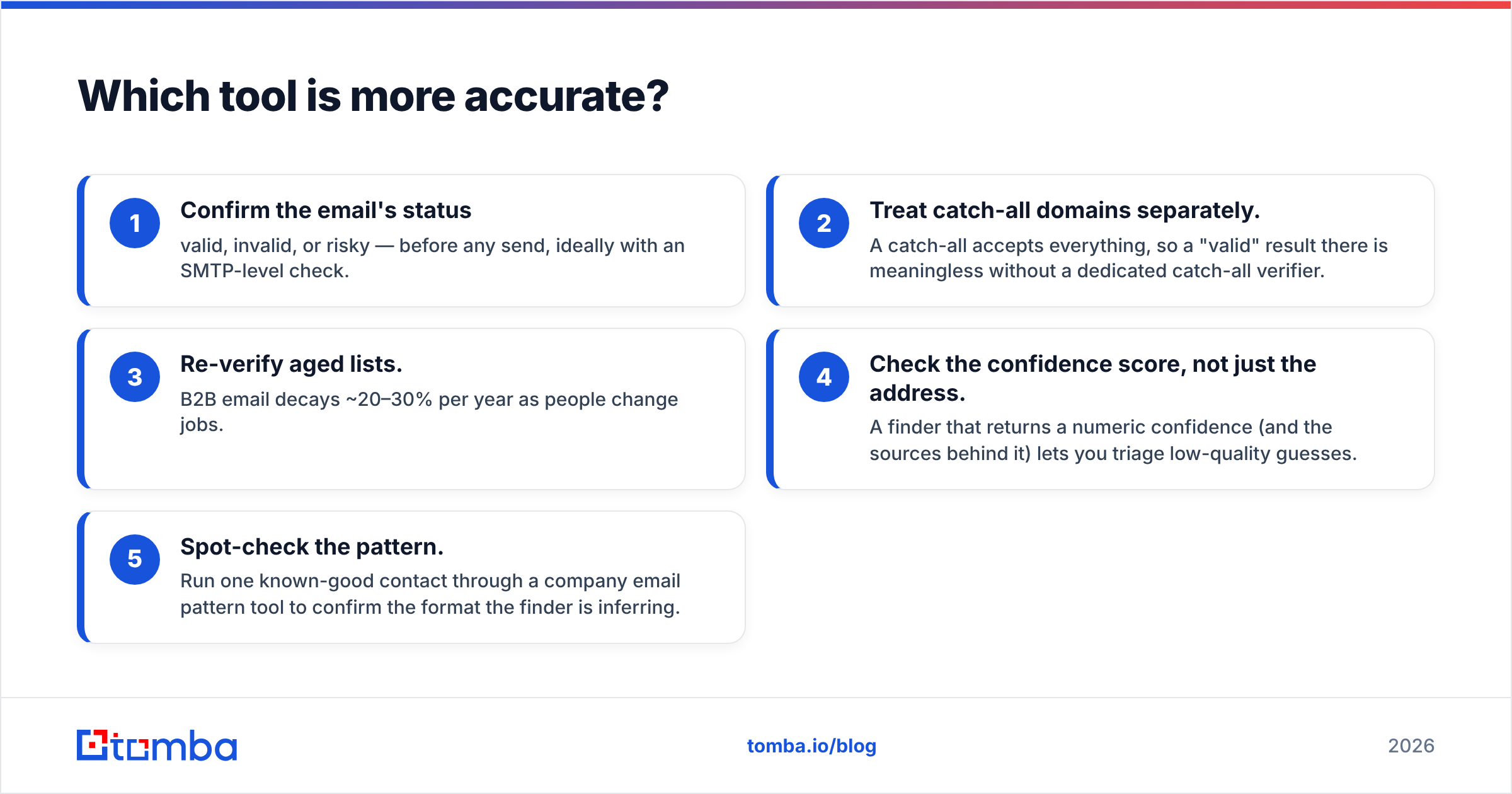
Here's the practical accuracy checklist regardless of which tool you pick:
- Confirm the email's status — valid, invalid, or risky — before any send, ideally with an SMTP-level check.
- Treat catch-all domains separately. A catch-all accepts everything, so a "valid" result there is meaningless without a dedicated catch-all verifier.
- Re-verify aged lists. B2B email decays ~20–30% per year as people change jobs.
- Check the confidence score, not just the address. A finder that returns a numeric confidence (and the sources behind it) lets you triage low-quality guesses.
- Spot-check the pattern. Run one known-good contact through a company email pattern tool to confirm the format the finder is inferring.
FindThatLead offers verification as part of its credit system, but it's an extra step that consumes credits. Bytemine's verification is thinner. This is exactly the seam where a verification-first finder earns its place in the stack.
How does pricing compare?#
Both tools land in a similar entry-price band, but you're buying different things. FindThatLead's plans bundle finding, the prospector, and the email sender, so the per-dollar value is high if you'll use the sender. Bytemine charges for a simpler product, so you're paying for convenience and a clean workflow rather than data depth.
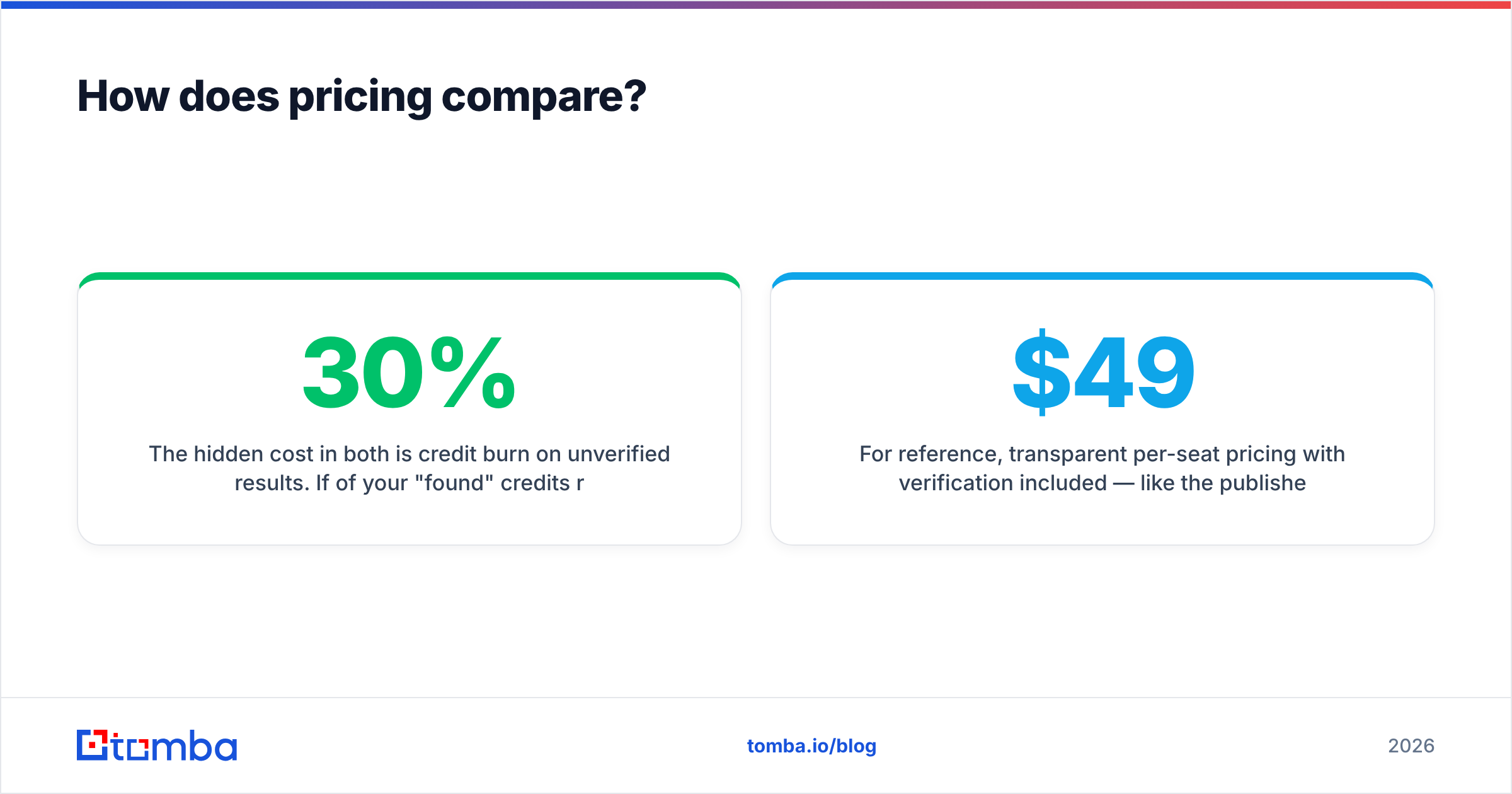
The hidden cost in both is credit burn on unverified results. If 30% of your "found" credits return addresses you later discard as invalid, your effective cost-per-usable-lead is far higher than the sticker price suggests. When you compare plans, divide the monthly cost by verified contacts you expect to keep, not by the raw credit count.
For reference, transparent per-seat pricing with verification included — like the published Tomba pricing tiers (Free 25 searches, Starter $49/mo, Growth $99/mo, Pro $249/mo) — makes that math easier because you're not paying separately to find out whether a result is real.
When should you use Bytemine vs FindThatLead?#
Match the tool to the job rather than chasing a single "winner."
- Pick Bytemine if you're a solo founder or tiny team who wants one cheap, no-frills tool to find a handful of contacts and export them. You value speed and a flat learning curve over database size.
- Pick FindThatLead if you want list-building, finding, and sending under one login and you're comfortable spending credits on a verification pass. It suits SMB outreach teams running steady, moderate-volume campaigns.
- Add a dedicated finder/verifier if accuracy and deliverability are non-negotiable — high-ticket sales, regulated industries, or any team where a bounced email is a wasted, expensive touch.
This is also where many teams realize they don't need to choose between Bytemine and FindThatLead at all. They need a finder that returns verified results the first time, plus an API to wire it into their CRM. If that's you, a tool like Tomba's email finder covers the find-and-verify loop in one call, and the Tomba API drops it straight into your pipeline.
What about scale and automation?#
Manual one-off lookups are fine for a founder doing 20 emails a week. The moment you're building lists in the hundreds or thousands, three things decide whether the tool survives your workflow:
- Bulk processing. Can you upload a CSV of domains or names and get a verified file back? Both FTL and Bytemine offer bulk; verify how each reports per-row status. A proper bulk email finder returns a status column, not just an address.
- API and integrations. FindThatLead has an API; Bytemine's is limited. If you're enriching records inside HubSpot or Salesforce, native or Zapier-level integration saves you a brittle export-import dance.
- Data freshness. Ask where the data comes from and how often it refreshes. Stale sources mean more bounces no matter how slick the UI. Transparent vendors publish their data sources.
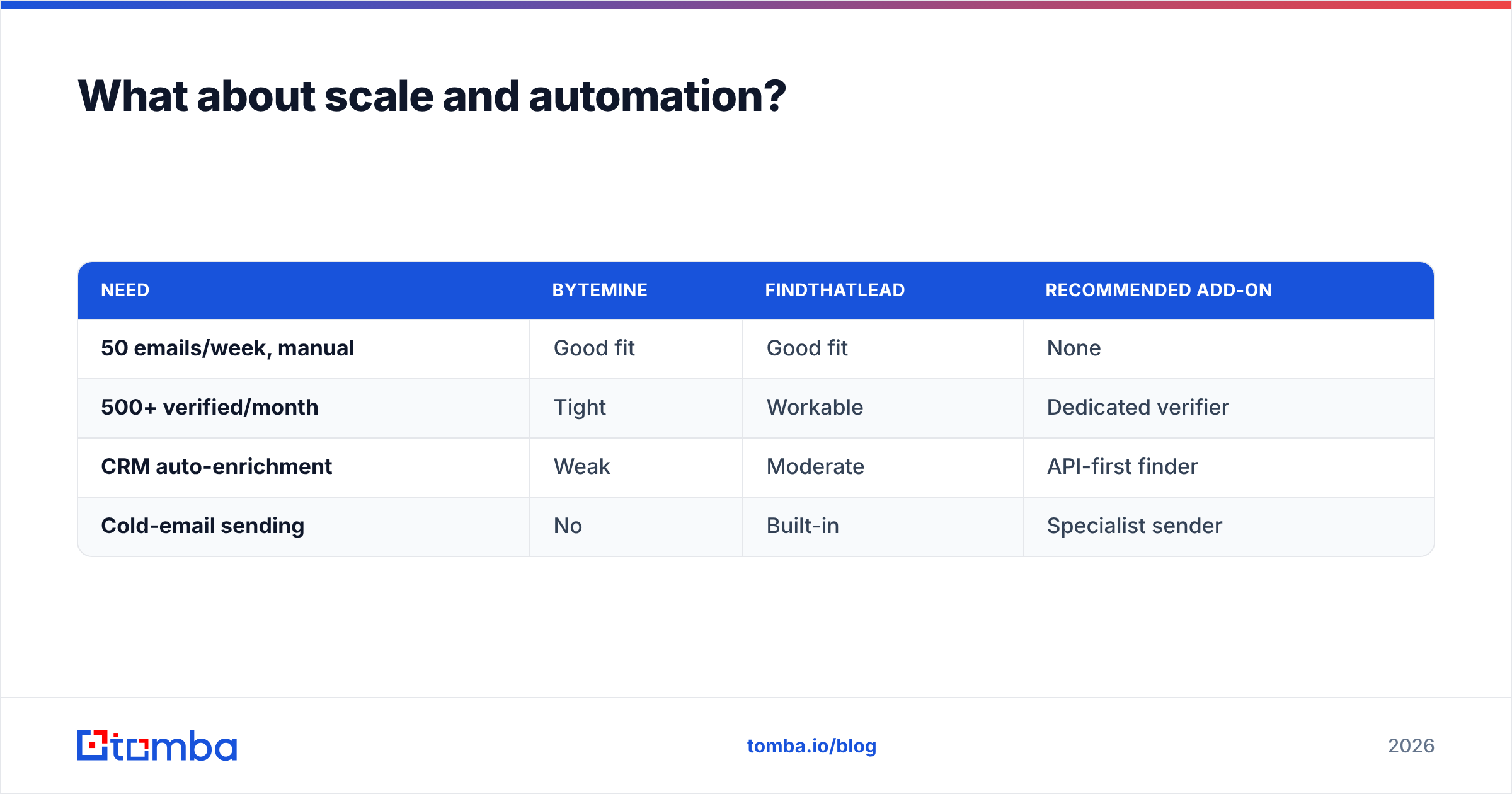
Here's a quick decision frame for scaling teams:
| Need | Bytemine | FindThatLead | Recommended add-on |
|---|---|---|---|
| 50 emails/week, manual | Good fit | Good fit | None |
| 500+ verified/month | Tight | Workable | Dedicated verifier |
| CRM auto-enrichment | Weak | Moderate | API-first finder |
| Cold-email sending | No | Built-in | Specialist sender |
Is there a better alternative to both?#
For accuracy-first teams, yes — and it's not about picking the flashiest brand, it's about removing the verification gap that both tools leave open. The core problem with both Bytemine and FindThatLead is that finding and verifying are separate steps, so you pay twice and you ship bounces in the gap between them.
A finder that runs an SMTP-level check on every result, scores confidence, flags catch-alls, and exposes a clean API closes that gap. You can compare options on review sites like Capterra to see how each handles verification, but the test that matters is your own: run the same 50 known contacts through each tool and count the bounces.
Tomba was built around exactly this find-and-verify loop. Beyond the finder, it includes a domain search for company-wide patterns, data enrichment to fill in missing fields, and bulk tools for scale — all under one transparent plan instead of stacked credit add-ons.
Frequently asked questions#
Is FindThatLead better than Bytemine? FindThatLead offers more features (finder, prospector, and a built-in sender), so it's better for teams that want an all-in-one. Bytemine is simpler and cheaper for solo users. Neither makes verification automatic, so accuracy depends on your follow-up checks.
Do Bytemine and FindThatLead verify emails automatically? Not by default. FindThatLead has verification within its credit system; Bytemine's is limited. Always run found addresses through a dedicated verifier before sending to protect deliverability.
What's the safest way to avoid bounces? Verify every address at the SMTP level, handle catch-all domains separately, and re-verify any list older than a few months. A finder with built-in verification removes the extra step.
The bottom line#
Bytemine and FindThatLead solve overlapping problems from different angles — Bytemine for simplicity, FindThatLead for breadth — but both leave the verification gap that quietly drains your sender reputation. If your priority is verified contacts that actually land, start with a finder that checks every result before you do.
Try the Tomba Email Finder free with 25 searches a month, confirm the accuracy against your own known contacts, and only scale up once the bounce rate proves it. No credits wasted on guesses — just verified emails ready to send.
// get started
Find, verify and enrich your first contacts today
Start on the free plan with 25 searches a month, then scale when your team is ready.
Free plan · No credit card required · GDPR & CCPA
// about the author