Bytemine vs Lusha 2026: B2B Contact Data Tools Compared
Bytemine vs Lusha in 2026: a side-by-side breakdown of accuracy, pricing, phone data, and integrations — plus where a leaner alternative beats both.
TL;DR
- Bytemine is a lightweight email-finder and lead-list builder aimed at solo founders and small outbound teams who want cheap, fast B2B emails without a heavy platform.
- Lusha is a bigger sales-intelligence suite with strong phone coverage, a Chrome extension, and CRM enrichment — but its credit-based pricing climbs fast as you scale.
- Pick Bytemine if you mostly need bulk emails on a tight budget; pick Lusha if direct dials and CRM workflows matter more than cost.
- Neither wins on raw email accuracy plus transparent pricing at the same time — that gap is exactly where alternatives like Tomba compete.
- This guide breaks down pricing, data accuracy, phone coverage, integrations, and compliance so you can choose without a sales demo.
What are Bytemine and Lusha?#
Bytemine and Lusha solve the same core problem — turning a name or a company into a usable contact — but they come at it from opposite ends of the market.
Bytemine is an email-finding and prospecting tool. You feed it domains, names, or LinkedIn profiles, and it returns business email addresses you can drop straight into a cold sequence. It positions itself as a no-frills, budget-friendly way to build lists, which makes it popular with freelancers, agencies, and early-stage founders who don't want to commit to enterprise contracts.
Lusha is a full B2B sales-intelligence platform. Beyond emails, it leans hard into mobile phone numbers and direct dials, a polished Chrome extension, CRM enrichment, and intent signals on higher tiers. It's built for sales teams that live inside LinkedIn and Salesforce and want enrichment baked into their daily workflow.
So the "bytemine vs lusha" decision usually comes down to one question: do you need a cheap email faucet, or a contact-data platform with phones and CRM hooks?

How do Bytemine and Lusha compare at a glance?#
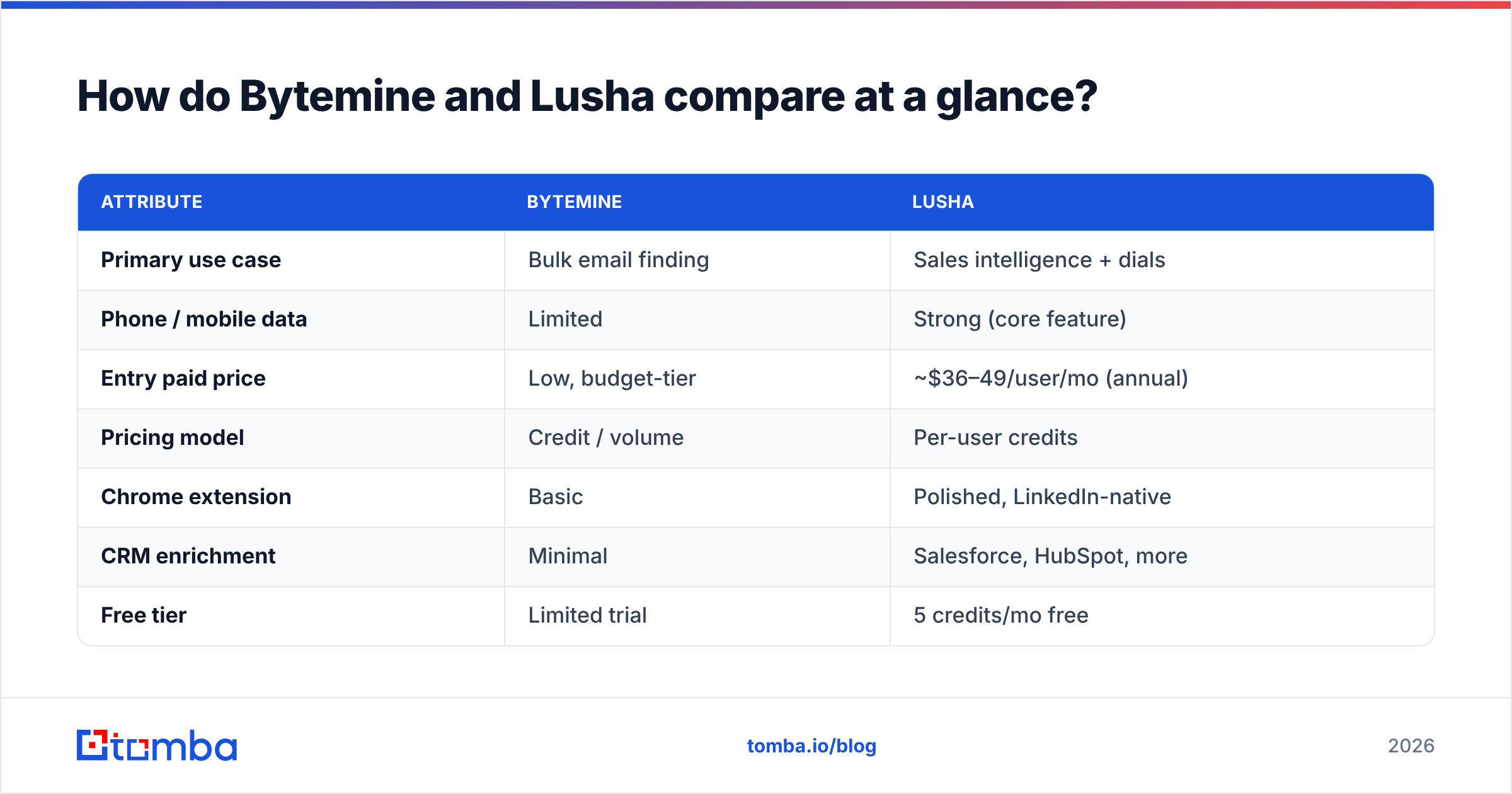
Here's the fast version before we go deep. These figures reflect publicly listed plans as of 2026; credit-based tools change pricing often, so confirm before you buy.
| Attribute | Bytemine | Lusha |
|---|---|---|
| Primary use case | Bulk email finding | Sales intelligence + dials |
| Phone / mobile data | Limited | Strong (core feature) |
| Entry paid price | Low, budget-tier | ~$36–49/user/mo (annual) |
| Pricing model | Credit / volume | Per-user credits |
| Chrome extension | Basic | Polished, LinkedIn-native |
| CRM enrichment | Minimal | Salesforce, HubSpot, more |
| Free tier | Limited trial | 5 credits/mo free |
| Best for | Solo / agency outbound | SDR teams, RevOps |
The pattern is consistent: Bytemine optimizes for cost-per-email, Lusha optimizes for workflow depth and phone coverage. Neither is "wrong" — they're tuned for different buyers.
Is Bytemine or Lusha more accurate?#
Accuracy is the metric that actually decides your bounce rate, so treat vendor claims skeptically and test on your own list.
Lusha publishes high accuracy figures and backs them with a large, frequently refreshed contact database plus real-time verification on lookups. In practice, its email accuracy is solid for North American tech and enterprise contacts, and its mobile-number accuracy is one of the strongest in the category. Where it weakens is non-US regions and smaller companies, where coverage thins out.
Bytemine's accuracy is harder to pin down publicly because it's a smaller operation without the same benchmark transparency. Anecdotally, it does fine on standard corporate domains with predictable email patterns, but it can struggle with catch-all domains and less common formats — exactly the cases where a dedicated verification layer matters most.

The honest takeaway: no email-finder is 100% accurate, and any tool that claims it is lying. What separates the good from the risky is whether the platform verifies before it bills you and tells you the confidence level of each result. Before any cold campaign, run your exported list through a dedicated email verifier to strip invalid and risky addresses — that one step protects your sender reputation more than switching vendors ever will.
If you send to catch-all domains, also check whether the tool can resolve them. A catch-all verifier distinguishes mailboxes that actually exist from domains that accept everything, which is where a lot of "verified" lists quietly fall apart.
How does Bytemine vs Lusha pricing compare?#
This is where the two diverge most sharply, and where buyers get burned by credit math.
Bytemine sells on affordability. Its plans are built around email-finding volume at a low monthly cost, with fewer seats and fewer add-ons. If your only need is "give me 2,000 emails a month cheaply," Bytemine's entry tiers undercut most of the market.
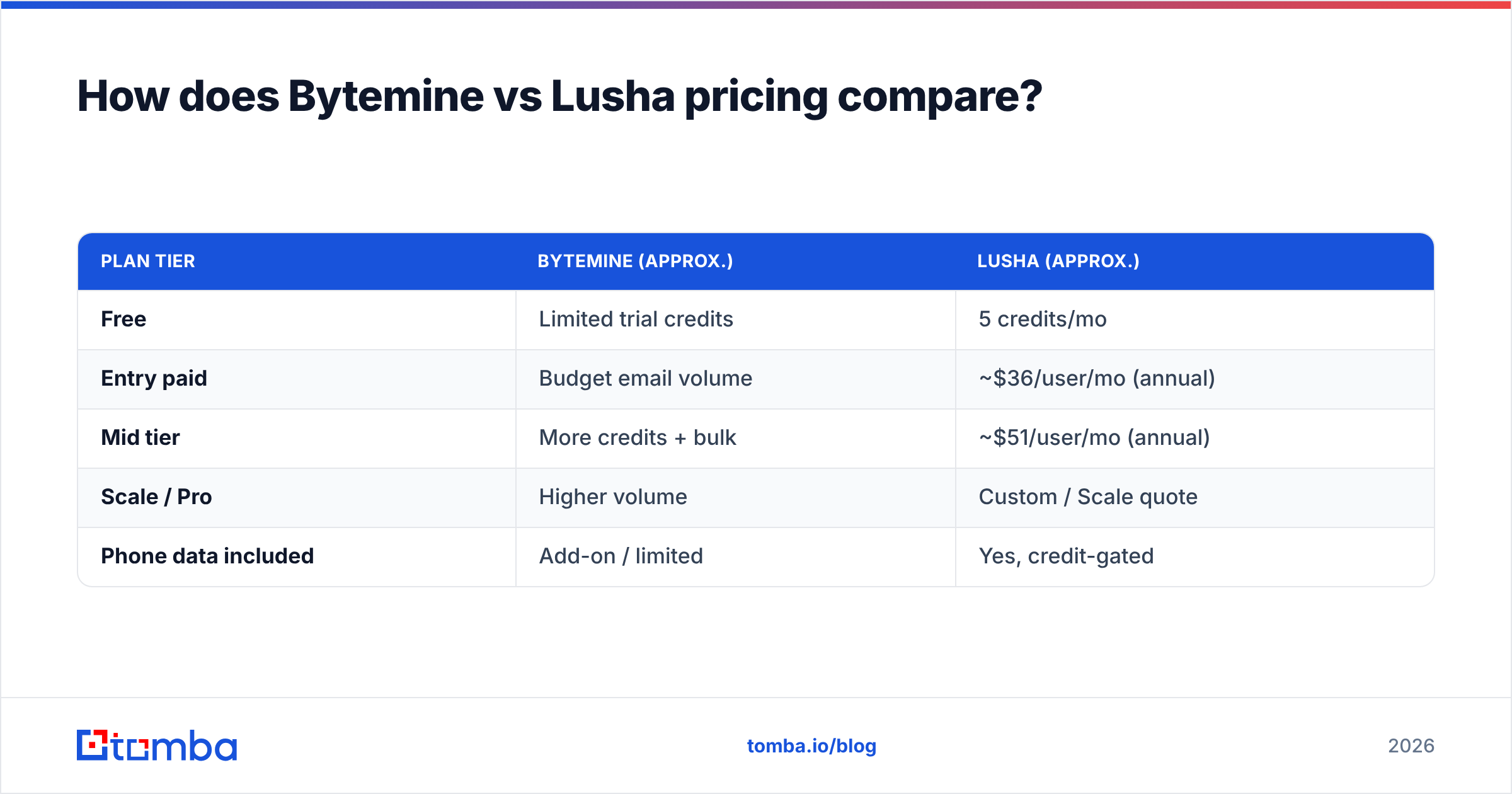
Lusha uses a per-user, credit-based model. The free plan gives you a handful of credits per month; paid tiers add more credits, the bulk features, and CRM integrations as you climb. The catch is that one "credit" can mean one revealed contact, and a team of five SDRs burning through prospecting credits hits the next pricing tier quickly. Phone reveals and enrichment can consume credits faster than you expect.
| Plan tier | Bytemine (approx.) | Lusha (approx.) |
|---|---|---|
| Free | Limited trial credits | 5 credits/mo |
| Entry paid | Budget email volume | ~$36/user/mo (annual) |
| Mid tier | More credits + bulk | ~$51/user/mo (annual) |
| Scale / Pro | Higher volume | Custom / Scale quote |
| Phone data included | Add-on / limited | Yes, credit-gated |
A practical warning for both: credit models punish experimentation. You pay per lookup whether or not the contact converts, and unused credits often don't roll over. When you compare quotes, calculate cost per usable, verified contact, not headline price — a cheap credit that returns a dead email costs you more than a slightly pricier one that lands.
For teams that want predictable spend, it's worth comparing against flat-feature plans. Tomba's pricing, for example, runs Free (25 searches/mo), Starter at $49/mo, Growth at $99/mo, and Pro at $249/mo, with email finding and verification bundled rather than metered as separate phone vs email credits.
Which tool has better phone and direct-dial data?#
Lusha, clearly — and it's not close.
Phone coverage is Lusha's flagship strength. Mobile numbers and direct dials are a core part of why SDR teams pick it, and for cold-calling-heavy motions that data is the whole point. If your reps dial more than they email, Lusha's phone database alone can justify the cost.
Bytemine is email-first. It may surface some phone data, but it isn't built as a dial-generation engine, and you shouldn't choose it expecting Lusha-grade mobile coverage.
That said, phone data is only useful if it's accurate and callable. Wrong numbers waste rep hours and can trigger compliance headaches. Whatever tool you choose, validate numbers before a calling blitz — a phone validator confirms line type and reachability so your reps aren't burning a morning on dead dials. If phones are central to your motion, Tomba also offers a dedicated phone finder you can layer alongside either platform.
How do integrations and workflow compare?#
Your data tool is only as good as how easily it gets data into the systems your team actually uses.
Lusha wins on integration depth. Native Salesforce and HubSpot enrichment, a strong LinkedIn-native Chrome extension, and Zapier connections mean a rep can enrich a record without leaving their CRM or browser. For RevOps teams running revenue operations playbooks, that embedded enrichment is a real time-saver.
Bytemine keeps integrations lighter. It's more of a standalone list-builder — find emails, export CSV, import into your sequencer. That's perfectly fine for lean outbound, but it means more manual handoffs if your stack is CRM-centric.
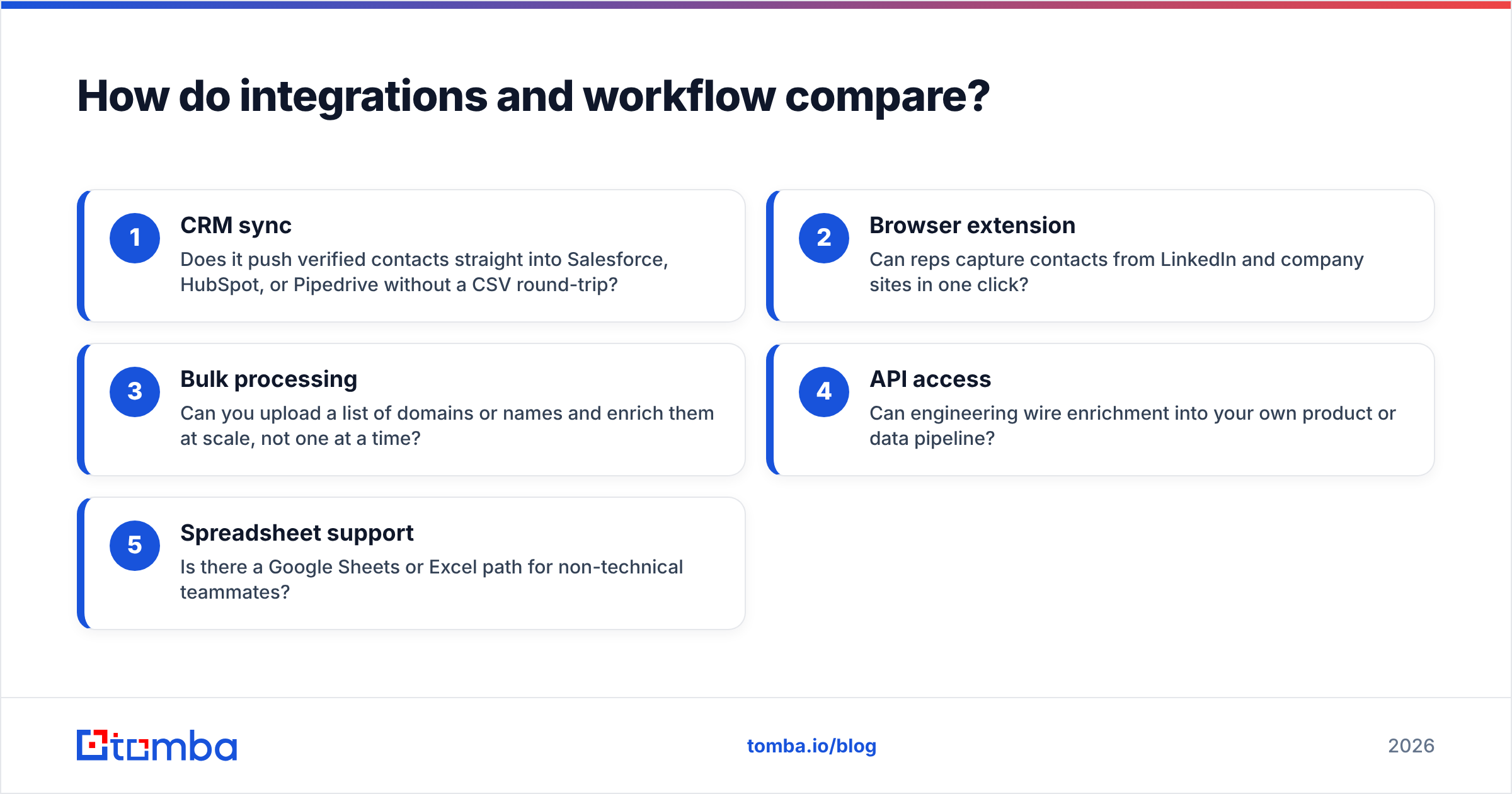
Consider these integration must-haves when you evaluate either tool:
- CRM sync — Does it push verified contacts straight into Salesforce, HubSpot, or Pipedrive without a CSV round-trip?
- Browser extension — Can reps capture contacts from LinkedIn and company sites in one click?
- Bulk processing — Can you upload a list of domains or names and enrich them at scale, not one at a time?
- API access — Can engineering wire enrichment into your own product or data pipeline?
- Spreadsheet support — Is there a Google Sheets or Excel path for non-technical teammates?
If API and bulk matter to you, that's another area where dedicated email-finder platforms pull ahead. Tomba exposes a documented email finder API plus a bulk email finder for large lists, which gives engineering and ops teams more programmatic control than either Bytemine or Lusha's standard tiers.
What about data sourcing and compliance?#
Compliance isn't optional in 2026 — GDPR, CCPA, and tightening privacy enforcement make "where did this data come from?" a question your legal team will ask.
Lusha publicly emphasizes compliance and holds certifications it markets to enterprise buyers, which is part of why larger orgs trust it. It documents its data practices and offers opt-out mechanisms, important when you're processing EU contacts.
Bytemine, as a smaller player, is less transparent about sourcing and certifications publicly. That doesn't mean it's non-compliant, but it does mean you should do your own due diligence before processing regulated-region data, and confirm its data-handling terms in writing.
For any vendor, ask three questions: where does the data originate, how often is it refreshed, and what's the opt-out process? Tools that are upfront about data sources make this easy; tools that dodge the question are a risk you're inheriting.
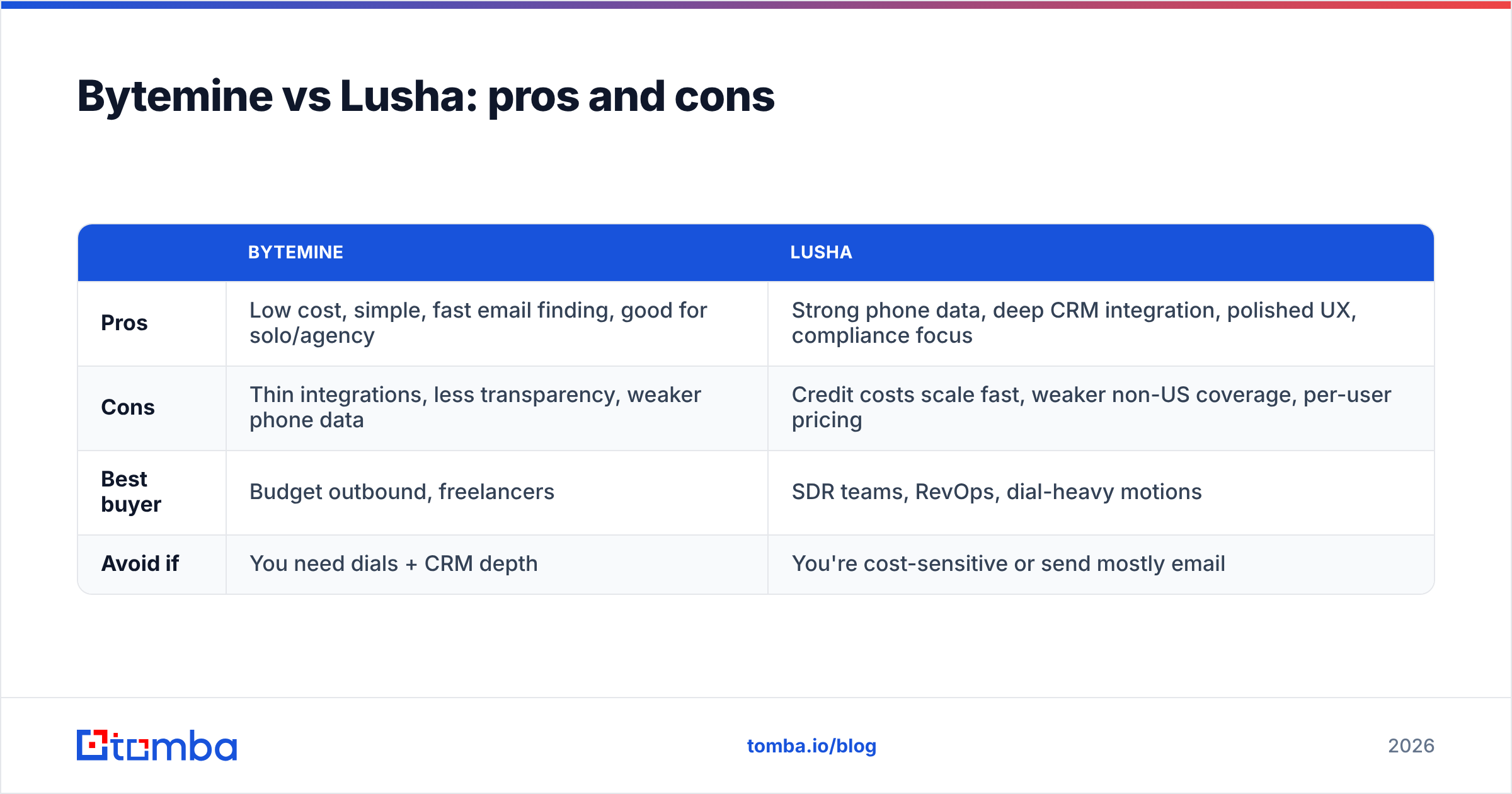
Bytemine vs Lusha: pros and cons#
| Bytemine | Lusha | |
|---|---|---|
| Pros | Low cost, simple, fast email finding, good for solo/agency | Strong phone data, deep CRM integration, polished UX, compliance focus |
| Cons | Thin integrations, less transparency, weaker phone data | Credit costs scale fast, weaker non-US coverage, per-user pricing |
| Best buyer | Budget outbound, freelancers | SDR teams, RevOps, dial-heavy motions |
| Avoid if | You need dials + CRM depth | You're cost-sensitive or send mostly email |
When should you consider an alternative to both?#
If you read the trade-offs above and felt like you're being asked to choose between "cheap but limited" and "capable but expensive," you're not wrong — and that's the gap a focused email-finder fills.
Consider a third option when:
- You want accuracy and predictable pricing together. Per-credit phone-and-email metering makes budgeting painful; bundled plans don't.
- Email is your primary channel. You shouldn't pay for a dial-heavy platform if 80% of your outreach is email.
- You need verification built in. Finding an email is half the job; confirming it's deliverable is the other half.
- You run domain search at scale. Mapping every contact at a target company is a distinct workflow that lighter tools handle awkwardly.
This is where Tomba fits the comparison honestly. It's email-finder-first like Bytemine, but with the verification, domain search, and API depth that Bytemine lacks — and flat, readable pricing instead of Lusha's credit ladder. It won't out-dial Lusha on raw mobile coverage, so if phones are your whole game, Lusha still leads there. For email-led B2B prospecting, though, it's the middle path many teams actually want.
You can cross-check the broader landscape in independent directories like G2 before committing to any vendor.
Which should you choose?#
Conclusion first: choose Bytemine for cheap, email-only list building; choose Lusha for phone-led, CRM-integrated selling; choose a dedicated email-finder like Tomba when you want accuracy plus predictable cost for email outreach.
The "bytemine vs lusha" question rarely has a universal winner because the two tools aren't really competing for the same buyer. Map your decision to your motion:
- Mostly cold email, tight budget, solo or agency → Bytemine.
- Heavy cold calling, CRM-embedded, funded team → Lusha.
- Email-first prospecting that needs verification and clean data without credit math → an email-finder platform built for exactly that.
Whatever you pick, build verification into your process from day one. A great contact list with a 25% bounce rate is a deliverability problem waiting to happen.
Ready to find and verify emails without the credit math?#
If your outbound is email-led and you're tired of choosing between cheap-but-unreliable and capable-but-pricey, try the Tomba Email Finder. Find professional emails by domain, name, or company, verify them in the same workflow, and scale through a clean API — on a plan that starts free (25 searches/mo) and stays predictable as you grow. Run your next target account through it, compare the hit rate against your current tool, and let the bounce rate decide.
// get started
Find, verify and enrich your first contacts today
Start on the free plan with 25 searches a month, then scale when your team is ready.
Free plan · No credit card required · GDPR & CCPA
Get the Tomba newsletter
Product and data updates
// about the author